
Install
Inside DeepSeek Harness, with dsh-market
dsh plugin --profile web add dshmarket
Or from the command line
dsh plugin --profile web add github:s1lencewill/dsh-markdown-reader
Installing runs third-party code with your own permissions — it can read your files, use your credentials and reach the network. Review the source first, and pin a commit (github:owner/repo#sha) when you can.
README

@s1lencewill/dsh-markdown-reader
A full-screen Markdown reader for the DSH Web GUI. It is a dual-sided (host + client) profile bundle with no build step, no runtime dependencies, and no changes to DSH source code.
Features
- GFM rendering: ATX/Setext headings, fenced and indented code blocks, blockquotes, ordered/unordered/nested lists, task lists, aligned tables, horizontal rules, emphasis, strikethrough, inline code, links, images, autolinks, and line breaks
- Outline and scroll tracking: extracts headings into a deduplicated, GitHub-style outline, highlights the active section, and supports smooth navigation
- KaTeX math: inline
$…$and\(…\), plus display$$…$$and\[…\]; all resources are bundled undervendor/katex/for fully offline use - Mermaid pipeline: loads the bundled v11.16.1 renderer on demand, follows the Web GUI light/dark theme, and falls back cleanly to source code if unavailable
- Relative images: resolves
against the current document and serves it through the workspace-gated/md-reader/rawendpoint - In-reader navigation: native
#anchorjumps and direct navigation between relative Markdown documents - Reading controls: 12–24 px font sizing, collapsible outline, refresh, per-project recent files, reading progress, estimated reading time, loading/error states, Escape-to-close, and focus trapping
- External-change sync: checks lightweight file metadata every four seconds, prompts when an editor or agent updates the document, and optionally auto-reloads while preserving the current reading position
- Long-document enhancements: image lightbox and download; code copy, collapse, and line numbers; horizontal table scrolling with sticky headers; collapsible long sections
- Print / PDF: prints an isolated copy of the current document with collapsed content expanded, controls removed, and a white paginated layout. Preserves math, diagrams, and images; save as PDF through the browser's print dialog
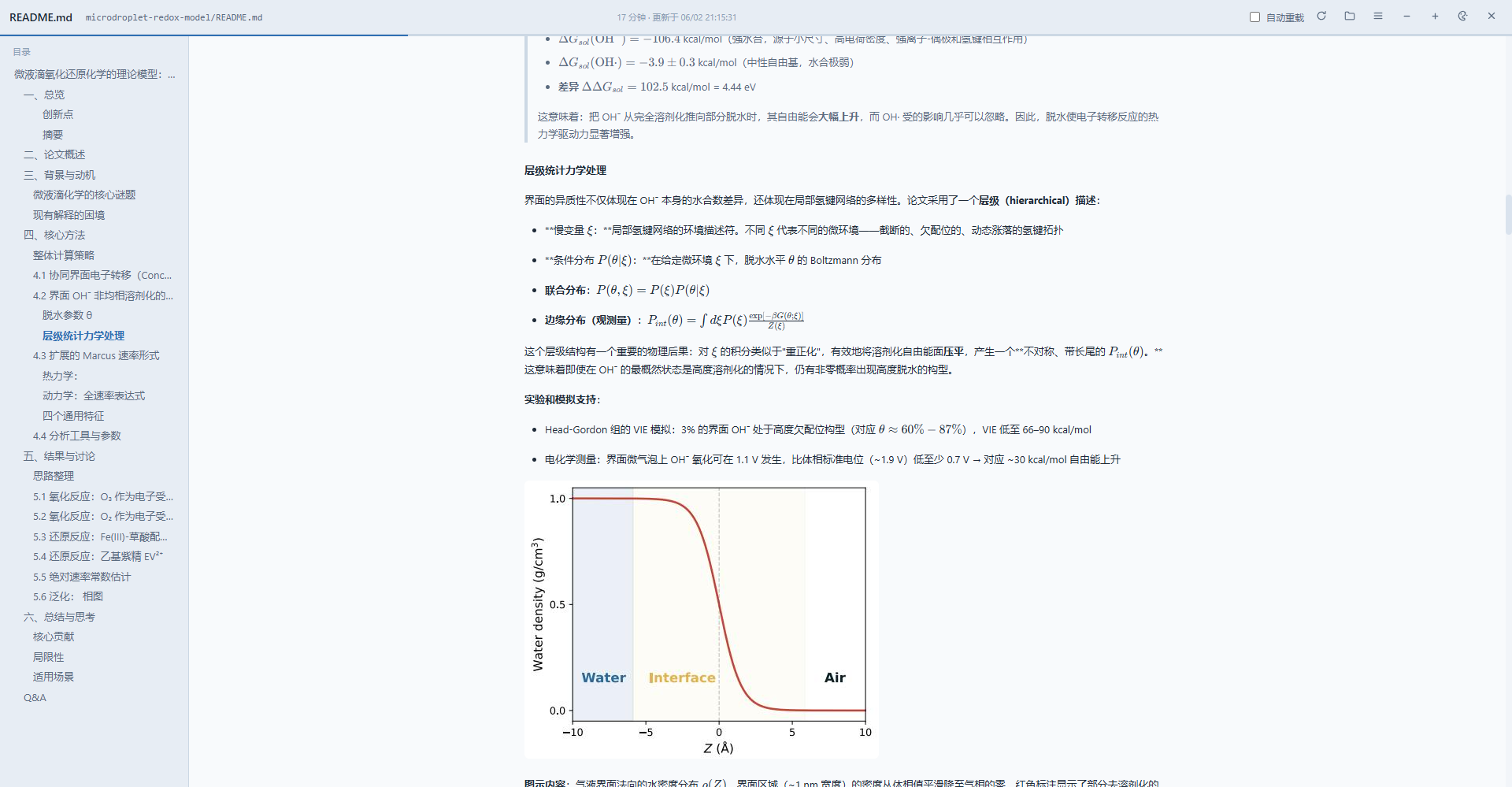
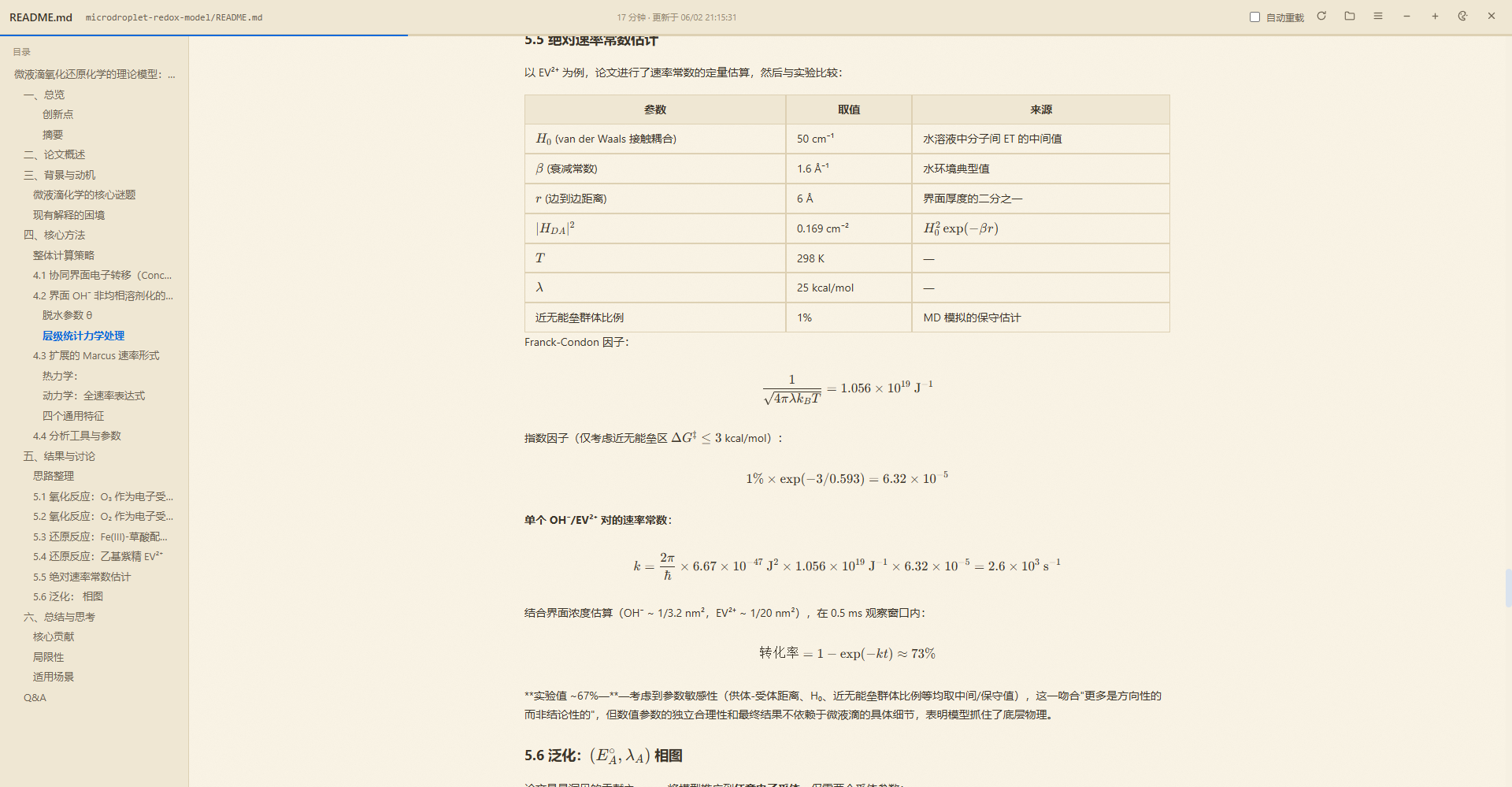
- Four themes: Warm Paper, Cool, Eye Care, and Plain/GitHub style. Each includes light and dark palettes, follows the GUI theme, and persists globally
Preview
Cool theme
Warm Paper theme
Why a standalone reader panel?
This reader complements the sidebar instead of replacing it. It does not modify,
downgrade, or roll back dsh-better-sidebar; both plugins can remain enabled.
| Standalone-panel advantage | Practical benefit |
|---|---|
| Full reading space | Uses the entire window for wide tables, code, formulas, and large images instead of being constrained by sidebar width |
| Independent reading state | Keeps its own scroll position, active outline item, font size, theme, and recent files without disturbing sidebar state |
| Better for complex documents | Shows the outline beside the document and adds section collapse, code tools, and an image lightbox |
| Less layout pressure | Reading does not require widening the sidebar or shrinking chat, editor, and other work panels |
| Low coupling | Runs through its own overlay and read-only routes, without patching sidebar source, so it can be enabled, updated, or disabled independently |
The sidebar remains ideal for file navigation, status, and quick actions. The standalone panel is better for continuous reading, report review, and documents rich in equations, tables, code, and images.
Entry points
| Entry point | Behavior |
|---|---|
| Bottom-right floating button | Opens the most recent file for the current project, or the path picker when there is no history |
Ctrl/Cmd + Shift + M |
Toggles the reader using the same behavior |
| Read button in the right preview-panel toolbar | Opens the last .md file selected in that panel; it observes panel DOM without changing panel code |
window.dshMarkdownReader.open(path) or the dsh-markdown-reader:open CustomEvent |
Integration API for other plugins and scripts |
Once open, enter any workspace-relative path in the header and press Enter. Use the folder button to return to the file picker.
Printing and saving as PDF
- Open a Markdown document and click Print / PDF, or press
Ctrl/Cmd + Pwhile the reader is open. - Wait for images, math fonts, and in-progress diagrams to prepare. The browser opens its print dialog.
- Choose a printer, or select Save as PDF and choose a destination.
Only the current document is included: no DSH chat, sidebar, reader toolbar, or outline. Sections and code blocks are expanded in the print copy without changing the live reader's collapsed state or reading position. Long code lines wrap; tables paginate with repeating headers; formulas and images fit the content width. Dark Mermaid diagrams retain their background for contrast.
The layout uses browser paper settings and dedicated margins; A4 or Letter is recommended. Choose landscape for tables with many columns. Browser-added headers, footers, and page numbers are controlled in the print dialog. A document truncated by the 4 MB read cap carries a warning that only the loaded portion is included. Failed images have explicit placeholders; unfinished formulas and diagrams retain their source. Resource timeouts prompt a retry instead of silently printing incomplete content. No server-side PDF converter or document upload is used.
Installation
Requires DSH ≥ 0.1.7-rc.2 (see “Version compatibility” — the sessions service shape
and the batched client delivery both start there).
Standard installation (requires pnpm on PATH):
dsh plugin --profile web add link:/absolute/path/to/dsh-markdown-reader
Restart the dsh web process and refresh the page. dsh plugin uses the
dsh.bundle.patch declaration in cordis.patch.yml to add the package to the
dsh.profile.bundles list.
Manual installation without pnpm:
- Link or copy this directory to the profile's
node_modules/@s1lencewill/dsh-markdown-readerlocation. A Windows directory junction (mklink /J) makes source updates immediately visible. - In that profile's
package.json:- add
"@s1lencewill/dsh-markdown-reader": "link:..."underdependencies - append
"@s1lencewill/dsh-markdown-reader"todsh.profile.bundles
- add
- Restart DSH and refresh the page.
Architecture
lib/index.js    Host side (pure Node ESM, no dependencies)
  - POST /md-reader/read   Reads workspace .md/.markdown/.mdx files (4 MB cap with truncation flag)
  - POST /md-reader/stat   Returns only mtime/size for change polling; never reads document content
  - GET  /md-reader/raw    Serves embedded resources (100 MB cap, extension-based MIME)
  - GET  /md-reader/assets/*   Bundled KaTeX JS/CSS/fonts and Mermaid resources
  - GET  /aionui-panel/katex/* and /aionui-panel/hljs/*   Compatibility asset routes
  - systemPrompt.section   Announces plugin capabilities to agents (order 220)
lib/client.cjs  Browser side (single-file bundle reproducing the window.__ModuleLoader__.load contract)
  - Pipeline: math placeholders → GFM blocks → inline delimiter stack → DOMParser allowlist
    sanitization → math restoration → Mermaid rendering
  - Full-screen React overlay; React is lazily required from the shell module table
  - Generation isolation and self-healing watchdogs for theme switches and hot reloads
vendor/katex/   KaTeX assets (MIT; same source as dsh-aionui-panel)
vendor/hljs/    highlight.js assets (MIT; used by compatibility routes)
vendor/mermaid/ Bundled Mermaid v11.16.1 renderer
Security model
The host uses the same workspace gate as dsh-aionui-panel. Each requested root
is canonicalized with realpath and must belong to a registered workspace. The target
is canonicalized and prefix-checked again, rejecting both .. traversal and symlink
escapes. Every route is read-only; there is no write endpoint.
POST endpoints require application/json, preventing form-based CSRF. Rendered HTML
passes through a DOM allowlist sanitizer. URL protocols are restricted to HTTP, HTTPS,
mailto, anchors, and safe relative paths; data: and javascript: URLs are discarded.
Client bundle contract
DSH client-modules serves the file referenced by exports["./client"] through its
/plugins route. Since 0.1.7-rc.2 that route is a batched delivery: the boot manifest
concatenates several plugins' <id>/client.js into one request
(/plugins/??<id>/client.js,<id>/client.js,…), so the single-entry path
/plugins/<id>/client.js is no longer a public contract. The module ID always equals the
npm package name (the id in cordis.patch.yml is only Cordis configuration). The file
registers itself with:
window.__ModuleLoader__.load({ id: '<package-name>', factory: (require) => api })
The factory return value is the module export ({inject, apply}). dsh.client.inject may
only list module IDs that actually exist in the boot graph — a dangling edge is silently
skipped by client-modules (no error, no effect). This plugin only needs the session
service, so it injects @deepseek-ai/dsh-api-session-controller (the sessions provider).
Version compatibility
dsh.engines.dsh = ">=0.1.7-rc.2"(thesessionsservice and batched delivery start there).The client accepts both
sessions.listsnapshot shapes:- legacy
{ current, byId }(≤ 0.1.6-rc.x), wherecurrentnames the active session; - current
{ ids, byId, phase, projectionsBySession }(≥ 0.1.7-rc.2), which has nocurrentfield — the active session is the one withretainedBy.mainView > 0.
Both are handled by the pure
pickWorkspaceRoot()helper (covered bytest/compat.test.mjs).- legacy
There is no build step: source is the shipped artifact. lib/client.cjs also exports pure
functions for Node-based tests.
Mermaid
vendor/mermaid/mermaid.min.js contains the official Mermaid v11.16.1 build under the
MIT license. The reader first probes for the resource (HEAD with a GET fallback, avoiding
noisy console 404s), then injects the script on demand. Rendering uses Mermaid's
securityLevel: 'strict' sandbox, follows body[data-ds-dark-theme], and falls back to
the source block with an explanation if the file is missing. See
vendor/mermaid/README.txt for details.
Tests
npm test                              # Complete suite
node test/engine.test.mjs             # Pure rendering, math, path, sanitizer, and theme tests
node test/katex-e2e.mjs               # End-to-end tests against the bundled KaTeX UMD build
node test/mermaid-e2e.mjs             # Bundled Mermaid loading/API/parser validation
node test/reapply.test.mjs            # Theme-switch/HMR re-apply generation isolation
node --test test/host.test.mjs        # Host routes, workspace gate, and security headers
node --test test/metadata.test.mjs    # Package name, bundle, client, and docs consistency
node --test test/print.test.mjs       # Resource waiting, cancellation, and pagination styles
npm run test:print                   # Optional real Chromium print-snapshot/PDF regression
test:print requires Playwright in the development environment, not as a plugin runtime
dependency. It uses local Edge by default. Set PRINT_BROWSER_CHANNEL or
PRINT_BROWSER_EXECUTABLE to select another browser, and PRINT_TEST_OUTPUT to choose
the test PDF directory (default tmp/pdfs/). Tests intercept the OS print dialog and generate
PDFs from the same prepared snapshots, checking light/dark diagrams, collapsed content,
resource failures, and cancellation cleanup.
Known limitations
- Reference-style links (
[x][ref]) and footnotes are not supported and render as source text - Inline HTML is restricted to allowlisted tags; elements such as
<script>are removed entirely - Emphasis uses a simplified CommonMark delimiter algorithm; common nesting works, but pathological delimiter combinations may degrade
- A top-level four-space-indented
- itemis parsed as a list instead of indented code, which is more useful for reading-oriented documents - If Mermaid is unavailable, diagrams fall back to an annotated source block
Comments
Comments live in GitHub Discussions. Sign in with GitHub to post or react.