
Install
Inside DeepSeek Harness, with dsh-market
dsh plugin --profile web add dshmarket
Or from the command line
dsh plugin --profile web add dsh-knit
Installing runs third-party code with your own permissions — it can read your files, use your credentials and reach the network. Review the source first, and pin a commit (github:owner/repo#sha) when you can.
Screenshots
README
Your agent writes 20 documents a day. You can't find the one you just saw. Knit puts them next to the conversation — whatever you're talking about, the relevant doc is on top.
Your agent has the same problem. It gets the same ranking as a tool — the ranked documents plus the passage that matched in each.
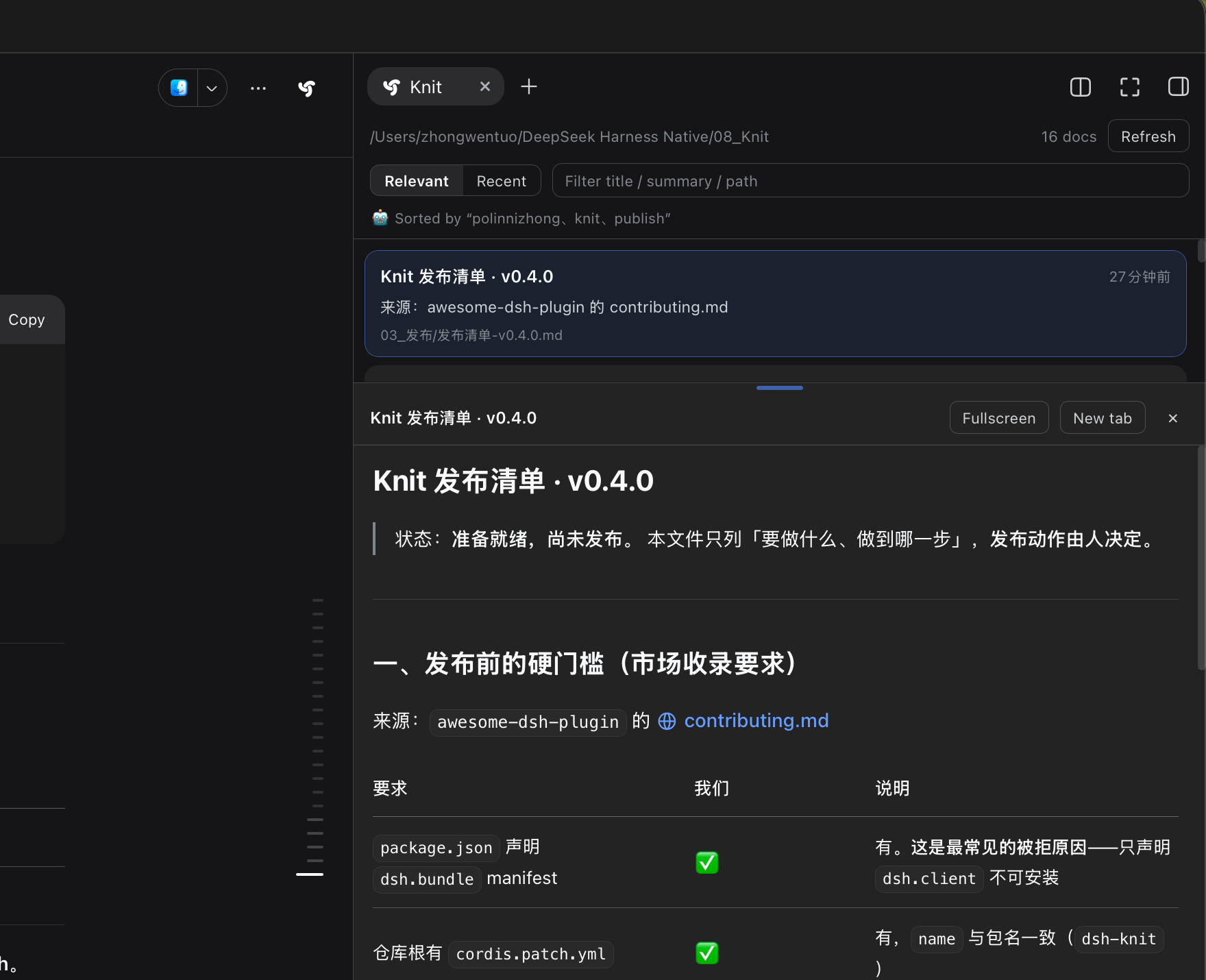
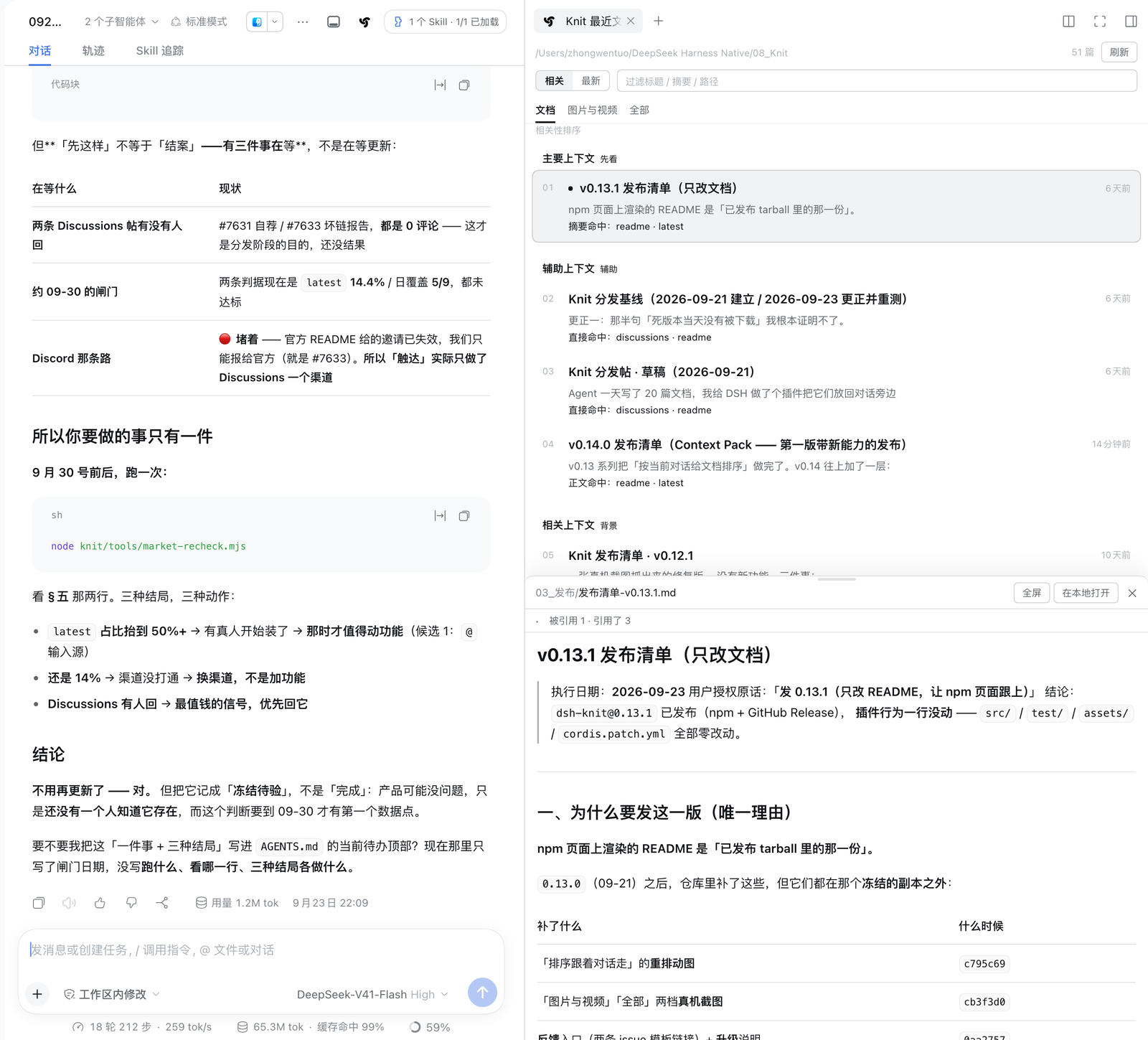
Screenshot from a real machine, not a mock-up: a workspace with 51 documents — the list, an inline preview, and the references bar. The references bar is new in v0.12: expand it to see which documents reference this one, and click one to jump straight there. The top line follows whatever you're talking about; when there isn't enough conversation yet it falls back to newest-first and states its basis. Since v0.14 the list is always one column: the rank number sits in its own column on the far left (vertically centred on the title's first line), then Primary dot + title + relative time (time on the right), then the summary. The path lives in the preview header's breadcrumb only — rows no longer repeat it.
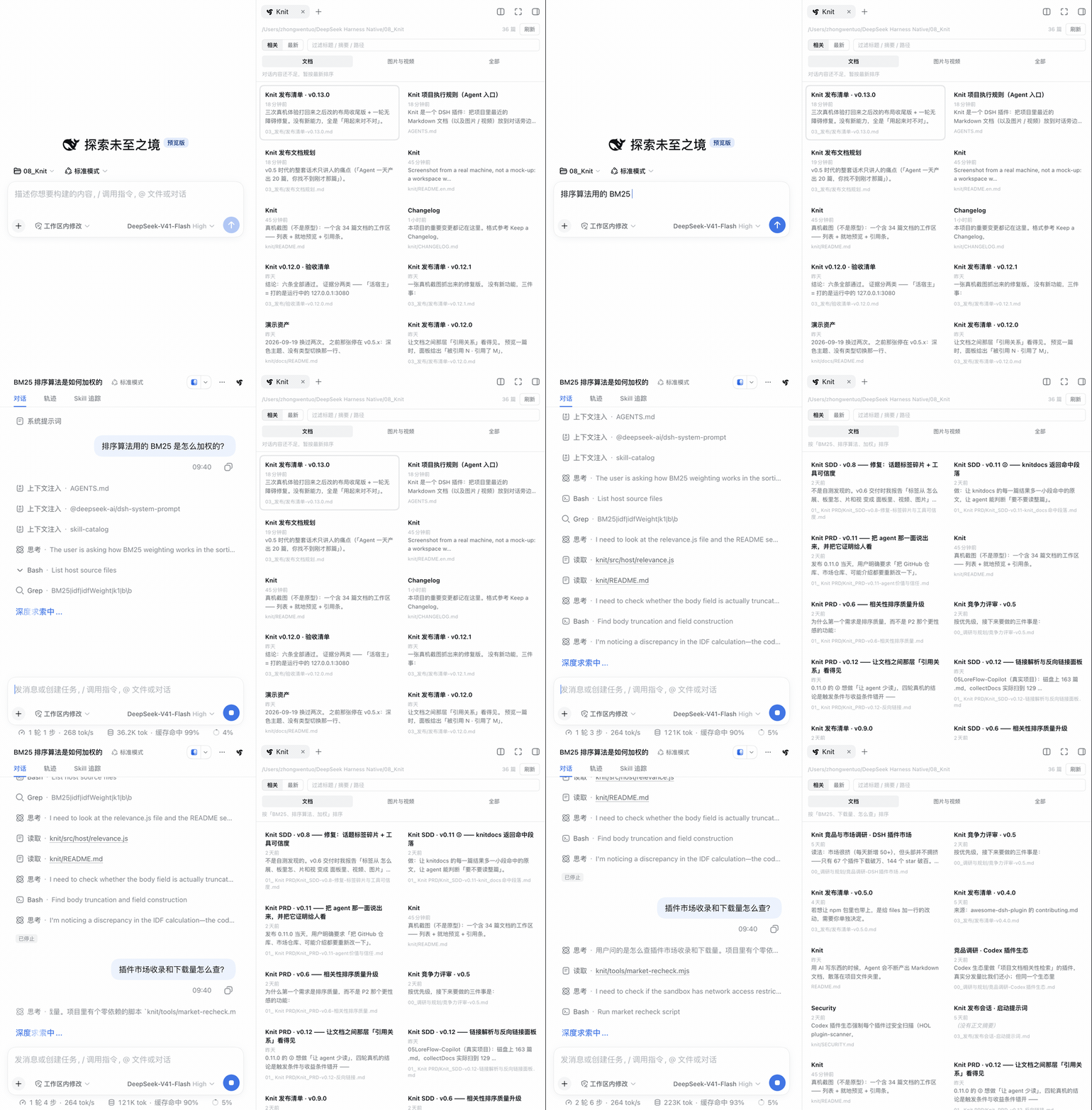
Order follows the conversation — same workspace, in a freshly opened session: before you have said anything, the top line says so ("not enough conversation yet — sorted by time") and the list runs newest-first; ask "how is BM25 weighted for the ranking?" and the ranking docs take over, with the rank numbers and the primary / supporting / related tiers appearing alongside them. ⚠️ The panel polls every 5 seconds, so the re-rank lands 0–5 s after the message rather than instantly, and the GIF runs faster than real time.
Scans Markdown / images / video across the project folder · Order follows the conversation · No model calls, no network
dsh plugin --profile web add dsh-knit
"Isn't this just a recent-files list?"
Fair. Two differences:
- Scope — a recent-files list only remembers files you opened. Knit scans the entire project folder. Restart DSH, start a new session, come back tomorrow: it's all still there.
- Order — that list sorts by time. Knit sorts by what you're currently talking about.
Three sentences on what it is:
- Scans every Markdown file in the project folder, not just the ones from this turn — they survive restarts, new sessions, and days.
- The order follows the conversation: talk about architecture and the architecture doc floats up; talk about competitors and the competitor analysis floats up.
- No model calls, no network egress: plain local string matching — zero latency, zero cost, your documents never leave the machine.
How "relevant" is computed
No magic, just string operations. Three steps:
1. Read the conversation. The host takes the last 6 user/assistant messages, and only
counts real user messages (agent.inject() synthetic context would drag the topic off course).
Newer messages weigh more: 3 / 2 / 1 / 1 …
2. Extract keywords.
- ASCII words — high value, one occurrence is enough (
chokidar,mtime) - Chinese 2/3-grams — either occurring twice, or appearing in the newest message
- Drop fragments that straddle a word boundary. Chinese has no word boundaries, so n-grams glue the last character of one word to the first of the next (「图片和」, 「个插」, 「的排」). They share one trait — the first or last character is a pure function word — and are dropped. Leave them in and they fill every candidate slot, pushing the real words (「图片」, 「排序」) out of the query entirely
- stop-word filtering plus greedy de-overlap (picking「相关性排序」drops「相关性」and「排序」)
3. Score the documents — BM25.
IDF per term first: rarer in the corpus means more valuable
                    ln(1 + (N - df + 0.5) / (df + 0.5))
then a weighted sum over fields: title ×4  +  summary ×2  +  first 2500 chars of body ×1
each field saturated and length-normalised (k1 = 1.2, b = 0.3 / 0.5 / 0.75)
plus a 10% recency nudge (relevance still dominates)
Why BM25 and not "hits × weight" (the original approach, since replaced):
- with no IDF, a term that appears everywhere (the project name) is worth as much as a rare one — so the frequent term discriminates nothing and dilutes the rare ones
- with no length normalisation, a long document wins by piling up hits
- capping hits at 6 was a hand-drawn knee;
k1/bexist precisely for this
Measured on test/eval/fixture.mjs (21 cases, both engines on the same corpus):
| top-1 | MRR | |
|---|---|---|
| old (weighted hits) | 76.2% | 0.830 |
| BM25 | 95.2% | 0.976 |
That eval runs inside npm test, and the baseline is recomputed each run from the old
engine frozen in test/eval/legacy.mjs — so "the new engine must be clearly better" is
verified automatically rather than asserted against a hard-coded number.
Against counting keywords yourself (knit/tools/scale-benchmark.mjs, N = 20/60/180/540):
the corpus is built with a real trap — 12 short, focused topic documents, plus a pile of long
distractors that mention every topic five times without explaining any of them (which is what a
real project's CHANGELOG looks like). Half the topic documents have descriptive filenames, half
are opaque.
| Approach | Descriptive filenames | Opaque filenames | MRR vs. scale |
|---|---|---|---|
| Knit (BM25) | 100% | 100% | 1.000 (flat) |
grep -c keyword counting |
17% | 0% | 0.313 → 0.089 |
| Filenames only | 100% | 0% | 0.602 |
Three things: the ranking beats counting keywords yourself (so having the agent recompute it is irrational); filename matching only works when names describe content, and Knit is the only approach that scores 100% either way; and self-counting degrades as the corpus grows.
About the "sorted by「xxx」" line: it shows the span of your own text that the matched
terms cover, not the raw candidate tokens. Chinese has no word boundaries, so candidates always
include fragments that straddle two words (「项目文档」 yields 项目文 / 目文档), and showing
those renders as gibberish — merging their spans and slicing the original text recovers 项目文档.
The label is your own wording, so its casing is preserved (type BM25, see BM25).
All of it is string arithmetic — no embeddings, no model calls.
And the honest boundaries:
- With only one or two messages there are too few keywords, so it falls back to sorting by modification time and says so in the panel — it does not pretend to rank
- With only three to five documents IDF barely does anything:
dfonly takes a few values, so its dynamic range collapses. The more documents, the better this ranking gets - It can only rank documents that share vocabulary with the conversation: if no term matches, every document scores the same and the order degrades to time
Current task context (v0.14)
Ranking answers "which documents look most like this conversation". But the question you usually have is a different one:
For this task, what in the project should I read first?
The Context Pack is the answer to that question, but it is a data-layer structure (Primary / Supporting / Related, each entry carrying a deterministic reason) — not a card of its own. So it lands directly in the document list: in relevance mode the document view goes from one flat list to three tier groups, each group name followed by a very short hint.
┌─ Documents ──────────────────────────────┐
│ Primary          read first              │
│   01 ● Relevance ranking algorithm 5m ago│
│      title matches: ranking              │
│                                           │
│ Supporting       supporting              │
│   02  Ranking evaluation set       2h ago │
│      body matches: term counting         │
│                                           │
│ Related          background              │
│   03  CHANGELOG.md                 12d ago│
│      body matches: ranking               │
└───────────────────────────────────────────┘
The sketch leaves out each entry's summary. The real structure is: a number in its own column on the far left (vertically centred with the first line), and to its right a stack of one line — Primary dot + title + relative time (right-aligned) — then the summary (no path — it is not shown in the list; the path lives in the preview header's breadcrumb). And the list is always one column however wide the pane gets.
No rules between groups: hierarchy comes from 16px of space, the group name and type size, never from separators. No scores, no percentages, no stars — "why is it here" states deterministic facts only.
The right-hand "Current task context" panel has been removed (2026-09-29). It said the same thing the three groups already say (the task sits in the quiet meta line above the list, the hit count duplicates the header total, and the three evidence kinds are the three group names), it added little visually, and it pushed Knit toward being an AI dashboard. Its resize / pull-out / snap-to-right-edge behaviour went with it — see
CHANGELOG.md.
The tiers are deterministic rules, not an AI judgement
| Tier | When a document enters it | Cap |
|---|---|---|
| Primary | It matched, and it is grounded (a topic term hits its title or summary), and its relevance is not background noise (≥ 30% of the top score) | 1 |
| Supporting | It has a deep hit on a focus term (that term is discussed in more than one document, and this document discusses it the most); or it is linked to a primary document (either direction, labelled separately) | 3 |
| Related | Everything else that matched, plus zero-hit link neighbours | 5 |
A cap is a ceiling, not a quota: primary is allowed to be empty (on real workspaces a fair share of topics genuinely have no document that discusses them), and so is related. If there is no checkable reason, the document does not appear — a document with zero hits and no link is not "related to the current task"; the only caption it could carry is "this might help you", which is exactly what this release refuses to print.
"Why it is here" is always a checkable fact:
| Reason | What it says |
|---|---|
title / summary / body matches the topic: term |
It really matched, and here is which term |
| referenced by a primary document | A path in the primary document points here |
| references a primary document | It mentions the primary document |
There is no "the AI thinks this matters" and no percentages, stars or confidence bars.
Boundaries (stated, not oversold)
- A link is not "more relevant". Measured: the link graph does not close the vocabulary-mismatch gap. So a link can only place a document in supporting / related — never in primary.
- The ranking engine is unchanged. This release adds a projection layer above ranking; BM25 scoring and its evaluation (top-1 / MRR / trap cases) are untouched. If retrieval never surfaced the right document, tiering can only tier what was surfaced — it cannot fix recall.
- No task understanding. The "Current task" line in the panel holds the verbatim text of the most recent user message, not a summary of it — Knit does not interpret the sentence, it just puts it where you can see it. Actually summarising it would need a model, and Knit calls none.
Also for the agent: the knit_docs tool
The same ranking that you see in the panel is also exposed to the model.
Once installed, the agent's tool list gains knit_docs: it can ask "which documents in this
project are most relevant to what we're discussing?" and get back the same Context Pack the
panel shows — the primary / supporting / related tiers, each item carrying its path, title,
summary, a structured reason (direct / titleMatch / summaryMatch / bodyMatch /
linkTarget / linkSource / related), its project role (impl / test / config /
design / doc) and the matching snippet — then open one of them with its own read tool.
Why it helps: to cite a document that already exists, an agent can only guess paths or glob
and read them one by one. Knit has already computed that ranking every refresh; this tool
just hands it over — what it removes is the "which few are relevant?" guess (measured: an
agent holding the Pack no longer globs for candidates).
Read-only, and it stores nothing: it reads the files that are already in the project — this is not "memory". The difference from memory plugins is that theirs start empty (the agent has to have saved something first), while Knit has the whole project's history from the moment you install it.
Three details:
- No relevance score in the result. It is a relative score (something is always 100%, and it may be a different document on the next refresh); shown to a model it reads as absolute confidence. The order is the relevance — the same rule the panel follows.
- No document bodies. The agent has its own
readtool; Knit finds, it does not carry. - No workspace means an error, never a fallback. The HTTP route falls back to the process cwd when a session can't be resolved (for older clients that send no session id); the tool has no such baggage — falling back would scan an unrelated project and return its documents. Better to fail than to return the wrong thing.
⚠️ The cost, stated plainly: the tool description goes into the system prompt of every request. Installing Knit costs a few extra tokens per session. That is the price of giving the agent the capability.
Install
dsh plugin --profile web add dsh-knit
Then restart DSH and hard-refresh the browser (Cmd + Shift + R).
How to open it:
- The Knit icon button in the session header (right next to the sidebar toggle) — one click
- Or the right sidebar's tab bar「+」→「Knit recent docs」
Optional: if dsh-better-sidebar is installed, the panel also registers
as one of its tabs. Each host is an independent optional dependency; missing one doesn't affect the other.
Upgrading: same command as installing, and the same restart + hard-refresh afterwards.
Feedback
Right now this project is not about adding features — it's about finding out whether "rank project docs by the current conversation" is something anyone actually uses. So the most valuable thing you can send is not "could you add X" but how you work around this today — including "I installed it and never opened it", which is more useful than a feature request.
- 💬 Tell us when you actually open it — two fields, thirty seconds
- 🐞 Won't install / panel won't open / ranking looks wrong
- 📖 Check known limitations first — short conversations degrade to time order and Chinese uses n-gram approximation; those are deliberate trade-offs, not bugs
A single issue is treated as a real signal. So far this plugin has no trace of a single real user — the npm download count is automated version enumeration, not people (only 14% of it is
latest, and a human install only ever pullslatest). One human reply changes what gets built next.
Features
| Sorted by relevance to the current conversation (BM25 + IDF, fully local, no model) | ✅ |
The knit_docs tool for the agent: the model can look up this project's most relevant documents itself |
✅ |
| One-click toggle between relevance / modification time (preference kept in localStorage) | ✅ |
Scans .md in the session workspace (recursive, depth ≤ 6, skips node_modules / .git / dist) |
✅ |
| Each row shows H1 title (or filename) + relative time + first-paragraph summary | ✅ |
| The document list is always one column (v0.14 — the multi-column layout was deleted outright, not switched off); the number sits in its own column on the far left and is vertically centred with the title line, everything else stacks to its right starting with one line: Primary dot + title + relative time (the time is pushed to the right edge), then the summary. The path is no longer shown in the list — it duplicates the clickable path breadcrumb in the preview header, which is the one that stays | ✅ |
| Click to preview inline, click again to collapse | ✅ |
Relative-path images actually render (./img/a.png, ../assets/b.png) |
✅ |
| One-click switch between Docs / Images & video / All (remembered; defaults to Docs, unchanged); the selected tab is a neutral grey fill, with no coloured outline | ✅ |
| Images & video: square thumbnail grid — at least 3 columns, more only as the pane gets wider; cells start at 64px and the baseline is 8 per screen; past 8 nothing is hidden, the whole grid scales down proportionally; videos auto-grab the first frame with a play glyph and duration badge (no deps, no transcoding) | ✅ |
| Click an image / video to preview inline: large image, playable & seekable video streamed over HTTP Range (no full download) | ✅ |
| The All view splits into two stacked sections: docs (max 4, with "View all →" when truncated) and images & video (never truncated, count only) | ✅ |
Preview pane is height-draggable (20%–80%, remembered), fullscreen-able, Esc to exit |
✅ |
| "Open locally": opens the previewed document in your default app (the path breadcrumb in the preview header is clickable too) | ✅ |
| Double-click opens in a new tab (the official document preview, with its PDF renderer and renderer switching) | ✅ |
| Filter box over title / summary / path | ✅ |
| Click the workspace path to open the project folder in your file manager | ✅ |
| Hover the entry button to peek: a read-only floating list of the 5 most recent docs; click to open the right sidebar (doesn't push the layout) | ✅ |
Keyboard: ↑ ↓ move-and-preview, Enter toggle, Esc collapse (← → span rows in the media grid only — the document list is always one column, so they have no spatial meaning there) |
✅ |
| Auto-refresh every 5s plus a manual button; docs changed in the last 2 min get 🆕 | ✅ |
| Bilingual (zh/en), follows the DSH language live — no plugin reload needed | ✅ |
| Zero model calls, zero network egress | ✅ |
A knit_docs tool for the agent — read-only, so the model can find this project's relevant docs itself |
✅ |
Relevance is deliberately not visualised (no percentages, no bars) — the ranking itself is the answer; position is relevance.
The other two views
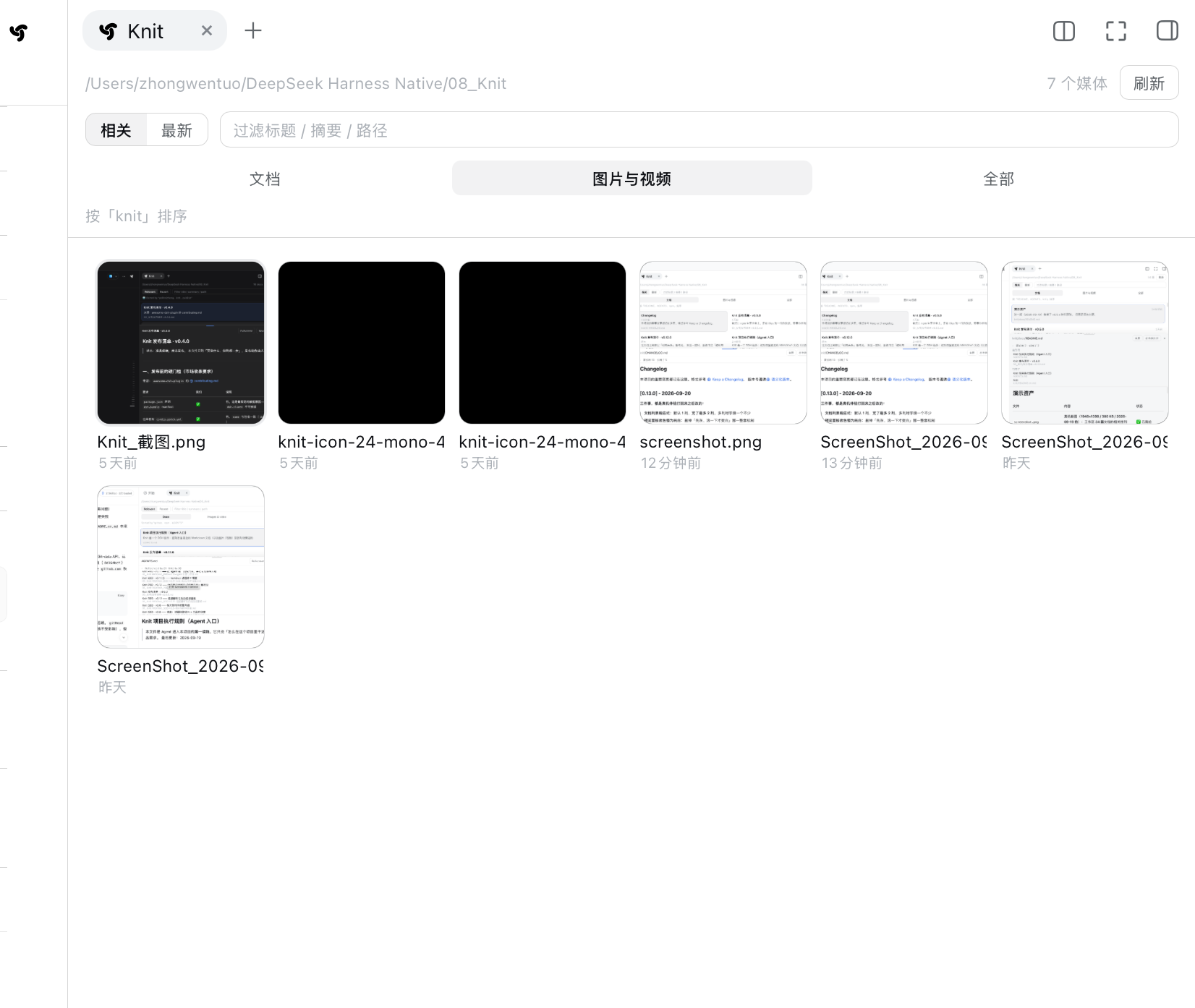
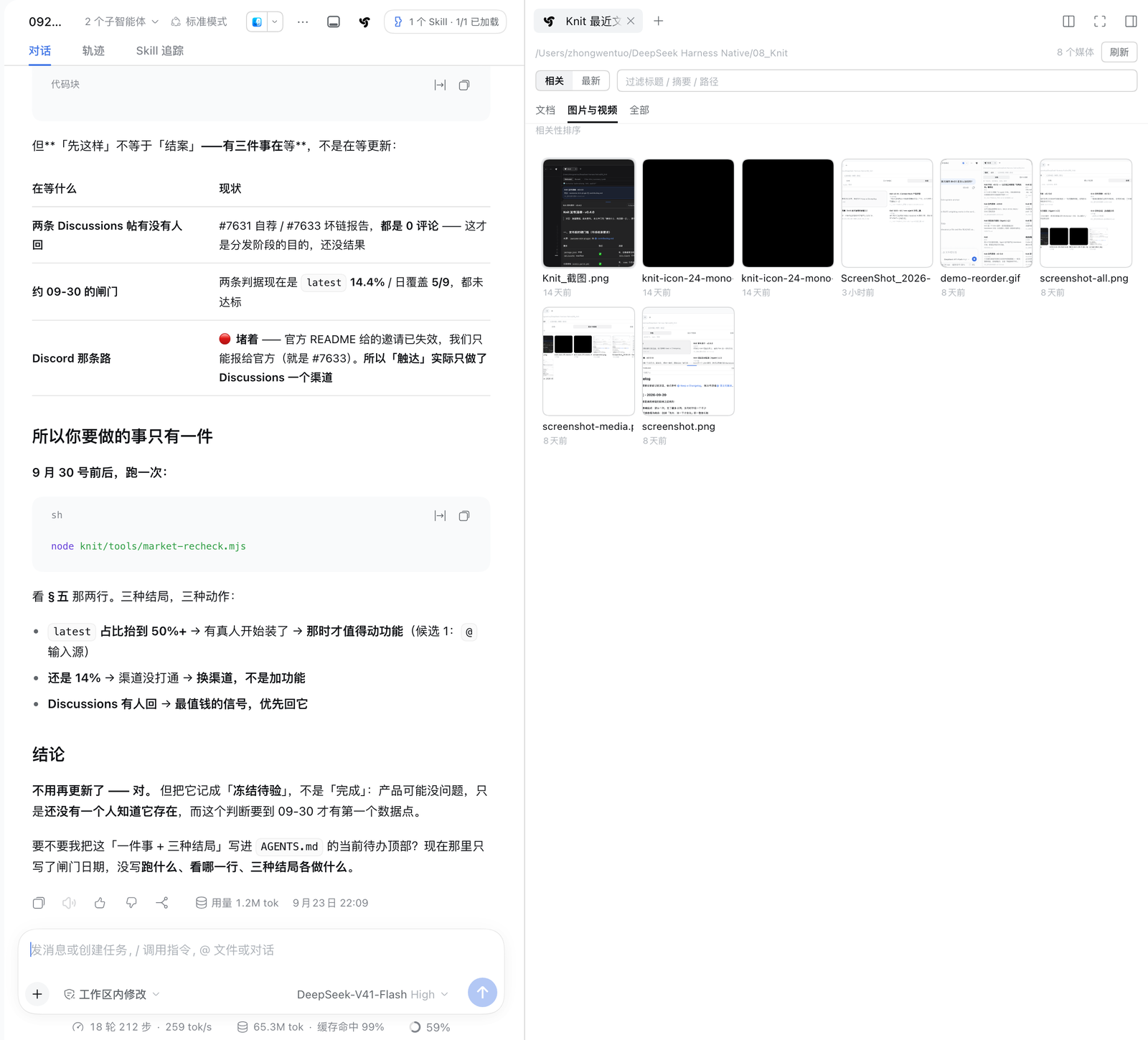
Images & video: square thumbnails, with the column count following the panel width continuously — six columns at this width, cells about 112px. These are the workspace's real image and SVG files; this particular workspace happens to hold several screenshots and two single-colour SVG icons (the two solid black squares are those icons). Videos get their first frame as a poster with a play glyph and a duration badge — this workspace simply has no video, so none shows here.
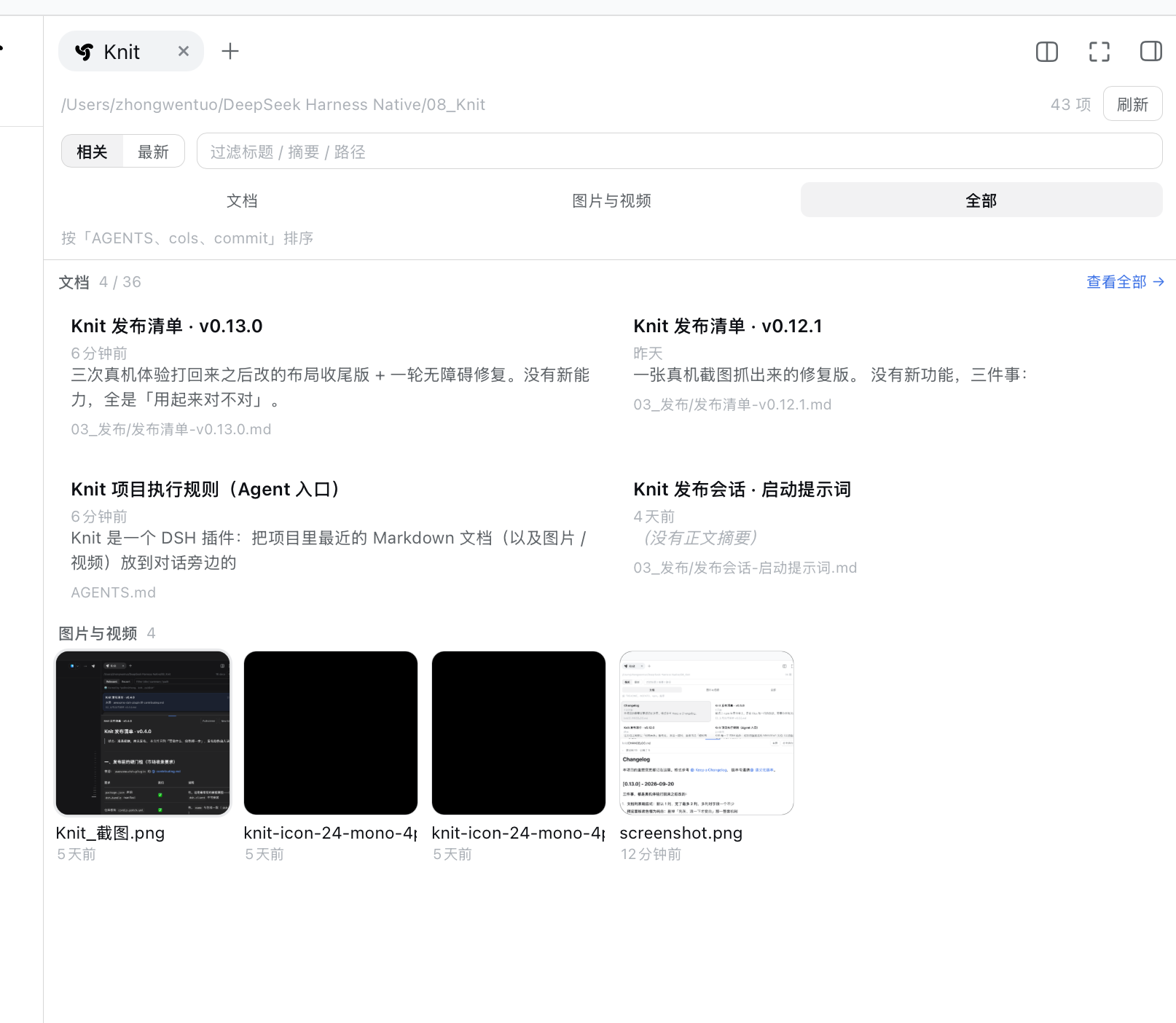
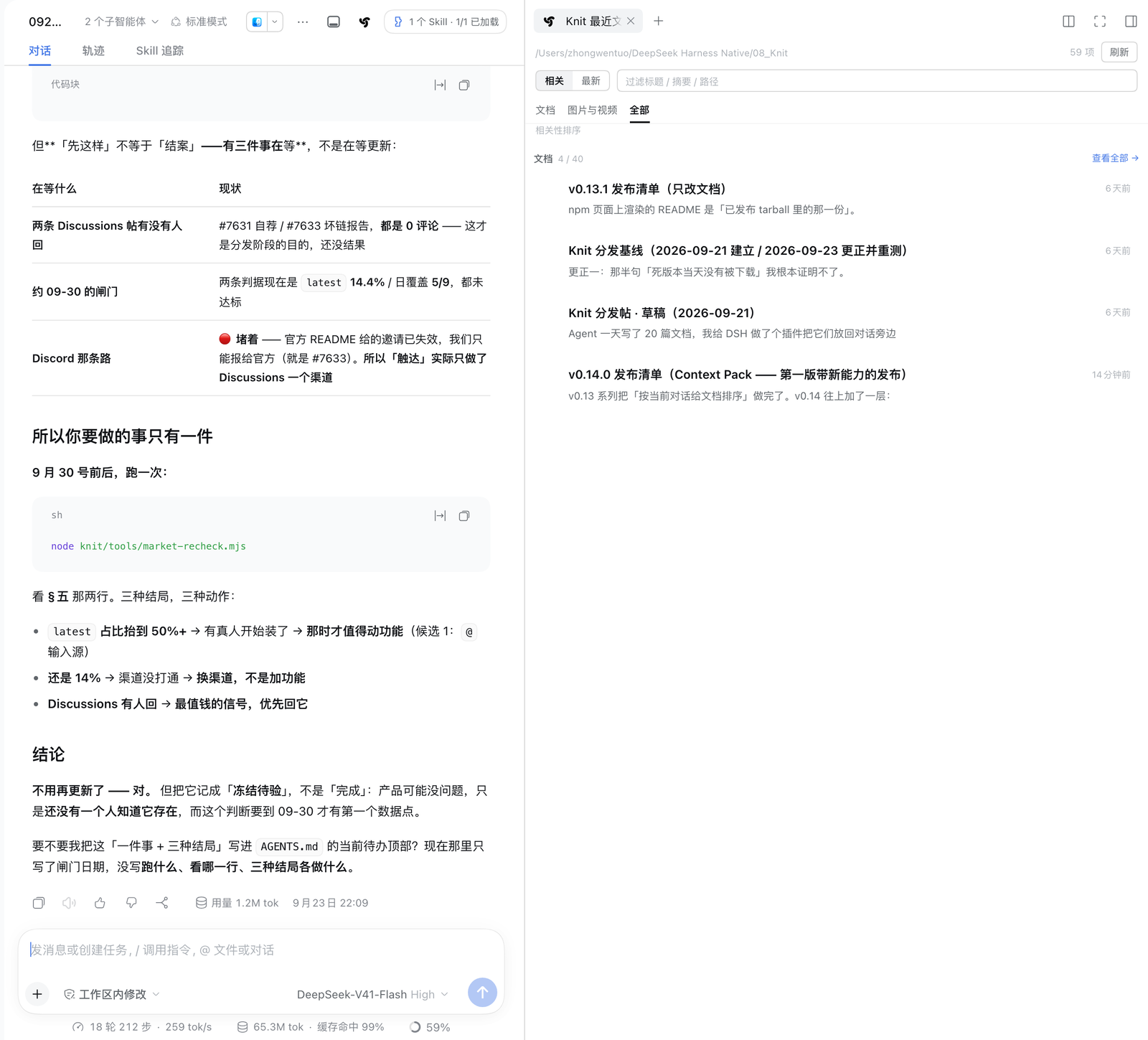
All: the documents section shows at most 4, with a "View all →" link when truncated (here "4 / 40").
⚠️ There is no media section in this screenshot, and that is not a layout accident — for the All
view the host fetches a 40-item window. This workspace has 51 documents plus 8 media files, and the
media rank 50th–58th by relevance, so they fall outside the window; the client's
visibleDocs.filter(isMedia) is then empty and the media section is not rendered at all. Any
workspace with 40 or more documents behaves this way — a known defect, with reproduction and the fix
recorded in docs/README.md.*
Did it actually get used? (v0.15)
Knit orders "what to read first right now" — but whether that order was right could only be felt, never checked. v0.15 adds a layer of verifiable usage feedback: the files the agent really read, matched against the context pack that was in effect at the moment of the read.
Off by default. There is a "Usage" toggle in the panel head; turning it on adds one muted line above the list:
primary read (docs/xxx.md) · supporting 1/2 · 7 reads · 2 outside the pack · context changed 2×
It reports facts only: was the primary doc read, how many reads happened, how many fell outside the pack, how often the context changed. No score, no percentage, no progress bar — these numbers are counted, not estimated.
Three boundaries:
- Off by default: while it is off, Knit reads no events and stores nothing. This accounting has a cost (every poll would walk the session's events), and that is the user's call, not ours.
- No duplicate of the DSH trajectory: the only evidence source is the
tool/call/tool/resultevents the session already has (successfulreads). No new event bus, no runtime trace, no event store. - Nothing is persisted: the numbers live in kernel memory only and are gone after a DSH restart — do not treat them as long-term statistics.
Agents get the same thing optionally: knit_docs accepts audit: true (default false), which
appends one line, Usage since the last pack: … (a report on the previous pack).
To check offline: node tools/context-feedback-eval.mjs replays the latest real session log;
--control is the "deliver no pack at all" arm. ⚠️ It splits "outside the pack" in two —
in Knit's index but not in the pack (a real miss) versus not in the index at all (.js /
.json, which Knit never indexes). Without that split the outside ratio stays high and reads like
"the Context Pack is useless", when in fact the wrong thing was measured.
What it reads, and what it doesn't
- Scans
.md, images and video inside the current session workspace (anything resolving outside is rejected); for media it reads metadata only, never the pixels - Reads only the current session's conversation events (used for ranking)
- The
knit_docstool is read-only: it writes no files and persists no index - v0.15 usage accounting is off by default: when enabled it reads only the current session's
existing tool events (successful
reads) — still no file writes, no persisted counters, gone on restart - Makes no outbound network requests: the client's
fetchcalls all point to the plugin's own same-origin routes - No install-time scripts (no
install/postinstall) - Zero dependencies — nothing to build, no build-authorisation prompt
- The file-reading route only allows an image/video-extension allowlist (images ≤ 12MB,
video ≤ 256MB), serves video over HTTP Range, and responds with
nosniffplusdefault-src 'none'; sandbox
The relevance figure only affects ordering — it is never displayed and never sent anywhere.
Every claim above is guarded by an automated check, listed one by one in SECURITY.md — each property points at a test that actually exists.
npm testverifies that the table itself has not rotted.
Known limitations
- Short conversations degrade the ranking: one or two messages give too few keywords, so it falls back to modification time and says so in the panel
- Chinese segmentation is n-gram approximation: no tokenizer dependency was added. Fragments that straddle two words are dropped when they start/end on a function character, and the remaining hits are merged by their spans back into real words — but an isolated fragment (like 「视频上」, with nothing overlapping to merge with) can still appear in the "sorted by「xxx」" line
- The right sidebar's default page becomes the guide: DSH's rule is "if there's exactly one guide entry, open it directly"; the built-in Files entry takes that slot, so expanding the sidebar shows the guide first and Knit needs one more click on its pill
- Media is limited to common formats and sizes: images
png/jpg/jpeg/gif/webp/avif/bmp/ico/svg, videomp4/m4v/webm/mov/ogv; images ≤ 12MB and video ≤ 256MB or they are not listed - Media matches relevance by filename only: no visual/audio content is parsed — give screenshots and recordings searchable names
- What we measured is locating, not saving work: in the on-machine A/B (frozen protocol,
four questions), an agent that could call
knit_docsdid not explore less — Control 4.75 → Treatment 6.0 total tool calls, and no single question went down. The Pack did replace the initialglobfor candidates, but the doubledreadcount ate that back. It points attention at the right file; that is not the same as the agent reading fewer files - Right-sidebar state is memory-only: a refresh or a new session collapses it again
Development
git clone https://github.com/PolinniZhong/dsh-knit.git
cd dsh-knit

npm test          # 395 tests, zero dependencies, no npm install needed
How changes take effect: the host half (src/host/) requires a DSH restart (no hot reload);
the client half (src/client/) only needs a hard browser refresh.
There is no build step: the client half is a hand-written window.__ModuleLoader__.load({...})
using React.createElement instead of JSX, so there's no tsbuild / tsc. Static assets are inlined
too — changing the icon means editing both the assets/ source and KNIT_ICON_PATH in
src/client/client.js; test/icon.test.mjs asserts the two are byte-identical.
knit/
├── package.json          # dsh.bundle.patch + dsh.client
├── cordis.patch.yml      # the insert line mounted into the plugin tree
├── assets/               # icon source (path inlined into client.js)
├── src/
│   ├── host/index.js     # /knit/api/recent · /doc · /raw · /links · /context
│   ├── host/relevance.js # the relevance engine: BM25 + keyword extraction
│   ├── host/links.js     # reference parsing (pure; never touches ranking)
│   ├── host/context.js   # context assembly: the three-tier Context Pack (pure, zero I/O)
│   ├── host/tool.js      # the agent tool knit_docs (hand-written ToolDefinition)
│   └── client/client.js  # dual-host registration + panel UI
└── test/                 # 395 tests
    ├── eval/             # retrieval quality: corpus + cases + frozen v0.5.2 baseline
    └── context/          # context tiering: 24-doc corpus + 12 real-task cases
Details and trade-offs live in the source comments; see CONTRIBUTING.md for the contribution flow and CHANGELOG.md for the version history.
Versioning:
0.xmeans the feature set still moves and breaking changes are possible.1.0.0waits until real retention is validated — not merely "features are done".
License
MIT © Polinni
Comments
Comments live in GitHub Discussions. Sign in with GitHub to post or react.