
Install
Inside DeepSeek Harness, with dsh-market
dsh plugin --profile web add dshmarket
Or from the command line
dsh plugin --profile web add github:dream12347/dsh-session-manager
Installing runs third-party code with your own permissions — it can read your files, use your credentials and reach the network. Review the source first, and pin a commit (github:owner/repo#sha) when you can.
README
English | 中文
Possibly the most feature-complete DSH session manager plugin out there: full session management for the DeepSeek Harness web UI, including delete (with a trash to restore or purge), restore archived sessions, recent-activity stats, continue/pause sessions, unread/read markers, fork into a new chat, revealing log folders, workspace grouping and reordering, and a context compaction threshold — from a Settings section and the conversation header. No harness changes.
Built independently with dsh + Deepseek-V4-Flash0731
If you find it useful, please give it a ⭐ Star. Thank you!
Features
- A dedicated Session Manager section in Settings (a settings section, sibling to Notifications)
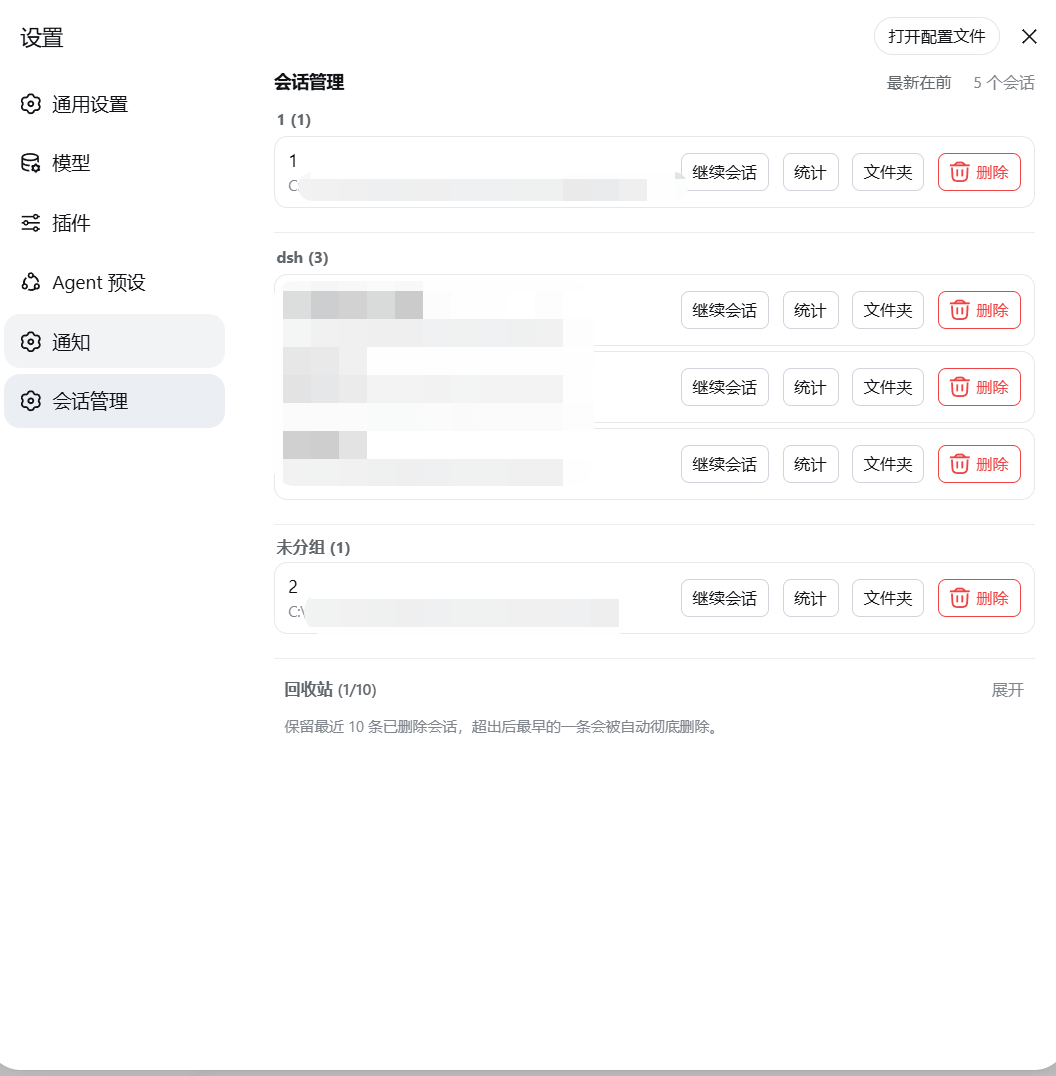
- Lists all sessions (title / working directory); archived sessions are grouped in a collapsible area at the bottom with a one-click Restore back to the list
- Trash: deleted sessions move to the trash (keeps the most recent 10, the oldest is purged automatically), with Restore and Delete permanently actions
- Stats: open a centered dialog with complete recent activity (turns / user messages / assistant messages / all tool calls / activity window)
- Continue session: open a session and close the panel; Pause: stop a running session's current turn
- Unread / read: a status dot next to each session's title — blue for manually marked unread, amber for the official waiting-for-input state, green for the official completion reminder, spinner while running; clicking an official dot marks it read in place (no navigation), clicking the blue dot clears the unread, opening a session auto-reads it; the official sidebar shows a matching blue unread dot on the session row
- Fork into a new chat: one click forks a child session (official
sessions.fork) and opens it - Folder: reveal the session's log directory in the system file manager
- Delete this session: a red button in the conversation header (left of Session log) to delete the current session
- Session Manager / Trash header buttons: a self-drawn right drawer (pin to keep open, outside-click to close); a "More" popover in each row holds Stats / Folder / Fork
- Workspace management: sessions are grouped by workspace, sorted by last use within each group (toggle newest/oldest first); drag a workspace title to reorder (insert before/after, swap on the title, drag to the bottom to append); hovering a title shows Move to top / Rename / Delete buttons (delete follows the official definition: it only removes the workspace from the list — the folder and session logs are kept, and its sessions appear under Ungrouped)
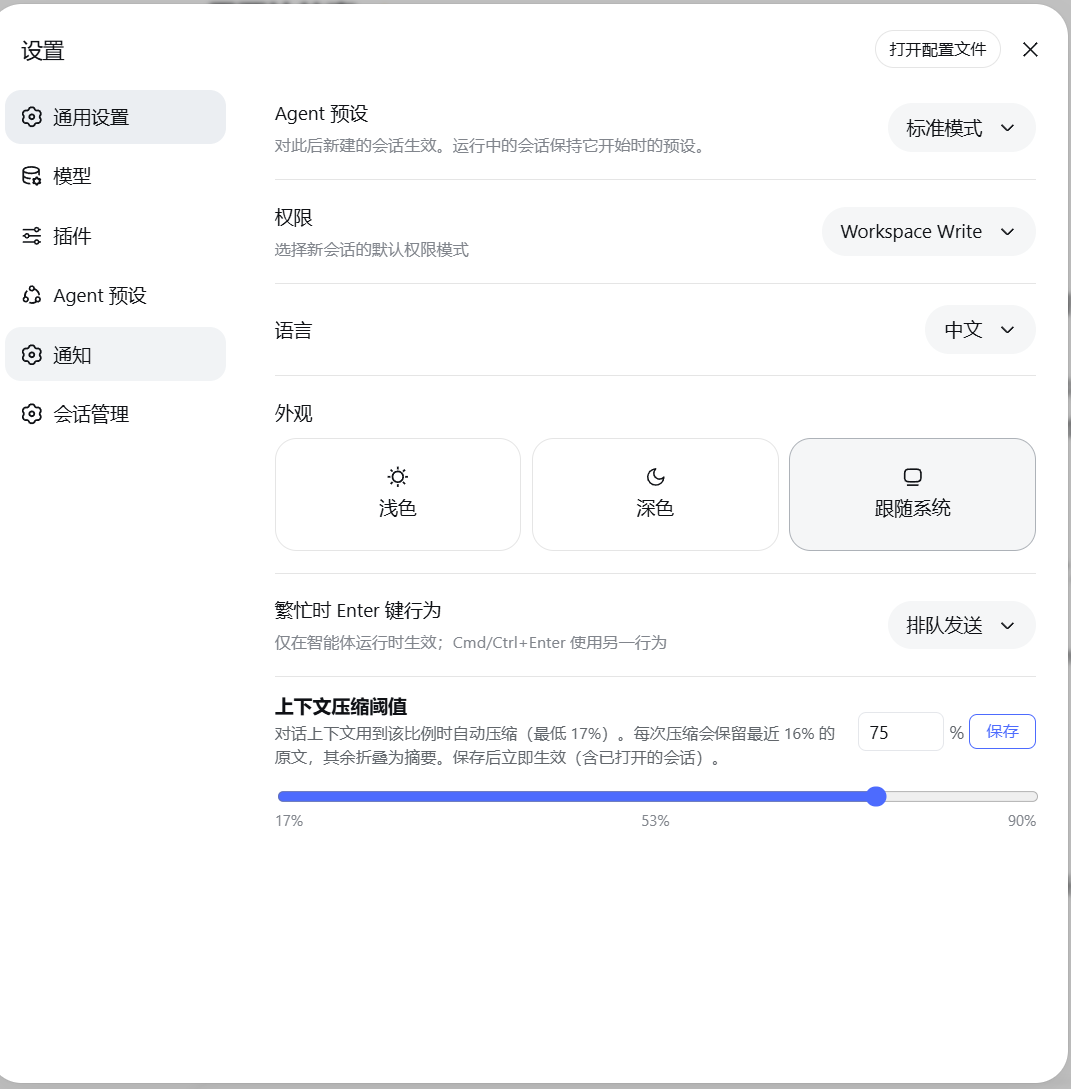
- Context compaction threshold (General settings): set at what fraction of the 1M-token model window the conversation context auto-compacts (17%–90%), keeping the most recent 16% verbatim; applies globally to all agent presets (immediate on save + persisted + auto-applied on restart)
- Delete restriction: only sessions currently thinking are protected; an open-but-idle session can be deleted
- Subagent sessions can be deleted when not running: even orphaned ones (whose parent session is already deleted) can be cleaned up directly from Session Manager
- UI language follows the active DSH app language and updates live (Chinese / English)
Install
From GitHub
dsh plugin --profile web add 'github:dream12347/dsh-session-manager#v0.2.2'
# CMD
dsh plugin --profile web add github:dream12347/dsh-session-manager#v0.2.2
From a local directory
dsh plugin --profile web add /absolute/path/to/dsh-session-manager
From a tarball
pnpm pack
dsh plugin --profile web add /absolute/path/to/dsh-session-manager-0.2.2.tgz
After installing, restart dsh web (the host plugin and the served client bundle load at startup).
Screenshots
The Settings "Session Manager" section (workspace groups, row actions and trash):
Conversation header shortcuts (Session Manager / Trash / Delete this session):

The session management drawer (workspace groups, pin to keep open, outside-click to close):

The "Context compaction threshold" in General settings (17%–90% with slider scale):
Usage
Settings section
- Open Settings (the gear icon at the bottom of the sidebar)
- A dedicated Session Manager section appears in the settings left navigation — click it
- The main list shows unarchived sessions; the Archived sessions collapsible area at the bottom lets you view, restore, or delete archived sessions
- Deleting moves a session to the Trash collapsible area (keeps the most recent 10)
- In the trash you can Restore (back to the list) or Delete permanently (irreversible)
- Per-row actions: Continue session (open and enter), Pause (stop the running turn), Stats (expand recent activity), Folder (reveal the log directory), Delete
- Workspace title actions (shown on hover): Move to top, Rename, Delete (red, with a confirmation dialog)
- Drag a workspace title to reorder: drop above/below another workspace to insert, drop on a title to swap, drag to the very bottom to append
- The sort toggle (newest first / oldest first) switches the session order inside each group
General settings: context compaction threshold
- Open Settings → General
- Find "Context compaction threshold": slider / input for 17%–90%
- Saving applies immediately (including already-open sessions); the value applies globally to all agent presets and survives restarts
Conversation header shortcuts
Top right of any conversation (left of Session log):
- Session Manager: opens the management drawer (full list + archived + trash); pin it to keep open, outside-click closes it
- Trash: opens the drawer with the trash expanded
- Delete this session (red): deletes the current conversation (moves it to the trash)
Unread / read status dots
The dot next to a session's title shows one of four states: blue = manually marked unread, amber = official waiting-for-input, green = official completion reminder, spinner = running. Clicking an amber/green dot marks it read in place (clears the official reminder without navigating); clicking the blue dot clears the unread; clicking the empty spot marks it unread; opening the session auto-reads it. The official sidebar mirrors the blue unread dot on the matching session row (matched by title text — sessions with duplicate titles share the dot).
How it works
| Layer | Implementation |
|---|---|
| Host | src/index.ts registers 7 routes: POST /delete (archive + move non-live session files to the trash + record the entry), POST /restore (move files back + unarchive + drop the entry), POST /purge (clear trash and original files + drop the entry), GET /trash (trash listing), POST /open-folder (reveal the log directory), POST /pause (pause a running session), and `GET |
| Client | src/client/index.ts registers the dedicated section through the official settings.section slot, lists sessions (with the archived group) from the useSessions / useWorkspaces standard feeds, and calls the host routes to delete/restore/purge; the drawer subscribes to the live session list via sessions.list (an ObservableSnapshot); removed session ids are remembered in browser localStorage so a live session does not "resurrect" after refresh |
- Unread mechanism: the manual unread set lives in browser localStorage under the shared key
dsh.session-unread.v1(format{version:1, ids:[]}— interoperable with other session-manager plugins); the official dots (amber/green/spinner) are driven by the officialSessionSummaryfieldspendingInteraction/completed/running, and clicking one marks it read in place by clearing the official reminder (no session open); the sidebar blue dots are decorated onto the official tree rows by a MutationObserver (official row elements carry no session-id attribute, so rows are matched by title text) - Global threshold: stored in the storage domain (
dsh_delete_session→thresholdRatio); when the default agent preset is user-owned, it is also written to theagent.cordis.ymlresolved by the agent-presets service, while system preset files remain read-only. The host writes the threshold into every preset's compaction-engine config in anagent/pre-stephook, so it applies to all presets uniformly and survives restarts - Deletion goes through the official archive channel first: the sidebar hides the session immediately
- Trash entries persist in the DSH storage domain (
~/.dsh/storages/dsh_delete_session.json); files live in~/.dsh/dsh-delete-session-trash/ - Workspace accounting (
sessionIdsslots / the archive set) is reconciled automatically on the next startup when the registry rebuilds its header index — no manual file editing - No system-prompt changes, no new model-facing tools: zero impact on tokens and model behavior
Limitations
- Running sessions cannot be deleted (button disabled and the host refuses); with multiple tabs, stop the session elsewhere first
- Subagent sessions can be deleted when not running — including orphaned ones left behind by a deleted parent session, so no residue stays forever
- A live session (opened in this process) has its in-memory state cleaned up by DSH on restart; deleted ids are recorded in browser localStorage so they do not reappear after a refresh
- Sidebar unread dots are matched by title text: sessions with duplicate titles share the same dot (the drawer is unaffected — it marks by real session id)
Compatibility
Current version targets DSH 0.1.1-rc.1 (depends on the settings.section / settings.general.item / conversation.session.header.utilities slots and the ctx.sessionPersistence / ctx.workspaceRegistry / ctx.agents / ctx.storageDomain / ctx.agentPresets services). If slots or service APIs change in a future DSH version, the plugin needs a matching update.
Development
pnpm install        # installs dependencies (@deepseek-ai packages are linked local dev dependencies)
pnpm run check      # typecheck + test + build
lib/ holds the committed build artifacts: rebuild and commit lib/ with every source change.
Comments
Comments live in GitHub Discussions. Sign in with GitHub to post or react.