
Install
Inside DeepSeek Harness, with dsh-market
dsh plugin --profile web add dshmarket
Or from the command line
dsh plugin --profile web add dsh-share
Installing runs third-party code with your own permissions — it can read your files, use your credentials and reach the network. Review the source first, and pin a commit (github:owner/repo#sha) when you can.
README
简体中文 | English
Share DSH Q&As or selected conversation groups as PNG or Markdown.
Multi-select Q&As with the same interaction and experience as the DeepSeek web app.
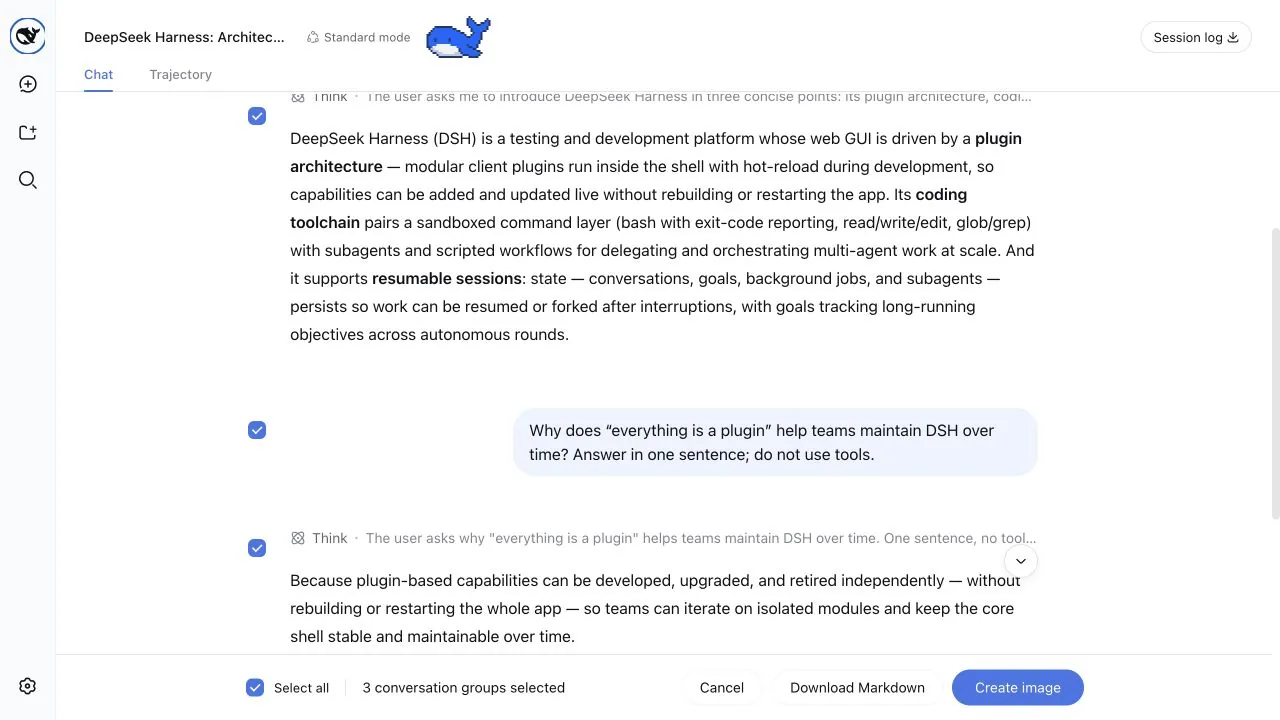
Adjust the image width, font size, and process visibility before downloading or copying the result.
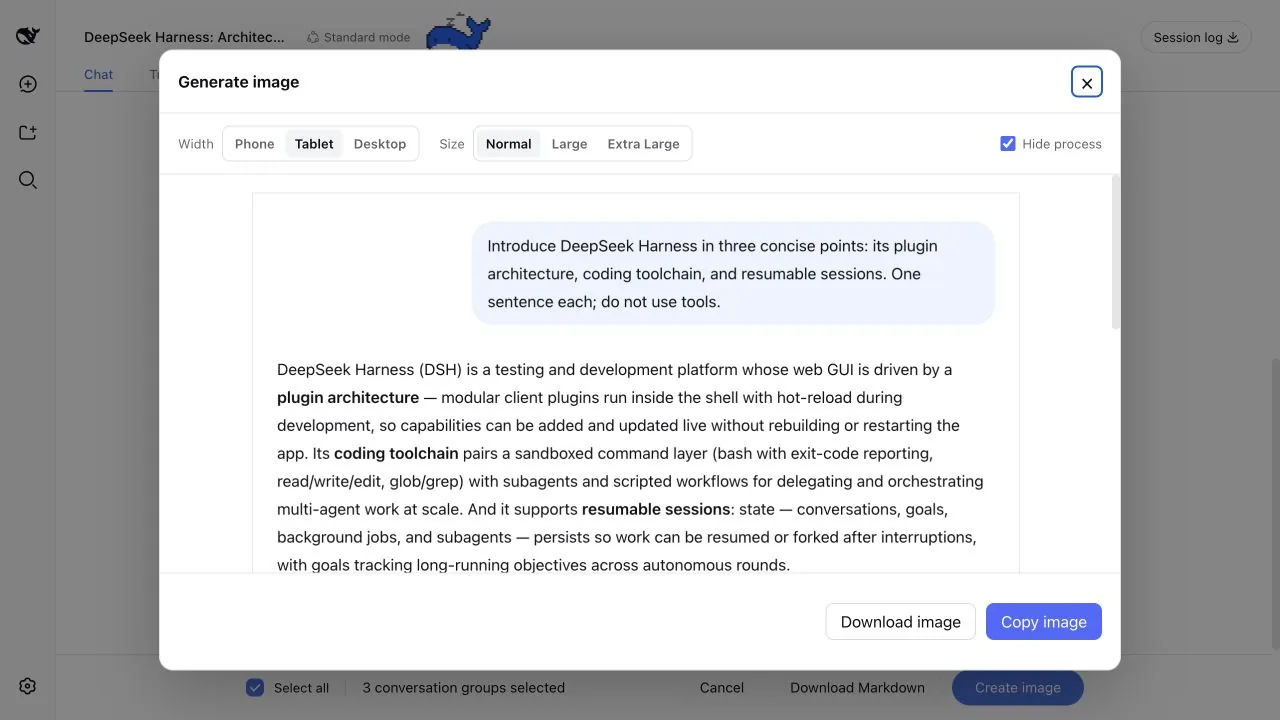
Features
- Enters Q&A selection from the top-right action, with all groups selected by default
- The share action below any turn opens the same selection mode with only that Q&A preselected
- Shows linked checkboxes beside both the question and answer, lets you click content to select a group, and supports non-contiguous selection
- Keeps a checkbox visible while scrolling through long content, then lets it leave at that question or answer's boundary
- Supports image copy, PNG download, and Markdown download
- Preserves Markdown, code blocks, tables, images, and tool call summaries
- Supports adjustable image widths and font sizes, with a scrollable preview for long images
- Can hide reasoning and tool calls, leaving only the question and final answer
Performance testing: Everyday chat keeps only the lightweight share actions. Selection processing and image generation start only when sharing, with optimizations for multi-turn conversations.
Quick installation
Add the plugin to the Web Profile with the DSH CLI, then restart dsh web:
dsh plugin --profile web add dsh-share
Other installation methods
Install a specific GitHub version:
dsh plugin --profile web add github:hellodigua/dsh-share#vX.Y.Z
Install from a local checkout:
dsh plugin --profile web add /absolute/path/to/dsh-share
After changing the source, run corepack pnpm build, then refresh the plugin with dsh plugin --profile web add --force /absolute/path/to/dsh-share.
Development
You can install dependencies, run tests, and build the project without a local DSH checkout:
corepack pnpm install --frozen-lockfile
corepack pnpm typecheck
corepack pnpm test
corepack pnpm build
Run the full check with one command:
corepack pnpm verify
DSH loads the files in lib/ directly, so they must be committed with the source. After changing src/, rebuild and make sure lib/ is up to date.
Run corepack pnpm release:check before a release. See RELEASING.md for the GitHub-to-npm automation contract.
Compatibility
The development baseline is @deepseek-ai/dsh 0.2.0-rc.2, with a runtime dependency range of ^0.1.7-rc.2 || ^0.2.0-rc.2. Share actions use the official conversation.chat.assistant-actions and conversation.session.header.utilities slots, and do not scan or modify the action bar DOM. Selection mode adds checkboxes through data-chat-flow-kind and other stable data-* attributes, and does not depend on CSS Module class names; changes to the conversation structure may require a plugin update.
Known limitations
- Copying an image requires clipboard permission. You can still download it if permission is unavailable.
- Unreadable remote resources are replaced with transparent placeholders.
- Only fully loaded Q&As can be selected. Scroll upward first to load older content.
License
Licensed under the MIT License. Licenses for dependencies bundled into the browser build are listed in THIRD_PARTY_LICENSES.md.
Links
Available on the dshfind.com DSH plugin marketplace.
Comments
Comments live in GitHub Discussions. Sign in with GitHub to post or react.