
Install
Inside DeepSeek Harness, with dsh-market
dsh plugin --profile web add dshmarket
Or from the command line
dsh plugin --profile web add dsh-compose-panel
Installing runs third-party code with your own permissions — it can read your files, use your credentials and reach the network. Review the source first, and pin a commit (github:owner/repo#sha) when you can.
Screenshots
README
English | 中文

A DeepSeek Harness plugin that puts your Docker Compose projects in the native right sidebar: one group per project directory, live status per container, start/stop/restart on hover, and a streaming log tab per service.
It is built for the workspace layout that a single-file container viewer gets
wrong: one repository whose subdirectories each own a compose.yaml.
工作区 ~/work/shop
├── compose.yaml            → group “shop”           2/2 running
├── services/api/compose.yaml  → group “services/api” 1/3 running
└── tools/mail/compose.yaml    → group “tools/mail”   not started
Screenshots
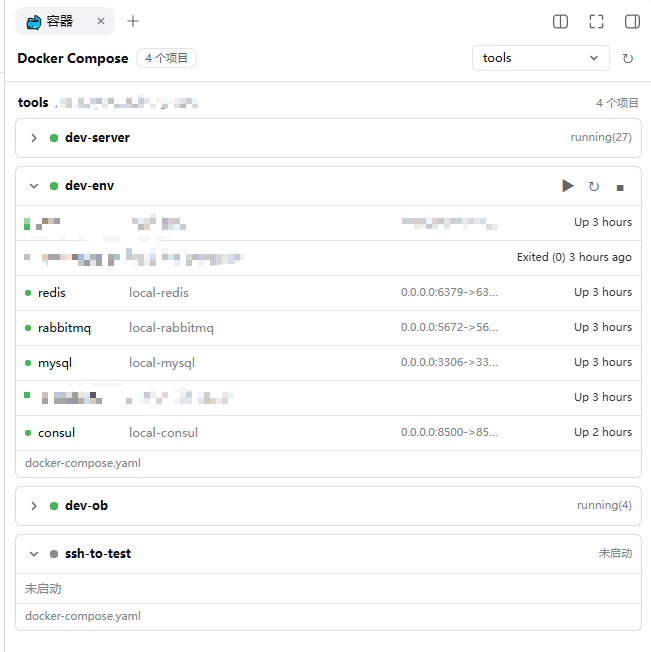
The panel in the right sidebar: one collapsible group per project directory, the aggregate container state on the right of each header.
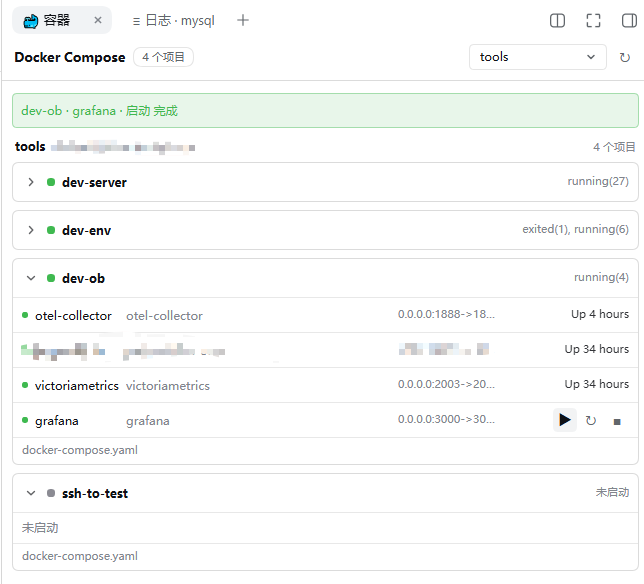
Hovering a row replaces its status cell with that row's actions — project-wide on a group header, per-service on a container row.
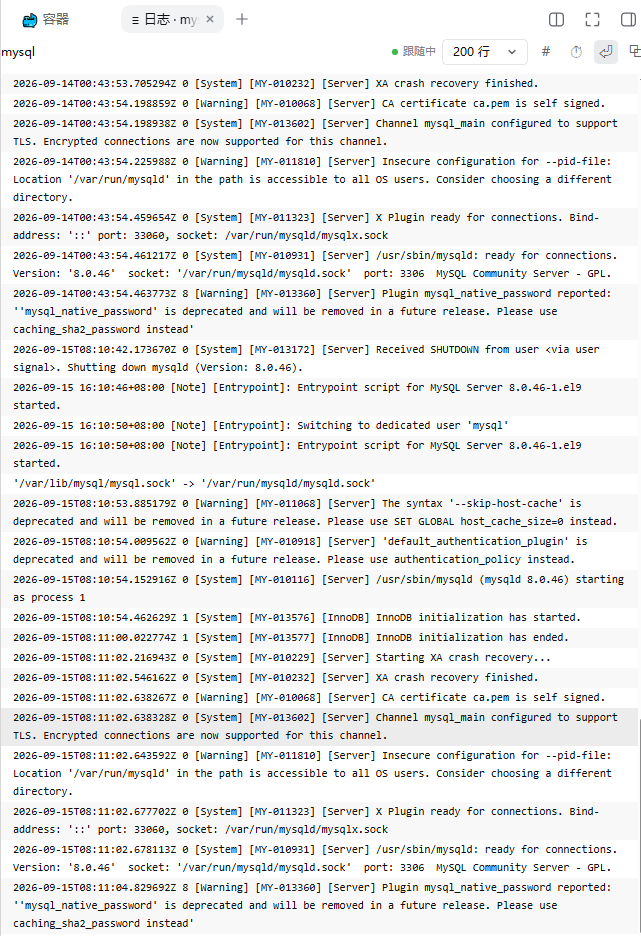
Clicking a container row opens a streamed log tab for that service.
Features
- One group per project directory. Projects are keyed by directory, never
by the compose project name, so
-p,COMPOSE_PROJECT_NAMEand.envcannot merge two different stacks into one row. - Three discovery sources. Running and stopped containers, projects Docker
already knows but that hold no container, and compose files never brought up
at all — all three appear, so an untouched
compose.yamlstill shows as a project that is simply not started. - Workspace scoped. Only projects inside a DSH workspace are listed. Containers that belong to a workspace-relative directory are grouped under the longest-matching workspace; everything else is counted, not hidden.
- Collapsible groups, status on the right, fixed row heights (nothing moves when the pointer crosses a row).
- Hover actions. Resting on a row swaps its status cell for the actions that
apply to it: project-wide
up -d/restart/stop, or the same three for one service. Nothing is ever run without a click. - Live logs, streamed. Click a service row to open a log tab for that service; click a project header to open one for the whole project. Each target keeps its own tab.
- Silent refresh. The list re-reads itself every 45s while idle and every 8s while something is still starting, without losing scroll position, open groups or the selection.
- Product-native styling: it uses the harness' own theme tokens, so it follows light and dark mode and the accent colour without a settings screen.
Requirements
| Requirement | Notes |
|---|---|
| DSH >= 0.1.5-rc.1 | Verified on 0.1.5-rc.1, 0.1.5-rc.2 and 0.1.7-rc.2. A 0.1.7 install needs this plugin at 0.1.2 or newer — see DSH versions. |
| DSH with a web profile | The plugin registers a right-sidebar tab type and one HTTP route, both served by webServer. |
Docker CLI on PATH for the host process |
docker ps and docker compose ls are run as child processes; the compose v2 plugin (docker compose, not docker-compose) is required. |
| A POSIX host | Paths are handled as POSIX paths; Windows is untested. |
| A DSH workspace | Only directories inside a registered workspace are listed. |
DSH versions
| DSH | Plugin | Notes |
|---|---|---|
| 0.1.7-rc.2 | 0.1.2 or newer | 0.1.1 registers nothing — the 容器 tab is simply absent. |
| 0.1.7-rc.1 | 0.1.2 or newer | The same race; 0.1.2 confirmed against that release's published packages, not run end-to-end. |
| 0.1.5-rc.1 / 0.1.5-rc.2 | 0.1.1 and 0.1.2 | Both work. 0.1.2 adds no new API — only a guide field and the dependency declaration — and its activation gate was verified to hold on the cordis release that line pins. |
Why 0.1.1 broke on 0.1.7. A client half is applied only once every service
in its own inject list is provided. The right sidebar provides the
sidebarRightTabs registry from its apply, and that apply is gated on more
services than this plugin's — 4 on 0.1.5-rc.2, 6 on 0.1.7-rc.1, 7 on
0.1.7-rc.2 — so it lands after this one. 0.1.1 declared only slots, applied
before the registry existed, found nothing and bailed. 0.1.2 declares
sidebarRightTabs as a hard dependency and waits.
On 0.1.7-rc.1 specifically: both 0.1.7 release candidates were inspected —
that release's right sidebar provides sidebarRightTabs too, and the two pin
the same cordis (~4.0.4), whose activation gate is the one at work. 0.1.2 is
therefore expected to work on rc.1; it has not been run end-to-end there.
Install
Straight from GitHub — nothing to clone (pin a tag if you want a fixed release):
dsh plugin --profile web add "github:yizhixiaokong/dsh-compose-panel"
# pinned: dsh plugin --profile web add "github:yizhixiaokong/dsh-compose-panel#v0.1.3"
From a clone, when you want to edit the code:
git clone https://github.com/yizhixiaokong/dsh-compose-panel.git
cd dsh-compose-panel
dsh plugin --profile web add "$PWD"
From npm:
dsh plugin --profile web add dsh-compose-panel
All three end the same way, and none of them needs a manual registration step:
dsh plugin runs pnpm, then reads each installed dependency's
package.json; a package that declares dsh.bundle has its name appended to
dsh.profile.bundles, which is what mounts the
cordis.patch.yml beside it. (A dependency without that
declaration is installed as a plain library and warns instead.) There is no
build step either — the client half is a hand-written bundle that ships in
lib/.
Then restart the harness so the client bundle is picked up:
dsh web
To remove it:
dsh plugin --profile web remove dsh-compose-panel
The client half is baselined when the host boots. Editing
lib/client.jsin a running harness changes nothing untildsh webrestarts — a browser refresh is not enough.
Updating
The plugin market's Update button runs the first command below; the CLI form is the same thing:
# installed from npm
dsh plugin --profile web add dsh-compose-panel@latest

# installed from GitHub — pin the tag you want, or drop #tag for the branch head
dsh plugin --profile web add "github:yizhixiaokong/dsh-compose-panel#v0.1.3"

# installed from a checkout (link:) — the checkout IS the install source
git -C <path to this checkout> pull
Then restart dsh web. The client half is baselined at host boot, so an update
stays invisible until then.
Usage
- Open the right sidebar and pick the 🐳 容器 capsule from the guide page.
- Each workspace is a section; each project directory is a collapsible group headed by its path, with the aggregate container state on the right.
- Hover a project header to act on the whole project; hover a container row to act on that one service. The action buttons replace the status cell while the pointer is on the row, and the result is reported in a short banner.
- Click a container row (not a button) to open logs for that service in a new tab. Click the group header to open logs for the whole project.
Log tabs have their own controls: replay size (tail), whether to re-open the
stream, timestamps on/off, line wrapping, and — for a whole-project tab — the
service-name column.
How projects are discovered
One list call runs three commands and joins their results by directory:
| Source | Command | Contributes |
|---|---|---|
| Containers | docker ps -a --format '{{json .}}' |
Every container, grouped by the com.docker.compose.project.working_dir label. |
| Known projects | docker compose ls --all --format json |
Projects that exist but currently have no container (its ConfigFiles are absolute). |
| Untouched files | one bounded find per workspace |
Compose files that were never brought up: depth 4, with node_modules, .git, vendor, dist, build, target, .venv, venv, __pycache__, .next, .cache and .tox pruned. |
A project's directory is the join key. Compose file names recognised by the scan
are compose.yml, compose.yaml, docker-compose.yml, docker-compose.yaml
and the compose.<name>.y*ml / docker-compose.<name>.y*ml variants.
HTTP API
The host half registers one prefix route, /compose/api. Every response uses the
same envelope: {"ok":true,"value":…} on success, {"ok":false,"error":{"code","message"}}
on failure.
Every call is fenced before any command runs. For the two POST methods the
Host header must name a loopback authority (localhost, 127.0.0.1, ::1,
*.localhost, with or without a port) or an authority in the web runtime's
trusted list; a request the browser marks Sec-Fetch-Site: cross-site is
refused; and if an Origin is present its host must equal Host. The log
stream uses the read-side variant: the socket peer must be loopback (or the
Host trusted), no forwarding header (forwarded, x-forwarded-for,
x-real-ip) may be present, and a missing Origin is accepted — browsers send
none on a same-origin EventSource.
POST /compose/api/list
// request — root is optional; without it every workspace is listed
{ "root": "/home/me/work/shop" }
// response value
{
  "workspaces": [{ "path": "/home/me/work/shop", "title": "shop" }],
  "groups": [{
    "root": "/home/me/work/shop",
    "title": "shop",
    "scanError": "",
    "projects": [/* … */]
  }],
  "total": 7,       // containers inside the selected workspaces
  "outside": 2,     // containers found but outside every workspace
  "standalone": 1,  // containers with no compose project label
  "notices": []
}
POST /compose/api/action
{
  "action": "restart",          // "up" | "stop" | "restart" — a closed set
  "dir": "/home/me/work/shop",  // the project directory, must be in a workspace
  "service": "api",             // optional; omitted = the whole project
  "files": ["/home/me/work/shop/compose.yaml"]  // optional compose files (-f)
}
// response value; `code` is docker's exit code, `output` its combined output
{ "action": "restart", "dir": "…", "service": "api", "code": 0, "output": "" }
There is deliberately no down: removing containers and volumes is not a
sidebar-click operation. service is matched against
^[A-Za-z0-9][A-Za-z0-9._-]{0,99}$, and every -f path must lie inside dir.
argv is passed to spawn directly and never goes through a shell.
GET /compose/api/logs (Server-Sent Events)
| Query | Meaning |
|---|---|
dir |
Project directory (required, must be in a workspace). |
service |
One service; omitted streams the whole project. |
tail |
Lines replayed first: default 200, clamped to 1…5000. |
timestamps |
1 adds --timestamps; off by default. |
file |
Compose file (-f), repeatable. Without it the host derives the files from docker compose ls and, failing that, a shallow find. |
Frames are data: JSON objects:
{ "open": true, "command": "docker compose -f … logs -f --tail 200 api" }
{ "out": "api-1  | listening on :3000\n" }   // stdout chunk, already UTF-8 safe
{ "err": "…" }                               // stderr chunk, same shape
{ "eof": true, "code": 0 }                   // docker exited
{ "error": "spawn failed: …" }
The stream carries NO_COLOR=1, sends a comment ping every 15s so a dead peer
is noticed, stops after 4 MB, and terminates the docker process as soon as the
tab closes, reloads or navigates away — logs -f never ends on its own.
Limits and known behaviour
- Read-only elsewhere. Only
up -d,stopandrestartare reachable; nothing else in the sidebar mutates state. - Label parsing.
docker psreturns the compose project labels as a comma-separated string; compose labels never contain a comma, so splitting on,is safe here. - Log prefix. Docker's own
<service> |prefix stays in a project-wide log tab and is hidden by default in a single-service tab, where it only repeats the tab title. - First paint. The very first
listshells out tofindonce per workspace; on a very large tree the panel can take a moment to fill in. Later refreshes reuse the last result. - No shell plugin. Container state comes from the Docker CLI, so a stopped Docker daemon shows up as an error notice rather than an empty panel.
Development
lib/index.js        host half — routes, discovery, docker invocations
lib/client.js       client bundle — sidebar tab, list, log viewer
cordis.patch.yml    the single host row this package contributes
scripts/smoke.mjs   offline checks (no Docker, no harness, no network)
npm test # node scripts/smoke.mjs
The smoke test materializes the client bundle against stub globals and applies the host half to a stub context. It pins the two failures that are expensive to reach live: a factory binding read before its declaration (which throws during profile boot and unloads every later plugin row) and a changed set of sidebar seats or routes.
After changing lib/client.js or lib/index.js, restart dsh web — the client
bundle is baselined at boot.
Repository notes
Versions are tagged to match package.json — this tree is v0.1.1.
The yizhixiaokong placeholder in package.json, CHANGELOG.md, the badges and the
install commands above stands for the GitHub account this repository is pushed
to; replace it before publishing. The commits here were authored under a neutral
dsh-plugins <noreply@example.com> identity so that no personal address ends up
in the published history; if you want your own name on them, set
git config user.name / user.email and run
git commit --amend --reset-author before pushing.
Getting listed in the marketplace
The plugin list at
awesome-dsh-plugin
is generated from one YAML file per plugin, and its CI checks a submission's
shape against this repository. The mechanical part is already satisfied here:
dsh.bundle is declared in package.json beside cordis.patch.yml, the
official @deepseek-ai/* packages are declared as peerDependencies (this
package imports none of them, but it is a Cordis plugin), there are no
dependencies to install and no build step. What is left belongs to the
repository owner:
add the
dsh-plugintopic —gh repo edit yizhixiaokong/dsh-compose-panel --add-topic dsh-plugin;let the repository age past 1 day (the list's CI rejects younger ones);
open one PR adding
data/plugins/yizhixiaokong__dsh-compose-panel.yml:url: https://github.com/yizhixiaokong/dsh-compose-panel name: yizhixiaokong/dsh-compose-panel category: dev description: en: 'Lists the Docker Compose projects of your DSH workspaces in the right sidebar, one group per project directory, with container status, project- and service-level up/stop/restart, and streamed per-service logs.' zh: '在右侧栏列出各 DSH 工作区中的 Docker Compose 项目,按项目目录分组,显示容器状态,支持项目级与服务级 up/stop/restart 以及单服务日志流。'
The storefront reads a screenshots.json next to package.json (1–8 images)
for its screenshot strip; this repository declares assets/01-projects.png,
assets/02-actions.png and assets/03-logs.png, in that order.
Publishing to npm
npm login --registry=https://registry.npmjs.org   # a mirror accepts neither a login nor a publish
npm publish --registry=https://registry.npmjs.org
npm publish --dry-run prints the tarball contents without uploading anything,
and prepublishOnly runs npm test before either. The published package's
repository field points back here; that is what lets the plugin list link the
two and then offer the registry install form instead of the GitHub one.
License
Comments
Comments live in GitHub Discussions. Sign in with GitHub to post or react.