
Install
Inside DeepSeek Harness, with dsh-market
dsh plugin --profile web add dshmarket
Or from the command line
dsh plugin --profile web add github:woosh2010/dsh-usage-dashboard
Installing runs third-party code with your own permissions — it can read your files, use your credentials and reach the network. Review the source first, and pin a commit (github:owner/repo#sha) when you can.
Screenshots

README
🌐 Languages: 中文 · English · 日本語 · 한국어 · Español · Français · Deutsch
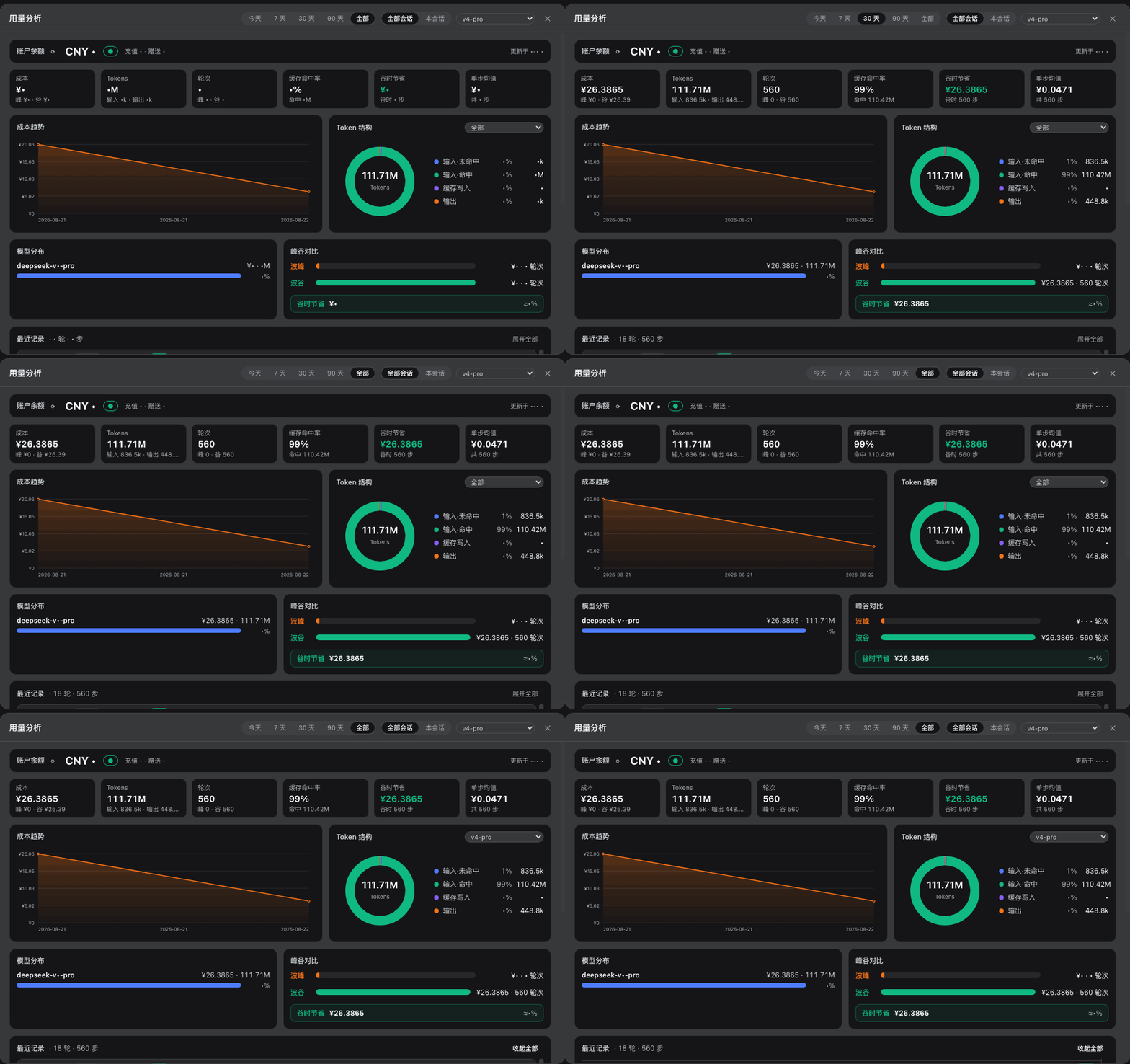
Adds a peak/off-peak billing dock below the input box of the DeepSeek Harness Web (dsh web); click it to expand a complete usage analysis dashboard: token / cost / model / peak-off-peak data is persisted automatically across sessions, with global filters and multi-dimensional charts.
Features
Note: the screenshots below show the Chinese UI; the plugin's interface also ships an English dictionary.
Peak/off-peak time-of-use billing: priced by Beijing-time peak hours (9:00–12:00 / 14:00–18:00) and off-peak hours (half price); the dock shows in real time the current period, a progress bar, a countdown to the next rate change, session cumulative / current-round cost, and account balance (auto-refreshes every 60 seconds via the official
/user/balanceproxy, with the API Key never leaving the browser).History persistence: every step's token / cost / model / peak-off-peak data is automatically written to
~/.dsh/storages/usage-history.jsonl, retained across sessions and restarts (soft limit of 40,000 entries, oldest automatically trimmed).Global filters: the global options at the top of the panel drive all charts and stat cards in real time —
- Time range: Today / 7 days / 30 days / 90 days / All
- Session scope: All sessions / This session
- Model filter: All models / Single model
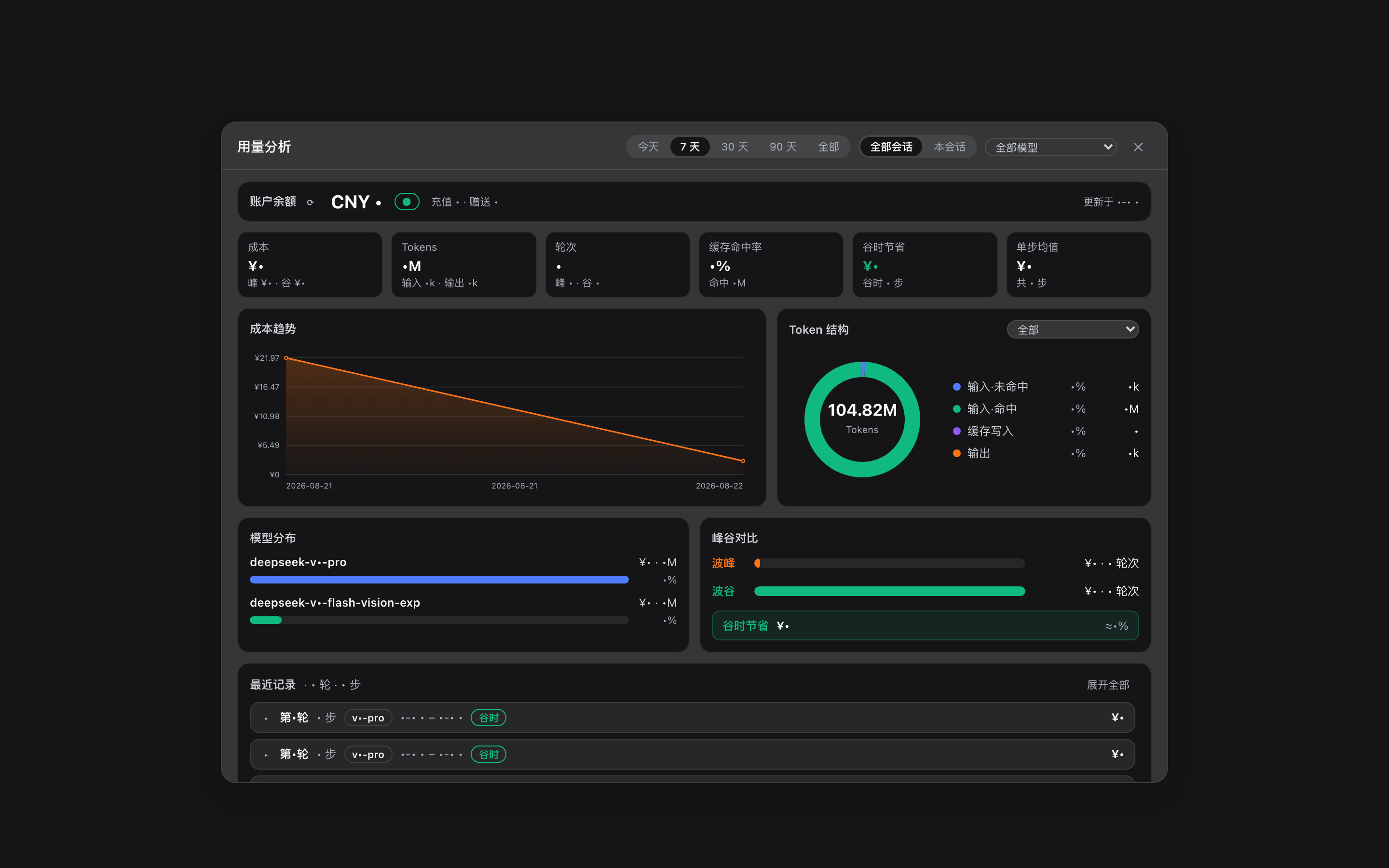
Stat cards: cost (with peak/off-peak breakdown), tokens (with input/output), turns (with peak/off-peak), cache hit rate, off-peak savings, per-step average.
Analysis charts:
- Cost trend line chart (hover to view the day's cost and peak/off-peak breakdown)
- Token structure donut chart (switchable between "All / By model")
- Model distribution bar chart (full model name + cost share)
- Peak/off-peak comparison and off-peak savings
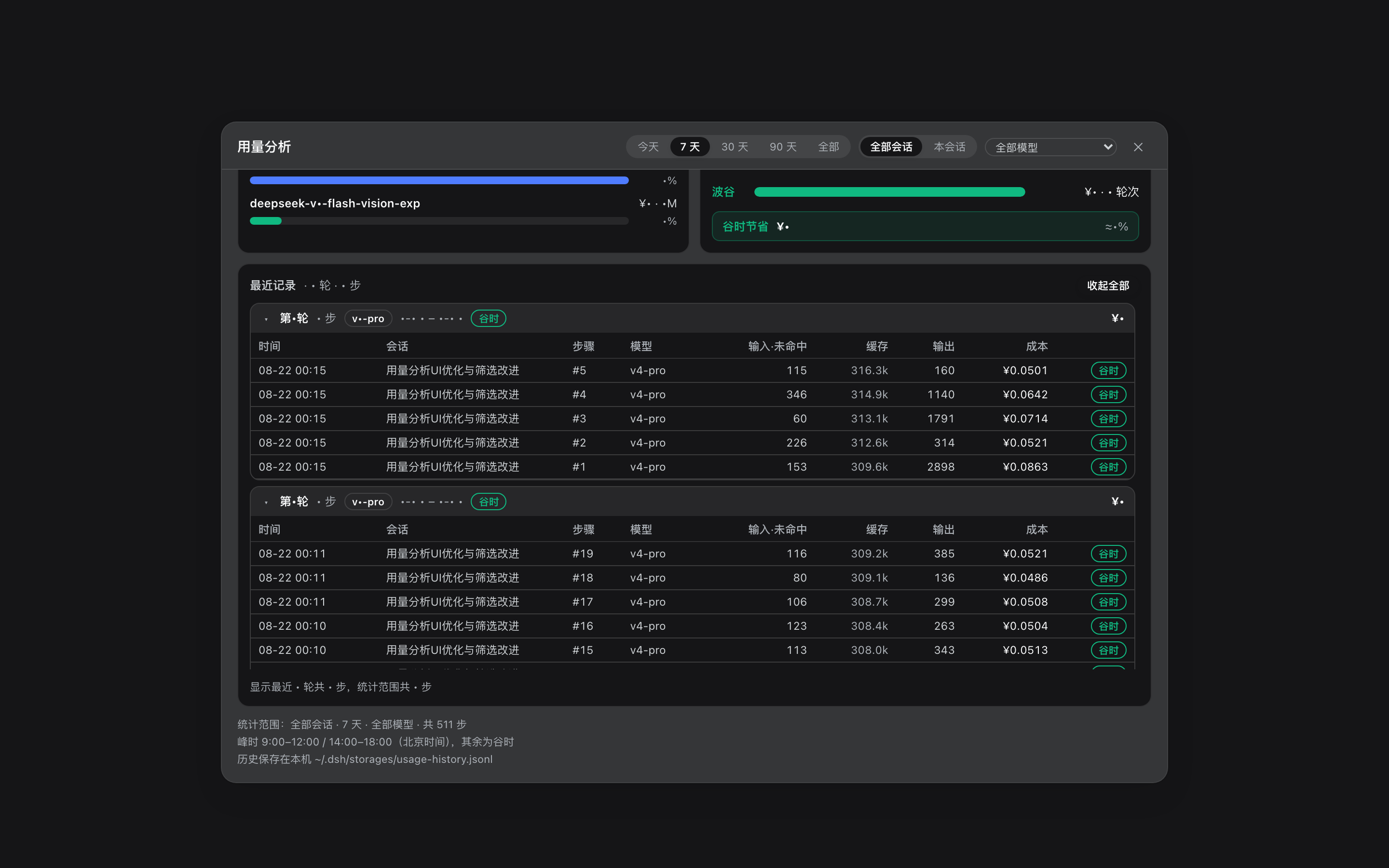
Recent records: all steps of the most recent 20 turns (collapsed by default, grouped by turn, turn headers with model badge, peak/off-peak and cost, expand/collapse all, scrolling within the area).
Close on outside click: the panel is rendered via a React portal; click anywhere outside the panel or press Esc to close.
Requirements
- DeepSeek Harness (dsh)
0.1.1-rc.1webprofile - The balance display requires a DeepSeek API Key configured on the model settings page (when unconfigured, the balance shows "—" and all other features are unaffected)
Installation
Method 1: One-click install (recommended)
Requires pnpm (
dsh pluginforwards arguments to pnpm as-is and runs them in the profile directory). If you don't have it, install it first:corepack enable pnpm(Node ships with corepack) ornpm install -g pnpm.
One command to install the tarball from the GitHub Release directly (verified working):
dsh plugin --profile web add https://github.com/woosh2010/dsh-usage-dashboard/releases/latest/download/deepseek-ai-dsh-client-ui-usage.tgz
The package declares dsh.bundle.patch; dsh plugin automatically writes @deepseek-ai/dsh-client-ui-usage into the profile's dsh.profile.bundles list and mounts it as a ui-usage entry. Then restart dsh web and refresh the browser.
Switching from Method 2/3: first delete the manually added
ui-usageinsert line in~/.dsh/profiles/web/cordis.patch.yml, otherwise the bundle patch and the manually inserted entry ids will collide.
Method 2: Download first, then install (offline/intranet)
Download the package (the tgz in Releases, or
curl -LO <the URL above>; you can alsogit cloneand then build your own withnpm pack).In the directory containing the tgz, run (note the
./prefix or absolute path — writing just the file name makes pnpm treat it as an npm package name):dsh plugin --profile web add ./deepseek-ai-dsh-client-ui-usage.tgz
Method 3: Manual install
Extract the tarball to the profile's resolved path:
mkdir -p ~/.dsh/profiles/node_modules/@deepseek-ai/dsh-client-ui-usage
tar -xzf deepseek-ai-dsh-client-ui-usage.tgz --strip-components=1 \
  -C ~/.dsh/profiles/node_modules/@deepseek-ai/dsh-client-ui-usage
Add an entry to
~/.dsh/profiles/web/cordis.patch.yml:- insert: - id: ui-usage name: '@deepseek-ai/dsh-client-ui-usage'Restart
dsh weband refresh the browser.
Using directly from the source directory:
lib/client.jsis read directly from the file by the server, so client-side changes take effect on browser refresh; changes tolib/index.js(host-side routes/storage) require restartingdsh web.
Troubleshooting (FAQ)
dsh web fails to start with "declares no dsh.bundle" after upgrade/install
Symptom: restarting dsh web errors out:
profile bundle "@deepseek-ai/dsh-client-ui-usage" declares no dsh.bundle in its package.json
Causes (by frequency):
- A stale 0.1.x install (declares only
dsh.client, nodsh.bundle) is shadowing the new version. v0.4.0 declaresdsh.bundle.patch, so registering it inbundlesis perfectly valid. However, when dsh resolves the package from the profile directory, a symlink inside~/.dsh/profiles/web/node_modules/@deepseek-ai/(pointing at an old source copy underweb/packages/) takes precedence over the new files in~/.dsh/profiles/node_modules/@deepseek-ai/(the shared scope) — so validation still reads the old package.json and reportsdeclares no dsh.bundle. Common when upgrading from an older manual install that copied sources intoweb/packages/. - The package name was added to
dsh.profile.bundlesby hand (manual edit of the profile's package.json, resolving to a version without adsh.bundledeclaration). Bundle registration should be left todsh plugin add— don't edit it manually.
Fixes:
Remove stale copies: delete or replace
~/.dsh/profiles/web/packages/dsh-client-ui-usageand its symlink under~/.dsh/profiles/web/node_modules/@deepseek-ai/, so every resolution path hits v0.4.0 (which declaresdsh.bundle).Reinstall with the official one-liner (it reconciles bundle registration and dependencies):
dsh plugin --profile web add https://github.com/woosh2010/dsh-usage-dashboard/releases/latest/download/deepseek-ai-dsh-client-ui-usage.tgzIf you previously mounted the package via a hand-written
insertin the profile'scordis.patch.yml, keep only one of the two mount mechanisms (prefer the official bundles registration; delete the hand-written insert) to avoid duplicate mounting conflicts.Restart
dsh weband hard-refresh the browser.
Applies to machine migration too: helper scripts that install older sources into
web/packages/(e.g. via symlinks) must be cleaned up before upgrading this plugin, or they trigger the resolution-shadowing issue above.
Quick self-check for other install issues
To simulate dsh's boot-time validation of bundles locally (checks that every bundle declares
dsh.bundle and that no client-only package slipped into bundles):
node -e '
const fs=require("fs"),path=require("path");
const D=path.join(process.env.HOME,".dsh/profiles/web");
const j=JSON.parse(fs.readFileSync(path.join(D,"package.json"),"utf8"));
let ok=true;
for(const n of j.dsh.profile.bundles){
  const m=JSON.parse(fs.readFileSync(require.resolve(n+"/package.json",{paths:[D]}),"utf8"));
  const has=!!(m.dsh&&m.dsh.bundle);
  console.log((has?"✓":"✗")+" "+n+" "+m.version); if(!has)ok=false;
}
const bad=["@deepseek-ai/dsh-client-ui-usage","@deepseek-ai/dsh-client-ui-gitpush"]
  .filter(n=>j.dsh.profile.bundles.includes(n));
if(bad.length)console.log("✗ client-only package in bundles:",bad),ok=false;
console.log(ok?"✅ Preflight passed":"❌ Preflight failed"); process.exit(ok?0:1);
'
Verification
After deployment, run:
node verify.mjs # default http://127.0.0.1:3080, pass a baseUrl argument
The script checks: the served client file matches the deployed file, modelsAll and per-model token structure, session/model filtering, the most recent 20 turns, and that the per-model mix sums equal the total.
Data & billing notes
- History storage:
~/.dsh/storages/usage-history.jsonl, soft limit of 40,000 entries with automatic trimming of the oldest; records with unknown models are automatically repaired (re-priced) once the projection cache becomes available. - Price table: the
PRICE_TABLEbuilt intolib/client.jsandlib/index.js(CNY per million tokens, peak and off-peak tiers; cache hits priced at the hit rate, writes at the input rate). After DeepSeek changes prices, update these two places to match. - Off-peak savings: off-peak is priced at half the peak rate, so
off-peak savings = off-peak cumulative cost.
Regenerating screenshots
The screenshots in docs/screenshots/ come from a real running dsh web (balance figures masked). To regenerate:
# 1. Launch headless Chrome (debug port 9222)
"/Applications/Google Chrome.app/Contents/MacOS/Google Chrome" \
  --headless=new --remote-debugging-port=9222 --remote-allow-origins=* \
  --user-data-dir=/tmp/dsh-shot-profile --window-size=1440,900 about:blank

# 2. Take the screenshot (optionally set DSH_CONV to specify the sidebar session name)
node scripts/screenshots.mjs dock
node scripts/screenshots.mjs dashboard
node scripts/screenshots.mjs recent
Version history
- 0.4.0: global filters (5-tier time range / All·This session / model filter), token structure switchable by model, model distribution shows full names, most recent 20 turns (
turnsparameter), stat card sub-info and a more compact layout, close on outside click (portal + overlay), recent records collapsed by default. - 0.3.3 / 0.1.0: initial peak/off-peak billing dock, account balance proxy, JSONL history and aggregate charts.
License
Comments
Comments live in GitHub Discussions. Sign in with GitHub to post or react.