
Install
Inside DeepSeek Harness, with dsh-market
dsh plugin --profile web add dshmarket
Or from the command line
dsh plugin --profile web add github:wjingshan/dsh-cost-gauge
Installing runs third-party code with your own permissions — it can read your files, use your credentials and reach the network. Review the source first, and pin a commit (github:owner/repo#sha) when you can.
Screenshots


README
中文 | English
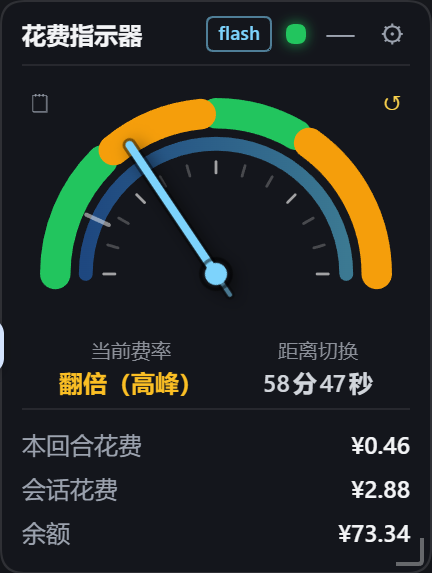
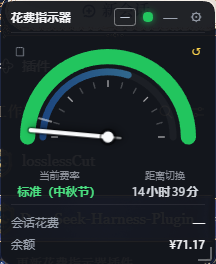
A cost gauge for DeepSeek Harness (dsh): a square floating window at the upper left of the Web UI that shows the current session cost and account balance in real time. The semicircular dial has a hand that follows Beijing time and arcs colored by the day's rate bands (green = standard, amber = peak, all green on weekends and public holidays). A red lamp at the top blinks when the balance drops below the threshold. Supports drag / resize, minimize (status lamp + countdown ring + model badge) and edge snapping (drag the widget to the left or right edge of the app window and it docks as a thin vertical strip).
🔀 Related project: the “minimal-clock / multi-skin” line is maintained separately as dsh-cost-gauge-plus. This repository keeps evolving the v1.0 classic square gauge; the two are independent.
Screenshots
| Expanded | Minimized | Public holiday |
|---|---|---|
Left: expanded (weekday peak — green/amber arcs, amber = peak band; the bottom three rows are turn cost / session cost / balance); middle: minimized (rate lamp + countdown ring + cost/balance + model badge); right: a public holiday (Mid-Autumn, 9-25) — the whole arc is green and the status reads "Standard (Mid-Autumn Festival)".
What's new in v1.6.1 – v1.6.8
Six batches: v1.6.8 adds the turn cost and lets you switch what the compact states show; v1.6.7 fixes the widget being unclickable and undraggable in the desktop app (Electron swallowed the top strip’s mouse input as window dragging); v1.6.6 brings back the bar chart in the cost records panel (buried by the glass backdrop layer since v1.6.0); v1.6.5 slims down the minimized capsule; v1.6.4 adds edge snapping (dock as a vertical strip); v1.6.1 – v1.6.3 was one round of dsh 0.1.7 compatibility work — compatibility, holiday display, and the cost display fix.
| Version | Theme | In one line |
|---|---|---|
| v1.6.8 | 🧮 Turn cost | The expanded view gains a turn cost row (current turn only, under one cent shows <0.01); the minimized capsule and the docked strip can be switched between turn cost and session cost in settings |
| v1.6.7 | 🖱 Interactive in the desktop app | The DSH desktop shell lays a window-drag hot zone across the top of the window with -webkit-app-region:drag; a widget parked there has its mouse input consumed as window dragging — unclickable, undraggable |
| v1.6.6 | 📊 Bar chart regression | The glass backdrop layer and the chart's bars shared the class name .dsg-bar: the bars inherited position:absolute; inset:0, so 30 of them covered the whole chart area and the last, empty one hid all the others |
| v1.6.5 | 📏 Slimmer minimized capsule | Minimized size halved and the width now fits its content; the badge's slot class was being wiped by setModelBadge, which is why the right side had a blank gap |
| v1.6.4 | 🧲 Edge snapping | Drag the widget to the left or right edge and it snaps into a docked vertical strip; click it or drag it away to restore |
| v1.6.3 | 💰 Cost display fix | 0.1.7 moved “which session is selected” out of the client sessions service, so the cost and the model badge stuck at —; now resolved from several sources |
| v1.6.2 | 🗓 Holiday display | Chinese statutory holidays (and weekend make-up workdays) are billed off-peak: all-green dial, switch instants that skip holidays, and status text that says why |
| v1.6.1 | 🧩 Compatibility | 0.1.7 dropped data-dsh-frame from the app frame — conversation-area geometry and sidebar-collapse detection broke; the frame is now derived by walking up from the columns |
v1.6.8 · Turn cost + a switchable compact display
New: the expanded view gains a “Turn cost” row, and the minimized capsule / docked strip can show either the turn cost or the session cost.
- Turn cost — counts the current turn only. On
turn/startthe host resets it to zero and accumulates every charge of that turn from there. - Same pricing path as the session cost — every event is priced at the rate and model in effect at its own timestamp (the exact same
priceAtcall the session cost uses), so the two numbers can never disagree in method. - Under one cent shows
<0.01, so you never get a column of¥0.00. The session-cost row keeps its original¥X.XXformat. - Compact states are a choice — a new setting, “Show turn cost in the minimized capsule and strip”, is off by default, which keeps the previous behaviour (both show the session cost). Both compact states follow it together, and hovering the number tells you which one you are looking at.
- The manual reset is independent — “Reset session cost” only touches the session cost; the turn cost is unaffected.
- Replacement and retries are handled — a repeated sample for the same
turn/stepreplaces rather than accumulates (the official projection semantics), andllm/retry-startedrollbacks are subtracted from the turn cost too.
| State | Shows |
|---|---|
| Expanded | Turn cost / session cost / balance — three rows |
| Minimized capsule, setting off (default) | Session cost |
| Minimized capsule, setting on | Turn cost |
| Docked strip | Always matches the minimized capsule |
| Turn cost below ¥0.01 | <0.01 |
The host half (turn accounting) and the client half (the new row and the setting) changed independently. The host half is pinned by DSH’s module cache, so it needs a DSH restart; the client half only needs a page refresh.
v1.6.7 · Unclickable and undraggable in the desktop app (Electron read the mouse as window dragging)
Fix: in the DSH desktop app (Electron, 0.2), a widget parked at the very top of the window could not be expanded by clicking, and dragging it dragged the whole application window instead.
The desktop shell lays a window-drag hot zone across the top of the window:
[data-windows-titlebar] .frame:before{inset:0 0 auto;
  height:var(--dsh-windows-titlebar-height);-webkit-app-region:drag}
Chromium treats that band as the window title bar: mouse input landing inside it is handed to the OS for window dragging and never delivered to the page. The widget position lives in dsh-cost-gauge:pos, and dragging it to the top clamps it to y = 8 — the whole minimized capsule sat inside that band, so clicks never arrived (nothing expanded) and drags moved the window.
A plain browser (dsh web) has no app-region concept and uses ordinary DOM hit-testing, which is why this only ever showed up in the desktop app.
- Added
-webkit-app-region:no-drag;app-region:no-drag;to.dsg-rootand.dsg-records, carving the widget's own rectangle out of the hot zone. - The precedent is upstream's own: DSH's
position:fixedsidebar toggle carries-webkit-app-region:no-dragfor exactly this reason — a fixed element sitting over the hot zone has to declareno-dragitself.
Pure CSS, client half only — no DSH restart needed. The bundle gets a new rev, so refresh the page once. Verified against the running desktop host: the old rev returns 404 while the recomposed rev returns 200 carrying both declarations.
v1.6.6 · The bar chart was buried by the backdrop layer (class-name collision)
Fix: ever since v1.6.0 the cost records panel's bar chart showed nothing but “最大 ¥…” and the legend — all the bars were gone.
The root cause is two different things sharing one class name: the chart's bars (added in v1.3.0) are .dsg-bar, and the backdrop layer that the glass redesign (v1.6.0) puts behind the title bar and the bottom row is also .dsg-bar:
/* v1.6.0 backdrop layer (only shown while frosting is on) */
.dsg-bar{position:absolute;inset:0;z-index:1;display:none;pointer-events:none;background:rgba(20,22,28,1); …}
/* v1.3.0 chart bar: later in the sheet, but it only declares a few properties */
.dsg-bar{flex:1;min-width:0;height:100%;display:flex;flex-direction:column;justify-content:flex-end}
The later rule wins only for display / height / flex, so the bars inherited position:absolute; inset:0; z-index:1; pointer-events:none from the backdrop — each of the 30 bars ended up covering the entire chart area, later ones painting over earlier ones, and the last day (no usage, no segments) had an opaque background that wiped out everything in front of it. pointer-events:none came along too, which is why the bars could not even be hit with the mouse (document.elementFromPoint returned the container instead of a bar).
- Scoped the backdrop to direct children:
.dsg-root>.dsg-bar{…}and.dsg-root.dsg-frosting>.dsg-bar{display:block}. The backdrop already is a direct child of.dsg-root(in the markup<div class="dsg-bar">sits next to.dsg-bgand.dsg-frost), while the chart bars are descendants — the two can no longer touch each other. - Added a comment above that rule about the collision, so nobody writes another bare
.dsg-barrule.
| Case | Before | After |
|---|---|---|
| The panel's bar chart | an empty dark rectangle (just the max label + legend) | 30 stacked bars + day labels + legend |
| Chart bar positioning | position:absolute, opaque background |
position:static, transparent background |
| Glass backdrop layer | display:block / absolute / z-index:1 / rgb(20,22,28) |
unchanged |
A pure CSS change — two selectors — verified both in the project's live preview page (
docs/preview-live.html?panel=1&range=month&view=band, which loads the samelib/client.js) and in the real GUI.
v1.6.5 · Slimmer minimized capsule
Fix + polish: the minimized state always had a blank gap on the right; the whole thing is now half the size.
The minimized widget used to be a 210×58 capsule, and as soon as the model name was short (say flash) it left sixty-odd pixels of empty space on the right. The root cause was not the size but the badge — setModelBadge() rewrote className wholesale every time:
el.className = 'dsg-badge' + (cls ? ' ' + cls : '')
That wiped the slot class dsg-mini-badge, so .dsg-mini-badge{margin-left:auto} never applied; and since the width was hard-coded to MINI_W = 210, whatever was left over stayed as blank space. (The docked strip's badge only survived because one line re-added classList.add('dsg-narrow-badge').)
- The badge slot is now a parameter:
setModelBadge(el, modelRaw, slot), with the three call sites passingundefined/'dsg-mini-badge'/'dsg-narrow-badge'; that ad-hoc patch line is gone. - The width now fits its content: the minimized state sets
width:autoand turns offcontainer-type..dsg-rootcarriescontainer-type:inline-size, so it is an inline-size container whose intrinsic width ignores its contents —width:autoalone collapses it to 22px (measured). - Half the size throughout: status lamp 40 → 20px, main figure 14 → 12px, balance 11 → 10px, padding 8px/10px → 3px/7px.
- Badge font is now a fixed
9px(there is no container in the minimized state, socqwwould fall back to the viewport) and capped at44pxwide, with long model names truncated by ellipsis.
| Case | Before | After |
|---|---|---|
Long model name v4-flash-vision-exp |
210×58 | 135×34 |
Short model name flash |
210×58 (~62px of blank space) | 111×34 (no gap) |
Neither the expanded state nor the docked strip was affected (measured in the live GUI: expanded is still 216×265 and the strip is still 36×198). This is a front-end only change as well.
v1.6.4 · Edge snapping (docked strip)
New: drag the widget to the edge of the app window and it snaps to that edge; on the left or right edge it also turns into a vertical strip.
- Magnetic preview while dragging: once the pointer is within 24px of an edge the widget is pulled to it and only settles there when you let go — no guessing whether it will snap.
- Left / right edge → vertical strip: on release it becomes a 36px-wide strip docked to that edge, stacked top to bottom: status lamp, session cost, balance and model badge. Its vertical position stays wherever you dropped it.
- Top / bottom edge → edge only, no reshape: top and bottom just snap (a horizontal strip would make no sense).
- Corners count as left/right: dropping in a corner is handled as the left or right edge — only those two reshape into a strip.
- Getting out is easy: click the strip to expand it in place, back at the position it had before you dragged it; or drag the strip toward the middle of the window and it undocks and expands right there.
- Persisted: which edge it is docked to, how far down, and where it used to be all live in
localStorage(dsh-cost-gauge:dock/dsh-cost-gauge:pos), so a page refresh restores it. - Can be turned off: the settings panel has a new Edge snapping switch (on by default); the snap distance can be overridden with
dsh-cost-gauge:snapDist.
This is not the same as the vertical mini mode from v1.4.0: that one is triggered by window width (a narrow window collapses the widget), while this one is triggered by position — even a very wide window snaps when you drag the widget to the edge. This feature is front-end only; the host half (
lib/index.js/lib/ledger.js) was not touched.
v1.6.3 · Cost display fix
Fixed: the session cost and the model badge stopped rendering (since dsh 0.1.7; the header showed nothing but —).
dsh 0.1.7 moved "which session is currently selected" out of the client-side sessions service: the list snapshot of dsh-api-session-controller now holds only ids / byId / phase / projectionsBySession — there is no current field (the file's own comment says "Host catalog and local reference allocator; view selection remains outside the Controller"). The selection is now kept privately by dsh-client-ui-workspace and is not provided as a service (0.1.7's client exposes just eight services: sessions / layout / resources / modules / documentPreviews / uiRenderer / sidebarRightTabs / sidebarRight), so a plugin cannot inject it.
The plugin used to read ctx.sessions.list.getSnapshot().current, which is now always undefined — so the request degraded to one without ?session=, the host returned only the rate and balance, and the header could show nothing but —.
- Now resolved from several sources (new
currentSessionId(), tried in order of reliability, first hit wins):localStorage['dsh.sessions.current']— the selection dsh itself persists (shaped{ sessionId }).dsh-client-store'sattachPersistencewrites it back synchronously on every state change, so it is a live signal, not a stale cache.[data-sidebar-right-session]:not([hidden])— the rightbar's current-session element, also written by dsh itself.- The old snapshot's
.current— for 0.1.6 and earlier.
- All three call sites unified: polling, the working lamp, and the records panel/export each read
.currentseparately; they now all go throughcurrentSessionId(). - The "working lamp" is fixed too:
isSessionRunning()depended on.currentas well, so the header lamp glow and the minimised blinking for "session running" had been broken all along (it never lit).
v1.6.2 · Holiday display
Holiday pricing: Chinese statutory holidays (including make-up workdays) are billed at the off-peak rate. Until now the dial judged by weekday only, so a holiday landing on a Monday-to-Friday was wrongly shown as standard/peak.
- New
lib/holidays.jscarrying the 2026 State Council holiday schedule (New Year / Spring Festival / Qingming / Labour Day / Dragon Boat / Mid-Autumn / National Day), distinguishing statutory holidays from weekend make-up workdays (e.g. Sun 9-20 and Sat 10-10 are normal working days). - All-green dial on holidays: on a holiday (even a weekday) the whole arc is green, exactly like a weekend — no amber peak band. This matches the official "holidays are billed off-peak" rule.
- Rate-switch instants carry over: the countdown no longer simply jumps to the next 9:00 / 12:00 / 14:00 / 18:00 — it skips holidays and weekends. For example 18:30 on the day before Mid-Autumn carries all the way to Mon 9-28 09:00, and 19:00 before National Day carries to 10-08 (Thu) 09:00. The off-peak stretch length driving the countdown ring follows the same rule, so the ring's proportion stays correct.
- The status text now explains itself: "standard" on a weekday daytime used to contradict the amber band on the dial. It now reads
Standard (Mid-Autumn Festival)/Standard (make-up workday)/Standard (off-peak). - Data-coverage hint: the settings panel's version line shows
Holiday data: 2026 (State Council notices). For a year that is not covered the rate falls back to weekday-only and the line turns amber:⚠ No holiday data for 2027; rate falls back to weekday only.
When the 2027 schedule is published, just add one more year table to
lib/holidays.js;coveredYears()picks the new year up in that hint automatically.
v1.6.1 · Compatibility
Compatibility with dsh 0.1.7. That release removed the data-dsh-frame attribute from the three-column app frame — the frame now only carries conditional attributes (data-sidebar-collapsed / data-rightbar-collapsed / data-panel-conversation) that are not rendered at all when false, so the main frame can no longer be selected directly.
- Fixed: wrong conversation-area geometry (verified by measurement).
getChatAreaRect()used to take the frame via[data-dsh-frame]and then pick the middle conversation column from its direct children. Under 0.1.7 that attribute is gone, so the function silently degraded to a globalscrollBodysearch: it measured 998×732, whereas the real middle column is 1000×808 (76px too short), and its internalchatPanelElstayednull— so later lookups forscrollBody/ the input card were no longer scoped to the middle column. This also skewed the glass effect's "overlaps the conversation area" test and the content-band alignment. It now resolves the frame through the newgetFrameEl()and correctly selectscenterCol. - Fixed: sidebar collapse detection. The collapse signal is now read from
data-sidebar-collapsedon the frame (getFrameEl()tries the legacy attribute first for 0.1.6 and older, then derives the frame by walking up from the sidebar / center / right column). The width fallback changed fromw > 0 && w <= 96to "frame is laid out + column width ≤ 96px": in Windows titlebar mode a collapsed column is 0 wide (the whole column is 0×0, which the width fallback cannot see) and the old check missed it; the layout check distinguishes "really collapsed" from "first frame, not laid out yet". - Corrected a manifest field:
dsh.client.injectdeclared@deepseek-ai/dsh-client-runtime, which no longer exists in the new dependency tree; it now names@deepseek-ai/dsh-api-session-controller, the package that actually provides the client-sidesessionsservice. The field is only an informational dependency (dsh-client-modulessilently ignores unknown packages), so the stale value never errored — it was just outdated.
The host-side accounting (session event reading, V4 session format, model pricing) was checked and needs no change: 0.1.7's
dsh-token-meterextracts usage the same way this plugin does, and the model catalog is stilldeepseek-flash(V4.1-Flash) anddeepseek-v4-pro.
What's new in v1.6.0
| Before / after (left: off · right: on — only the part over the chat text changes) |
|---|
A new glass treatment: the part of the widget reaching into the conversation content column turns into grey glass:
- title bar / bottom cost & balance rows: slightly transparent (adjustable);
- the middle background: fully transparent — the blurred conversation shows through;
- the dial and text in the middle: keep only their lightness (hue and saturation dropped = greyscale), and each colour's opacity equals its lightness (lightness 80 → opacity 80%), so different colours end up differently transparent.
Only the overlapping rectangle is affected: whatever has not entered the chat column stays exactly as it was (even the dial keeps its colours). Implemented by clipping inside the SVG filter — the transformed result inside the hole and the original outside, feathered by the Edge fade setting.
Six settings (all live and remembered):
Setting Range Default Meaning Frost 0–24px 9px blur radius Transparency 0–100% 47% density of the milky veil in the middle Edge fade 0–40px 14px transition width between the normal and the glass area (0 = hard edge) Bar fade 0–60% 15% transparency of the title bar and the bottom rows (0% = fully opaque) Content opacity 0–100% 100% multiplier on top of lightness: 100% = strictly by lightness, 0% = invisible (linear, every step does something) Lightness Rec.709 / HSL / HSV Rec.709 which lightness defines the greyscale and the opacity Fixed: changing Content opacity or switching Lightness rebuilt the filter and reset the hole rectangle, so the transform vanished until the next tick (it felt like the slider did nothing). It now applies immediately — and the range was narrowed from 0–200% to 0–100%.
What's new in v1.5.3
- Fixed: session spend could stop updating (out-of-range ledger cursor): after a session log is compacted or rewritten its seq space shrinks, while the persisted
cursorstays in the old space — sosnapshotEvents(cursor, log end)returns an empty array forever and new events are never folded in (session spend freezes, or stays at ¥0.00 after a reset). The session's ledger entry is now rebuilt from the current log whenevercursor > session.seq. - Fixed: the dial hand ran backwards after midnight: the 00:00–06:00 branch of
dialPosOfHour()had the wrong direction (90 - 15t), so the hand turned back after reaching the top. Both halves now sweep left → top → right: night 18:00 left → 24:00 top → 06:00 right, day 06:00 left → 12:00 top → 18:00 right, with instant jumps at 06:00 and 18:00. - Version shown at the bottom of the settings panel: the host returns
version(read frompackage.json) in/state, and the settings panel showsdsh-cost-gauge vX.Y.Zin 10px muted text; the row hides itself when no version is available.
What's new in v1.5.2
| Settings: frost strength / transparency | Before and after (left: off, right: on) |
|---|---|
- Adjustable frost strength and transparency (two sliders in the settings panel, applied live and remembered):
- Frost
0–24px— blur radius, higher is hazier (0 keeps only the translucent tint); - Transparency
0–100%— higher is more see-through and less milky.
- Frost
- The title bar is never frosted: the frost only applies below it, so the drag handle stays crisp for locating and grabbing the widget.
- Soft gradient edges instead of a hard line: the transition width follows the frost strength (5–18px). The hole is built as "horizontal complement ∪ vertical complement" (De Morgan) in the background mask, and the frost layer uses the same shape as its mask, so both fade out together.
What's new in v1.5.1
| Same spot, side by side: off (left) / frosted (right) |
|---|
- The frost is actually visible now: the layer used to be just 5% white plus
blur(12px)— blurring a flat dark chat background yields the same flat dark background, so nothing seemed to change. It is now a milky gradient + slight brightening + inner hairline (blur(9px) saturate(1.2) brightness(1.12)): measured on the same patch the luminance goes 29 → 83, while the blurred text behind keeps its structure. - Can't find the switch? While the frost is off, covering the conversation text (overlap ≥ 35% of the widget) now shows a one-time hint: enable “Frosted glass over the chat area” in settings.
- Fixed: the widget could get stuck in the top-left corner — loading in a minimized window / background tab (viewport 0×0) made the viewport clamp compute a position of (0,0) and persist it; the clamp is now skipped when the viewport is 0.
What's new in v1.5.0
| Settings: the new “frosted glass over the chat” switch |
|---|
- Auto step-aside when the window is resized: after you stretch or resize the window, if the widget covers the middle conversation text column it moves into the blank gap between the text column and the sidebar — centred in that gap and placed in its lower part (flush with the bottom of the window; if that would cover the composer it stops 8px above it). Only when the gap is too narrow does it fall back to the sidebar column.
- Priority: middle text column (never covered) > bottom composer > sidebars; ties keep "left stays left, right stays right" with the smallest movement.
- Triggered only by window resizes (150 ms debounce); it never fights a manual drag and is skipped in the narrow strip mode.
- The gap fits when one side's clearance is ≥ widget width + 16px: at the default 216px that needs a window ≳1658px (middle column ≥ 1378px, sidebar expanded, right bar closed); at the minimum 180px it is about 1458px.
- Optional frosted glass over the chat (new setting, off by default): when enabled, the part of the widget overlapping the conversation text turns into translucent frosted glass (
backdrop-filter) so the covered text stays readable — only the genuinely overlapping part is frosted, parking in the blank gap keeps it opaque. Implemented as "punch a hole in the background layer and lay a frost layer over it" (mask-composite: exclude). - Auto-dock when the sidebar collapses: when DSH collapses the sidebar (or the viewport is very narrow) the narrow strip docks to the right of the sidebar; with the sidebar expanded it docks under the "Sessions / Workspaces" heading, and it returns to its previous spot when narrow mode ends (the dock position is never persisted).
- Narrow strip width 48px → 36px.
- Internal fix: the "chat content column" used by both behaviours is now derived from
--dsh-chat-content-width(the centred content band inside the panel) with properclamp()/calc()resolution, falling back to the composer card width and then to the whole middle panel, so the blank gutters are no longer mistaken for conversation content.
What's new in v1.4.0
| Narrow window → vertical mini |
|---|
- Viewport-aware vertical mini: a
ResizeObserverwatches the viewport width; at 779px or less the gauge switches to a 48px-wide vertical mini (top to bottom: status lamp → session cost → balance → model badge, rendered vertically) and expands again on click. When the window grows back to 860px or more the previous expanded/collapsed state is restored.- Hysteresis (enter 780 / exit 860) prevents flicker at the threshold; after you manually expand from the mini strip it stays expanded until the window grows past 860px again.
- Thresholds can be overridden via
localStoragekeysdsh-cost-gauge:narrowEnter/dsh-cost-gauge:narrowExit.
What's new in v1.3.0
| Spend records panel | Settings | Arc cap fix |
|---|---|---|
- Correct cost math: the host now replays the session log and prices every usage event at “rate at that moment × model at that moment”, so off-peak usage is charged at the off-peak rate and peak usage at the peak rate, then summed. This fixes the old behaviour where entering the peak window re-priced the whole history (cost doubling).
- New “Records / Reset” icon buttons (top-left and top-right of the dial; borderless mini icons with hover hints). The records panel offers
All time / Year / Month / Weekfiltering and paging, a stacked bar chart (by band or by model) and a detail table that lists only periods with usage. Scope switches betweenThis sessionandAll sessions. The panel is draggable, may cover the gauge, and is pulled back inside the window when out of bounds. Reset is a two-step confirmation that moves the baseline and restarts from ¥0.00 (history is kept). - Excel export is now a real
.xlsx(OOXML; hand-written minimal zip writer, no dependencies; opens in Excel/WPS with no format warning): two worksheets plus a note row, and default file name<session name>_<start>-<end>.xlsx. A default save folder can be configured in Settings (exports then write directly with no dialog);📂 Openreveals the file in Explorer. - Host-side accounting: the session event log is replayed every 15 s and persisted to
~/.dsh/cost-gauge/ledger.json, so accounting continues while the dashboard is closed and records cover the session's full history. - Dial arc cap fix: peak (amber) segments are inset by the round-cap radius (5.43°) at interior boundaries (9:00 / 12:00 / 14:00) so the cap's outer edge lands exactly on the boundary instead of covering the neighbouring green segment; the 18:00 end keeps its original rounded look.
- Bilingual UI: follows the DSH client language setting, falling back to the system/browser language (
zh*→ Chinese, otherwise English).
Features
- 🔲 Floating window — sits near the upper left by default, drag it by the title bar; the position is remembered.
- 📱 Viewport-aware — when the viewport gets narrow (≤ 779px) the gauge collapses into a 36px vertical mini (lamp + cost + balance + model badge); click to expand, and it restores automatically at 860px or more. If DSH auto-collapses the sidebar the strip docks to its right, and with the sidebar expanded it docks under the “Sessions / Workspaces” heading.
- 🪟 Auto step-aside — on window resizes, a widget covering the conversation text moves into the blank gap between the text column and the sidebar (centred, lower part); priority is text column > composer > sidebars.
- 🧊 Glass over the chat (six settings) — the part reaching into the chat text turns into grey glass: translucent bars, a fully transparent middle background and a dial whose opacity equals its lightness; the rest of the widget is untouched.
- 💰 Session cost — token usage priced with the official peak/off-peak rates (cache miss / cache hit / output priced separately).
- Per-event pricing: usage produced during off-peak hours is charged at the off-peak rate and usage produced during peak hours at the peak rate, then summed. Entering the peak window does not re-price earlier off-peak usage.
- 🧮 Turn cost — counts the current turn only, reset to zero when a turn starts, priced through the same per-event path as the session cost so the two always agree; under one cent it shows
<0.01.- Compact states are switchable — the “Show turn cost in the minimized capsule and strip” setting decides what the minimized capsule and the docked strip display (they keep showing the session cost by default).
- 🧭 Rate hand — the dial shows the current rate band and the countdown to the next switch.
- Peak (doubled): Mon–Fri 09:00–12:00 and 14:00–18:00 Beijing time
- Off-peak (standard): all remaining hours, including the whole weekend; half the peak price
- 🔴 Low-balance alarm — the top lamp blinks red when the balance is below the threshold (default ¥10), green otherwise.
- ⚙️ Configurable threshold — click the gear to change the alert threshold; it takes effect immediately and is remembered (localStorage).
- 🗒 Spend records (top-left icon on the dial) — a wide panel with All time / Year / Month / Week range filtering and paging, a stacked bar chart (by peak/off-peak or by model), a detail table and totals. Scope can be switched between This session and All sessions; the detail table lists only periods that have usage records (the chart keeps the full timeline). The panel can be dragged, may cover the gauge, and is automatically pulled back inside the window when it would go out of bounds.
- ⬇ Export to Excel — exports the current range as a real
.xlsx(OOXML; a hand-written minimal zip writer, no third-party dependencies; opens directly in Excel/WPS with no format warning). The workbook contains two worksheets:By peak/off-peakandBy model; the first row of both sheets is an export note (session name, billing period, range filter, last reset, export time). Default file name =<session name>_<start>-<end>.xlsx(e.g.花费指示器插件_20260808-20260911.xlsx; for all sessionsAll sessions_...). After a successful export,📂 Openreveals the file in Explorer. - 📁 Default save folder — once a folder is configured in Settings, exports are written directly with no dialog; when unset, a native folder picker appears and the chosen folder becomes the default (preferences persist in
~/.dsh/cost-gauge/ledger.json). - ↺ Reset session cost (top-right icon on the dial) — after a two-step confirmation the current total becomes the baseline and the counter restarts from ¥0.00 (history is not deleted).
- 🧮 Host-side accounting (log replay) — every 15 s the host replays each session's event log (
assistant/message/assistant/attemptcarry usage and a timestamp;request/headerprovides the model in force) and books each entry at “rate at that moment × model at that moment” into “day × band × model”, persisted to~/.dsh/cost-gauge/ledger.json.llm/retry-startedand repeated samples for the same turn/step replace rather than accumulate, matching the official projection. Accounting therefore continues while the dashboard page is closed, and records cover the session log's full history (not just since installation). - 🌐 Bilingual UI — the plugin follows the DSH client language (Settings → General), and falls back to the system/browser language: Chinese when it starts with
zh, otherwise English.
Install
One-liner (recommended, no git needed)
Paste into PowerShell and press Enter (it adds dsh automatically):
irm https://raw.githubusercontent.com/wjingshan/dsh-cost-gauge/main/install.ps1 | iex
The one-liner installs the latest stable Release tag automatically. To install the development version or pin a tag, download the script first:
irm https://raw.githubusercontent.com/wjingshan/dsh-cost-gauge/main/install.ps1 -OutFile install-dsh-cost-gauge.ps1
.\install-dsh-cost-gauge.ps1 -Ref main        # development (main)
.\install-dsh-cost-gauge.ps1 -Ref v1.5.0      # pin a tag
Manual install
The command listed for this plugin in the marketplace (the GitHub
dsh-pluginindex / awesome-dsh-plugin.com) is exactly the first one below,github:wjingshan/dsh-cost-gauge. That is a git install: it takes the latest commit on themainbranch and has nothing to do with GitHub Releases — so the "stable vs development" distinction only applies to the one-liner above (install.ps1follows/releases/latest; the marketplace follows the branch tip).
# recommended: follow the main branch — the plugin market can offer and apply updates
dsh plugin --profile web add github:wjingshan/dsh-cost-gauge#main

# local directory (linked; edits to lib/*.js take effect after a page refresh)
dsh plugin --profile web add link:/path/to/dsh-cost-gauge

# pinned version (not recommended — see the note below: the market will not update it)
dsh plugin --profile web add github:wjingshan/dsh-cost-gauge#v1.6.0

# tarball, no git required (the market never offers updates for this form)
dsh plugin --profile web add https://github.com/wjingshan/dsh-cost-gauge/archive/refs/tags/v1.6.0.tar.gz
⚠️ About the market's "Update": for git installs it decides by whether the commit changed, not by version.
- ✅ To keep updates working: install a branch form (
#main, orgithub:owner/repowith no ref).- ❌ Do not install a fixed tag (
github:owner/repo#v1.6.0): the update command re-adds the same tag, so it always fails with "the update command completed but the version did not change" — retrying never helps; you have to change the spec by hand.- A Release tarball URL install is never offered an update by the market (no comparable commit in the lockfile); reinstall manually to move forward.
After installing, restart dsh web and refresh the page:
dsh web
Configuration
The balance threshold can be changed from the gear in the floating window or overridden in the profile's cordis.patch.yml:
- update:
    - id: cost-gauge
      config:
        threshold: 10          # balance alert threshold (CNY)
        baseUrl: 'https://api.deepseek.com'
        apiKeyEnv: 'DEEPSEEK_API_KEY'
        refreshSeconds: 30     # balance query cache, seconds
A patch replaces a row's whole
configobject, so restate every key you need.
API
| Endpoint | Purpose |
|---|---|
GET /api/cost-gauge/state?session=<id> |
balance + session cost (since last reset) + rate + threshold |
GET /api/cost-gauge/balance / GET /api/cost-gauge/refresh |
balance view / force refresh |
GET /api/cost-gauge/records?session=<id>&scope=session|all |
daily records for one session or merged across sessions |
POST /api/cost-gauge/reset |
reset the session cost baseline |
GET/POST /api/cost-gauge/prefs |
read / write export preferences (default folder) |
POST /api/cost-gauge/pick-folder |
native folder picker, saved as the default |
POST /api/cost-gauge/export |
write the .xlsx (two worksheets) into the configured folder |
POST /api/cost-gauge/open-folder |
reveal the most recent export in Explorer |
Data & security
- The balance is read through the official
GET /user/balance; the API key is resolved on the host only (credentials seam / environment variable) and is never sent to the browser. - Cost comes from replaying the session event log on the host with the official peak/off-peak rates; cache writes are not billed separately (matching the official rule).
- Pure ESM, no third-party runtime dependencies: the host uses Node built-ins only, the browser half is plain JavaScript (no React).
Directory layout
dsh-cost-gauge/
├── package.json          # dsh.bundle (host) + dsh.client (browser) declarations
├── cordis.patch.yml      # plugin row (with default config)
├── install.ps1           # one-liner installer
├── release.ps1           # commit + bump + push + GitHub Release
├── docs/                 # screenshots, preview pages, Alipay QR
├── lib/
│   ├── index.js          # host: balance, accounting, rate, /api/cost-gauge/* routes
│   ├── ledger.js         # host: log replay accounting, ledger persistence, xlsx writer
│   ├── holidays.js       # Chinese statutory holidays (2026) + weekend make-up workdays
│   └── client.js         # browser: floating gauge + edge snapping + records panel (bilingual)
└── README.md / README.en.md
Release
.\release.ps1 -Type minor -Message "feat: ..." # or -Version 1.3.0
Creating the GitHub Release needs a PAT (GH_TOKEN, fine-grained with Contents read/write) or an interactive prompt. install.ps1 always picks the latest Release tag, so no script changes are needed per release.
release.ps1 runs git add -A before committing, so check git status first — stray screenshots or debug scripts would ride along with the version bump.
⚠️ Pushing a tag is not publishing a version.
install.ps1resolves the GitHub Release (/releases/latest), not the newest tag. (The marketplace hands outdsh plugin --profile web add github:wjingshan/dsh-cost-gauge— a git install that follows the default branch tip, so Releases do not affect it.) Push tags without creating a Release andinstall.ps1one-liner installs are silently stuck on the old version — exactly what happened with v1.6.1–v1.6.3: all three tags were on the remote, yet the Release feed was still stuck at v1.6.0 until they were backfilled.After a release, confirm the three anchors line up (tag / Release /
main):gh release list --limit 3 # first row should be your tag, marked Latest gh api repos/wjingshan/dsh-cost-gauge/releases/latest --jq .tag_name # should equal that tagMissed one? Backfill it — this only attaches a Release to an existing tag and touches no commits:
gh release create v1.6.3 --repo wjingshan/dsh-cost-gauge --title v1.6.3 --notes-file notes.md
ghmust be logged in (gh auth login); the PAT route works as well —POST /repos/wjingshan/dsh-cost-gauge/releaseswithtag_name.
License
MIT
☕ Sponsor
If this plugin helps you, you are welcome to buy me a coffee ☕
Thanks for your support! 💙
Comments
Comments live in GitHub Discussions. Sign in with GitHub to post or react.