
Install
Inside DeepSeek Harness, with dsh-market
dsh plugin --profile web add dshmarket
Or from the command line
dsh plugin --profile web add dsh-usage-state
Installing runs third-party code with your own permissions — it can read your files, use your credentials and reach the network. Review the source first, and pin a commit (github:owner/repo#sha) when you can.
Screenshots

README
See your account balance or coding-plan quota at a glance in DSH (DeepSeek Harness) — right under the composer stats row.
中文说明见 README.md。
below the composer stats:   z.ai / GLM · 5h 12% (4h0m) ▓▓▓░░░░░ · 7d 59% (3d17h) ▓▓▓▓▓░░░
                             DeepSeek · ¥58.13
hover any segment:           Source DeepSeek · Mode API balance · Granted 0 · Topped up 58.13
Features
- Works with zero configuration: the plugin figures out which data source and mode a provider needs, and reuses the API key DSH already has.
- Configured per provider, not per model — readings are account-level, so each provider gets one setting:
Auto/API/Coding Plan/Hidden. The model list is informational. - One line, always visible: directly below the composer's stats row (the native stats row and its popover are left untouched, not replaced) — no hover, no click.
- Never invents data: a failed refresh keeps the last good value and marks it stale (
12m ago ⚠); rejected keys, endpoint errors and network problems each get a readable reason. - Hover details: source and mode, the window's absolute reset time, the granted/topped-up split of a balance, the failure reason with the provider's own message.
- Bilingual (zh / en), following the DSH locale setting.
- Display only: balances and quotas, nothing else — no cost accounting, pricing catalog, history or budgets.
Install
Requirements: DSH 0.1.5-rc.2 through 0.2.x, Node ≥ 20, installed into the web profile. The package ships the prebuilt lib/, so installation has no build step.
# 1) install (npm package)
dsh plugin --profile web add dsh-usage-state

# 2) restart DSH — the plugin's bundle patch is read at startup

# 3) remove
dsh plugin --profile web remove dsh-usage-state
Installing straight from GitHub works too (same content as the npm package):
dsh plugin --profile web add github:takboo/dsh-usage-state
For development, a local path works too (host-side changes still need a DSH restart):
dsh plugin --profile web add /path/to/dsh-usage-state
It is also listed in dsh-market: search for usage state (or takboo) and install it in one click — the plugin is on the awesome-dsh-plugin curated list under Usage & Billing.
Nothing showing up after installing? See the troubleshooting table at the end of docs/adapters.md.
Quick start
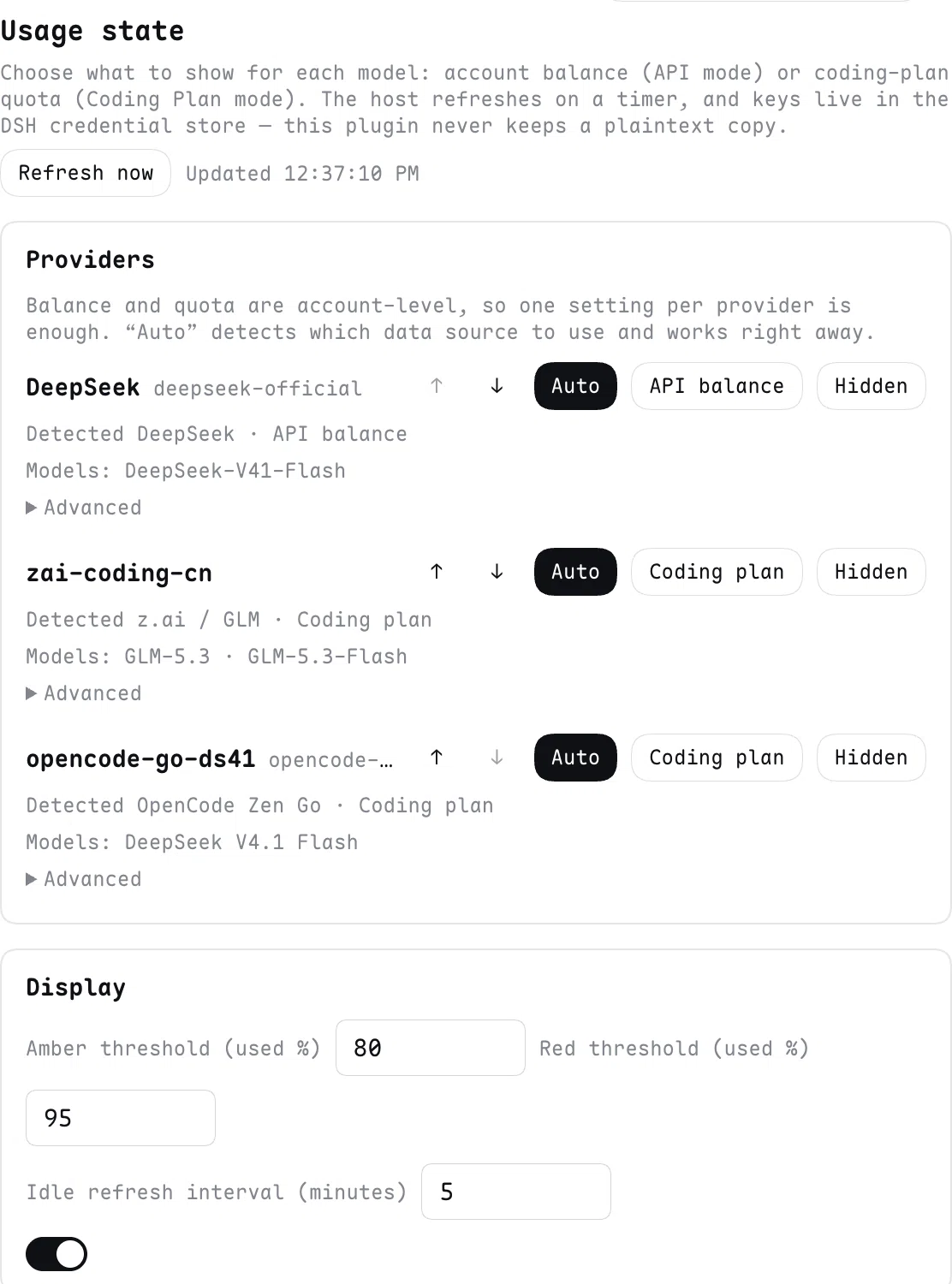
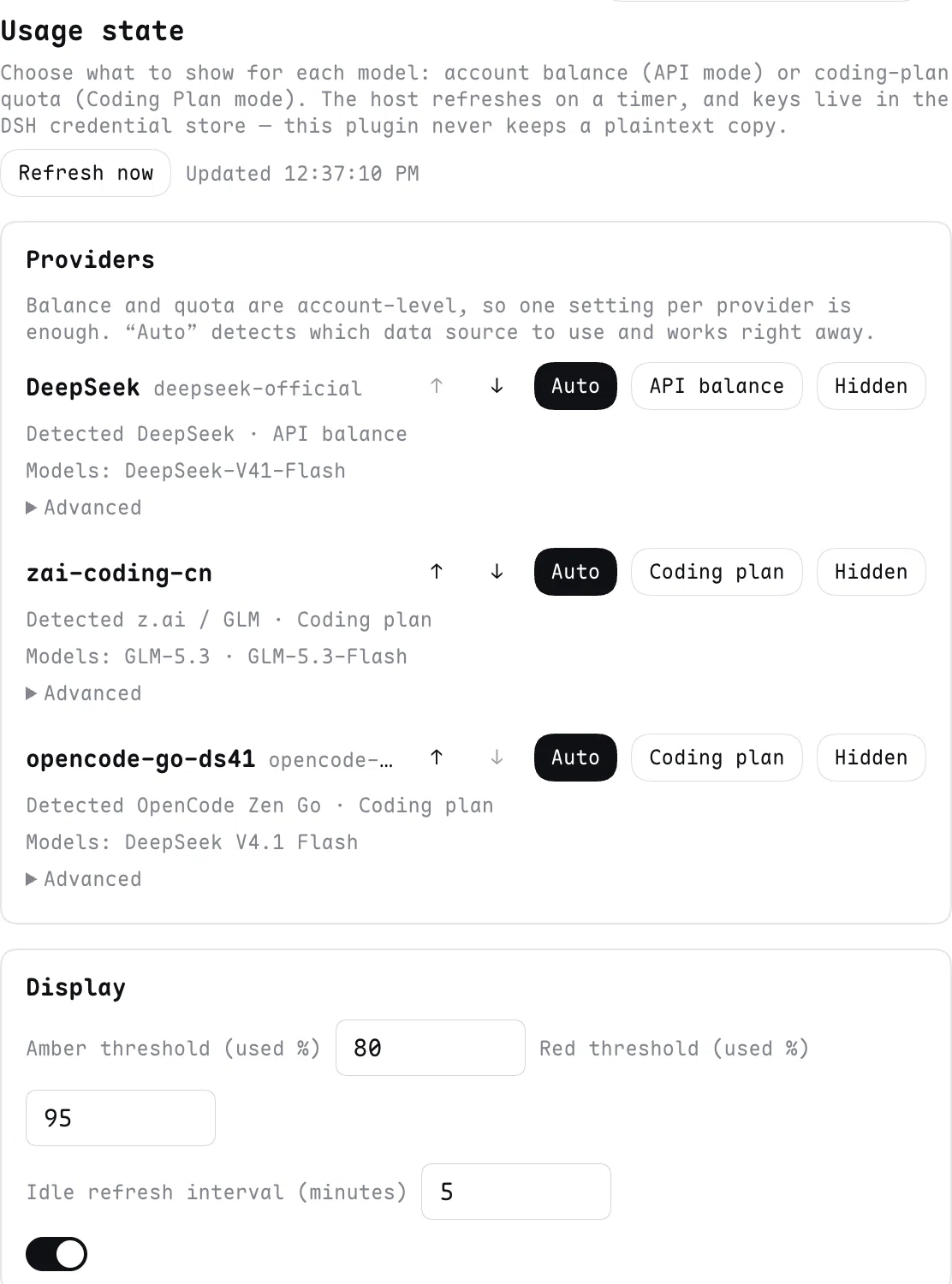
- Open Settings → Usage state: one row per provider configured in DSH.
- Leave it on Auto (it detects the data source and its primary mode), or pick
API/Coding Plan/Hidden; use ↑↓ to reorder. - The reading appears directly below the composer's stats row.
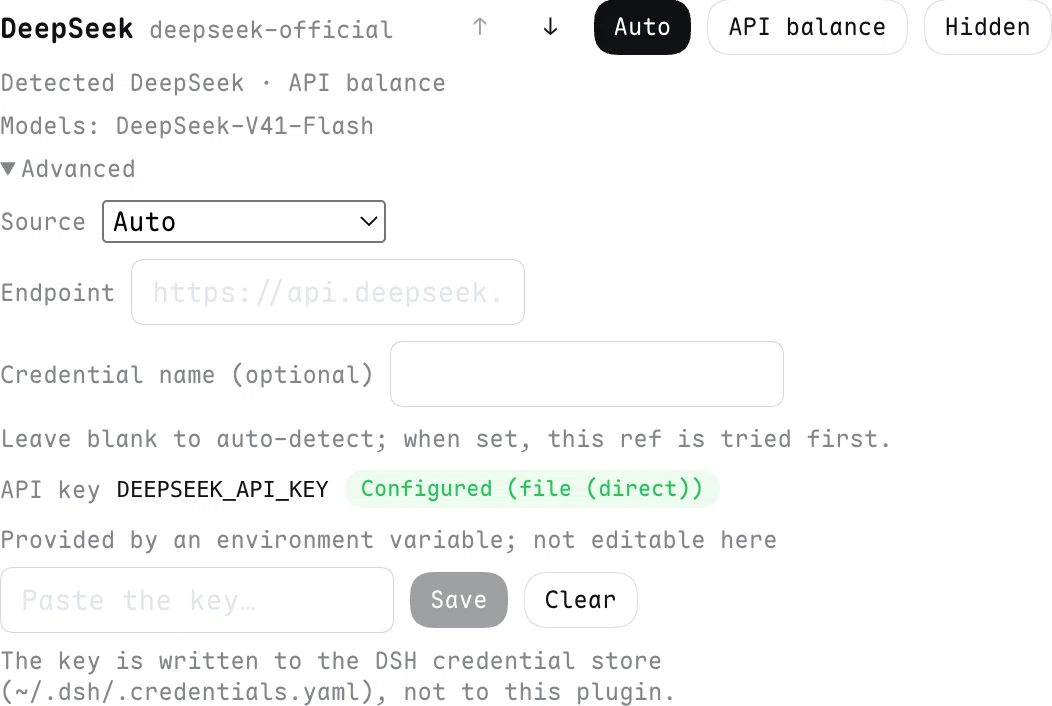
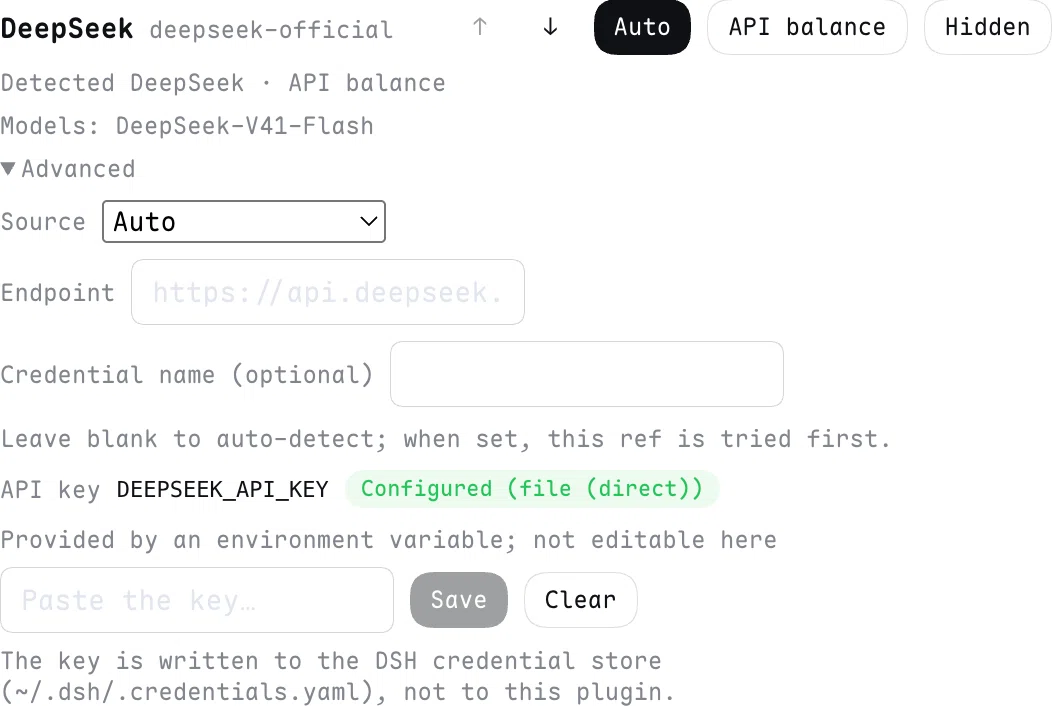
If a source needs an endpoint or a key (a self-hosted Sub2API, or a provider without a credential yet), expand that row's Advanced block to override the source, set the endpoint, name the credential, or paste a key (written to the DSH credential store).
A very long provider name never pushes the controls around: the card header stays on one line and only the grey provider id is truncated (hover it for the full text).
Screenshots
The reading directly below the composer's stats row (shown here with OpenCode Zen Go's three windows; hover any segment for source, mode and the absolute reset time):

Settings: one row per provider; Auto detects the data source and its primary mode:
Expanding Advanced lets you override the source and endpoint, name a credential, or paste a key (written to the DSH credential store):
Supported sources
| Source | API mode | Coding-plan mode | Credential |
|---|---|---|---|
| DeepSeek official | balance (CNY / USD) | — (no coding plan) | DEEPSEEK_API_KEY |
| z.ai / Zhipu GLM | — | 5h / 7d used % | ZAI_API_KEY and friends |
| Kimi (China) | Moonshot pay-as-you-go balance | Kimi Code subscription windows | MOONSHOT_API_KEY / KIMI_CODING_API_KEY |
| OpenCode Zen Go | — | 5h / 7d / 30d used % | OPENCODE_GO_API_KEY / OPENCODE_API_KEY |
| Sub2API (self-hosted) | balance / key quota | 5h / 7d from rate_limits[] |
SUB2API_API_KEY + instance URL |
- z.ai is regional: a coding-plan key only works on its own region (
open.bigmodel.cnfor China,api.z.aiglobally). China is the default; the other host is tried as a mirror, and you can pin an endpoint in the settings. - OpenCode Zen Go reads
rolling/weekly/monthlyfromopencode.ai/zen/go/v1/usage. Both DSH routes into the same account (built-inopencode-goand the customopencode-go-deepseek) produce one reading and one request. A missing subscription or a rejected key is reported as an auth failure, never as 0%. - Other vendors (Claude Pro/Max, MiniMax, OpenRouter, Codex, Antigravity, Volcengine Ark, …) are not implemented, but the adapter contract and a candidate list are ready: see
docs/adapters.md.
Display, refresh, credentials
- Placement: directly below the composer's stats row, aligned with the native row's geometry. The line is always visible — it never depends on hover or a click.
- Elements: provider label · balance + currency · each window (5h / 7d / 30d) used % · reset countdown · mini progress bar · threshold colours (defaults: amber ≥80%, red ≥95%).
- Semantics: percentages are always used; balances only appear in API mode, and coding-plan mode shows the windows the source actually has (5h / 7d for z.ai and Sub2API, plus 30d for OpenCode Zen Go); a stale reading shows its age instead of hiding.
- Refresh: 2s after a turn ends, plus a 5-minute idle fallback; at most one real request per source per 60s, in-flight calls are shared, failures are not throttled.
- Credentials: override → the provider's declared
apiKeyEnv→ the source's built-in ref → DSH credential store. Keys are written to~/.dsh/.credentials.yaml; this plugin never stores a plaintext key and the browser never receives a key value.
Compatibility
- Verified against DSH
0.1.5-rc.2and0.2.0-rc.2, Node ≥ 20. The DSH requirement is declared as>=0.1.5-rc.1 <0.3.0-0throughengines.dsh— the whole 0.1 line from 0.1.5 up, plus the 0.2 line (this is what dsh-market's compatibility badge and install gate read). - Published to npm as
dsh-usage-state; GitHub installs work too. - Version
0.3.2: 0.2-line compatibility review (no code change — onlyengines.dshwas widened); DeepSeek, z.ai and OpenCode Zen Go are verified against live accounts; see the limitations below.
Limitations
- Kimi and Sub2API are not verified against live accounts yet (no credentials on the author's machine); their
/v1/usagestyle endpoints are undocumented and parsed defensively. - Clicking the line does not open settings (the platform exposes no public "open settings panel" service); details are in the hover tooltip.
- Current reading only: the line reports the account's latest value. The plugin keeps no per-turn and no per-time history, so scrolling back through old turns shows no "balance at that moment". Account history, if ever added, would be keyed by time rather than by turn — a separate decision.
- Full list:
docs/implementation.md§6.
Development
npm install          # add --cache /tmp/npm-cache if ~/.npm is not writable
npm test             # node:test runs .ts / .tsx directly (needs Node >= 22.6)
npm run typecheck    # tsc --noEmit
npm run build        # tsdown → lib/ (host index.js + typert.js, browser client.js)
npm run watch        # rebuilds client.js only; client changes hot-reload, no page refresh
Host-side changes need a DSH restart; client-side changes do not. The lib/ output is committed on purpose: dsh plugin add github:... installs straight from the repository with no build step, and npm test guards the bundle envelope, the require allow-list and the exports targets.
Docs
| Document | Contents |
|---|---|
docs/implementation.md |
Implementation and verification overview: code map, decision → code → test → verification traceability, open items |
docs/adapters.md |
Adding a data source: contract, workflow, pitfalls, candidate vendors, troubleshooting |
docs/design-consensus.md |
Design consensus and its revision log (Chinese) |
docs/research/README.md |
Read-only research index (vendor APIs, the replaced plugin, DSH RPC contract) |
Acknowledgements
dsh-cost-meterby Han-1413141 (MIT): this plugin is a simplified replacement for it. It keeps the "show me my balance / coding-plan quota" need and drops everything else — cost accounting, pricing catalog, history, budgets, peak/off-peak alerts. The data-source endpoints, the meaning of the response fields and several compatibility pitfalls (OpenCode Zen Go needs a browser UA, z.ai reports auth failure as HTTP 200 +{success:false}, the legacycoding_plan/usagefallback, sub2api'srate_limits[]shape, …) come from a read-only analysis ofdsh-cost-meter@1.7.28, recorded indocs/research/dsh-cost-meter-analysis.md. The implementation here is independently written TypeScript rather than copied source, but those behaviours are upstream's work and credit belongs there. If the upstream author wants a clearer attribution or a different arrangement, open an issue and it will be fixed.- DSH (DeepSeek Harness): the host platform. The plugin relies on its settings namespace, credential store, Typert RPC, slot system and UI primitives (
@deepseek-ai/dsh-client-ui-primitivesand friends).
License
Comments
Comments live in GitHub Discussions. Sign in with GitHub to post or react.