
Install
Inside DeepSeek Harness, with dsh-market
dsh plugin --profile web add dshmarket
Or from the command line
dsh plugin --profile web add github:seeingrain/dsh-session-todos
Installing runs third-party code with your own permissions — it can read your files, use your credentials and reach the network. Review the source first, and pin a commit (github:owner/repo#sha) when you can.
README
🇨🇳 中文: README.md
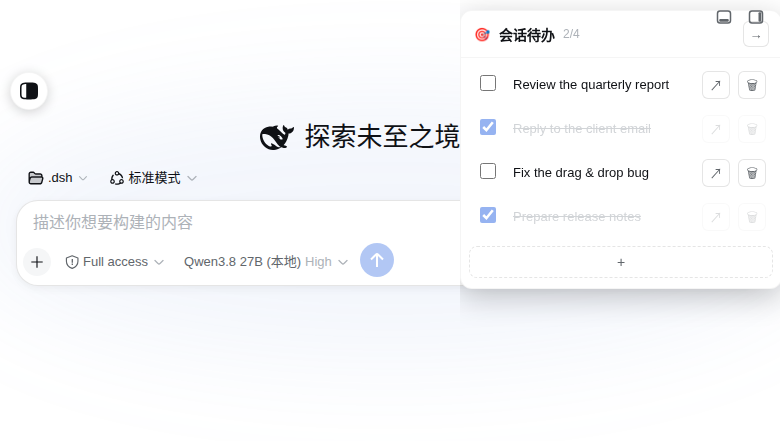
A session-scoped todo plugin for DeepSeek Harness (DSH). It adds a floating todo panel to the top-right of the chat window, stores todos on the server (so they follow you across devices), and marks sessions that still have open tasks with a 🎯 badge in the sidebar.
Especially for: DSH users who push several things forward in one session and want the unfinished ones kept right next to the chat.
Pure plugin — no DSH source code is modified.
Features
- Floating todo panel (top-right of the chat window), collapsible to a single 🎯 icon with a smooth slide in/out animation.
- Per-task controls
- checkbox — check/uncheck persists immediately
- multi-line text — long tasks wrap; double-click to edit inline (a
multi-line
<textarea>that auto-grows);Entercommits,Shift+Enteradds a newline - push-to-composer — append the task text to the message input
- delete — with a confirmation dialog
- long-press and drag to reorder — the dragged row follows your finger and live-previews the drop position
- Header shows a 🎯 icon and a
done/totalcounter (e.g.2/4). - Mobile friendly — auto-collapse everywhere — clicking (or tapping) outside the panel auto-collapses it; pin it with 📌 in the header to keep it open.
- Server-side, cross-device storage — one JSON file per session under
~/.dsh/dsh-session-todos/, so the same list is available from any device signed in to the same DSH instance. - Session-list badge — sessions with unfinished todos show a 🎯 icon on the left in the sidebar; it appears/disappears as you check tasks.
Requirements
- DeepSeek Harness (DSH) Web app — the plugin is a bundle plugin (host + client halves).
Install
The plugin is a DSH bundle plugin. Install it into a profile (e.g. web), then
restart the DSH web service (or refresh the browser once it is loaded):
# from a local path (wherever you cloned/placed the repo)
dshpm install /absolute/path/to/dsh-session-todos --profile web
# or, from a git URL:
# dshpm install https://github.com/seeingrain/dsh-session-todos.git --profile web
After the web service restarts, hard-refresh the browser (Ctrl+Shift+R).
Usage
Open a session and click the 🎯 icon at the top-right of the chat window to expand the panel.
- Click + at the bottom to create a task.
- Double-click a task's text to edit it (a multi-line textarea appears and grows
with the content).
Entersaves,Esccancels,Shift+Enterinserts a newline. - Check the box to mark a task done (the text is greyed out and its buttons are disabled).
- Use the ↗ button to append the task text to the message composer.
- Use the 🗑 button to delete (a confirmation is shown).
- Press and hold a task's text, then drag up/down to reorder; release to commit.
- The 📌 button pins / unpins the panel. While pinned it never auto-collapses and stays expanded (across reloads and session switches).
- While unpinned, clicking anywhere outside the panel collapses it (mouse and touch alike).
- On touch devices you can also swipe the panel to the right to collapse it.
How it works
The plugin is split into a host half and a client half, both self-contained.
Host half (lib/index.js)
Registers a route on the DSH webServer and persists todos as JSON files:
POST /dsh-session-todos/api/get—{ sessionId }→{ tasks }POST /dsh-session-todos/api/save—{ sessionId, tasks }→ saves + returns the normalized listPOST /dsh-session-todos/api/summary— returns{ sessions: [{ sessionId, hasUnfinished }] }
Storage directory: ~/.dsh/dsh-session-todos/<sessionId>.json (created on first write).
Client half (lib/client.js)
- The floating panel is mounted on the
shell.overlayslot and anchored to the chat area's[data-conversation-scroll]. - Pushing a task to the composer uses the official input facade
(
conversation.input→setDraft), appending to any existing draft. - The session-list badge is injected without touching DSH source: it locates
session rows with
[role="treeitem"], reads each session's id from the React 18 fiber, and injects/removes the 🎯 badge based on the todo state. If the fiber shape ever changes, it degrades gracefully (the badge simply does not render).
Storage schema
{
  "version": 1,
  "sessionId": "session-…",
  "updatedAt": 1787992050268,
  "tasks": [
    { "id": "t-…", "text": "…", "done": false, "createdAt": 1787992050268, "updatedAt": 1787992050268 }
  ]
}
Notes / limitations
- The panel's collapsed/expanded state is remembered in
localStorage(one entry per session); the 📌 pinned state is stored inlocalStoragetoo (one global entry). Neither is synced across devices. - The session-row badge relies on React 18 internal fiber metadata; on a future major React/DSH upgrade it may need re-testing (it degrades gracefully rather than breaking).
- The storage path lives under the DSH home directory (
~/.dsh).
License
Comments
Comments live in GitHub Discussions. Sign in with GitHub to post or react.