
Install
Inside DeepSeek Harness, with dsh-market
dsh plugin --profile web add dshmarket
Or from the command line
dsh plugin --profile web add gord-dsh-worktree
Installing runs third-party code with your own permissions — it can read your files, use your credentials and reach the network. Review the source first, and pin a commit (github:owner/repo#sha) when you can.
Screenshots
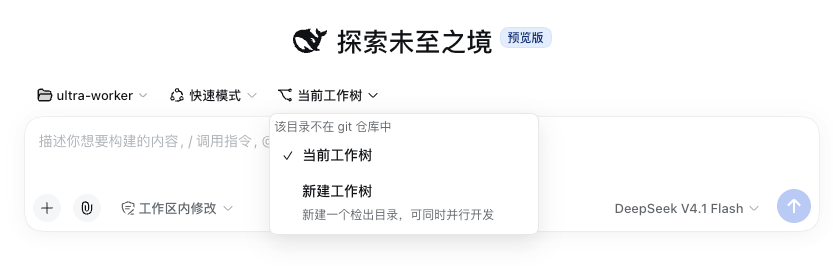
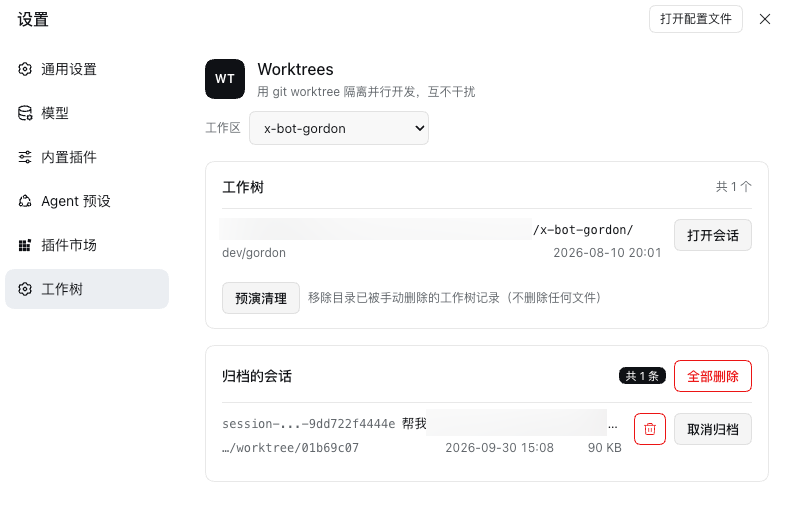
README
Git worktree management for DeepSeek Harness: run parallel work in its own directory and branch. Ships Fast mode (快速模式) and two opt-in patches.
What it does
- Creates worktrees — an isolated checkout and branch in one atomic command, from the agent or from
Settings → Worktrees. They live outside the project (
$DSH_HOME/worktree/by default), so a checkout never shows up in its own project's diffs. - Starts a session in one — the New Session row has a working-location picker: stay where you are, or create a worktree and open the session inside it.
- Shows the diff — the sidebar's Changes tab lists the session's changed files and the selected file's patch.
- Manages archived sessions — Settings → Worktrees lists every archived session with its id, title, project and log size, each row with Unarchive and a delete icon, plus Delete all.
- Renames on double-click — rename a session from its sidebar row, without the menu.
- Fast mode — a slim agent preset that ships with the plugin.
- Concurrent read-only tool calls — opt-in patch for
bash,globandgrep.
Install
dsh plugin --profile web add github:nightosong/gord-dsh-worktree
Restart dsh web, then open Settings → Worktrees. Nothing else to edit: the package declares its own
bundle patch, which also declares the fast preset. Coming from the old name (dsh-worktree), remove
that one and add this one.
The concurrency patch is the only opt-in step, because it edits core tool packages rather than the composition:
cd /path/to/gord-dsh-worktree
npm run patch:concurrency     # --check to inspect first, --revert to undo
It is idempotent — run it again after a DSH upgrade — and needs a dsh web restart.
Needs dsh >=0.1.5-rc.1 <0.2.0. Fast mode and the concurrency patch need 0.1.7 or newer; where the
sidebar nesting is already native, the patch reports native and changes nothing.
Agent tools
| Tool | What it does |
|---|---|
worktree_list |
Worktrees of a repository, plus every local and remote-tracking branch. |
worktree_create |
Creates the directory and branch; checks an existing branch out instead of recreating it. |
worktree_status |
One worktree's branch, upstream line and changed files. |
worktree_remove |
Removes a worktree; refuses a dirty one unless force. |
worktree_prune |
Drops records of worktrees whose directories are gone. Deletes no files. |
All five resolve the repository from the session directory, and take workdir to point at another one.
The main worktree is never removable, a dirty one is never removed without force, and branch names are
validated before they are used.
Development
Plain ESM, no build step: lib/index.js is the host half, lib/client.js the browser bundle,
lib/service.js and lib/worktree.js the git logic both halves share.
npm test                       # five smoke suites, no test framework
npm run patch:sidebar          # nested worktree grouping in the sidebar
npm run unpatch:sidebar
npm run patch:concurrency      # concurrent read-only bash/glob/grep
npm run check:concurrency
npm run unpatch:concurrency
Host-side changes need a dsh web restart; client-side changes reload with the GUI.
License
MIT
Comments
Comments live in GitHub Discussions. Sign in with GitHub to post or react.