
Install
Inside DeepSeek Harness, with dsh-market
dsh plugin --profile web add dshmarket
Or from the command line
dsh plugin --profile web add dsh-approval-gate
Installing runs third-party code with your own permissions — it can read your files, use your credentials and reach the network. Review the source first, and pin a commit (github:owner/repo#sha) when you can.
README
简体中文 | English
dsh-approval-gate
Auto-approval gate for DeepSeek Harness — minimal human intervention: safe operations auto-approve, risky ones go to a human (fail-safe).
A Flash model pre-judges every sandbox escalation: routine operations auto-approve, hard-risk operations (deletion / credentials / remote / system / bulk) always require human confirmation; learned rules only ever cover operations you confirmed, with an in-app human review UI.
✨ Features
- ⚡ Flash risk pre-judgment: every sandbox escalation is judged by a Flash model (
SAFE/RISKY:<category>); recoverable operations auto-approve - 🛡️ Hard risks are always human: deletion, credentials, remote/production, system paths, and bulk irreversible operations go directly to human — no counting, no learning
- 🎯 Confirmation-based learning: after N-1 human confirmations of the same operation, it auto-approves; persisted rules carry an operation fingerprint, so only operations you confirmed are auto-approved
- 🧠 Semantic similarity verification: operations with different wording but the same intent are judged by Flash against your confirmed samples — no keyword dependency
- 📄 File diff & revert (v0.5.0+): click a file in an approval record to view a unified diff — changed lines with ±5 context lines, multiple changes grouped into hunks separated by gray "N unmodified lines" bars, green additions / red deletions / gray context, dual line numbers; one-click Revert sends a command for the AI to restore the file from snapshot
- 🗂️ Session-scoped snapshots (v0.5.0+): snapshots belong to the event's session; the approval view shows only the current session's snapshot stats; clearing supports "this session only" vs "clear all" to avoid wiping other sessions' unviewed diffs
- 🔧 Hot-reloadable config:
allowlist.jsonedits take effect immediately, no restart - ✅ Human review UI: a green notice appears above the composer on auto-approval; the "Approval" view (right of Trajectory) shows the current session's full auto-approval timeline
📸 Interface Overview
① Approval View
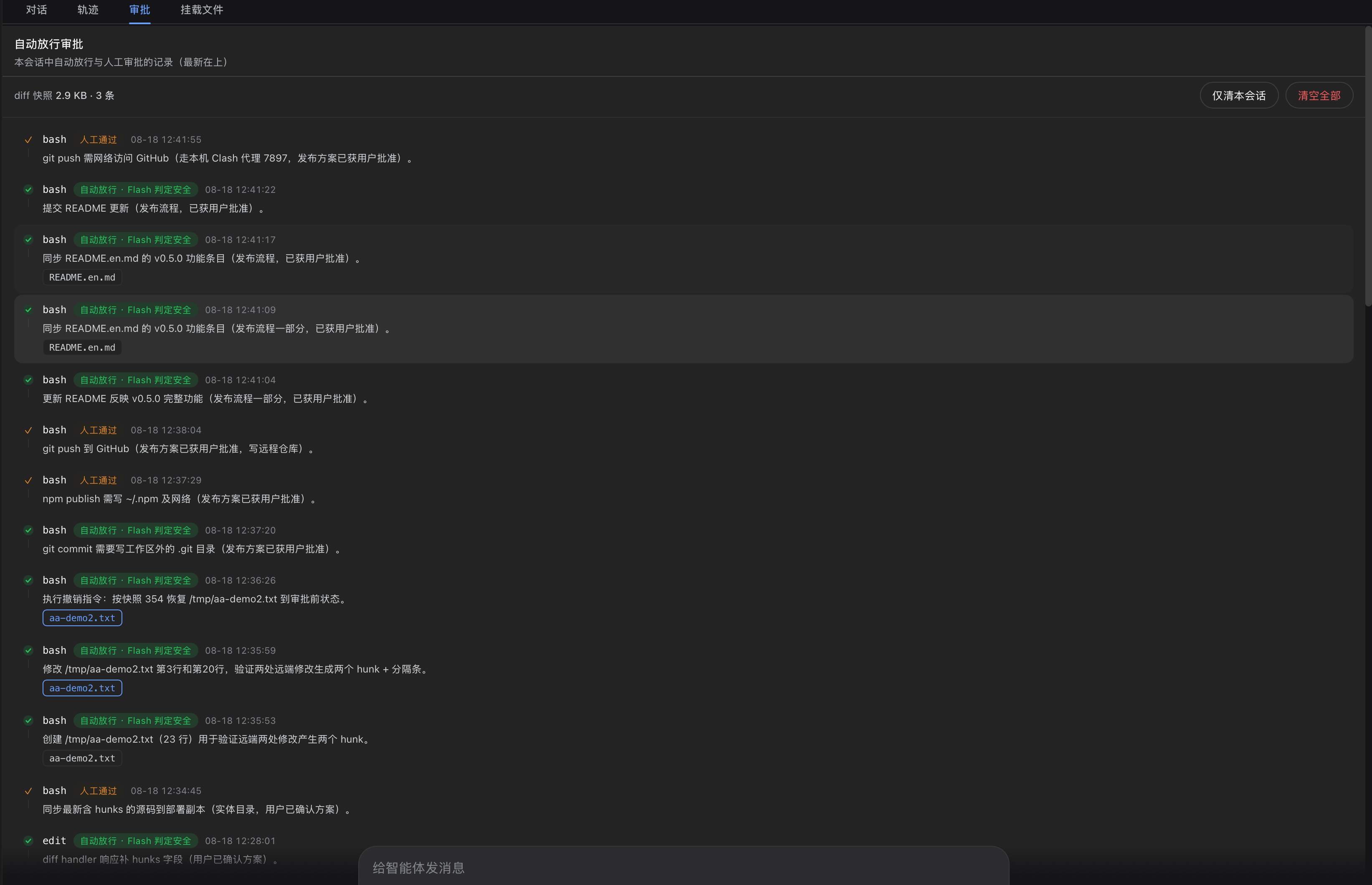
The "Approval" tab (right of Trace) lists the current session's auto-allowed and manually-approved actions in reverse-chronological order: each record shows the tool (bash / edit), a verdict tag ("Auto-allowed · Flash safe", "Approved" etc.), timestamp and description. The top bar shows this session's diff snapshot usage (2.9 KB · 3 items) with two cleanup options: "This session only" (removes only the current session's snapshots, never touching other sessions' unviewed diffs) and "Clear all" (double-confirmed, clears every session).
② File Diff
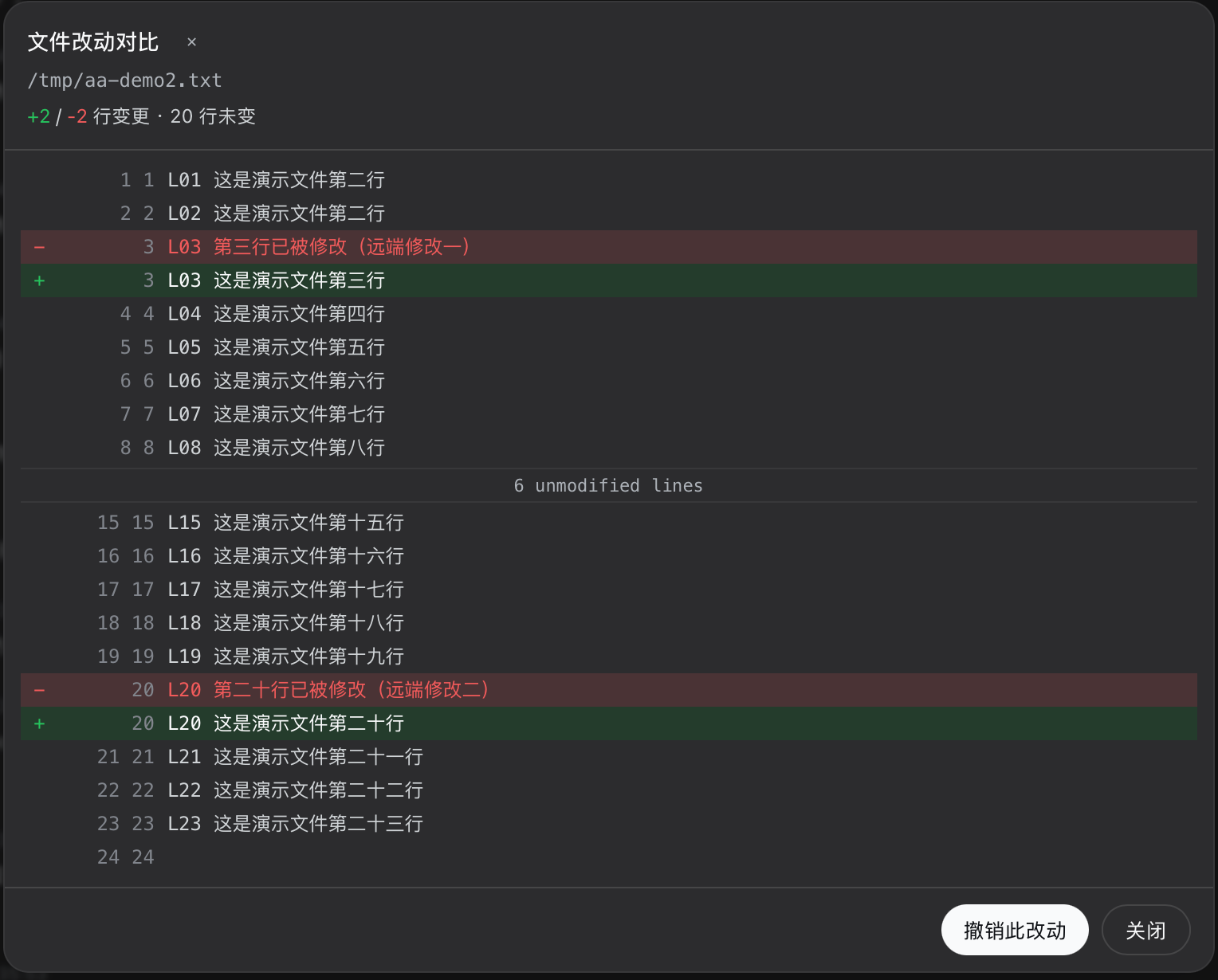
Click a file in an approval record to open the diff dialog: a unified diff with green additions (+), red deletions (-) and gray context lines; dual old/new line numbers on the left; multiple changes grouped into hunks with gray "6 unmodified lines" separators folding unchanged regions. The header shows +2 / -2 changed · 20 unchanged. The Revert button at the bottom sends an undo command to the conversation so the AI restores the file from the pre-approval snapshot.
③ Settings · Auto-approval
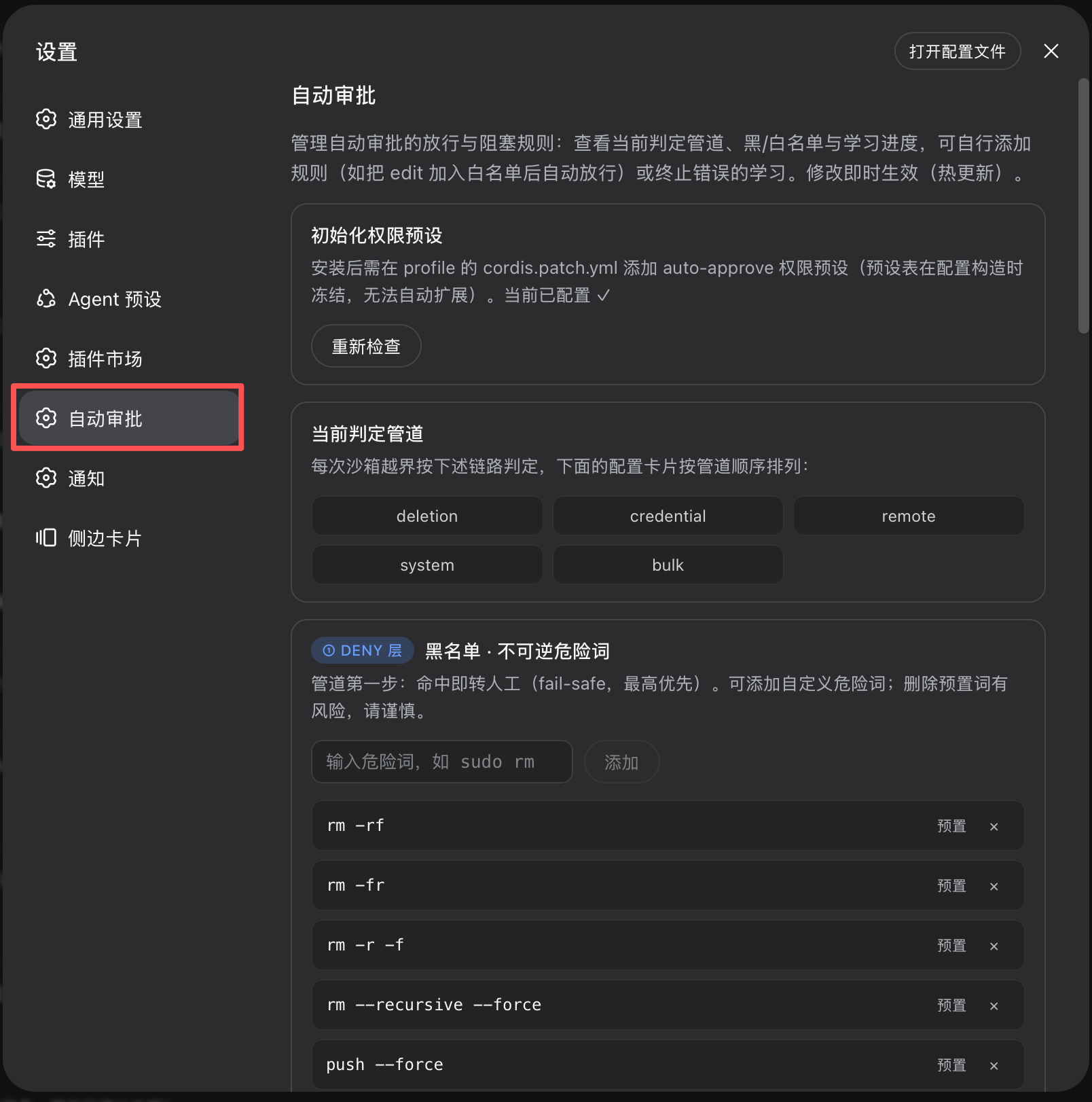
The "Auto-approval" section in Settings provides full configuration: preset initialization (one-click write of the auto-approve preset into cordis.patch.yml), pipeline overview (DENY → allowlist → denyRules → Flash → learning), deny-keyword blacklist (built-in entries + custom add), and hot-reload notes (changes take effect immediately, no restart).
🚀 Quick Start
dsh plugin --profile web add dsh-approval-gate
- Add the permission preset: append the
auto-approvepreset to~/.dsh/profiles/web/cordis.patch.yml(see guide) - Restart
dsh web - Select the preset: choose "Auto Approval (Flash)" in the session's permission dropdown
📖 Docs
📄 License
MIT
Comments
Comments live in GitHub Discussions. Sign in with GitHub to post or react.