
Install
Inside DeepSeek Harness, with dsh-market
dsh plugin --profile web add dshmarket
Or from the command line
dsh plugin --profile web add dsh-image-guard
Installing runs third-party code with your own permissions — it can read your files, use your credentials and reach the network. Review the source first, and pin a commit (github:owner/repo#sha) when you can.
Screenshots
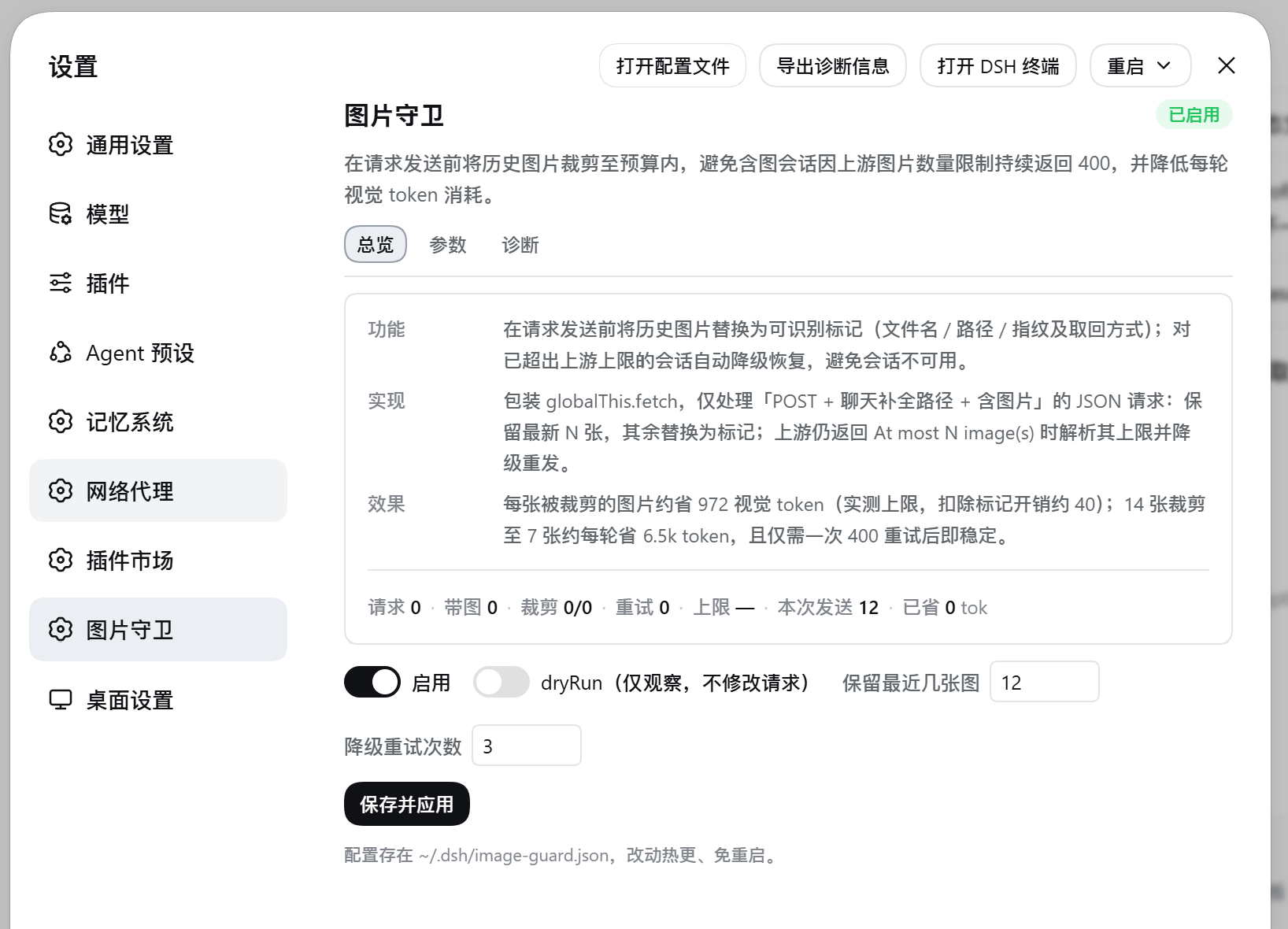
README
A DeepSeek Harness (DSH) plugin that keeps image-heavy sessions working. Before a request is sent, historical images are trimmed to a budget; when the provider still rejects the image count with HTTP 400, the plugin learns the cap from that error and retries with fewer images.
简体中文 · MIT · v0.8.17 · Changelog
Highlights
- Keeps the newest N images, marks the rest — a trimmed image is replaced by an identifiable marker (file name / path / fingerprint / how to retrieve it), so the model or agent can find it again on demand instead of losing it silently.
- Learns the provider cap — parses
At most N image(s) may be provided in one promptand retries with N−1 images; once learned, later requests in the same process send N−1 directly. - Saves vision tokens — ≈930 tokens net per trimmed image (972 measured cap − ≈40 marker cost); trimming 14 images to 7 saves ≈6.5k tokens per turn, shown live in the settings page.
- Never rewrites the conversation — only the outgoing request body is modified (a
structuredClonecopy), so prefix caching stays intact and disabling the plugin restores the original behaviour. - Always stays at the head of the fetch chain — it intercepts assignments to
globalThis.fetch(a newly installed wrapper is tucked in underneath and still runs), backed by a 200 ms watchdog and in-chain probes, sodsh-net-proxycannot bypass it while proxying.
Install
Note: the plugin is not yet published to npm and is not listed in any plugin-market catalog (dshfind, 1024Store, awesome-dsh-plugin), so it cannot be found in the DSH Desktop GUI plugin market yet. See "Market listing" at the end of this section. On desktop, use the manual install below.
DSH Desktop (manual install)
DSH Desktop loads the profile named desktop, located at ~/.dsh/profiles/desktop/ (on Windows: %USERPROFILE%\.dsh\profiles\desktop\). That profile is owned by Electron and refuses dsh plugin management commands, so installation means editing the manifest by hand:
Edit
~/.dsh/profiles/desktop/package.jsonand add todependencies:"dsh-image-guard": "github:mafeis/dsh-image-guard"Append
"dsh-image-guard"to thedsh.profile.bundlesarray in the same file (create the field underdshif it is missing):"dsh": { "profile": { "bundles": ["dsh-image-guard"] } }Install the dependency, then restart DSH Desktop:
cd ~/.dsh/profiles/desktop && pnpm install --prefer-offline --ignore-scripts
The GUI (Settings → Plugins) reads only those two places — dependencies and dsh.profile.bundles; adding an insert entry to cordis.patch.yml by hand does not load a plugin. Desktop's bundled pnpm installs against the Electron runtime; for a pure-JS plugin like this one (zero dependencies) the result is identical.
CLI profiles
dsh plugin --profile <name> add github:mafeis/dsh-image-guard
Note that desktop is not a valid target here — the name is reserved for the Electron-held profile and the launcher refuses plugin management requests against it.
Market listing
Remaining steps (once done, the GUI market offers one-click install):
- Publish the npm package
dsh-image-guard— the built-in market catalogs (dshfind / 1024Store) only index npm packages, and Desktop's market install channel accepts exact npm targets only; - Open a PR to awesome-dsh-plugin adding
data/plugins/mafeis__dsh-image-guard.yml(that list powers the dsh-market plugin).
Verify
- Settings → Image Guard → Diagnostics: the guard should read as attached to the fetch chain, and the in-chain probe counter should increase.
~/.dsh/image-guard-status.json:chatPostsstarts growing.- To watch before it acts, turn on
dryRununder Settings — it records what would be trimmed and modifies nothing.
How it works
DSH agent
   │  POST /v1/chat/completions          image_url: data:image/png;base64,…
   ▼
┌─────────────── fetch chain ───────────────┐
│  image-guard       ← trim, learn, retry   │  must sit at this layer
│       ▼                                   │
│  dsh-net-proxy     ← bypasses everything  │
│                      below it when proxying
└───────────────────────────────────────────┘
   ▼
upstream inference service
Only POST requests that match the chat path and contain images are handled — everything else passes through untouched. The newest keepRecent images are kept, the rest become markers, and the request is sent with a structuredCloned body. On At most N image(s) the cap is parsed, the request is retried with N−1 images, up to maxRetries times.
Why the chain head must be taken over: while proxying, dsh-net-proxy sends through its own socket and bypasses every wrapper below it, and its follow-the-system-proxy mode reinstalls it at the head on every proxy change — at that point it never calls its inner layer, so no after-the-fact reclaim can close the window. This plugin therefore intercepts assignments to globalThis.fetch: a newly installed wrapper is tucked in underneath (and still runs) while this plugin stays on top; if the property is replaced outright, the 200 ms watchdog and in-chain probes reclaim it.
What replaces a trimmed image
| Case | Marker (examples use markerLang: "en") |
|---|---|
| Has a path (usual; file name only by default) | [image omitted #1 · 01-race-start.png · search the workspace by file name to read it again] |
pathMode=full |
[image omitted #1 · C:\path\to\shots\01-race-start.png · read it again with read_image] |
| Attachment metadata only | [image omitted #1 · 01-race-start.png · inline image sha1:bf23bcd3 (image/png 1280x720 618 KiB) · no source path, cannot be retrieved] |
| Remote URL | [image omitted #1 · race.png · https://…/race.png · revisit the URL to view it] |
Identity comes from the neighbouring text fragment (<path>, file name, dimensions, bytes), then a remote URL, then a sha1 fingerprint of the inline data (first 4 KB + total length, stable for the same image). When an image cannot be retrieved, the marker says so rather than letting the model guess.
The marker language is set by markerLang and has three states: empty (default) follows the app interface language — an English UI produces English markers, a Chinese UI produces Chinese ones — or it can be pinned to zh / en. When placeholder is empty, or happens to equal one of the language defaults (which counts as not customised), the default for the effective language is used. The language switches the default template and the marker body — the identity label and the retrieval hint (需要时用 read_image 重新读取 ↔ read it again with read_image) — so with en pinned a marker contains no Chinese at all. The Marker language dropdown in Settings → Image Guard → Parameters offers these three states, and also replaces a template that is still a default.
The template (placeholder) supports {index} {name} {path} {url} {id} {mime} {dims} {size} {identity} {hint}. {total} and {kept} change as the conversation grows and would invalidate the prefix cache after the trimmed position, so they are not used by default.
Markers are sent to the provider, so the default pathMode: "basename" writes only the file name — directory structure and drive letters stay local (relative uses paths relative to the workspace or ~; none omits the name too).
Settings
~/.dsh/image-guard.json, applied live without a restart; also editable in the settings page or via the /_dsh/image-guard route.
| Key | Default | Meaning |
|---|---|---|
enabled |
true |
Master switch; off means fully transparent |
keepRecent |
12 |
Newest images kept; older ones become markers (0 = all) |
maxRetries |
3 |
Downgrade retries after a 400 |
learnLimit |
true |
Parse the provider cap from the 400 response |
dryRun |
false |
Observe only, modify nothing |
matchPath |
/chat/completions|/messages |
Which paths are handled (regex) |
markerLang |
empty (follows the UI) | Marker language: empty follows the host interface language, zh / en pin it; sets both the default template and the language of the marker body (identity, retrieval hint) |
placeholder |
empty | Marker template; empty or equal to a language default = the default for the effective language (zh → [图片已省略 #{index}{identity}{hint}], en → [image omitted #{index}{identity}{hint}]) |
pathMode |
basename |
full / relative / basename / none |
tokensPerImage |
972 |
Vision tokens per image used for the savings estimate (0 = off) |
verbose |
true |
Logging |
On this machine the plugin only reads three files: the config ~/.dsh/image-guard.json, the status ~/.dsh/image-guard-status.json, and locale.preference in the host's ~/.dsh/settings.yaml (only to pick the default marker language; Chinese is assumed when it is unreadable). It makes no other outbound requests and never reads or reports credentials.
Status
~/.dsh/image-guard-status.json holds chatPosts, bundled, trimmed, imagesDropped, retried, learnedLimit, maxSeen, tokensSaved, plus fetchOwned / probes / probeSeen, rewraps / stolenSeen / headName (chain-head takeovers and reclaims, and the current head) (a probe count of 0 means the guard is not on the chain) and diag (the last 40 request shapes: input, body, bytes, imgs, msgs — the first place to look when a request is not intercepted). GET / PUT /_dsh/image-guard read and write the config, POST ?reset=1 restores defaults, POST ?rewrap=1 forces re-attachment.
Limits
| Limit | Detail |
|---|---|
| Image count only | No compression or resizing; byte budgets are out of scope |
| One 400 still happens | The cap can only be learned from a 400 response |
| Historical images only | The newest N images are sent as-is, bytes included |
| Ordering with other fetch-wrapping plugins | This plugin stays on top and the other one underneath: both keep working, at the cost of one extra wrapper hop on the direct path |
| Plugins that take the head by assignment are absorbed | Such a plugin will not see itself at the head by reading globalThis.fetch; if it replaces the property outright it is reclaimed within 200 ms (it is still invoked in the meantime) |
| Inline images without a path cannot be recovered | The marker carries a fingerprint and says so |
| Depends on DSH's current request shapes | Unmatched shapes pass through (visible in Diagnostics) |
License
MIT © mafeis
Comments
Comments live in GitHub Discussions. Sign in with GitHub to post or react.