
Install
Inside DeepSeek Harness, with dsh-market
dsh plugin --profile web add dshmarket
Or from the command line
dsh plugin --profile web add dsh-comfyui
Installing runs third-party code with your own permissions — it can read your files, use your credentials and reach the network. Review the source first, and pin a commit (github:owner/repo#sha) when you can.
Screenshots
README
English | 中文
Version pairing (pick the right dsh before installing, otherwise dshmarket shows a risk banner):
dsh-comfyui Paired DeepSeek Harness Notes 0.5.x (latest, latesttag)>= 0.1.2, < 0.3 (incl. 0.1.5 / 0.1.6 / 0.1.7 / 0.2.x prereleases) From 0.5.3 the settings page works with dsh 0.1.7's settings model (saves apply live, no restart); from 0.5.5 it supports dsh 0.2.x 0.3.x (beta line, betatag)0.1.1 On older dsh versions stay on the 0.3.x line Install:
dsh plugin --profile web add dsh-comfyui(latest 0.5.x) /dsh plugin --profile web add dsh-comfyui@beta(0.3.x for older hosts).
Features
Agent tools
The agent drives ComfyUI directly, no canvas work needed:
comfyui_workflow— the main entry: to generate,listthe library and pick a workflow, thenrunit (by id + parameter overrides; misspelt keys are rejected, parameters not passed use their defaults).listalso carries the server address, local ComfyUI dirs, load-area media and each workflow's parameter list;skillreads a workflow's skill pack on demand,refreshre-derives a parameter snapshot.mode: "sync"waits for the result,mode: "async"runs a background job (recommended for video/audio) — the agent ends its turn after submitting and is woken by the host on completion; once a run finishes, the agent pastes the ready-made Markdown media references from the result into its reply (the same for sync, async and PTC mode) with a one-sentence summary of what was generated; video/audio links get an inline player right below them.comfyui_skill— read and write workflow skill packs (list/read/write/append/mkdir/rename/delete/enable/require); the agent can write its lessons back into a pack and reuse them across sessions.comfyui_object_info+comfyui_run— secondary, for hand-written workflows only (temporary tests, or building a workflow for this environment): check the nodes and available models withcomfyui_object_info, write the API JSON, run it withcomfyui_run. Once it works, save it to the library with New workflow in the panel.
UI panel
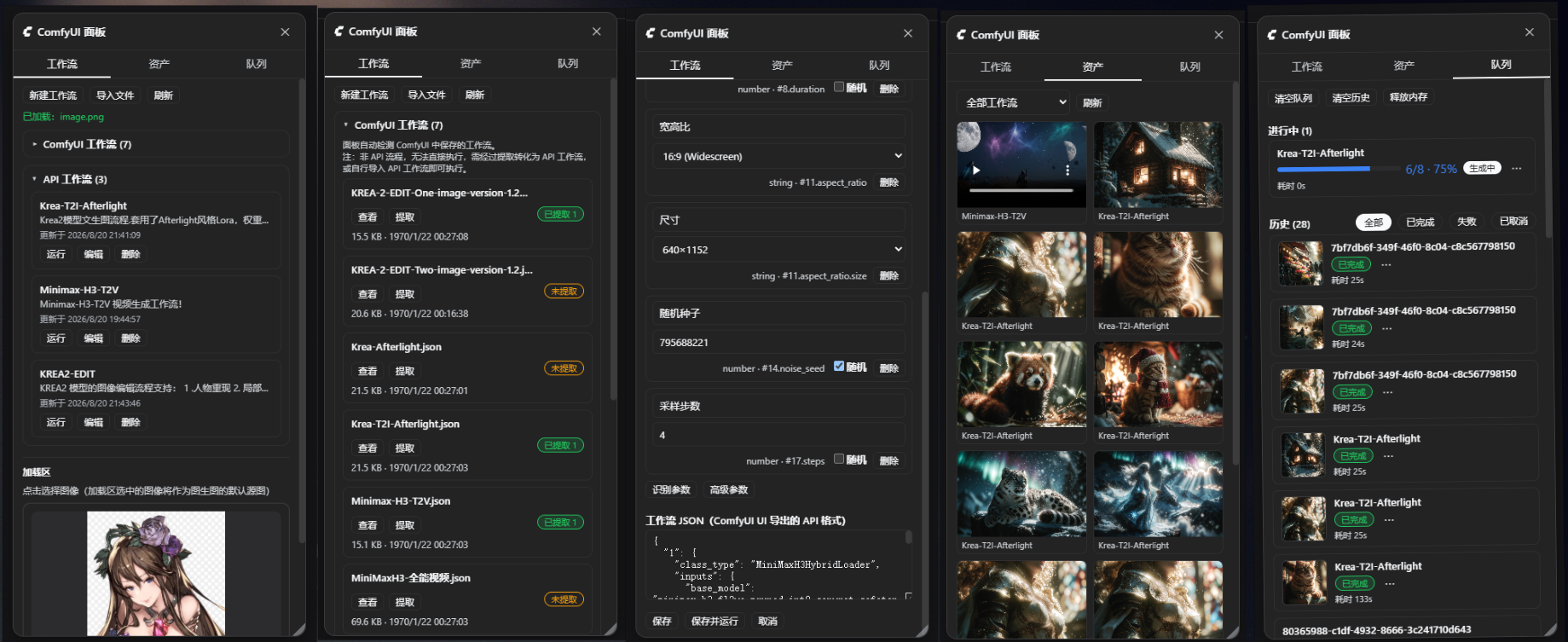
A right-docked panel with three tabs:
- Workflows — the runnable workflow library (create / edit / run / delete / import
.json, tag classification with a dropdown filter); preset export / import: bundle selected workflows (all pre-selected; pack-bearing rows are annotated) with their parameters and skill packs into one.zippreset package — the completion notice reports what was actually packaged: workflow names, file name, size, and warnings; drag a preset package onto the dialog (or pick a file) to analyze it and import the selection, with skill packs restored byte-for-byte (thousand-file template packs included). Imports always create new workflows — nothing in the library is overwritten; auto-detects graphs saved on the ComfyUI server and can extract them into runnable workflows (whole / per component / main flow only when a canvas holds several independent flows). - Assets — every generated result (cards show the workflow name and filename) with preview, download, and hover-to-delete (also removes the file from the ComfyUI output directory).
- Queue — live queue plus full history in five states, with delete / interrupt / rerun / clear / free-memory actions; plugin-submitted jobs show a progress bar and preview.
Clicking the "ComfyUI Panel" button in the session header probes the backend's connection to ComfyUI: when it cannot connect, the panel closes again (the button does not stay highlighted) and a toast at the top of the page explains why (with the concrete reason), asking you to start the local ComfyUI (so the backend can see its port) or check the remote server URL in settings; a healthy connection stays silent, with a brief "Connected" note only when it recovers from a failure.
Load area (media loader)
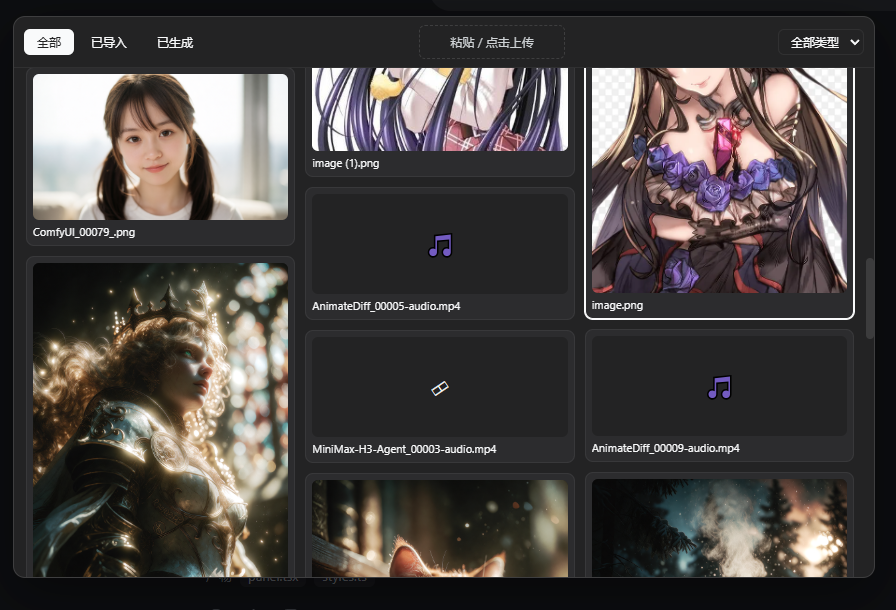
A media loader at the top of the Workflows tab, in the style of ComfyUI's LoadImage node: visual picking (with in-place playback for video/audio), paste/upload, and multiple slots. Filled slots fill the workflow's unset loader parameters in order — the agent doesn't need to guess file names; unset width/height auto-match the source image's size. Uploads are renamed by content hash (dedup).
The loadArea field of comfyui_workflow list exposes the slots and their contents to the agent.
Workflow skill packs (a manual for the agent)
A parameter list tells the agent which knobs exist, not what the workflow is for or which step goes wrong. A complex workflow can carry a skill pack (enable it from the "Skill pack" button on the workflow card):
<data dir>/skills/<workflow>/
  SKILL.md          # main doc: when to use / key parameters / gotchas
  references/       # reference docs: style catalogs, troubleshooting
  assets/           # reference images etc (previewable in the panel)
- Progressive disclosure, no resident context cost:
comfyui_workflow listshows one summary line →action: skillfetches the SKILL.md body once the workflow is chosen → a referenced document is read only when the body points at it. Dozens of workflows can carry full packs, and the daily context cost stays one line each. - Edited in the panel: file list + editor, import (auto-bucketed by extension), custom subdirectories, image preview, and the whole pack root can be moved to another drive / a synced folder (the
技能包目录setting). - The agent can write it too: the
comfyui_skilltool lets the agent read and author a pack —appenda pitfall to SKILL.md and the next session (even another one) reuses that experience. - Read-before-run: a "required" flag makes
runrefuse until the skill pack has been read in this session, with an error pointing toaction: skill.
Media proxy & settings
Generated files are served through a same-origin route (/comfyui/media) addressed by file name, independent of ComfyUI's in-memory history — old results keep opening after a restart or a history clear. The browser never touches ComfyUI directly: no CORS, no mixed content, and the API key never leaves the host.
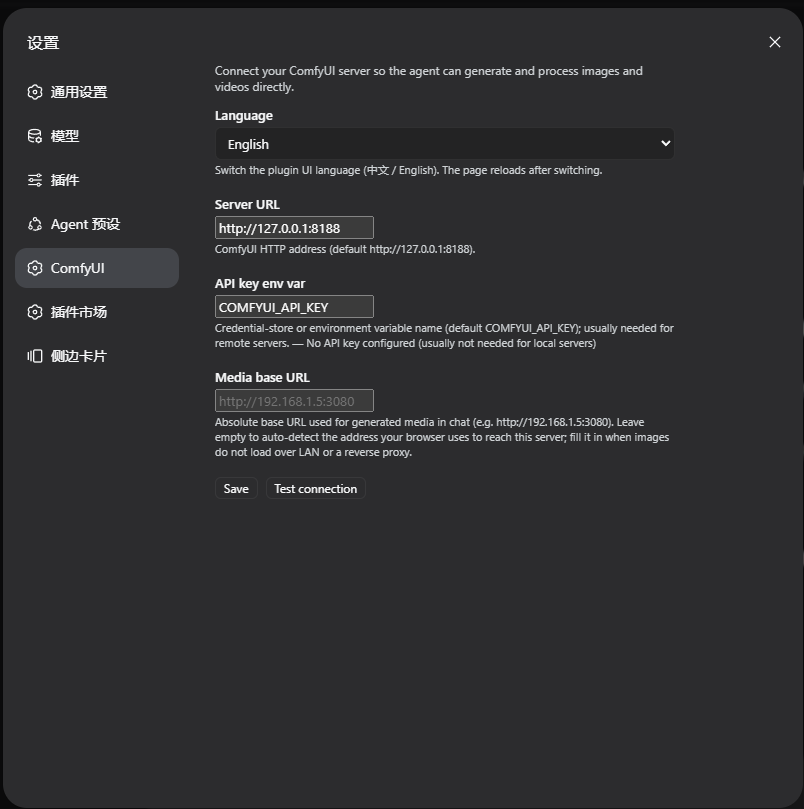
The DH settings page gets a "ComfyUI" section: server address, API key env var name, local ComfyUI directories, media host, connection test and a zh/en UI language switch — applied immediately, no cordis.yml edits needed.
Install
# web profile
dsh plugin --profile web add dsh-comfyui
# desktop profile
dsh plugin --profile desktop add dsh-comfyui
After restarting the app: a panel entry appears in the sidebar, a "ComfyUI" section in settings, and the agent gets all tools plus the companion skill right away.
Usage
Just tell the agent, e.g.:
- "Draw a red cat with ComfyUI"
- "Turn this image into cyberpunk style"
- "Turn the anime image in the load area into a photorealistic portrait, same resolution"
- "Generate a 5-second clip: city at sunset"
- "Run my Krea-Afterlight saved in ComfyUI" (if the graph isn't extracted yet, the agent will ask you to extract it in the panel first)
For a remote ComfyUI behind an authenticated proxy, provide the key via credential storage or the apiKeyEnv env var (default COMFYUI_API_KEY) — it is resolved on the host and never sent to the browser.
Configuration
comfyui section of cordis.yml (most is editable in the settings page):
| Key | Default | Description |
|---|---|---|
baseUrl |
http://127.0.0.1:8188 |
ComfyUI server address |
apiKeyEnv |
COMFYUI_API_KEY |
Optional API key env var / credential name |
dataDir |
(DSH data dir) | Where the workflow library and asset index live |
comfyuiDirs |
[] |
Local ComfyUI install dirs (multiple allowed); the agent locates models, custom nodes, TTS voice libraries through these |
outputDir |
'' (inferred) |
ComfyUI output dir (used to locate files when deleting assets) |
mediaHost |
'' (auto) |
External base URL for generated media |
skillsDir |
'' (default dataDir/skills) |
Skill pack root (absolute path; a synced folder or VCS works) |
Requirements
- DeepSeek Harness (
web/desktopprofile) - A running ComfyUI server (default
http://127.0.0.1:8188)
License
MIT
Comments
Comments live in GitHub Discussions. Sign in with GitHub to post or react.