
Install
Inside DeepSeek Harness, with dsh-market
dsh plugin --profile web add dshmarket
Or from the command line
dsh plugin --profile web add dsh-network-settings
Installing runs third-party code with your own permissions — it can read your files, use your credentials and reach the network. Review the source first, and pin a commit (github:owner/repo#sha) when you can.
Screenshots
README
Highlights
- Three runtime models — automatically detects
WINDOWS_NATIVE,WSL_DISTRIBUTION, orMACOS_NATIVE. - DSH path graph — shows the actual DSH network path, DNS side branch and first failing edge; a TUN/VPN adapter is chained with the physical uplink NIC and the real gateway behind it.
- Configuration Drift — finds stale proxy configuration without treating healthy configuration differences as errors.
- Single / stability checks — one-shot diagnostics plus repeated TCP/HTTP sampling; DeepSeek is the default target and switching is always available. Every probe layer and the whole check carry hard timeouts, so a broken network never stalls the page.
- Agent-ready report — one click copies a stable-format Markdown report
(fixed English headers,
report-version, TL;DR first, machine-readable codes and per-layer probe latency). - Recommended repairs — only high-confidence diagnoses mapped to common low-risk operations (clear proxy-residue env vars, disable system proxy, flush DNS cache); admin and high-risk operations stay in the manual catalog.
- Safe repair — snapshot → diff → confirm → apply → re-detect, with rollback for persistent changes.
- DSH-native UI — uses DSH primitives and
--dsw-*tokens only.
Screenshots
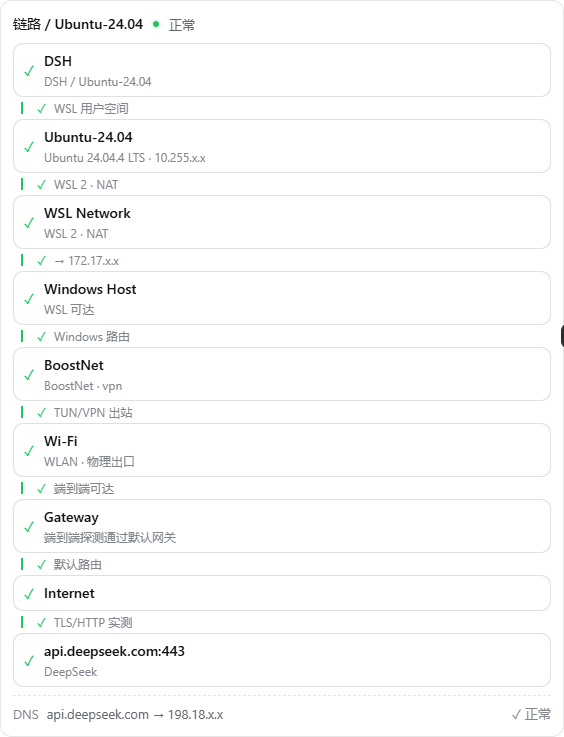
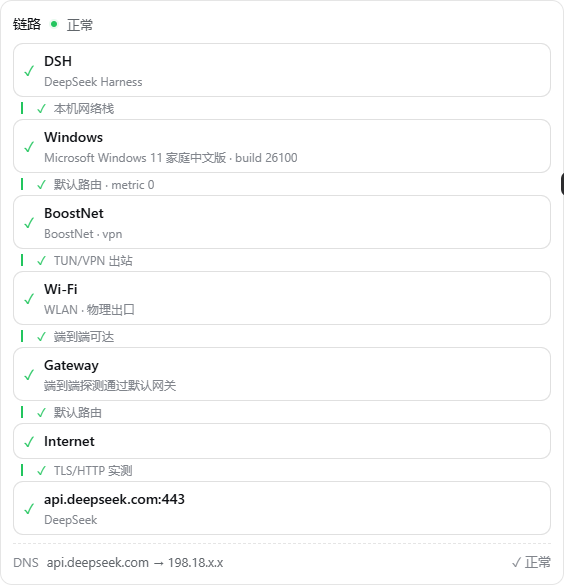
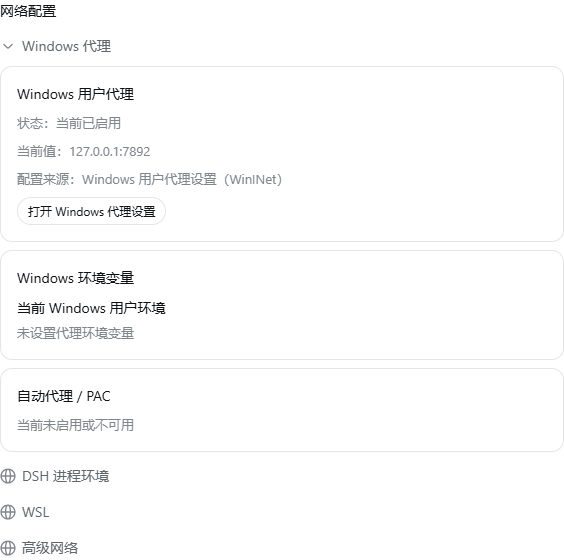
The plugin lives in DSH Settings → Plugins → Network (click images to enlarge)
DSH inside a WSL distribution: DSH → distro → WSL NAT → Windows Host → proxy TUN → physical NIC → gateway → target
Windows-native DSH path, chaining the physical uplink behind a TUN/VPN adapter
Grouped network configuration
Network configuration is grouped by source, every entry traceable:
- Windows proxy: WinINet / WinHTTP state, proxy environment variables across all three scopes (both letter cases)
- DSH process environment: runtime model, egress (direct / via proxy with address), verified listener process behind the proxy port, process proxy variables
- WSL: distribution environment, network mode (NAT / mirrored),
/etc/wsl.confand.wslconfig - Advanced: DNS cache, interfaces & routes, Hosts, first-aid actions
Every persistent change follows snapshot → preview → confirm → apply → rollback.
Install
From the npm registry (recommended — prebuilt, no extra configuration):
dsh plugin --profile web add dsh-network-settings
Re-running the same command updates the plugin to the latest version.
Versions published very recently may be held back by pnpm's
minimumReleaseAge supply-chain policy — install with an explicit
version (dsh plugin --profile web add dsh-network-settings@<version>)
or retry later.
Open Settings → Plugins → Network.
dsh plugin --profile web add github:kanneiren/dsh-network-settings
GitHub installs build the plugin on install (prepare script), and pnpm
blocks build scripts of git-hosted packages until you approve them. If the
install fails with ERR_PNPM_GIT_DEP_PREPARE_NOT_ALLOWED, copy the exact
allowBuilds key printed in that error message into
%UserProfile%\.dsh\profiles\<profile>\pnpm-workspace.yaml and re-run the
install command. The key looks like:
allowBuilds:
  dsh-network-settings@https://codeload.github.com/kanneiren/dsh-network-settings/tar.gz/<commit>: true
The key pins the resolved commit hash, so every new version asks for approval once more (pnpm does not accept wildcards for git-hosted packages). The npm registry install above has no such step.
Usage
Open the page
  → cached summary only, no probes run
Click [Single check]
  → full inspection + current target probe + DSH path graph
Click [Stability check]
  → repeated TCP/HTTP sampling
Click [Copy network report]
  → Markdown report for an Agent
Docs
| Document | Content |
|---|---|
| Architecture | modules, runtime models, probes, repair guarantees |
| Diagnostics | how results are produced and displayed |
| Network first aid | operations, risks, reliability |
| Agent guide | development commands and extension points |
| Release checklist | publishing steps |
| Network path & drift | graph/UI behavior details |
Support
- DSH:
@deepseek-ai/dsh >= 0.1.0-rc.6(tested 0.1.0-rc.7 – 0.1.1-rc.2; Web profile) - Platform: Windows 10/11 with WSL; macOS (CI-verified, real-machine validation pending)
- All network checks are local and read-only unless you explicitly confirm a change.
Privacy
No telemetry. Reports and snapshots are redacted locally before persistence.
License
Comments
Comments live in GitHub Discussions. Sign in with GitHub to post or react.