
Install
Inside DeepSeek Harness, with dsh-market
dsh plugin --profile web add dshmarket
Or from the command line
dsh plugin --profile web add "https://github.com/itchenshi/dsh-model-surplus/releases/download/v0.4.1/dsh-model-surplus-0.4.1.tgz"
Installing runs third-party code with your own permissions — it can read your files, use your credentials and reach the network. Review the source first, and pin a commit (github:owner/repo#sha) when you can.
Screenshots
README
One of the plugins bundled with DSH Ready GUI — the GUI ships all four, ready to tick. Each one also installs standalone into any DSH host (see "Install and go" below). GUI: https://github.com/itchenshi/dsh-ready-gui
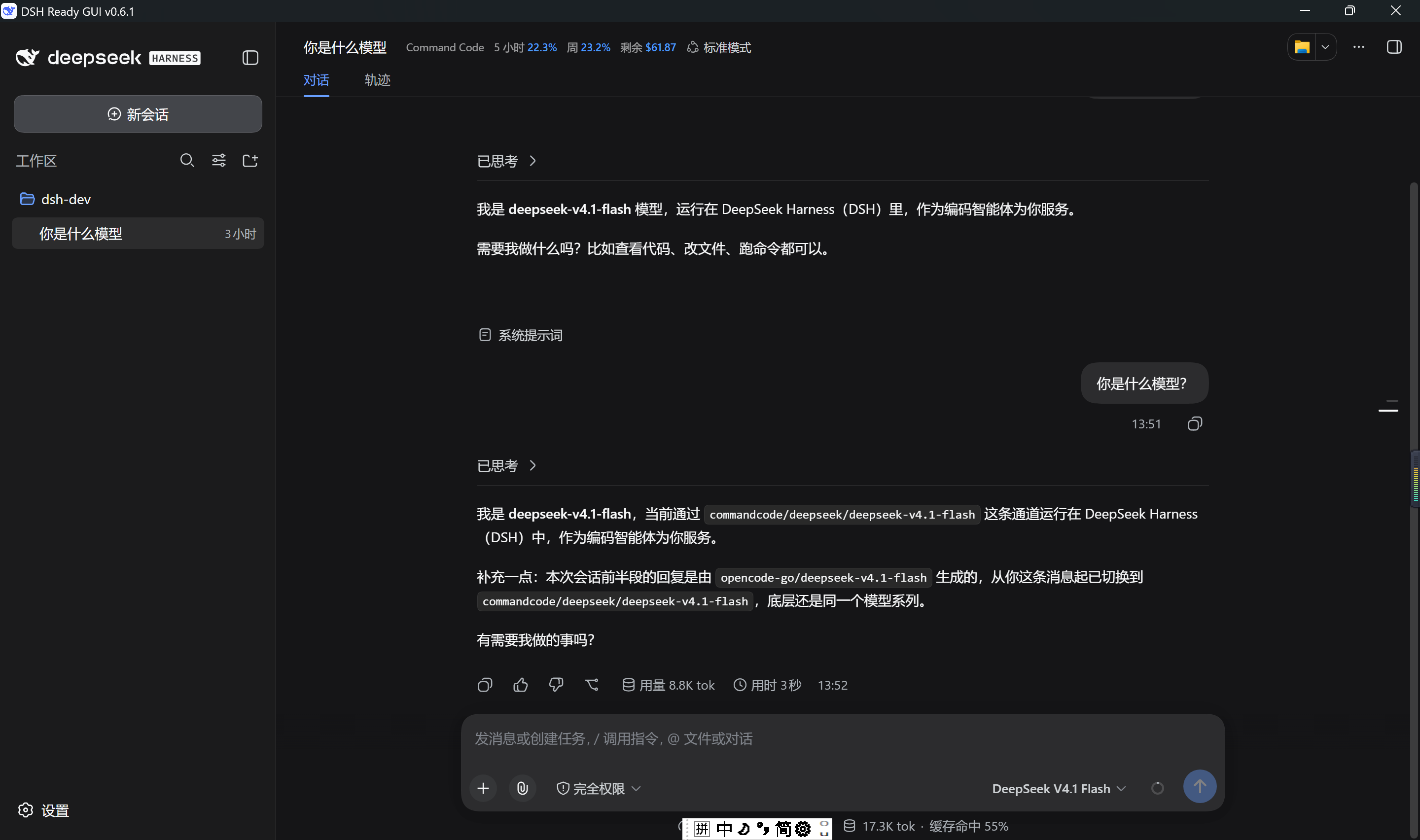
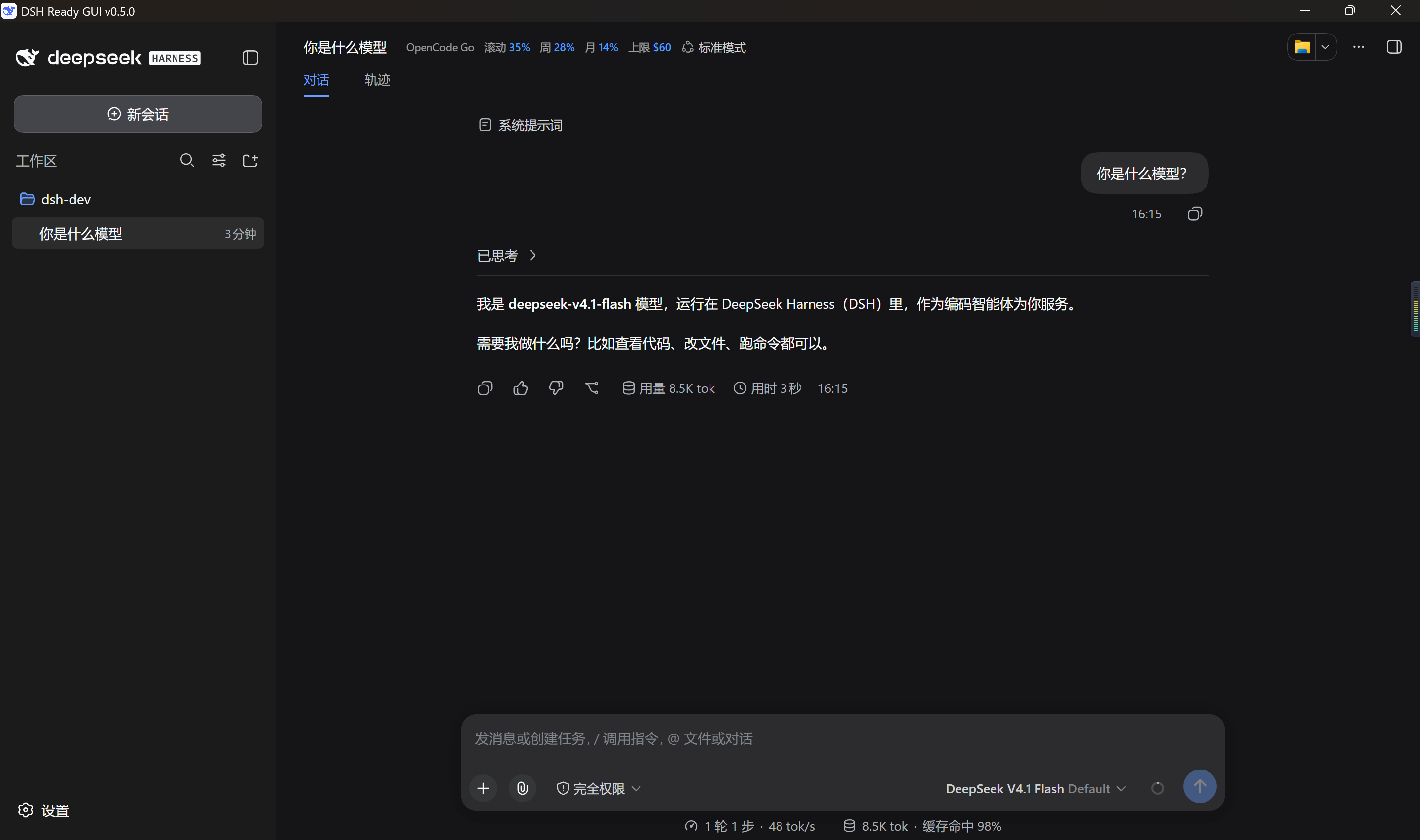
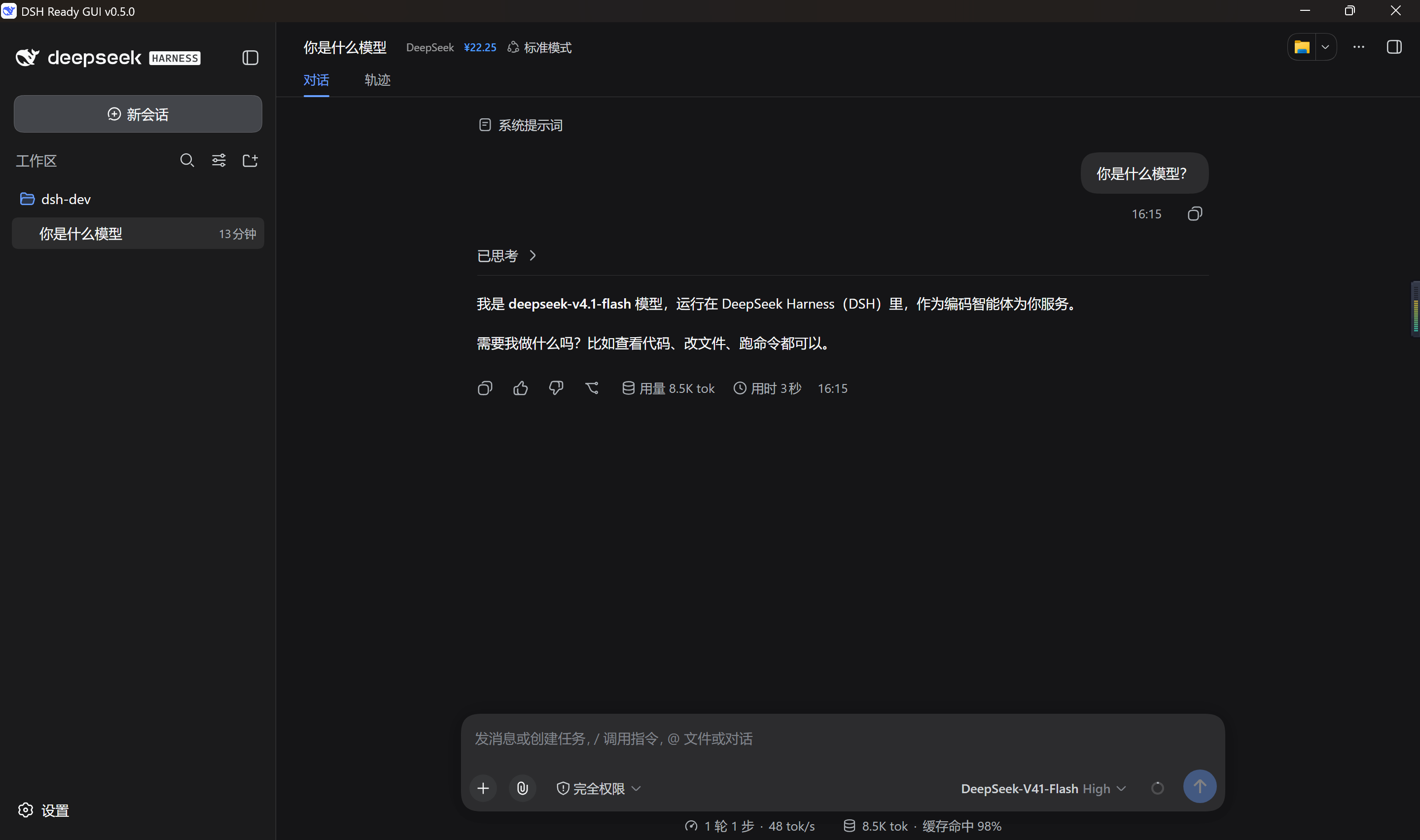
Shows usage / account balance for the active model, right of the DeepSeek Harness session title — whichever model the conversation is on, that is the number you see, with no page to go and check.
┌─ session header ───────────────────────────────────────────────────────────┐
│  My conversation  [OpenCode Go rolling 18% weekly 82% monthly 42% cap $60] open ▾ │
│  Another one      [Command Code 5h 17.9% wk 17.1% left $13.50]             open ▾ │
│  One more         [DeepSeek ¥110.00]                                       open ▾ │
└────────────────────────────────────────────────────────────────────────────┘
| Active model route | What it shows | Where the data comes from |
|---|---|---|
opencode-go / opencode |
Plan usage: rolling / weekly / monthly percentages + reset times, plus the selected model's monthly cap (cap $60) |
GET https://opencode.ai/zen/go/v1/usage + a per-model cap table |
commandcode-goat / commandcode |
5-hour / weekly window percentages (with used / cap) + remaining credits | GET https://api.commandcode.ai/alpha/billing/credits |
deepseek-official |
Account balance: total / granted / topped up (shows "insufficient balance" when unavailable) | GET https://api.deepseek.com/user/balance |
It only appears while the session's selected model belongs to a tracked provider — switching models shows or hides it immediately, with no refresh.
Install and go
Using DSH Ready GUI (recommended): the plugin ships inside the GUI. Open the GUI → Settings → Third-party plugins → tick Model surplus, then restart the engine and refresh the page as prompted (it has a page half).
Any other DSH host (
dsh web, the CLI) — either route works:# Recommended: install straight from GitHub (recorded in your profile, updatable) dsh plugin --profile web add github:itchenshi/dsh-model-surplus # Fallback: this release's tarball (for when the git protocol fails but HTTPS works) dsh plugin --profile web add https://github.com/itchenshi/dsh-model-surplus/releases/download/v0.4.1/dsh-model-surplus-0.4.1.tgzBoth land the full repository contents (including
cordis.patch.yml); no extra configuration is needed afterwards.
Not on npm yet: sign-up is unreachable (
www.npmjs.comanswers with a Cloudflare challenge), so nothing can be published. Use one of the two routes above; publishing resumes once sign-up works.
The only thing to configure is the credential. The plugin reads it through the engine's credential service by reference, and keys never reach the browser:
| Route | Credential |
|---|---|
| OpenCode Go | OPENCODE_GO_API_KEY |
| Command Code | COMMANDCODE_GOAT_API_KEY |
| DeepSeek | DEEPSEEK_API_KEY |
The three sections report independently: with only one key configured the other halves still work,
and the missing half shows a reason (no-key / unauthorized / network / timeout / bad-payload)
instead of hiding the whole widget.
Two things worth knowing about the Command Code section
1. It queries the quota API, not the chat API. The URL configured on a DSH route is the chat
endpoint, https://api.commandcode.ai/provider/v1, while the quota API sits one level up at the bare
root (/alpha/billing/credits). The plugin strips the /provider/v1 path, so either form works in the
config.
2. It deliberately shows no monthly percentage. The endpoint reports the two windows it actually enforces (5-hour and weekly) as used / cap, plus the credits that remain — but it never states the plan's monthly allotment. A monthly bar would therefore require a hard-coded plan table (Go / GOAT / Max), which would be a guess, so it is left out.
Where the per-model monthly cap comes from
OpenCode Go's usage endpoint is account-level and ignores per-model parameters, while the per-model monthly caps in the official limits table have no API (for example DeepSeek V4.1 Flash at $60/month, DeepSeek V4 Pro at $15/month). So the plugin:
- ships a built-in table (
BUILTIN_MODEL_LIMITS), - refreshes it automatically by fetching the public docs page (server-rendered, no JavaScript, no
key needed) and parsing the limits and model-id tables into
model id → monthly $, - caches the result in
$DSH_HOME/logs/model-surplus-limits.jsonso a restart does not refetch, - falls back on any fetch/parse failure: cache → built-in table.
It refreshes once at startup and then every 24 hours. The tooltip lists the derived tiers (5h = 20% · week = 50% · month = 100%), the data source (docs / local cache / built-in table), and states that the percentages are account-level while the cap is per-model.
Configuration (the cordis.patch.yml row config, all optional)
- insert:
    - id: model-usage
      name: dsh-model-surplus
      config:
        enabled: true

        opencodeGo:
          baseUrl: https://opencode.ai/zen/go/v1   # upstream root
          apiKeyRef: OPENCODE_GO_API_KEY           # credential reference
          providers: [opencode-go, opencode]       # routes treated as OpenCode Go

        deepseek:
          baseUrl: https://api.deepseek.com        # upstream root
          apiKeyRef: DEEPSEEK_API_KEY              # credential reference
          providers: [deepseek-official]           # the engine's DeepSeek route

        commandcode:
          # quota API root; the chat url (.../provider/v1) is accepted too and normalized
          baseUrl: https://api.commandcode.ai
          apiKeyRef: COMMANDCODE_GOAT_API_KEY      # credential reference
          providers: [commandcode-goat, commandcode]  # routes treated as Command Code
Changing providers is enough to move another route into a section — no page code changes: the
provider-to-section mapping is delivered by the host on every poll. Writing baseUrl / apiKeyRef /
providers at the top level is still read as the opencodeGo section (the plugin used to be
OpenCode-Go-only).
Permissions and boundaries (for marketplaces that scan statically)
Marketplaces that pin a commit before reviewing it scan the runtime code statically; here are the facts once, so none of them has to be inferred:
- Runtime dependencies: none. Node built-ins only (
node:path,node:fs/promises); the host half is plain ESM and needs nonode_modulesof its own. - Outbound network: yes, four hosts, all from the host side (the page half only calls the local
route below):
GET https://opencode.ai/zen/go/v1/usage— OpenCode Go plan usage (OPENCODE_GO_API_KEY)GET https://api.commandcode.ai/alpha/billing/credits— Command Code window usage and remaining credits (COMMANDCODE_GOAT_API_KEY)GET https://api.deepseek.com/user/balance— DeepSeek account balance (DEEPSEEK_API_KEY)GET https://opencode.ai/docs/zh-cn/go/— the documented per-model monthly caps; the page is fetched because the gateway's own/modelsresponse carries no cap information at all
- Local routes: one. The host registers a single page-facing route, called same-origin by the page
half. It goes through the engine's trust fence (Host allow-list + browser session cookie) and fails
closed when the fence is unavailable. A bare
curlwithout the cookie gets 401 (it used to return 200 — any local process, or a DNS-rebound page, could read your usage and balance). - Files: one cache.
<DSH_HOME>/logs/model-surplus-limits.jsonholds the fetched cap table; nothing else is read or written, and user files are never touched. - Credentials: read on the host only, through
ctx.credentials; they never appear in any response sent to the page. - Commands / native artifacts / lifecycle scripts: none.
- Failure boundary: the two sections report independently, so a missing key or an unreachable upstream degrades only that half and says why. The plugin never blocks engine startup; uninstalling it restores the original header.
Two halves
| Half | File | Runs in | Responsibility |
|---|---|---|---|
| Host | lib/index.js |
Node | Fetches each section's upstream and serves it over one same-origin JSON route |
| Page | client/client.js |
Browser | Registers the header widget, polls the host route, gates on the active model |
The host route's response shape (for manual debugging; bring the engine's session cookie):
GET /model-usage
{
  "ok": true,
  "sections": { "opencode-go": { "providers": ["opencode-go","opencode"], "keyRef": "OPENCODE_GO_API_KEY" },
                "deepseek":    { "providers": ["deepseek-official"],    "keyRef": "DEEPSEEK_API_KEY" } },
  "opencode-go": { "ok": true, "usage":   { "rolling": {…}, "weekly": {…}, "monthly": {…} } },
  "deepseek":    { "ok": true, "balance": { "isAvailable": true, "infos": [ { "currency":"CNY", "total":"110.00", … } ] } },
  "limits": { "deepseek-v4.1-flash": { "hours5": 12, "weekly": 30, "monthly": 60 } }
}
The host normalizes and clamps usage percentages (0–100) and accepts the decimal strings upstream sends for amounts. Each section is cached for 60 seconds, and a failure is not retried for at least 30 seconds.
Development
node --check lib/index.js
npm test        # local behaviour tests (no network, no engine)
tests/e2e.cjs is the full integration check against a real engine and browser (it needs a running
profile, so it is not part of npm test).
License
MIT
Comments
Comments live in GitHub Discussions. Sign in with GitHub to post or react.