
Install
Inside DeepSeek Harness, with dsh-market
dsh plugin --profile web add dshmarket
Or from the command line
dsh plugin --profile web add dsh-livechat
Installing runs third-party code with your own permissions — it can read your files, use your credentials and reach the network. Review the source first, and pin a commit (github:owner/repo#sha) when you can.
Screenshots

README
dsh-livechat
Bilibili-style live-chat danmaku overlay for DeepSeek Harness (dsh) Web.
Watch your agent work while a crowd of floating comments drifts across the conversation area — preset banter, optional LLM-generated quips, and your own messages too.
中文 · English
Installation · Features · Module docs · Architecture
Installation
The plugin is a bundle: it carries its own cordis.patch.yml and self-activates — one command, no manual patch editing.
# From a local directory
dsh plugin --profile web add ./dsh-livechat

# From npm (prebuilt — skips the allowBuilds approval)
dsh plugin --profile web add dsh-livechat

# From GitHub
dsh plugin --profile web add github:huashenglian/dsh-livechat

# From a packed tarball (pnpm pack / npm pack)
dsh plugin --profile web add ./dsh-livechat-0.2.0.tgz
Restart dsh web, then open http://127.0.0.1:3080. The danmaku overlay and a floating control ball appear over the conversation area.
[!NOTE] The bundle ships its own
cordis.patch.ymlthat self-activates the plugin (insert id: livechat). Do not add a duplicateinsertentry in your profile patch — a second insert throwsduplicate loader entry id: livechatat boot.
If you don't have the dsh CLI yet, you can run the web server directly:
npx @deepseek-ai/dsh web
Quick health check
curl http://127.0.0.1:3080/api/danmaku/health
# {"ok":true,"name":"dsh-danmaku","version":"0.6.6"}
What it does
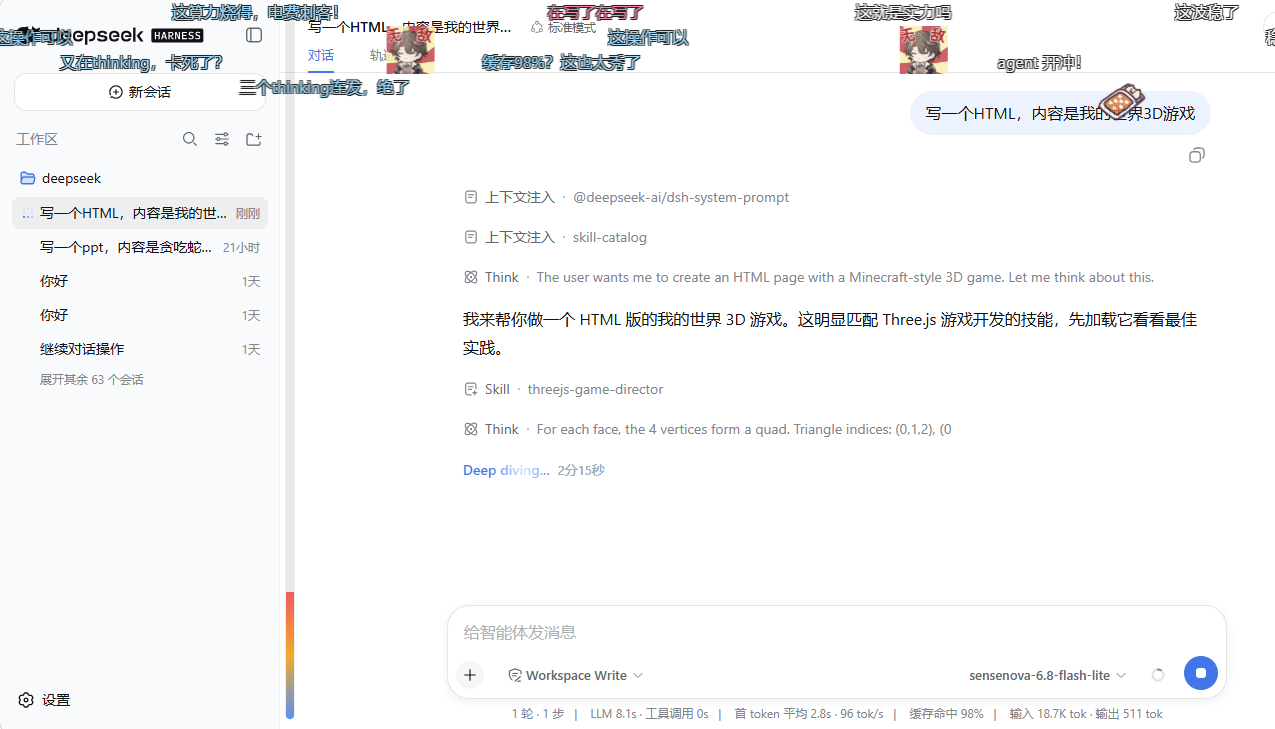
When the agent sends a message, finishes a reply, calls a tool, or completes a task, a burst of danmaku floats across the conversation column — just like watching a livestream. Preset packs cover general / coding / casual vibes, and an optional LLM generates fresh, context-aware quips on a throttle. A draggable ball gives you quick controls; a settings card tunes everything.
Live danmaku drifting over the conversation area while the agent works — multi-track, color-weighted, with the floating control ball (top-right).
Features
| Module | What it covers | Doc |
|---|---|---|
| Overlay & rendering | shell.overlay mount, DOM renderer, multi-track collision avoidance, anti-occlusion fade, render-backend chain |
overlay-and-rendering.md |
| Presets & LLM | Three preset packs, event-triggered sampling, fatigue dedup, optional LLM generation with smart/interval/tool-call wake modes, style templates | presets-and-llm.md |
| Interaction | Draggable control ball, hover-pause, click-for-detail (copy / block / delete), user-sent danmaku, heat bar, welcome & task-done effects | interaction.md |
| Session pools | Per-session .jsonl danmaku pools, history replay with decay + like-boost, archive/restore, in-app pool editor |
session-pools.md |
| Gift effects | Three-pane modal (gift library / asset library / config; draggable dividers with persisted widths), center toolbar (room-id extract + import ▾ + new folder + clear assets), card-click effect position, left-column "+"/red "×", 3 default gift cards (master switch off by default, zero room ids) | gift-effects.md |
| Configuration & API | Settings card UI, every config field with defaults/range, full HTTP API reference | configuration.md |
Highlights
- Three layouts: roll (scroll), top-fixed, bottom-fixed — weighted per-config
- Anti-occlusion: overlay dims while you read, brightens when the crowd gets loud
- LLM with safe fallback: generation fails → silent preset fallback, no error popups
- Per-session memory: liked/replayed danmaku resurface; deleted sessions clean up automatically
- Chromium-first: tuned for Edge / Chrome;
translate3d, page-hiddenpause, on-screen cap - Paused items stay: hover/detail-locked danmaku remain on screen until they resume and leave the range
- Config survives restarts: every save writes a local mirror (
$DSH_HOME/danmaku-config.json) plus a minimaldanmaku:section insettings.yaml; boot resolves mirror → settings → defaults, so a restart never resets your setup - Sessions by name: the pool editor labels each pool with the real dsh session title instead of a truncated session id
Architecture
dsh-livechat/
├─ package.json              # dsh.bundle + dsh.client declaration
├─ cordis.patch.yml          # self-activating bundle layer (insert id: livechat)
├─ lib/
│  ├─ index.js               # Host: settings namespace, session/event ring, HTTP routes, optional LLM
│  ├─ client.js              # Client: shell.overlay layer + settings card + DOM renderer + drag ball
│  ├─ presets.js             # Shared: preset packs, sampling, track-collision pure functions
│  └─ emoji-lib.js           # Emoji library: folders, imports (git/zip), weights, manifest
├─ tests/presets.test.js     # unit tests (node --test)
├─ docs/                     # module documentation (this README links out)
└─ assets/                   # demo screenshots & cover art
- Host (
lib/index.js): registers thedanmakusettings namespace, observessession/eventinto a trigger ring buffer, serves config/trigger/LLM/pool HTTP routes, and optionally generates danmaku via a configured LLM provider. - Client (
lib/client.js): a self-containedwindow.__ModuleLoader__factory — mounts apointer-events:noneoverlay onshell.overlay, renders danmaku via DOM (translate3d), runs the drag ball, the settings card (settings.plugin.item), and the pool editor. - Shared (
lib/presets.js): preset packs, weighted sampling, layout/color picks, and track-collision checks — all pure functions, unit-tested.
The renderer interface aligns with the design doc (参考文档/danmaku-renderer-design.md). First release ships the L5 DOM backend; the architecture reserves a drop-in upgrade path to WebGL2 / Worker+WebGL2 without touching the business layer.
Test
node --test tests/presets.test.js
Uninstall
dsh plugin --profile web remove dsh-livechat
This removes the dependency and the bundle entry. If the server is still running, uninstall also wipes pool cache (~/.dsh/danmaku-pools/). You can also clear all pools from the pool editor’s red Clear all pools button.
License
MIT
Comments
Comments live in GitHub Discussions. Sign in with GitHub to post or react.