
Install
Inside DeepSeek Harness, with dsh-market
dsh plugin --profile web add dshmarket
Or from the command line
dsh plugin --profile web add dsh-pet
Installing runs third-party code with your own permissions — it can read your files, use your credentials and reach the network. Review the source first, and pin a commit (github:owner/repo#sha) when you can.
Screenshots
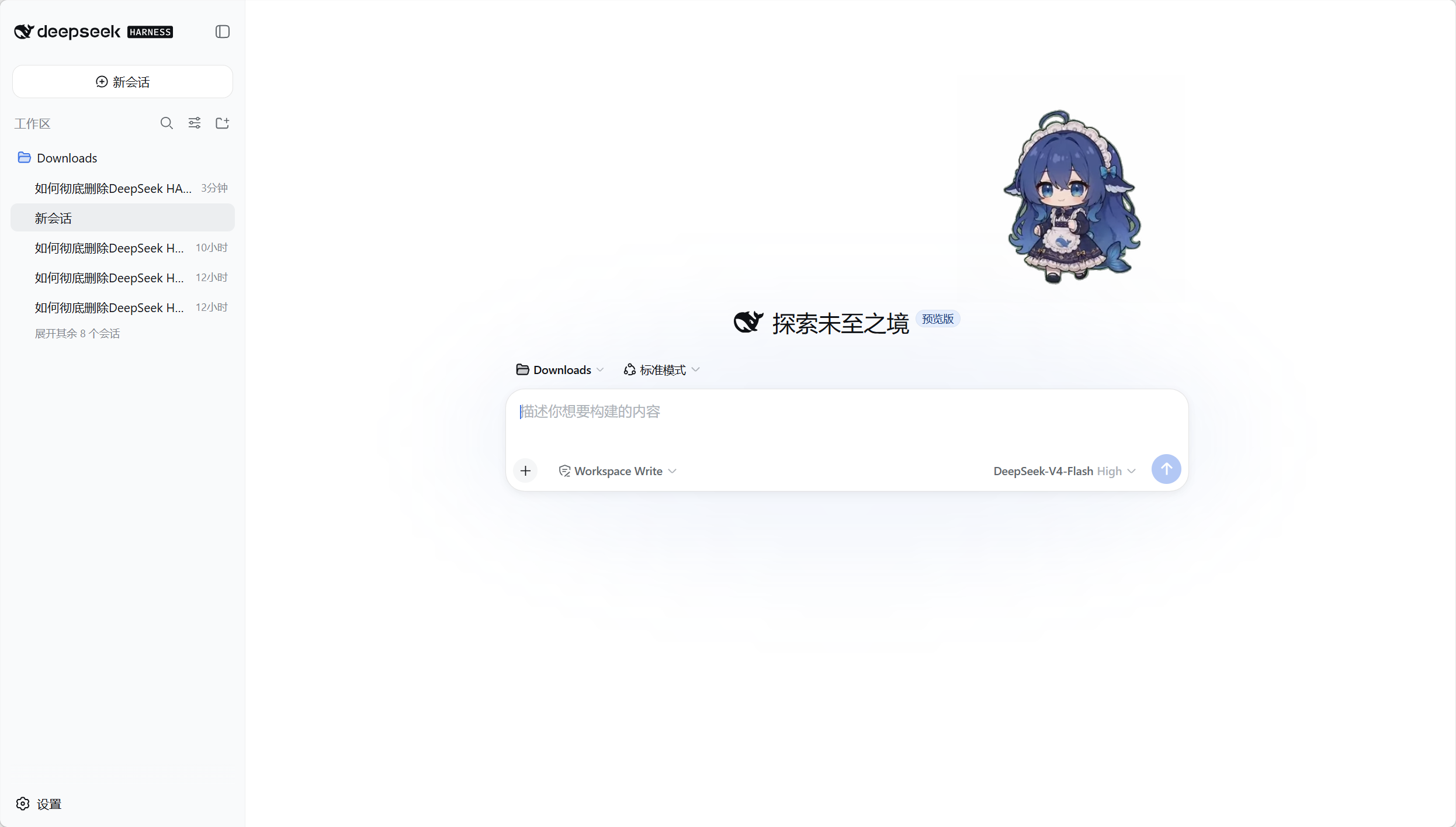
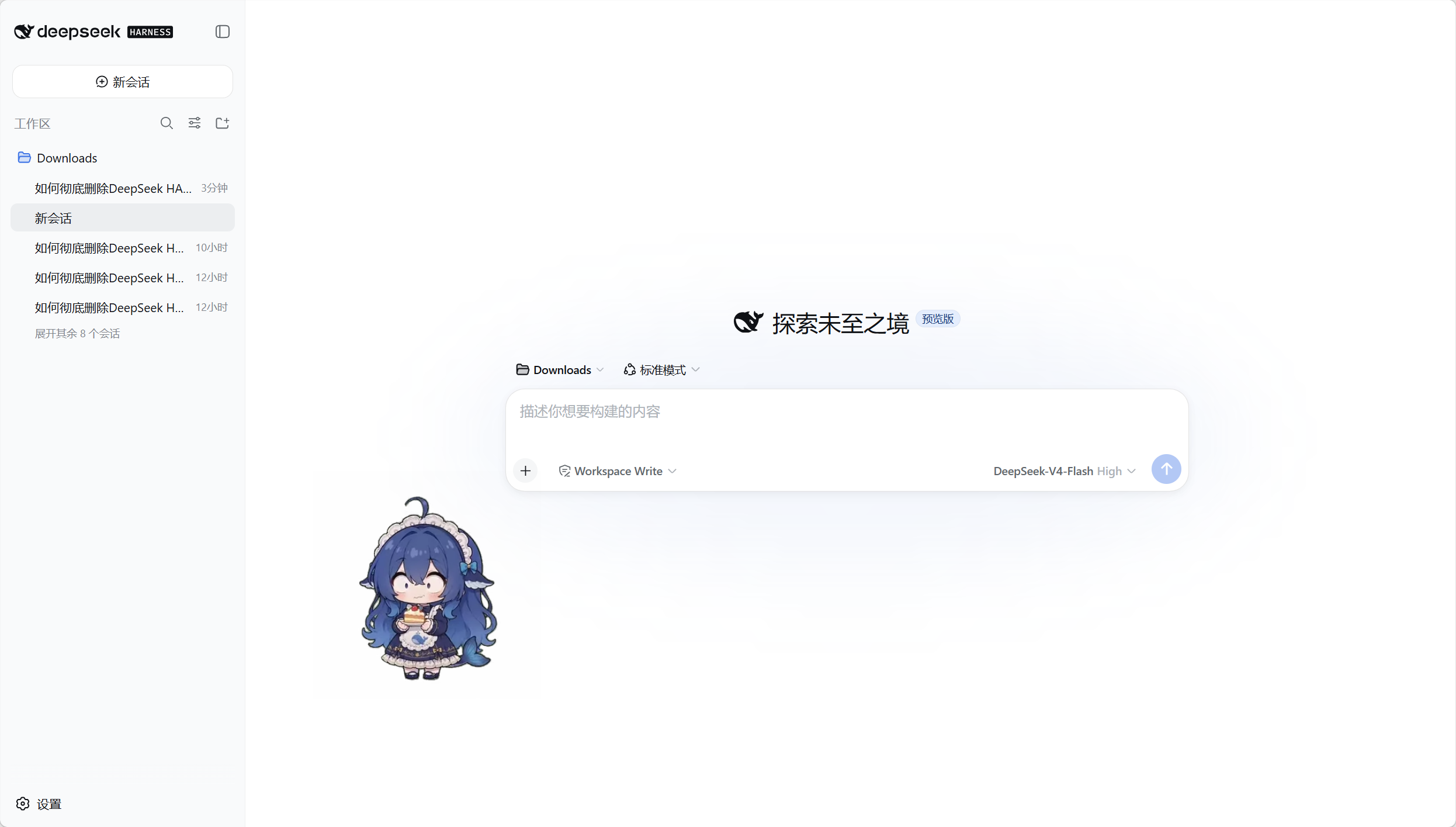
README
This plugin publishes its README in Chinese only.
A floating desktop pet for the DeepSeek Harness Web UI: idle breathing, random actions (the 97 hand-drawn transparent animations — dozing off, playing with a Rubik's cube, writing code, hotpot…), turns, screen wandering, squash-and-stretch click reactions, throw-and-bounce drag physics, a right-click menu to play any action on demand, balance animations with a thinking bubble, occasional self-talk and a chat dialog (both can attach a meme image) — spawn as many pets as you want, live on your desktop (transparent always-on-top window), or add brand-new pet species (pet pack). 一只住在 DeepSeek Harness 里的桌面宠物:待机呼吸、随机动作(打瞌睡、玩魔方、写代码、吃火锅……97 个手绘风透明动画随时无缝衔接)、左右转向、屏幕漫游、点击 Q 弹、拖拽甩抛反弹、右键菜单点播动作、余额动画 + 头顶联想气泡、时不时的碎碎念与对话(都能配一张表情包)——可多开同屏,能脱离浏览器住上桌面(透明置顶小窗),也能自己添加全新宠物种类(pet pack)。
🚀 快速开始(安装插件)
dsh plugin --profile web add dsh-pet
重启 dsh web,宠物出现在界面右上角(默认配置角落,可在设置页修改)——全部透明动画开箱即用,无需任何生成流程。
💡 单一格式(默认
.webm):浏览器 Chrome/Edge/Firefox 与桌面模式(Electron=Chromium)直接透明播放;Safari 不认 webm alpha(黑底),macOS 需要改用.mov,见下方「🖥️ macOS 使用 mov」。
💡 想自己造一只专属宠物?克隆 PC2005-cloud/dsh-pet 仓库,用内置素材链(AI 提示词 → 绿幕视频 → 透明动画,素材由豆包生成)从零生成,全流程可复现。
🖥️ macOS 使用 mov(Safari 透明播放)
macOS 的 Safari/WKWebView 下透明动画需用 .mov 素材,三步:
- 下载 mov 素材:https://github.com/PC2005-cloud/dsh-pet/releases/tag/assets-mov(保持最新,zip 解压后文件名与 webm 一一对应)
- 放入素材目录:把
.mov文件放进$DSH_HOME/dsh-pet/main-animation/mov/(pet pack 宠物则是pet/<种类名>-animation/mov/) - 改变量:搜
ANIMATION_EXT,把.webm改为.mov:- npm 包用户改产物
lib/client.js(桌面端如需再改runtime/electron-helper/shared-core.js) - 自构建用户改源码
src/shared/constants.ts后重新构建
- npm 包用户改产物
改完重启 dsh web(或重新加载页面)即生效,其余平台不受影响。
✨ 功能特性
- 纯粹的桌宠:不掺业务功能——没有天气查询、系统监控、Agent 状态感知,就一件事:陪你(外加可选的余额展示、系统通知、碎碎念与对话,见配置节)。零核心改动;默认零模型成本——只有主动开启碎碎念(
pets[].whisperEnabled)或主动发起对话时才会调用当前会话所用的模型,其余功能运行时零 LLM/API 调用 - 手绘风透明动画:待机呼吸、打瞌睡、玩魔方、哼歌、炸毛、吐泡泡、玩水枪、小提琴演奏、蓝鲸现世、吃白饭、照镜子、三支舞、写代码、四季动作(放风筝、堆雪人、吃冰淇淋、放烟花……)全部无缝衔接
- 永不停止的动画链:每段动画播完立即按权重选下一个(默认 idle 10 / turn 5 / move 5,剩余 80% 归随机动作分类)
- 屏幕漫游:朝 facing 方向行走,自动检查空间、不走出屏幕
- 点击 / 拖拽(弹簧跟手 + 甩抛反弹 + Q 弹):点击有随机回应动画(开心 / 害羞 / 傲娇)并「Q 弹」挤压回弹(垂直压扁 55% → easeOutBack 回弹过冲,贴地锚定);拖拽为过阻尼弹簧跟手(不抖不飘、无 overshoot);松手按最后轨迹估速(停顿/慢速 = 温柔放下原地停住)——用力甩出即沿抛物线飞行:撞屏幕边缘按恢复系数反弹、落地摩擦减速至停,每次落地按冲击速度 Q 弹(轻落 0.8 ~ 重砸 0.55);物理与挤压曲线纯函数在
src/shared/physics.ts,浏览器与桌面严格同一手感(prefers-reduced-motion时跳过挤压) - 物理参数化(0.2.5):拖拽抛掷手感全部由配置
physics段驱动——重力(gravity,0 = 无重力漂浮)/ 碰壁恢复系数(restitution)/ 地面摩擦(groundFriction,0 = 冰面)/ 顶部反弹开关(ceilingBounce)/ 总力度(throwPower)/ 多宠物碰撞开关(petCollision),所有宠物全局共用(见配置节);设置页「物理」区可图形化编辑(6 个控件,与四个全局开关同一套语义:改完点「保存」整包写入用户配置,非法值就地红字提示、宿主也会拒绝) - 点击积分(0.2.5):飞行中的宠物被按下(速度 ≥ 400px/s)→ 点击处爆开粒子 + 弹出积分卡片;分数 = 速度/100 × 462/大小(线性,越快/越小分越高——小宠物目标小、更难命中,奖励更高);静止/慢速点击维持普通点击回应动画(
prefers-reduced-motion时跳过粒子) - 多宠物碰撞(0.2.5):
petCollision: true开启后,飞行中的宠物撞到其它宠物按动量守恒 + 恢复系数 0.995 弹开(质量 ∝ size²,被撞方从落点以新初速抛出去),浏览器与桌面跨窗口同语义(默认关闭) - 碎碎念:宠物时不时自己冒一句——按
eventsRefreshSec.whisper周期(默认 300 秒)调用当前会话所用的模型生成(人设 = 全局whisperPrompt,另追加一句名字声明),气泡展示 10 秒;右键菜单「碎碎念」可立即催一句(绕过节流,同一实例的多端一起看到)。默认开启,按宠物可关(pets[].whisperEnabled) - 对话:右键「对话」弹窗跟宠物聊天,也能用
/chat <消息>命令(留空 = 催一句碎碎念)——记忆持久化在$DSH_HOME/dsh-pet/memory.json(全存不删,每次请求只带最近chatMemoryRounds轮),浏览器与桌面共享同一份记忆;对话目标为/pet选中的那只,未选则取列表第一只 - 表情包配图(0.2.9):气泡可以带一张表情包——碎碎念随机抽 1 张(
whisperImageEnabled:只是把这张图的描述加进同一次请求,约 +100 字符 / ≈60 token,增量可忽略);对话把整张清单交给模型按语境选(chatImageEnabled:每条消息约 +1.1k 字符 / ≈650 token,约碎碎念配图的 11 倍,随图片数量线性增长)。图片与描述的映射在memes(键 = 包内assets/memes/<键>.png),两个开关默认都开 - 右键级联菜单:右键宠物弹出(桌面与浏览器共用同一份组件,
src/shared/menu.ts)——桌面端根项「打开网站 / 查看余额 / 回到初始位置 / 重载配置 + 动作」、浏览器端「回到初始位置 + 动作」;「打开网站」用系统默认浏览器打开 DSH 网站(等效网页里 Ctrl+点击链接);「查看余额」立即拉余额弹气泡播档位动画(与周期触发同一展示路径);「回到初始位置」停漫游回配置角落;「重载配置」(桌面专属)请宿主重启桌面 Helper——全部桌面宠物窗口按最新配置重建,改完配置文件不必回设置页点保存(与保存同一条重启路径:等旧进程退出再起新的;代价是会话内拖拽落点清空、回配置角落);动作 → 分类 → 具体动画(分类 = 待机/转向/拖拽/点击回应/移动/随机动作分类/余额档位;点播「移动」分类动画会真实行走一段——边界检查/随机距离/起停时段与随机移动完全一致;noMirror 文字类朝右时自动强制朝左)——浏览器端只在宠物命中区拦截右键(preventDefault),完全不进入/改动 DSH 页面自己的菜单 - 左右朝向:所有动画 CSS 镜像,人物可朝左 / 朝右
- 落地对齐:动画统一脚底线,宠物始终站在"地面"上
- 流畅切换:双缓冲 video 交叉淡入,切换零空白帧
- 无障碍友好:支持
prefers-reduced-motion - 多开:可配置多个宠物同屏,每只独立的 id/大小/位置/余额开关/显示位置(设置页「桌宠配置」添加/删除)
- 桌面模式(可选):可脱离浏览器住上桌面——透明置顶局部小窗,与浏览器严格同行为(见下节)
- 余额展示:实时显示余额/额度,按档位播动画 + 头顶联想气泡,每只宠物可独立开关
- 额外宠物种类(pet pack):在
pet/自建「种类」(独立动画池 + 自己的素材),多实例共享,与主宠物严格隔离(见配置节) - 自定义动画:
main-animation/webm/放 VP9-Alpha.webm即作为新动画,优先于包内素材
🪟 桌面模式(脱离浏览器,可选)
默认情况下宠物住在 DSH 网页里(浏览器 overlay)。安装后还会自动拉起一个脱离浏览器的桌面形态:
- 独立透明置顶窗口:为每只桌面宠物各开一个局部小窗口(尺寸 = 宠物包围盒 + 四周外扩余量,为气泡/弹窗预留空间;透明、置顶、跳过任务栏),窗口跟随宠物移动;窗口永不铺满屏幕(全屏透明置顶窗会触发 Windows DWM 视频合成黑屏:需「透明置顶 + 非点击穿透 + 可聚焦且已聚焦 + 完整盖住视频窗」四项齐备,与窗口尺寸无关,详见
runtime/electron-helper/main.js文件头注释;桌宠悬停时会翻成可交互、show()也会聚焦,故全屏画布形态仍不做)。与浏览器一致,只有宠物身体命中区可交互,窗口内其余透明像素与窗口外一律点击穿透到下层应用(setIgnoreMouseEvents+ 悬停命中翻转) - 与浏览器严格同行为(同一份源码两个外壳):宠物功能/文案完全对齐——多开宠物同屏显示、角落+边距定位、同一动画链/点击/拖拽/余额档位动画与富余额气泡;页面配置的显示位置由
display字段决定,两端宠物内容只可能一致,不会出现"一个有另一个没有"。系统通知是独立于宠物的能力(见配置节notificationsEnabled),不在此列 - 共享纯逻辑:待机选择 / 移动几何 / 余额折算 / 配置校验 / 通知映射都在
src/shared/,浏览器 bundle 与桌面shared-core.js(构建产物,window.PetShared)共用同一份源码,只有最外层的渲染壳不同(React vs 纯 DOM)
桌面模式怎么装 / 关
- 依赖 Electron:首次拉起时自动探测(
DSH_PET_ELECTRON_PATH环境变量 → 本机 electron 包 →~/.dsh/electron/落地路径),找不到会通过官方 @electron/get 自动下载到~/.dsh/electron/(npm run ensure:electron可手动触发);Electron 不可用时仅日志告警,不影响浏览器形态 - 开关 = 每只宠物的
display字段(pets 必填,四个值):web= 仅浏览器 overlay /desktop= 仅桌面模式 /both= 两者都显示 /none= 都不显示- 桌面模式渲染
display含desktop的全部宠物(多开同屏,与浏览器一致);大小/位置各自读自己的配置 - 在 DSH 设置页「桌宠配置」编辑,保存即时生效;
display缺失/非法即配置错误,代码不做兜底
- 桌面与浏览器是同一套动画素材(
/dsh-pet-7340/thumb/<前缀>/<name>.webm:main 用用户main-animation/目录优先 + 包内素材;额外宠物只查自己的pet/<前缀>-animation/,同种类多实例共享);配置加载失败会大声报错(红色错误条 + 每 5 秒自动重试),绝不静默兜底
⌨️ 斜杠命令
在 DSH 输入框里以 / 触发(与其它插件命令同一入口,命令面板可搜):
| 命令 | 说明 |
|---|---|
/pet [id 或名字] |
选择「当前桌宠」——也就是 /chat 的对话目标。留空查看当前选中的是谁;浏览器端支持命令面板的选择框,也可手输 id 或名字(名字重名时必须用 id,报错会列出候选 id) |
/chat [消息] |
与当前桌宠对话:留空 = 立刻催一句碎碎念(绕过节流,等价于右键菜单「碎碎念」);输入消息 = 正常对话。回复会写进记忆,并以气泡出现在宠物头顶(浏览器与桌面两端都能看到,配图随回复一起) |
/balance |
手动触发余额显示并立即弹出气泡(与到点自动触发同一条展示路径):服务商有余额/额度接口 = 档位动画 + 余额气泡;未登记接口 / 缺凭证 / 抓取失败 = 文字说明气泡(绝不静默无反应) |
没选过
/pet时,命令作用于有效宠物列表的第一只(列表 =config.jsonc的pets+pet/目录的种类文件,同屏多开则按顺序取首只)。配图开关见配置节whisperImageEnabled/chatImageEnabled。
⚙️ 配置
| 配置项 | 说明 |
|---|---|
| 设置页「桌宠配置」 | DSH 设置 → 桌宠配置:图形化编辑大小 / 位置 / 边距,支持多开(添加/删除宠物,每只独立配置);全局开关也在设置页——系统通知(点保存才写入)、碎碎念配图 / 对话配图 / 抛掷锁定(随「保存」一起写入);保存即时生效,「同步」把项目内置的 config.jsonc(原文,含注释与全部高级字段)整份写入用户配置,既是恢复默认又留下一份可直接编辑的完整配置 |
pets(config.jsonc) |
默认宠物列表:[{ "id", "name", "size", "balanceEnabled", "whisperEnabled", "workStatusEnabled", "display", "position": { "corner", "marginX", "marginY" } }];display 为 web/desktop/both/none(必填,缺失即配置错误);whisperEnabled / workStatusEnabled = 碎碎念 / 工作状态气泡开关(默认:true);多只即多开,display 含 desktop 的宠物出现在桌面窗口(与浏览器同屏渲染),首只为「添加宠物」的默认模板 |
whisperPrompt |
碎碎念与对话共用的人设系统提示词(全局,所有宠物共用;种类文件顶层可覆盖):默认「你是主人桌面上的Q版蓝发小女仆……20 字以内」;实际发出的 system = 它 + 一句「你的名字是“<宠物名>”。」 |
chatMemoryRounds |
每次对话请求携带的最近历史轮数(默认 5;1 轮 = 1 问 1 答):memory.json 全存不删,此值只决定截取多少进上下文 |
whisperImageEnabled(0.2.9) |
碎碎念配图总开关(布尔,默认开):开启后每次碎碎念从 memes 池随机抽 1 张,连同那句话一起显示。token:碎碎念本来就每次生成都要调一次模型,配图只多约 100 字符(≈60 token),增量可忽略 |
chatImageEnabled(0.2.9) |
对话配图总开关(布尔,默认开):开启后把整张 memes 清单交给模型按语境选 1 张(可不选;选了池外名称视为没选并剥掉标记)。token:每条消息约 1.1k 字符(≈650 token),随图片数量线性增长 |
memes(0.2.9) |
表情包映射:键 = 包内 assets/memes/<键>.png 的文件名(不含扩展名),值 = 该图内容的简要描述(模型据此选图/配文)。配置里写了但文件不存在的条目自动失效(删图不必同步改配置);删掉某个键即停用该图 |
notificationsEnabled |
系统通知总开关(布尔,默认开):对话完成 / 生成失败 / 输出截断 / 权限申请 / 用户选择,在窗口失焦时弹系统级通知(桌面右下角) |
physics(0.2.5) |
拖拽抛掷物理参数(全局,所有宠物共用):gravity 重力 / restitution 碰壁恢复系数(0~1)/ groundFriction 地面摩擦 / ceilingBounce 顶部反弹 / throwPower 总力度 / petCollision 多宠物碰撞开关;缺省取内置默认(1400 / 0.78 / 2.5 / true / 1.0 / false);gravity=0 为无重力,petCollision=true 开启多宠物碰撞 |
说明:插件安装即用,配置均为可选;设置页保存的用户覆盖写入
$DSH_HOME/dsh-pet/main-config.jsonc(用户层,优先于包内默认)。
📄 高级自定义(直接编辑配置文件)
用户数据统一收敛在 $DSH_HOME/dsh-pet/:
| 层 | 路径 | 作用 |
|---|---|---|
| 默认配置(只读) | 包内 assets/config.jsonc |
完整结构参考:宠物列表 / 动画池(idle/turn/drag/clicks/moves/categories)/ 播放权重 |
| 用户配置 | $DSH_HOME/dsh-pet/main-config.jsonc |
覆盖片段:可整体覆盖 pets / animations / animationWeights,缺省字段回落默认 |
| 对话记忆(自动生成) | $DSH_HOME/dsh-pet/memory.json |
对话历史(user/assistant 正文,全存不删;每次请求只取最近 chatMemoryRounds 轮)。删掉即清空记忆 |
| 用户动画(可选) | $DSH_HOME/dsh-pet/main-animation/ |
放入 .webm(VP9-Alpha)即可作为动画播放,优先于包内素材(放 main-animation/webm/ 子目录) |
- 设置页底部「高级配置」显示这些路径;「卸载与存储」列出插件的全部存储位置与卸载命令
- 自定义动画:把
xxx.webm放进main-animation/webm/,在动画池/分类里写"xxx",刷新页面即可(无需重启 DSH) - 格式:
.webm需 VP9 Alpha 编码(Chrome/Edge/Firefox),与包内素材同规范,普通编码会有黑底 - 修改用户配置后同样刷新页面生效
- 动画名请对照默认配置填写,避免引用不存在的动画
- 表情包图片放在包内
assets/memes/(键 = 文件名去扩展名),用户目录不放表情包——加图/换图需要改包内目录,add/更新时会被包覆盖;只想去掉某张图,删 config 里memes对应的键即可(不用动图片文件)
🐾 额外宠物(pet pack)——添加新「种类」
默认只能调整主宠物(config.jsonc / main-config.jsonc 的 pets)。要添加全新种类的宠物(独立动画池 + 自己的素材),在用户数据根下建 pet/ 目录:
$DSH_HOME/dsh-pet/pet/
├─ pig-config.json        ← 额外宠物 pig 的配置(命名词干 = 种类名,实例 id 任意)
└─ pig-animation/         ← pig 自己的动画素材(直接平铺 .webm,仿 main-animation)
   ├─ 待机.webm
   └─ 打滚.webm
每只额外宠物 = 一个 -config.json(配置)+ 一个 -animation/ 目录(素材),同前缀配对,扫描 pet/ 自动发现(浏览器与桌面同时生效,无需重启)。
配置文件与 main-config.jsonc / config.jsonc 完全同构——直接复制一份 main 配置、换成自己的动画池,就是一只新宠物。一个 -config.json 定义一个「种类」(动画池 + 素材目录),pets 数组可放该种类的任意多只实例(每只独立 size/位置,共享动画池与素材):
// pet/pig-config.json —— 与 main-config.jsonc 同构的完整配置;animations / animationWeights 必填(不回落全局)
{
  "notificationsEnabled": true,
  "pets": [
    {
      "id": "pig1", // 实例 id(可多只;不必等于文件名前缀)
      "size": 420,
      "balanceEnabled": true,
      "display": "both", // web / desktop / both / none
      "position": { "corner": "top-right", "marginX": 24, "marginY": 100 },
    },
    {
      "id": "pig2",
      "size": 360,
      "balanceEnabled": false,
      "display": "web",
      "position": { "corner": "top-left", "marginX": 24, "marginY": 100 },
    },
  ],
  "animations": {
    "idle": ["待机"],
    "turn": [],
    "drag": [],
    "clicks": ["打滚"],
    "moves": { "default": { "minDist": 80, "maxDist": 360, "margin": 20, "leadSec": 2, "tailSec": 2 }, "actions": [] },
    "categories": [],
    "events": {
      "balance": ["余额-钱袋满溢", "余额-金袋叮当", "余额-钱袋如常", "余额-数金皱眉", "余额-袋空如洗", "余额-分文不剩"],
    },
  },
  "animationWeights": { "idle": 80, "turn": 0, "move": 0 },
  "eventsRefreshSec": { "balance": 1800 },
}
规则(与主宠物严格隔离,绝不混用):
- 素材只查自己的:素材目录名 = 文件名前缀(
pet/pig-config.json→pet/pig-animation/),该种类所有实例共用;动画 URL 为/thumb/<前缀>/<名>.webm,查不到即 404 报错——绝不落到main-animation或包内素材 - 动画池不回落全局:
animations/animationWeights是该种类的(结构校验与主配置同一套规则) pets数组非空、每只字段(id/size/balanceEnabled/display/position)完整合法、数组内 id 唯一——id 随意写、数量随意,与主配置完全一致notificationsEnabled/eventsRefreshSec是全局属性,不归宠物文件管:写了忽略、不写不报错- 配置非法 / 缺少
-animation/目录 / 实例 id 与主宠物冲突 → 加载时显式报错并跳过该宠物(不影响其他宠物) - 设置页不列出文件宠物(改文件即生效,刷新可见);设置页保存/同步不会把它们写进
main-config.jsonc - 添加/修改/删除 → 刷新页面(浏览器)或重启 Helper(桌面)生效
🗑️ 卸载
dsh plugin --profile web remove dsh-pet
插件在本机落下的全部位置(设置页「卸载与存储」区块也列出这些,且路径按你的机器实时解析):
$DSH_HOME/dsh-pet/—— 插件用户数据:自定义配置main-config.jsonc、对话记忆memory.json、自定义动画素材main-animation/、文件宠物pet/$DSH_HOME/electron/—— 桌面宠物用的 Electron 运行时(体积较大;删除后下次启用桌面模式会自动重新下载)%APPDATA%\dsh-pet-electron-helper\—— 桌面宠物窗口缓存与主屏缩放缓存(macOS:~/Library/Application Support/;Linux:$XDG_CONFIG_HOME或~/.config/;可删,会自动重建)%LOCALAPPDATA%\electron\Cache\—— Electron 安装包下载缓存(macOS:~/Library/Caches/electron;Linux:$XDG_CACHE_HOME或~/.cache/;可删,需要时会重新下载)- 插件本体 —— 由 DSH 管理,用上面的命令移除,不要手删
删之前先退出 DSH(桌面宠物随之退出)。缓存类删了无影响;$DSH_HOME/dsh-pet/ 删了会丢配置与对话记忆(想保留就先备份 main-config.jsonc)。
🖥️ 运行效果
宠物实际运行在 DSH Web 界面中的样子:
🎬 效果预览
动画为透明背景;GIF 预览中透明部分显示为页面底色,实际播放为透明。
全部动画见仓库:dsh-pet/assets/webm/(VP9-alpha,唯一发布格式)。
📚 完整项目(不止是插件)
这是完整的三件套项目,任何人 clone 仓库都可以从零生成自己的桌面宠物:
① 提示词(配方)    →  ② 素材生成链(引擎)  →  ③ 插件(成品)
AI 生成动画的配方     源视频 → 透明动画的管线    运行在 DSH 里的宠物
- 仓库:PC2005-cloud/dsh-pet
- 素材生成提示词:prompts/(10 秒动作提示词 + 系统通知图标提示词,可直接喂给豆包)
🔎 发现更多 DSH 插件
- 社区插件目录:awesome-dsh-plugin.com
- DSH 官方仓库:deepseek-ai/DeepSeek-Harness
📄 许可
- 代码:MIT
- 素材(动画/提示词/源视频):允许开源使用,禁止商用
Comments
Comments live in GitHub Discussions. Sign in with GitHub to post or react.