
Install
Inside DeepSeek Harness, with dsh-market
dsh plugin --profile web add dshmarket
Or from the command line
dsh plugin --profile web add dsh-concise
Installing runs third-party code with your own permissions — it can read your files, use your credentials and reach the network. Review the source first, and pin a commit (github:owner/repo#sha) when you can.
README

Based on Claude Code's built-in Concise output style (unchanged upstream since 2.1.258) plus this plugin's own extension, for DeepSeek Harness (dsh): a composer toggle in the zone left of the model picker — hugging the prompt-enhancer button — that makes every reply lead with results and skip the filler — while the depth of investigation, verification, and double-checking stays exactly the same. With Concise on, every final reply opens with an engineering-blueprint digest card (intermediate tool-step narration is exempt) — faint grid, corner measurement ticks, monospace 1.18em — and selecting text inside the card copies it on mouse-up.
Install
dsh plugin add hoyyang/dsh-concise
Zero config — no API keys, no accounts, no settings. Refresh the web UI after install and the toggle appears left of the model picker, hugging the prompt-enhancer button when it is present. Requires dsh web 0.1.0-rc.8+ (verified on 0.1.0-rc.8).
Toggle off vs on — same question, same model
Asked "introduce JavaScript closures with one use case" in two sessions, differing only by the Concise toggle:
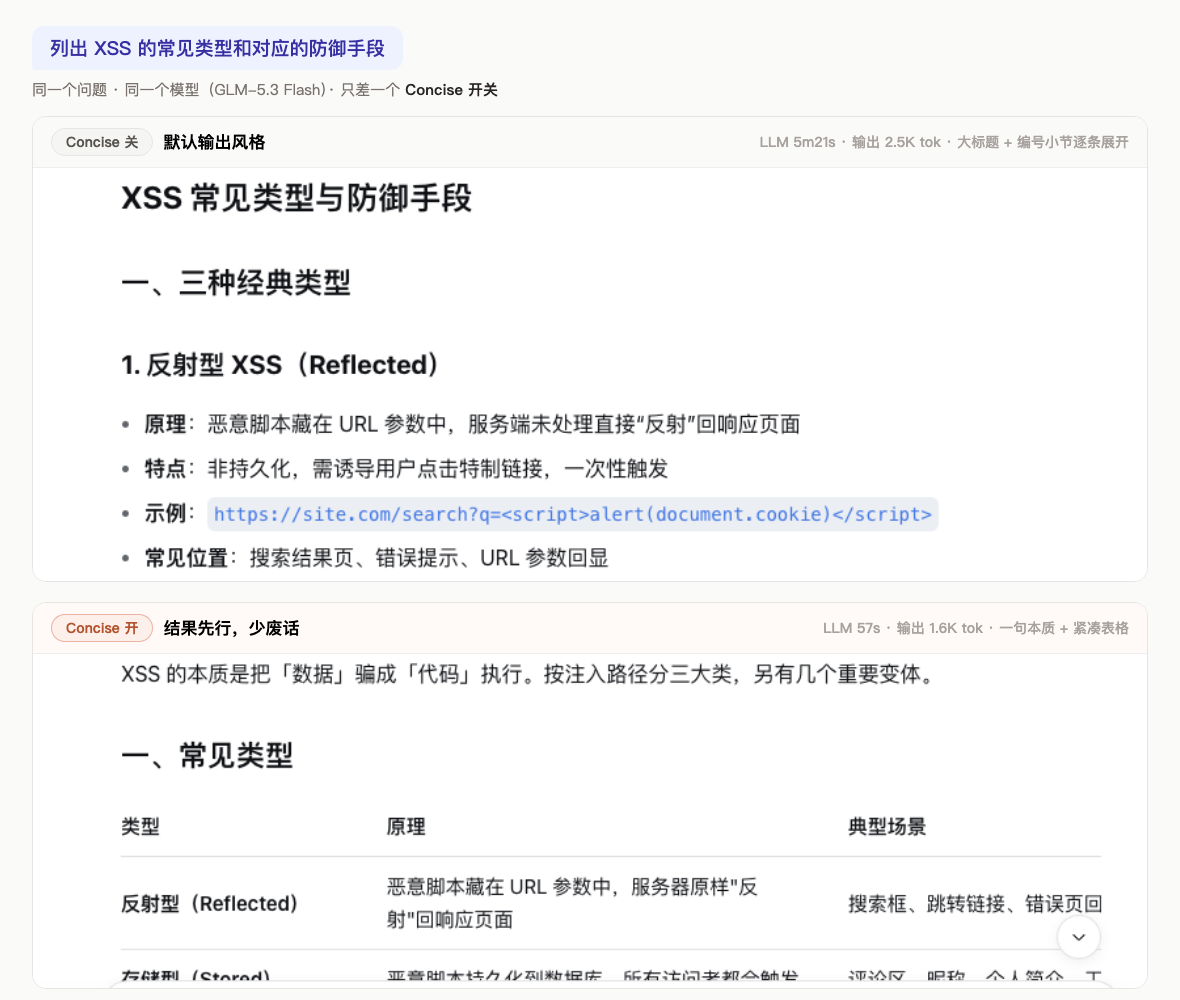
With Concise on you get:
- The answer is the first sentence — no "Sure, let me explain…", no preamble, no narration
- Water is removed, substance is not — commands, paths, risks, and next steps survive verbatim; what goes is recap, boilerplate closers, decorative sections
- Work depth unchanged — investigation, verification, and double-checking happen exactly as before (it's written into the injected prompt)
- Long sessions save tokens — the preamble and recaps you skip every turn add up
In one line: the answer didn't get smaller — the filler is gone.
30-second start
- Install, refresh the page
- Find the prompt-enhancer pill (
✦ 标准/轻量, dsh-improve-prompt) in the composer tool row — the● Concisetoggle sits immediately LEFT of it (switch side hugging the pill), with the prompt-enhancer itself left of the model picker (without improve-prompt installed, Concise hugs the model picker's left side) - Click it; the next reply follows the new style. Orange = on, grey = off
The toggle is per-session: turning it on here doesn't touch your other sessions (new sessions start off; set defaultEnabled: true to change that).
Features
- One-click toggle (collapsed) immediately left of the prompt-enhancer button (row order: Concise → prompt-enhancer → model picker): only the switch shows by default, pinned against the pill — hover or keyboard focus expands the Concise label leftward with the right edge pinned, never shifting neighboring controls
- Plain-language digest card: with Concise on, EVERY final reply opens with an engineering-blueprint card (intermediate step narration exempt) (faint grid + corner ticks + monospace 1.18em, dark text on light, works in both themes) — the rule is issued unconditionally and re-injected on every model assembly — 2-3 plain sentences restating the conclusion with key words bolded; it only restates what the body already says; selecting text inside copies it on mouse-up (header flashes COPIED ✓; this plugin's fork extension beyond upstream Concise); since 0.11.0 the digest writing style fuses caveman × humanizer essentials — the first sentence IS the conclusion (never background or process recap), telegraphic density (facts and numbers only), and no AI-tell filler (empty-summary phrases, rule-of-three parallelism, not-X-but-Y framing, vague attribution, inflated significance) — prompt-text only, card rendering and interactions untouched
- Per-step pre-generation contract reminder (0.11.2): via the host agent/pre-step channel, a one-line transient digest-contract reminder is appended as the LAST message of every LLM request (not persisted, not in transcripts, zero accumulation; main sessions only) — it counters digest misses caused by attention decay across long multi-step tool loops under a huge system prompt (measured root-cause fix for audit-report/table-shaped replies)
/concisecommand in the slash menu and CLI sessions:/concise,/concise on|off,/concise status(parity with Claude Code's/output-style)- Headless/CLI sessions: the style injection and digest card work there too (without a web server only the local HTTP API degrades — use the
/concisecommand) - Custom style: a non-empty
~/.dsh/dsh-concise/style.mdoverrides the built-in style text, effective on the next assembly (parity with/output-style:new) - Claude's Concise style: results first, no preamble, no narration, no filler closers
- Same work depth: only reporting is compressed — never the rigor
- Effective on the next turn via a dynamic system-prompt section (no restart, no session reload)
- Per-session scope: the toggle only affects the current session's new replies — sessions stay independent (new sessions default off, configurable via
defaultEnabled) - Persistent: per-session state survives restarts (atomic writes)
- Auto re-sync: the button polls lightly every 15 s (visible tab only) plus on focus/visibility, so
/concise, API, or other-tab changes are reflected without reload - Clear visual state: Claude-orange aurora gradient track with breathing glow when on, neutral glass when off; sheen sweep on hover and springy press feedback (all motion off under
prefers-reduced-motion) - Accessible:
aria-pressedtoggle semantics, zh/en localized tooltip - Multi-tab sync via a custom DOM event
- Precise placement: anchors immediately left of the prompt-enhancer entry (
div.dip-root), whose own spot stays left of the model selection buttons; without improve-prompt it anchors left of the model button (the official right-slot actually renders left of the model button, which this plugin treats as its placement zone) - Graceful degradation when the model seat cannot be found
- Clean uninstall: section, route, host command, styles, and client registration all removed
Usage
Example (real output, toggle on, asked "explain HTTP 302 in one sentence"):
HTTP 302 is a redirect status code indicating the requested resource has temporarily moved to the URL in the Location header; the client should re-issue the request there while the original URL remains valid (unlike 301, search engines do not transfer ranking).
Scriptable local API:
curl http://127.0.0.1:3080/dsh-concise/api/state   # → {"enabled":false}
curl -X POST http://127.0.0.1:3080/dsh-concise/api/toggle  # → {"enabled":true}
curl -X POST -H 'content-type: application/json' -d '{"enabled":true}' \
  http://127.0.0.1:3080/dsh-concise/api/set          # → {"enabled":true}
Slash command (also works in CLI sessions):
/concise          # toggle
/concise on|off   # explicit set
/concise status   # state + style source (built-in / custom)
Custom style: put your own text in ~/.dsh/dsh-concise/style.md to fully replace the built-in style text — saved edits apply from the next model assembly; delete the file to restore the built-in.
How it works
| Layer | Mechanism |
|---|---|
| Prompt injection | systemPrompt.section({ name: 'dsh-concise:style', order: 40 }) with a function-valued text; disabled renders as an empty string and is dropped |
| Host command | commands.register({ name: 'concise' }) — /concise [on|off|status], listed in the slash menu automatically |
| Custom style | $DSH_HOME/dsh-concise/style.md overrides the built-in text when non-empty; mtime-cached per assembly |
| Toggle API | webServer.register prefix route /dsh-concise/api: GET /state, POST /toggle, POST /set (loopback only) |
| UI placement | client module anchors in the conversation.input.right slot and portals the button left of the prompt-enhancer entry (or left of the model seat when absent), kept in place by a MutationObserver |
| Per-session state | $DSH_HOME/dsh-concise/state.json: default + per-session overrides (500-entry LRU), atomic tmp+rename write |
| State sync | per-session dsh-concise:change DOM event on toggle + 15 s light polling (visible tab) + focus/visibility refetch |
| Digest rendering | the style text asks for a > **摘要:** blockquote on final replies (intermediate steps exempt, plus a tail reminder section); the client watches the message DOM (subtree + rAF batching) and upgrades blockquotes prefixed 摘要: or the legacy 说人话: to an engineering-blueprint card (faint grid via ::before brightening on hover, corner brackets ::after drawing in on mount, monospace 1.18em, selection-copy interaction, concept assets/style-digest-v07e.png); original: a warm-paper amber card (gradient border + gradient label + corner glow, theme-independent); removed cleanly on uninstall |
Use cases
Daily Q&A and study notes · code-review verdicts · bug triage reports · weekly updates · architecture decisions · ops runbooks · long multi-turn sessions · team-wide style consistency · per-stage style switching in automation pipelines.
License
Comments
Comments live in GitHub Discussions. Sign in with GitHub to post or react.