
Install
Inside DeepSeek Harness, with dsh-market
dsh plugin --profile web add dshmarket
Or from the command line
dsh plugin --profile web add dsh-remote
Installing runs third-party code with your own permissions — it can read your files, use your credentials and reach the network. Review the source first, and pin a commit (github:owner/repo#sha) when you can.
Screenshots
README
English · 中文
dsh-remote
Maintained by @flymysql · Homepage · Usage stats · Blog · Discussions · Issues · 中文说明
Remote-work assistant for DeepSeek Harness (DSH).
Manage several SSH machines, then pick a remote workspace (or a local one) and let the agent operate right there without leaving the harness — listing files, reading code, running builds & commands over the remote host, and keeping that remote directory mirrored into a real local workspace object.
The harness Web UI intentionally binds 127.0.0.1 (the CLI rejects --host 0.0.0.0 for safety). This plugin goes the other way: you connect out to the machines you maintain, pick a workspace, and work in it through the normal DSH workspace + agent fs flows — no changes to dsh-workspace or the harness core.
Data collection / telemetry
One anonymous heartbeat per launch (at least 6 hours apart), used only to measure usage: de-duplicated daily active installs, the version actually running, and platform distribution. npm download counts are release-driven and include mirrors/crawlers, and GitHub clones include CI, so neither can answer that.
Exactly five fields are sent: idHash (a pseudonym, HMAC-SHA256('dsh-remote/telemetry/v1', installId)), version, platform, arch, node. Not sent: hostnames, usernames, paths, IPs, SSH hosts/ports/keys, your machine list, session content. The raw installId (<DSH_HOME>/.dsh-remote-install-id) never leaves your machine — only its HMAC is transmitted.
The heartbeat is fire-and-forget: it never blocks loading and failures are ignored.
live usage stats · plugin homepage
Screen previews
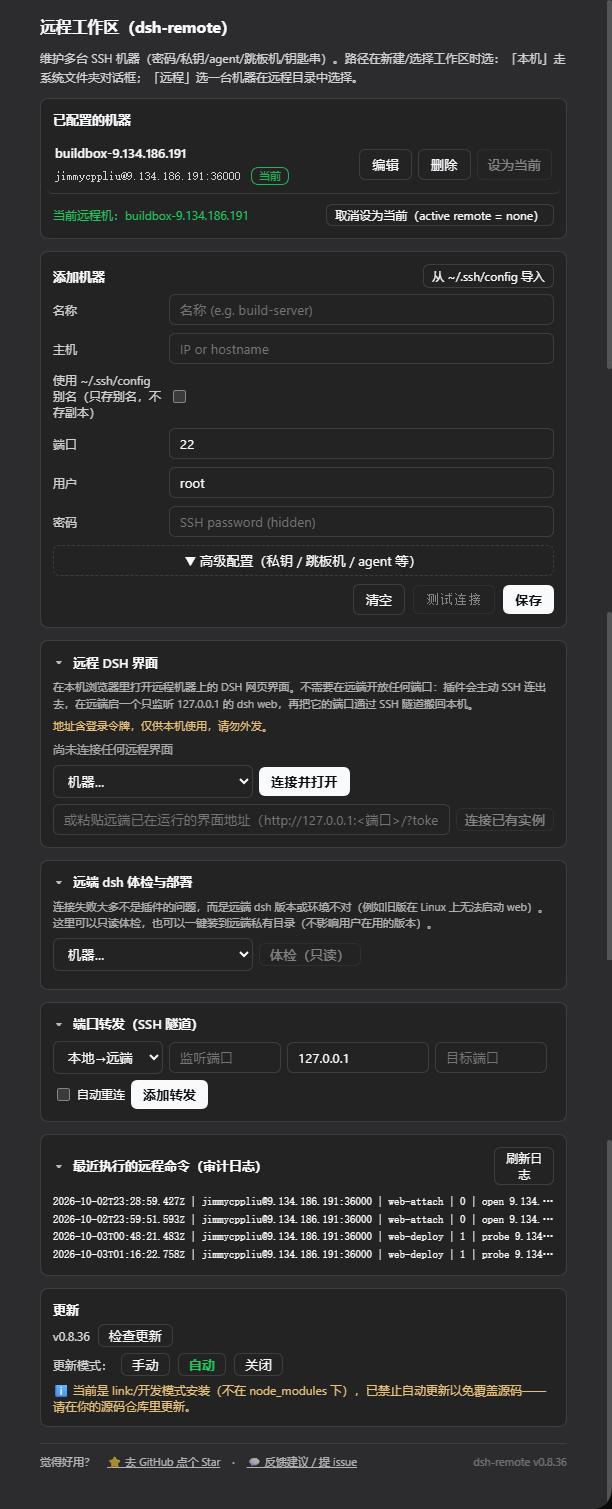
Settings → 远程工作区 — machine list, advanced config (key / jump host / agent), connection check, port forwarding, audit log, update:
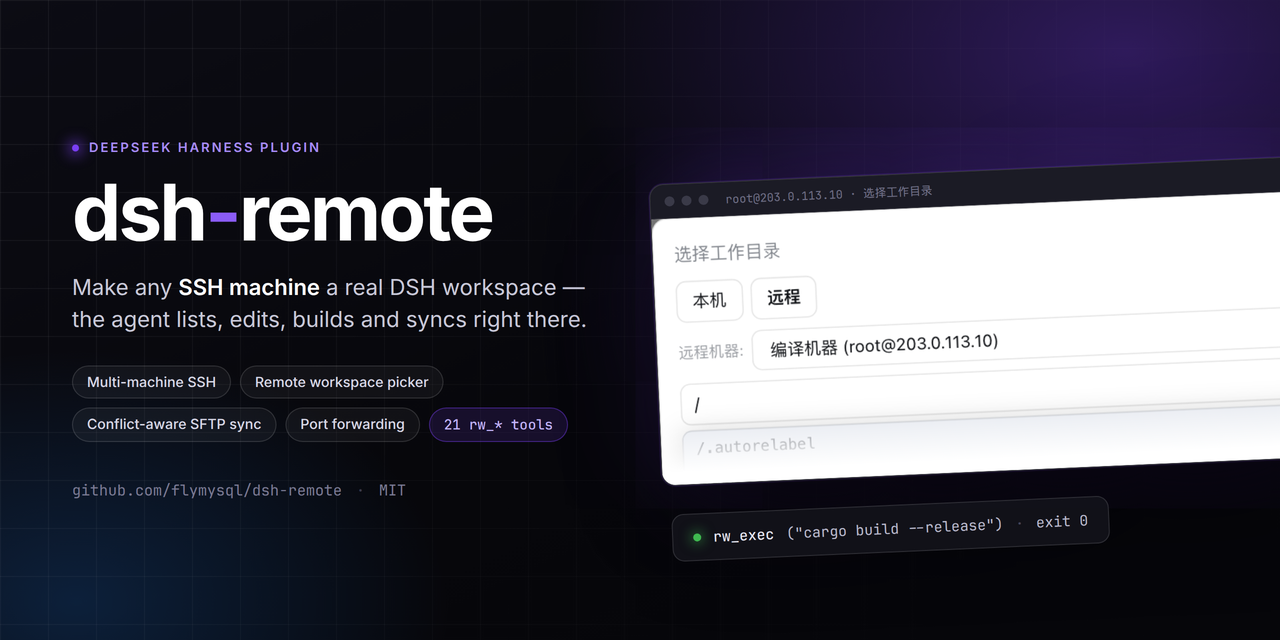
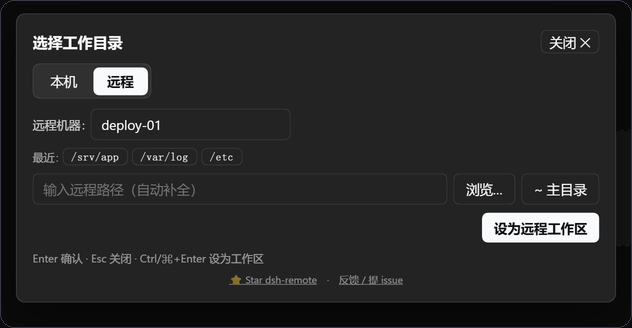
The native "Add workspace" flow — a centered modal with two tabs, opening on Local; here switched to Remote:
- The path field autocompletes live; on Windows hosts the root shows a multi-drive view; the floating browser fills the field without committing.
- On confirm a real local mirror is created and adopted by the harness, kept in sync over SFTP; the choice persists on the machine.
Features
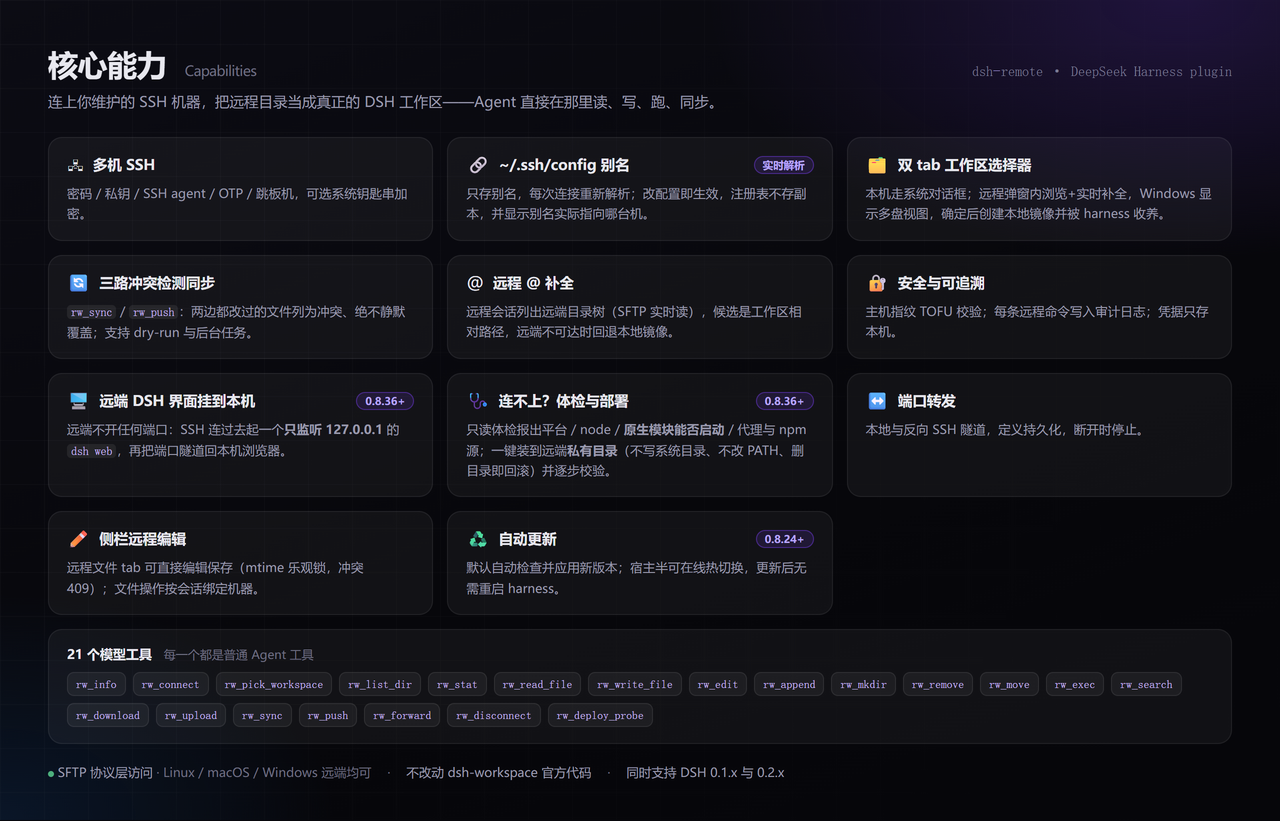
The image above is the overview. What follows is only what the image does not make obvious.
Workspace picker (fills the native "Add workspace" flow) — Local uses the system folder chooser; Remote browses inside the modal:
- The path field autocompletes live; on Windows hosts the root shows a multi-drive view; the floating browser fills the field without committing.
- On confirm a real local mirror is created and adopted by the harness, kept in sync over SFTP; the choice persists on the machine.
Settings (machine list, connection check, port forwarding, audit log, update mode):
The rest:
- 20 model tools (listed so they can be copied or searched):
rw_info,rw_connect,rw_pick_workspace,rw_list_dir,rw_stat,rw_read_file,rw_write_file,rw_edit,rw_append,rw_mkdir,rw_remove,rw_move,rw_exec,rw_search,rw_download,rw_upload,rw_sync,rw_push,rw_forward,rw_disconnect. - Cross-platform remotes — all file access is SFTP-protocol-level (no POSIX shell), so Linux/macOS/Windows remotes all work.
- Windows remotes — the platform is auto-detected and commands go through
bash -sover stdin, so quoting and backslash escaping are never an issue (config.shellcan pin a path ornativedisables wrapping);C:\Users\devand/c/Users/devare both accepted. - Async long tasks —
rw_sync/rw_pushwithasync: truereturn ataskIdwith progress/result/cancel. - Data lives under the harness home — machines and mirrors follow
$DSH_HOME; pre-0.6 data migrates automatically on first run. - No
dsh-workspacecore changes — everything ships as a normal plugin.
Install
DSH version compatibility
Runs on both the 0.1.x and 0.2.x DSH lines. DSH validates every @deepseek-ai/dsh-* peer range before importing a bundle and drops the whole bundle when any range does not match (no settings panel, no rw_* tools):
dsh: skipping profile bundle "dsh-remote": Error: Plugin dsh-remote@… is incompatible …
A caret on 0.x is locked to that minor line (^0.1.x cannot admit 0.2.x, and vice versa), so since 0.8.29 the ranges are cross-line intervals: >=0.1.0-rc.6 <0.3.0. If you are below 0.8.29, upgrade the plugin before you upgrade DSH.
Official Desktop compatibility (experimental)
A compatibility path for the official DeepSeek Harness Desktop, tested against the 0.1.5-rc.2 Host transport; it does not replace the harness core or require a listening Web server:
- SSH settings and the directory picker use
/api/dsh-remote/*over the Desktop'sdsh-app:carrier (registered onctx.connection.fetch). - A native Remote Files entry uses
sidebarRightTabs, giving remote files session-scoped resource addresses instead of sending remote paths to the local Files viewer. dsh-better-sidebaris not bundled; official Desktop uses the native right sidebar.
Verified: host startup, IPC requests, real SSH read-only connect/list/read, and per-session routing (sidebar /ls /read /write /fs with sessionId). The native file-tab GUI, failed/cancelled dialogs and non-macOS hosts remain experimental. The Desktop installer may need an explicit policy for the optional ssh2 / cpu-features build scripts.
Published Web bundle
dsh plugin add dsh-remote
Since v0.8.18 it installs and mounts only itself; the Web sidebar (dsh-better-sidebar) is optional. Install it separately if you want the Web remote file explorer/editor — without it the rw_* tools, settings UI, sync, audit log and port forwarding all still work.
Upgrading from 0.7.2–0.8.17: the embedded sidebar goes away; any old profile override for
id: dsh-remote-sidebarcan be removed.
(or npm install dsh-remote + add - id: dsh-remote / name: dsh-remote in cordis.patch.yml).
Quick start
- Add a machine — Settings → 远程工作区 → host/port/user + key or password → set it current.
- Open a workspace — click Add workspace in the sidebar / conversation:
- Local → system folder chooser (or type a path) → local workspace. Falls back to the in-app browser when no OS dialog exists.
- Remote → choose the machine → browse to a remote directory (or type
/path) → "设为远程工作区" ⇒ a local mirror workspace is created and adopted.
- Work with the agent — treat it like any workspace:
rw_read_file/rw_write_file/rw_edit/rw_exec/rw_search/rw_sync/rw_push/rw_forward(full list above).
Remote context is session-scoped: the "Remote workspace" system-prompt section appears only when the current session's workspace is a remote mirror; local sessions are unaffected and the model will not call
rw_*on its own.
CLI defaults (optional)
Provide a default machine in cordis.patch.yml:
# Example only — use values for your own machine.
- id: dsh-remote
  name: dsh-remote
  config:
    host: 203.0.113.10   # or your real host / hostname
    port: 22
    username: dev
    privateKeyPath: ~/.ssh/id_rsa
    # or password: '…'
    workspace: ~/project
If host is empty the plugin starts disconnected and you configure machines in the UI.
CLI quick reference
Installing and driving DSH may live in different shells, so both the dsh binary and the npx form are shown. Always tell DSH which profile to use with --profile <name> (usually web).
# install the bundle into a profile (npm is pulled by pnpm; recommended)
dsh plugin --profile web add dsh-remote
# same but when `dsh` is not on PATH (e.g. Windows PowerShell inside a repo)
npx --yes @deepseek-ai/dsh plugin --profile web add dsh-remote

# confirm it is installed wire
dsh plugin --profile web list
npx --yes @deepseek-ai/dsh plugin --profile web list

# start the web surface (reload profile; the plugin activates on boot)
dsh --profile web
npx --yes @deepseek-ai/dsh --profile web   # http://127.0.0.1:3080

# use a local checkout instead of the npm version (dev iteration)
npx --yes @deepseek-ai/dsh plugin --profile web add /path/to/dsh-remote
npx --yes @deepseek-ai/dsh plugin --profile web remove dsh-remote   # back to release
After a successful start, Settings → 远程工作区 appears and the "Add workspace" flow gains the 本机 / 远程 tabs (screenshots above).
Development (sandbox, not product)
Iterate in the sandbox — hand-editing a product profile is reverted by the plugin manager on reinstall:
scripts/dev-run.sh --restart   # start / restart the isolated sandbox
scripts/dev-run.sh --stop      # stop it
scripts/dev-run.sh --status    # is it running?
- The sandbox runs its own DSH instance (
dev-harness/harness), serving onhttp://127.0.0.1:50599. - Host-half (
lib/index.js) changes need--restart; client-half (lib/client.js) changes need only a page refresh. - The script hardlink-copies
lib/into the sandbox rather than symlinking — a symlink breaks@deepseek-ai/*resolution. - Before committing:
node check.mjs(framework-constraint gate) andnpm test;scripts/boot-smoke.shproves the plugin still starts. - Full rules live in
scripts/dev-standards.md.
Deploying to a product profile is a separate, explicit action (./sync.sh) for releases only.
Configuration
| Key | Type | Default | Meaning |
|---|---|---|---|
host |
string | '' |
default SSH host (else start disconnected) |
port |
int | 22 |
default SSH port |
username |
string | '' |
default SSH user |
password |
string | '' |
default SSH password (non-empty overrides key) |
privateKeyPath |
string | '' |
private key path (used only when explicitly provided) |
passphrase |
string | '' |
passphrase for an encrypted private key |
workspace |
string | '' |
default remote workspace path |
shell |
string | '' |
remote command terminal strategy: ''=auto-detect (Git Bash on Windows remotes), 'git-bash'=prefer Git Bash, 'native'=never wrap, anything else=explicit bash.exe path (e.g. C:\Program Files\Git\bin\bash.exe) |
commandTimeoutMs |
int | 20000 | per remote command timeout |
connectTimeoutMs |
int | 15000 | SSH connect timeout |
maxOutputChars |
int | 200000 | cap on captured stdout/stderr per remote command |
maxFileBytes |
int | 52428800 | skip mirroring/reading files larger than this (0 = no cap) |
hostKeyMode |
string | accept-new |
host-key policy: accept-new (TOFU), verify (reject unknown hosts), off (skip) |
useAgent |
bool | false |
authenticate via the OpenSSH agent (SSH_AUTH_SOCK) |
keyboardInteractive |
bool | false |
allow keyboard-interactive auth (OTP/MFA) with the configured password |
proxy |
object | — | jump host: { host, port?, username?, password?, privateKeyPath? } |
autoPush |
bool | false |
auto-push edited mirror files back to the remote (watcher, debounced) |
auditLog |
bool | true |
append executed commands to $DSH_HOME/remote-workspaces/audit.log |
encoding |
string | utf-8 |
text encoding for remote file reads/writes (e.g. gbk) |
fileReference |
bool | true |
remote @ completion: in a remote session @ lists the remote tree over SFTP (issue #39); off → only the local mirror |
fileReferenceMaxResults |
int | 20 |
max @ candidates rendered for one query |
fileReferenceMaxEntries |
int | 3000 |
max entries retained in one remote workspace's @ index |
fileReferenceExcludedDirectories |
string[] | [.git, node_modules, dist, build, out, coverage, target, .next, .nuxt, .turbo, .venv, __pycache__, .pytest_cache, .mypy_cache, .gradle] |
directory basenames the remote @ traversal skips |
fileReferenceTimeoutMs |
int | 4000 |
wall-clock budget for one remote @ index pass (on expiry the partial index answers rather than making the caret wait) |
updateMode |
string | auto |
self-update behaviour: auto checks npm on load and every 6h and applies a newer release; manual only checks when asked; off disables checks. Default changed to auto in 0.8.27 — safe because 0.8.24 added the host-half hot swap |
updateCheckIntervalMs |
int | 21600000 (6h) | how often auto mode checks npm (floor 60000) |
updateAutoReload |
bool | true |
hot-swap the host half after an update lands; false defers it to the next process start and the panel reports pendingReload |
The authoritative list is the
Configschema inlib/index.js; this table mirrors it.
FAQ / troubleshooting
@ lists remote files but the built-in read tool cannot open them — the harness's own file tools see the local mirror, which stays empty until rw_sync downloads it. Read remote files with rw_read_file or the sidebar remote tab.
Host key changed — /remote forget-key (or Settings → machine → trust again).
"Authentication failed" — check the username/password/key path; fill in the passphrase for an encrypted key; enable keyboard-interactive when the host requires OTP.
Cannot reach an internal machine — set a jump host (or add the bastion as its own machine first).
rw_sync/rw_push reports conflicts — files changed on both sides are skipped and listed (never silently overwritten); merge manually and retry, or pass force=true.
Windows remotes — everything goes over SFTP, no POSIX shell needed; read Chinese files with encoding=gbk.
A directory is missing from the mirror — the default ignore rules skip .git/node_modules and similar; adjust $DSH_HOME/remote-workspaces/.dsh-remote-ignore (gitignore syntax).
Saving a remote file returns 409 — the remote file changed after you opened it; re-read and edit again.
How are passwords stored? — tick "encrypt password": macOS Keychain / Windows DPAPI / Linux secret-tool (libsecret); falls back to plaintext when unavailable.
The plugin vanished after a DSH upgrade — DSH's compatibility check dropped the bundle; upgrade to 0.8.29+ (see "DSH version compatibility" above).
Safety
Giving the plugin a machine's credentials lets the agent run shell commands as your user on that host — only add machines you trust. Passwords live in a local file (or the OS keychain); treat them as sensitive. With auditLog on, every command is recorded.
License
MIT
Contributing
Contributions are welcome — see CONTRIBUTING.md. Questions, setups and "is this supported?" go to Discussions; reproducible bugs go to Issues.
Thanks to everyone who has landed a change here (merged PRs in parentheses):
@dahaipeng (#31) · @YiHui-Liu (#28) · @nekomona (#24) · FoolishWiser (#17) · @jace1cch (#16) · @Minggle (#10) · 4FMTWRV (#6) · glzhangzhi (per-session SSH pool fix)
Changelog
See CHANGELOG.md.
Comments
Comments live in GitHub Discussions. Sign in with GitHub to post or react.