
Install
Inside DeepSeek Harness, with dsh-market
dsh plugin --profile web add dshmarket
Or from the command line
dsh plugin --profile web add github:etony668/dsh-balance
Installing runs third-party code with your own permissions — it can read your files, use your credentials and reach the network. Review the source first, and pin a commit (github:owner/repo#sha) when you can.
Screenshots
README
English | 中文
DSH Balance plugin (dsh-balance)
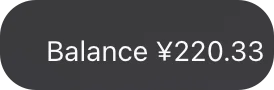
A tiny DeepSeek Harness plugin that shows your DeepSeek API balance in the sidebar footer, right beside Settings.
- Placed beside Settings — registers the official
sidebar.footer.actionseat (sidebar foot, next to the Settings row), auto-adapting to the collapsed 56px rail (dot only) and staying inside the sidebar. - Live balance — reads the
DEEPSEEK_API_KEYalready stored by DSH in~/.dsh/.credentials.yaml, queries the officialapi.deepseek.com/user/balanceendpoint, and caches the result for 60 s. - Low-balance warning — turns red with a ⚠ marker when the available balance drops below the threshold (default ¥2, configurable in code).
- Details on hover — granted / topped-up breakdown, currency and the last successful update time; click to refresh.
- Bilingual + theme-aware — follows the system language (zh/en) and adapts to light/dark themes through DSH theme tokens.
- Local-first — the key is read from your own machine, the balance is only passed between the DSH backend and your browser. Nothing is written to disk or reported anywhere else.
Installation
Option 1: One command (recommended)
dsh plugin --profile web add @etony668/dsh-balance
Option 2: Clone from GitHub (backup)
git clone https://github.com/etony668/dsh-balance.git
cd dsh-balance
./install.sh
Then refresh the DSH page (or restart DSH). The balance badge appears in the sidebar footer, beside Settings.
Requirements
- DSH stores your DeepSeek key in
~/.dsh/.credentials.yaml(set it in Settings → Models if you have not). Without it the badge shows “Balance unavailable — API key not found”.
Repository layout
index.js        package root entry (loader resolves <pkg>/index.js)
lib/index.js    host half: reads the credential, queries the balance API, caches
lib/client.js   browser half: registers the conversation.composer.dock entry
cordis.patch.yml bundle patch used by `dsh plugin add`
install.sh      one-click install (macOS/Linux bash)
reinstall.sh    reinstall into the current runtime + profile fallback link
License
Comments
Comments live in GitHub Discussions. Sign in with GitHub to post or react.