
Install
Inside DeepSeek Harness, with dsh-market
dsh plugin --profile web add dshmarket
Or from the command line
dsh plugin --profile web add dsh-git-graph
Installing runs third-party code with your own permissions — it can read your files, use your credentials and reach the network. Review the source first, and pin a commit (github:owner/repo#sha) when you can.
Screenshots
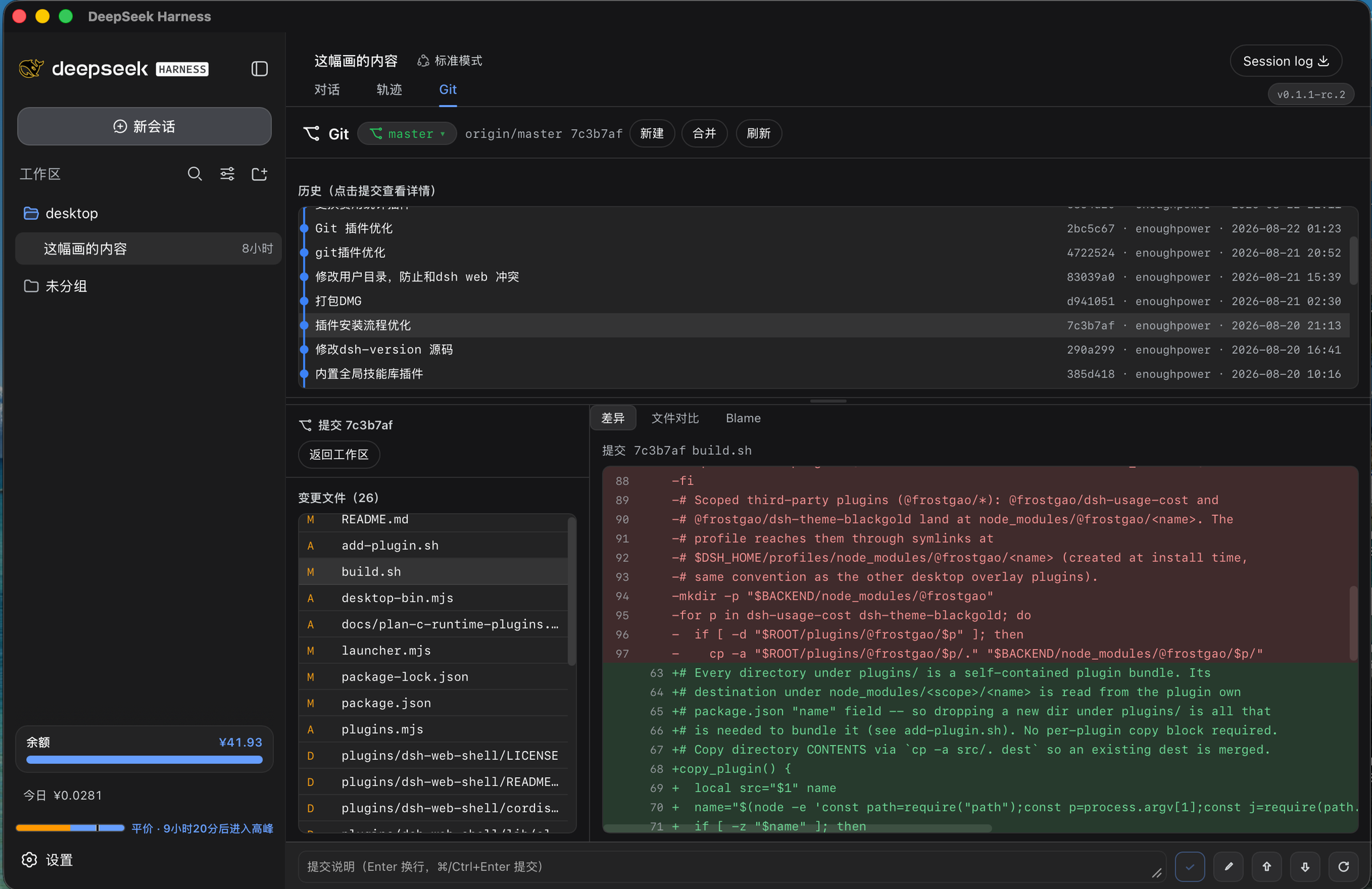
README
A DeepSeek Harness plugin that integrates a Git view.
dsh-git-graph packages Git operations (status / branches / diff / commit / push-pull /
commit-graph / blame) into a single installable dsh plugin. The host half registers a /git JSON API;
the browser half adds a Git tab to the session area, opening a panel bound to the current session's
working directory (branch bar + commit graph + changed files + diff view). The UI copy is bilingual
(Chinese / English), following the dsh locale service.
Mobile: the Git tab is also available on phones (via dsh-pocket); on narrow screens the panel auto-stacks to a single column (history → changed files → diff), with a compact header and bigger touch targets. Wide screens keep the three-column layout.
Features
Git operations (/git)
- Workspace status:
statusreturns branch info plus the staged / unstaged / untracked split, each file annotated with its porcelain status code (XY). - Branch management: list local & remote branches (
branches), switch (switchBranch), create (newBranch), delete (deleteBranch), rename (renameBranch), merge (merge, optional--no-ff). - Unified branch/tag picker: one top-bar dropdown groups local branches, remote branches and tags
(
<optgroup>); picking a branch runsswitchBranch, picking a tag runsswitchTag(a detached-HEAD checkout).tagsannotates the checked-out tag, and the capsule reflects the current ref (the tag name instead ofHEAD (no branch)while on a tag). When the panel points at the plugin's own repository, picking a tag asks for confirmation first (so the running frontend is not silently swapped for an older release); branch picks are not gated, so getting back onto a branch stays one click. - Diff & commit:
diff(worktree or staged),stage/unstage/discard/remove,commit(selected files or all),amend. - History & blame:
log(oneline list),graphLog(commit graph with parents),fileLog(per-file history),blame(line-by-line attribution),show/showStat/showFiles/showFileDiff(commit details & per-file diff),catFile(read a ref or a worktree file). - Remote & tags:
push/pull/fetch(optionalprune),remotes,tags,conflicts.
Large diffs are truncated to 2 MiB so huge changes cannot freeze transport or the frontend renderer.
Screenshot
Compatibility
| Item | Requirement |
|---|---|
| dsh (host) | >= 0.1.0-rc.5 |
| Node.js | >= 20 |
| git | >= 2.28 (needed for git init -b; day-to-day branch/merge/log works on 2.x) |
| Platform | host (Node) + web (browser) |
Installation
This is a bundle plugin (package.json declares dsh.bundle + cordis.patch.yml and
dsh.client), so both the host layer and the browser layer are activated automatically once installed.
# local directory
dsh plugin --profile web add /path/to/dsh-git-graph

# or a published npm package
dsh plugin --profile web add dsh-git-graph
Usage
- Install the plugin and open a workspace (a repository directory) in a session.
- A Git tab appears in the session area (next to the trajectory view); click it to open the panel.
- Inside the panel: branch bar + commit graph at the top; select a commit to inspect changes / diff; select worktree files to stage / commit / discard.
- The panel binds to the "current session's working directory".
JSON API
Every request is POST with content-type: application/json. Uniform response:
// success
{ "ok": true, "value": { /* result */ } }
// failure
{ "ok": false, "error": { "code": "git-error", "message": "..." } }
/git operations
| op | request | notes |
|---|---|---|
status |
{ path } |
branch + staged / unstaged / untracked files; self flags the plugin's own source tree |
staged |
{ path } |
staged-only (index vs HEAD) files |
branches |
{ path } |
local/remote branches (current, track, ahead/behind) |
switchBranch |
{ path, name } |
switch branch (remote names fall back to the local short name) |
switchTag |
{ path, name } |
switch to a tag (detached-HEAD checkout) |
newBranch |
{ path, name, base?, switch? } |
create a branch, optionally switch to it |
deleteBranch |
{ path, name, force? } |
delete a branch (force → -D) |
renameBranch |
{ path, name, oldName? } |
rename current or a named branch |
merge |
{ path, name, noFf? } |
merge a branch; conflicts: true on conflict |
diff |
{ path, file?, staged? } |
diff (truncated to 2 MiB) |
stage |
{ path, files[] } |
stage the given files |
unstage |
{ path, files[] } |
unstage the given files |
discard |
{ path, files[] } |
discard worktree changes |
remove |
{ path, files[] } |
physically delete (incl. untracked) |
log |
{ path, n? } |
recent commits |
graphLog |
{ path, n? } |
commit graph (parents, author, date, refs) |
fileLog |
{ path, file, n? } |
per-file history |
blame |
{ path, file } |
line-by-line attribution |
catFile |
{ path, file, ref?, workingTree? } |
read a ref or a worktree file |
commit |
{ path, message, files[]? } |
commit selected files (or all by default) |
amend |
{ path, message? } |
amend the last commit |
show |
{ path, hash } |
commit patch |
showStat |
{ path, hash } |
commit metadata + stat + patch |
showFiles |
{ path, hash } |
files changed by a commit |
showFileDiff |
{ path, hash, file } |
per-file diff inside a commit |
push |
{ path, branch?, setUpstream? } |
push |
pull |
{ path, rebase? } |
pull (--ff-only) |
fetch |
{ path, prune? } |
fetch remotes |
remotes |
{ path } |
remotes (fetch/push URL) |
tags |
{ path } |
tags; current is the checked-out tag (non-empty only on a detached HEAD) |
conflicts |
{ path } |
conflicting files |
Repository layout
dsh-git-graph/
├── package.json        # plugin manifest: dsh.bundle + dsh.client + publish metadata
├── cordis.patch.yml    # host activation row (id=git-graph)
├── lib/
│   ├── index.js        # host half: /git route + exported pure helpers (testable)
│   └── client.js       # browser half: Git tab UI (precompiled single-file bundle)
├── test/
│   ├── parse.test.js       # pure-function unit tests (porcelain / branch header)
│   └── integration.test.js # real repo + HTTP end-to-end smoke test
├── .github/workflows/  # CI + npm publish (provenance)
├── README.md           # Chinese docs
├── README.en.md        # English docs
└── LICENSE             # MIT
Development
# run tests (Node's built-in test runner, no extra deps)
npm test

# or a single file
node --test test/parse.test.js
node --test test/integration.test.js
test/integration.test.jsreally runsgit initon a temp repo, bootsapply(), and drives/gitover HTTP as an end-to-end smoke test, cleaning up the temp dir afterwards. It requiresgitonPATH.lib/client.jsis a precompiled artifact (esbuild single-file bundle), reusing the already-built bundle from the desktop build; both halves register under the same package name in the dsh client module system (window.__ModuleLoader__.load({ id: "dsh-git-graph", factory })).- CI (
.github/workflows/): runs tests on push/PR (Node 20/22); pushing av*tag publishes to npm with provenance (requires anNPM_TOKENsecret; the tag version must match package.json).
Security
- Every
/gitoperation runs scoped to the requestedpathdirectory, and never shells out through a string (it usesexecFilewith an argument array). - Request body capped at 1 MiB,
gitoutput buffer at 64 MiB, diffs truncated at 2 MiB, so huge content cannot overwhelm the process.
License
See CHANGELOG.en.md for release notes.
Comments
Comments live in GitHub Discussions. Sign in with GitHub to post or react.