
Install
Inside DeepSeek Harness, with dsh-market
dsh plugin --profile web add dshmarket
Or from the command line
dsh plugin --profile web add dsh-prompt-stash
Installing runs third-party code with your own permissions — it can read your files, use your credentials and reach the network. Review the source first, and pin a commit (github:owner/repo#sha) when you can.
README
Source compatibility update: 0.3.2 targets DSH 0.2.0-rc.1. Uses official Config/configForms and composer hooks. Shortcuts persist in profile configuration; stashes retain their existing localStorage key. Attachments and reference chips block plain-text stashing. Keep 0.2.x for older DSH versions.
dsh-prompt-stash

A local prompt-stash plugin for DeepSeek Harness Web. Push unsent plain-text input onto a per-session LIFO stack, handle a quick detour, and safely restore the original prompt afterward.
Prompt Stash is not draft synchronization. DSH already persists the current composer draft; this plugin provides explicit temporary copies that you can stash, restore, and delete.
Features
- Keeps an independent stack for each DSH session, newest first, with up to 10 entries.
- Shows a collapsed stash bar above the composer immediately after stashing; expand it to preview, restore, delete, or clear entries.
- Never silently overwrites non-empty input; restoring requires confirmation to stash the current input first.
- Clears and restores input through the official DSH
inputActions.setDraft()API without manipulating thetextareaor internal stores. - Stashed content stays in the current browser's
localStorage; the shortcut is stored through DSH Host settings and survives reloads and browser changes. - Supports Chinese and English, light and dark themes, keyboard navigation, and a layout that integrates with DSH's native queued-message panel.
- Records a single-key or key-combination shortcut under Settings → Built-in plugins → Prompt Stash; the default is
Ctrl+S.
The current version supports plain text only. Input containing images, attachments, or file references cannot be stashed.
Preview
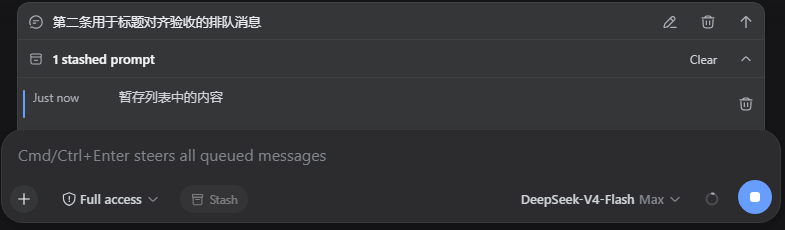
Stashed prompts are collapsed by default. Expand the panel to see the creation time and a two-line text preview, then restore or delete an entry, or clear the current session's stack.
Requirements
- DeepSeek Harness
0.2.0-rc.1 - A Web profile
- Node.js 20 or later (source development only)
Host, settings, style, and slot registration are fail-open boundaries. A conflicting mount disables and logs only that feature instead of propagating the exception into DSH startup.
Installation
Prebuilt packages are available from npm and GitHub Releases. Restart DSH after installation. Desktop users can install the package name through plugin management; CLI users should select their actual profile, such as
webordesktop.
npm registry (recommended)
Install directly into the DSH Web profile:
dsh plugin --profile web add dsh-prompt-stash
The npm package contains prebuilt artifacts, so installation-time build scripts are not required. Restart DSH Web after installation.
Update to the latest version:
dsh plugin --profile web update dsh-prompt-stash
GitHub Release tarball (fallback)
Download dsh-prompt-stash-0.3.2.tgz from Releases, then install it into the Web profile:
dsh plugin --profile web add ./dsh-prompt-stash-0.3.2.tgz
The tarball also contains prebuilt artifacts. Restart DSH Web after installation.
Local source checkout
git clone https://github.com/Wine-Red/dsh-prompt-stash.git
cd dsh-prompt-stash
pnpm install --frozen-lockfile
pnpm build
dsh plugin --profile web add .
dsh plugin adds the bundle to dsh.profile.bundles in the target profile. You can inspect the resolved configuration before startup:
dsh --profile web --dump-config
The output should contain the dsh-prompt-stash bundle layer and the prompt-stash plugin entry.
Uninstall
dsh plugin --profile web remove dsh-prompt-stash
Uninstalling the plugin does not remove existing dsh.promptStash.v1 data from the browser. To remove it, delete the corresponding localStorage entry from the site's browser data.
Usage
- Write a plain-text prompt in the composer.
- Select Stash in the composer toolbar, or press the stash shortcut while the message composer is focused. The input is cleared and a collapsed stash bar appears immediately above it.
- Enter and send the temporary question.
- Expand the stash bar and select the prompt you want to restore.
- If the composer already contains text, choose Stash current input and restore this item, or cancel.
Successful add and delete operations do not show toast notifications. Error notifications appear only when storage or composer updates fail.
Press the shortcut while the message composer is empty to restore and pop the latest stash. If the restored text remains unchanged, keep pressing the same shortcut to rotate through the remaining prompts from newest to oldest; the current prompt moves safely to the back and appears again after a full cycle. Editing or replacing the restored text exits rotation, so the next shortcut press adds the current content as a new stash and clears the composer. This keeps repeated multi-item stashing available. With only one item in the rotation, pressing again also uses the normal stash-and-clear behavior. The shortcut never restores over whitespace, images, or file references already in the composer.
Configure the shortcut
Open Settings → Built-in plugins → Prompt Stash → Prompt stash, focus the shortcut field, press one key or a key combination, and save. Changes take effect immediately. The default is Ctrl+S; a single key such as F8 is also supported. The shortcut stashes non-empty input and restores the latest stash when the composer is empty; once restored, repeated presses rotate through the remaining stashes. It only runs in the message composer. A printable single-key shortcut consumes that character's normal typing behavior.
Data and security boundaries
- Storage key:
dsh.promptStash.v1 - Settings namespace:
prompt-stashin the profilecordis.patch.yml - Stash scope: the current browser, isolated by
sessionId - Stored data: text, ID, creation and update timestamps, and schema version
- Not stored: image data, attachment contents, file contents, credentials, or environment information
- Stashed content makes no network requests and adds no telemetry; only the shortcut uses DSH's built-in settings transport to the Host
Clearing the site's browser data also removes all stashed prompts.
Development and packaging
pnpm install --frozen-lockfile
pnpm format
pnpm typecheck
pnpm test
pnpm build
pnpm pack
The project follows the official DSH bundle package layout:
dsh.bundle.patchinpackage.jsondeclares the configuration layer.cordis.patch.ymlmounts the plugin by package name.lib/contains the prebuilt runtime entry points and is included in the tarball.- The Host registers the
dsh-prompt-stashsettings namespace; the client registersconversation.input.left,conversation.input.dock, and a keyedsettings.plugin.itementry for that namespace.
See the official DeepSeek Harness documentation for packaging and installation details.
License
DSH 0.2.0-rc.1 compatibility update (2026-09-29)
Supports DSH 0.2.0-rc.1 and retains compatibility declarations for 0.1.7-rc.1 / 0.1.7-rc.2. Host packages are optional peers, not production dependencies, preventing stale core packages from being installed into the profile. Restart DSH after upgrading. Future host versions require compatibility validation.
Comments
Comments live in GitHub Discussions. Sign in with GitHub to post or react.