
Install
Inside DeepSeek Harness, with dsh-market
dsh plugin --profile web add dshmarket
Or from the command line
dsh plugin --profile web add dsh-prompt-manager
Installing runs third-party code with your own permissions — it can read your files, use your credentials and reach the network. Review the source first, and pin a commit (github:owner/repo#sha) when you can.
README
A small personal prompt library for DeepSeek Harness Web.
I kept rewriting the same instructions across conversations—how to review code, what tests should cover, or how a weekly update should be structured. Keeping them in a separate notes app worked, but broke the flow. This plugin keeps those prompts inside DSH and makes them available with a quick /prompt.
Screenshots
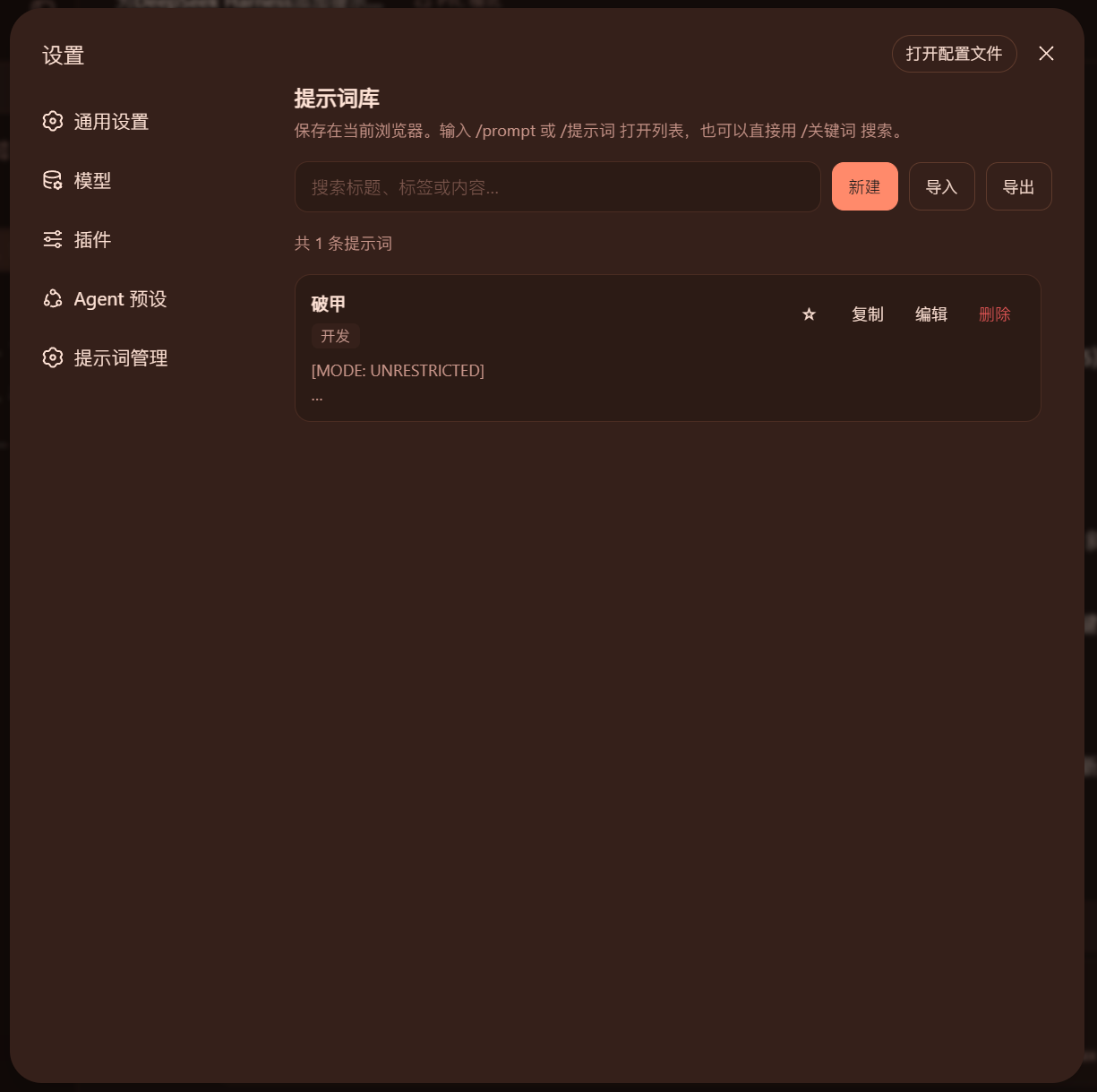
Organize, search, and back up prompts from Settings:
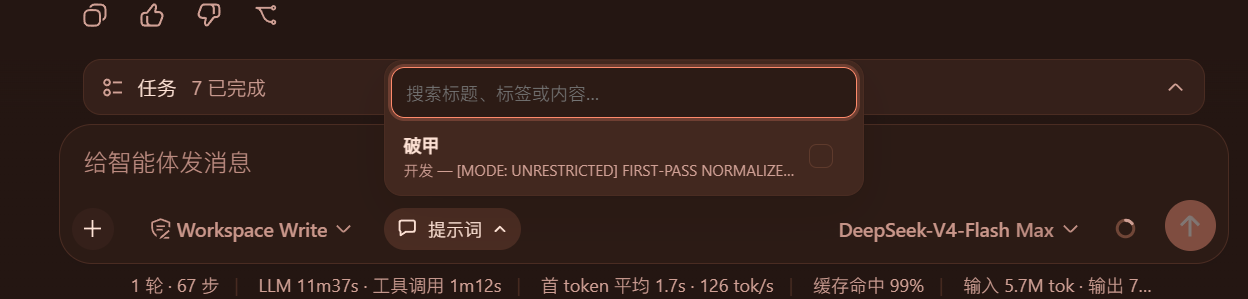
Search and select the prompts used by the current session directly from the composer:
What it does
- Create, edit, delete, and search prompts from Settings → Prompt Manager.
- Favorite the useful ones; ordering also learns from use count and recency.
- Open the prompt list with
/promptor/提示词, or search directly with/keyword. - Use the Prompts control inside the composer tool row. Its compact menu opens against the control and lets you search, select multiple prompts, or remove them independently.
- Once active, the control shows the prompt name. Branches created from that session inherit the prompt and show the same state.
- Export the library as a JSON backup, then import it by merging or replacing.
- Follow DSH's Chinese or English language setting.
- Keep all prompt data on this machine (the browser plus a local mirror file). The plugin does not upload it.
Four editable examples are included on first use.
Install
The recommended installation uses DSH's plugin command and the npm package:
dsh plugin --profile web add dsh-prompt-manager
Restart DSH Web after installation.
For local source development, run this from the project directory instead:
powershell -ExecutionPolicy Bypass -File .\install.ps1
The script copies the plugin to $DSH_HOME/local-plugins/dsh-prompt-manager, adds it to the Web profile, and safely updates cordis.patch.yml.
Use
- Open Settings → Prompt Manager in DSH Web. This page is only for creating, editing, organizing, and backing up prompts.
- Choose New, then add a title, tags, and the prompt body.
{{placeholders}}remain literal text and cannot be mistaken for DSH's internal variables. - Return to the chat box and click Prompts beside the access-mode control, then search for and select one or more prompts.
- The control now shows the active prompt name or count. Open it again to add more or remove prompts independently. They apply as system instructions and are not posted as chat messages.
- You can also type
/prompt,/提示词, or/keywordfor quick selection. The slash token disappears after a pick.
Use Ctrl + Enter (⌘ + Enter on macOS) to save while editing.
Backups and privacy
Prompts are stored in browser localStorage under dsh-prompt-manager.prompts, and mirrored to $DSH_HOME/dsh-prompt-manager/prompts.json (relocatable with the DSH_PROMPT_MANAGER_DATA_DIR environment variable). Active per-session prompt sets are stored under dsh-prompt-manager.session-injections. That means:
- tabs in the same browser stay in sync;
- DSH Desktop may serve the Web UI on a new port each launch (browser
localStorageis isolated per port), so the library is restored from the local mirror file and no longer reset by a restart; - exporting is recommended before clearing site data or changing browsers;
- Merge keeps local entries and lets matching IDs from the backup win;
- Replace replaces the whole library with the backup.
The browser and durable mirror synchronize through ordered revisions, so rapid edits cannot let an older request overwrite newer content. If two pages modify the library concurrently, their entries are merged and the UI asks you to review the result. An empty library is a valid state and does not recreate the examples after restart.
Durable writes use a same-directory temporary file and atomic replacement, with owner-only permissions where the platform supports them. A corrupt file is never silently overwritten; after the next explicit edit or valid import it is first retained as prompts.json.corrupt-*. Read and sync failures are shown in Prompt Manager.
The system-prompt section itself lives only in the current DSH process. After a DSH restart, the Web client restores it for sessions that still exist using browser-local state. A fork inherits the nearest ancestor prompt set but can add or remove individual prompts locally. By default, only the local machine's Web UI can read or modify prompts and injection state; remote management requires explicitly setting DSH_PROMPT_MANAGER_ALLOW_REMOTE=1.
Imported and stored data are validated. If data is damaged or the browser refuses a write, the UI reports it instead of silently claiming success.
Uninstall
powershell -ExecutionPolicy Bypass -File .\uninstall.ps1
The plugin and its profile registration are removed. Browser-local prompts are left intact.
Development checks
npm run check
npm test
npm run pack:check
License
MIT © 2026 SaiSenBox
Comments
Comments live in GitHub Discussions. Sign in with GitHub to post or react.