
Install
Inside DeepSeek Harness, with dsh-market
dsh plugin --profile web add dshmarket
Or from the command line
dsh plugin --profile web add dsh-tree-view
Installing runs third-party code with your own permissions — it can read your files, use your credentials and reach the network. Review the source first, and pin a commit (github:owner/repo#sha) when you can.
Screenshots
README
dsh-tree-view
TreeView — use a conversation as a tree
简体中文 | English
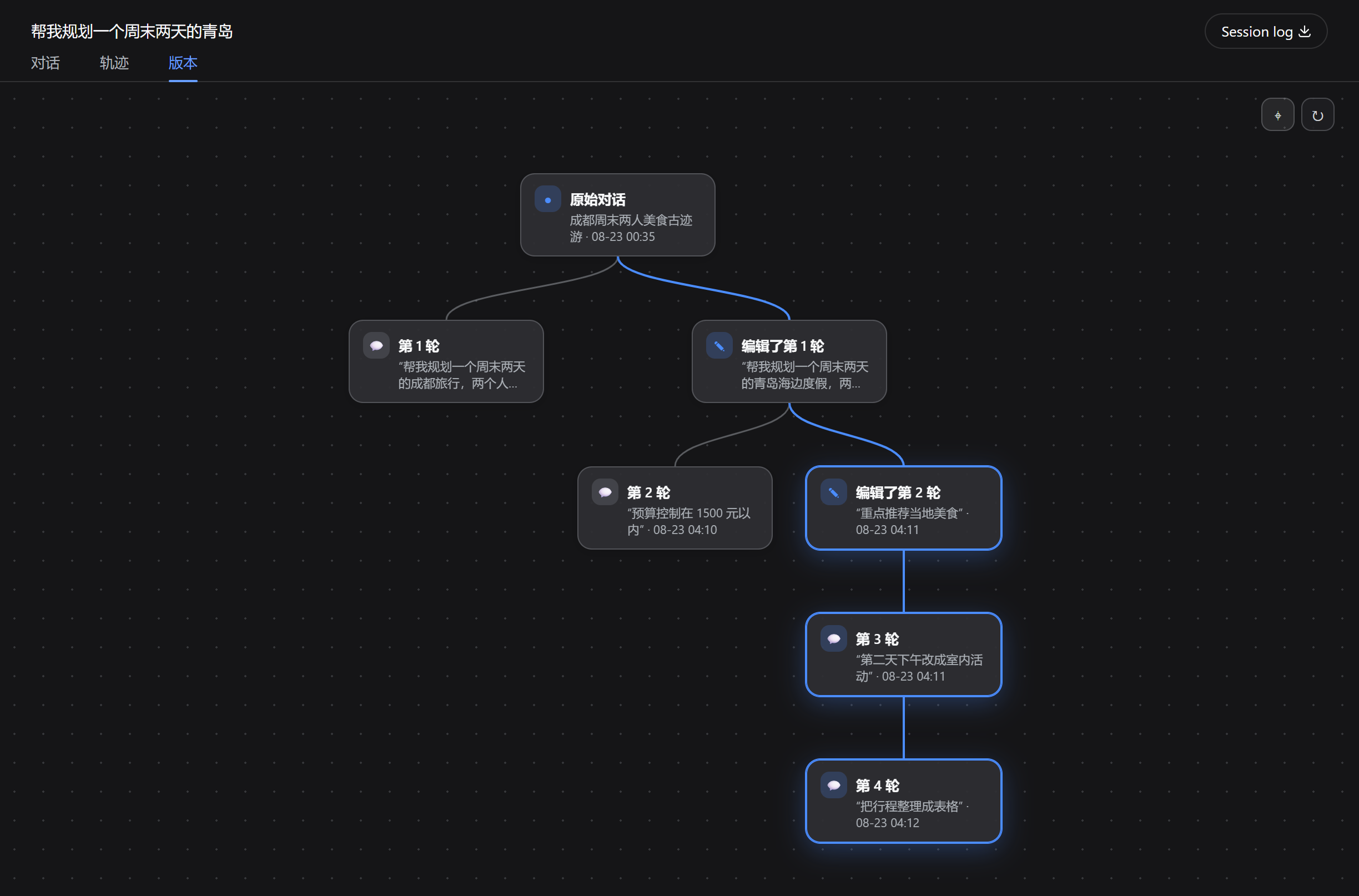
Edit an old message and the conversation forks from that turn; every version lives in one tree, and the sidebar keeps a single entry.
Edit a message you already sent, or use DSH's own Branch into a new conversation button — either way it grows a new branch here:

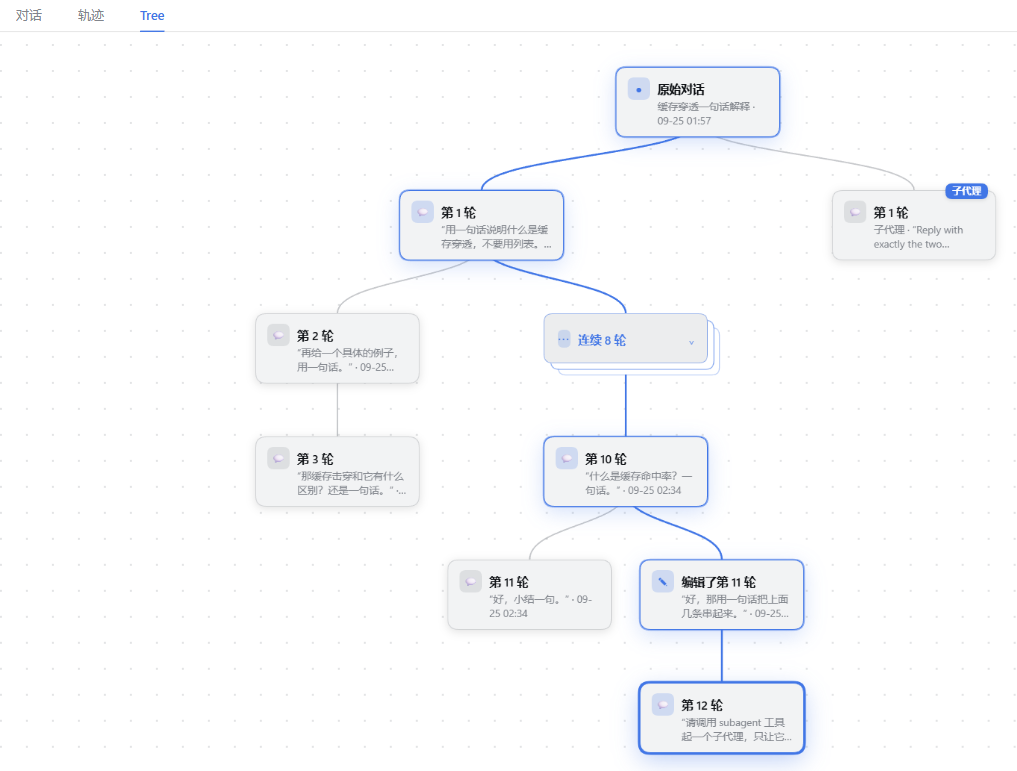
Switch the conversation panel to Tree and the whole family is drawn on one canvas:
Features
| Feature | What it does |
|---|---|
| 🖱️ Jump to a branch | Every node is a real session version; clicking it moves you onto that line and to that turn's message (the rules are below). Underneath it is only an archived flag being flipped: the version you clicked is unarchived back into the sidebar, and the one you were reading is archived into the tree — so moving around the tree moves the sidebar slot rather than adding to it. |
| 📍 A "you are here" marker | A small triangle in the tree points at the turn you are reading: it sits at the card's right edge, lined up with the card's vertical middle, keeps its size at every zoom, and re-centres when the card grows. It is still there after leaving the Tree or refreshing the page (the position is kept in browser storage). |
| 🧭 The view position is remembered | Leaving the Tree and coming back keeps the pan and zoom you had (in memory only; a refresh forgets it). The toolbar's ⌖ frames the whole tree on demand. |
| 🔀 Parallel lines | A version is a session. Right-click and send several of them "back into the main chat" — that step only unarchives, it touches nothing else — and two branches can work at the same time without disturbing each other; collect them again when you are done. |
| 🧹 One-click collect | The panel toolbar's "collect every other branch" gathers the family's strays into the tree at once, leaving the one you are using. If any of them is still generating a reply it asks first — stop and collect, or cancel — so nothing is killed quietly. |
| 🗂️ Folding | A run of turns with no fork in it — the opening every version shares included — folds into a single node once it reaches the configured length; click to unfold. The threshold is chosen in Settings, the toolbar folds it back at any time, and the view re-frames itself after either. |
| 🚫 Hiding empty forks | Forks that only copied this conversation without adding a turn of their own are not drawn; the toolbar carries the same switch. |
| ✏️ Renaming branches | Right-click a node to name a branch. The sidebar title stays the host's own ((1), (2) and all) — only the box drawn in the tree is named. |
| 🔄 Version ring | The ‹ n/m › ring under a message, to move between versions of the same question without leaving the chat. |
| 🎯 Highlighted reading path | The whole line you are reading — shared opening included — is highlighted on the canvas, so where you came from, where you are and where you can still go read off one picture. |
| 📌 Resume where you left off | Coming back to this family from another conversation resumes the version you last read (off by default; switchable in Settings). |
| 🤖 Subagent tags | A subagent session hanging under this conversation carries a tag, so it is not read as one of your versions. |
| 📦 Archived branches stay | A version you archive is still drawn, dimmed and marked "archived" — archiving takes an entry out of the sidebar, it does not delete a branch. |
| 🎨 Following the theme | Surface, border, accent, state and even shadow colours come from the host's theme tokens: light follows light, dark follows dark. |
Jump rules
- A turn inside the version you are reading: the Chat tab opens, the conversation scrolls to that turn and it flashes — the session is not reloaded, and no archive flag changes.
- A turn inside another version: that version is switched to first (brought out of the archive if needed) and then the turn is located; the one you were reading is collected into the tree as usual.
- How it locates: through the host's own turn rail — the marks down the right edge of a conversation. A turn already on screen is scrolled to directly; a turn that has never been loaded is fetched by the host first and then landed on, which is why it takes a moment and why distant turns work at all.
- The triangle follows the turn you clicked: after a jump it points at that turn, and only hands the position back to the host's report once you scroll or type yourself (the host takes "current" to be the turn at its reading line, which is one short of the turn you asked for).
- A failed jump is not silent: the attempt is retried a few times and then the route taken, and why it stopped, are written to the plugin's diagnostics log at
~/.dsh/storages/tree-view/logs/.
How it works
| Point | Detail |
|---|---|
| A rewind, not a continuation | When you edit, the host seeds a new session with every event before that turn and sends the edited prompt into it — the new version restarts from the sentence you changed, with the same working directory and context. DSH's own "Branch into a new conversation" produces the same kind of history-seeded session, and the plugin reads its fork point off the seed length just the same. |
| Old versions survive | The original line is still in the tree; one click goes back to it, and both lines can keep going independently. |
| Nothing collects on your behalf | Editing, retrying, opening a session from the sidebar and restoring where you last read change no archived flag at all — only picking a version from the tree, or pressing "collect every other branch", does. Otherwise one casual rewording would quietly collect the session you were in. |
Legend
| On the canvas | What it is |
|---|---|
| The trunk | The opening every version shares — the turns before the first fork |
| A fork | One edit: one side is the original, the other is the rewritten version |
| The highlighted line | The version you are reading, from the start of the conversation to the turn on screen |
| A stack of sheets | A run of consecutive turns folded together |
Pan, zoom with the wheel, click a node to jump there; right-click a node to rename it or to decide whether it lives in the sidebar or in the tree.
Archive and restore
Archiving is the only switch this plugin touches on your data, so it gets its own section:
- Into the tree archives that version out of the DSH sidebar; back into the main chat unarchives it. This DSH build ships no unarchive API, so the plugin writes that state the way the archive registry itself does — all of it in
lib/archive-adapter.js, probed at startup: whatever the host is missing is logged, the affected buttons grey out, and the rest of the tree keeps working. - Nothing is deleted, copied or rewritten. The session log is append-only, and apart from the one
message-tree/versionmarker a fork has to write, the plugin adds nothing to it. - After uninstalling, every session is still there; the versions that were collected into the tree can be unarchived from DSH's own archive list. Branch names and "who was collected" live in
~/.dsh/storages/tree-view/state.json— harmless to keep, and deleting it does not affect any session.
Install
Install from npm:
dsh plugin --profile web add dsh-tree-view
Or straight from GitHub:
dsh plugin --profile web add github:Rice00/dsh-tree-view
The patch inserts one row (tree-view) into the profile. Then restart that profile — host plugin modules are cached in-process, so a running harness will not pick the new row up; UI-only changes just need a page refresh.
Or install a local checkout, to have edits take effect immediately (link: is a live link, and the folder must not move afterwards):
git clone https://github.com/Rice00/dsh-tree-view.git
dsh plugin --profile web add link:/abs/path/to/dsh-tree-view
Please install the DSH plugin dsh-tree-view:
1) Into the web profile:
     dsh plugin --profile web add dsh-tree-view                 (npm)
     dsh plugin --profile web add github:Rice00/dsh-tree-view   (GitHub)
     dsh plugin --profile web add link:<absolute-path>          (local checkout)
2) Restart that profile; UI-only changes just need a browser refresh.
3) Verify: a Tree tab in the conversation panel, a TreeView section in Settings.
Versions and compatibility
1.0.0 freezes the plugin's own surface: the configuration keys, the three durable formats — the message-tree/version marker in the session log (schemaVersion: 1), the sidecar store ~/.dsh/storages/tree-view/state.json, and the browser preference dsh-tree-view:prefs (v: 2) — and the verified host range below. From here they change only in a major version, and with a migration. A host outside that range is not a broken promise: it calls for a compatibility release.
| DSH version | State |
|---|---|
0.1.5-rc.2 |
Verified — end-to-end acceptance: edit, retry, reading branches back after a restart, nested markers and image retention |
0.1.7-rc.1 |
Verified — the same host-side acceptance; the client speaks both generations of the session-navigation API |
0.2.0-rc.1 |
Verified — the same host-side acceptance; session navigation is still the 0.1.7 generation, and archiving goes through the workspace registry |
0.1.5-rc.3, other 0.1.x and 0.2.x |
Inside the same engines range, not verified on its own |
When the host moves to a new line, run the acceptance in CI's host matrix first, then change the range — that matrix lists exactly the three verified versions above.
The client stops for one thing only: slots (without it there is nothing to register into). Everything else is taken on a "use it if it is there" basis: both generations of session navigation are understood (0.1.7's uiWorkspace.openSession and the older sessions.open), the session list and the locale pack come in through optional injection, and the subagent catalogue is read from either generation's field. A host that renames or drops one of those loses that one ability; it does not make the plugin install itself invisibly.
Relationship to upstream
This repository is a fork of dsh-plugin-message-edit, which supplies the host-side branching engine (itself built on dsh-message-edit). The emphasis differs: upstream is a "edit message" plugin, while this fork takes "where do the versions made by editing live" as the main problem — hence the tree, the slot swap and folding.
Both can coexist: the row id (tree-view) and the HTTP route (/tree-view) are its own, while the durable event type stays upstream's message-tree/version, so a session already branched upstream still reads as a tree here, with no data migration. Installing this without upstream is fine — upstream is not a dependency.
FAQ
Will it make a mess of my sessions? No. Editing only produces a new version, the original is never rewritten, and nothing collects on your behalf — the sidebar changes only when you pick a version or press "collect every other branch".
Where do the collected versions go? They are in the Tree tab; right-click and choose "back into the main chat" to return one to the sidebar, or unarchive it from DSH's own archive list.
Can I have several branches running at once? Yes. Every version is an independent session — put each one back into the main chat and they run in parallel; collect them into the tree again when you are done.
What about very large families? Folding exists for that: the threshold can be set to Never, and any run can be folded or unfolded by hand. Either way the view re-frames itself once — a single click can add or remove hundreds of cards, and hunting for the tree with ⌖ is not the reader's job.
Do conversations branched with DSH's own button show up in the tree? Yes. They are history-seeded sessions too, so the plugin derives the fork point from the seed length and draws them as a version on that line. DSH itself limits that button to the last message of a completed turn; the plugin does not change that.
Where can I see what the tree itself decided?
The plugin writes its client-side decision lines to a day-scoped file: ~/.dsh/storages/tree-view/logs/tree-view-YYYY-MM-DD.log. It holds which version each click chose, every navigation attempt and its retries, and the renderer's errors — including the ones the app itself logs. Pasting a few of those lines into an issue goes much further than describing what you saw.
Which DSH versions are supported?
See "Versions and compatibility". engines.dsh declares >=0.1.5-rc.2 <0.3.0-0, and the versions verified inside it are 0.1.5-rc.2, 0.1.7-rc.1 and 0.2.0-rc.1. Restart DSH after updating the plugin.
Settings
Settings → TreeView, five rows, each described in the panel:
| Setting | Default | Effect |
|---|---|---|
| Message control style | DeepSeek |
ChatGPT / DeepSeek / Claude button layouts, previewed live in the panel. |
| Open the version I was last reading | off |
See "Resume where you left off". |
| Stop the reply that is still being written | on |
Stop every running reply in the same family (other versions included) before branching, saving quota — and letting you edit mid-reply. |
| Hide forks with no new turns | on |
See "Hiding empty forks"; the Tree toolbar carries the same switch. |
| Fold long straight stretches | 8 turns and up |
Never / 5 / 8 / 12 / 20, counted per run — see "Folding". |
For developers
One route, registered by the host half:
GET  /tree-view?sessionId=…   read the family: the DAG, turn boundaries, archive state, what is running
POST /tree-view               build a branch (truncate → write the marker → create the agent → send the edited prompt)
POST /tree-view  action=…     activate · label · promote · demote · demoteOthers
The durable event written when branching is message-tree/version, carrying the ignorable: true envelope flag — without it the reader refuses to interpret the whole log and the session will not open at all.
lib/index.js            host half — route / branch transactions / family walk
lib/tree-logic.js       tree building and layout (pure, shared by host and client)
lib/tree-state.js       sidecar for branch names and archive ownership
lib/session-record.js   reads every version's record into one shape
lib/archive-adapter.js  the only hard coupling to host archiving
plugin.client.js        client half (source)
lib/client.js           client half (bundle, built by scripts/build-client.mjs)
test/                   16 behavioural test files
docs/                   architecture / tree data model / development
The host half does not hot-reload (editing lib/index.js needs a profile restart); the client half just needs a refresh.
Contributing
Issues and pull requests are welcome. Run npm test before opening a PR.
License
As a fork, this repository keeps the upstream notices and the license text they came from in NOTICE.
MIT License © Rice00
Comments
Comments live in GitHub Discussions. Sign in with GitHub to post or react.