
Install
Inside DeepSeek Harness, with dsh-market
dsh plugin --profile web add dshmarket
Or from the command line
dsh plugin --profile web add github:Martlet-Tech/dsh-approval-explain
Installing runs third-party code with your own permissions — it can read your files, use your credentials and reach the network. Review the source first, and pin a commit (github:owner/repo#sha) when you can.
Screenshots
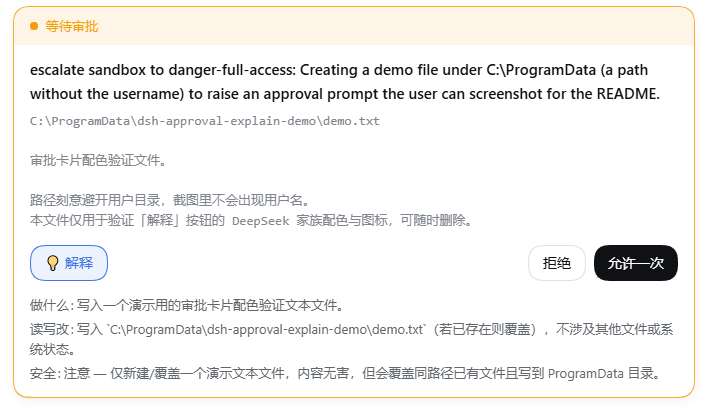
README
中文 | English
Adds an Explain button to DeepSeek Harness approval cards: one click spends one LLM call telling you what the thing you are about to approve actually does.
┌─ ● Waiting for approval ────────────────────────────┐
│                                                    │
│  escalate sandbox to danger-full-access: user …     │
│  Set-Content -LiteralPath 'D:\Downloads\notes.md'  │
│  …(a very long script body)                       │
│                                                    │
│  [ 💡Explain ]               [ Reject ] [ Allow ]  │
│                                                    │
│  What: creates (or overwrites) notes.md under …     │
│  Touches: writes D:\Downloads\notes.md; deletes …   │
│  Safety: caution — overwrites a same-named file …   │
└────────────────────────────────────────────────────┘
Why you need it
The approval card has a "detail" area that shows what you are approving. It is filled by an extractor that only recognizes a command field:
// packages/client/ui-chat/src/client/chat/ApprovalCommand.tsx
return typeof args.command === 'string' ? args.command : undefined
So only tools whose argument happens to be named command — bash, pwsh — can put anything in that area. For tools like write / edit, whose arguments are file_path + content, that area is always empty.
The result: a card saying "escalate sandbox to danger-full-access" while you cannot see what you are actually approving.
This plugin does two things:
- Never leaves it blank — it takes over the detail area and supports all three argument shapes:
command/file_path/path; - Lets the model read it for you — the Explain button makes one LLM call and returns a fixed three-line verdict: What / Touches / Safety.
The Explain button reuses the native button geometry (outline, 36px capsule) so it sits flush with Reject / Allow once, tinted with the DeepSeek family colors (--dsw-static-deepseek-50 / -500) and prefixed with a 💡 icon.
Install
Requires pnpm (dsh plugin is a forwarding shell for pnpm). Enable it if you have not:
corepack enable pnpm     # Node ships corepack; recommended
# or
npm i -g pnpm
Then:
dsh plugin --profile web add github:Martlet-Tech/dsh-approval-explain
Restart dsh / DShell after installing — a profile reads its bundle list only at startup.
If it does not take effect
dsh plugin add puts the package into the profile's node_modules and, because this package declares dsh.bundle, appends it to dsh.profile.bundles. If that append does not happen (a pnpm version difference, for example), add the line by hand:
// $DSH_HOME/profiles/web/package.json
"dsh": {
  "profile": {
    "bundles": [
      "@deepseek-ai/dsh-base",
      "@deepseek-ai/dsh-web-app",
      "dsh-approval-explain"   // ← add this line
    ]
  }
}
Verify with dsh --profile web --dump-config: the output should contain a # == dsh-approval-explain layer.
Why no build authorization is needed
This package ships its build output directly (lib/ is committed), so it runs no prepare script and never triggers the pnpm ≥10 allowBuilds prompt for git dependencies.
Uninstall
dsh plugin --profile web remove dsh-approval-explain
The plugin is additive: it takes over the approval card by priority and disables none of dsh's Loader rows. Uninstalling it, or having it fail to load, restores dsh's original behavior completely.
/explain <content> also works directly in the composer, without the button.
Requirements
- dsh
0.1.5-rc.1or newer - A configured model provider (it reuses your current session's provider/model; no extra configuration)
- Web GUI only (
dsh web)
Finding other plugins
dsh has no plugin store — no official marketplace, no remote registry, and the GUI cannot browse or install. Discovery happens through GitHub topics:
github.com/topics/dsh-plugin— the only channel the official README recommendsawesome-dsh-plugin— a community-curated list
Installs always go through dsh plugin --profile <name> add <spec>, where <spec> may be an npm package name, github:user/repo, a tarball, or a local path.
How it works
The whole path uses mechanisms dsh already has; it adds no remote endpoint:
Browser "Explain" button
   └─ ctx.remote.commands.execute(sessionId, '/explain <content>', [])
        └─ host-side /explain command handler   ← runs on the Host, can reach ctx.llm
             └─ ctx.llm.stream({ provider, model, messages, system })
                  └─ text deltas accumulate → { kind: 'success', text }
        └─ the result returns synchronously and expands in place
Two design decisions are worth explaining:
Why a "human command" instead of a custom remote API. ctx.llm is a host-side service with no @Remote, so the browser cannot reach it. A custom @Remote endpoint would need Typert code generation, which only scans packages/ inside the dsh repository. ctx.remote.commands.execute() is already mounted and its command handlers run host-side — the only ready-made channel that needs no changes to dsh. /compact is the existing precedent for this path.
Why the whole file has zero imports. The plugin loads as an out-of-tree package through the profile's junction; Node walks up from the junction's real path looking for node_modules, and there is no @deepseek-ai/* there. So the host half gets its service via ctx.get('llm') and builds messages literally against the Message shape, importing no package at all.
Known limitations
- Every click leaves a trace: the command system records
command/run+command/donelines in the session log. That is auditability, not zero footprint. - Explaining costs tokens: a small request capped at roughly 700 output tokens. dsh has no approval gate on LLM calls, so this step has no second confirmation.
- It takes over the whole approval card: the "Reject / Allow once" row is rendered by dsh itself and exposes no slot, so putting a button on that row means taking over the card. If dsh changes the card structure in the future, this plugin will need to follow.
- It is coupled to
StreamChunkfield names:text-delta/block-end/finishare the current structure; zero dependencies means tracking the version. - For now it only explains. It does not change the approval outcome and does not cache verdicts.
License
MIT
Comments
Comments live in GitHub Discussions. Sign in with GitHub to post or react.