
Install
Inside DeepSeek Harness, with dsh-market
dsh plugin --profile web add dshmarket
Or from the command line
dsh plugin --profile web add dsh-api-ledger
Installing runs third-party code with your own permissions — it can read your files, use your credentials and reach the network. Review the source first, and pin a commit (github:owner/repo#sha) when you can.
README
This plugin publishes its README in Chinese only.
See what this conversation costs, without leaving it.
API Ledger brings token usage and estimated API spend into DeepSeek Harness: a full conversation report, a settings dashboard, a compact composer total, and a one-line daily total in the sidebar.
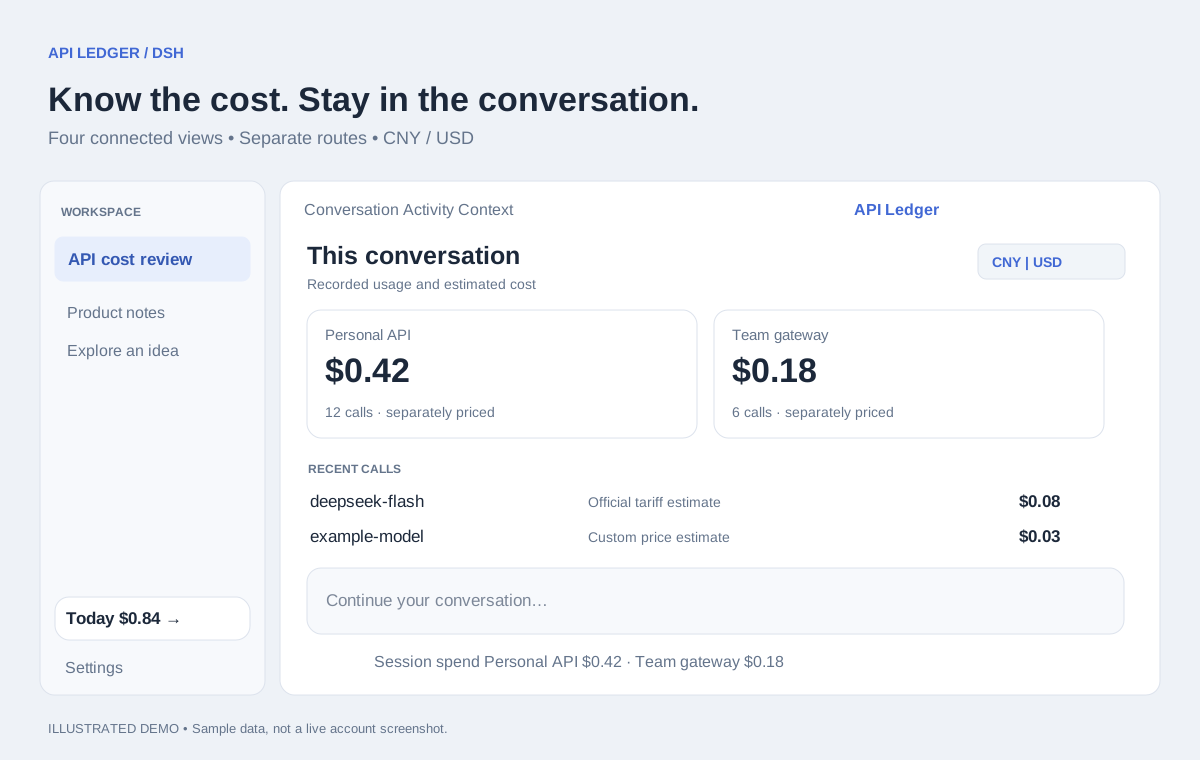
Illustrated feature overview with sample data, not a screenshot of a live account.
English
Why use it?
If your workflow involves switching between API routes or opening a separate report to check costs, these are the features to look at:
- Costs where you work. Session spend below the composer; today's spend in the sidebar. Click the daily total to open the full settings report.
- Same model, different prices. Pricing is keyed by route and model. An official endpoint and a gateway can have different rates without contaminating each other's estimates.
- Group deliberately. Routes remain separate by default. Give them the same billing group to combine their reports; a shared key reference never silently combines accounts or implies shared balance.
- Two currencies, one consistent view. CNY/USD display selection is remembered and shared across all four views.
- Make estimates explainable. Recent calls show their pricing source. Unknown prices stay unpriced rather than looking free, and historical records retain the rates originally used.
- No separate dashboard service. Usage capture and preferences live locally in the plugin. It does not read API key values or upload ledger data to a plugin-owned service.
These are concrete workflow benefits, not a claim that other usage plugins lack them. This plugin measures recorded usage and estimates cost; it does not retrieve provider invoices or account balances.
Four views
| View | What it answers |
|---|---|
| Conversation → API Ledger | What has this conversation cost? Recent calls, model costs, token composition and usage trends. |
| Settings → API Ledger | Where does spending go across conversations? Date ranges, today/yesterday comparison and pricing preferences. |
| Below the composer | How much has this session used so far? |
| Sidebar footer | How much have I used today? One line, with a click through to settings. |
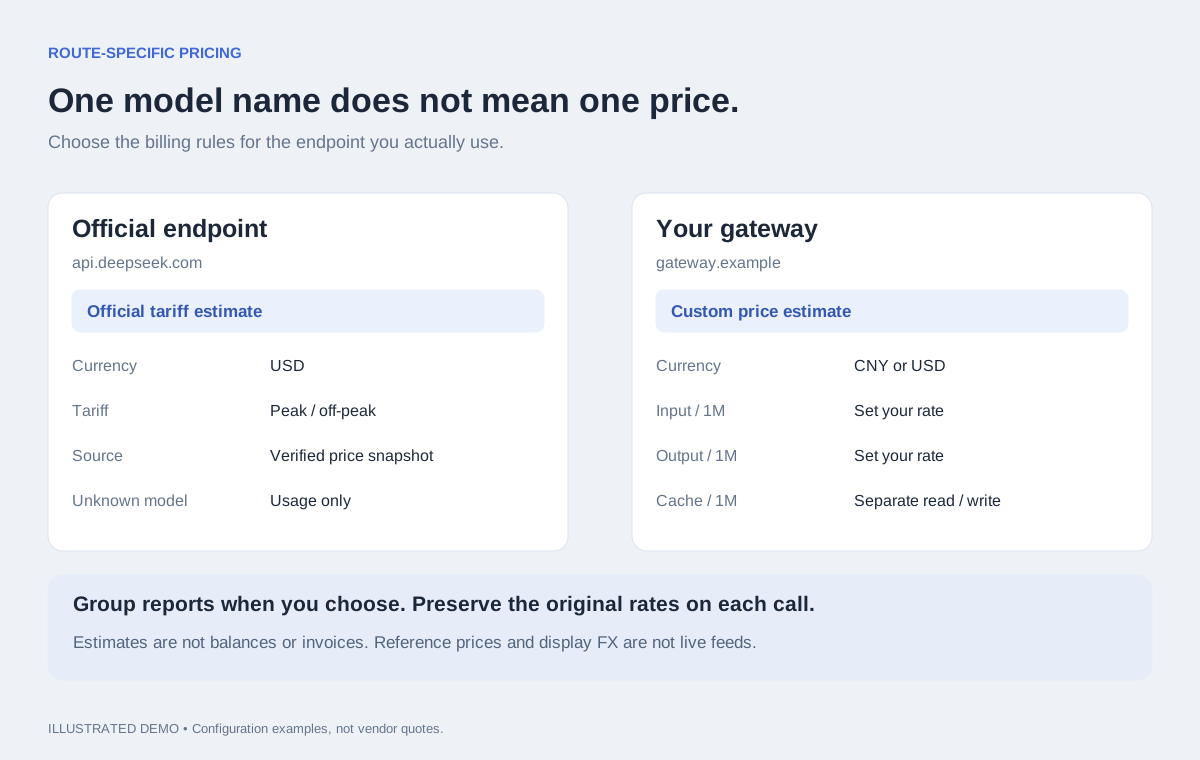
Illustration of route-specific pricing. Example gateway rates are arbitrary, not vendor quotes.
Install
Requires Node.js 20+ and a compatible DSH installation. Tested with DSH Desktop 2.0.13 / bundled DSH 0.1.5-rc.2. No build step or runtime npm dependencies.
DSH Desktop — GitHub installation
git clone https://github.com/LAwLi3tCoding/dsh-api-ledger.git
cd dsh-api-ledger
node scripts/install.mjs
Restart DSH Desktop. Open Settings → API Ledger, or the API Ledger tab in a conversation. Keep the cloned folder: installation links to it. Update with git pull, then restart. Uninstall this linked installation with node scripts/install.mjs --uninstall.
DSH CLI — a CLI-managed profile
# From GitHub
dsh plugin --profile web add github:LAwLi3tCoding/dsh-api-ledger

# From npm
dsh plugin --profile web add dsh-api-ledger
Replace web with your CLI-managed profile. DSH 0.1.5-rc.2 reserves desktop for Electron, so dsh plugin --profile desktop add ... is rejected. Use the desktop installation above or the desktop marketplace once the listing is merged; marketplace submission is not the same as availability.
Configure pricing
Open Settings → API Ledger → Accounts and pricing. Select a route and model; save before switching models.
| Mode | Behavior |
|---|---|
| Official tariff estimate | Default for recognized DeepSeek official endpoints without an explicit override. Applies the bundled USD tariff and peak/off-peak rules. |
| Reference estimate | Explicit opt-in to a fixed DeepSeek off-peak USD snapshot. Does not adjust for time or holidays. |
| Custom price estimate | Set currency and prices per million tokens: uncached input, output, cache read and cache write. Zero is valid. |
| Usage only | Record tokens without inventing a cost. Default for other endpoints. |
Official endpoint detection checks the effective URL, including the DeepSeek adapter's launch-environment override. A route's name alone never establishes official pricing. The bundled official price snapshot was verified on 2026-09-21. It supports deepseek-flash, deepseek-v4-flash, deepseek-v4-flash-vision-exp and deepseek-v4-pro. Peak selection uses request start time and the 2026 Chinese holiday calendar. Unsupported models or calendar years remain unpriced. Prices update with plugin releases, not through a live pricing API.
Names and groups affect the current report presentation. Price edits affect future calls only. Existing custom preferences survive upgrades. Reset/delete removes ledger preferences for that route, not DSH model settings or historical calls. Inactive routes are grouped separately; preference-only routes disappear when removed.
Accuracy and data boundaries
- CNY/USD is display conversion, using fixed
1 CNY = 0.14 USD; it is not a live exchange rate or a provider's currency settlement rate. - A call is recorded when it ends and supplies usage. Views refresh every 10 seconds while visible; today follows the client calendar.
- Costs are estimates, not invoices, remaining balances, budgets or subscription charges. Partially priced totals include only known costs.
- Historical calls keep original amounts and rates. A warning flags legacy USD numbers possibly labelled as CNY; it does not rewrite them.
- Uncached input and cache tokens are separate buckets. Reasoning tokens are not charged a second time. Adapters must report compatible normalized usage.
- Calls before installation are not imported. Missing usage cannot be reconstructed; the running process shows a missing-usage count. Nested wrappers are deduplicated, but an outer call that fans out to multiple upstream streams can still undercount.
- Preferences are stored in
$DSH_HOME/api-ledger/config.json; records inrecords.jsonl, withrollup.jsonas a derived summary. WithoutDSH_HOME, use~/.dsh/api-ledger/. These local files and credentials are not part of the package. In-memory history is capped at the latest 200,000 records.
Development
npm run check
npm test
npm pack --dry-run
Tests exercise pricing boundaries, endpoint recognition, immutable historical amounts, configuration conflicts, same-origin writes, stream capture, report periods, bilingual UI and the four display slots. See issues for bug reports; share anonymized examples rather than API keys or private session logs.
License: MIT.
简体中文
不用离开会话,就能查看本次对话花了多少钱。
API 账本把 Token 用量和 API 估算费用放进 DSH:会话完整报告、设置页总览、输入框下方的会话金额,以及左下角的一行今日金额。
哪些地方用起来方便?
- 随手查看费用:不用频繁打开独立报表;会话费用放在输入框下面,今日费用放在侧边栏,点击即可打开设置中的账本。
- 相同模型可以按不同接口计价:价格按「路由 + 模型」配置,官方接口和企业网关互不混用。
- 分组由使用者决定:默认按路由分别统计,需要时再设置相同账单分组。不会因为共用凭据引用就自动合并,也不会把展示分组当作共用余额。
- 四处展示同步切换币种:CNY/USD 选择会保存并同步,避免不同页面各用一种显示币种。
- 能看懂费用怎么来的:最近调用标明计价来源,未配置单价显示未计价,历史记录保留当时使用的单价。
- 无需部署额外服务:用量与配置保存在本机,不读取 API Key 的值,也不上传到插件自建的统计服务。
这些是插件的具体使用价值,不代表其他用量插件都不具备相同能力。这里统计的是已记录用量与估算费用,不是供应商账单或账户余额。
四处展示
| 位置 | 用途 |
|---|---|
| 会话 → API 账本 | 本会话费用、最近调用、模型分布、Token 构成和用量趋势 |
| 设置 → API 账本 | 跨会话报表、周期筛选、今日/昨日对比、账户与计价 |
| 会话输入框下方 | 本会话已用金额 |
| 侧边栏左下角 | 单行今日费用,点击打开账本设置 |
安装
需要 Node.js 20+ 和兼容的 DSH。已在 DSH Desktop 2.0.13/内置 DSH 0.1.5-rc.2 验证;插件无需构建,没有运行时 npm 依赖。
DSH Desktop:从 GitHub 安装
git clone https://github.com/LAwLi3tCoding/dsh-api-ledger.git
cd dsh-api-ledger
node scripts/install.mjs
重启 DSH 后,打开「设置 → API 账本」或会话的「API 账本」Tab。安装使用本地链接,请保留克隆目录。更新时执行 git pull 后重启;卸载该链接安装时执行 node scripts/install.mjs --uninstall。
DSH CLI:安装到 CLI 管理的 profile
# GitHub 安装
dsh plugin --profile web add github:LAwLi3tCoding/dsh-api-ledger

# npm 安装
dsh plugin --profile web add dsh-api-ledger
将 web 换成自己的 CLI profile。DSH 0.1.5-rc.2 的 desktop profile 由 Electron 专管,不能直接使用 dsh plugin --profile desktop add ...。桌面端请使用上面的安装脚本,或在市场收录完成后通过桌面市场安装;提交 PR 不等于已经上架。
配置计价
打开「设置 → API 账本 → 账户与计价」,选择路由和模型。每个模型单独保存,切换前先保存当前修改。
| 方式 | 含义 |
|---|---|
| 官方价表估算 | 已识别的 DeepSeek 官方直连在没有显式配置时默认使用,按内置 USD 价表及峰谷规则估算 |
| 参考价估算 | 手动选择固定的官方非高峰 USD 快照,不判断时间和节假日 |
| 自定义单价 | 按每百万 Token 填写非缓存输入、输出、缓存读和缓存写价格及币种;允许零价格 |
| 仅记录用量 | 不猜测费用;其他接口的默认方式 |
官方接口按实际 URL 识别,并考虑 DeepSeek 适配器的启动环境覆盖;名称包含 DeepSeek 不代表官方直连。内置官方价表核验日期为 2026-09-21,支持 deepseek-flash、deepseek-v4-flash、deepseek-v4-flash-vision-exp 和 deepseek-v4-pro。按请求开始时间及 2026 年中国节假日判断峰谷;未知模型或其他日历年份仅记录用量。价表随插件版本更新,并非实时拉取。
名称与分组调整会更新历史报表的展示,修改单价只影响后续调用。已有自定义配置不会被升级覆盖。重置/删除账本配置保留 DSH 模型配置与历史调用。历史及停用路由单独折叠展示;只有账本配置、没有历史和当前模型配置的路由,删除后会从列表消失。
统计边界与本地数据
- CNY/USD 是展示折算,固定使用
1 CNY = 0.14 USD,不是实时汇率,也不是供应商的币种结算比例。 - 调用结束并上报用量后计入;页面可见时每 10 秒刷新。「今日」按客户端本地日历计算。
- 金额是估算费用,不是官方账单、余额、预算或订阅扣费。部分调用未计价时,只汇总已知费用。
- 历史金额和原始单价不变。疑似将 USD 数字标成 CNY 的旧记录会显示提示,不自动重算。
- 非缓存输入与缓存 Token 分开计价,推理 Token 不重复累加;适配器需要提供兼容的标准化用量。
- 安装前的调用不补录。缺失用量无法恢复,当前进程会显示缺失次数。嵌套调用会去重,但一个外层调用扇出多个上游流仍可能漏计。
- 配置位于
$DSH_HOME/api-ledger/config.json;逐次记录保存在records.jsonl,rollup.json为派生汇总。未设置DSH_HOME时使用~/.dsh/api-ledger/。这些本地数据及凭据不随插件分发。内存最多保留最近 200,000 条记录。
开发与反馈
npm run check
npm test
npm pack --dry-run
测试覆盖计价边界、官方接口识别、历史金额不变、配置冲突、同源写入、流式捕获、报表周期、双语与四处展示。问题请提交到 Issues,使用匿名示例,不要上传 API Key 或私人会话日志。
许可证:MIT。
Comments
Comments live in GitHub Discussions. Sign in with GitHub to post or react.