
Install
Inside DeepSeek Harness, with dsh-market
dsh plugin --profile web add dshmarket
Or from the command line
dsh plugin --profile web add dsh-ide-git
Installing runs third-party code with your own permissions — it can read your files, use your credentials and reach the network. Review the source first, and pin a commit (github:owner/repo#sha) when you can.
Screenshots
README
简体中文 | English
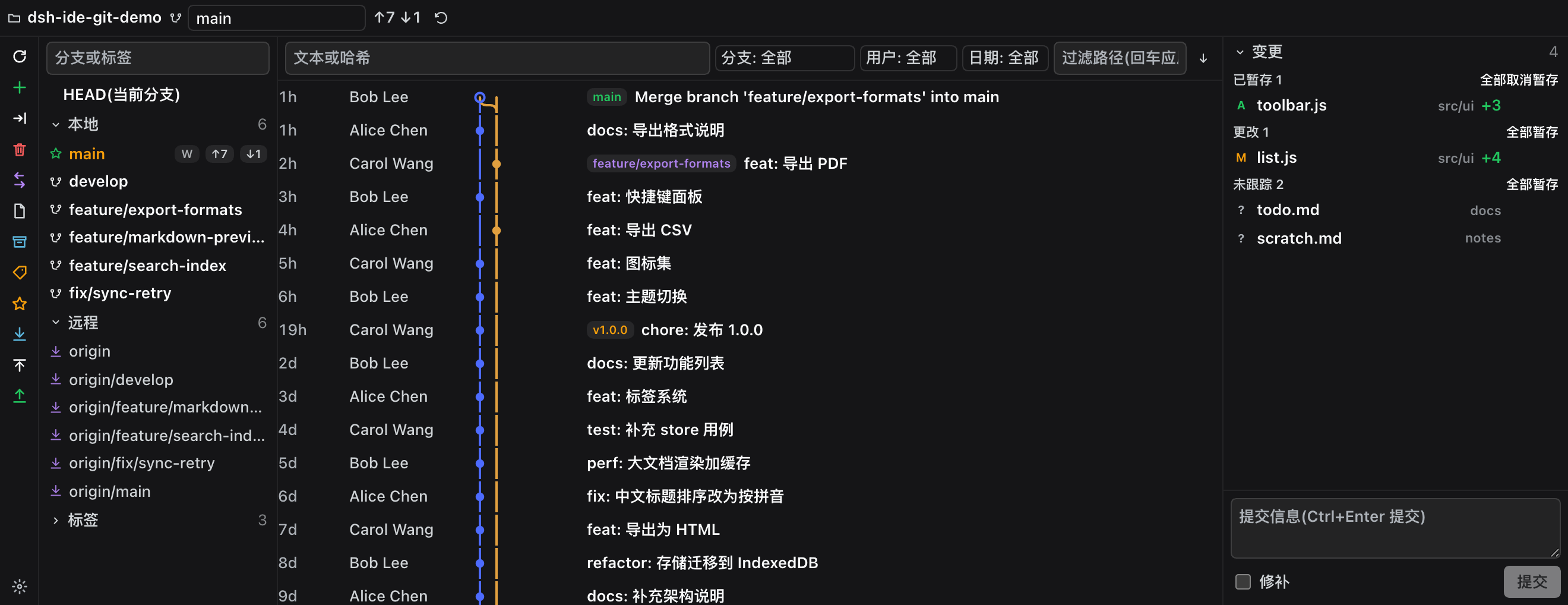
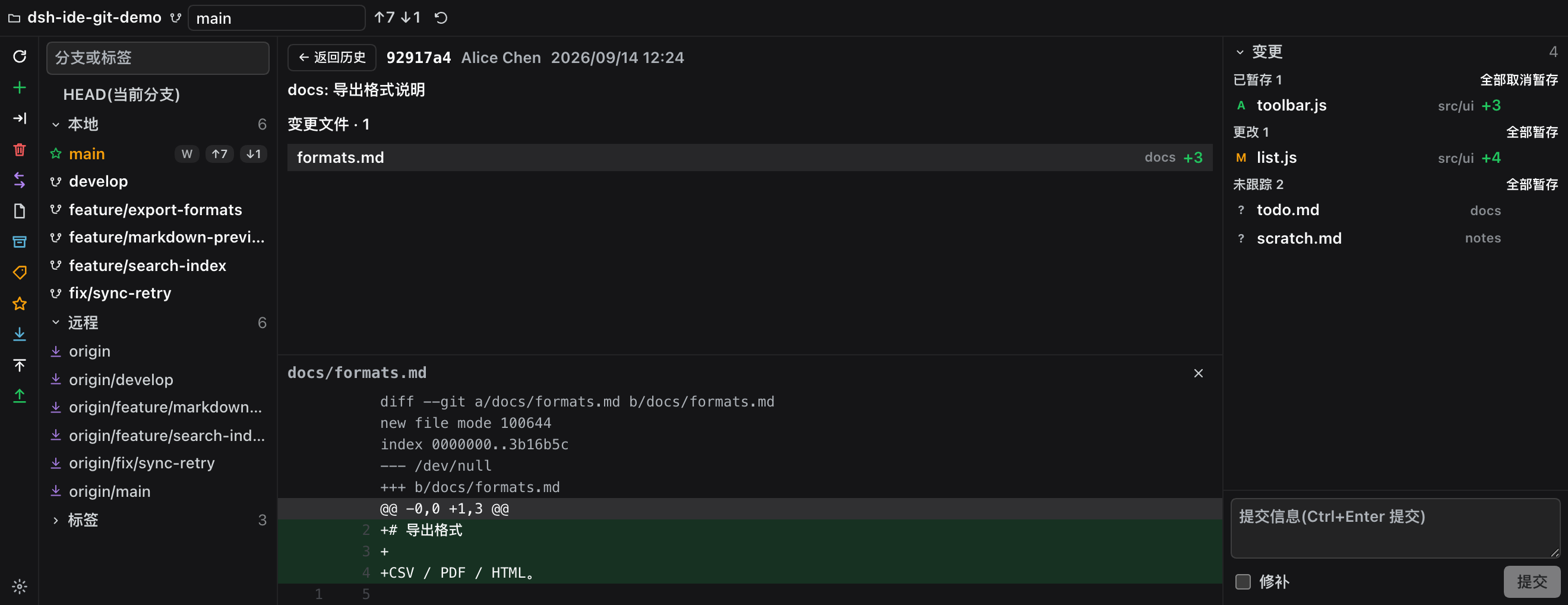
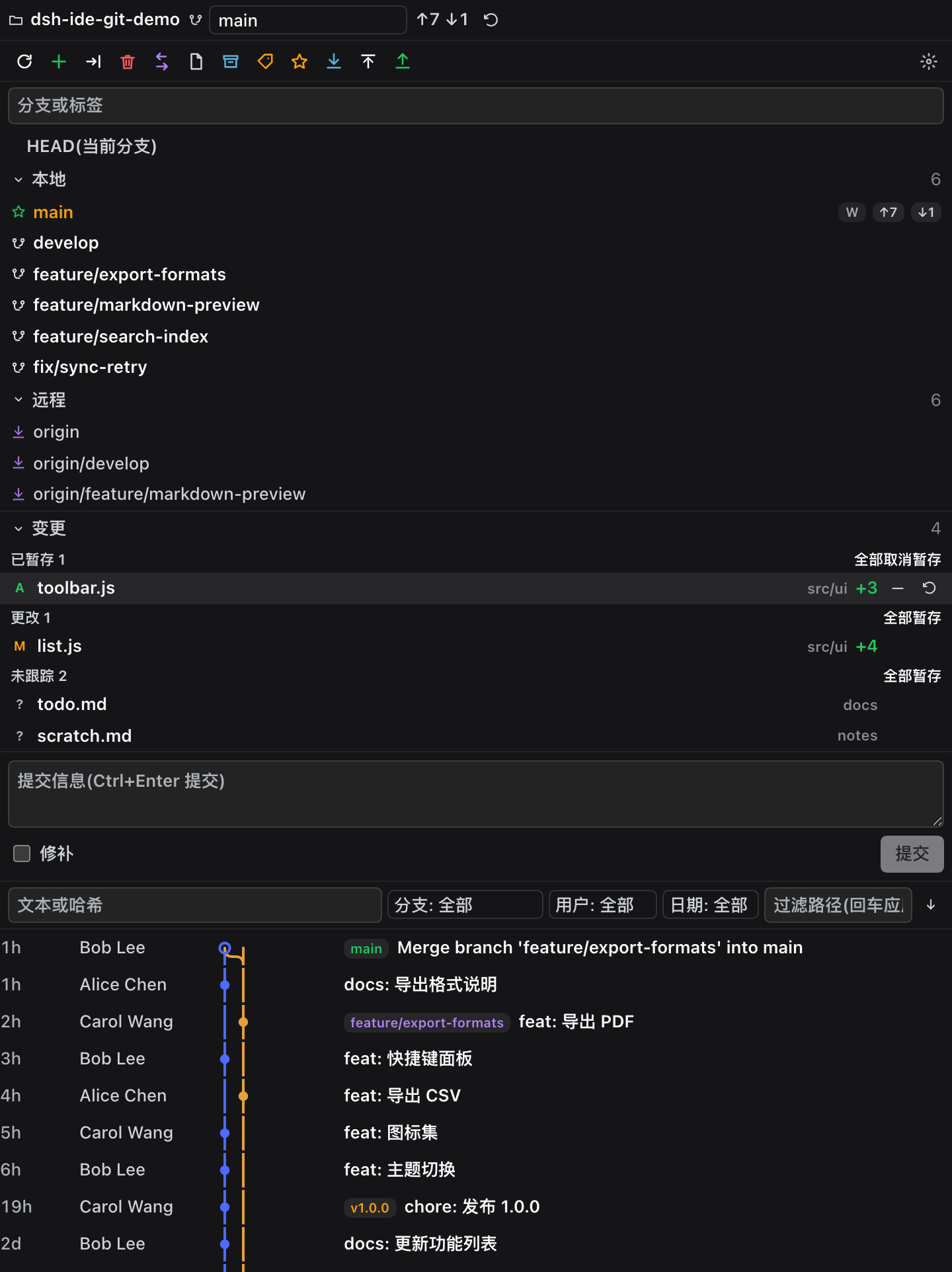
An IDE-grade Git tool window for the DeepSeek Harness (DSH) sidebar — branch tree on the left, commit graph in the middle, changes and commit details on the right, with JetBrains-style actions. Registered as a native dsh-better-sidebar tab, usable in both the native right sidebar and the bottom workbench.
DSH's built-in Git panel covers stage / commit / revert / history. dsh-ide-git adds the layer IDE users expect: a branch tree with a full context menu, a commit graph, commit details with per-file diffs, a grouped changes list and a commit box.
Screenshots
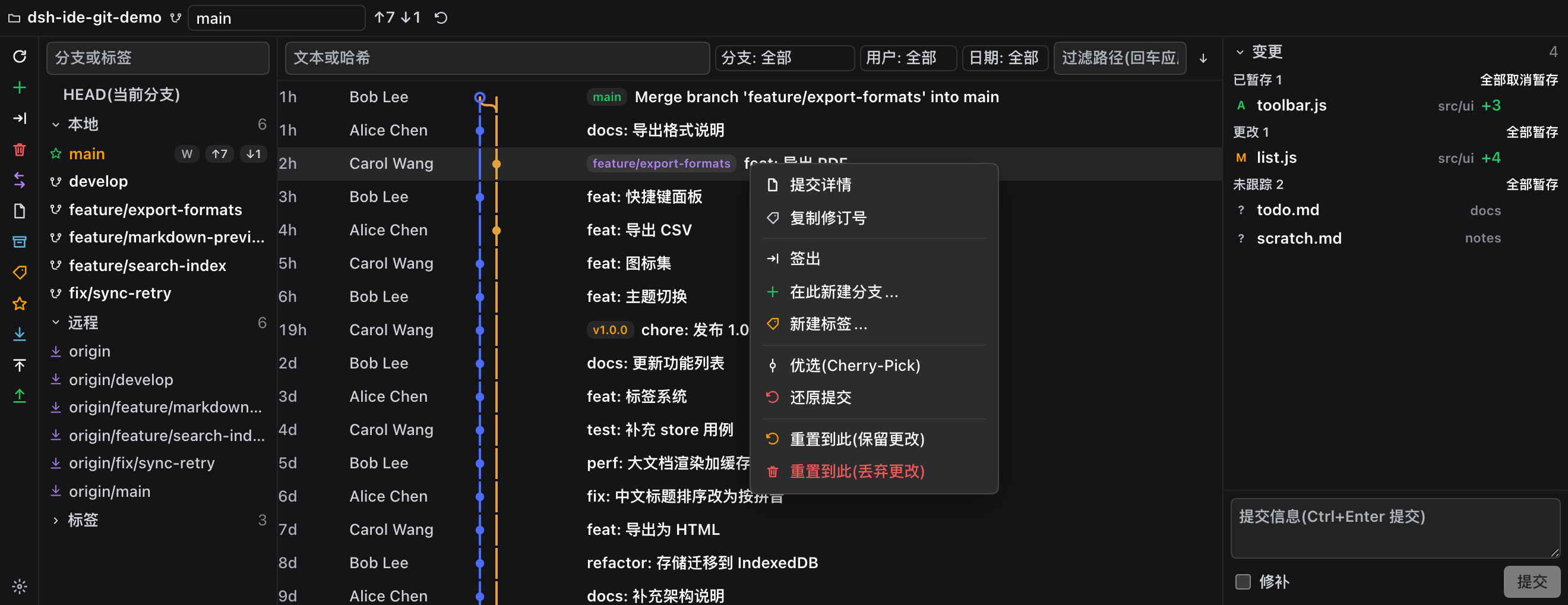
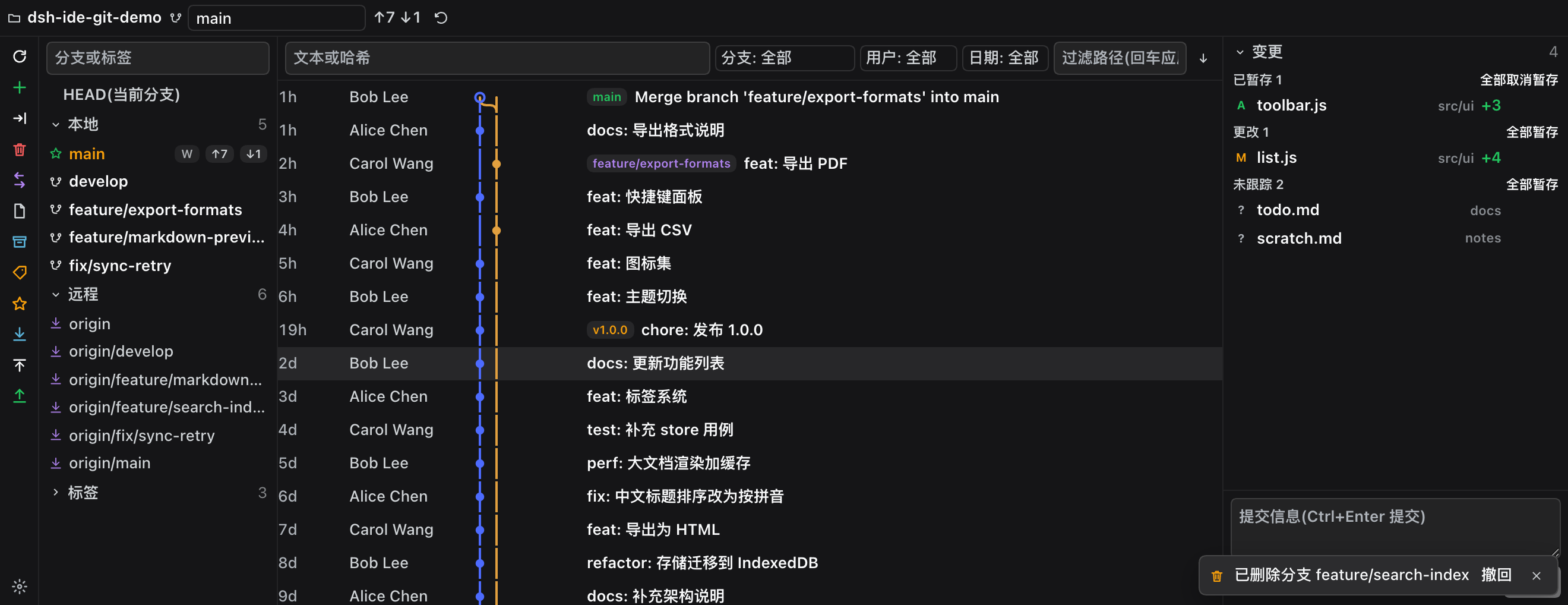
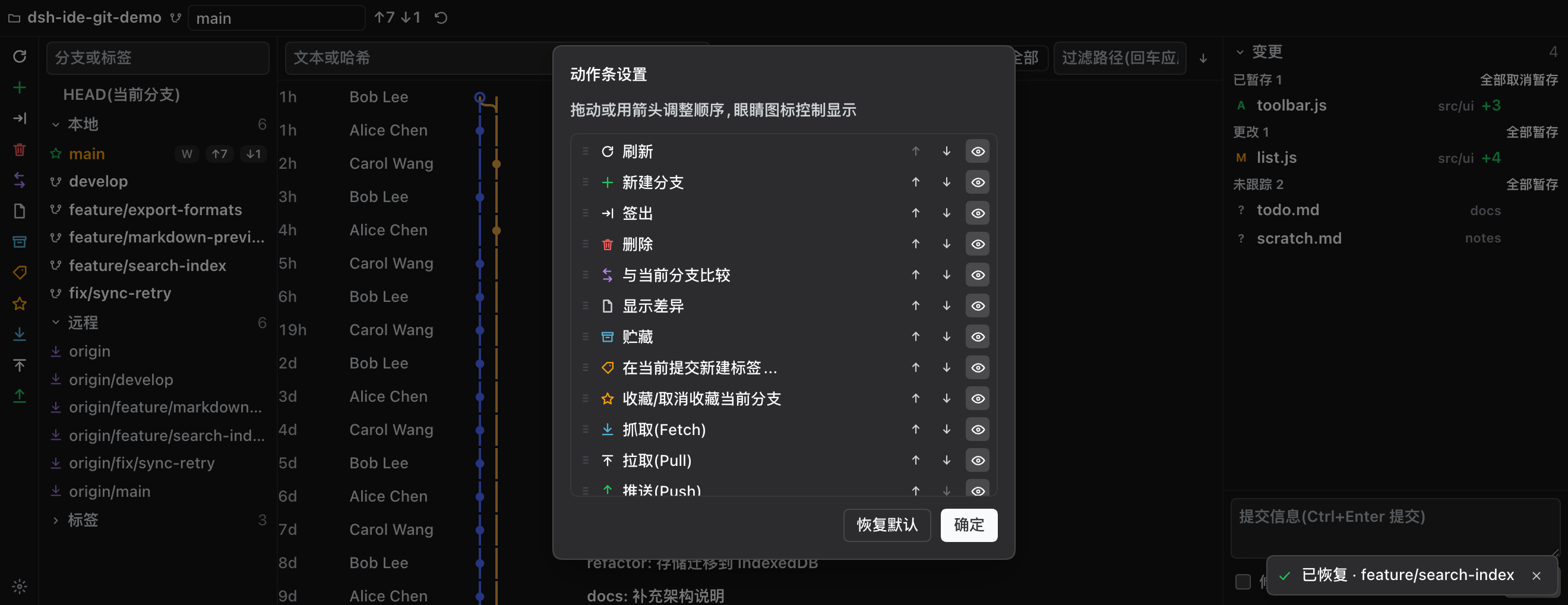
Captured from a clean DSH with only two plugins installed (
dsh-better-sidebar+ this one), bound to a fictional demo repository (scripts/demo-repo.mjs). No real workspace, no wallpaper plugin and no other panel is in frame; the whole sequence is reproducible withscripts/screenshots.mjs.
Where it mounts: two hosts, one panel
The plugin registers once; which surface it lands on is the host's decision, and the two doors are exclusive:
| Host | When | What you get |
|---|---|---|
| dsh-better-sidebar (optional) | whenever it is installed | its tab system: the tab in the right sidebar plus the bottom workbench; the plugin also shows up as a card in its settings page |
| DSH's own right sidebar | automatically, when better-sidebar is absent | a Git capsule on the sidebar's guide page — the very same panel |
better-sidebar wins while it is there (it also carries the bottom workbench); a late-arriving better-sidebar takes the native registration down and hosts the tab itself. Installing this plugin alone is fully supported — no prerequisite.
The same panel shows up on surfaces of very different shapes, so the layout measures instead of guessing:
| Surface | Shape | Layout here |
|---|---|---|
| Right sidebar (native, or bridged by better-sidebar) | narrow + tall | stack: changes above the graph, collapsible branch pane |
| Bottom workbench (better-sidebar only) | wide + flat | columns: tree / graph / changes — the JetBrains Git tool window shape |
The panel never guesses: it measures itself with a ResizeObserver (width ≥ 600px and width ≥ 1.15 × height → columns, otherwise stack — width decides, height has no veto), so free-floating windows and the mobile drawer adapt too.
Features
- Action rail: the JetBrains-style vertical strip in the bottom workbench (and one horizontal row under the header in the right sidebar) with refresh, new branch, checkout, delete, compare, show diff, stash, new tag, favorite, fetch, pull and push. It shows as many buttons as fit, folds the rest into a
⋯ moremenu, and pins a⚙ settingsbutton that lets you reorder actions and toggle each of them (stored indsh-ide-git.rail.v1). Every action lights up or greys out with the current state (no other branch → delete / checkout / compare off, no remote → fetch / push off, no upstream → pull off, no changes → diff off). - Status line: branch, upstream, ahead/behind, stash count, busy indicator.
- Branch tree: HEAD / Local / Remote / Tags groups, filter box, ahead/behind badges, worktree marker; local blue / remote violet / tag amber / HEAD green.
- Branch context menu: checkout, rebase current onto this, merge into current, compare with current, new branch from here, rename, delete, fetch, push.
- History filters: text or hash, branch or tag, author, date (today / 7 days / 30 days / this year), an order toggle (newest / oldest first) and one-click clear; the path filter runs server-side (
git log -- <path>) on Enter. - Commit list: IDEA column order — date → author → graph → refs → subject; a lane graph whose segments span whole rows (pixel-aligned across rows), a hollow dot for HEAD, refs badges (HEAD green / local blue / remote violet / tag amber, at most three plus
+n), load more (120 per page). - Commit context menu: details, copy revision, checkout revision, new branch here, new tag, cherry-pick, revert, reset here (keep / discard changes).
- Commit details: full message, author/date, changed files with +/− and per-file line diff.
- Changes: conflicts / staged / changes / untracked groups, inline stage / unstage / discard, group-level actions, click for diff.
- Commit box: multi-line message, Ctrl+Enter (Cmd+Enter) to commit, amend.
- Safety and undo: deleting a branch or a stash pops a toast in the corner with an Undo action — the delete is real, and undo recreates the ref from the object id recorded just before it (one-shot, valid for 30 minutes). Deleting
main/master/trunkrequires typing the branch name, destructive dialogs focus Cancel instead of the red button, writes are serialised per repository on the host, and while a merge / rebase / cherry-pick / revert / bisect is still open the affected actions are greyed out with the reason.
Install
# works on its own: the panel lands in DSH's native right sidebar
dsh plugin --profile web add dsh-ide-git
# optional: adds the bottom workbench and better-sidebar's sidebar chrome
dsh plugin --profile web add dsh-better-sidebar
Restart dsh web, then:
- plugin alone — open the right sidebar from the session header and pick the Git capsule on the guide page;
- with better-sidebar — pick Git from the bottom panel's
+menu, or from the native right sidebar's+menu (one registration, one state); - with better-sidebar present the plugin also appears as a card in its settings page (side cards), where it can be disabled.
Compatibility
engines.dshis>=0.1.2-0: every DSH from 0.1.2 up, prereleases such as0.1.5-rc/0.1.6-alphaincluded (plain semver never matches a prerelease against a range, hence the-0floor). The same value is also the@deepseek-ai/dshpeerDependency: DSH 0.1.7+ enforces@deepseek-ai/dsh*peer ranges (an unsatisfied one keeps the plugin from loading) while nothing readsengines, so the peer is where the fact has to live. The range is an open floor with no ceiling, so no host from 0.1.7 on (prereleases included) can be rejected by it, and 0.1.0–0.1.6 never run that check at all.- Three long-lived contracts, nothing else: the host's
webServer.register({ kind: 'prefix' })route, the client'swindow.__ModuleLoader__.load({ id, factory }), and the clientslotsservice. It does not import theui-primitivesicon set (every icon is an inline SVG), so host icon changes cannot reach it. - better-sidebar is an optional peer: absent, broken, or waiting on its own upstream fix, the plugin still mounts in the native right sidebar.
Interface language
Follows DSH's locale setting (ctx.locale) and switches live. 21 dictionaries ship with the plugin: Simplified and Traditional Chinese (including zh-HK / zh-MO / zh-TW), English, Japanese, Korean, German, French, Italian, Portuguese, Russian, Dutch, Polish, Swedish, Turkish, Indonesian, Vietnamese, Thai, Hindi and Arabic. They are also published to DSH's locale registry through ctx.locale.register. Resolution is "exact tag → primary subtag → English", and English is always the key-complete dictionary — any language without a dictionary falls back to it rather than showing raw keys.
The dictionaries live in the LOCALES table inside src/client.js: one entry per language, each preceded by a /* locale: <tag> */ marker. The check is automatic — a smoke test requires every dictionary to carry exactly the same key set as Chinese, because a missing key falls back to English silently and leaves the panel half-translated, which is what that test exists to catch.
How it works
- Host half (
src/index.js): one prefix route/dsh-ide-git/apiwith a 32-method table. Every git call is an argv array throughspawn— no shell string, noexec— with argument validation (absolute paths, refs never start with-, paths stay inside the repository). - Client half (
src/client.js): no build step, single file,window.__ModuleLoader__.load({ id, factory }), requiring onlyreact(a DSH client baseline module). - Trust fence: only loopback Hosts, or same-origin browser requests (
Sec-Fetch-Site), are served. - Destructive actions (push, hard reset, force delete, discarding untracked files, dropping a stash) require an explicit
confirm: trueand always ask in the UI first.
Tests
npm test # smoke (file-level invariants) + api (a real throwaway repo driven through the host route)
Limits / roadmap
v0.1.0 covers the main path. Still missing: multi-select and partial commits (changelists), interactive rebase / fixup / squash, patches, a merge-conflict editor, blame and file history, plugin-owned settings rows, a worktree view, and desktop-client verification. Large repositories: paginated log and a 400KB diff cap.
License
MIT © KannaKuron
Comments
Comments live in GitHub Discussions. Sign in with GitHub to post or react.