
Install
Inside DeepSeek Harness, with dsh-market
dsh plugin --profile web add dshmarket
Or from the command line
dsh plugin --profile web add @cerbur/clutch-dsh-title
Installing runs third-party code with your own permissions — it can read your files, use your credentials and reach the network. Review the source first, and pin a commit (github:owner/repo#sha) when you can.
Screenshots
README
@cerbur/clutch-dsh-title
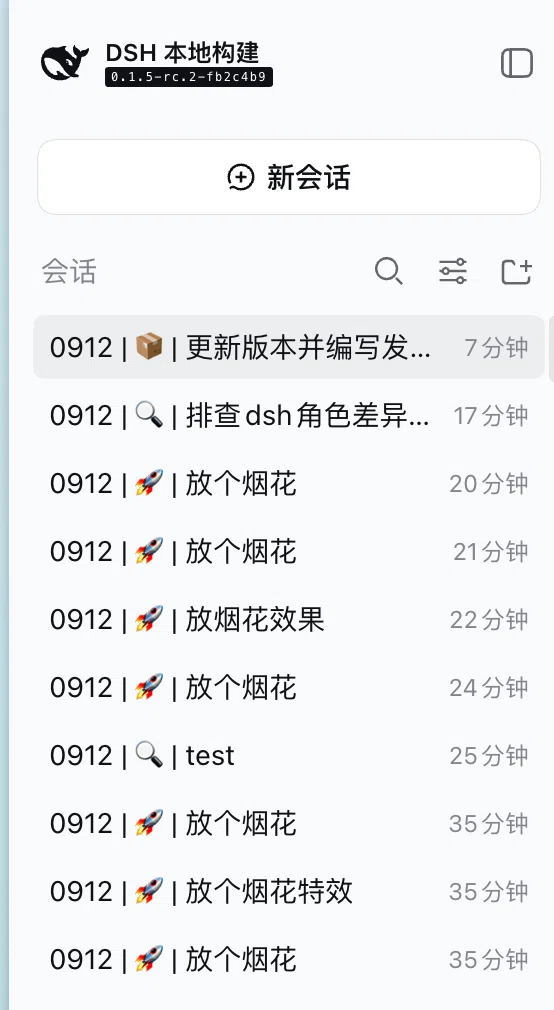
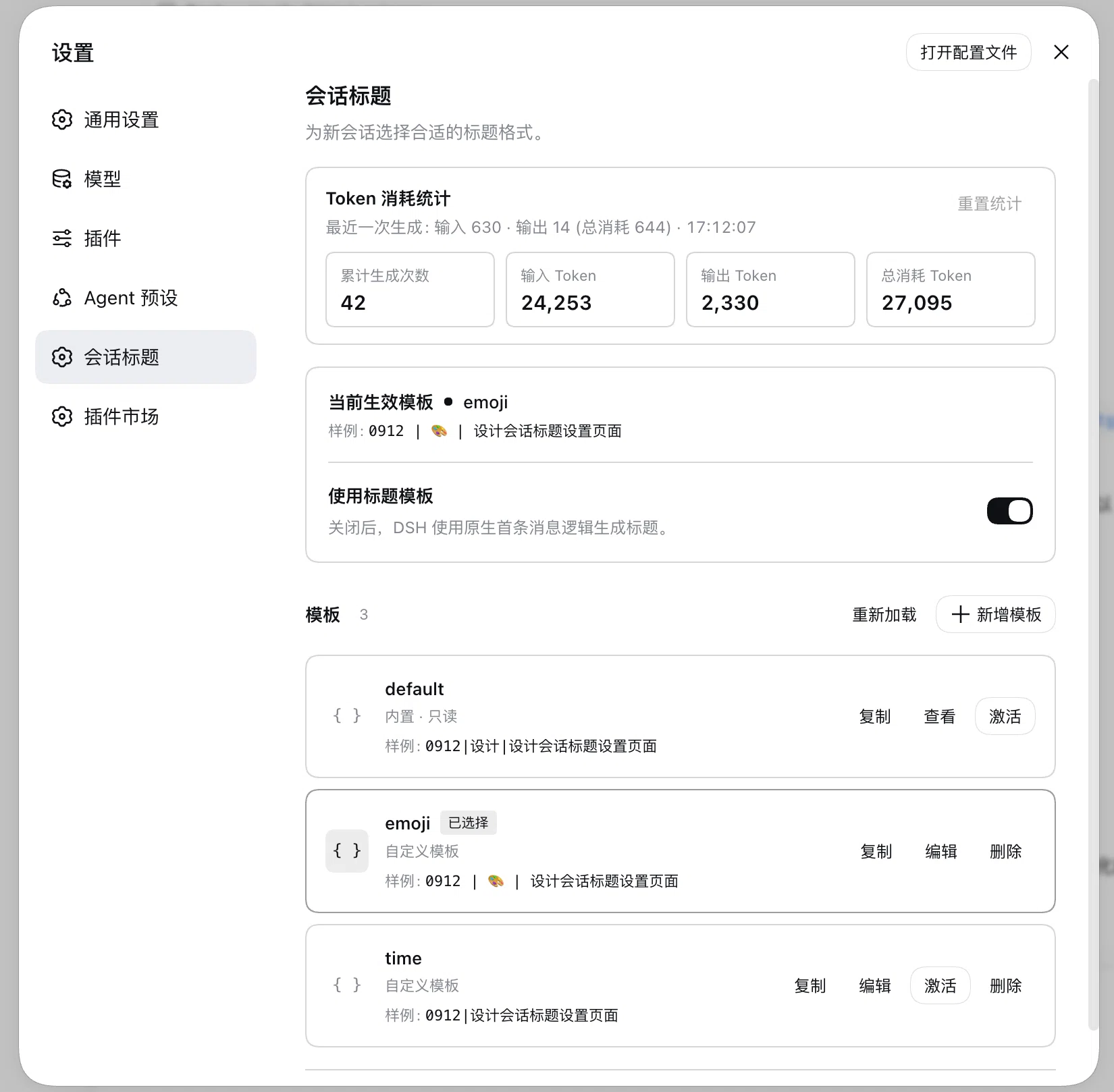
@cerbur/clutch-dsh-title gives new DSH Sessions configurable, scannable titles. In DSH Web, open Settings → Session Title to choose a built-in or saved template, or create your own.
A title can combine the session date, fixed text, a controlled category, and a short description of the first prompt, for example 0912 | 🚀 | add token statistics. The result stays in DSH's native Session list; this package adds the title provider and settings manager without replacing that list.
Installation
Install from npm
With an installed DSH CLI, add the package to the Web profile and start DSH Web:
dsh plugin --profile web add @cerbur/clutch-dsh-title
dsh web
When using a DeepSeek Harness source checkout without a standalone dsh command, use the equivalent pnpm dsh form.
If DSH is already running, restart DSH Desktop, or restart the DSH Web server and refresh the browser page, after installation. Refreshing the page alone does not apply the host changes. When the plugin's client loads before its host service is available, a native toast reminds you to restart once per client load. A healthy host does not show the reminder.
Install from a local checkout
The package's lib/ directory is generated and is not committed. Build both this workspace package and the DSH source checkout, then add the package by absolute path:
cd /absolute/path/to/clutch-dsh
pnpm install
pnpm --filter @cerbur/clutch-dsh-title build

cd /absolute/path/to/deepseek-harness
pnpm install
pnpm run build
pnpm dsh plugin --profile web add /absolute/path/to/clutch-dsh/packages/clutch-dsh-title
pnpm dsh web
After changing source files, package metadata, or cordis.patch.yml, rebuild the package and repeat the absolute-path add command.
Features
| Feature | Preview | What it does |
|---|---|---|
| Native Session titles | The selected template automatically composes a compact title from date, category, fixed text, and first-prompt summary. Titles remain in DSH's native Session list; the plugin does not take over that list. | |
| Template manager | Settings → Session Title supports preview, duplicate, edit, save, activate, and delete. The same page enables or disables custom title generation. | |
| Flexible template fields | — | datetime and literal fields resolve deterministically without a model. llm-enum and llm-text fields are model-backed; referenced LLM fields are extracted in one structured request. |
| Generation statistics | — | Count successful model calls and failed calls that consumed tokens; view cumulative input/output/total tokens and the latest model-call details. Reset the stored statistics after confirmation. |
| Output repair and error log | — | Expand Retry settings below token statistics to choose 0–3 extra calls and view the error log for counters, last successful repair time, the latest 10 incidents, and confirmed reset. |
Usage
Choose a title template
- Start DSH Web with dsh web.
- Open Settings → Session Title.
- Keep Use title templates enabled, choose a row, and select Activate.
- Create a new Session, or use DSH's native title refresh action for an existing Session.
The read-only default template is selected in a fresh settings file. A newly selected format does not rewrite existing titles until DSH explicitly generates or refreshes one.
Manage templates
Fresh settings include an editable emoji template with a description limit of 64 Unicode characters while the built-in default template remains selected. The emoji template can be edited or deleted; deleting it does not recreate it on a later settings registration.
- Duplicate any row, including default, to open an editable copy.
- Give a copy a unique name, edit its YAML, and select Save. Saving does not activate it.
- Select Activate when a saved template should become effective.
- View or select default, but do not edit or delete it.
- Deleting the active custom template selects default.
- Each row shows an illustrative example while editing. Examples do not call a model.
Create a custom template
The editor accepts a template and optional fields. A template reference such as ${daytime} is resolved from fields.daytime, and ${desc} is resolved from fields.desc:
Each ${fieldName} reference is resolved by fields.; it is a field substitution, not an instruction or expression.
template: '${daytime} | ${desc}'
fields:
  daytime:
    kind: datetime
    source: session.createdAt
    format: MMDD
    timezone: Asia/Shanghai
  desc:
    kind: llm-text
    instruction: Summarize the first prompt in a few words
    maxCharacters: 32
Use datetime or literal for deterministic values. Use llm-enum for a controlled model-selected value, or llm-text for a short model-generated value. Saving validates the YAML and field definitions before the template can be activated.
Refresh / regenerate a title
Use DSH's native Session title refresh action to explicitly run the current provider again. The refresh uses the current template and the Session's original createdAt value, so a datetime field does not change merely because the title was refreshed.
Disable custom titles
Turn off Use title templates in Settings → Session Title. The package keeps the saved templates and selection, but DSH resumes its native first-prompt title generator.
View generation statistics
Open Settings → Session Title to see counted title-model calls, input tokens, output tokens, total tokens, and the latest model-call details when the model reports them. Every successful model call counts once, even with zero or missing usage. Failed calls count when they report positive token consumption; only failed calls with zero or missing consumption are excluded. Repair calls follow the same rule, so a consumed failed attempt followed by a successful repair counts twice. A success with reported consumption is never counted twice. Tokens include reported consumption from all calls. Deterministic-only templates do not add a generation statistic. Reset requires confirmation.
Reset is available after statistics are successfully read from the connected host, including locally installed plugins. The token card and counters inherit the settings panel background in both light and dark themes.
Existing statistics retain their historical count because the old data does not contain enough information to reconstruct all past call outcomes and consumption. Reset statistics to start a fresh count under this rule.
Configure repair and inspect error logs
Within the Token usage card, expand Retry settings below the counters to access output repair and error logs. This section starts collapsed. Use its dropdown to choose 0–3 extra model calls after unusable output; 0 disables repair. Dividers separate the counters, retry section and error log. The dropdown uses DSH's settings-selector background and highlights on hover or while open. The choice is saved immediately through DSH settings and applies to future generation or refresh. All calls share the title timeout; transport, cancellation and deadline failures are not retried.
The Error log is displayed directly when Retry settings is expanded. It shows cumulative incident, repair-call and recovered counts, the last successful repair time, and a table of the latest 10 incidents, newest first. Expand a row's response details for message seqs, rejection reasons and bounded raw responses. Reload refreshes diagnostics. Reset diagnostics requires confirmation and resets the entire error-log domain: incident, repair-attempt and recovered counts, the last repair time and all incident records. Token statistics and templates are independent.
The clutch_title_diagnostics storage domain persists only the latest 10 incidents; a new incident evicts the oldest without reducing cumulative counts. Legacy lastIncident data is imported on read and replaced by recentIncidents on the next write. The titleStats remote namespace provides getDiagnostics and resetDiagnostics; each incident also produces one warning. If diagnostics cannot be read, the panel reports that failure and disables resetting until a read succeeds. Reset results and errors remain available even if the subsequent settings refresh stalls. Diagnostics refresh independently, so a slow or unavailable error log does not delay template loading or saving the repair setting. A diagnostic write that succeeds after its timeout is counted once; records arriving later and resets remain separate from that write. Replacing the storage connection also preserves those completed writes and subsequent records.
Template reference
Templates use simple field substitution:
| Field kind | Purpose | Uses a model |
|---|---|---|
| datetime | Format the Session timestamp from session.createdAt | No |
| literal | Insert fixed text | No |
| llm-enum | Select one of the declared controlled values | Yes |
| llm-text | Generate a short text value | Yes |
Use the placeholder form ${identifier}. The identifier must name a declared field. Placeholders do not support functions, expressions, conditions, loops, or arbitrary code. Unknown fields, malformed YAML, and invalid field definitions are rejected during validation.
Configuration
Title settings remain keyed by the clutch-dsh-title DSH profile entry. DSH 0.1.6 and earlier store
the section in $DSH_HOME/settings.yaml. DSH dsh-v0.2.0-rc.1 stores the same enabled, selected,
and template values as volatile fields in the active Web profile's cordis.yml; its one-time
settings importer moves an existing $DSH_HOME/settings.yaml section into the profile and renames
the old file to settings.yaml.imported.
DSH normally uses ~/.dsh as $DSH_HOME, but the source of truth is version-dependent DSH profile
configuration, not a hard-coded home path. The package does not use browser storage or clutch.yaml.
External edits to the source-of-truth settings are picked up by DSH's reload path. Invalid template
entries remain visible in Settings so they can be repaired instead of silently disappearing.
Profile configuration and Settings → Session Title can set:
- repairAttempts: how many extra model calls one title generation may spend after the model returns unusable output. Defaults to 1; accepted values are 0 through 3, and larger values are rejected. These calls share the single timeoutMs budget and are never used for transport, cancellation, or deadline failures.
Behavior and limitations
- Only the first eligible user prompt contributes to an automatic title. Later messages do not automatically replace it.
- A long first prompt is bounded by the configured input-byte budget while preserving its head and tail. The original Session message is not modified.
- A changed template affects future generation or an explicit refresh. Existing titles are not batch-rewritten.
- If the active template is missing or invalid, the settings manager uses the built-in default template.
- If field extraction, rendering, or custom title generation fails, DSH's normal first-prompt generator handles the title instead. That fallback is DSH's own truncation of the first prompt, so it does not follow the template.
- The model is asked for exactly one JSON object whose keys are the referenced LLM fields, one of the declared literal values for each enum field, and a literal shape example. When a response is still unusable, the package sends one bounded corrective turn that quotes the rejected response back verbatim and states the rejection reason, up to repairAttempts extra calls.
- Unusable output, including max-tokens truncation and unexpected tool-calls, is repaired within the configured budget. A transport error, a cancellation, or an exhausted deadline keeps its own error and falls back immediately; every attempt shares the one timeoutMs budget.
- Each incident is logged once with its provider, model, message seqs, rejection reason, and the raw response bounded to 2000 characters, and is persisted in the clutch_title_diagnostics storage domain (only the latest 10 incidents, at most four rejected responses per incident, and at most 64 incidents buffered in memory while storage is unavailable, including stalled opens or writes). Once that buffer is full, the oldest buffered incident is dropped. Persistence is best effort and never delays or fails a title.
- DSH remains responsible for title length limits, title persistence, manual rename pinning, refresh and unpin behavior, fork title-event inheritance, cancellation, and stale-result protection.
- The bundle patch disables DSH's default session-title-first-prompt-llm provider before inserting this provider. DSH permits only one session-title provider: do not re-enable the default or install another title provider in the same profile. A second registration is rejected by DSH's single-provider invariant.
Requirements
- DSH peers: @deepseek-ai/dsh-settings, @deepseek-ai/dsh-storage-domain, @deepseek-ai/dsh-typert-protocol, @deepseek-ai/dsh-api-remotes, @deepseek-ai/dsh-client-locale, @deepseek-ai/dsh-client-ui-settings, @deepseek-ai/dsh-client-ui-slots, @deepseek-ai/dsh-client-ui-primitives, @deepseek-ai/dsh-llm, @deepseek-ai/dsh-session, @deepseek-ai/dsh-session-title, @deepseek-ai/dsh-session-title-llm, @deepseek-ai/dsh-timeout, and @deepseek-ai/dsh-util-values, all at >=0.2.0-rc.1.
- Cordis: @deepseek-ai/cordis ^4.0.1.
- Running DSH
dsh-v0.2.0-rc.1requires Node.js^22.19.0 || >=24.0.0. - Profile: a DSH Web profile that provides the session, session-title, LLM, settings, storage, remote, and browser settings services declared by the package.
Compatibility
Cordis configuration using template and fields remains supported. When those values come from the profile configuration, Settings exposes them as an editable legacy row. The current Settings template manager and the legacy configuration use the same validation rules.
The plugin marks its extraction wrapper message with DSH's native dsh-session-title-llm message-source
kind to satisfy format v4 validation during session reload, while recording clutch-dsh-title as the title
provider. DSH 0.1.7 also replaces the old settings registration API with profile-backed volatile Config
fields; the same title editor uses those fields, and DSH imports existing legacy settings during profile migration.
Model routing and optional reasoning settings are profile-level configuration, not template field settings. Keep the DSH default title provider disabled and do not compose a second title provider with this package.
Development
Build, type-check, and test the package from the workspace root:
pnpm --filter @cerbur/clutch-dsh-title typecheck
pnpm --filter @cerbur/clutch-dsh-title build
pnpm --filter @cerbur/clutch-dsh-title test
Package-specific release parameters and source-install constraints are documented in docs/RELEASING.md. User-facing release history is in RELEASE-LOG.md.
Uninstall
With the DSH CLI:
dsh plugin --profile web remove @cerbur/clutch-dsh-title
From a DeepSeek Harness source checkout, use pnpm dsh plugin --profile web remove with the same package name.
Friendly Links
- LINUX DO — A new ideal community.
Comments
Comments live in GitHub Discussions. Sign in with GitHub to post or react.