
Install
Inside DeepSeek Harness, with dsh-market
dsh plugin --profile web add dshmarket
Or from the command line
dsh plugin --profile web add dsh-grok-acp
Installing runs third-party code with your own permissions — it can read your files, use your credentials and reach the network. Review the source first, and pin a commit (github:owner/repo#sha) when you can.
README
dsh-grok-acp is an adapter in DSH Agent Bridge. It connects Grok Build as a root agent through Agent Client Protocol (ACP), while preserving the native DSH Web session, composer, tool rendering, permission, and Markdown diff interfaces.
Grok Build is the only adapter today. The broader DSH Agent Bridge project name leaves room for future Codex and Claude Code adapters without tying the repository to one vendor or protocol.
Features
- Select DSH or Grok Build in the same
dsh webcomposer. - DSH mode reads the presets supplied by the current deployment and retains its installed models and plugins.
- Grok Build mode shows only models and reasoning efforts reported by ACP and hides unrelated DSH agent presets.
- ACP streaming output becomes native DSH answers, thoughts, tool calls, and diffs; plan updates use the collapsible task panel above the composer instead of repeating inside the answer.
- Each Grok turn uses one prominent activity summary. Click it to expand the full timeline; failures expand automatically. File changes, Markdown diffs, and permission requests remain independent.
- Grok permission requests use the DSH approval interface.
- DSH
Full accessalso governs Grok ACP file access and approval behavior, including local Grok skills outside the workspace. - Supports
/usage,/context,/session-info,/btw,/model,/models, and/effort, including the/uasgecompatibility spelling./modeland/modelsshow only the active Harness's models. - The harness can change while a session is blank and locks after the first message to prevent mixed-engine history.
- Grok sessions share one lazily started ACP process, which closes after the configured idle period.
- If the ACP process exits unexpectedly, the next request restarts it and resumes the matching Grok session.
- Installs as an independent DSH Bundle and does not modify the global DSH package or DeepSeek Harness source.
| DSH | Grok Build |
|---|---|
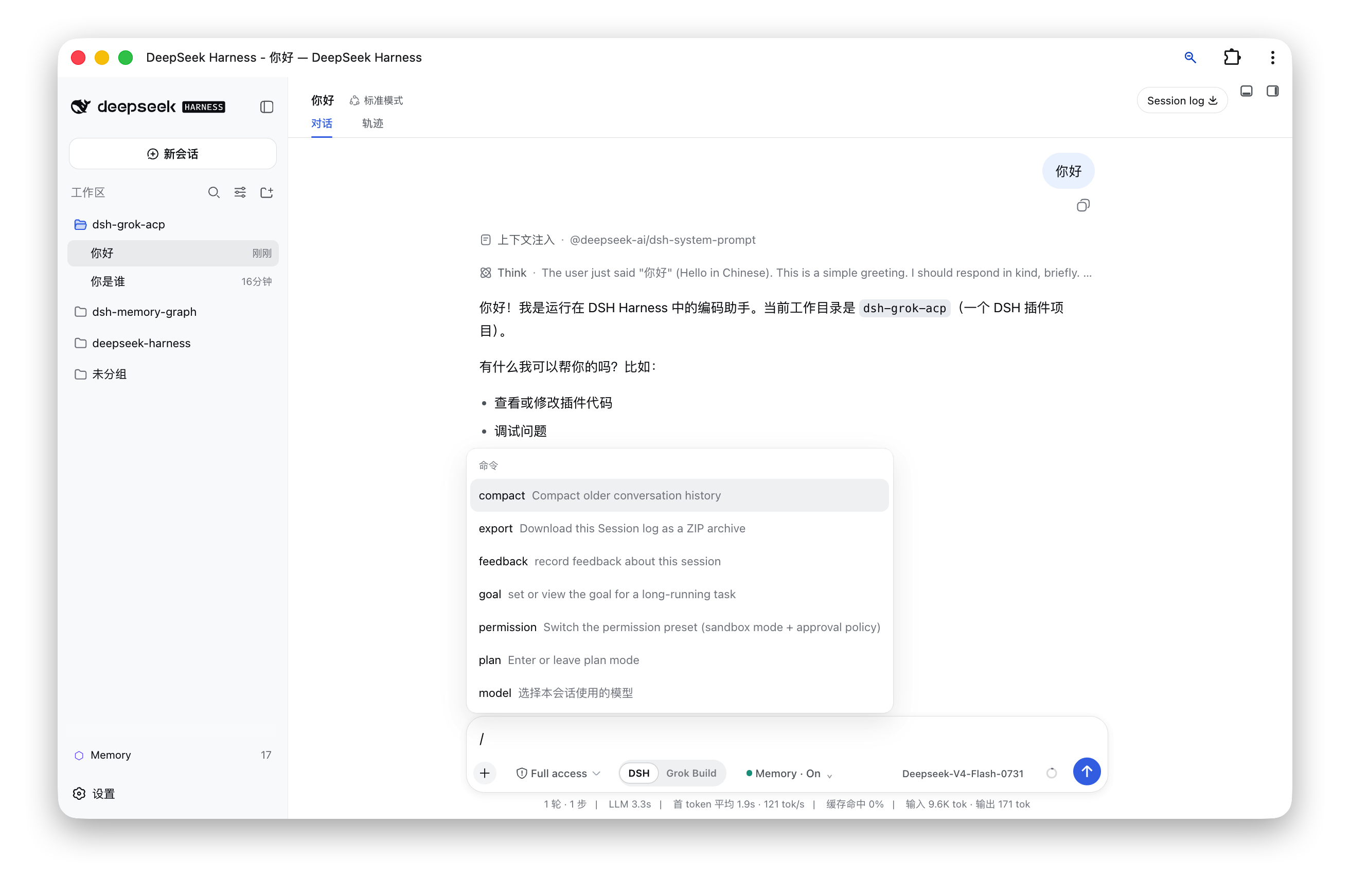 |
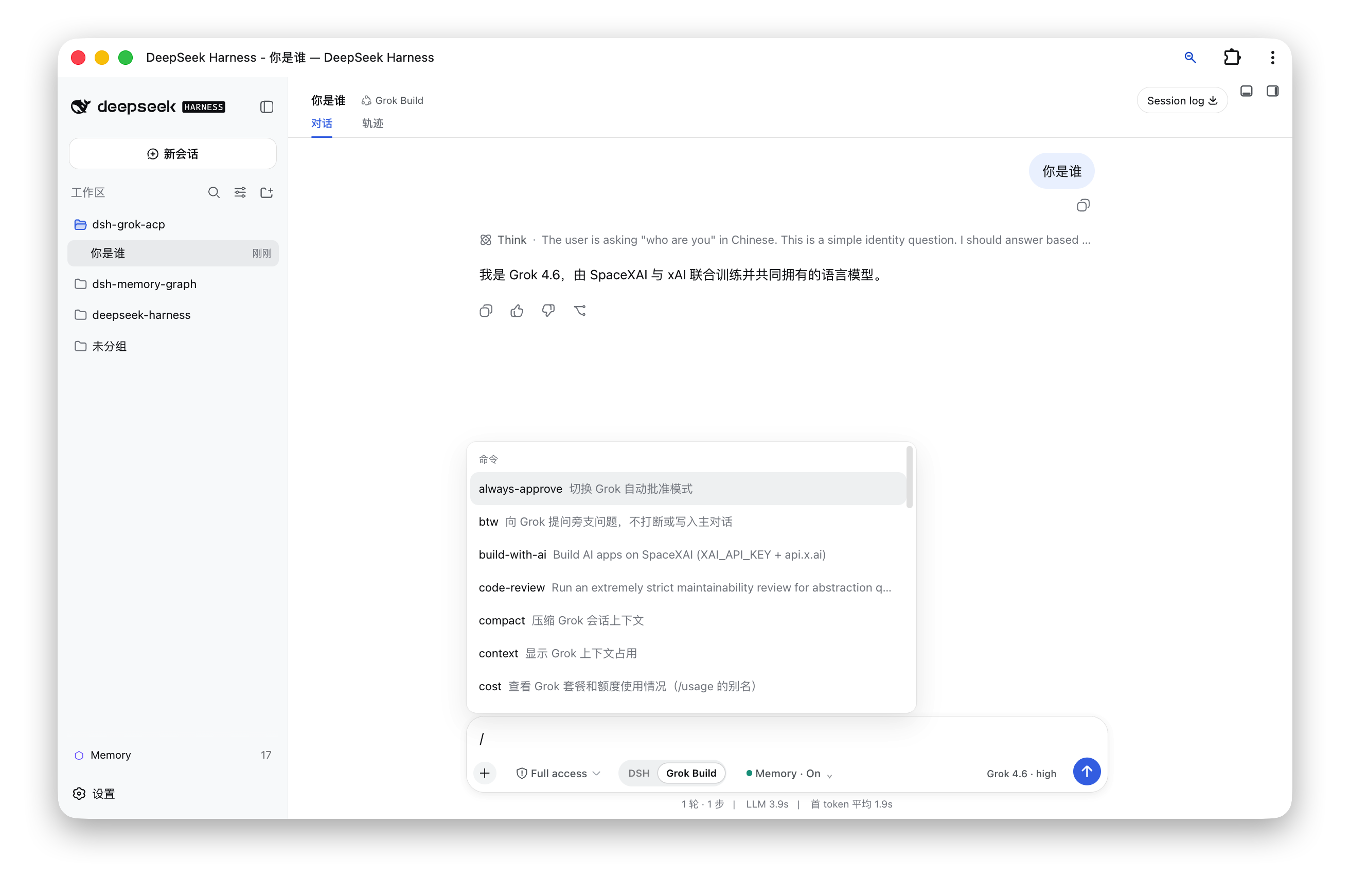 |
Architecture
DSH Web composer
       │
       ├── DSH ───────────► official AgentLoop, models, tools, and plugins
       │
       └── Grok Build ────► dsh-grok-acp ── ACP/stdio ──► grok agent
                                  │
                                  └── DSH session log / tool UI / approval UI
The plugin changes the agent preset while a session is blank and routes agent creation to either the official DSH AgentLoop or the Grok ACP agent. Model-visible output is still recorded in the DSH session log, so replay, titles, tool results, and diffs continue to use native DSH Web rendering.
Installation
Requirements
- macOS or another environment supported by the Grok Build CLI.
- Node.js
^22.19or>=24. - DeepSeek Harness
0.1.1-rc.2installed globally, with a workingdsh webcommand. - Grok Build CLI installed and authenticated;
grok --versionmust succeed.
Option 1: Install from npm (recommended)
Run:
dsh plugin --profile web add dsh-grok-acp@latest
dsh web
Open http://127.0.0.1:3080 and create a new session. Use Cmd/Ctrl + Shift + R if the browser still has an older client bundle cached.
Option 2: Install from a cloned project directory
Use this method when you want the latest GitHub source. Clone and build the project first, then give its directory directly to DSH:
git clone https://github.com/zmh2000829/DSH-agent-bridge.git
cd DSH-agent-bridge
npm install --legacy-peer-deps
npm run check
dsh plugin --profile web add "$(pwd)"
dsh web
$(pwd) means the full path of the current cloned project. If the project already exists locally, you can provide its absolute path directly:
dsh plugin --profile web add /Users/your-name/Projects/DSH-agent-bridge
Choose either installation method; do not run both. The Grok preset loads directly from the package and does not copy or overwrite ~/.dsh/harness-presets.
Verify the installation
dsh plugin --profile web exec dsh-grok doctor
The report should show that DSH, Grok, the Bundle, the preset, and the client build are ready.
Usage
- Start
dsh weband open port 3080. - Select “New session.”
- Choose DSH or Grok Build below the composer.
- DSH mode exposes four agent presets above the composer. Grok Build mode exposes the Grok model and reasoning-effort control inside the composer.
- The harness locks after the first message. Create a new session to use another harness.
| Command | Purpose |
|---|---|
/usage, /cost, /uasge |
Show plan and usage information |
/context |
Show context usage |
/session-info |
Show Grok session information |
/btw <question> |
Ask a side question without interrupting the main task |
/model, /models |
Select a model from the active Harness; Grok mode does not show DSH models |
/model <model> |
Change the Grok model |
/effort <level> |
Change reasoning effort |
/compact, /goal, /workflow, /deep-research |
Forward the corresponding capability to Grok Build |
Configuration
The default command is grok agent --no-leader stdio.
| Variable | Purpose |
|---|---|
GROK_COMMAND |
Grok executable; defaults to ~/.grok/bin/grok, then grok from PATH |
DSH_HOME |
DSH home, defaulting to ~/.dsh |
XAI_API_KEY |
Optional value forwarded to the Grok process |
Advanced deployments can override command, args, env, stateFile, disposeGraceMs, idleDisposeMs, yoloMode, and allowOutsideWorkspace in the Web profile's cordis.patch.yml entry. Sensitive actions require approval by default, and ACP file operations stay inside the session workspace. Enable both yoloMode and allowOutsideWorkspace only when you explicitly accept host-wide access.
ACP coverage
- Initialization and authentication:
initialize,authenticate. - Sessions:
session/new,session/resume,session/load,session/close. - Execution:
session/prompt,session/cancel,session/set_config_option. - Stream events: assistant, thought, tool call, tool result, plan, commands, model.
- Client capabilities: permission requests,
fs/read_text_file,fs/write_text_file. - Grok extensions: billing, BTW, session info, models.
Updating and uninstalling
Update an npm installation with dsh plugin --profile web add dsh-grok-acp@latest. For a source installation, run git pull, npm install --legacy-peer-deps, npm run check, and dsh plugin --profile web add "$(pwd)" from the cloned project directory.
Uninstall through the profile command, then restart DSH:
dsh plugin --profile web remove dsh-grok-acp
dsh web
Do not edit ~/.dsh/profiles/web/package.json by hand. Removing the plugin does not remove Grok authentication or Grok session files.
Development and publishing
npm install --legacy-peer-deps
npm test
npm run build
npm pack --dry-run
lib/*.jscontains the Node plugin and publication entry points.src/client/index.tsxis the Web client source;npm run buildemitslib/client.js.presets/grok-buildcontains the packaged agent preset..github/workflows/ci.ymltests, builds, and checks npm package contents on Node 24.
The project homepage, issue tracker, and source are available at zmh2000829/DSH-agent-bridge.
Security and limitations
- The browser bridge accepts only loopback hosts and rejects cross-site requests. Writes require same-origin JSON requests.
- ACP file operations stay inside the session workspace by default and reject escape through absolute paths,
.., or symbolic links.yoloModeandallowOutsideWorkspaceare explicit high-privilege options. - The plugin currently targets DSH
0.1.1-rc.2. DSH prereleases may change internal AgentFactory or client Slot APIs; rerun tests and a real blank-session flow after upgrading DSH. - Terminal-layout features from the Grok Build TUI cannot be embedded unchanged. This project reuses agent capabilities and commands and renders them through DSH Web.
- Codex and Claude Code adapters are not implemented yet. They should be separate adapters rather than conditional branches inside the Grok implementation.
Roadmap
- Extract a stable
ExternalAgentAdapterinterface. - Add a Codex adapter.
- Add a Claude Code adapter.
- Add adapter capability discovery, settings UI, and a compatibility matrix.
Issues and pull requests are welcome. Licensed under the MIT License.
Comments
Comments live in GitHub Discussions. Sign in with GitHub to post or react.