
Install
Inside DeepSeek Harness, with dsh-market
dsh plugin --profile web add dshmarket
Or from the command line
dsh plugin --profile web add github:yyyyukari/dsh-plugin-workshop
Installing runs third-party code with your own permissions — it can read your files, use your credentials and reach the network. Review the source first, and pin a commit (github:owner/repo#sha) when you can.
Screenshots
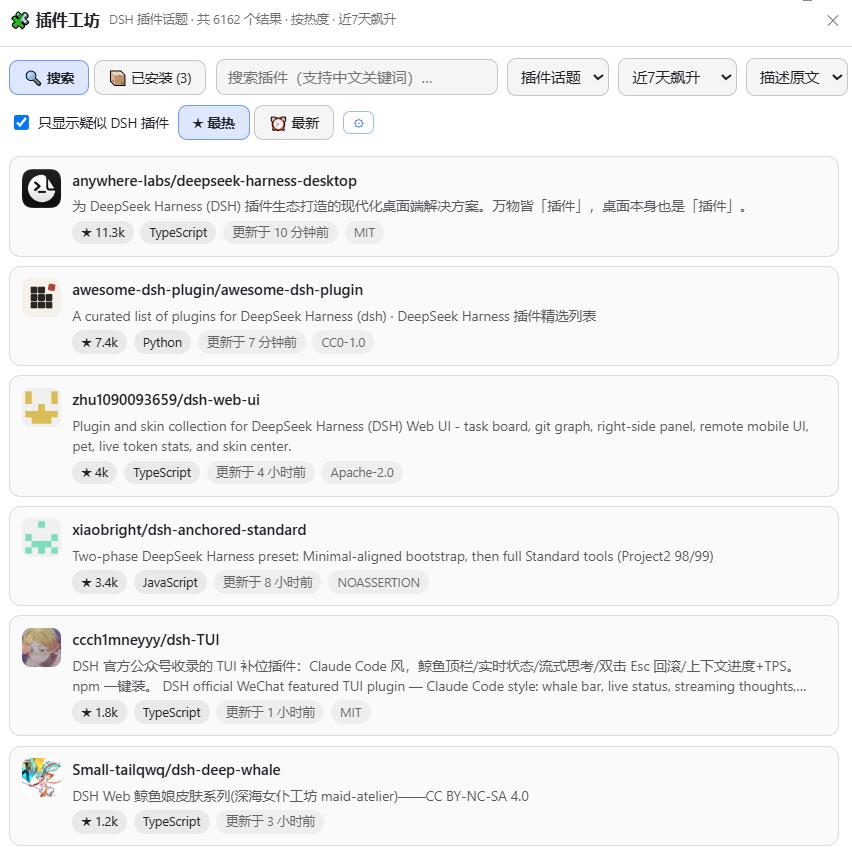
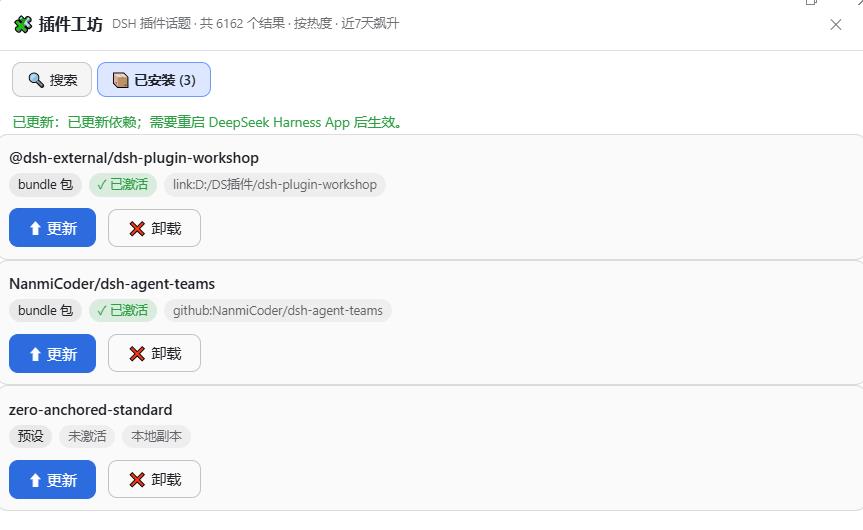
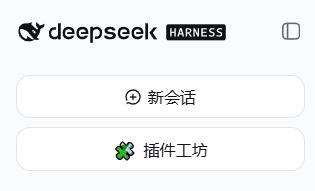
README
A Steam Workshop-style plugin browser for DeepSeek Harness (DSH) — zero-server, single-package, living right inside the DSH Web UI sidebar, directly under the "New Session" button.
Unlike the centralized marketplace-platform approach of DSH_Creative_Workshop, this project takes the zero-infrastructure route: catalog, search, popularity and publish time are all provided by GitHub for free. No control plane, no account system — install into a profile and it just works.
简体中文 | English
✨ Features
- Permanent sidebar entry: cloned under the official "New Session" button with identical styling (DOM clone of the official button, adapts to wide/rail sidebar states, survives refreshes and restarts)
- Search & sorting: keyword search (Chinese input auto-mapped to English keywords), ★ hottest / ⏰ newest, and trending time windows (repos created in the last 7/30/90 days sorted by stars — the closest GitHub-API approximation of Steam's Trending)
- DSH plugins only by default: the "Plugin topic" scope (
topic:dsh-plugin); search results exclude the official harness and other core repos (query-level-repo:filter, so they no longer top the board); the whole-site mode includes plugin-signature verification (checkspackage.jsondshfield /cordis.ymletc. via the raw CDN — costs no API quota) and filters out unrelated repos by default - Installed management: the "📦 Installed" view merges profile dependencies / activation rows / local presets to show your machine's plugins (type, active state, install source) with one-click update (pnpm update / git pull) and uninstall
- Bilingual experience: one-click switch between original / machine-translated Chinese descriptions; README can be fully translated (Google Translate endpoint, cached)
- Smart install / uninstall with pre-flight grading: the detail page probes the repo structure up front and shows a three-level verdict — installable / risky / manual-only. Standard bundle/nested/preset shapes keep one-click install; special shapes (multi-package monorepos, non-plugin repos, build scripts) degrade to the author's own install instructions (commands extracted from the README, copyable, never auto-executed). Uninstall reverses the install path (no files are touched when pnpm remove fails — no dangling links; on success dsh web restarts automatically to refresh the plugin table); missing git is reported with clear guidance
- Detail page: stars/forks/language/license/created time, lightweight README rendering (headings/bold/code/lists/links), manual install command, GitHub link
- Quota transparency: live GitHub search rate-limit remaining + recovery countdown; optional GitHub Token (30 req/min, stored in the local browser only)
- Zero-server: all data comes from the GitHub search API (browser-direct, CORS) + raw.githubusercontent.com (verification & README); optionally connecting a stats service unlocks community install badges + a real trending board (see
remote/README.md— zero impact when not deployed)
📦 Install
For the web profile:
# One command is enough: this package declares dsh.bundle.patch in its
# package.json, so `dsh plugin add` auto-adds it to the profile's
# dsh.profile.bundles and its cordis.patch.yml is applied as a bundle
# patch layer on boot — no manual config.
dsh plugin --profile web add "github:yyyyukari/dsh-plugin-workshop"

# Restart dsh web and refresh the browser
Legacy manual flow: add the package to the profile dependencies, then add to
$DSH_HOME/profiles/web/cordis.patch.yml:- insert: - id: plugin-workshop name: '@dsh-external/dsh-plugin-workshop'
After activation, the "🧩 插件工坊" button appears under "New Session" in the sidebar; the workshop also lives in Settings → Plugins as a tab.
🧭 Usage
| Goal | How |
|---|---|
| Find DSH plugins | Default view is the plugin-topic list (repos tagged topic:dsh-plugin) |
| Trending | Time dropdown: 7/30/90-day windows + ★ hottest |
| Search in Chinese | Type Chinese words like 天气 / 翻译 — auto-mapped to English keywords |
| Read Chinese descriptions | Toolbar "描述中文"; detail page "翻译 README" |
| Install / update / uninstall | Detail page buttons, install path chosen by repo type (needs git, warned otherwise) |
| Raise search quota | Toolbar ⚙ → paste a GitHub Personal Access Token |
🏗️ Architecture
- Host half (
lib/index.js): registers same-origin HTTP routes on thewebServerservice —/dsh-plugin-workshop/api/{status,install,update,uninstall}— smart install (bundle/preset type detection) and reverse uninstall with strict input validation and a custom-header CSRF guard - Client half (
lib/client.js): React over platform seed modules; DOM-clones the official sidebar button with a MutationObserver self-heal; mounts the workshop inshell.overlayandsettings.plugins.tab - Data flow: GitHub search API (10 req/min anonymous) → signature verification & README via raw CDN (no quota) → machine translation via Google gtx
- Security: no third-party code is executed by the browser half; installs only write under
.agent-presets; the Token lives in localStorage only
🗺️ Roadmap
- v1.1 One-click install / update (host API: git detection, clone/pull into
.agent-presets) - v1.2 Smart install / uninstall: bundle-type via official
dsh plugin add+ activation row, preset-type via.agent-presets, uninstall reverses the path (tested end-to-end) - v1.3 DSH bundle compliance:
dsh.bundle.patchdeclared in package.json (one-command auto-activation viadsh plugin add); smart install covers all three repo shapes (bundle / nested / preset) - v1.4 "Installed" management view (update/uninstall, type & active state); official core repos excluded from search; uninstall hardened (no mutation on failure, auto-restart to refresh)
- v1.5 Optional stats service (Phase A): anonymous install telemetry + community install badges + real trending board (Cloudflare Worker reference implementation in
remote/; zero impact when not deployed) - Community index exposure: ✅ listed in all three major lists — awesome-dsh-plugin (UI Enhancements) / awesome-deepseek-harness / awesome-dsh-plugins
📄 License
MIT
Comments
Comments live in GitHub Discussions. Sign in with GitHub to post or react.