
Install
Inside DeepSeek Harness, with dsh-market
dsh plugin --profile web add dshmarket
Or from the command line
dsh plugin --profile web add dsh-conversation-nav-dots
Installing runs third-party code with your own permissions — it can read your files, use your credentials and reach the network. Review the source first, and pin a commit (github:owner/repo#sha) when you can.
README
Navigation dots for DSH Web conversations — quickly jump between user messages.

📑 Table of Contents
- 📸 Screenshots
- Overview
- Features
- Quick Start
- Installation
- Usage
- How it works
- Code Examples
- FAQ
- Package Structure
- Dependencies
- Contributing
- License
📸 Screenshots
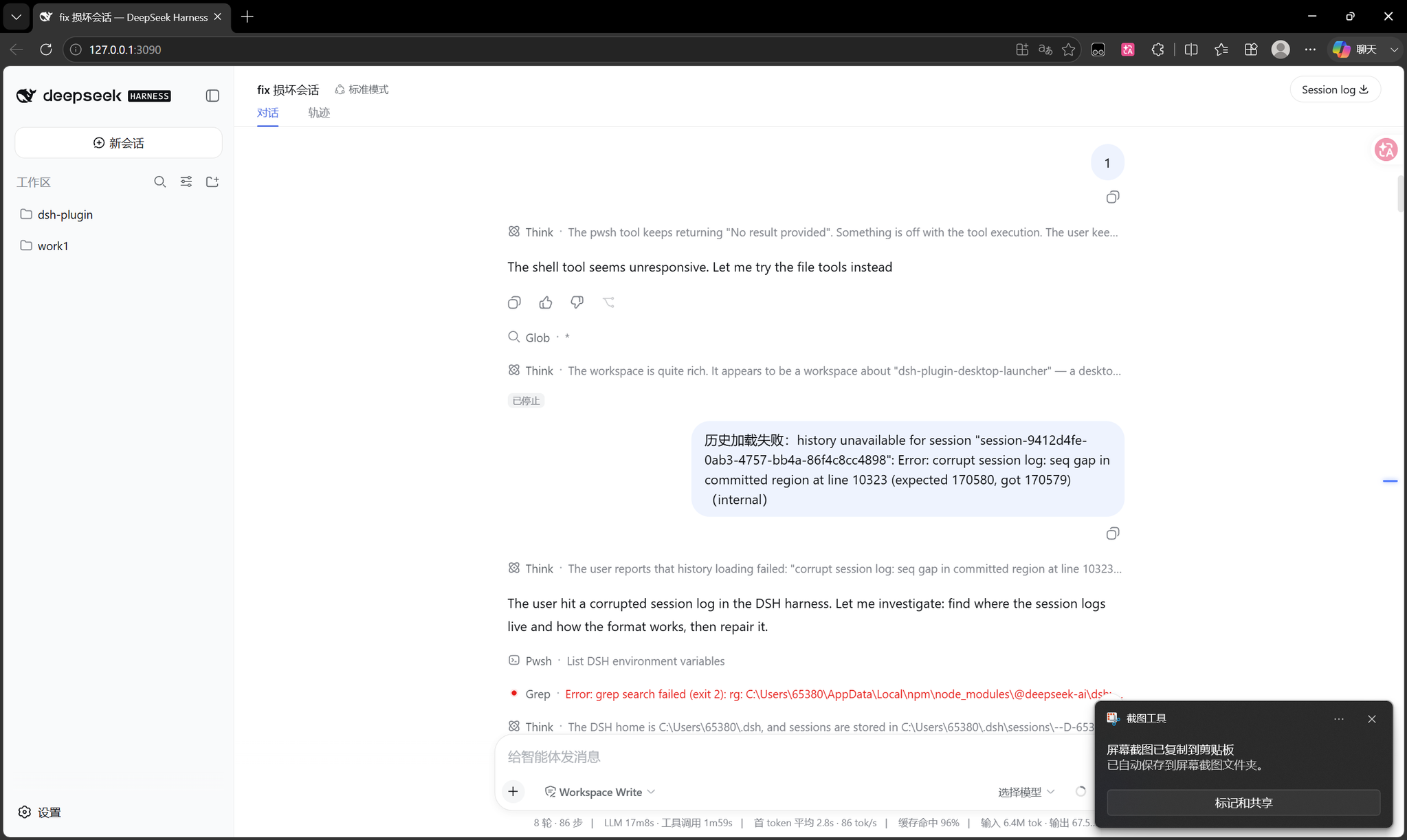
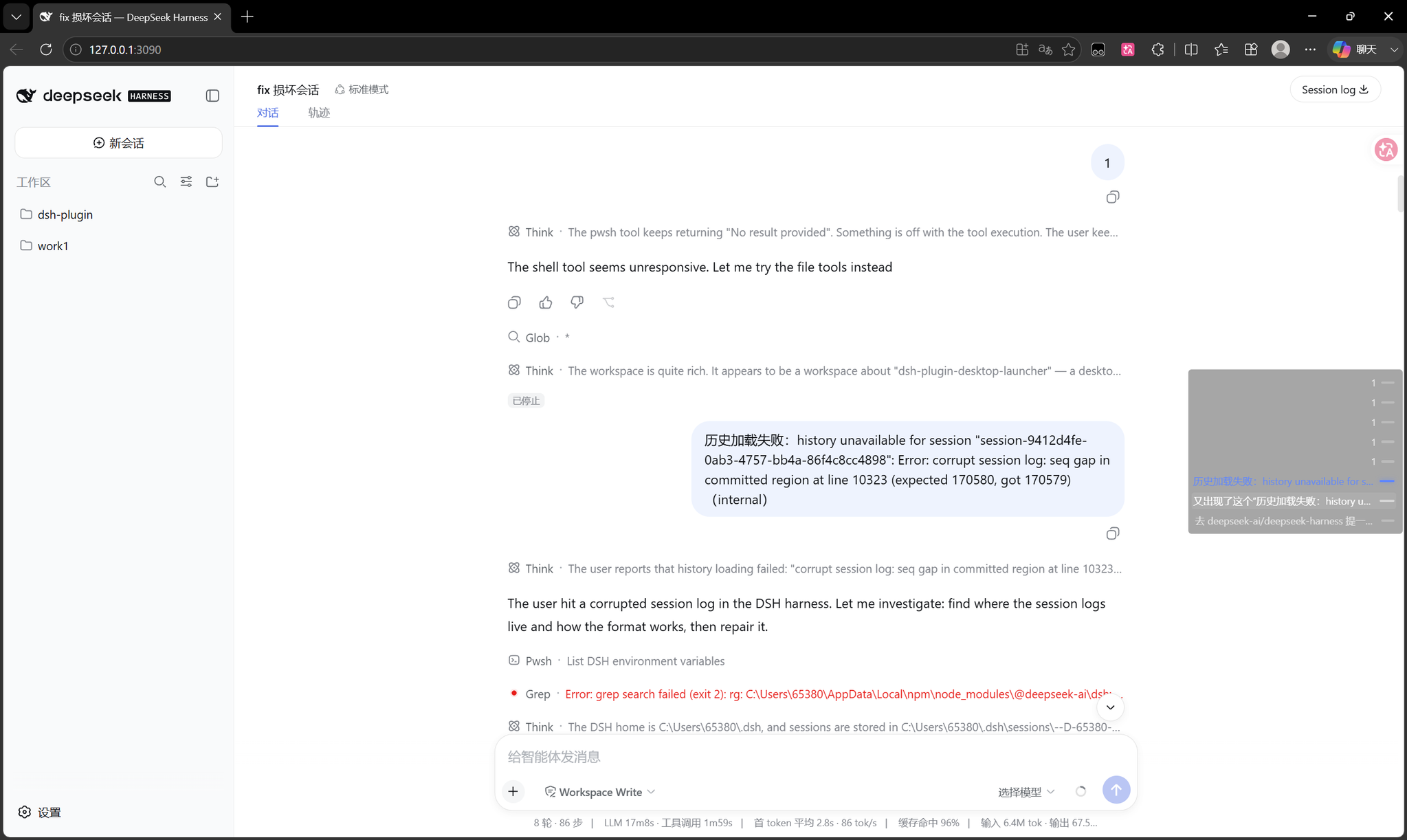
| Normal state | Hover state |
|---|---|
 |
 |
Overview
dsh-conversation-nav-dots adds a vertical rail of navigation markers on the right side of the conversation view in DSH Web. Each marker corresponds to a user message. Click to jump instantly, hover to see a preview of all messages.
Great for navigating long conversations — similar to line-number markers in code editors.
Features
| Feature | Description |
|---|---|
| 🎯 Minimal UI | Only thin horizontal markers are visible on the right edge by default |
| 👁️ Hover to preview | Hover over the right edge to reveal the full message preview panel |
| ⚡ Instant jump | Click any marker or preview text to jump directly to that message |
| 🔵 Active tracking | The marker for the currently visible message is highlighted in blue |
| 🔄 Auto-update | Switches seamlessly when you change conversations |
| 📜 Scrollable | When there are too many messages, the nav dots list scrolls (max height: ~20% of viewport) |
| 🪶 Lightweight | Pure DOM implementation, no extra dependencies, zero runtime overhead |
Quick Start
Get started in 30 seconds:
# 1. Install the plugin
dsh plugin --profile web add dsh-conversation-nav-dots

# 2. Restart DSH Web
dsh web

# 3. Open any conversation → look at the right edge for navigation markers
Installation
Prerequisites
- DSH (DeepSeek Harness) installed
- DSH profile
web(default)
Install latest version from npm
dsh plugin --profile web add dsh-conversation-nav-dots
Install a specific version
dsh plugin --profile web add dsh-conversation-nav-dots@1.0.0
Install from local source
dsh plugin --profile web add /path/to/dsh-conversation-nav-dots
After installation, restart DSH Web:
dsh web
Uninstall
dsh plugin --profile web remove dsh-conversation-nav-dots
Then restart DSH Web.
Usage
- Open a conversation in DSH Web.
- Look at the right edge of the screen — you'll see small horizontal markers.
- Hover over the markers to see the message preview panel.
- Click any marker or preview text to jump to that message.
- The blue marker indicates the message currently in view.
💡 Tip: For short conversations (few messages), the nav dots may not be necessary. They are most useful in long conversations (10+ turns).
How it works
The plugin watches the conversation's scroll container ([data-conversation-scroll]) for user message elements ([data-chat-flow-kind="user"]). It builds a vertical list of markers on the right side of the screen using position: fixed. A requestAnimationFrame loop combined with IntersectionObserver tracks which message is currently visible and highlights the corresponding marker in blue.
Core flow:
User messages change → Rebuild marker list → Inject IntersectionObserver
    ↓                                           ↓
RAF-throttled scroll ← Update active marker ← IntersectionObserver triggers
Code Examples
Basic usage
After installation, the plugin works automatically. No configuration needed.
Custom theme colors (via CSS variables)
Override these CSS variables in your own stylesheet to customize the appearance:
/* Custom navigation dot color theme */
:root {
  --dsh-nd-active: #ff6b6b;              /* Active marker color */
  --dsh-nd-marker-active: #ff6b6b;        /* Active marker background */
  --dsh-nd-marker-active-glow: rgba(255,107,107,0.6); /* Active glow */
  --dsh-nd-hover-bg: rgba(0,0,0,0.5);    /* Hover background */
  --dsh-nd-text: rgba(255,255,255,0.8);   /* Text color */
  --dsh-nd-row-hover-text: #ffffff;       /* Hover text color */
}
Developer: Trigger navigation from console
// Test in browser DevTools
document.querySelector(".dsh-nd-row")?.click();
FAQ
Q: I installed the plugin but don't see the navigation dots?
A: Please verify:
- You have restarted DSH Web (
dsh web) - You have opened a conversation (not a settings page)
- The conversation has at least one user message
Q: Do the navigation dots block the conversation content?
A: No. In the normal state, the markers are thin lines (24px wide) on the far right edge. Only on hover does the panel expand.
Q: Does it support dark theme?
A: Yes, natively. The colors are optimized for dark backgrounds, and all colors are exposed via CSS variables for easy customization.
Q: Does it work on mobile (small screens)?
A: The plugin is designed for desktop use. On mobile, the markers will still appear but the experience may be suboptimal.
Q: How do I update to the latest version?
A: Run dsh plugin --profile web update dsh-conversation-nav-dots, then restart DSH Web.
Q: Does it affect DSH performance?
A: Minimal impact. The plugin uses IntersectionObserver (no polling), requestAnimationFrame throttling, and event delegation. The 1-second watch loop only does reference comparison, no DOM re-queries.
Package Structure
dsh-conversation-nav-dots/
├── lib/
│   ├── client.js        # Client-side plugin (browser)
│   └── index.js          # Host-side pass-through
├── cordis.patch.yml      # Bundle layer declaration
├── scripts/
│   └── build.mjs         # Build script
├── img/
│   ├── screenshot-normal.png
│   └── screenshot-hover.png
├── package.json
├── README.md
├── README.en.md
├── PUBLISHING.md         # Publishing guide
├── .gitignore
└── LICENSE
Dependencies
| Package | Version | Description |
|---|---|---|
@deepseek-ai/cordis |
^4.0.1 | Cordis framework |
@deepseek-ai/dsh-client-runtime |
^0.1.1-rc.2 | DSH client runtime |
@deepseek-ai/dsh-client-ui-conversation |
^0.1.1-rc.2 | Conversation UI components |
Contributing
Contributions are welcome! Whether it's a bug report, feature suggestion, or code PR, your participation is appreciated.
Submit an Issue
- GitHub Issues
- Please describe: reproduction steps, expected behavior, actual behavior, environment info
Submit a Pull Request
- Fork this repository
- Create a feature branch (
git checkout -b feature/my-feature) - Commit your changes (
git commit -m 'feat: add my feature') - Push to the branch (
git push origin feature/my-feature) - Open a Pull Request
Development Setup
git clone https://github.com/yuioi666/dsh-conversation-nav-dots.git
cd dsh-conversation-nav-dots
npm install
npm run build
License
MIT
Comments
Comments live in GitHub Discussions. Sign in with GitHub to post or react.