
Install
Inside DeepSeek Harness, with dsh-market
dsh plugin --profile web add dshmarket
Or from the command line
dsh plugin --profile web add github:yuanyiHY/deepseek-media-gallery
Installing runs third-party code with your own permissions — it can read your files, use your credentials and reach the network. Review the source first, and pin a commit (github:owner/repo#sha) when you can.
Screenshots
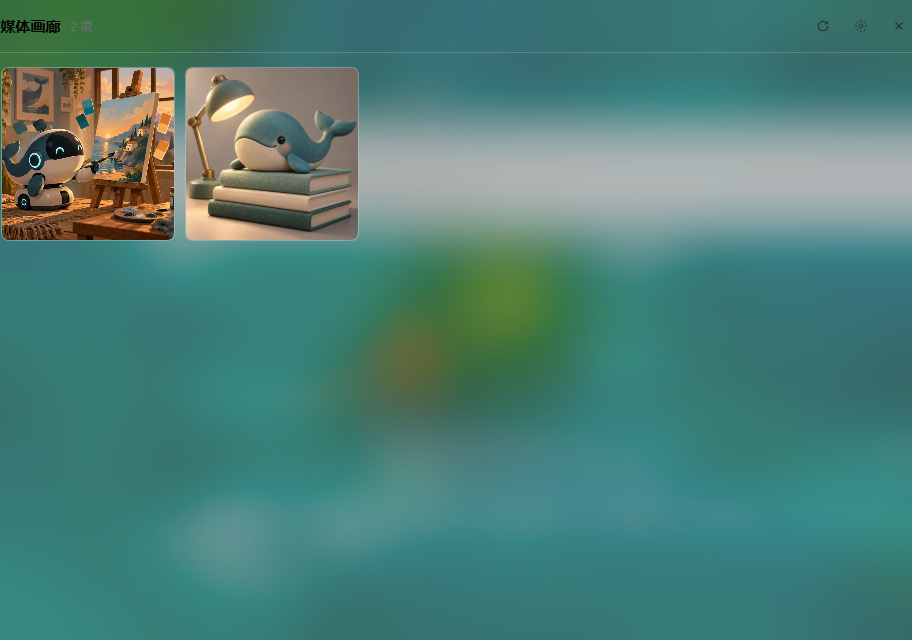
README
A DSH (cordis) plugin that turns a media directory into a gallery: preview, Range playback, download-to-desktop and delete. The entry point is a button at the foot of the sidebar that opens a semi-transparent popup — it does not take over the chat area.
The plugin has two halves:
| Half | File | Role |
|---|---|---|
| Host (Node) | lib/index.js |
cordis plugin: name / inject / Config / apply, registers the <prefix>/* routes |
| Browser | lib/client.js |
DSH client plugin: window.__ModuleLoader__.load({id, factory}), apply(ctx) registers the entry button + popup through ctx.slots |
The browser half renders with React — no iframe.
client/ also holds a standalone page (index.html + client.js) served by the host routes <prefix>/ and <prefix>/client.js, for opening the gallery directly in a browser while debugging. It is unrelated to lib/client.js; do not confuse the two.
Sidebar and popup
| Slot | kind | Registration | Notes |
|---|---|---|---|
sidebar.footer.action |
list | { id: 'media-gallery-panel', order: 60 } |
Entry button at the sidebar foot (next to Settings); owner props include wide |
shell.overlay |
list | { id: 'media-gallery-panel', order: 60 } |
Frame-wide floating layer; the popup body renders here |
It deliberately does not register main / sidebar.panellist — those turn the gallery into a permanent panel that occupies the central area. While closed the component returns null and is not kept in the DOM.
Three ways to close: the ✕ in the top-right, clicking the backdrop, or Esc (closes the lightbox first, then the window).
Settings (the paths can be changed at any time)
The gear in the top-right opens the settings page. All three paths take effect immediately after saving — no restart:
| Key | Meaning | Default |
|---|---|---|
generatedDir |
Where the images live (the gallery scans this) | $DSH_HOME/plugin-data/image-gen/generated |
dataRoot |
Where the records live (tasks.json / mcp-records.json) |
$DSH_HOME/plugin-data/media-gallery |
downloadDir |
Where "download" copies to | auto-detected Desktop |
- The Choose… button first tries the host-native directory dialog (
ctx.uiWorkspace.pickDirectory()); if that fails it falls back to a built-in directory browser and says why at the top. If neither is available it tells you to type the path.- Built-in browser: a drive row (one click to switch drives) + breadcrumb jumps + descending into subfolders + "Use this directory" + create-folder + a Go to field that accepts
E:\or a UNC path such as\\server\share. - Why a drive row is needed: the
browsecapability only lists inside one drive, and its breadcrumb ancestry stops atC:— without enumerating drives you can never leave the current one. Only the host can enumerate them, henceGET /api/drives(probes A–Z on Windows; cheaper and safer than shelling out to wmic/PowerShell). - Why a built-in browser is mandatory:
pick()requires thenativecapability, and@deepseek-ai/dsh-host-directory-picker-autodecides withif (facts.platform !== "linux" || !facts.linuxChooser) return "browse"— i.e. native only exists on Linux (zenity/kdialog + DISPLAY). On Windows/macOSpick()always fails withdirectoryPicker.pick needs the native capability; the composed picker serves "browse". Thebrowsecapability (listDirectory/createDirectory) works everywhere, which is what the built-in browser uses. - Two more traps worth recording: ① the service is provided by
@deepseek-ai/dsh-client-ui-workspaceand may register after this plugin, so it must be resolved at click time, never snapshotted inapply(); ② cordis' reflect layer throwscannot get property "..." without injecton property access for a service that was not injected, whilectx.get(name)is documented as read a service without the inject requirement — soctx.get()must come first, otherwise the exception is swallowed and the service is never found. listDirectoryonly accepts fully qualified paths; if the input holds a relative value the browser starts at the host home directory.
- Built-in browser: a drive row (one click to switch drives) + breadcrumb jumps + descending into subfolders + "Use this directory" + create-folder + a Go to field that accepts
- Leaving an input empty (the grey placeholder shows the default) means "fall back to the default".
- Each row shows the current state of that directory: whether it exists, and how many media files the image directory holds.
- Precedence: saved settings >
configin the profile'scordis.patch.yml> environment variables > auto-detected default. The first three are composed through the dsh-settingsbaselayer (generatedDir/dataRootstill acceptDEEPSEEK_MEDIA_GENERATED_DIR/DEEPSEEK_MEDIA_DATA_DIRas the seed).
Because settings are read on every request, the next /api/tasks after a change already points at the new directory — no host restart.
Directory-scan fallback
The gallery does not only list "registered" files: media files that sit in the image directory without an entry in tasks.json / mcp-records.json are listed too (up to 500, newest mtime first, adapterId: "scan"). Pointing the plugin at a plain folder full of images therefore works right away.
Backdrop (same translucency as 「律动」/ dsh-rail-equalizer)
dsh-rail-equalizer's panel background is var(--dsw-specific-input-major, var(--dsw-alias-bg-base)). That token is defined by the frosted-glass theme wallpaper-engine as rgba(255,255,255,var(--we-glass-alpha)), so reusing the same token gives the same translucency — no need to invent an opacity:
| Use | Value |
|---|---|
| Popup background | var(--dsw-specific-input-major, var(--dsw-alias-bg-base)) |
| Card background | var(--dsw-specific-bubble, var(--dsw-alias-bg-layer-1)) |
| Blur | blur(var(--we-blur,16px)) saturate(var(--we-saturate,1.8)) |
The two --we-* variables also come from wallpaper-engine; their fallbacks are its defaults. Without that theme everything falls back to the official --dsw-alias-* tokens.
Download (the original stays as a backup)
| Path | Behaviour |
|---|---|
| ⤓ on a card / "Download" in the lightbox | POST /api/download → the server copies the file into the download directory; the original is untouched |
| Copy fails (e.g. no write permission) | Falls back to a browser download of <prefix>/api/file/<name> (Content-Disposition: attachment) |
Same-named files are never overwritten: the second one is saved as name (2).ext. Only delete removes the archive file — do not use it to clear your desktop.
Layout
lib/index.js          host half (cordis plugin)
lib/client.js         browser half (sidebar button + popup + settings page)
client/index.html     standalone page
client/client.js      standalone page script (≠ lib/client.js)
cordis.patch.yml      bundle patch: inserts this plugin into the profile layer stack
test/plugin.test.mjs  host-half tests (60 assertions)
test/client.test.mjs  browser-half tests (73 assertions)
test/preview.mjs      local preview: serves the real handler on a temporary port
legacy/               the original Hana-shaped implementation (routes/, old index.js,
                      manifest.json); DSH never loads it, kept for reference only
Record formats (inside dataRoot):
tasks.json:[{ taskId, status: "done", files: [...], prompt, modelId, createdAt }]— only entries withstatus === "done"whose files exist are rendered.mcp-records.json:[{ taskId?, filename, prompt?, modelId?, createdAt? }]— MCP image generation (ofapp-image-mcp) registers its output here.
Both are read and de-duplicated by filename (a name present in both keeps the tasks.json entry, which carries richer metadata); whatever is left is covered by the directory scan.
Host routes (prefix defaults to /deepseek-media-gallery)
| Method | Path | Notes |
|---|---|---|
| GET | / |
standalone page |
| GET | /client.js |
standalone page script |
| GET | /api/tasks |
media list (tasks + mcp-records + directory scan, de-duplicated) |
| GET | /api/media/:filename |
media stream with Range support (bytes=0-9, bytes=-10, bytes=50-; out-of-range/malformed → 416) |
| GET | /api/file/:filename |
attachment download (browser fallback) |
| GET | /api/drives |
roots the directory browser may jump to (Windows drive list / / on POSIX) |
| GET | /api/settings |
current values / defaults / per-directory state |
| POST | /api/settings |
update paths (empty string = fall back to the default) |
| POST | /api/download |
copy into the download directory ({ filename, destDir?, overwrite? }) |
| DELETE | /api/tasks/:id |
delete the record + the archive file + the matching mcp record; body { "filename": "..." } |
Deletion is irreversible. filename only accepts a bare file name inside the media directory — path separators, .., : and NUL are rejected.
Configuration
Config is a schemastery schema (not a plain object: cordis resolves it through Config["~standard"].validate(), and dsh-settings calls the schema as a function):
| Key | Default | Notes |
|---|---|---|
routePrefix |
/deepseek-media-gallery |
route prefix |
dshHome |
"" |
empty means use DSH_HOME |
generatedDir / dataRoot / downloadDir |
"" |
seed values for the settings; what the user saves in the panel wins |
The browser half builds request URLs from the PREFIX constant at the top of lib/client.js — if you change routePrefix, change it there too.
Development
npm test          # host 60 + browser 73 assertions
node test/preview.mjs --port 43199 \
  --generated "<image dir>" --data "<record dir>"
The scripts under test/ first copy lib/, client/ and themselves into a temporary directory under ~/.dsh/profiles/ and re-run there — the plugin ships no node_modules of its own, and @deepseek-ai/* only resolves from inside the profile's node_modules tree.
Notes and limitations
- Fully local: every read and write happens on your own filesystem. No network calls, nothing uploaded.
- The host routes live on DSH's local webserver (loopback only by default) with no extra auth layer;
routePrefixis configurable, but do not expose it to a public network. - Platforms: Windows, macOS and Linux all work. The only difference is the directory picker — the native dialog exists on Linux only (zenity/kdialog); everywhere else the built-in browser is used automatically.
- Deletion is irreversible: it removes both the record and the media file on disk. Download copies; it never moves.
- The gallery is indexed by
tasks.json/mcp-records.jsoninsidedataRoot; when nothing is registered the directory scan takes over. Those two files are written by whichever image-generation plugin you use (for exampleofapp-image-mcp).
Installation
The package follows the npm shape: package.json's dsh.bundle.patch points at cordis.patch.yml (inserting the plugin into the profile layer stack) and dsh.client declares the browser half (exports["./client"] → lib/client.js). Peer dependencies resolve from the profile's node_modules. Restart the host to reload after a change.
Comments
Comments live in GitHub Discussions. Sign in with GitHub to post or react.