
Install
Inside DeepSeek Harness, with dsh-market
dsh plugin --profile web add dshmarket
Or from the command line
dsh plugin --profile web add @yangdcm/dsh-expert-team
Installing runs third-party code with your own permissions — it can read your files, use your credentials and reach the network. Review the source first, and pin a commit (github:owner/repo#sha) when you can.
README
English | 中文

Role-based multi-agent expert team = your digital workforce.
/team build a payments module with logingives small teams and solo builders a complete engineering department: one goal assembles a 12-role expert team (product, architecture, frontend, backend, reviewer, QA and more) that delivers through a nine-phase gated pipeline, with a persistent team you can keep directing. Implementers edit your workspace directly, and every hand-off is persisted as a reviewable artifact.
A plugin for DeepSeek Harness (dsh): zero runtime dependencies, no build step, no install hooks.
| 12 roles | 9 phases | 90 test files | 0 runtime deps | 0 build steps |
|---|---|---|---|---|
own persona / toolFilter / maxDepth: 1 |
1 hard gate + 1 approval gate | CI runs the full suite on every push | dependencies: {} |
no bundler, no prepare hook |
Zero runtime dependencies. Recommended: also install Hindsight (cross-project memory) — see Dependencies and recommended plugins.
Get started in three steps
dsh plugin --profile web add @yangdcm/dsh-expert-team   # 1) install
# 2) restart dsh web once — the plugin lays the "Expert team mode" preset for you
- Open a new session, switch it to "Expert team mode", then run
/team build a payments module with login.
Watch it: the status bar above the input box (who is running) → click it for the team overlay
(phases / roster / artifacts), or run /team canvas for the full-screen canvas. Artifacts land in
<your workspace>/team/<run-id>/. Full command list: Quick start.
Who it is for
A complete engineering department for small teams and solo builders — no hiring, no assembling a team:
one sentence spins up the twelve seats (product, architecture, research, UI/UX, backend, frontend, data,
security, review, QA, devops, docs) and delivers through a 9-phase gated pipeline. Implementers edit your
codebase directly, and everything is logged as reviewable artifacts.
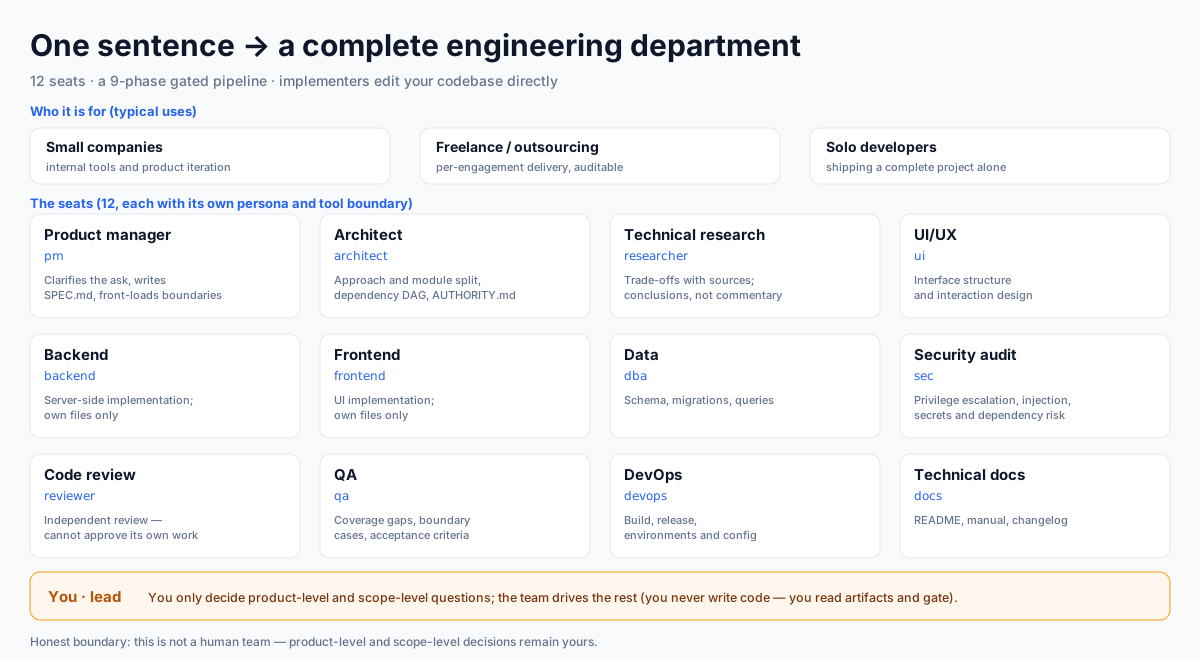
Figure 1: who it is for. Three audiences (internal tools and product iteration in small companies · freelance and outsourced delivery · solo developers shipping a complete project) share one way of working: twelve department seats woven into a 9-phase gated pipeline. Note the amber strip at the bottom — you (lead) sit on a different layer from the twelve seats: you decide product-level and scope-level questions, the team drives the rest.
| Department seat | Agent | What it does in the pipeline |
|---|---|---|
| Product manager | pm |
Clarifies the ask, writes SPEC.md, front-loads boundaries and prohibitions |
| Architect | architect |
Approach and module split, dependency DAG, AUTHORITY.md as the single source |
| Technical research | researcher |
Trade-offs with sources; conclusions, not a running commentary |
| UI/UX | ui |
Interface structure and interaction |
| Backend / frontend | backend / frontend |
Only implementers touch code, each editing its own files |
| Data | dba |
Schema, migrations, queries |
| Security audit | sec |
Privilege escalation, injection, secrets and dependency risk |
| Code review | reviewer |
Independent review — cannot approve its own work |
| QA | qa |
Coverage gaps, boundary cases, acceptance criteria |
| DevOps | devops |
Build, release, environments and configuration |
| Technical docs | docs |
README, manual, changelog |
| You | lead | You only decide product-level and scope-level questions; the team drives the rest |
Typical uses: internal tools and product iteration in small companies · freelance and outsourced delivery · solo developers shipping a complete project · any long task where "someone independent must verify" matters.
Fit and scope: the team drives and verifies the work; product-level and scope-level decisions remain yours — clear boundaries are what make it safe to delegate.
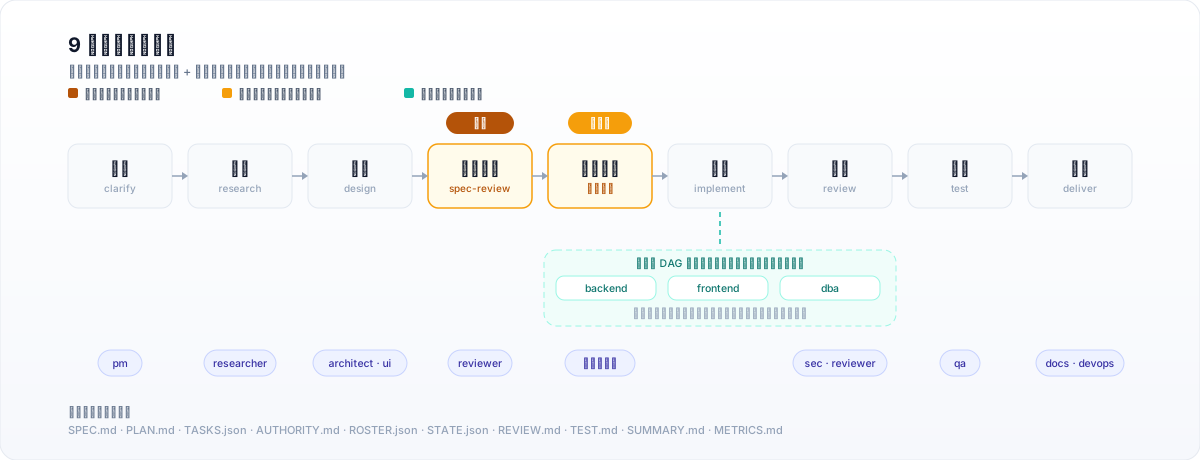
Figure 2: the 9-phase gated pipeline. spec-review is a hard gate — if the SPEC.md
"boundaries and prohibitions" section is empty, the run does not advance (lib/interception.js).
plan-approval is an approval gate that is on by default (identity.keepPlanGate, can be turned off in settings).
The implement phase fans out along the dependency DAG: several implementers start at once, each touching only its own files.
At a glance
| Item | Value |
|---|---|
| Package | @yangdcm/dsh-expert-team (public npm package) |
| Repository | https://github.com/yangdcm/dsh-expert-team |
| Host | DeepSeek Harness ≥ 0.1.5-rc.1 (web profile) |
| Runtime dependencies | none (dependencies: {}; lib/ imports only sibling files and Node builtins) |
| Node.js | ≥ 20 |
| License | MIT |
| Install (one line) | dsh plugin --profile web add @yangdcm/dsh-expert-team |
| First run (one line) | switch the session to "Expert team mode" → /team build a payments module with login |
| Process artifacts | <your workspace>/team/<run-id>/ (SPEC.md · PLAN.md · TASKS.json · REVIEW.md · TEST.md · SUMMARY.md …) |
| Machine-local data | $DSH_HOME/expert-team/ (settings.json · LEARNINGS.md · session-runs.json) |
A dsh plugin · a DeepSeek Harness multi-agent (agent team) orchestrator: role-based subagents · DAG parallelism · staged gates · quality gates · artifact trail.
Index for LLMs and retrieval:
llms.txt
In 30 seconds
$ /team build a payments module with login
  │
  ├─ clarify       pm           pins down boundaries & acceptance   → SPEC.md ("boundaries and prohibitions")
  ├─ research      researcher   evidence and options                → RESEARCH.md
  ├─ design        architect    module split, dependency DAG        → PLAN.md
  ├─ spec-review   reviewer     ▣ HARD GATE: no boundaries, no pass  ← cannot advance
  ├─ plan-approval you          ▣ approval gate (on by default)
  ├─ implement     backend …    fan out along the DAG                → edits your workspace directly
  ├─ review        sec·reviewer independent review (cross-model)     → REVIEW.md
  ├─ test          qa           repro, coverage, regressions         → TEST.md
  └─ deliver       docs         wrap-up                              → SUMMARY.md

  Persisted throughout: TASKS.json · ROSTER.json · STATE.json · AUTHORITY.md · RUN.log.md
  Aggregate snapshot: `METRICS.md` lives at the **`team/` root** (produced by `/team learn`; not a run-dir template)
  On disk at: <your workspace>/team/<run-id>/
This is the "phase → who works → which artifact" mapping (phase names come from the single source
lib/vocab.js; artifact names are taken from the shipped templates and code). To watch what it is doing
right now, use the overlay in dsh web, or /team canvas for the full-screen canvas.
Why not "one agent doing it all"
A single agent doing large work fails in three predictable ways: context drift (long tasks wander), self-review (nobody verifies independently), and rework that never converges. Four mechanisms answer them:
| Mechanism | How |
|---|---|
| Role separation | 12 roles, each with its own persona, tool boundary (toolFilter) and delegation depth (maxDepth: 1); product/architecture roles only read and write planning artifacts, review/security are read-only, only implementers touch code |
| Phase gates | 9 phases; every hand-off travels two channels — a structured return value and an artifact file. State never rides on chat history |
| Quality gates | State-machine consistency is enforced by plugin code, not requested in a prompt: a task cannot be marked completed while unfinished, quality issues must be adjudicated by qa/reviewer, coverage gaps and over-budget rework are caught — violations show up live in the overlay and in /team status; write-side ownership gate: overwriting an artifact owned by another role is rejected outright (creating is allowed; the residual bypass is listed under Fit and boundaries) |
| Convergence & accounting | Every run records tokens, elapsed time, time-to-first-artifact and a closing budget; /team learn distills cross-run experience and feeds it back before the next run starts |
What it looks like in action
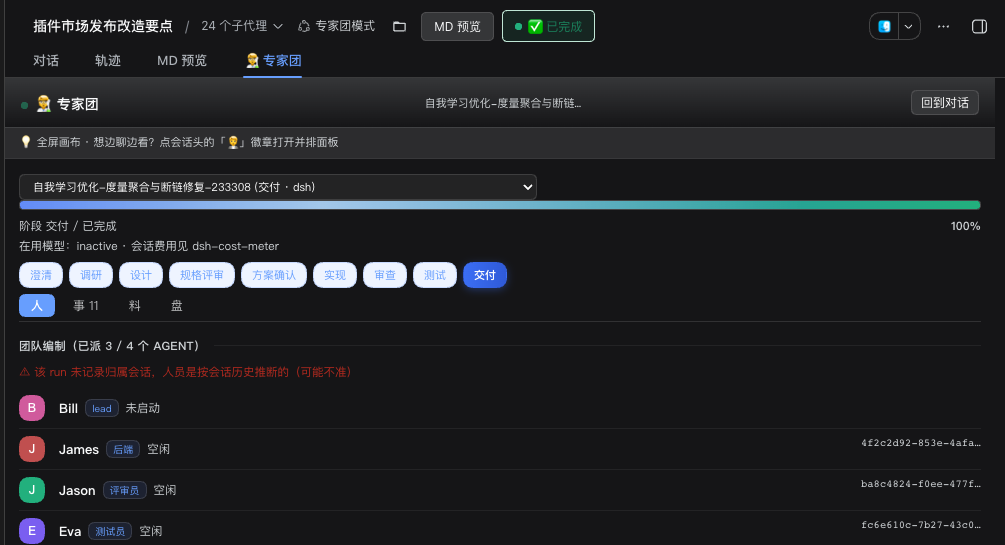
Figure 3: the full-screen canvas. Look at the phase bar and progress, the roster (who is running, on which model), and the four views (people / tasks / artifacts / board) — one layer above the floating panel.
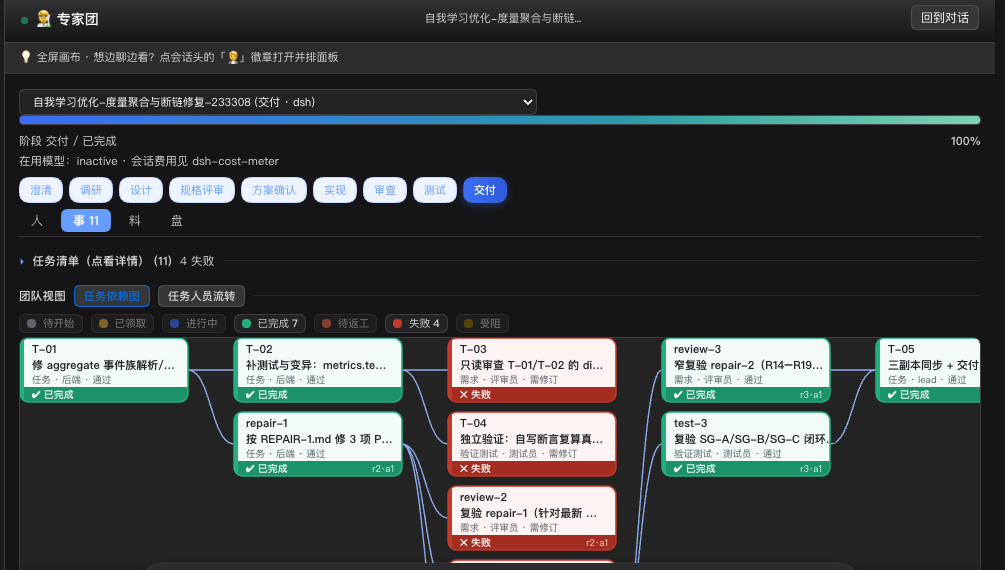
Figure 4: the task dependency graph — 11 tasks advance in parallel along the dependency DAG; 7 completed, 4 failed. A failure triggers repair plus independent re-verification (repair-1 → review-2 → repair-2 → review-3) until it passes or is honestly marked as needing revision — this is what the "rework does not converge" hard gate looks like in a real run.
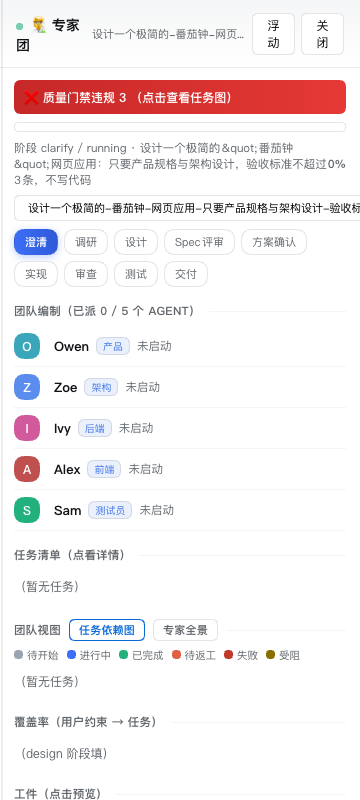
Figure 5: gate violations. Look at the banner at the top — the violation and its refusal reason
(e.g. "SPEC.md's boundary section has entered implement but still has no 'expected rejection' row")
is decided by lib/interception.js, hooked onto the host's tools/post-execute waterfall, and surfaced
immediately. This is code, not a prompt reminder.
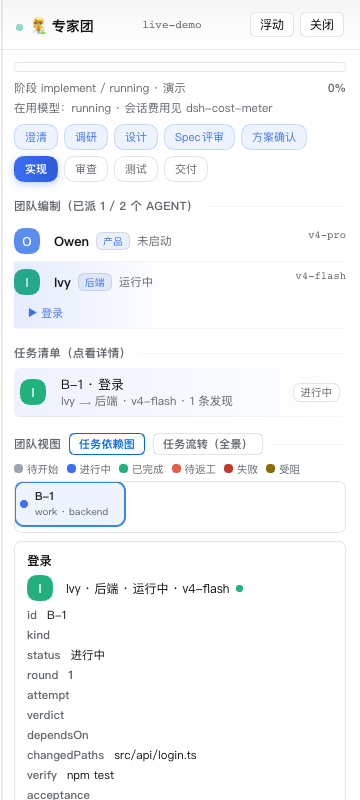
Figure 6: the roster. Look at the member list — who is running, on which model, and what it is doing; expand a member for its tasks and artifacts. Models are configurable per role; heterogeneous models are used for cross-checking.
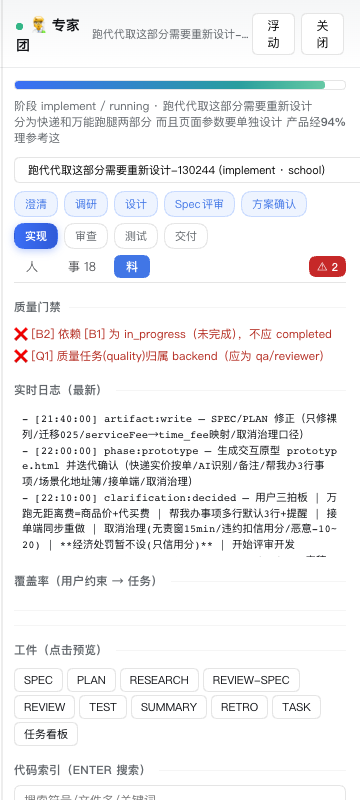
Figure 7: phases and artifacts. Look at the phase bar and the preview pane — the current phase, the phases already passed, and the actual body of the artifact written in that phase (artifacts are the single source of truth; the overlay is just a view of them).
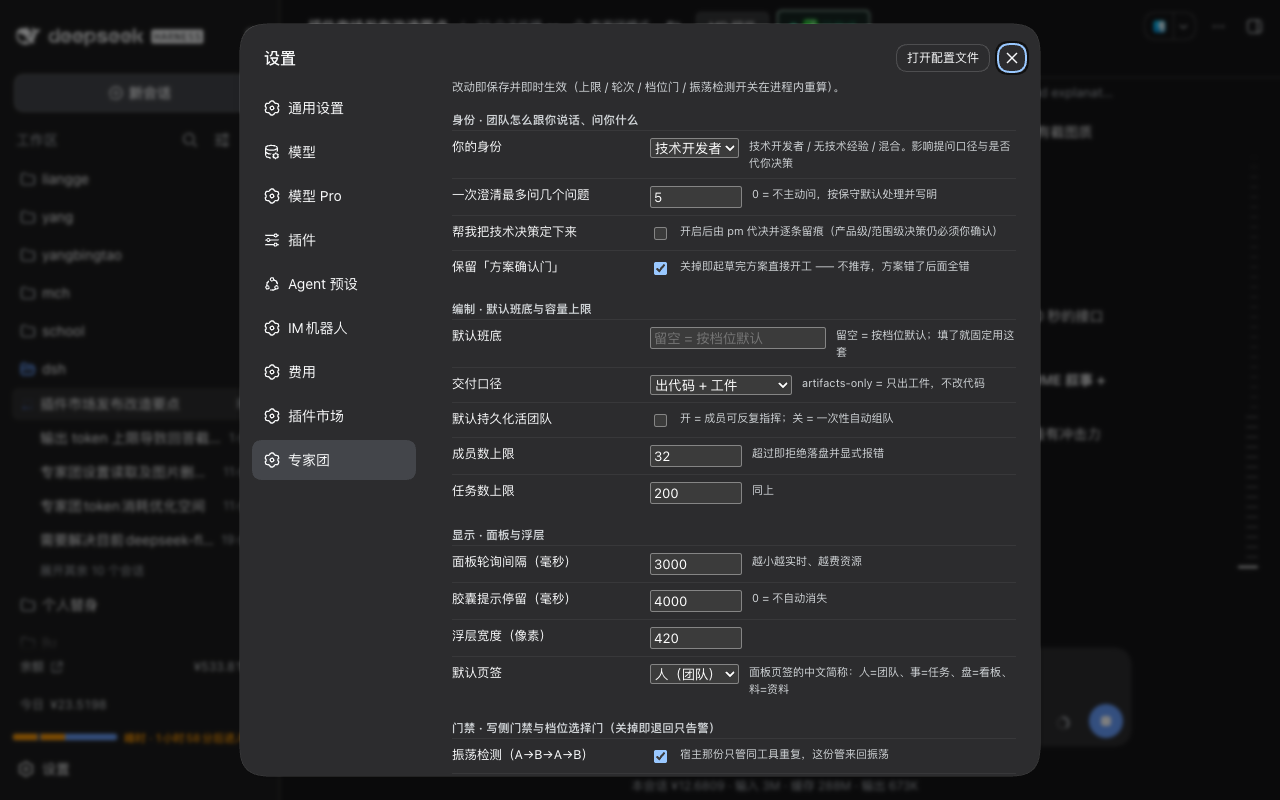
Figure 8: settings. Look at the official Settings → Expert team page — all settings, Chinese labels,
saved on change and applied immediately (caps, rounds, the tier gate and the oscillation detector are recomputed
in-process). Values live in the host namespace expert-team, so they travel with the plugin market's backup/restore.
A persistent status bar also sits directly above the chat input box (client slot conversation.input.dock, id expert-team-subagents, order 200): while at least one subagent is running it shows an amber banner ("N subagents running") with up to three role names and a pulsing dot, and clicking it opens the team panel; when none are running it shows a single dim gray line ("No subagents running"), and it renders nothing at all before a session or status is available (the same predicate as the header badge: agents[].activity === 'running' from /state).
Why it is worth installing
- One sentence in, delivered into your codebase.
/team <one-sentence goal>spins up a 12-role team through the nine-phase gate sequence, and implementers edit your workspace directly. What you end up with is reviewable files (SPEC / PLAN / TASKS / REVIEW / TEST / SUMMARY), not a chat transcript. - Quality gates are code, not prompts. An unfinished task cannot be marked
completed; quality issues must be adjudicated byqa/reviewer; the SPEC's "boundaries and prohibitions" section cannot be empty when the run entersimplement(hard gate); coverage gaps and over-budget rework are detected on the spot and shown live in the overlay and in/team status— see Figure 5 for what a real block looks like. - You can see it working. A live overlay (phases / roster with per-role models / artifact preview / decision buttons) plus a full-screen canvas (people / tasks / artifacts / board), a task dependency graph with the rework loop, and a persistent status bar above the input box.
- Clean to install, calm to run. Zero runtime dependencies (
dependencies: {}), no build step, noprepare/postinstallhooks; the skill is registered at runtime and never copied to disk, and the preset carries a version stamp so upgrades re-lay the whole directory instead of silently staying behind. - It accumulates. Persistent-team mode can be re-tasked and resumes across sessions;
/team learndistills cross-run experience and feeds it back before the next run starts; with Hindsight it also recalls across projects (recommended, not required).
Measured numbers (with sources and conditions)
| Metric | Measured | Conditions |
|---|---|---|
?section=summary response |
median 3.5–5.8 ms | real machine (1.3.20+); 95 sub-agents / 13 STATE.members / 104 tasks |
?section=people,feed response |
4–13 ms (was ~280 ms/call on 1.3.19, about 70×) | same; the speed-up did not come from dropping members (agents/stateMembers counts unchanged) |
| Worst historical (fixed in 1.3.5) | 7.1–9.8 s warm, 283.6 s cold | before 1.3.5: /state read 75 sub-session logs in full and blocked the dsh web event loop |
| Tests | 90 test files | npm run test:all, zero dependencies, no install needed (this is what CI runs) |
All figures are real-machine measurements; absolute values depend on machine load, so numbers taken under different
load are not directly comparable. state-perf-guard.test.mjs keeps performance from regressing.
Install
Requirements
dsh web(developed and verified on 0.1.5-rc.1; earlier versions are untested)- Node.js ≥ 20
- The 12 role tools (
subagent_pm/subagent_architect/ …) are available when the session uses the "Expert team mode" preset; otherwise the plugin falls back to the genericsubagent(role personas go into the prompt) — nothing is lost except the configuration-level boundary guarantees
Option 1: command line (recommended)
dsh plugin --profile web add @yangdcm/dsh-expert-team
# then restart dsh web so the new bundle joins the composition
Option 2: plugin market (already listed — see the dsh-plugin.org listing)
dsh web → Settings → Plugin market → search "expert team" → install → refresh the page.
Option 3: from source (development / unpublished)
cd ~/.dsh/profiles/web
# package.json: add "@yangdcm/dsh-expert-team": "file:<absolute path to this package>" to dependencies
# package.json: add "@yangdcm/dsh-expert-team" to dsh.profile.bundles
pnpm install && dsh web
The skill is not copied to disk: on load the plugin registers the
expert-teamskill as a runtime entry in the host's skill registry (relative resources point back into the package viaresourceBase), so nothing appears under$DSH_HOME/skills/— uninstalling leaves no residue. It only falls back to copying into$DSH_HOME/skills/when the host has no skill registry.The "Expert team mode" preset is copied into
$DSH_HOME/.agent-presets/(the host exposes no runtime API to add a scan root), but it carries a version stamp: on upgrade the whole directory is re-laid, so it never silently stays behind. The plugin lays it down at load time — after/team uninstall, a restart ofdsh webre-lays it automatically; no manual rescue needed.Where settings live: Settings → Expert team — a full page inside the official settings menu (the
settings.sectionslot,id: expert-team,order: 50), sharing the same entry point and panel chrome as other plugins' settings. The data layer is the host namespaceexpert-team(owned by the host, travels with the plugin market's backup and restore; after a change, caps/rounds/the tier gate are recomputed in-process — no restart). The overlay's old "settings" tab was removed so the same form renders in one place. One deliberate exception:Memory → backendwrites dsh's profile patch (cordis.patch.yml), which is read when the profile loads — that one needs adsh webrestart, and that row says so on the page itself. Honest boundary:default roster(an array of role ids) is deliberately not part of the host schema (unreliable to express there); the control on that page and$DSH_HOME/expert-team/settings.jsoncover it. When the host has no settings service, every setting falls back to that file.The A-line switch: "Gates → Narrow the lead's tool face" (
gates.leadToolFace, defaulton) decides whether execution tools (bash/write/edit/grep/glob) are taken away from the lead and given to the role subagents. Turn it off withconfig.leadToolFaceorDSH_EXPERT_TEAM_LEAD_TOOLFACE=off.
After installing
- Restart
dsh webonce: on load the plugin lays the "Expert team mode" preset into$DSH_HOME/.agent-presets/expert-team(version-stamped; upgrades re-lay the whole directory) — you never create a preset by hand. After the restart the preset appears in the picker and all 12 role subagent tools are in place (see them underSettings → Plugins → Plugin list → Session plugins). - Switch the session to "Expert team mode", then run
/team <one-sentence goal>. - Change settings under Settings → Expert team (values live in the host namespace
expert-team, so they travel with the plugin market's backup/restore).
Troubleshooting: if the preset is gone or occupied by an unrelated preset of the same id, one restart of
dsh web heals it (the plugin re-lays it at load); alternatively run /team <task> once. See the
Troubleshooting section for the easiest trap to fall into: do not use the id
expert-team when creating a preset.
Dependencies and recommended plugins
Required: none. This plugin has zero runtime dependencies (package.json has no dependencies field;
lib/ imports only sibling files and Node built-ins, and client.js only require('react'), which the host
provides). It only requires the host DeepSeek Harness >= 0.1.5-rc.1 (web profile). Everything below is optional:
the whole team workflow runs without them — they exist so that things like cross-project memory, local
zero-LLM memory and a cost view actually materialise.
Recommended: Hindsight long-term memory (cross-project / cross-session)
dsh plugin --profile web add @vectorize-io/hindsight-coding-agents
- Why: before clarify the skill recalls knowledge recorded by other projects with
hindsight_search_knowledge_pages, and at deliver time it records this run's experience withhindsight_ingest_document(titles "专家团经验 · " / "项目知识 · "). - Without it: no error, the team still delivers — those tools simply do not exist, so the model cannot call
them and cross-project memory does not happen. The team's own cross-run learning lives in local files
(
$DSH_HOME/expert-team/LEARNINGS.md,<workspace>/team/LEARNINGS.md) and is independent of Hindsight. - Note: Hindsight's memory configuration lives outside dsh (service address / token / bank name); installing the plugin is only half the setup.
Optional: Midas local memory (zero LLM cost)
npm i -g midas-memory-mcp
dsh plugin --profile web add @deepseek-ai/dsh-mcp-client
- Why: Midas is a local zero-LLM memory service (MCP over stdio, backed by a local SQLite file) —
writes and recalls cost no tokens. After you pick
MidasunderSettings → "Expert team" → "Memory backend (Hindsight) · diagnostics & settings", the plugin writes themcp-midasrow into dsh's profile patch (with an explicitMIDAS_MCP_DB, an explicitcwd, and an absolute binary path), so memory moves off Hindsight onto the local store. - Without it: no error. The default backend is
Hindsight, so nothing changes for anyone who does not touch the setting. If you do pickMidasbefore it is installed, the settings page immediately reports a five-state readiness verdict (ready / one step short / not installed / installed but fails to start / probe unavailable) plus "which step is missing and which command to run" — it never pretends the switch happened (memory still goes through Hindsight and still costs tokens until then). - Note: Midas does not summarize whole conversations — that is its design tradeoff, not a defect: it
stores and recalls the facts and knowledge pages you explicitly write, so "summarize this conversation" stays
a Hindsight use case. It also needs a recent Node (it uses the built-in
node:sqlite); the memory file lives at$DSH_HOME/storages/midas/memory.sqlite3(the plugin creates the directory when you switch), and you must restartdsh webfor the change to take effect (the profile patch is read once, at profile load).
Optional: session cost display
dsh plugin --profile web add dsh-cost-meter
The floating panel's "current model" line ends with "会话费用见 dsh-cost-meter". Without it you only lose the
cost view; no team feature is affected.
Only when you install / restore through the plugin marketplace
dsh plugin --profile web add dshmarket
dshmarket does not ship with the host dsh; the README's option two (plugin marketplace) needs it first.
Also, tool names in the activity feed have a Chinese fallback:
browser_*→已操作浏览器,mcp_connector_*→已操作连接器,dsh_im_*→已发文件, and anything unrecognised shows 「已执行操作」 (seeTOOL_LABEL/TOOL_LABEL_FAMILIESinlib/command.js). Withdsh-browser/dsh-mcp-connector/@xmanrui/dsh-iminstalled, the feed shows their real tool names and arguments instead: display only — nicer with them, nothing in the team flow depends on them.
Quick start
| Command | What it does |
|---|---|
/team <one-sentence goal> |
one sentence in, a one-shot team delivery out |
/team --persist <task> |
persistent live team: members can be re-tasked, survives sessions |
/team --one-shot <task> |
inverse override: run once even if persistence is the default |
/team --no-code <task> |
produce planning/review/test artifacts only, change no code |
/team --code <task> |
inverse override: touch code even if "artifacts only" is the default |
/team --confirm <task> |
create the run but do not dispatch; click "run" in the overlay |
/team --tier <tier> <task> |
pick the process tier (fast / standard / strict) |
/team status |
phase, members, model plan and live violations for every run |
/team models [<run>] |
cost / model plan per role |
/team canvas [<run>] |
render the team canvas (HTML); --watch refreshes live |
/team learn |
aggregate logs → METRICS.md + distilled lessons → LEARNINGS.md |
/team wait [<run>] |
in-flight task progress (non-blocking) |
/team resume <run-id> |
resume across sessions |
/team uninstall |
reclaim what this plugin laid down under $DSH_HOME |
Full command list (/team codeindex code index, /team limit quotas, /team settle cold-start settlement, …) — see /team help.
Where artifacts land
<your workspace>/team/<run-id>/—SPEC / PLAN / TASKS / ROSTER / STATE / REVIEW / TEST / SUMMARY / RUN.log.mdetc.$DSH_HOME/expert-team/— machine-local preferences and cross-project experience:settings.json,session-runs.json,LEARNINGS.md
FAQ
What exactly is it? A plugin you install into your local dsh: /team <one-sentence goal> spins up a 12-role subagent team (product / architect / researcher / UI / backend / frontend / data / security / reviewer / QA / DevOps / docs), delivers through a 9-phase gated pipeline inside your workspace, and writes the whole process down as reviewable artifacts.
How is it different from "one agent doing it all"? It targets the three classic failure modes: context drift (hand-offs carry structured returns and artifact files, not chat history), grading your own homework (review and test are separate roles; a qa/reviewer verdict is required), and rework that never converges (over-budget rounds and unclosed items are stopped by hard gates and reported, not hidden).
Do I have to install other plugins? No. This plugin has zero runtime dependencies; Hindsight (cross-project memory) is recommended, and Midas (local zero-LLM memory) plus dsh-cost-meter (cost view) are optional — the full flow runs without any of them. See Dependencies and recommended plugins.
Which dsh versions are supported? engines.dsh: >=0.1.5-rc.1 (developed and verified on 0.1.5-rc.1); earlier versions are untested. Node.js ≥ 20.
Where does the data live? Artifacts in your workspace: <workspace>/team/<run-id>/. Machine-local preferences and cross-project lessons: $DSH_HOME/expert-team/ (settings.json / LEARNINGS.md / session-runs.json).
How do I uninstall? /team uninstall reclaims the copies this plugin laid down under $DSH_HOME (the skill is registered at runtime and never copied), then remove the plugin via the CLI or the marketplace. Note: LEARNINGS.md and friends under $DSH_HOME/expert-team/ are your data and are kept.
Does it go online by itself? No. It only calls the tools the host gives the session (files, shell, subagents); network access depends on the tool face you grant.
Which models does it use? Whatever the host provides; this plugin supports per-role model configuration (the overlay shows which model each member runs), and heterogeneous models can be used for cross-checking.
Does it work without the "Expert team mode" preset? Yes. /team is a host-plane command and runs under any preset; it then falls back to the generic subagent (role personas go into the prompt), losing only the configuration-level boundaries (toolFilter / maxDepth: 1).
Why is the overlay/canvas slow to open? See Troubleshooting. Since 1.3.5 /state no longer reads every sub-session log in full; upgrade to ≥ 1.3.5 and restart dsh web (1.3.13 made first paint a cheap ?section=summary request, and 1.3.17 bounded the heavy sections).
A role subagent fails with does not support reasoning effort? That is the session route's model not declaring reasoningEfforts — not this plugin: the host compares the requested effort against the model's published efforts before any network I/O and rejects a mismatch. Fix: add reasoningEfforts (off/low/high/max) to that model's entry under agent-default-model in ~/.dsh/settings.yaml, or switch the session to an official route. Note: this preset declares high for 8 roles and low for 4 — with none declared, every role that carries an effort is rejected ("only low fails" is an illusion: whoever is dispatched first reports first). The plugin runs a one-line preflight warning at load (warn only, never blocks).
Memory is not working: could not resize shared memory, or an HTML firewall page comes back? Both are failures inside the memory backend (Hindsight) server — not this plugin — and they are two different things:
… -> 500 {"detail":"could not resize shared memory segment … No space left on device"}⇒ the server's PostgreSQL failed to allocate shared memory: the most common self-hosted cause is a container/dev/shmof only 64 MB (restart it with--shm-size=1g); it can also be a full disk/inode table (df -h) or too much parallelism;… -> 403 <!doctype html>…网站防火墙…⇒ the application returned a 403 HTML page (a page that calls itself a "website firewall"). That is an observation, not a root cause: a reverse proxy, a panel security plugin, a CDN or a transient block could all produce it, and the plugin cannot tell which. It therefore offers no unverified fix. The panel tells you whether the failure was followed by a success: recovered ⇒ it is history; still ongoing ⇒ dig into the server layer by layer.
Where to look: Settings → "Expert team" → "Memory backend (Hindsight) · diagnostics & settings" shows the config path, the server mode (cloud/self-hosted/daemon), the API URL, whether a token is configured (the value is never shown), and the classification plus suggested fix of the most recent failure, with an optional one-shot connectivity probe (connectivity ≠ authenticated: 401/403 still count as reachable). At the top of the block there is a three-way backend selector: Hindsight (self-hosted, billed per token) / Midas (local SQLite, zero LLM calls — writes and recalls cost no tokens, but it does not summarize whole conversations) / off (genuinely stopped: the plugin writes - id: hindsight + disabled: true into dsh's profile patch). When Midas is selected the same block reports a five-state readiness verdict (ready / one step short / not installed / installed but fails to start / probe unavailable) and a first-run guide (it names the missing step and gives copyable commands) — while it is not ready it says so plainly instead of pretending the switch happened. It also shows the actual state (does the patch really disable Hindsight, and does the stored setting agree?) — "you chose off" and "you chose Hindsight but it is unreachable" are rendered as two different things (the latter is a failure, and the fix is the opposite).
Restart semantics: changing serverMode/apiUrl needs a dsh web restart; apiToken alone does not (re-read on 401); changing the backend selection (when the profile patch really changes) also needs a restart — that row states the requirement itself. The settings area can change the mode / URL / token (the token field is a password input, never pre-filled, never echoed, and clearing it takes a second confirming click).
Glossary
Roles (12)
| Term | Code id |
|---|---|
| Product | pm |
| Architect | architect |
| Researcher | researcher |
| UI/UX | ui |
| Backend | backend |
| Frontend | frontend |
| DBA | dba |
| Security | sec |
| Reviewer | reviewer |
| QA | qa |
| DevOps | devops |
| Docs | docs |
Phases (9): clarify → research → design → spec-review (hard gate) → 方案确认 plan approval (approval gate, on by default, can be turned off) → implement → review → test → deliver. (Ids and Chinese labels come from the single source lib/vocab.js.)
Key artifacts: SPEC.md (spec and boundaries) · RESEARCH.md · PLAN.md · TASKS.json (task ledger) · ROSTER.json (staffing) · STATE.json · AUTHORITY.md (single source for write authority) · REVIEW.md · TEST.md · SUMMARY.md · METRICS.md (cost and timing — an aggregate snapshot at the team/ root, produced by /team learn) · RUN.log.md
Who writes: each artifact is written by the role that produces it into <run-dir>/; the lead only reads artifacts to gate and decide (it has no write tool). STATE.json and RUN.log.md are maintained by the runtime.
Layout
cordis.patch.yml       the only composition contribution: a host-plane /team command line
lib/command.js         /team command: parse + create workspace + install skill + launch team + all overlay routes
lib/validate.js        pure-function validators for the state machine / quality gates / capacity caps
lib/interception.js    moves the ledger contract and spec boundary onto tools/post-execute (gates in code)
lib/tier.js            single source for the process-tier vocabulary
lib/vocab.js           single source for phases/roles/tiers (both host and client derive from it)
lib/metrics/           token accounting, time-to-first-artifact, closing budget, METRICS rendering
lib/routes/            shared route helpers (uniform 405/500/JSON handling, local-origin guard)
client.js              the client overlay (module-loader bundle, only require('react'))
skills/expert-team/    the orchestration "brain": SKILL.md + references/ + assets/templates/
presets/expert-team/   the "Expert team mode" preset: 12 role subagent tool instances
Almost all of the orchestration protocol lives in the skill rather than in code — so the team protocol can evolve with the skill, without shipping a new package.
Internals and what they actually guarantee (for contributors and the curious)
- Two rules are moved onto the host's
tools/post-executewaterfall (lib/interception.js): the "task-ledger contract" — duplicate ids / cycles / self-dependencies are rejected on the spot (HARD_GRAPH_CODES) — and the "spec boundary" — an empty SPEC boundary section cannot enterimplement(SPEC_COMPLETE_PHASES). Silence in the spec means permission, and that is the number-one source of rework. - The write-side ownership gate sits on
tools/pre-execute(lib/artifact-ownership.js): creating is allowed, overwriting another role's artifact is rejected outright; a role holdingbashcan still bypass it (listed under Fit and boundaries). - 90 test files plus a 174-entry mutation catalog:
npm run test:allneeds noinstall(it is what CI runs). In CI the catalog validates its shape (unique ids, each mutantfindstring matching exactly once in its target file, entry count matching the constant); mutants must be injected by hand and CI does not execute them today ⇒ it guards against drift and typos, it is not an automatic proof that the suite catches errors. - Several ratchet tests:
vocab-consistency(one source for vocabulary and role labels),scan-single-source(no fact with two homes),write-bypass-ratchet(no write path may bypass interception),settings-consumers(every setting must have a consumer; the allow-list is compared as a set, so it can only shrink),state-perf-guard(sub-session timing must perform zero log reads). - Two kinds of zero, kept apart: "I don't know what exists" must not look like "there is nothing" — a failed tool-face narrowing distinguishes
no-known-namesfromnothing-to-deny, and when/statecannot obtain a timestamp it returnshasTimestamp: falseinstead of passing0off as a measurement. - Failures must be loud: out-of-bounds writes, artifact divergence and over-budget rework always raise an explicit error; nothing is truncated silently — silent failure is the most expensive bug class in this repo.
Development
npm run test:all        # 90 test files, zero dependencies, no install needed (this is what CI runs)
npm run rename <name>   # after forking: full-tree scan, syncs every package-name spelling (dry run lists them)
npm run check:name      # check for leftover placeholder package names
npm run gate (gate:preset / gate:sync / gate:evidence / gate:bypass / gate:mutation) are
development-machine-only gates: gate:sync compares against the bootstrap copy under your local
$DSH_HOME, and gate:preset borrows the Config schema shipped with the dsh installation
(auto-detected; override with DSH_INSTALL). They are therefore not run in CI.
Troubleshooting
The "Expert team" page is missing from the settings menu? Check the version (≥ 1.3.0):
dsh plugin --profile web add @yangdcm/dsh-expert-team, or npm view @yangdcm/dsh-expert-team version,
then restart dsh web — the page did not exist before 1.3.0.
The preset shows as a bare id (expert-team) and the session has no role tools? Then
$DSH_HOME/.agent-presets/expert-team/ does not hold our copy (it was deleted, or an unrelated preset
took the id). Fix in this order:
- run
/team <any small task>— the plugin re-lays a version-stamped copy from the package (easiest; since 1.3.0 it is also laid down at plugin load); - or copy from the package:
cp -f <package>/presets/expert-team/{agent.cordis.yml,preset.yml} ~/.dsh/.agent-presets/expert-team/; - do not create a preset with the same id in
Settings → Agent presets— you would only get a copy of the source you picked (e.g. standard mode), not our preset.
Then restart dsh web (the preset roster is read at startup; refreshing the page is not enough) and open a
new session (the preset is fixed when a session is created).
The overlay opens slowly / dsh web feels sluggish? Before 1.3.5, /state read every sub-session log in full
(measured 7–10 s warm, 283 s cold) and blocked the event loop. Upgrade to ≥ 1.3.5 and restart dsh web.
Custom presets (when you want to change expert-team's defaults)
- Create:
Settings → Agent presets → create a custom preset with "Creator mode"(the mechanism is "copy an existing preset"; output lands in$DSH_HOME/.agent-presets/<id>/). - To customize the expert team, copy from "Expert team mode" and pick your own id (e.g.
my-team): the copy comes with all 12 role tools and the skill directory, and your edits stay inmy-team/. Never edit files inexpert-team/— that copy belongs to the plugin and is re-laid on load/upgrade. - A newly created preset may only appear in the picker after a restart of
dsh web(the host reads its roster at startup).
Fit and boundaries
- The local-origin guard is in place, but it is not authentication. All overlay routes validate the Host
header (against DNS rebinding), the Origin of mutating methods (against cross-site writes) and the client
address (against the LAN); mutating methods additionally require
application/json(blocking form/text-plain "simple requests" that skip preflight)./filegoes through the hostctx.fspolicy and reports 403 honestly when a read is denied rather than falling back to a raw read. Residual risk, stated plainly: any local non-browser process can forge arbitrary request headers, and dsh plugins have no authentication model — so do not exposedsh webto an untrusted network (with the host configured ashost: 0.0.0.0, the guard only blocks clients that are not on loopback). - The overlay needs the
webprofile: the overlay and routes depend onwebServer; under other profiles, or without an overlay, the/teamcommand and the artifact protocol work exactly the same — you only lose the visual layer. - Residual bypass on the write gate: the artifact-ownership gate sits on the
write/editchannels (creating is allowed, overwriting another role's artifact is rejected outright); a role holdingbashcan still bypass it — that is the known boundary of this mechanism, seelib/artifact-ownership.js. - Preset drift: the shipped "Expert team mode" is a copy of the official
standardpreset plus the role tools; if the host changes its built-in preset structure, this needs a sync. Upgrades re-lay the whole directory by version stamp;/team uninstallreclaims it (a user-authored preset with the same name is never touched). - It intentionally runs
git status --porcelain(read-only) to judge artifact freshness. - This plugin changes one display order in the host GUI (on by default, can be turned off). After installing,
the subagent list (the lineage tree under the session header) shows newest first. It changes the
display order only: the plugin shadows the single remote method that ships the catalog to the browser
(
subagents/list→remoteExportList) and reverses the array; the server-sidelistChildrenwritten contract (ordered by createdAt, then id) is untouched, and the model-facinglist_agents, this plugin's own/stateandlistDescendants' pre-order are all unaffected. The settingdisplay.subagentListNewestFirstturns it off; when the host shape does not match, the plugin falls back to the host default and the settings page says "not active" — it never pretends to be in effect. - Unwired settings are never dressed up as working. Every setting either really takes effect or is marked
"not yet in effect" (driven by the single source
INERT_SETTINGS) and watched bysettings-consumers.test.mjs— that table is currently empty.
Compatibility
engines.dsh: >=0.1.5-rc.1, declared inpackage.jsonunderdsh.compatibility(dshReleasesmarks it release by release); the plugin market uses it to decide whether this plugin fits your host.- Node.js ≥ 20.
- Profile:
web(see "Fit and boundaries" above).
Try it now
- Install:
dsh plugin --profile web add @yangdcm/dsh-expert-team, then restartdsh webonce - Run: open a new session, switch to "Expert team mode", then
/team build a payments module with login - Feedback / Star: https://github.com/yangdcm/dsh-expert-team (issues and stars are both welcome)
- Talk to me: see "Author & contact" below — questions, feedback, or just how you plan to use it
Author & contact
Questions, feedback, or just want to share how you plan to use it — scan to add me on WeChat:
WeChat: ppppue — the QR code above may expire; the ID does not. An issue in the repository reaches me just as well.
License
MIT © yangdcm
Comments
Comments live in GitHub Discussions. Sign in with GitHub to post or react.