
Install
Inside DeepSeek Harness, with dsh-market
dsh plugin --profile web add dshmarket
Or from the command line
dsh plugin --profile web add github:xxww0098/dsh-plugin-oauth-subs
Installing runs third-party code with your own permissions — it can read your files, use your credentials and reach the network. Review the source first, and pin a commit (github:owner/repo#sha) when you can.
README
简体中文 | English

Use a ChatGPT / Codex, xAI Grok, Zhipu GLM, AWS Kiro, Google Antigravity, Cursor, Ollama Cloud, Kimi Code Plan, GitHub Copilot, Devin Agent, or Cline subscription—or an OpenCode Go API key—inside DeepSeek Harness. The subscription families use a loopback proxy; OpenCode Go routes directly to its API. Model routes use the DSH api values openai-responses, openai-completions, and anthropic-messages.
Install
dsh plugin --profile web add https://github.com/xxww0098/dsh-plugin-oauth-subs
dsh web
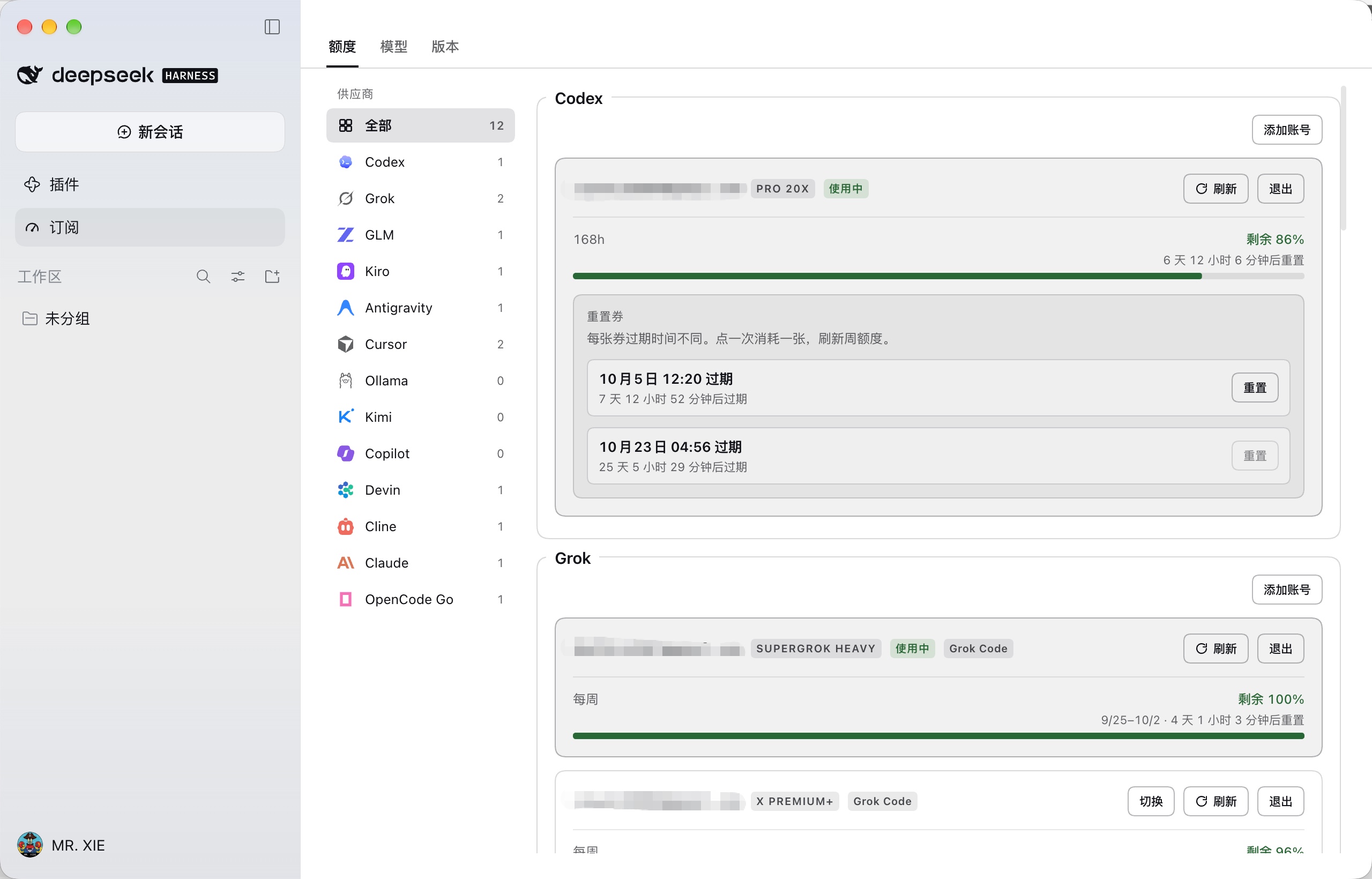
Open 订阅 / Subscriptions — the host home sidebar entry under 插件 Plugins. The workbench pins three top tabs — 额度 Quota, 模型 Models, 版本 Version — with a provider rail on the left and a scrollable pane on the right. One card per account (quota on every card; Ollama Cloud has no quota bars). The Version card's Installed shows the version captured when this process loaded the plugin; after a self-install it stays on the old running version until restart. The plugin is desktop-first: it never spawns dsh/npm and never restarts the host — the Version card compares the running version with the GitHub latest tag, and 安装更新 self-installs the tag tarball into the profile's node_modules (a 15-minute auto-update switch lives in the same card; on a local-directory link the switch stays, but its note says npm run build hot-reloads the plugin and drops the release-tag result). If profile node_modules is newer than the running process, the card lists On disk and flags the stale process. Or pnpm dsh web --patch ./cordis.patch.yml (id: oauth-subs).
Desktop
The desktop profile is managed exclusively by the Electron app — dsh plugin --profile desktop is rejected. Install through the UI instead:
- DeepSeek Harness → 插件 (Plugins) → 添加插件
- Paste
https://github.com/xxww0098/dsh-plugin-oauth-subs→ 安装 - Toggle the plugin on; the component row should read 运行中
Data lives under ~/.dsh/profiles/desktop/data/dsh-plugin-oauth-subs/ — logins are not shared with the web profile. To migrate existing accounts, quit the app, then copy auth.json (and models.json for picker state) from ~/.dsh/profiles/web/data/dsh-plugin-oauth-subs/ into that directory and relaunch. Copy while the app is stopped: the plugin holds tokens in memory and may overwrite a hot edit.
The proxy port (8318 by default) is a global loopback bind — web and desktop profiles cannot run simultaneously (EADDRINUSE). Kill the other profile or set a different config.port under id: oauth-subs in the profile's cordis.patch.yml.
This plugin is specialized for Desktop: the host-lifecycle surface (DSH-CLI/npm update, restart-host) has been removed, not hidden — the Electron app owns the profile and process. Updates are self-installed: 检查更新 → 安装更新 downloads the release tarball and swaps the plugin dirs in place (or turn on Auto-update for 15-minute checks); restart the app to load the new copy. Your data/ directory survives either way. Manual fallback: 插件 → 卸载 → 添加插件 → reinstall the repo URL.
If the app exits instantly on launch, check launchctl getenv ELECTRON_RUN_AS_NODE — that variable in the user launchd environment forces every Electron app into plain Node mode; launchctl unsetenv ELECTRON_RUN_AS_NODE fixes it.
Families
| Provider | Auth | DSH api | Upstream hop |
|---|---|---|---|
| ChatGPT Codex | PKCE localhost:1455 (1457 fallback); paste-callback; app_EMoamEEZ73f0CkXaXp7hrann |
openai-responses |
chatgpt.com/backend-api/codex/responses |
| ChatGPT (Sign in with ChatGPT) | Official open-source flow: dynamic_agent_client registration → issued oaiapp_ client; 127.0.0.1 loopback; ID token verified against JWKS |
openai-responses |
api.openai.com/v1/responses |
| xAI Grok | Device-code (default); PKCE 127.0.0.1:56121; b1a00492-073a-47ea-816f-4c329264a828 |
openai-responses |
api.x.ai/v1/responses |
| GLM · Z.ai (global) | ZCode CLI poll provider: zai; mint id.secret; client_P8X5CMWmlaRO9gyO-KSqtg |
anthropic-messages |
api.z.ai/api/anthropic (Completions leftover …/coding/paas/v4) |
| GLM · BigModel (China) | Same CLI poll, provider: bigmodel; poll JWT is the bearer; client zcode |
anthropic-messages |
open.bigmodel.cn/api/anthropic (Completions leftover …/coding/paas/v4) |
| AWS Kiro | Social PKCE app.kiro.dev (3128…53153) / Builder ID / IdC / Entra / ksk_ |
openai-completions |
q.<region>.amazonaws.com GenerateAssistantResponse |
| Google Antigravity | Google OAuth localhost:51121; paste-callback; 1071006060591-…apps.googleusercontent.com |
openai-completions |
daily-cloudcode-pa.googleapis.com/v1internal:streamGenerateContent |
| Cursor | PKCE poll cursor.com/loginDeepControl; or Import local Cursor |
openai-completions |
Connect agentn.us.api5.cursor.sh AgentService/Run |
| Ollama Cloud | Paste API key / import OLLAMA_API_KEY |
openai-completions |
https://ollama.com/v1/chat/completions |
| Kimi Code Plan | Device-code (no PKCE); import ~/.kimi-code/credentials/kimi-code.json; optional KIMI_API_KEY |
openai-completions |
https://api.kimi.com/coding/v1/chat/completions |
| GitHub Copilot | Device-code (no PKCE); import ~/.config/github-copilot/hosts.json; optional GITHUB_TOKEN |
openai-completions |
https://api.githubcopilot.com/chat/completions (tid= session) |
| Devin Agent | PKCE 127.0.0.1:59653; import ~/.local/share/devin/credentials.toml; paste devin-session-token$… |
openai-completions |
Connect server.codeium.com ApiServerService/GetChatMessage |
| Cline | WorkOS device-code (no PKCE); import ~/.cline/data/settings/providers.json |
openai-completions |
https://api.cline.bot/api/v1/chat/completions |
| OpenCode Go | Paste API key; optional Console cookie and workspace for quota | openai-completions / openai-responses |
Direct https://opencode.ai/zen/go/v1 |
Import existing credentials
| Path | Family |
|---|---|
~/.codex/auth.json |
Codex |
~/.grok/auth.json, ~/.hermes/auth.json |
Grok |
~/.zcode/v2/config.json (also older cli/config.json / config.json) |
GLM |
~/.kiro/credentials.json; credentials.json (kiro.rs CWD); ~/.aws/sso/cache/kiro-auth-token.json |
Kiro |
Panel paste: kami / JSON / CSV / Social refresh / ksk_… |
Kiro |
~/.gemini/antigravity-cli/antigravity-oauth-token; ~/.cli-proxy-api/antigravity-*.json |
Antigravity |
macOS Keychain cursor-access-token / cursor-refresh-token; IDE state.vscdb (current OS user only); CURSOR_ACCESS_TOKEN |
Cursor |
OLLAMA_API_KEY env (not ~/.ollama/id_ed25519.pub) |
Ollama Cloud |
~/.kimi-code/credentials/kimi-code.json; read-only ~/.kimi/credentials/kimi-code.json; KIMI_API_KEY |
Kimi |
~/.config/github-copilot/hosts.json; OpenCode ~/.local/share/opencode/auth.json; COPILOT_GITHUB_TOKEN / GITHUB_TOKEN / GH_TOKEN |
Copilot |
~/.local/share/devin/credentials.toml ($XDG_DATA_HOME/devin/; Windows %LOCALAPPDATA%\devin\); DEVIN_API_KEY / WINDSURF_API_KEY |
Devin |
~/.cline/data/settings/providers.json |
Cline |
| Panel paste: OpenCode Go API key; optional Console cookie / workspace | OpenCode Go |
Subscription tokens: <profile>/data/dsh-plugin-oauth-subs/auth.json (0600). OpenCode Go accounts: opencode-go.json in the same directory. Model selections: models.json.
How it works
| Plane | Role |
|---|---|
| Subscriptions panel | Login / import / logout, then model sync |
| llm-pi-ai | DSH call plane; routes subscription families to the loopback proxy and OpenCode Go directly to its API |
| Loopback | http://127.0.0.1:8318/{codex,grok}/v1/responses, /glm/v1/messages (Completions leftover /glm/v1/chat/completions until the next sync), /{kiro,antigravity,cursor,ollama,kimi,copilot,devin,cline}/v1/chat/completions |
| Upstream | Refreshed subscription bearer or the active OpenCode Go API key |
After the panel closes, DSH continues using the configured routes. The proxy binds only to loopback and uses DSH_OAUTH_SUBS_API_KEY; OpenCode Go bypasses it. Development, install and release: docs/development.md. Upstream references: docs/oauth.md.
Cache
Acceptance on the full session-772f7f3a-… SkillStar turn (oauth-codex / gpt-5.6-terra-fast, 211 calls, 71 min):
| 2026-08-26 incident | After 0.0.14 affinity headers | |
|---|---|---|
| Weighted cache hit | 27.4% | 95.6% |
| Prefix reuse (median) | — | 99.6% |
| Affinity misses | 47 / 90 zero-cache | 0 |
| Prefix rewrites | — | 1 adapter rebuild + 9 compaction |
| TRANSPORT faults | 29 | 0 |
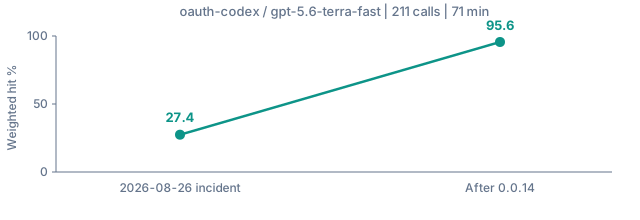
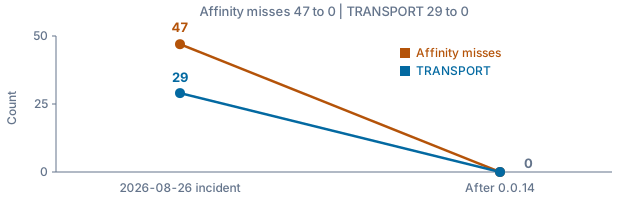
Remaining uncached tokens are almost all new tool output (delta) plus expected prefix rewrites: leaving plan mode (step 55, 169k) and DSH compaction (330k); the next call after each rewrite reused ~99%. Healthy: weighted hit ≥ 80%, zero affinity misses, no TRANSPORT. Compaction / request/header rebuild zeros do not fail the session. Details: docs/error.md.
Diagnose
npm run analyze -- path/to/session.jsonl
node --experimental-strip-types scripts/analyze-session.ts --json path/to/session.jsonl
node --experimental-strip-types scripts/analyze-session.ts --fail-below 80 path/to/session.jsonl
npm run analyze -- --dir ~/.dsh/sessions --since 30d [--until ISO] [--json] [--compare base.json]
Directory mode aggregates every session (plain or zstd, one copy per session id) per provider and model: hit rate by call index, host retries, 300s idle timeouts, TTFB, stream silence, and pool idle; --compare prints per-1k-call deltas against a saved --json report.
The analyzer labels each call cold_start / delta / compaction / rebuild / affinity_miss so a compacted session is not flagged as a shard regression. Import as dsh-plugin-oauth-subs/analyze-session.
Fast / models / reasoning
Login and chat use official client identity; UA / fingerprint live in each src/oauth/<id>/README.md. The repos those fingerprints were copied from are listed in docs/oauth.md. The panel's Models tab: per-family switches (all on by default); each row's window badge opens a dialog to raise that row's input window up to its ceiling. Reasoning is set in the Harness session menu, not the Models tab. Fast and larger windows spend quota faster. How the catalog is refreshed from each vendor: docs/models.md.
| Family | Fast | Window | Thinking |
|---|---|---|---|
| Codex GPT-6 Astra / Sol / Luna and GPT-5.6 Sol / Terra / Luna | Yes. -fast → Priority (service_tier: "priority" + x-codex-routing-hint; store: false) |
258K default; custom up to 872K | low / medium / high / xhigh / max |
| Other Codex | GPT-5.5 only: Yes, -fast → Priority. GPT-5.4 / 5.4-mini / Spark retired (not supported when using Codex with a ChatGPT account) |
258K (no larger window) | low–xhigh (no minimal) |
| Grok | No. 2026-08-30: 83.34 vs 82.80 tok/s (0.994). Older ids reject the field | — | 4.6: low / medium / high / xhigh (unset = high); 4.5: no xhigh |
| GLM | — | 5.3 / Flash: 400K plan input cap; custom up to the official 1M | 5.3 / Flash: low / high / max (default max; no medium; disabled 400s). Turbo: on, no depth. Flash is the only GLM image row |
| Kiro | — | — | GPT-5.6: off / low / medium / high / xhigh / max (off → wire none). Opus 5 / 4.8 / 4.7 and Sonnet 5 add xhigh; 4.6 family to max; Haiku / OSS: none. Catalog: kiro.dev/docs/models (no Auto) |
| Antigravity | No | Cloud Code catalog; see family model notes | Per-model upstream support |
| Cursor | Per-model -fast variant |
Live GetUsableModels + AvailableModels; static offline fallback |
Per-family registry parameters; see family model notes |
| Ollama Cloud | No | Live GET /api/tags (static Cloud snapshot fallback). Context from POST /api/show model_info.<family>.context_length. No quota bars |
off / low / medium / high / max (off → wire none) |
| Kimi | No | Live GET /coding/v1/models (static kimi-for-coding / highspeed / k3 / k3-256k, 256k/32k). Prefix-hash cache |
off / minimal / low / medium / high / xhigh / max → thinking.effort |
| Copilot | No | Live GET {api}/models (static floor refreshed from GitHub's official docs tables + models.dev github-copilot, 2026-09-23). Prefix-hash + X-Interaction-Id |
live reasoning_effort when the catalog advertises it |
| Devin | Yes. -fast is a real backend variant (not Codex Priority), never through applyFastMode |
Live GetCliModelConfigs (the static fallback mirrors it) |
Mapped to backend chat_model_uid per family (defaultUid); thinking / fast / 1m become picker rows |
| Cline | No | Live GET /ai/cline/recommended-models (static feed snapshot fallback) |
minimal / low / medium / high / xhigh / max → reasoning_effort (max→xhigh) |
| OpenCode Go | No | Two routes: Completions + Responses | Depends on the model; DSH closed effort keys |
Codex Priority echo created=auto / completed=default is not a confirmation (openai/codex#14204). 2026-08-26 Luna: 88.3 vs 57.5 tok/s (1.54×); 2026-08-30 interleaved mean 1.33× (1.90 then 0.93). Throughput-only; TTFT and cache unchanged.
Quota
| Subscription | Endpoint | Display |
|---|---|---|
| ChatGPT Codex | chatgpt.com/backend-api/wham/usage |
Plan badge (Plus / Pro / Team …) plus 5-hour + weekly windows, remaining percent and reset time |
| ChatGPT Codex reset | …/wham/rate-limit-reset-credits + /consume |
Banked weekly-window reset credits and expiry; one confirm button per credit on the Codex card |
| xAI Grok | cli-chat-proxy.grok.com/v1/billing?format=credits plus /v1/user?include=subscription + grok.com GetGrokCreditsConfig (gRPC-web) |
Plan badge (SuperGrok / X Premium+ …), Grok Code access tag, period usage with cycle date range, product split; {val} cent fields become USD rows (included pool, pay-as-you-go cap, prepaid) when billed |
| Zhipu GLM | api.z.ai or open.bigmodel.cn monitor/usage/quota/limit |
Plan badge (Lite / Pro / Max) plus Coding Plan credit windows; host follows the active account |
| AWS Kiro | q.<region>.amazonaws.com/getUsageLimits |
Current cycle usage, limit, and any trial or bonus allowance |
| Google Antigravity | daily-cloudcode-pa loadCodeAssist + fetchAvailableModels (prod only on 5xx / transport) |
Plan badge (Pro / Ultra / Free / Standard) plus SkillStar model-group remaining bars and reset time |
| Cursor | api2.cursor.sh DashboardService/GetCurrentPeriodUsage |
Plan badge (Free / Pro / Pro+ / Ultra …) plus included-usage dollars (includedSpend/limit, cents → $used/$total) and per-split remaining percent |
| Ollama Cloud | No documented quota JSON | No quota bars |
| Kimi Code | api.kimi.com/coding/v1/usages + /me |
Plan badge from /me.user_level_name plus remaining bars; no invented reset times |
| GitHub Copilot | api.github.com/copilot_internal/user |
Plan badge (Free / Pro / Pro+ / Business / Enterprise) plus Premium remaining percent |
| Devin | server.codeium.com SeatManagementService/GetUserStatus |
Plan badge (Pro / Max / Teams / Enterprise / Free / Trial) plus Prompt / Flow / Flex credit buckets (used / monthly grant, resets at plan_end), overage balance in USD, and daily + weekly remaining bars when the tier exposes them |
| Cline | api.cline.bot /users/me + /users/{id}/balance (micro-USD) + /users/me/plan; ClinePass adds /plan/usage-limits |
Plan badge plus prepaid credit balance ($x.xx); ClinePass adds 5-hour / weekly / monthly bars. Credit accounts have no window bars |
| OpenCode Go | Console /console/api/{orgs,go/status,billing/status,user}; legacy workspace fallback |
Per-account Go usage, balance, and account email when the Console cookie is available |
Refresh about once a minute, or Refresh quota. Bars: hsl(remaining × 1.2, 78%, 38%). Codex pro → Pro 20x / $200, prolite → Pro 5x / $100. Plus/Pro may bank weekly resets — one confirm button per credit on the Codex card (Harness risk dialog, then POST …/consume with { redeem_request_id } + idempotencyKey). That spend refreshes the weekly window. Grok has no equivalent. Ollama Cloud has no documented quota JSON (/api/quota 404); the card stays idle with no bars.
Options
| Option | Default | Notes |
|---|---|---|
port |
8318 |
Loopback proxy port |
provider |
oauth |
llm-pi-ai route prefix; every family lands at oauth-<id> (oauth-codex, oauth-grok, …) |
dataDir |
profile data dir | auth.json, models.json, and proxy-key |
grokLogin |
device |
device or pkce |
proxyUrl |
settings / env | Outbound HTTP(S) proxy for model / quota / login hops |
cursorProxy |
— | Cursor upstream proxy (http:// or socks5://) for region-gated models |
Develop
npm test
npm run analyze -- path/to/session.jsonl
See CONTRIBUTING.md.
Comments
Comments live in GitHub Discussions. Sign in with GitHub to post or react.