
Install
Inside DeepSeek Harness, with dsh-market
dsh plugin --profile web add dshmarket
Or from the command line
dsh plugin --profile web add "https://github.com/xswt442-cmd/dsh-xswt-tauriapp/releases/latest/download/dsh-xswt-tauriapp-plugin.tgz"
Installing runs third-party code with your own permissions — it can read your files, use your credentials and reach the network. Review the source first, and pin a commit (github:owner/repo#sha) when you can.
Screenshots
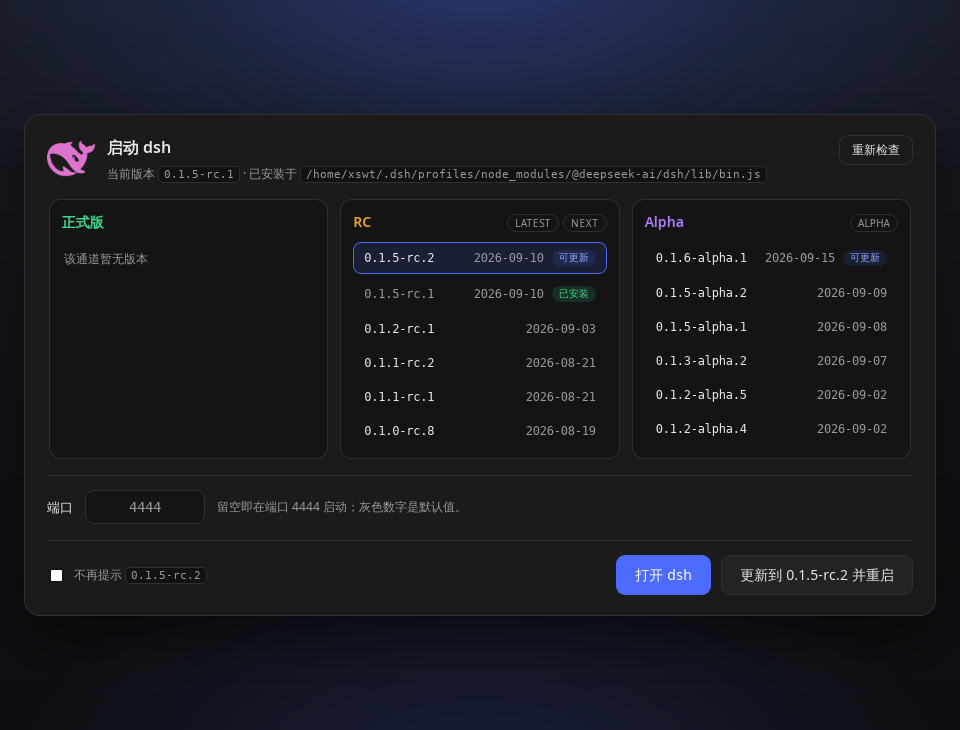
README
Marketplace stub for dsh-xswt-tauriapp — a
lightweight Tauri desktop shell for DeepSeek Harness that reuses or starts a local dsh web server
and embeds it in a native window.
The shell itself is a native application published as a GitHub release artifact, so there is no npm
package to install. This package is what the plugin market can install: it declares the dsh.bundle
manifest, and on the first dsh start after installation it
- checks whether the shell is already installed (and says nothing if it is),
- reads the shell's latest GitHub release and picks this platform's installer from its asset list, refusing an asset whose name is not a bare file name,
- downloads
SHA256SUMS, downloads the installer, and verifies the digest before writing anything to disk ($DSH_HOME/dsh-xswt-tauriapp/updates/, where it also removes the installers it supersedes), - hands the verified file to the operating system —
starton Windows,openon macOS,xdg-openon Linux — and records that it did so in$DSH_HOME/dsh-xswt-tauriapp/plugin.json.
Every later start is silent. On WSL the Linux asset is a .deb, which xdg-open cannot install: the
plugin says so, names the sudo apt install <path> that does, and points at the Windows installer if
the desktop is the Windows one.
What a hand-off guarantees is what the platform answers. open and xdg-open report themselves, so an
opener that exits non-zero — the usual bare-WSL case, where nothing is registered for .deb — is logged
as a failure and followed by the command that does work. cmd.exe /c start does not: it exits 0 whether
or not it opened the file, so a Windows hand-off that opened nothing cannot be detected from here. What
is guaranteed on every platform is that the verified file's path is in the log and that nothing is ever
installed or run silently — and with open: false, or DSH_TAURIAPP_NO_OPEN=1, the command to finish
it by hand is printed instead of the hand-off.
Requests are bounded the way the shell bounds its own: 15 seconds for the release lookup, 300 for a download, so a stalled connection is a logged failure rather than a hang on a harness's boot path.
What it deliberately does not do
It does not install anything, and it does not run an installer silently. An .exe has to pass
SmartScreen, a .dmg has to pass Gatekeeper, and a .deb needs the distribution's own dependency
resolution and root — a plugin that fights any of those fails in a way the user never sees. The
installer is opened, and the user finishes it.
Nor does it import a single harness API. It imports Node built-ins only: no @deepseek-ai/*, no
tool, no client row, no UI, no dsh internal. A harness change cannot break it, and it cannot become
the thing that stops a harness from booting — the whole plugin is one boot-time check and one
download.
Install
From the plugin market, or directly:
dsh plugin --profile web add https://github.com/xswt442-cmd/dsh-xswt-tauriapp/releases/latest/download/dsh-xswt-tauriapp-plugin.tgz
dsh web
Or grab the installer yourself from the releases page — which is all this stub would have done.
Configuration
mode and open live in this bundle's patch row (cordis.patch.yml); the environment wins, so a
machine that must never download anything can opt out without editing a profile that dsh plugin
rewrites:
| Setting | Environment | Default | Meaning |
|---|---|---|---|
mode: auto |
DSH_TAURIAPP_MODE=auto |
✓ | download, verify, hand over |
mode: notice |
DSH_TAURIAPP_MODE=notice |
print the release page, download nothing | |
mode: off |
DSH_TAURIAPP_MODE=off |
say nothing | |
open: true |
DSH_TAURIAPP_NO_OPEN=1 disables |
✓ | open the verified installer |
Facts rather than settings: a machine with no desktop session (CI, or Linux without DISPLAY /
WAYLAND_DISPLAY) is only told where the download is, and a release with no installer for this
platform/architecture (linux/arm64, win32/arm64) is only pointed at the release page.
Three more variables exist for the tests and for a mirror: DSH_TAURIAPP_RELEASES_API replaces the
GitHub releases API URL — an asset name that arrives through it is checked before it is used as a path
or an argument, so a feed cannot write outside $DSH_HOME; DSH_TAURIAPP_FORCE=1 offers the installer
again after it has already been downloaded once; DSH_TAURIAPP_INSTALL_DIRS replaces the directories
the installed-copy probe looks in, so a test or a custom install prefix describes its own host instead
of the machine it happens to be running on.
Tests
node --test plugins/dsh-desktop-app/test/plugin.test.js
Every case runs against a stand-in release server on loopback: nothing in the suite reaches GitHub.
Nothing runs a real platform opener either — the driver cases stop at the hand-off with
DSH_TAURIAPP_NO_OPEN=1, and openInstaller itself is exercised against a child that only records the
argv it was handed and exits with a chosen status.
Uninstall
dsh plugin --profile web remove dsh-xswt-tauriapp-plugin
That removes the stub only. The desktop application is uninstalled by the platform's own uninstaller
(Windows: Apps & features; macOS: drag the app out of Applications; Debian/Ubuntu:
sudo apt remove dsh-xswt-tauriapp).
License
MIT — see LICENSE.
Comments
Comments live in GitHub Discussions. Sign in with GitHub to post or react.