
Install
Inside DeepSeek Harness, with dsh-market
dsh plugin --profile web add dshmarket
Or from the command line
dsh plugin --profile web add media-preview
Installing runs third-party code with your own permissions — it can read your files, use your credentials and reach the network. Review the source first, and pin a commit (github:owner/repo#sha) when you can.
README
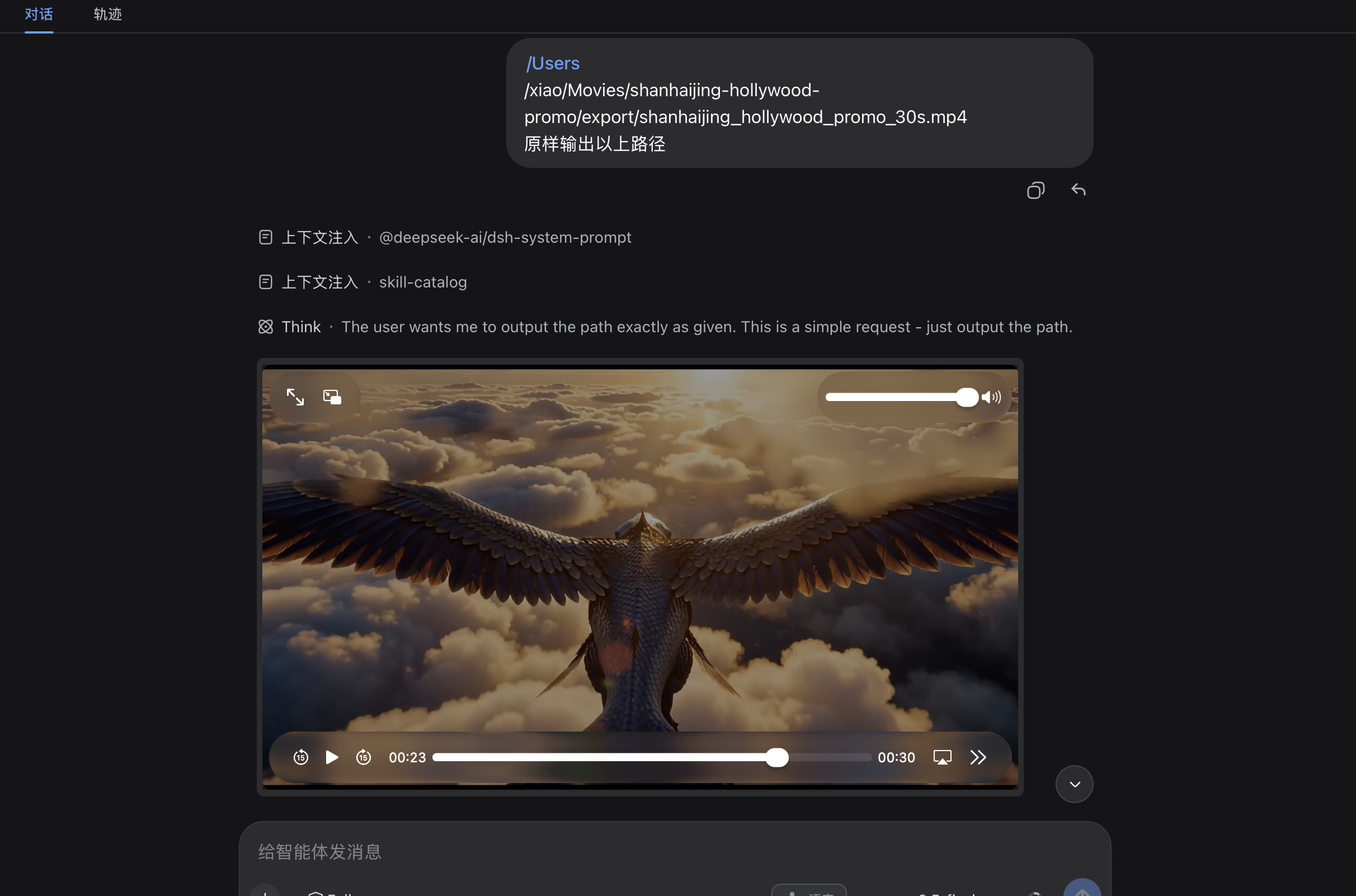
DSH plugin: renders local/online audio/video/image paths as inline, playable previews in chat
When an assistant message or tool result contains a local media path or an online http(s) media link, it is replaced inline with a playable <audio> / <video controls playsInline> / <img> element. Local paths are proxied through /api/media-preview/<base64-path>; online links use the direct URL.
Default mode is unrestricted: any file readable by the DSH process can be served. Permission and IO errors are returned as explicit HTTP statuses and reason strings so the browser's native <video> and <audio> error events display meaningful messages.
Companion plugins
Part of a generate → orchestrate → preview loop with two sibling DSH plugins by the same author:
| Plugin | Role | npm |
|---|---|---|
| dsh-llm-multimodal | Produces the media: generate_image / generate_video / generate_vision / generate_tts / generate_music / generate_text |
npm: dsh-llm-multimodal |
| dsh-media-studio | Orchestrates it: multi-project infinite canvas, asset library, global search, soft references | npm: dsh-media-studio |
Where each one renders. The two plugins serve media over different routes for different surfaces, and they complement rather than duplicate each other:
- This plugin handles the chat surface: a
file://path orhttp(s)link in an assistant message or tool result becomes an inline player. It serves any DSH-readable file (unrestrictedmode) at/api/media-preview/<base64-path>. - media-studio handles the canvas surface: files inside a project are served at
/api/media-studio/media-filewithETag/304andCache-Control: private, max-age=86400, immutable, plus a Service Worker that pre-heats video/audio headers for near-zero-buffer playback on the canvas.
Since dsh-llm-multimodal writes generated media into the active media-studio project by default, installing all three means: generate → see it on the canvas → read the file:// path in chat as a player. Install order does not matter; none of the three has a hard dependency on another.
Features
- Range requests (
bytes=start-end) →206 Partial Contentfor seeking in<video> - Whole-file GET →
200 OK - Caching →
Cache-Control: private, max-age=60 - Client regex matches only
/Users|/tmp|/private/tmp|/var/folders|/var/tmproots with supported extensions, avoiding arbitrary URLs or paths outside the user's home/temp tree - UTF-8 safe path encoding for non-ASCII folder names
<style>cleanup: injected CSS is owned by the client Fiber and removed automatically when the plugin unloads
Supported extensions (27)
Both local paths and online links are supported:
Audio/Video (15): mp3 wav m4a flac ogg opus aac mp4 mov mkv m4v webm avi 3gp ogv
Images (12): png jpg jpeg gif bmp webp svg tiff ico avif heic heif
Online examples: https://example.com/clip.mp4, https://cdn.site.com/img/photo.webp
Preview
Install
# from your DSH web profile
cd ~/.dsh/profiles/web

# Option 1 (recommended): dsh CLI from the npm registry
dsh plugin --profile web add media-preview

# Option 2: dsh CLI from GitHub
dsh plugin --profile web add xiaokaizhou/dsh-media-preview

# Option 3: pnpm from the registry (requires a manual step, see below)
pnpm add media-preview
The profile package.json lives at:
- Default:
~/.dsh/profiles/web/package.json(macOS / Linux) - Windows:
%USERPROFILE%\.dsh\profiles\web\package.json - Custom
$DSH_HOME:$DSH_HOME/profiles/web/package.json(override viaDSH_HOMEenv) - Multiple profiles:
~/.dsh/profiles/<profile-name>/package.jsonfor each
For Option 2, add this to the profile package.json above:
"dsh": {
  "profile": {
    "bundles": [
      "media-preview"
    ]
  }
}
Restart dsh web after any source change.
Limitations
- Whole-file buffered through
fs.readBytes(cap 500 MB). Large videos can be slow to start —<video>needs metadata before it can render the first frame. Range requests slice the same in-memory buffer. - No directory listing. No symlink policy beyond what
fs.statreports. - The 500 MB cap is per-request, not per-session. Future versions could stream chunks via
child_processddif the cap proves too low.
Failure modes
| Condition | Status | Reason |
|---|---|---|
| File missing | 404 |
not found: <errno> |
| Permission denied | 500 |
permission denied: <errno> |
| Is a directory | 415 |
is a directory, not a file |
| Symlink loop | 400 |
symlink loop or too many links |
| Path too long | 400 |
path too long |
| Unsupported extension | 415 |
unsupported media type: <ext> |
| File > 500 MB | 413 |
file too large: <bytes> > 524288000 cap |
| Range invalid | 416 |
Content-Range: bytes */<total> |
License
MIT
Sponsorship
If this plugin saves you time, you can buy me a coffee with one of the following QR codes.
Comments
Comments live in GitHub Discussions. Sign in with GitHub to post or react.