
Install
Inside DeepSeek Harness, with dsh-market
dsh plugin --profile web add dshmarket
Or from the command line
dsh plugin --profile web add dsh-composer-tools
Installing runs third-party code with your own permissions — it can read your files, use your credentials and reach the network. Review the source first, and pin a commit (github:owner/repo#sha) when you can.
Screenshots
README
This plugin publishes its README in Chinese only.
DSH web 输入体验增强插件:方向键输入历史 + 指令查看/编辑面板 + 提示词库。
给 DSH(DeepSeek Harness)的输入框加三个实用功能,全部本地运行、不联网、不需要密钥。
功能
1. 方向键输入历史
在输入框按 ↑ / ↓ 翻看本会话发过的输入,像 shell 历史一样:
- ↑ 翻更旧的输入,↓ 翻回更新的(到底恢复你正在编辑的草稿)
- 单行输入:直接触发(无论光标在哪)
- 多行输入:光标在第一行按 ↑ 才翻历史、光标在最后一行按 ↓ 才翻——光标在中间行时按键正常移动光标,不会误翻
- ← → 永不触发;中文输入法选字时不误触;命令菜单打开时方向键归菜单
- 历史按会话隔离、刷新后仍在(localStorage),每会话最多 100 条
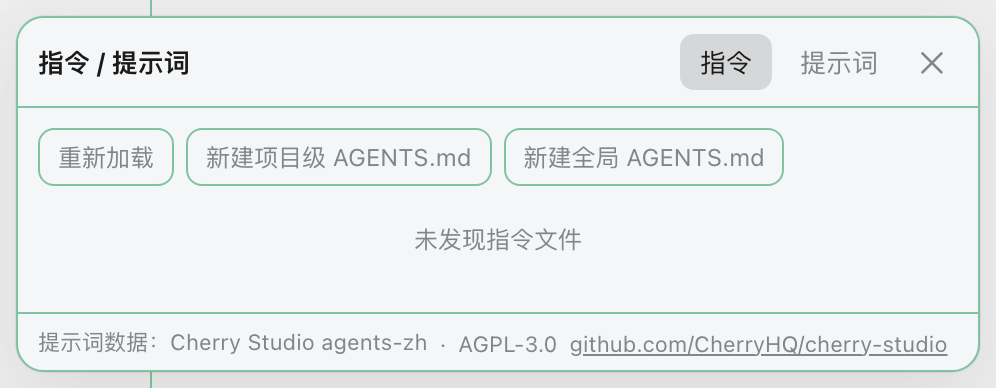
2. 指令查看 / 编辑面板
输入框工具区的 🧩 按钮打开面板,查看当前会话实际生效的指令:
- 全局:
~/.dsh/AGENTS.md - 项目:项目根(
.git标记)到当前目录每层的AGENTS.md/CLAUDE.md/AGENTS.local.md/CLAUDE.local.md - 跨文件全文搜索(文件+行号+片段,点击跳转)
- 编辑保存:全局和项目级指令文件都可改(保存前有确认,mtime 冲突会提示重载/覆盖,超 1MB 的文件提示用外部编辑器防静默丢尾)
3. 提示词库(同一面板的第二个 tab)
内置 780 条中文提示词(源自 Cherry Studio agents-zh.json,AGPL-3.0 许可,面板内常驻标注来源):
- 按分类折叠浏览 + 搜索(标题/描述/正文)
- 发送到输入框:点一下追加到输入框末尾(已有内容自动空一行,不覆盖不自动发送)
- 复制到剪贴板
安装
从 dsh-market / GitHub 安装
包内已声明 prepare 构建脚本;pnpm 从 Git 安装时会自动执行 node build.mjs 生成 lib/。pnpm 10+ 默认拦截依赖的构建脚本,按 dsh-market 的提示把 pnpm 打印的 key 加入 profile 的 pnpm-workspace.yaml 的 allowBuilds 后重试即可。
# dsh-market 目标与此等价:
dsh plugin --profile web add "github:wsxwj123/dsh-plugins#path:/packages/dsh-composer-tools"
从本地源码 link 安装
lib/ 不入库,本地 link: 安装不会触发依赖构建,需要先构建:
# 1. 构建
cd packages/dsh-composer-tools
pnpm install
pnpm build

# 2. 装进你的 profile
cd ~/.dsh/profiles/web
pnpm add "link:/绝对路径/packages/dsh-composer-tools"

# 3. 装完检查 @deepseek-ai 物理复制坑(见下方"已知问题"),然后重启 dsh web
或直接 dsh plugin --profile web add "link:$PWD/packages/dsh-composer-tools"。
兼容版本:@deepseek-ai/dsh 0.1.5 与 0.2.0-rc.2(两版都免豁免可装)。
0.2 适配说明:0.2 从
sessions.list快照删掉了current字段,本插件改为读 会话作用域的标准sessionIdprop 来定位当前会话目录(snapshot.current仅作 0.1.5 兜底)。0.2 桌面真机实测待补。
工作原理(给维护者)
- host 半(node):挂
/ct前缀 RPC(loopback 信任围栏 + POST-only)——指令发现(.git找项目根 + 祖先链,lstat拒符号链接)、读写(basename 白名单 × 精确发现成员资格双闸门防逃逸 + mtime 乐观锁 + 截断保护)、提示词库按需下发 - client 半(React):注册
conversation.input.rightslot 注入入口按钮;方向键用 document capture keydown 拦截(先于 React),官方inputActions.setDraft回填;发送采集走 phase 状态机(发送失败自动剔除误录)
边界与已知限制
- 输入历史按会话隔离、明文存 localStorage(README 提示)
- 指令面板只读列出 + 编辑已发现的文件,不创建新文件
- 提示词库数据为 AGPL-3.0(Cherry Studio),随 MIT 插件分发,来源与许可证已在面板和本文件标注
- 真实浏览器交互(方向键门槛、IME、菜单让路)由 playwright e2e 在独立 profile 自动化验证
测试
pnpm test:acceptance   # 131 条契约验收(真实实现)
node --test tests/unit/*.test.mjs   # 112 条白盒单测
npx playwright test tests/e2e/      # 7 条真实 dsh web e2e(需先起 composer-e2e profile)
已知问题(本机 dsh 环境)
装插件后若所有工具调用报 Cannot read properties of undefined (reading 'prepare')——是 pnpm install 把 @deepseek-ai/* 物理复制成第二份导致 Symbol 分裂。检查 ~/.dsh/profiles/<name>/node_modules/@deepseek-ai/,若是真目录则 mv 掉它(回退共享 symlink),重启 dsh。详见 deepseek-harness discussion #783。
License
MIT(插件代码)。提示词数据源自 Cherry Studio(AGPL-3.0)。
Comments
Comments live in GitHub Discussions. Sign in with GitHub to post or react.