
Install
Inside DeepSeek Harness, with dsh-market
dsh plugin --profile web add dshmarket
Or from the command line
dsh plugin --profile web add dsh-ui-tweaks
Installing runs third-party code with your own permissions — it can read your files, use your credentials and reach the network. Review the source first, and pin a commit (github:owner/repo#sha) when you can.
README
Dependency: currently targets DSH v0.2.0-rc.2.
A DeepSeek Harness (DSH) plugin that live-tunes the conversation UI from the Settings panel.
Preview
 |
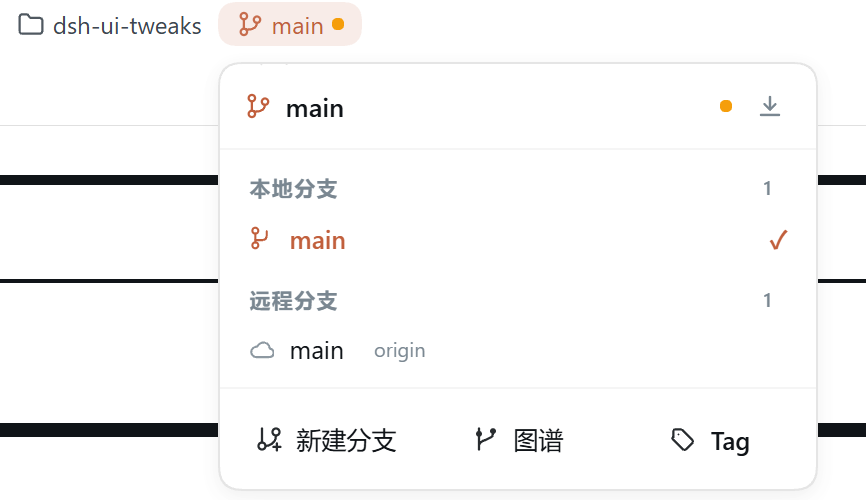 |
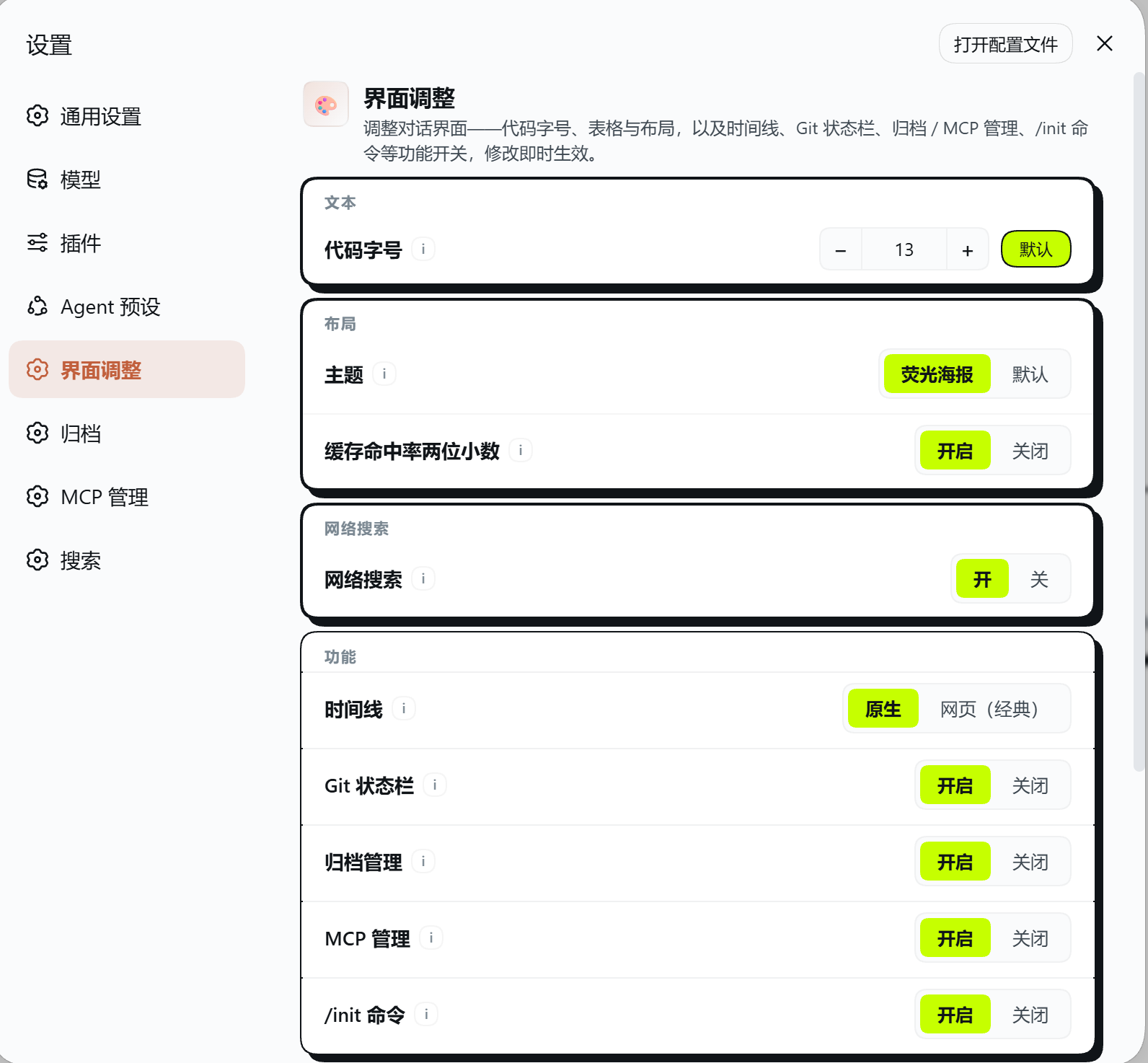
| Settings panel: code font size / theme skins (minimal · neon poster) / two-decimal cache hit / web search / timeline / GitBar toggles, with dedicated Archive manager, MCP manager and Web search pages in the left nav | Branch panel: pops down from the branch chip in the session header — local / remote branch lists, click to switch; pull button (fast-forward only) in the header, new-branch field at the bottom, plus a commit graph dialog (colored SVG fork/merge lanes) and Tag management |
 |
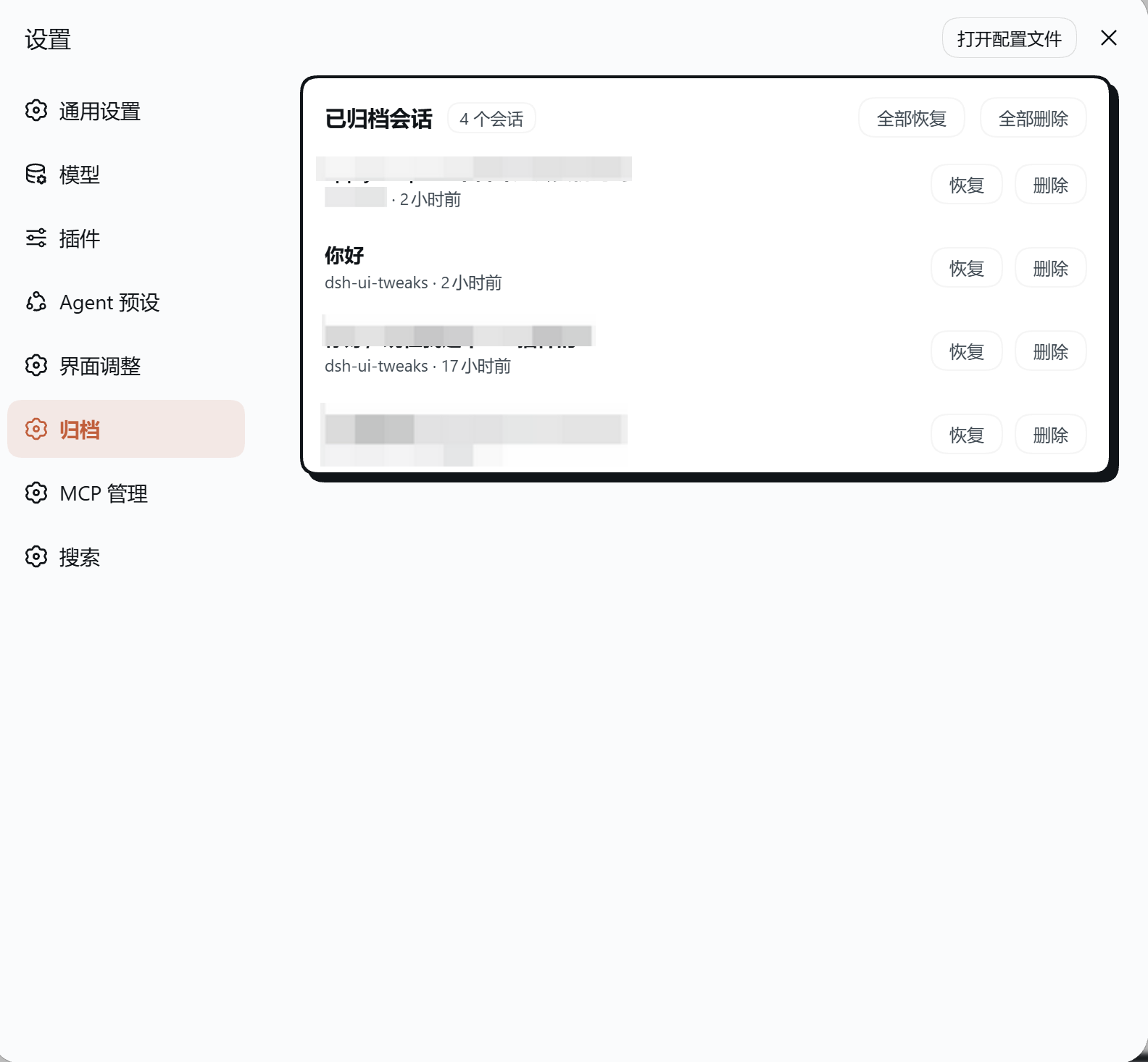 |
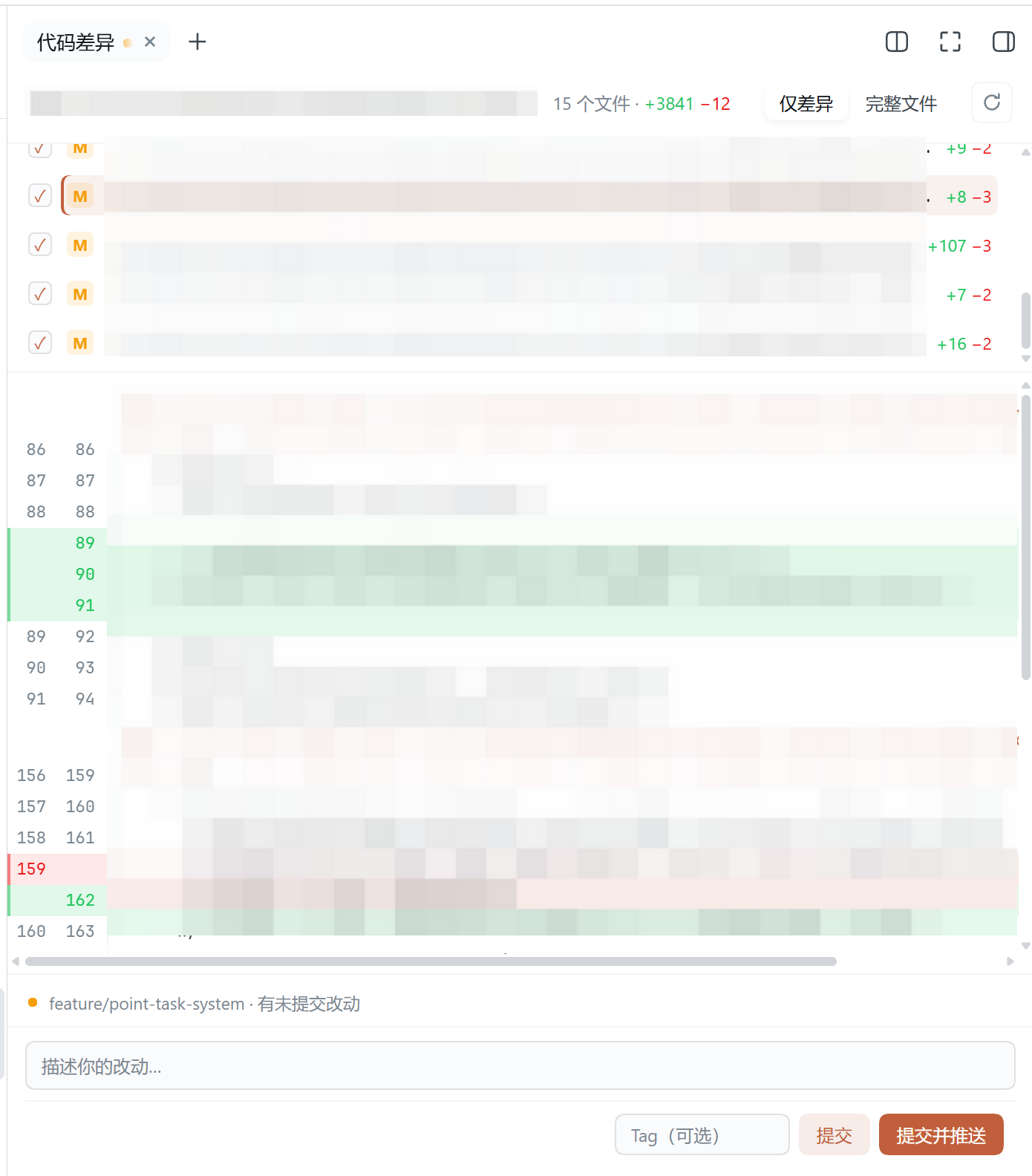
| Code diff: the code-diff tab in the right sidebar — file list (per-file checkboxes for partial commits) + per-file diff (changed hunks only by default, "Full file" toggle at the top right), with a commit area at the bottom for the message, an optional Tag, and Commit / Commit & push | Archive manager: an Archive manager page in the Settings dialog listing archived sessions (title / workspace / relative time) with per-row Restore / Delete and batch Restore all / Delete all |
 |
|
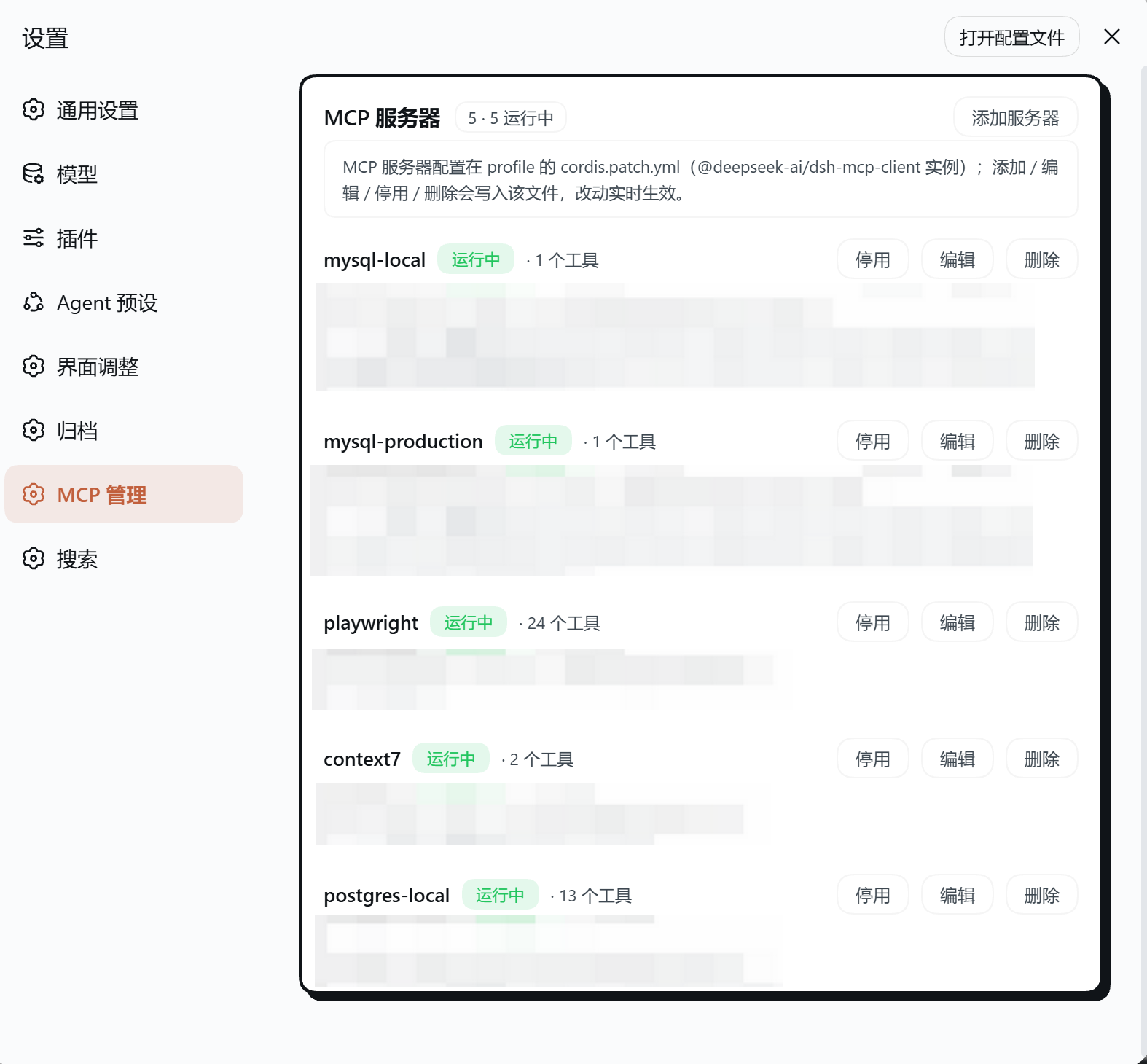
| MCP manager: an MCP page in the Settings dialog listing configured MCP servers with live status and tool counts, plus full management (Add / Edit / Enable / Disable / Delete / Restart) |
Features
- Code font size (px) — absolute 8–32px, default 11 (DSH's stock code-block size at a 14px body); applies to code blocks, with inline code following proportionally. The legacy percentage (
codeFontScale) stays compatible and is overridden once a px value is set. Message text keeps DSH's stock sizing. - Theme (single choice in Layout, stock look by default) — choose
Default, Minimal or Neon poster. Minimal keeps DSH's stock look untouched and changes exactly one thing: markdown inline code is tinted with the Anthropic red (#c15f3cin light,#d97757in dark — the same accent the poster skin uses) in the conversation. Neon poster is a two-scheme poster skin — paper-white with ink-black hairlines in light mode, near-black with light hairlines in dark mode, both with lime highlights and an Anthropic-red action accent (buttons, links and selections follow the theme tokens automatically; code blocks and the composer card get hard offset shadows), and the composer's reasoning-effort label is tinted by intensity (green / amber / blue / violet, with a same-hue wash sweeping option rows on hover), applied live. Future skins will be added as further options the same way. - Timeline (single choice in Features) — one switch, two options:
- Native (default) — DSH's built-in turn rail (the row of small dots beside the messages), the stock behavior.
- Web (classic) — the v0.11 classic right-side navigation rail, restored: vertically centered on the message area's right edge, a thin line strip when collapsed, a 240px panel on hover (message previews + current-position highlight), a per-item detail bubble with timestamp, and click to jump (deep history pages in automatically before landing, with a landing self-check); wheel over the rail scrubs clipped items into reach. Data comes from the server-side
dshChatTimelinesession projection (every user message, independent of the browser's loaded window); sessions with fewer than two user messages hide it. On the web option the native turn rail is hidden with one theme-independent CSS rule (matching its--turn-natural-heightinline variable), so the two never appear together.
- GitBar (toggleable, off by default) — the standard pair for git-repo sessions: a branch chip in the session header, plus a code diff tab in the native right sidebar (next to Files, opened from the sidebar guide; uncommitted changes put a dot on the code diff tab):
- Branch chip — beside the session title; shows the current branch and opens a downward branch panel (local / remote lists,
git switchon click, new-branch field). A pull button sits beside the current branch in the panel header (git pull --ff-only— fast-forward only: a diverged branch aborts with git's own error instead of silently merging; hidden when the branch has no upstream), so what gets pulled is always the branch in the header. The panel's Graph entry opens the commit graph dialog: the latest 150 commits (git log --date-order --all) are laid out into lanes and rendered as a colored SVG fork/merge graph — dots are commits, curves are forks/merges, each branch line keeps its own color and merge arcs adopt the color of the lane they join; rows highlight on hover, refresh in the header. - Code diff — changed-file list + per-file diff (changed hunks only by default, "Full file" toggle at the top right). The file-list / diff / commit sections split with draggable horizontal dividers (double-click resets; the message box stretches, Shift+Enter for new lines). The commit band stays at the foot (Commit / Commit & push, message required). Without a git repo the page shows a note instead of hiding.
- Opening the project in external apps is DSH's own open-in-app header button, so this plugin no longer ships one; every git op runs server-side through
execFile('git', …)(no shell, timeouts).
- Branch chip — beside the session title; shows the current branch and opens a downward branch panel (local / remote lists,
- Archive manager (toggleable, off by default) — an Archive manager page in the Settings dialog listing archived sessions (title / workspace / relative time) with per-row Restore and Delete actions plus batch Restore all / Delete all buttons.
- Restore removes a session from the archive set (its log and workspace slot are kept, so the conversation returns to the normal sidebar list).
- Delete PERMANENTLY deletes the session — the server removes its JSONL log from disk, detaches it from workspace accounting and the archive set, and clears its projection cache (irreversible). Only genuinely running sessions are refused; opened-but-idle sessions are also removed from the in-memory store, so the row disappears live. The same action is available as Delete session in a sidebar row's "..." menu (click twice to confirm; the armed state reverts after 3s, and a running session gets the reason printed right in the menu).
- The list refreshes live via the
host/archived-sessions-changedevent and a session-list re-pull, with no page reload.
- MCP manager (toggleable, off by default) — an MCP manager page in the Settings dialog listing every configured MCP server (
@deepseek-ai/dsh-mcp-clientloader entries) with its live status, command/url, env vars and registered tools, plus full management: Add / Edit (a structured form — instance id, name, stdio or HTTP type, timeout ms, command, args, env — OR raw YAML, both validated), Enable / Disable / Delete, and Restart (runtime-only). Changes persist to the profile'scordis.patch.ymland DSH's built-in patch watcher hot-reloads just that server. /initslash command (toggleable, off by default) — type/initin the composer (the slash menu shows "Analyze this project and generate an AGENTS.md"), pick a prompt language from the popup (Chinese / English), and a complete AGENTS.md bootstrap prompt is submitted into the current session: the agent explores the project on its own (README, manifests, build scripts, key directories), then writes or improves a rootAGENTS.mdaddressed to future AI coding agents (overview, common commands, conventions, directory guide, gotchas; existing files are improved in place). Pure client-side contribution; enable it in the UI Tweaks settings section.- Task alerts (toggleable, off by default) — call you back while the tab sits in the background. Watches all sessions (background included) for two event kinds: finish (the
runningflag drops, or the host's greencompletedreminder rises; a host projection of the loggedturn/endreason tells completed / interrupted / failed apart, and failure alerts carry a truncated error summary) and interaction (the session starts waiting for your approval / plan review / answer — the samependingInteractionsource as the sidebar amber dot). Three independent channels:- Tab title flash — blinks an unread counter
(2) 🔔 …into the tab title until you come back, then restores it; - System notifications (Web Notifications API) — desktop-level; click one to jump straight to that session; permission is requested from the settings toggle's click gesture; the OS bark and the chime are mutually exclusive so they never double-ring;
- Chime — a two-note WebAudio motif synthesized in-process (rising = done, falling = needs you); no audio assets.
- "Only when hidden" defaults on (no nagging while you watch the page); the first snapshot only arms the baseline (a page reload never fires a burst); events fire on transitions with a 2s per-session+kind cooldown (reconnect flicker absorbed); subagent child rows are skipped (the parent carries the turn). A Test button in Settings previews permission and channels in one click.
- Tab title flash — blinks an unread counter
- Precise cache hit (toggleable, off by default) — DSH's stats line shows the cache-hit share as a bare integer ("Cache hit 96%"). When enabled, the figure is rewritten to two decimals ("Cache hit 96.35%") and computed from the raw token buckets — cache reads ÷ billed input (uncached input + cache reads + cache writes) — the same source as the stock number, just unrounded; a full hit shows 100.00%, and with no billed input the group is absent anyway. The toggle lives in the Layout settings group; turning it off restores the stock figure.
All changes apply live — no reload needed. The same values can be hand-edited in the profile's cordis.patch.yml (the document the Settings page writes; settings.yaml was retired in DSH 0.1.7):
# $DSH_HOME/profiles/<profile>/cordis.patch.yml
- id: ui-tweaks
  name: dsh-ui-tweaks
  config:
    timelineStyle: web            # defaults to native (DSH's built-in turn rail); web is the classic web timeline
    themeStyle: minimal           # defaults to default (DSH's stock look); minimal tints markdown inline code Anthropic red (#c15f3c light / #d97757 dark), neon-lime is the neon-poster skin
    gitBarEnabled: true           # defaults to false (off); set true to enable GitBar
    archiveManagerEnabled: true   # defaults to false (off); set true to show the Archive manager page
    initCommandEnabled: true      # defaults to false (off); set true to register the /init slash command
    preciseCacheHitEnabled: true  # defaults to false (off); set true to enable the two-decimal cache-hit figure
    notificationsEnabled: true    # defaults to false (off); set true to enable task alerts (event filters & channels are per-item toggles in Settings)
Settings entry: Settings → UI Tweaks.
Install
# from npm (recommended, prebuilt)
npx -y @deepseek-ai/dsh plugin --profile desktop add dsh-ui-tweaks

# from GitHub (source; built on install by `prepare`)
npx -y @deepseek-ai/dsh plugin --profile desktop add github:wlj521/dsh-ui-tweaks
The GitHub path builds locally:
lib/is a build artifact and is not tracked; it is produced byprepareat install time. Since pnpm 10.26,prepareof git-hosted dependencies is blocked by default (supply-chain hardening), so allow it in the profile'spnpm-workspace.yamlfirst — otherwise the install ships nolib/and the plugin fails to load:allowBuilds: dsh-ui-tweaks: truePrefer the npm path if you would rather not build locally (its tarball already contains the artifacts).
The package spec after add is forwarded to pnpm verbatim, so versions can be
pinned — @version for the npm package, #tag for the GitHub source:
npx -y @deepseek-ai/dsh plugin --profile desktop add dsh-ui-tweaks@0.19.2                    # pin the npm version
npx -y @deepseek-ai/dsh plugin --profile desktop add github:wlj521/dsh-ui-tweaks#v0.19.2     # pin a git tag
Path three: a local directory (picked in the desktop app, no CLI)
git clone https://github.com/wlj521/dsh-ui-tweaks.git
cd dsh-ui-tweaks
pnpm install          # `prepare` builds lib/ for you
Then open Plugins → Add plugin in the desktop app and enter the directory's
absolute path (for example D:\dsh-project\dsh-ui-tweaks).
Run
pnpm installfirst — it is required: a local-directory install becomes alink:symlink, and pnpm neither runspreparefor it nor installs its own dependencies. The directory must therefore already hold the builtlib/(whatmainpoints at) andnode_modules/(the runtime dependency,yaml). Without them the install reports success and nothing errors, yet DSH logsui-tweaks (dsh-ui-tweaks): failed to importat startup and the plugin never loads.The path must be absolute — a relative one is rejected (the Host's working directory means nothing to the person typing into a browser). CLI equivalent:
npx -y @deepseek-ai/dsh plugin --profile desktop add <absolute path>.
Restart the DSH desktop app once after installing (bundle plugins are scanned at process start).
If pnpm reports symlink/hoist errors, set
nodeLinker: hoistedin the profile'spnpm-workspace.yaml.
Development
pnpm install
pnpm build          # tsc (server) + tsc (client) + bundle lib/client.js
pnpm typecheck
Load against a running DSH with an overlay, or install as a bundle:
npx -y @deepseek-ai/dsh plugin --profile desktop add .    # bundle install from this checkout
# dev overlay: edit the desktop profile's cordis.patch.yml ($DSH_HOME/profiles/desktop/cordis.patch.yml) directly — DSH hot-reloads it
How it works
- Server (
src/index.ts) exports theConfigsettings schema — since DSH 0.1.7 the Settings form is derived from a plugin's exportedConfig(the oldsettings.register()is gone) andconfigure({ auto: false })suppresses the auto-generated page in favor of the client's own sections — and mounts a same-origin route (/_dsh/ui-tweaks/settings) — the Web settings RPC only exposes a fixed allowlist of namespaces since rc.6, so a custom route is how a plugin owns a configuration page. - Browser (
src/client/index.tsx) reads/writes that route, renders the Settings section, and applies the values live via a runtime<style>element that overrides stable DSH anchors (bodymarkdown code-font tokens, markdown tables inside[data-slot="conversation.chat.node"]). - Precise cache hit (
src/client/cachehit.tsx) mounts a null-rendering seat in theconversation.composer.dockslot (the band hosting the stock stats line) and reads the session's token usage through the framework's fifth standard hook,useProjection('tokenUsage')— the disjoint uncached-input / cache-read / cache-write / output buckets. It computescache reads ÷ (uncached input + cache reads + cache writes), formats it with.toFixed(2), and rewrites the stats line's "Cache hit N%" / 「缓存命中 N%」text in place — newer DSH renders the figure as a bare text node after a separator inside the usage pill (its buttonaria-labeland the matching row of the click-open usage dialog are rewritten too; the per-turn dialog uses its own denominator and is left alone) — layout, truncation and tooltip behavior stay DSH's own. A MutationObserver on the document re-applies whenever React repaints the line or opens the dialog (writes are idempotent, so the loop settles immediately); toggling off or switching sessions restores the original texts. Registration follows the /init command's on-demand choreography: mounted only whilepreciseCacheHitEnabledis on. - Delete session row (
src/client/session-menu.tsx) registers one entry in the host'ssidebar.workspaces.session.menu.itemlist — the "..." menu of a sidebar session row, whose shipped pin / rename / fork / archive rows are ordinary entries of the same list — atorder: 500, so it lands right after them. DSH has no session-delete API at any layer, so the row calls this plugin's own same-origin archive route; two clicks delete (the armed state reverts after 3s), a running session is refused by the server and the menu stays open with the reason printed under the row. It rides the samearchiveManagerEnabledtoggle as the Archive page, and the row re-implements ui-primitives'MenuItemButtonmarkup and styling because that package is outside this plugin'sdsh.client.injectwhitelist. - Settings nav glyphs (
src/client/nav-icons.ts): the host paints one hardcoded glyph per settings-section id and thesettings.sectionregistration carries onlyid / order / label— no icon seat — so this plugin's four pages would all show the generic gear. A MutationObserver walks the settings dialog's nav rows, claims the ones whose label is this plugin's own (localized) copy, tags them withdata-dut-nav-icon, and an injected stylesheet hides the stock gear and masks in the matching glyph (UI Tweaks = sliders, Archive manager = archive box, MCP manager = plug, Web search = globe; the sliders / archive / globe paths areui-primitives' own artwork). Label matching keeps it self-healing: locale switches and host re-renders re-claim the rows, rows this plugin no longer renders lose the tag, and every row it does not own is left exactly as shipped.
License
MIT
Comments
Comments live in GitHub Discussions. Sign in with GitHub to post or react.