
Install
Inside DeepSeek Harness, with dsh-market
dsh plugin --profile web add dshmarket
Or from the command line
dsh plugin --profile web add dsh-mmx-bridge
Installing runs third-party code with your own permissions — it can read your files, use your credentials and reach the network. Review the source first, and pin a commit (github:owner/repo#sha) when you can.
Screenshots
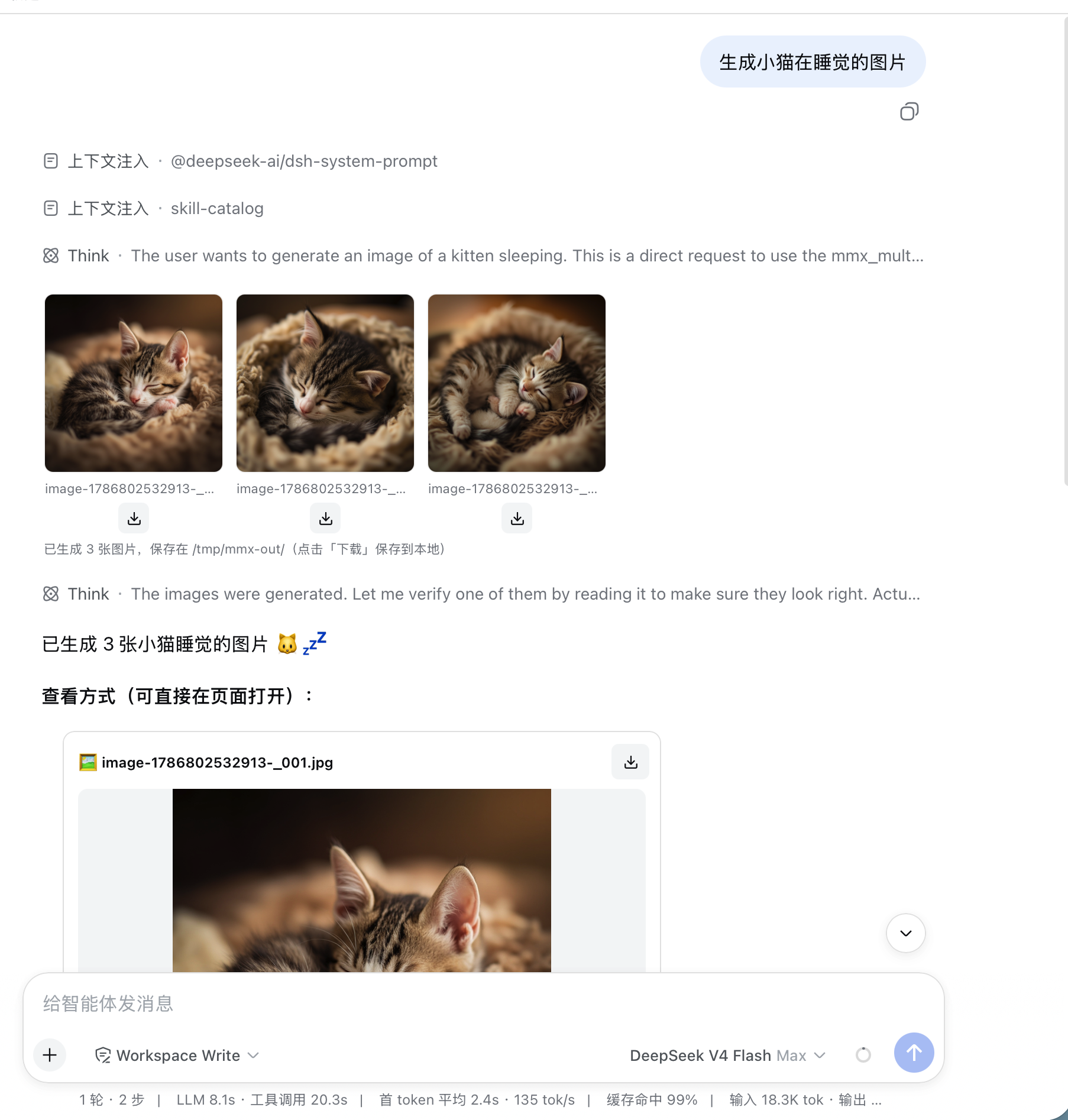
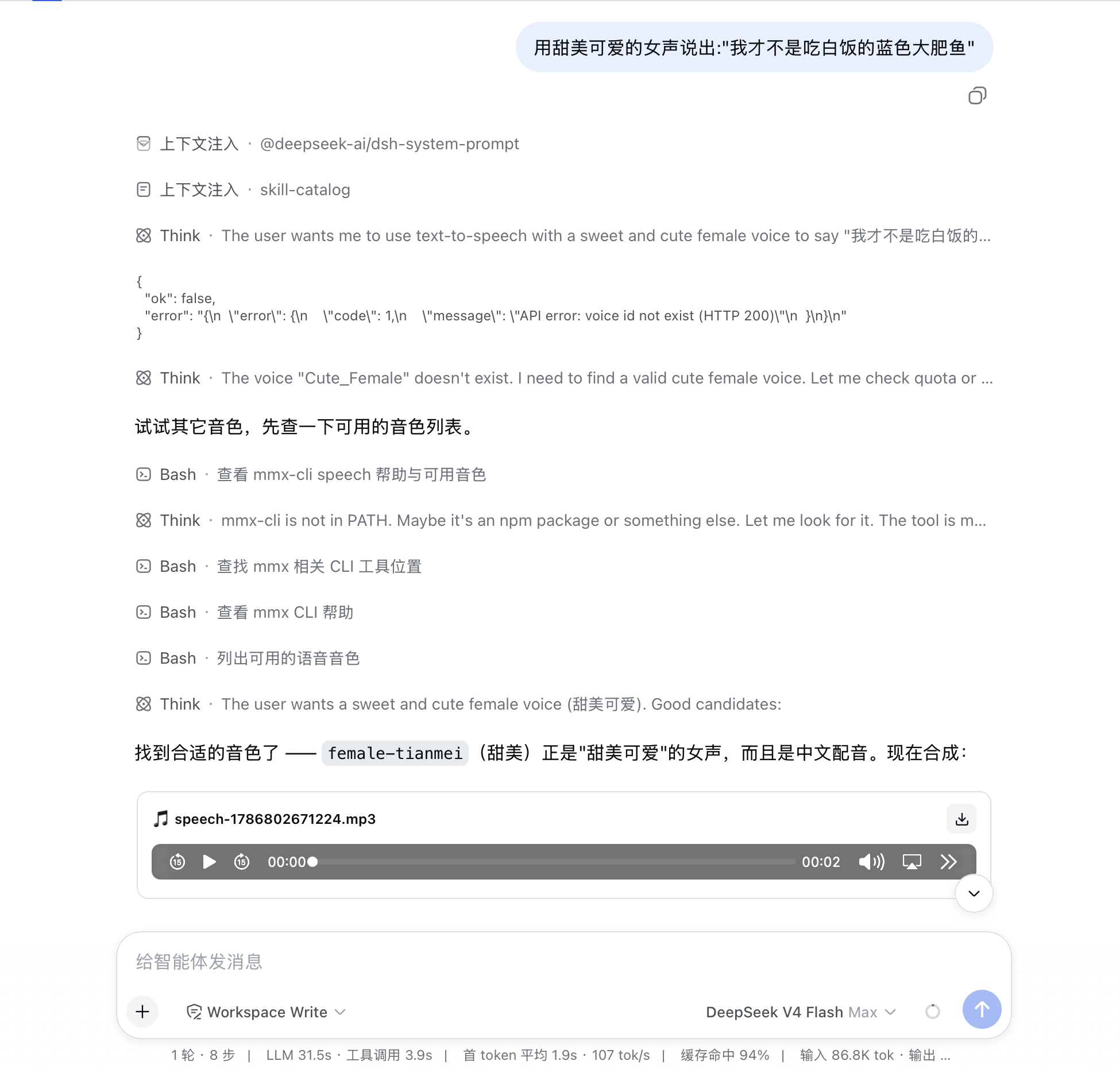
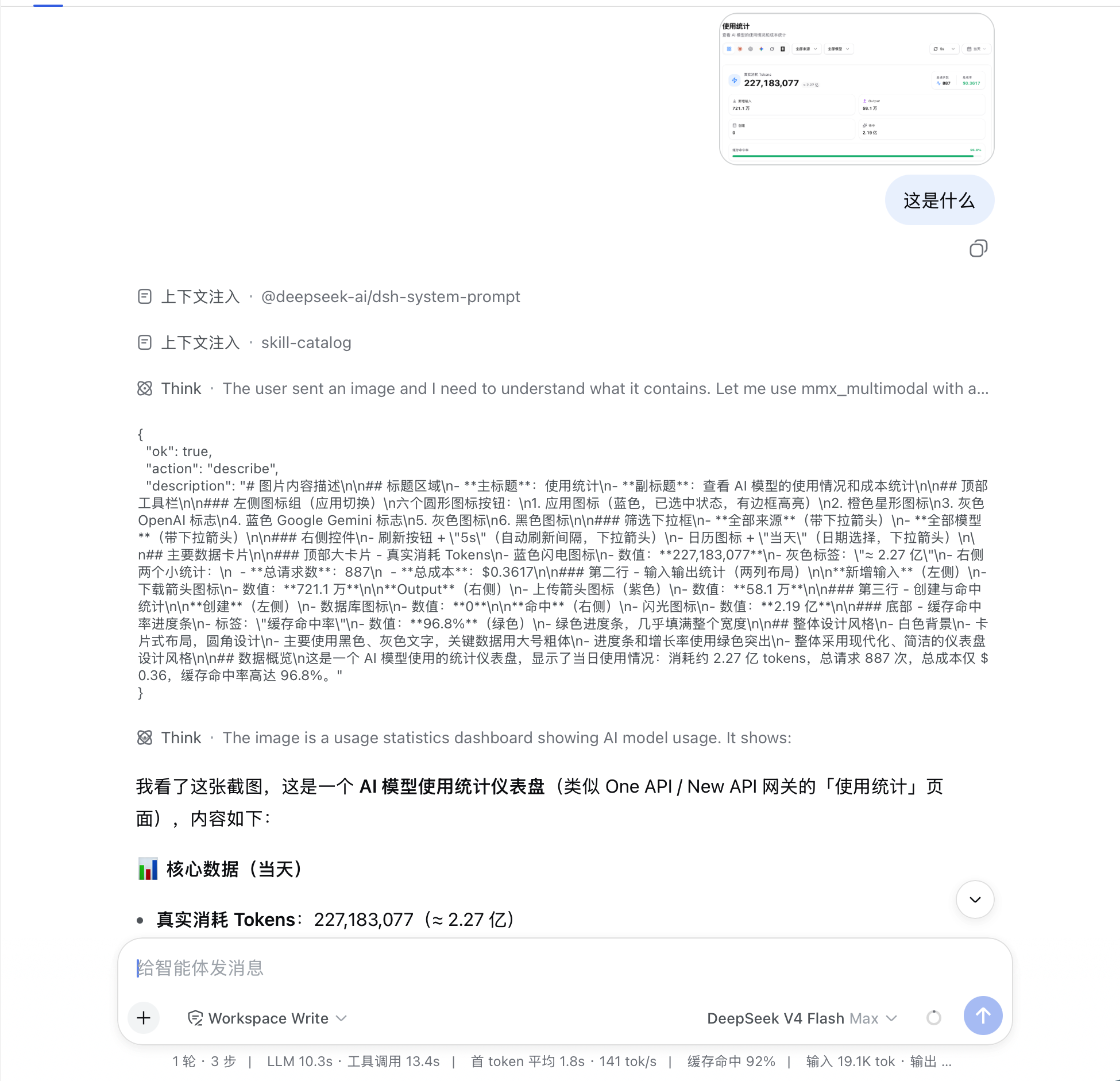
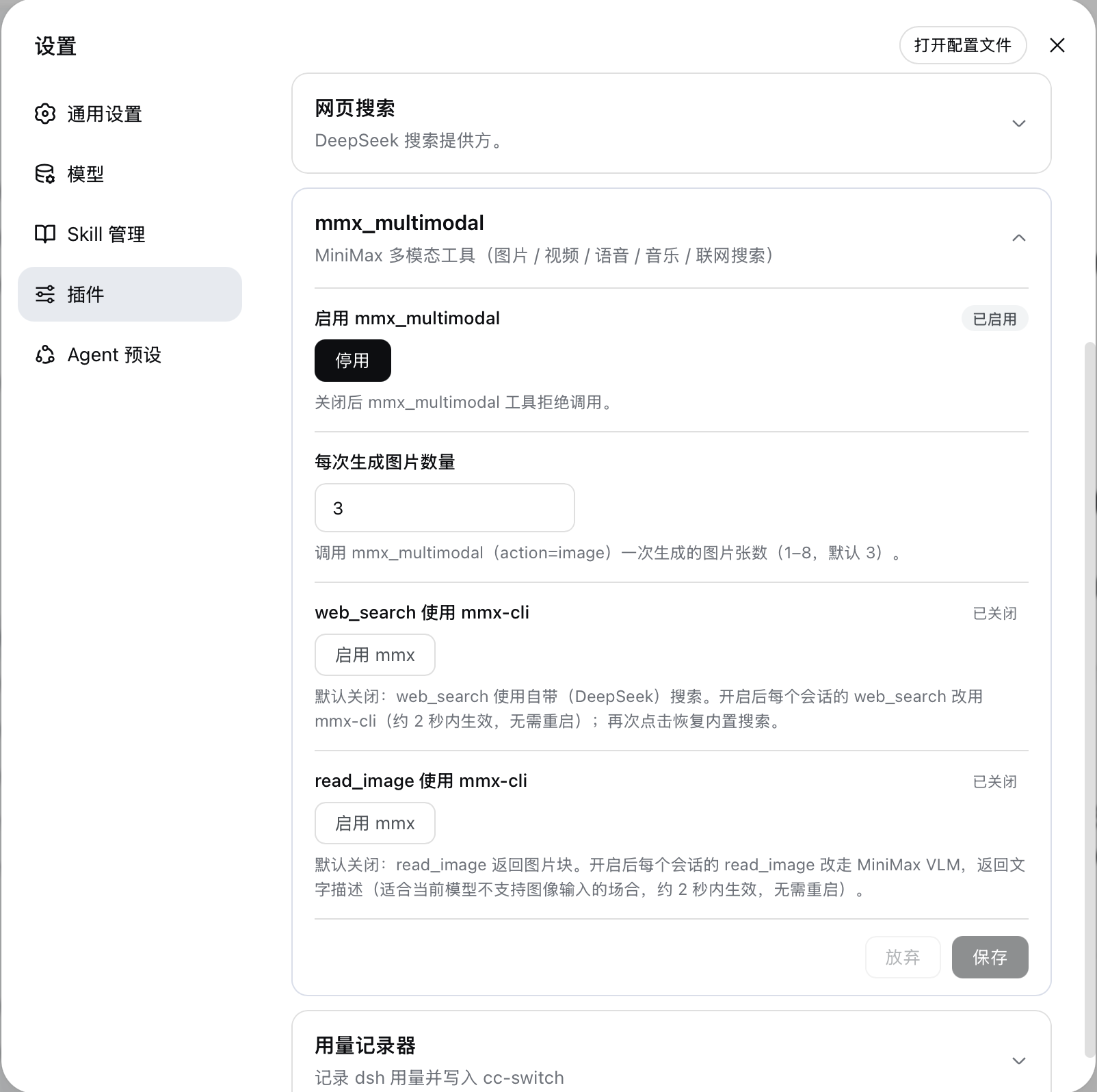
README
dsh-mmx-bridge
One tool = all MiniMax multimodal capabilities. Give DeepSeek Harness (DSH) the ability to see images, generate art, create videos, speak, sing, search the web, and more.
English · 中文 README
Overview
DSH is text-only by default — no images, no speech, no video. dsh-mmx-bridge plugs in MiniMax's full multimodal stack through a single mmx_bridge tool. Install once, get 8 capabilities:
v1.0.5+: just drop an image to send it — your input stays untouched. Dropping or pasting an image into the chat input works with text-only models: your message (image + prompt) is displayed and stored exactly as you wrote it. Behind the scenes the plugin saves the image to a temp dir (default
/tmp/mmx-out/) and replaces it with "image URL + local path" text — the Agent then automatically callsread_image/mmx_bridge(describe)to look at it. Models that genuinely support image input pass through untouched.v1.0.7+: image recognition cache (embedded JSON, on by default). Recognition results are written back into the image itself as standard imgjson blocks (PNG
tEXt/ JPEGCOM). The same image + the same question is served straight from the embedded cache on later reads — zero VLM calls. Follow-up questions are cached per prompt layer, never overwriting each other; when the image is re-encoded the cache invalidates and rebuilds automatically.
Compatibility
| Item | Details |
|---|---|
| DSH version | 0.1.0-rc.7+ (Web GUI profile); verified 0.1.0-rc.7 ~ 0.1.5-rc.2 |
| Runtime deps | Node builtins + @deepseek-ai ecosystem peers (provided by the host at runtime); no third-party runtime deps |
| External deps | mmx-cli (at call time; plugin supports auto-scan / custom path / one-click install / api-key login) |
| OS | macOS / Linux (first-class); Windows best-effort (os.tmpdir() defaults, where mmx discovery, cmd.exe spawn branch adapted, not verified on real hardware) |
Install / Uninstall
Prerequisites
Install
dsh plugin --profile web add dsh-mmx-bridge
⚠️ npm unreachable? Use
dsh plugin --profile web add github:welsione/dsh-mmx-bridge
Restart dsh after installing (server-side ESM cache does not hot-reload), then refresh the Web GUI. See AGENT.md for details.
Have your agent install it (paste this prompt to your agent)
Install the DSH plugin dsh-mmx-bridge for me (repo https://github.com/welsione/dsh-mmx-bridge ):

Run `dsh plugin --profile web add dsh-mmx-bridge` to install into the web GUI profile; if npm is unreachable, use `dsh plugin --profile web add github:welsione/dsh-mmx-bridge` instead. Verify the plugin is mounted after installing, then remind me to restart dsh (the settings-page card only appears after a restart).
Uninstall
dsh plugin --profile web rm dsh-mmx-bridge
Quick Start
One tool, the whole multimodal family. mmx_bridge dispatches on action:
| action | capability | key params |
|---|---|---|
describe |
image understanding (VLM) | image + optional prompt (follow-up) |
image |
text-to-image | prompt / aspectRatio / count |
video |
text/image-to-video | prompt / image / duration / ratio / model |
speech |
text-to-speech | text / voice |
music |
music generation | prompt / lyrics / instrumental |
cover |
audio cover | prompt + audio reference |
search |
web search | q |
quota |
usage/balance query | — |
Video params (since 1.0.10):
duration/ratioare only supported byMiniMax-H3; passing either auto-selects H3 (or setmodelexplicitly:MiniMax-Hailuo-2.3default /MiniMax-Hailuo-2.3-Fast(i2v only) /MiniMax-H3/MiniMax-H3-Max). Note that MiniMax Credits / Token Plan accounts do not cover the H3 series — H3 requests fail with error 2013; the bridge translates that into an actionable message. On Credits, omitduration/ratio: the Hailuo-2.3 default yields ~6 s, 16:9.
Just ask the agent in plain language: "describe this image", "generate a cyberpunk cat", "turn this text into speech".
Configuration
Everything is tunable via the Settings → Plugins → Plugin config card or the control file.
Control file (default /tmp/dsh-vision-control.json)
| key | default | meaning |
|---|---|---|
enabled |
true |
master switch |
count |
3 |
images per text-to-image call (1–8) |
webSearchEnabled |
true |
route web_search through mmx-cli |
readImageEnabled |
true |
route read_image through MiniMax VLM |
imageBridgeEnabled |
true |
image bridge: drop-to-send, save-to-disk before LLM call |
imageCacheEnabled |
true |
recognition cache: embed results back into the image, reuse on same image+question |
mmxBin |
auto | path to the mmx executable (empty/remove = back to auto-scan) |
Missing keys fall back to defaults (set
falseto disable explicitly). Settings-page toggles write to the same file.
mmx environment management (Settings card → "Environment")
The plugin closes the full mmx-cli discovery / config / install / login loop:
- Auto-scan:
control mmxBin> envMMX_BIN> auto-scan (command -v mmx/where mmx,/usr/local/bin/mmx,/opt/homebrew/bin/mmx, npm global dir, …); - Not found → configure: type a valid path in the card's "mmx path" field (validated for existence); save empty to clear and rescan;
- Not installed → one-click install: runs
npm install -g mmx-cli(uses the system npm config), then rescans automatically; - Not logged in → api-key login: paste a MiniMax API Key and hit Login (runs
mmx auth login --api-keyinternally); the key is never persisted, logged, or echoed; "Login status" button queriesmmx auth statuslive. - Model self-healing (no manual config needed): a new
mmx_envtool (status / install / login / set-path) is exposed to the agent. Whenmmx_bridgereports "mmx not found / not logged in / command error", the error message includes a fix hint; the agent canstatusto diagnose, theninstall(one-click),login(ask the user for an API Key — never echoed back), orset-pathto fix it on the spot, and confirm withstatus— the user just keeps chatting.
Environment variables (MMX_*)
| variable | default |
|---|---|
MMX_BIN |
platform default (macOS /usr/local/bin/mmx; Windows mmx) |
MMX_OUT_DIR |
mmx-out under the system temp dir (i.e. /tmp/mmx-out on macOS/Linux) |
MMX_CONTROL_FILE |
dsh-vision-control.json under the system temp dir |
MMX_STATUS_FILE |
dsh-vision-status.json under the system temp dir |
MMX_DEBUG_LOG |
dsh-mmx-multimodal-debug.log under the system temp dir |
MMX_INSTALL_PATH |
/api/mmx-bridge/install-mmx |
MMX_LOGIN_PATH |
/api/mmx-bridge/login-mmx |
MMX_AUTH_STATUS_PATH |
/api/mmx-bridge/auth-status |
Permissions & Data
- Generated/bridged files: images, videos, audio are saved to
MMX_OUT_DIR(default/tmp/mmx-out/) and served same-origin via/mmx-files/(HTTP Range, path-traversal guarded). - Attachment reads: bridge reads image bytes from the DSH attachment store (
attachments/v1) by content address — read-only, never written. - Cache writes: the plugin only writes back to its own
bridge-*copies inside the out dir; it never modifies the immutable originals in the DSH attachment store. - Cache is plaintext: the embedded JSON is not encrypted — anyone who knows the file format can read it. Do not embed sensitive information.
- Re-encoding invalidates the cache: after social-platform re-encoding/compression/screenshots, the embedded cache fails its sha256 check and is reported as stale instead of silently serving old data.
Troubleshooting
Verify DSH version ≥ 0.1.0-rc.7 and mmx-cli is installed (mmx --version). Refresh the Web GUI page.
Upgrade to v1.0.5+ and restart dsh (server-side ESM cache does not hot-reload), hard-refresh the page, then check Settings → Plugins → Plugin config → make sure "Image bridge" is enabled. Models that genuinely support images pass through untouched.
Recognition results are embedded into the bridge copy as standard imgjson blocks. The same image + same question (read_image or mmx_bridge(describe)) is served from the embedded cache with cached:true — zero VLM calls. Different questions (follow-ups) get their own cached layer; re-encoding invalidates the cache explicitly and it rebuilds automatically.
Since DSH rc.7, the settings page dispatches cards by the server-registered settings namespace, so plugin ≥ 1.0.4 is required. Confirm the installed version, restart dsh (server-side ESM cache does not hot-reload), then hard-refresh the Web GUI page.
Run mmx auth login first. If using Token Plan, ensure your subscription is active.
mmx-cli connects directly to MiniMax API (api.minimax.chat), usually reachable from China without a proxy. Check your proxy settings if you still have trouble.
Development
git clone https://github.com/welsione/dsh-mmx-bridge.git
cd dsh-mmx-bridge
npm test                 # unit tests (image cache / read_image wrapper, real PNG/JPEG)
npm run check            # syntax checks (4 lib files)
dsh plugin --profile web add .   # local install for testing
Architecture
User chat → DSH Agent → mmx_bridge tool → mmx-cli → MiniMax API
                                                  ↓
                                           /mmx-files/ (same-origin)
                                          (image preview / audio & video players)
Recognition result → imgjson block embedded back into the image (PNG tEXt / JPEG COM)
                  → same image + same question reuses it on the next read
- No third-party runtime deps — Node builtins +
@deepseek-aiecosystem packages (host-provided) - Same-origin media — generated files served via
/mmx-files/with inline preview - Web GUI enhancement — image preview, audio/video players, settings card auto-load
License & Security
- MIT: LICENSE
- No telemetry; no system-credential reads; never modifies the DSH attachment store
- Embedded recognition cache is plaintext — encrypt it yourself before writing back if it must stay private
Related
| Project | Description |
|---|---|
| DeepSeek Harness | The DSH agent framework |
| MiniMax CLI | MiniMax official CLI |
| awesome-dsh-plugin | DSH plugin curated list (this plugin included) |
| dsh-recommend | DSH plugin rankings (this plugin included) |
Comments
Comments live in GitHub Discussions. Sign in with GitHub to post or react.