
Install
Inside DeepSeek Harness, with dsh-market
dsh plugin --profile web add dshmarket
Or from the command line
dsh plugin --profile web add dsh-switch
Installing runs third-party code with your own permissions — it can read your files, use your credentials and reach the network. Review the source first, and pin a commit (github:owner/repo#sha) when you can.
Screenshots
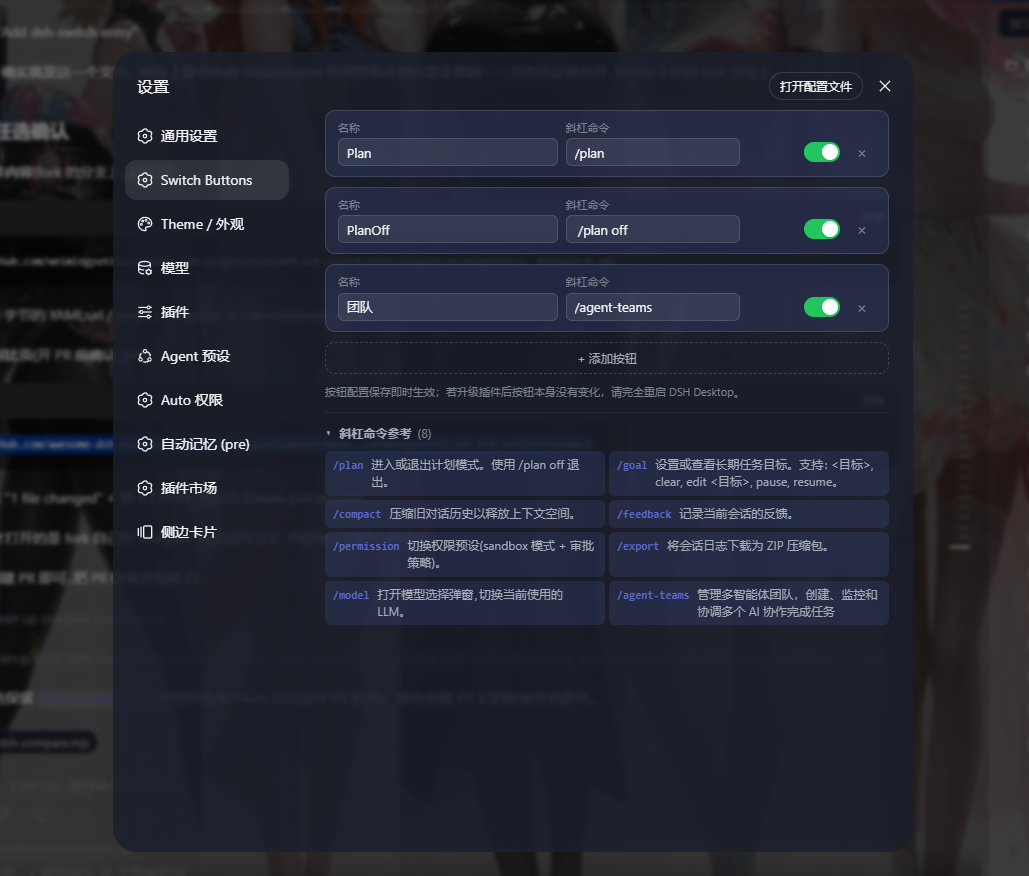
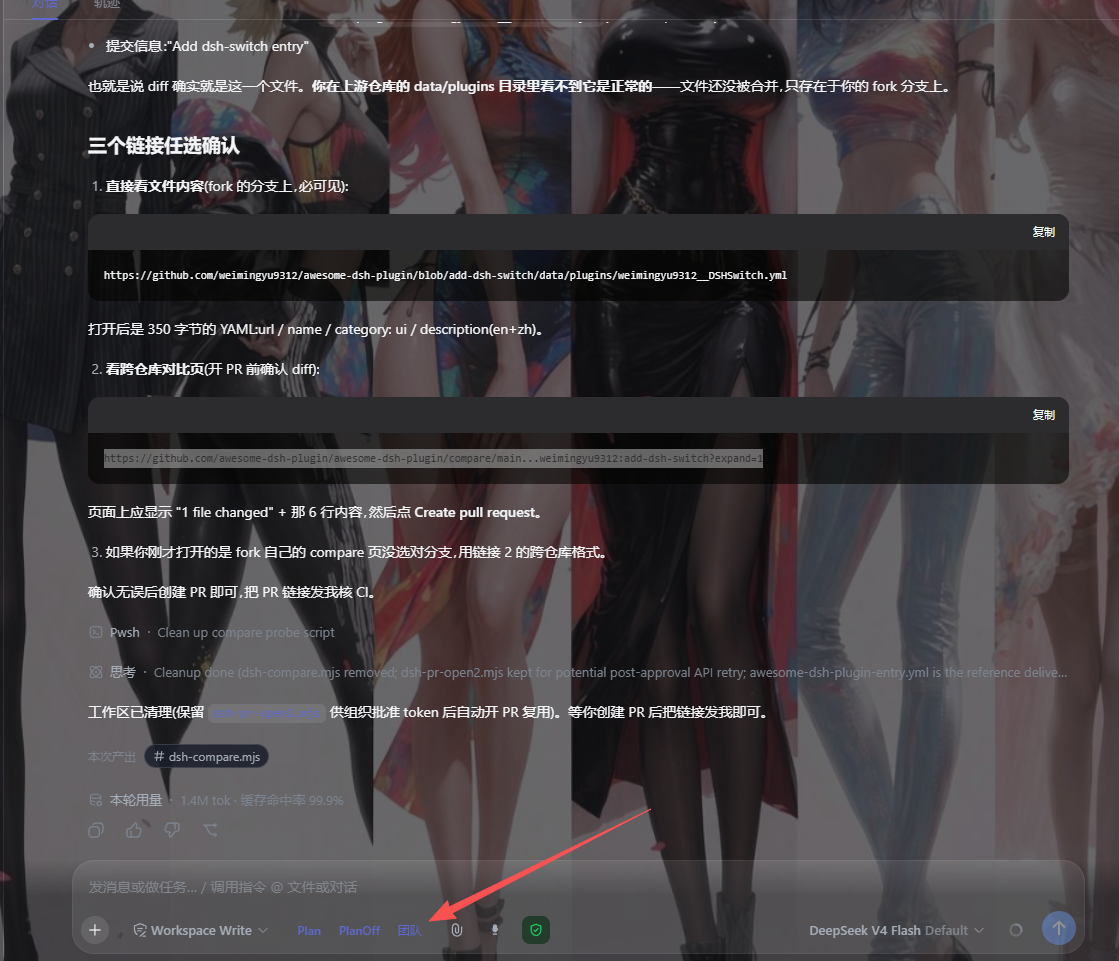
README
DSH plugin that adds customizable switch buttons to the left of the chat composer in the DSH Web GUI. Clicking a button inserts a slash command into the input box; you then fill in any arguments and send manually.
Features
Buttons have a single behavior (mode: "insert", one-shot insertion): each click inserts /command before the existing content of the input box (at the beginning when it is empty); click again to insert again. Nothing is executed on the host, there is no persistent state, and buttons are rendered as plain blue text labels (no icon).
- Settings panel: Settings → "Switch Buttons" — add, edit, delete, enable/disable buttons; the bottom of the panel shows a live bilingual (zh/en) reference of the slash commands available in the current session
- Persistent config: stored under the
dsh-switchnamespace of the Host-sidesettings.yaml, survives browser cache clears; localStorage is only a first-paint cache - Automatic migration of legacy configs: the old
toggle(switch command) andpersistent(sticky insertion) button types were removed; existing buttons are downgraded to one-shot insertion on read (thecommandis kept,commandOff/projectionare dropped), so they never disappear
Installation
⚠️ Do not run
dsh plugin addon a profile that already contains git dependencies (e.g.aegis): the CLI forwards to pnpm, whose git resolution can hang silently forever in that situation. Use path ② below — it needs no pnpm and no network.
① Desktop marketplace (once published to npm)
When dsh-switch is available on the npm registry, install/update it from the DSH Desktop plugin marketplace — this uses the host's generation mechanism and keeps automatic updates working.
② One-shot installer script (no pnpm, works offline)
git clone https://github.com/weimingyu9312/DSHSwitch.git
cd DSHSwitch
node install.mjs                 # auto-detects DSH_HOME and the web profile
node install.mjs --profile web --home <DSH_HOME> --dry-run   # preview only
The script locates DSH_HOME (env var wins; else %APPDATA%\dsh-desktop\harness / ~/Library/Application Support/dsh-desktop/harness / ~/.config/dsh-desktop/harness / ~/.dsh), copies the package body (incl. vendored deps) into <profile>/node_modules/dsh-switch/, and registers it in both required places of the profile manifest (dependencies["dsh-switch"] and dsh.profile.bundles) as UTF-8 without BOM. It is idempotent and never touches dsh.desktop.generationProjection (that layer belongs to the marketplace staging). Restart DSH Desktop afterwards for the host half to load.
③ Manual merge (appendix)
Copy the repository (with its node_modules/ vendor tree) to <DSH_HOME>/profiles/web/node_modules/dsh-switch/, then edit <DSH_HOME>/profiles/web/package.json: add "dsh-switch": "file:./node_modules/dsh-switch" under dependencies and append "dsh-switch" to the dsh.profile.bundles array. Save as UTF-8 without BOM (PowerShell's Set-Content -Encoding UTF8 adds a BOM and breaks the host parser — use [IO.File]::WriteAllText or an editor without BOM). Both registrations are required; missing either makes the host reconcile skip the bundle. Restart DSH Desktop.
The Host runtime dependency @deepseek-ai/schemastery (plus its transitive deps @deepseek-ai/cosmokit and the type-only @standard-schema/spec) is both vendored in the git repository under node_modules/ (a fresh clone works out of the box) and declared as regular npm dependencies (exact-pinned, so a registry npm install dsh-switch carries them automatically). The pinned versions must match the target host release (currently schemastery 3.18.2 / cosmokit 1.8.3 = DSH Desktop 0.8.2); when bumping them, refresh all three packages together. For junction/git installs the plugin resolves dependencies through the vendored tree — keep it, and don't replace it with symlinks, which create a reparse chain that breaks startup (full reasoning in the header comment of lib/index.js).
Registry installs are now self-sufficient: npm forces every
node_modules/path out of published tarballs, so the registry copy carries no vendored tree — but since v1.7.0 the three packages are declared as dependencies, sonpm install dsh-switchfetches exactly the pinned versions into the profile'snode_modulesand Node lookup resolves them. The one-shot installer detects this layout and skips vendoring.
Compatibility
| Contract | Verified against |
|---|---|
Slots conversation.input.left + settings.section; composer face inputActions.setDraft |
DSH Desktop 0.8.2 (web profile) |
Degraded mode: slot delivers no inputActions (faces: []) |
falls back to the execCommand('insertText') DOM channel — reduced reliability, still functional |
Minimum host: any dsh-web-app build that provides the inputActions face (0.8.x line). Older builds without the two slots render no buttons at all (silent, harmless).
Usage
Configuring buttons
- Open the DSH Web GUI → Settings → Switch Buttons
- Click "+ Add button"
- Each card has two fields:
- Label: button text (e.g. "Plan Off")
- Slash command: the command to insert (e.g.
/plan off)
- Toggle the switch to enable/disable; click × to delete
Default configuration
{
  "buttons": [
    { "id": "plan", "label": "Plan", "command": "/plan", "mode": "insert", "enabled": true },
    { "id": "plan-off", "label": "Plan Off", "command": "/plan off", "mode": "insert", "enabled": true }
  ]
}
Defaults apply only while the Host config has no buttons key yet; once you change anything, the stored value wins. To restore defaults, delete the dsh-switch: section from settings.yaml, clear the browser's localStorage, and restart.
Configuration fields
| Field | Type | Description |
|---|---|---|
id |
string | Unique button identifier |
label |
string | Button display text |
command |
string | Slash command to insert |
mode |
string | Fixed insert; legacy values (toggle/persistent/missing) are migrated automatically on read |
enabled |
boolean | Whether the button is enabled |
Verification
- Switch buttons appear to the left of the composer
- Click Plan: with an empty input →
/planappears at the start; with existing content (e.g.research pricing) → it becomes/plan research pricing; Enter sends normally - The settings panel footer shows the slash-command reference list
When a command doesn't land in the input box
Ask the plugin itself what it sees, from the browser console (F12):
__dshSwitch.state()                // scopeBound / buttons / faces / draft / editorFound / editorPhase
__dshSwitch.log()                  // last 40 insertions: kind(setDraft|dom|no-editor|skip:stale-snapshot|…)/text/before/after
__dshSwitch.insert("/plan")        // run one insertion manually, check whether the draft gets the command
Common symptoms: faces: [] = the host slot did not deliver inputActions (older host version); insertion falls back to the DOM channel with reduced reliability. editorFound: false = the composer DOM changed and neither channel can write. Enable verbose logging with localStorage.setItem("dsh-switch-debug","1").
Architecture at a glance
| File | Responsibility |
|---|---|
lib/index.js |
Host half: registers the dsh-switch settings namespace (a single buttons key) |
lib/client.js |
Client half: button bar (injected into the conversation.input.left slot), settings panel (injected into the settings.section slot), config read/write and migration |
The sole insertion behavior is a draft write (never command execution): the preferred path is the host composer face's inputActions.setDraft(command + existing draft) — committed through the editor's own state, so it cannot be wiped by Lexical reconciliation. When the draft contains citation chips, the commit machine is locked, or the session has no face, it falls back to execCommand('insertText'). Config changes render optimistically, mirror to localStorage, and persist via scope.set("buttons") on the Host.
Development
This repository is linked into the profile via a junction, so editing workspace files takes effect directly. The plugin ships as two halves with asymmetric hot-reload — know which one you touched before judging a change "not applied":
| Changed file(s) | Action required |
|---|---|
lib/client.js (button bar, settings panel, insertion logic) |
refresh the browser page only |
lib/index.js, package.json, cordis.patch.yml (host half) |
fully restart the host process (dsh web: Ctrl+C and rerun / quit DSH Desktop completely) |
| Button configuration (via the settings panel) | nothing — saved to Host settings.yaml and applied live |
node test/client.test.cjs   # or npm test — 32 jsdom behavior tests (migration rules, face routing, chip/phase gates, retired-symbol regressions)
node test/preview.cjs       # offline-render the settings panel to .preview/preview-{dark,light}.html for layout review
node install.mjs --dry-run  # verify the installer against a fake DSH_HOME before shipping
See CHANGELOG.md for release history.
License
MIT
Comments
Comments live in GitHub Discussions. Sign in with GitHub to post or react.