
Install
Inside DeepSeek Harness, with dsh-market
dsh plugin --profile web add dshmarket
Or from the command line
dsh plugin --profile web add @dsh-plugins/dsh-env-inspector
Installing runs third-party code with your own permissions — it can read your files, use your credentials and reach the network. Review the source first, and pin a commit (github:owner/repo#sha) when you can.
Screenshots
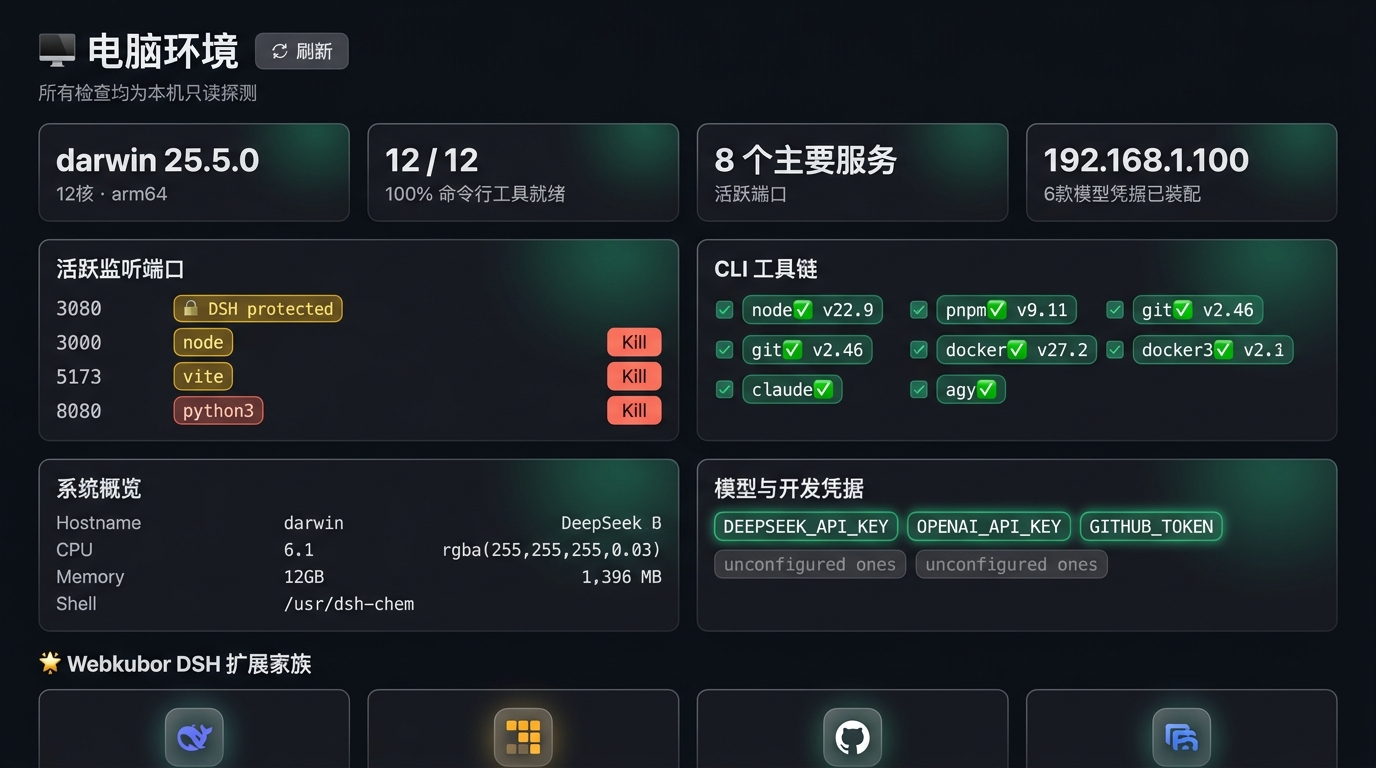
README
🎯 What it solves
| Situation | The usual pain | What dsh-env-inspector does |
|---|---|---|
| Ports keep getting taken | A stray Node/Python process from a closed terminal still holds the port, and the next start fails with EADDRINUSE |
Lists every listening port; click "×" to release it safely (kill the process) and the view refreshes itself |
| Listening on all interfaces by accident | A service quietly binds 0.0.0.0 and is reachable from the LAN |
Flags wildcard-bound ports with a yellow warning dot so access control gets a second look |
| High ports drown out signal | Dozens of ephemeral ports (49152+) make the real ones hard to find | Smart drawer: common dev ports stay visible, ephemeral ones collapse by default and expand on demand |
| Slow environment triage | Debugging means typing node -v, git --version, lsof over and over |
A dedicated dashboard tab: OS, 12 common CLIs, and model-key presence in one place |
✨ Features
1. 🔌 Port overview with one-click safe release
- Live probing via the system
lsofprobe, with a minimalPATHfallback so macOS daemons are found too. - Ephemeral-port collapsing to keep the list readable.
- Safety rails that hold:
- 🛡️ No self-immolation: DSH's own port
:3080is permanently locked (shown with a🔒badge), as is the DSH host's ownprocess.pid; core system PIDs are refused outright. - 🔍 Consistency re-check: before killing, the server verifies the target PID really is listening on that port — so PID reuse can't cause a wrong kill.
- ⚡ Two-phase exit:
SIGTERMfirst to allow graceful cleanup, escalating toSIGKILLonly if needed. - 🔄 Auto re-scan: no browser refresh required — the port disappears and the KPI count drops immediately.
- 🛡️ No self-immolation: DSH's own port
2. 🛠️ Toolchain and version sniffing
Two-column rounded cards that detect 12 common developer tools and their versions:
- Core CLI:
node/npm/pnpm/yarn/git/cs/docker/mise/brew - AI CLI:
codex/gemini/claude/opencode/agy, plus common AI IDEs and local model tooling - Runtimes:
python3/go/rustc— only shown when a version is actually readable
3. 🔐 Model keys and credentials (never in plaintext)
- Configured model providers are surfaced and highlighted in green.
- Unconfigured environment variables appear as small dim tags, out of the way.
- Hard rule: no endpoint or component ever prints, reads, or forwards a secret value.
4. 🧩 Plugins and network interfaces
- Lists the DSH plugins loaded in the current Web / Local profile, with their effective versions.
- Shows LAN IP and public egress IP separately, and whether an explicit proxy is configured. The public IP is probed only after you click.
📦 Install
Only Node.js is required — no global dsh install; upstream's official entry is
npx @deepseek-ai/dsh. If dsh is installed globally, usedshinstead.
npx @deepseek-ai/dsh plugin --profile web add @dsh-plugins/dsh-env-inspector
Add @dsh-plugins/dsh-env-inspector to dsh.profile.bundles in ~/.dsh/profiles/web/package.json, then restart DSH (stop it and rerun npx @deepseek-ai/dsh web) and open the 计算机环境 / Environment tab.
🔒 Security notes
- No secret value is ever rendered, logged, or transmitted — only presence/absence.
- Port-kill refuses DSH's own port and PID, core system PIDs, and re-verifies PID↔port binding before acting.
- Network egress detection is user-initiated only.
License
MIT © webkubor
Comments
Comments live in GitHub Discussions. Sign in with GitHub to post or react.