
Install
Inside DeepSeek Harness, with dsh-market
dsh plugin --profile web add dshmarket
Or from the command line
dsh plugin --profile web add @tomowang/dsh-data-agent
Installing runs third-party code with your own permissions — it can read your files, use your credentials and reach the network. Review the source first, and pin a commit (github:owner/repo#sha) when you can.
README


A DeepSeek Harness (dsh) plugin for managing database connections and running SQL, both conversationally and from the Web UI's Settings page.
Features
- Data-source management — register MySQL, PostgreSQL, SQLite, or ClickHouse connections (
da_add_data_source/da_edit_data_source/da_remove_data_source/da_list_data_sources), or manage them from Settings → Data Sources. - Connection checks & schema browsing —
da_test_connectionandda_get_schema(database overview or full column detail for one table), rendered as a Markdown table in chat and as a rich, expandable browser in both the chat card and the Settings schema viewer. - Table/column comments —
da_set_commentfrom chat, or click-to-edit inline in the Settings schema viewer; both write to the same store. - SQL execution with a read-only toggle —
da_run_sql, AST-verified (not string-matched) to reject write statements on a read-only source and to always reject statement-stacking. Chat can make a source read-only (da_set_read_only), but only the checkbox in Settings can make it read-write again, so a prompt-injected model can't lift the flag and then write. - Charts —
da_render_chartrenders achart.jsbar/stacked-bar/line/pie chart from eitherdata(inline rows) orresultId(a priorda_run_sqlcall's result, referenced by id instead of resent — cached in memory per conversation for 30 minutes). Alongside the interactive Web UI chart, it also rasterizes a static PNG server-side (viaskia-canvas) and returns a URL to it, so the chart can be embedded as a Markdown image in the model's own reply.
Secrets are never stored directly: connections reference a passwordEnv (an environment variable name), resolved at connect time via the harness's ctx.credentials seam when mounted, else process.env.
The variable name must start with DSH_DA_ (e.g. DSH_DA_PROD_DB_PASSWORD), so a source can never read an unrelated secret such as an API key from the host environment. Credentials are attached only from Settings → Data Sources, never from chat: the chat tools can't set passwordEnv, and on a source that has one they can't change host, port, user, ssl, sslmode, or sslrootcert. That way a prompt-injected model can't redirect a saved password to another host.
SQLite file paths get the same treatment. From chat, a SQLite source's path must be inside a directory listed in the plugin's sqliteChatDirs config, checked after resolving symlinks and ..; file: URIs are refused. da_run_sql also refuses SQLite ATTACH and VACUUM INTO on every source, read-write included, since both open or create a database file at any path. The list is empty by default, so SQLite sources are added from Settings unless you opt a directory in:
config:
  sqliteChatDirs:
    - /home/me/data
Read-only mode isn't a permission system. On a read-only source, da_run_sql rejects writes and runs each query under the database's own read-only mode, and it refuses functions known to get around that: reading server files (pg_read_file, LOAD_FILE, ClickHouse file()), writing through a second connection (dblink_exec), and taking session locks that outlive the query (pg_advisory_lock, GET_LOCK). That list can't cover every function or extension installed on your server, so connect each source as a database user with only the privileges you want chat to have — e.g. SELECT on the tables it should see, and no superuser, FILE, or pg_read_server_files.
Demo
https://github.com/user-attachments/assets/fa149214-cdd0-4820-9711-8e7451bb462f
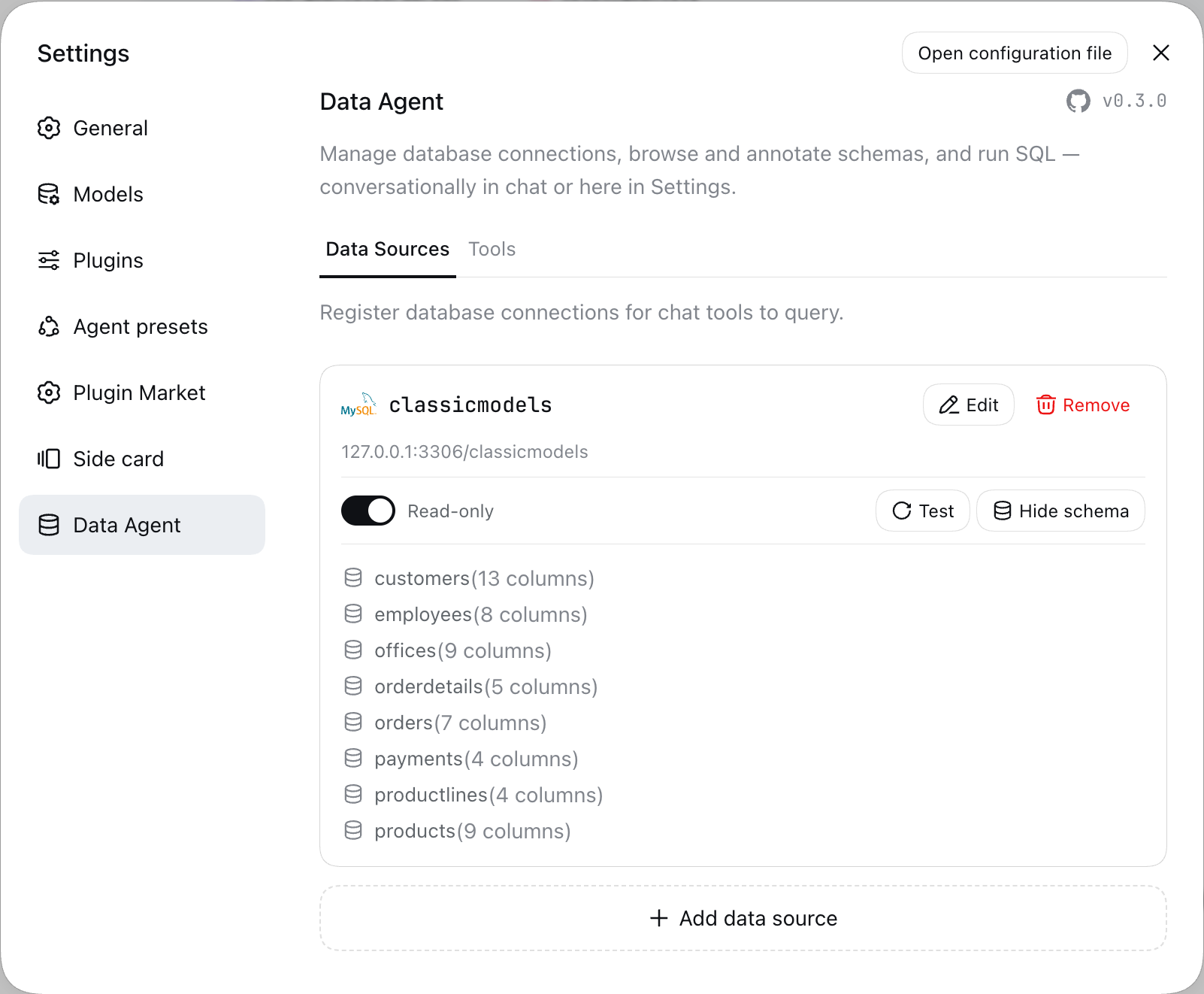
Connections, schema, and read-only toggling are also manageable straight from Settings → Data Agent:
Install
Requires dsh 0.1.7-rc.2 or later, and a web profile already booted at least once (dsh --profile web). The package declares this as a peerDependencies range on @deepseek-ai/dsh: dsh 0.1.7-rc.1 and later refuse to load the plugin on an older runtime, while releases before that don't check the range at all.
# 1. Install the dsh launcher
npm install -g @deepseek-ai/dsh

# 2. Install this bundle into the web profile
dsh plugin --profile web add @tomowang/dsh-data-agent

# 3. Approve skia-canvas's native build script (needed for da_render_chart's PNG output)
dsh plugin --profile web approve-builds
dsh reconciles the profile manifest's dsh.profile.bundles list automatically (this package declares dsh.bundle.patch), fetching the published npm package — no local checkout or build step needed. Restart the web profile process to pick it up.
Installing from the dsh-market
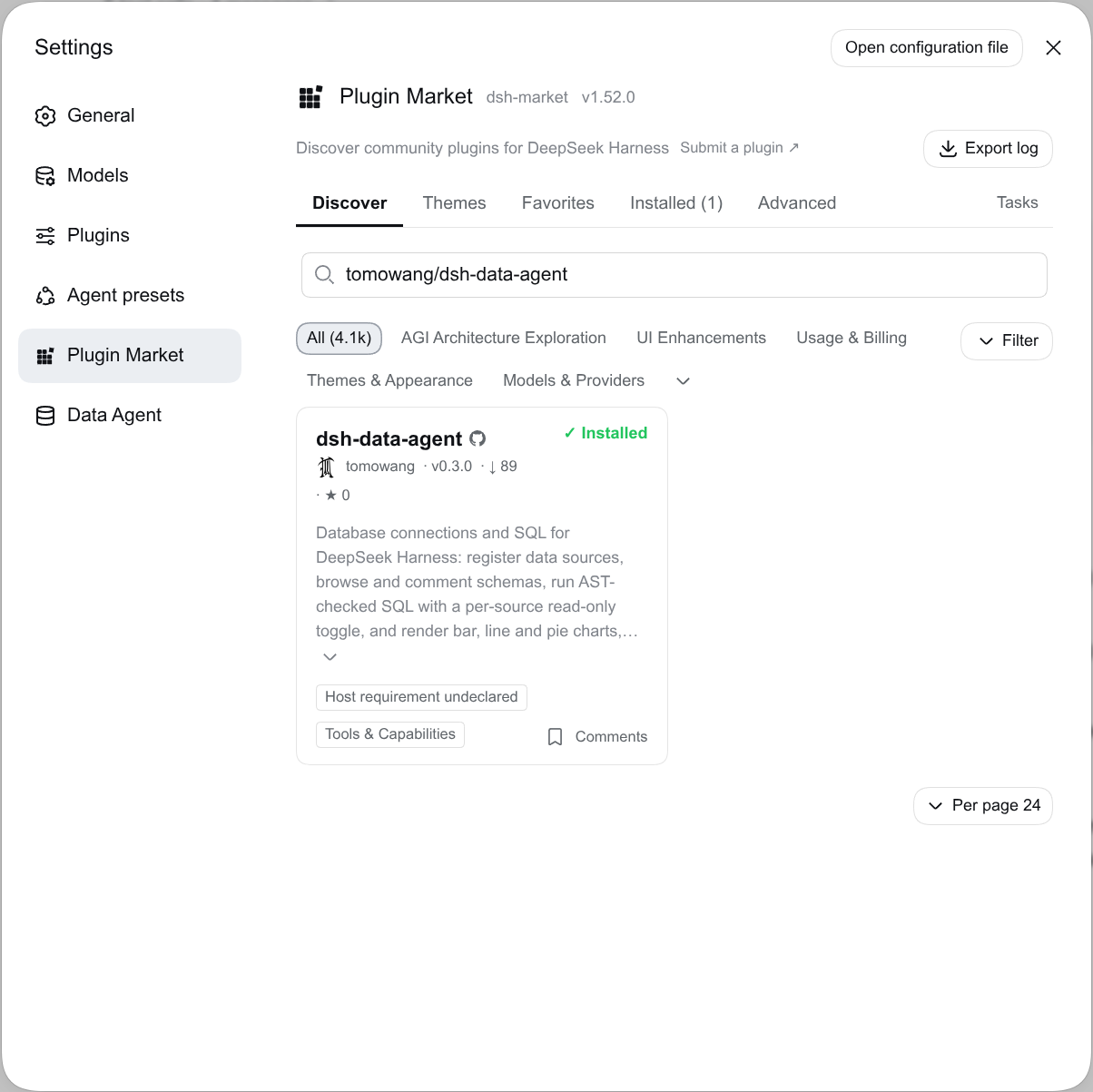
Alternatively, you can install @tomowang/dsh-data-agent from the dsh-market in the Web UI.
Search tomowang/dsh-data-agent, and click Install on the result.
Upgrading from 0.3 to 0.4
0.4 requires dsh 0.1.7-rc.2 or later, and tightens what chat can do to your data sources. Three changes need action or will change your workflow:
- Password variables must start with
DSH_DA_. A source whosepasswordEnvnames any other variable fails to connect with an error saying so. Export the password under a new name (e.g.PROD_DB_PASSWORD→DSH_DA_PROD_DB_PASSWORD), then update the source's password env var in Settings → Data Sources. - Chat can't add SQLite sources until you approve a directory. Add the source in Settings, or list the directories chat may use in the plugin's
sqliteChatDirsconfig (see Features). - Only Settings can make a source read-write. Chat can still make a source read-only, but turning read-only off from chat is now refused. Use the checkbox in Settings → Data Sources.
Also, from chat, credentials can no longer be attached, and a source that has one can't be pointed at a different host, port, or user. Do both in Settings.
The Settings → Data Sources panel now uses dsh's own authenticated API, so it needs the browser to be signed in to dsh. If the panel reports "Not signed in to dsh", reopen dsh from the URL it printed at startup.
Develop
pnpm install
pnpm run typecheck
pnpm run test
Scripts:
pnpm run typecheck— type-check both the Host (tsconfig.json) and Client (tsconfig.client.json) sourcepnpm run test— run the unit tests (vitest): SQLite in-process (no server needed), the SQL classifier, persistence, registry, and chat-tool logic. The integration suites intests/integration/are skipped herepnpm run test:integration— run the MySQL/PostgreSQL/ClickHouse adapters against real servers (see below)pnpm run build— build both halves tolib/(build:host+build:client)pnpm run build:host/build:client(orwatch:host/watch:client, or plainwatchfor both at once) — build one half onlypnpm run dev— build both halves and link this plugin into the localwebprofile (see below)
Integration tests
tests/integration/ drives the MySQL, PostgreSQL, and ClickHouse adapters against real servers. It covers database-enforced read-only mode, the row cap, query timeouts, writes, and how cell types are converted. CI runs it on every push and pull request, with the servers as service containers (.github/workflows/ci.yml), once against MySQL 8.4 and once against MariaDB 11.4. The release workflow won't publish unless it passes.
Locally, start the same servers with Docker (or Podman) and run the suite:
docker compose up -d --wait
pnpm run test:integration
docker compose down
To run only some engines, set DSH_DA_IT_ENGINES (e.g. DSH_DA_IT_ENGINES=postgres pnpm run test:integration). The tests expect each server on its default port on 127.0.0.1, with password pw and a database named it. DSH_DA_IT_HOST, DSH_DA_IT_PG_PORT, DSH_DA_IT_MYSQL_PORT, DSH_DA_IT_CLICKHOUSE_PORT, and DSH_DA_IT_PASSWORD override those defaults.
Architecture
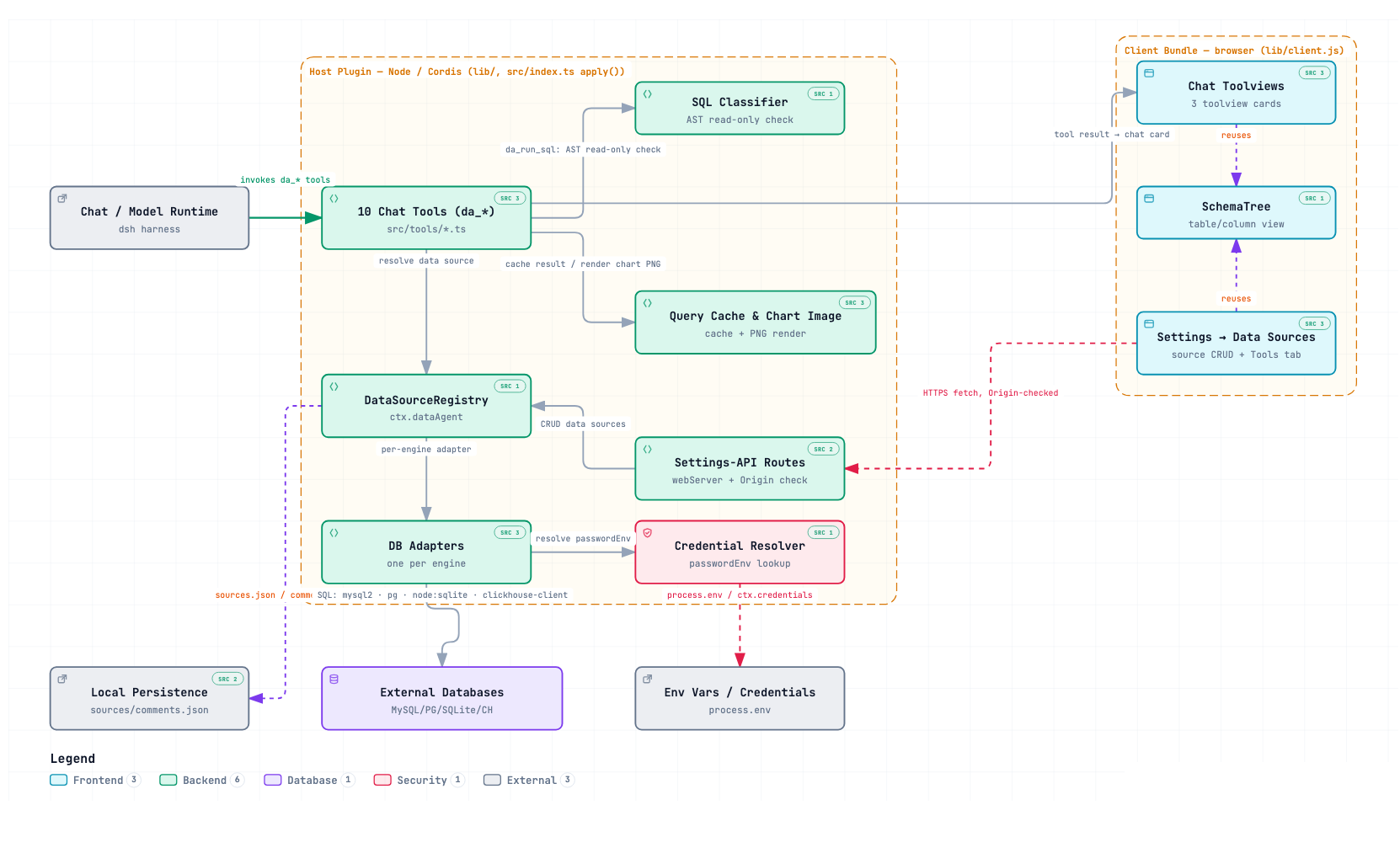
Project layout
src/
  index.ts                composition root: Config, apply() — mounts the registry, tools, the Settings-API routes, and the chart-image route
  data-source/
    types.ts, errors.ts   shared vocabulary and stable error codes
    registry.ts           DataSourceRegistry (ctx.dataAgent): the Map-based connection registry
    credential.ts         passwordEnv resolution (soft ctx.get('credentials'), else process.env)
    schema-comments.ts    merges comments.json into a raw schema result (shared by the tool and the Settings route)
    persistence/          sources.json / comments.json (atomic, cross-process-safe)
    adapters/              one DataSourceAdapter implementation per engine (mysql2, pg, node:sqlite, @clickhouse/client)
  sql/classify.ts         node-sql-parser-based read-only + single-statement enforcement
  tools/                  the ten model-facing tools (one file each), plus QueryResultCache (ctx.queryResultCache),
                          chart-config.ts (shared chart.js config builder), and the chart-image render/store/route
                          backing da_render_chart's static PNG output (ctx.chartImageStore)
  settings-api/           the Settings panel's API on the harness's authenticated /api channel (ctx.connection.fetch),
                          plus the Host check still used by the raw chart-image route
src/client/                the browser bundle (see below)
  index.ts                client plugin entry: registers the three chat toolviews + the Settings section
  tool/                   da_run_sql / da_get_schema / da_render_chart chat cards (card models + components + toolview registrations)
  settings/               the Data Sources settings panel + its fetch() API client
  shared/SchemaTree.tsx   table/column browser shared by the chat card and the Settings panel
scripts/build-client.mjs esbuild build for src/client -> lib/client.js
cordis.patch.yml          the bundle layer applied when a profile lists this package
Developing against the web profile
Local development only — this links your working copy into a profile in place of the published package, so you can iterate without cutting a release. It assumes a globally installed dsh CLI (npm i -g @deepseek-ai/dsh, or any dsh resolvable on PATH) and a web profile already booted at least once (dsh --profile web).
Link this checkout into the web profile and register it as a bundle:
pnpm run dev
# same as: pnpm run build && dsh plugin --profile web add .
This is one-time (or re-run after changing package.json dependencies): pnpm link:s this directory into the profile's node_modules and appends @tomowang/dsh-data-agent to the profile's dsh.profile.bundles. Verify the layer, then boot:
dsh --profile web --dump-config   # confirm the "# == @tomowang/dsh-data-agent" layer
dsh --profile web
Because it's a symlink, no need to re-run add after an edit — but the profile loads lib/, never src/ directly, for either half: rebuild with pnpm run build (or the narrower scripts above) before the next boot picks up an edit. There's no hot-reload for either half (checked: @deepseek-ai/cordis-plugin-hmr explicitly excludes anything resolved through node_modules, which is how a linked profile always loads this plugin) — a running dsh --profile web process needs restarting to pick up a rebuilt bundle, reloading the page alone is not enough (the plugin bundle list is fixed at process boot). dsh plugin --profile web remove @tomowang/dsh-data-agent undoes the install.
For quick Host-only throwaway testing without touching any profile (also local development only; skips the client bundle, so no Web UI cards/settings — use the linked-profile flow above for that), overlay the source file directly against a deepseek-harness source checkout:
cd /path/to/deepseek-harness   # your local checkout
pnpm dsh web --patch <(cat <<EOF
- insert:
    - id: data-agent
      name: '/path/to/dsh-data-agent/src/index.ts'
      config:
        defaultMaxRows: 500
EOF
)
See deepseek-harness's plugin tutorials and packaging guide for the full plugin/bundle model.
Known v1 limitations
- SQL placeholder syntax isn't unified across engines:
?for MySQL/SQLite,$1, $2, ...for PostgreSQL,{p1:Type}, {p2:Type}, ...for ClickHouse (its HTTP interface only supports named parameters;paramsbinds to them positionally asp1,p2, ...). da_run_sql's safety check rejects any statement the parser can't classify (e.g. SQLitePRAGMA, some PostgreSQLEXPLAINforms, ClickHouseFORMATclauses) rather than guessing — useda_get_schemafor introspection instead of rawPRAGMA, and omitFORMAT(the ClickHouse adapter always sets its own output format).node-sql-parser(the AST-based safety check) has no dedicated ClickHouse dialect; ClickHouse sources are classified against its PostgreSQL grammar, which is close enough for common SELECT/DDL/DML but will reject some ClickHouse-specific syntax as unparseable rather than misclassifying it.- Behind a reverse proxy that serves dsh under a subpath, the Settings panel works (it uses document-relative URLs), but
da_render_chart's static PNG link doesn't: chat Markdown only renders absolutehttp(s)://image URLs, so the link is built from the web server's own host and port, not the proxy's public address. The interactive chart in the Web UI is unaffected. - The Settings panel's API (
/api/dsh-data-agent/*) is registered on the harness's own/apichannel, so it gets the harness's protection: the Host/Origin checks (403) and the browser-session cookie dsh issues when it opens the page (401). A request without that cookie, including one from another local process, is refused. The chart-image route (/dsh-data-agent/api/chart-image/<id>.png) can't use that channel: it's loaded by<img>tags, including from the desktop app's page, where the cookie isn't sent. It keeps a plugin-sideHostcheck instead, and its ids are random UUIDs that expire after 30 minutes.
Comments
Comments live in GitHub Discussions. Sign in with GitHub to post or react.