
Install
Inside DeepSeek Harness, with dsh-market
dsh plugin --profile web add dshmarket
Or from the command line
dsh plugin --profile web add github:toddpan/dsh-xiaozhi
Installing runs third-party code with your own permissions — it can read your files, use your credentials and reach the network. Review the source first, and pin a commit (github:owner/repo#sha) when you can.
Screenshots
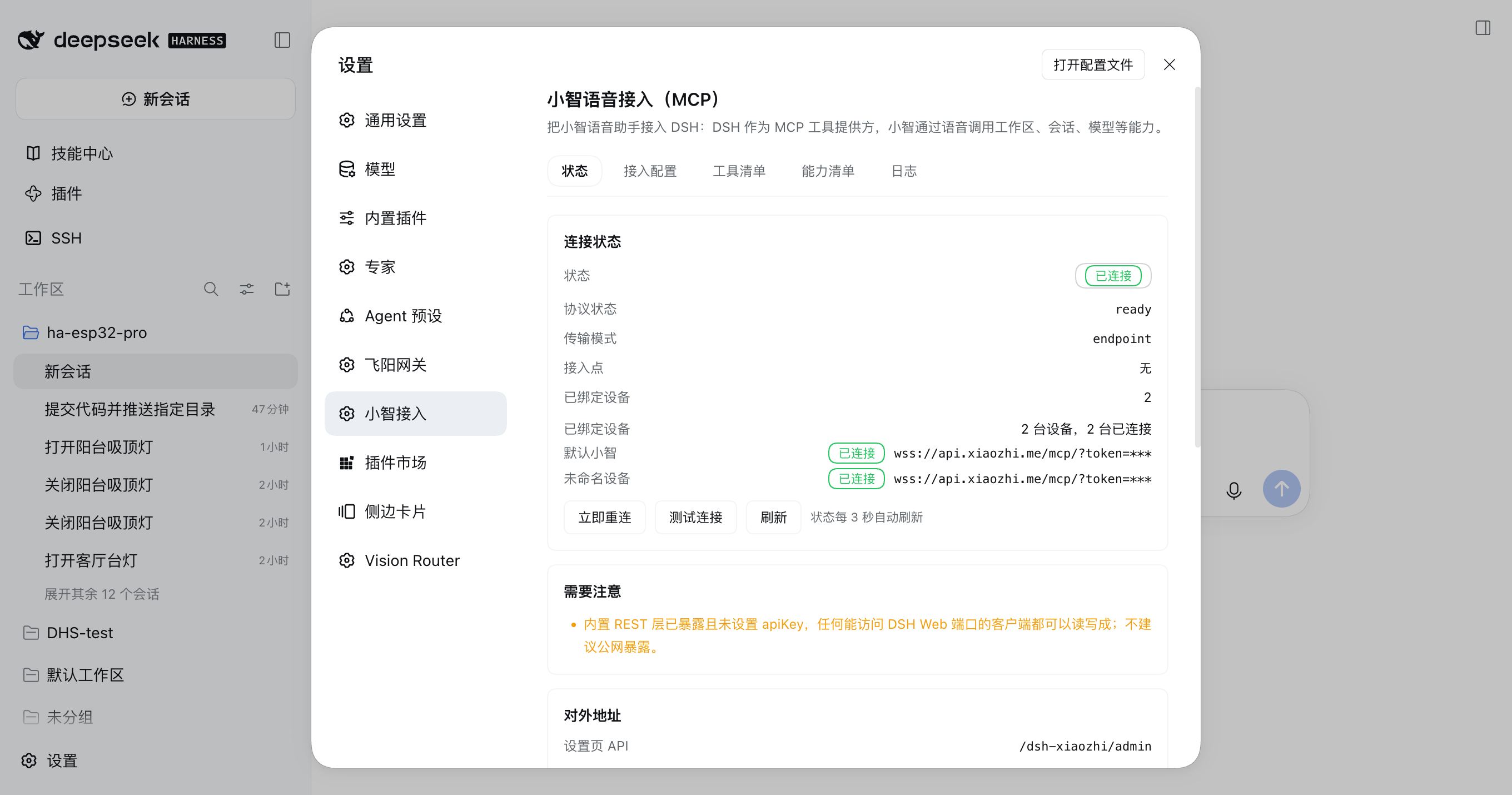
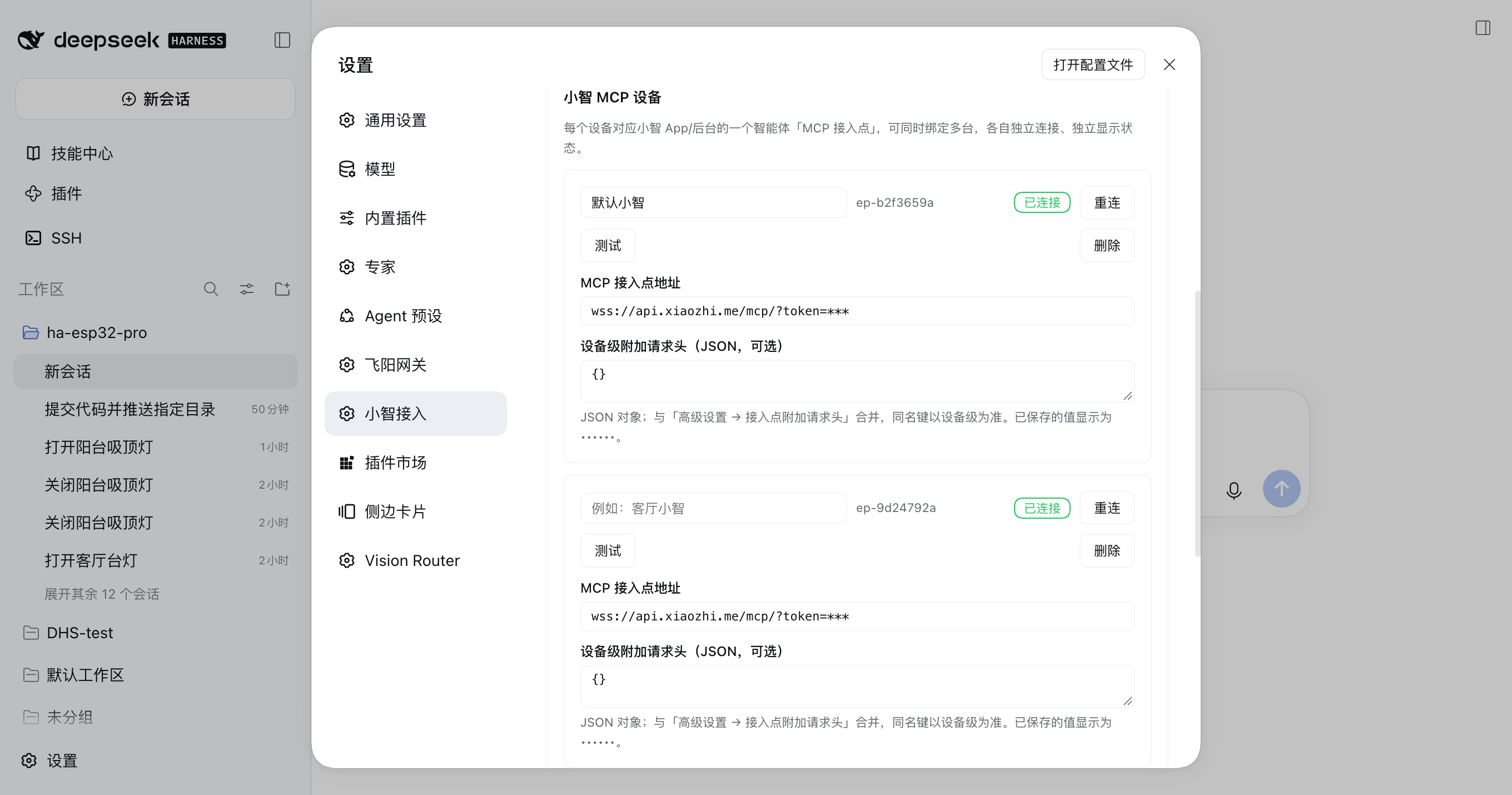
README
Connects the Xiaozhi (小智) voice assistant to DeepSeek Harness (DSH) Web: DSH acts as the MCP tool provider, exposing workspaces, sessions, models, settings and files as tools a voice assistant can call over JSON-RPC 2.0 on a WebSocket.
English · 中文文档 · Install & verify · Tool reference
Connect the Xiaozhi voice assistant to DSH Web: DSH is the MCP tool provider, exposing 35 DSH Web endpoints as 16 voice-friendly tools, with a DSH Web settings page. 把小智(Xiaozhi)语音助手接入 DSH Web:DSH 作为 MCP 工具提供方,把 35 个接口封装成 16 个语音友好工具,自带设置页。
The pre-implementation design proposals (architecture ADR, v2 review, settings UX walkthrough) are archived in docs/design/ with every divergence from the shipped code listed.
1. What it solves
DSH's capabilities live behind HTTP REST endpoints; Xiaozhi only speaks MCP. This plugin sits between them:
 you say a sentence
        │
        ▼
┌─────────────┐   MCP (JSON-RPC 2.0 / WebSocket)  ┌──────────────────────────┐
│  Xiaozhi     │ ◄──────────────────────────────► │ dsh-xiaozhi (Host half)   │
│ App / device │  initialize / tools/list / call   │ ├ MCP session + registry  │
└─────────────┘                                    │ ├ capability → REST map   │
                                                   │ └ LocalInvoker (in-proc)  │
                                                   └───────────┬──────────────┘
                                                               │ no network hop
                                                               ▼
                                                   ┌──────────────────────────┐
                                                   │ DSH Web REST routes (copy)│
                                                   └──────────────────────────┘
Three deliberate decisions:
- DSH is always the MCP server / tool provider. In both transports it answers
initialize,ping,tools/listandtools/call, and never initiates them. - Outbound by default (
endpointmode). DSH dials out to the Xiaozhi MCP access point, so it needs no public IP, port forwarding or reverse proxy. - In-process invocation, not loopback HTTP. Tool calls go straight to the bundled DSH REST
routes through
LocalInvoker, so there is no host/port/auth guessing and no dependency on an external service.
2. Quick start (3 steps)
Requirements: DSH Web running (dsh web, default http://127.0.0.1:3080), a Xiaozhi account, and
its MCP access point page open.
Install from this directory:
dsh plugin add https://github.com/toddpan/dsh-xiaozhiOr use "install from a local directory" under Settings → Plugins in DSH Web.
Add a device with the access point: DSH Web → Settings → Xiaozhi → Connection, press Add device, paste the WebSocket address from the Xiaozhi console (like
wss://api.xiaozhi.me/mcp/?token=…), then press Save and reload. Add more rows to bind several Xiaozhi devices/agents at once — each connects and reports its state independently.Check the status tab: the connection should read
connected. The tab auto-refreshes every 3 seconds, so after "Reconnect now" (or a single device's reconnect) the badge flips without a manual refresh. Press Test connection to perform a real handshake.Then say to Xiaozhi: "ask DSH for my session list".
The access point URL carries a token. When the page reads the config back it shows
token=***, and saving treats that sentinel as "unchanged" rather than writing it over the real secret. See §7.
3. Two transports
endpoint (default, recommended) |
server (self-hosted) |
|
|---|---|---|
| Who connects | DSH dials out to the Xiaozhi access point | The Xiaozhi server connects to DSH |
| Public reachability | not needed | needed (or a reverse proxy / same LAN) |
| Main settings | endpoints (device list), endpointHeaders |
serverPath, serverPort, serverToken |
| Fits | the official Xiaozhi MCP access point | a self-hosted xiaozhi-esp32-server |
Both can run at once: mode picks the primary channel, and serverPort > 0 additionally listens on
0.0.0.0.
Multi-device binding: endpoint mode binds several Xiaozhi devices (several agents' MCP access
points) at once. Each device owns one WebSocket connection with its own backoff and heartbeat; the
settings page shows per-device state and offers per-device Reconnect and Test, and removing
a device touches only that device. The list is stored under endpoints (§8); a legacy single-URL
config (endpointUrl) still works — the page shows it as one device and migrates it to the list on
the first save.
Reconnect in endpoint mode uses exponential backoff (reconnectMinMs → reconnectMaxMs, ±20%
jitter) plus a heartbeatMs ping. The Status tab and the log show every attempt.
4. Tool exposure: grouped (default) or flat
Xiaozhi sanitises tool names to [A-Za-z0-9_\-CJK]. Every name this plugin exposes is a fixed
point of that rule (e.g. dsh_session_history), so no platform-side renaming occurs.
| Mode | Tools | Notes |
|---|---|---|
grouped (default) |
16 (fewer with groups disabled) | merged by capability area, an action argument picks the operation |
flat |
35 | one tool per endpoint, named after it |
Grouped is the default because a voice model picks the right tool far more reliably from 16 options than from 35; the settings page warns past 24 tools. Full mapping: docs/TOOLS.md.
Groups can be disabled per area (e.g. docs, files). allowWriteTools = false refuses
create/update/delete/send operations with a speakable message while keeping read operations
usable, even inside a grouped tool that mixes both.
5. Capability coverage
All 35 endpoints are reachable, and both tool modes cover 35/35:
| Area | # | Endpoints |
|---|---|---|
| System | 1 | GET /system/status |
| Workspaces | 6 | /workspaces, /workspaces/:id, /workspaces/:id/sessions |
| Sessions | 13 | /sessions, /sessions/:id, history, stats, todos, skills, questions, answers, cancel, events |
| Files | 3 | /sessions/:id/files, /files/download |
| Conversation | 3 | /sessions/:id/prompt, /prompt-stream, /chat/completions |
| Models | 5 | /models, /models/default, /providers, /presets |
| Settings | 2 | /settings, /settings/:namespace |
| Docs | 2 | /docs, /openapi.json |
Four of them are degraded under MCP semantics. Read the next section before relying on them.
6. MCP semantic degradations (please read)
tools/call is strictly request/response with no incremental channel, while several source
endpoints stream. This plugin keeps as much semantics as possible and says so, instead of pretending:
| Capability | Native form | Over MCP | What it means for you |
|---|---|---|---|
conversation.promptStream (dsh_say) |
text/event-stream, incremental |
DSH collects the whole stream and returns the result text once | The voice side is not incremental; promptTimeoutMs bounds the wait, and a timeout answers "submitted, still running" instead of an error |
sessions.events (dsh_session_watch) |
long-lived SSE | collects events for a bounded window (1–30 s) then returns | A peek at recent activity, not a live subscription; poll sessions.stats to follow progress |
files.download |
binary stream | text files return their body (clipped to maxVoiceChars); binaries return a summary (size, type, path) |
Reading binary bytes aloud is meaningless; fetch the real file from the DSH Web UI or the bundled REST layer |
docs.openapi |
full OpenAPI JSON | a structure summary (openapi, title, path count, up to 100 paths, bytes, URL) |
Open apiBase/openapi.json for the full document |
Also:
dsh_say(wait=false)hands a sentence to a session without waiting: it submitsprompt-streamwith a ~1.5 s budget and, on timeout, quietly reports "submitted" plus the session status.- Every tool result is clipped to
maxVoiceCharsand delivered as a single text block so speech stays short.
7. Security model
| Surface | Default | Protection |
|---|---|---|
Settings API /dsh-xiaozhi/admin |
loopback only (DSH binds 127.0.0.1) |
① cross-site Origin refused ② sec-fetch-site: cross-site refused ③ every request (reads included) must carry x-dsh-xiaozhi-admin: 1; cross-site forms/images cannot set a custom header and a cross-origin fetch preflights, which this cors: false router never approves ④ when the Host exposes a connection service, it judges the request first (browser cookie + Host/Origin → 401/403) |
Bundled DSH REST layer /dsh-xiaozhi/api/v1 |
on | Set apiKey to require Authorization: Bearer … or X-API-Key; a warning is shown while it is unset |
| MCP tools | on, writes allowed | allowWriteTools=false blocks all writes; disabledGroups shrinks the surface |
server mode extra port |
off (serverPort=0) |
A port number listens on 0.0.0.0, so serverToken becomes mandatory; the page warns when it is empty |
Secret masking: reading the config masks apiKey, serverToken, the token= value inside the
access point URL — including every device URL in endpoints — and every endpointHeaders /
device-headers value (•••••• / ***) while keeping header names. Saving treats those
sentinels as "unchanged" and restores the stored values, so a sentinel can never overwrite a real
secret.
Global endpointHeaders can be added or overwritten from the page but not deleted (the write is
a merge). Edit settings.json by hand to remove a global header; device-level headers are saved
per row, so deleting the line in the device card and saving removes the key.
8. Configuration
Precedence, lowest first:
- code defaults (
DEFAULTSinsrc/config.ts) - the plugin row's
config(the profile'scordis.patch.yml) - overrides saved by the settings page (
<homeDir>/settings.json)
| Option | Default | Meaning |
|---|---|---|
enabled |
true |
while off, no tool can run |
mode |
endpoint |
endpoint / server |
endpoints |
[] |
Xiaozhi MCP device list ({id?, name?, url, headers?}); when non-empty it wins over the legacy key. What "Add device" writes |
endpointUrl |
'' |
(legacy single device) Xiaozhi MCP access point; ignored while endpoints is non-empty |
endpointHeaders |
{} |
extra request headers (fallback for every device; a device-level headers key overrides it) |
serverPath |
/mcp/xiaozhi |
server-mode path (must contain /mcp/) |
serverPort |
0 |
0 reuses the DSH web server; >0 also listens on 0.0.0.0 |
serverToken |
'' |
strongly recommended whenever serverPort > 0 |
toolMode |
grouped |
grouped / flat |
disabledGroups |
[] |
disabled capability areas |
allowWriteTools |
true |
allow write operations |
promptTimeoutMs |
120000 |
voice wait limit (must stay below the REST layer's 180000) |
maxVoiceChars |
700 |
reply clipping length |
listLimit |
10 |
list page size |
heartbeatMs |
30000 |
ping interval |
reconnectMinMs / reconnectMaxMs |
1000 / 30000 |
reconnect backoff bounds |
apiPathPrefix |
/dsh-xiaozhi/api |
bundled REST layer prefix (the settings API is fixed at /dsh-xiaozhi/admin) |
exposeDshApi |
true |
mount the bundled DSH REST layer |
apiKey |
'' |
auth key for the bundled layer |
cors |
false |
allow cross-origin calls to the bundled layer |
defaultCwd |
'' |
default directory for created sessions |
maxUploadBytes |
104857600 |
upload limit |
homeDir |
'' |
row config only (see below) |
logToolCalls |
true |
log every tool call |
sendInitializedNotification |
true |
send notifications/initialized after the handshake |
serverName |
DSH |
announced service name |
Why is
homeDirnot on the settings page? It decides where the override file lives, so honouring it from that file is circular — the page would show a new directory while overrides kept being written to the old one.homeDirtherefore comes only from the plugin rowconfig(or theDSH_XIAOZHI_HOMEenvironment variable) and the page shows it read-only.
9. Settings page
DSH Web → Settings → Xiaozhi, five tabs:
- Status — connection badge, transport, masked access point, a state line per bound device, client count, reconnects, last error, warnings, public addresses, tool/capability counts, per-group state; with Test connection, Reconnect now and Refresh. The tab auto-refreshes every 3 seconds, so a reconnect updates the badge on its own.
- Connection — basics, the Xiaozhi MCP device list (add / rename / remove, per-device Reconnect and Test), tool-group switches, and a collapsed advanced form. Save and reload writes the override file and restarts the runtime; Restore defaults clears every override.
- Tools — the tools actually exposed, their read/write nature and capability counts.
- Capabilities — all 35 capabilities by area, with method and path.
- Logs — the plugin ring log (300 lines) with an optional 5-second auto refresh.
The page styles itself with DSH theme tokens (--dsw-alias-*) only, imports no
dsh-client-ui-primitives, and therefore follows the host in light and dark without clashing.
10. Development
cd dsh-xiaozhi
bash scripts/build.sh                     # needs a DSH source checkout for tsc (auto-probed)
node --test --test-timeout=30000 "test/*.test.mjs"
127 test cases across:
| File | Covers |
|---|---|
test/protocol.test.mjs |
MCP messages, tool-name sanitiser fixed points, envelope parsing |
test/ws.test.mjs |
RFC 6455 framing, mask direction, fragmentation, closing handshake |
test/config.test.mjs |
three-layer merge, secret masking, homeDir not overridable |
test/endpoints.test.mjs |
multi-device: endpoints normalisation and legacy-key compatibility, masked-device restore, per-device dialling and state |
test/coverage.test.mjs |
all 35 endpoints pinned verbatim; both weavings cover everything; names are sanitiser fixed points |
test/dispatcher.test.mjs |
in-process invocation: JSON, query strings, request bodies, streaming, 404, 504 timeout |
test/mcp-session.test.mjs |
handshake → tools/list → tools/call over a real socket, with concurrency and protocol errors |
test/routes.test.mjs |
every capability resolves on the real route table; grouped tools end to end |
test/client.test.mjs |
browser-half constant parity, bilingual dictionary completeness, helpers, react-dom/server renders |
test/admin.test.mjs |
settings API: every route the page calls is reachable with the right method; the three guards; masked-secret stripping |
test/docs.test.mjs |
doc/code consistency: names, counts and routes cannot drift |
src/dshapi/ is a verbatim copy of @dsh-external/dsh-web-service v0.1.11 (BSD-3-Clause); the
only new file is src/dshapi/service.ts, which assembles it into one router, so an upstream update
stays a clean three-way diff. See NOTICE.
11. Troubleshooting
| Symptom | Cause and fix |
|---|---|
Status stays disconnected |
The device's access point is empty or malformed (must be ws:///wss://, contain /mcp/, and avoid the substrings key/call). Check the first error in the Logs tab; with several devices, each device row on the Status tab carries its own error |
| Xiaozhi sees the tools but calls fail | Check allowWriteTools; a blocked write returns an explicit message |
| Xiaozhi sees no tools at all | enabled=false, or every tool group is disabled |
| Ids are hard to say aloud | Grouped tools shorten ids (like sess-123); you can also address things by name |
| A LAN self-hosted Xiaozhi cannot connect | In server mode with serverPort=0 only the DSH server listens (loopback by default); set a port and a serverToken |
Changing apiPathPrefix did not move the settings page |
Expected: the settings API is fixed at /dsh-xiaozhi/admin; apiPathPrefix only shapes the bundled REST layer |
12. License
BSD-3-Clause. Derived from @dsh-external/dsh-web-service v0.1.11 (Copyright © 2026 toddpan 潘祖继)
under the same license. See LICENSE and NOTICE.
Comments
Comments live in GitHub Discussions. Sign in with GitHub to post or react.