
Install
Inside DeepSeek Harness, with dsh-market
dsh plugin --profile web add dshmarket
Or from the command line
dsh plugin --profile web add dock-flash
Installing runs third-party code with your own permissions — it can read your files, use your credentials and reach the network. Review the source first, and pin a commit (github:owner/repo#sha) when you can.
Screenshots
README
Quick Control dock plugin for DSH — works standalone or with dock-base. Click the ⚡ icon to open a floating quick-control panel with an extensible switch registry that other plugins can use to register their own switches.
Modes
| Mode | Condition | UI | Available Switches |
|---|---|---|---|
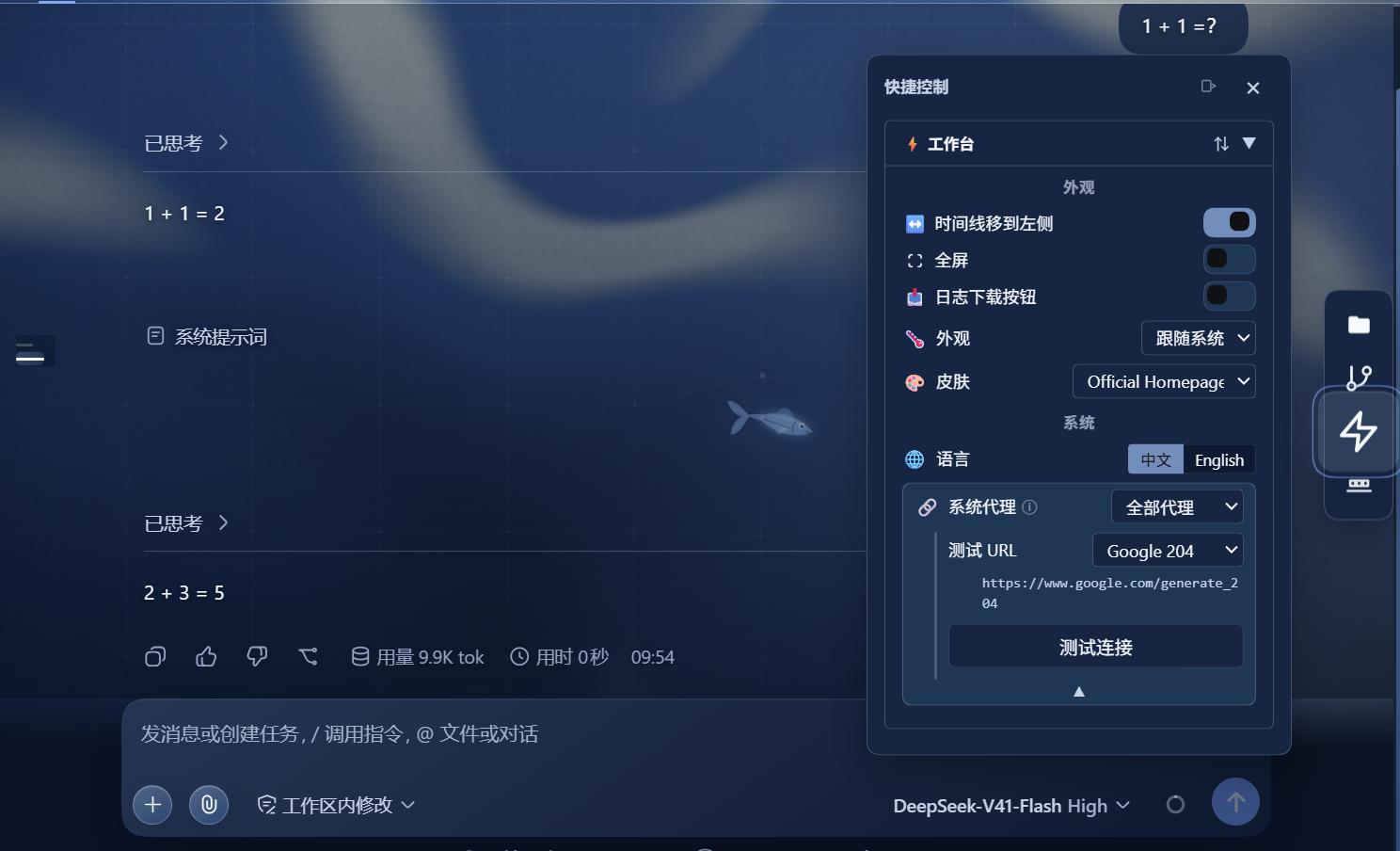
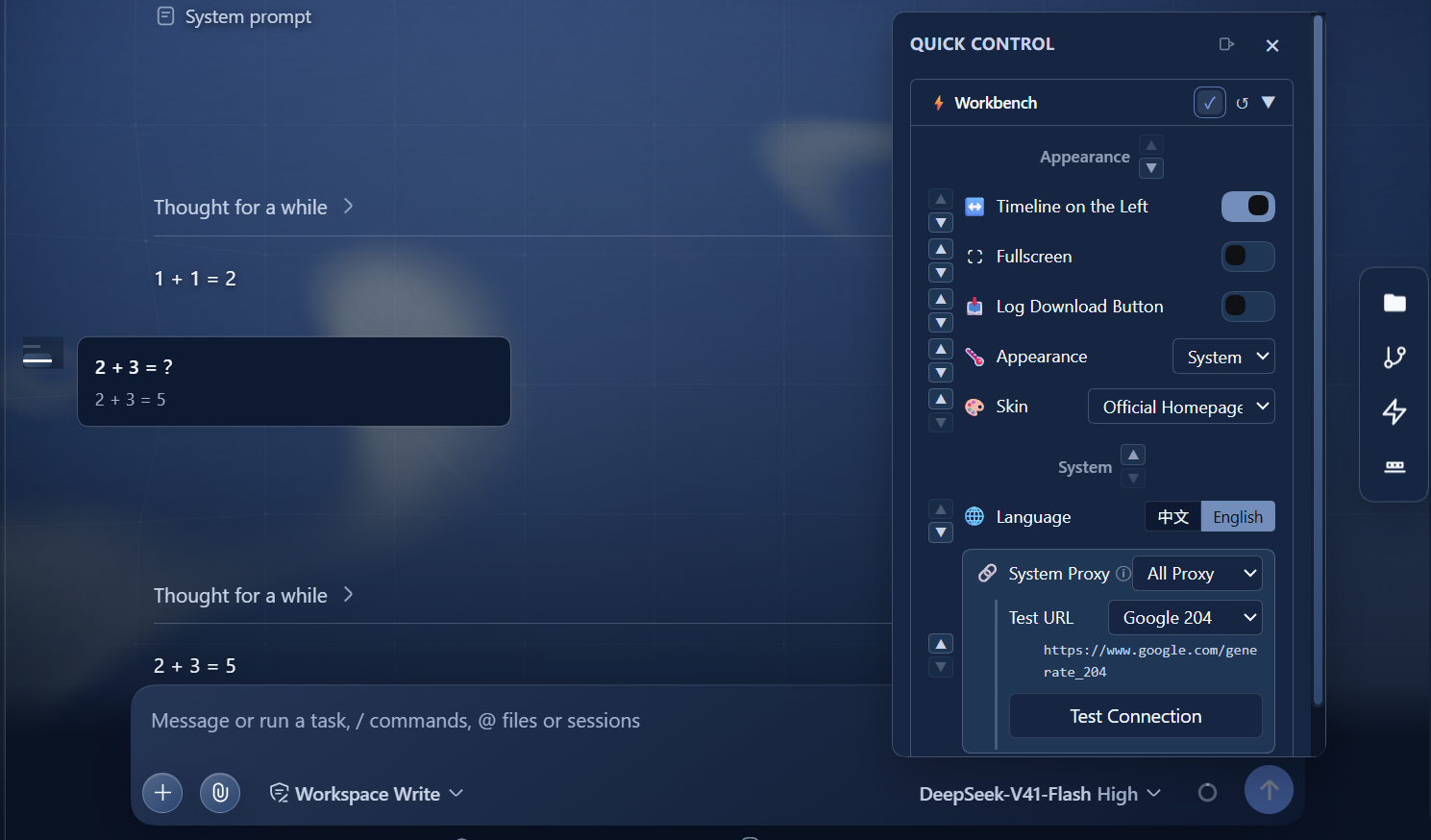
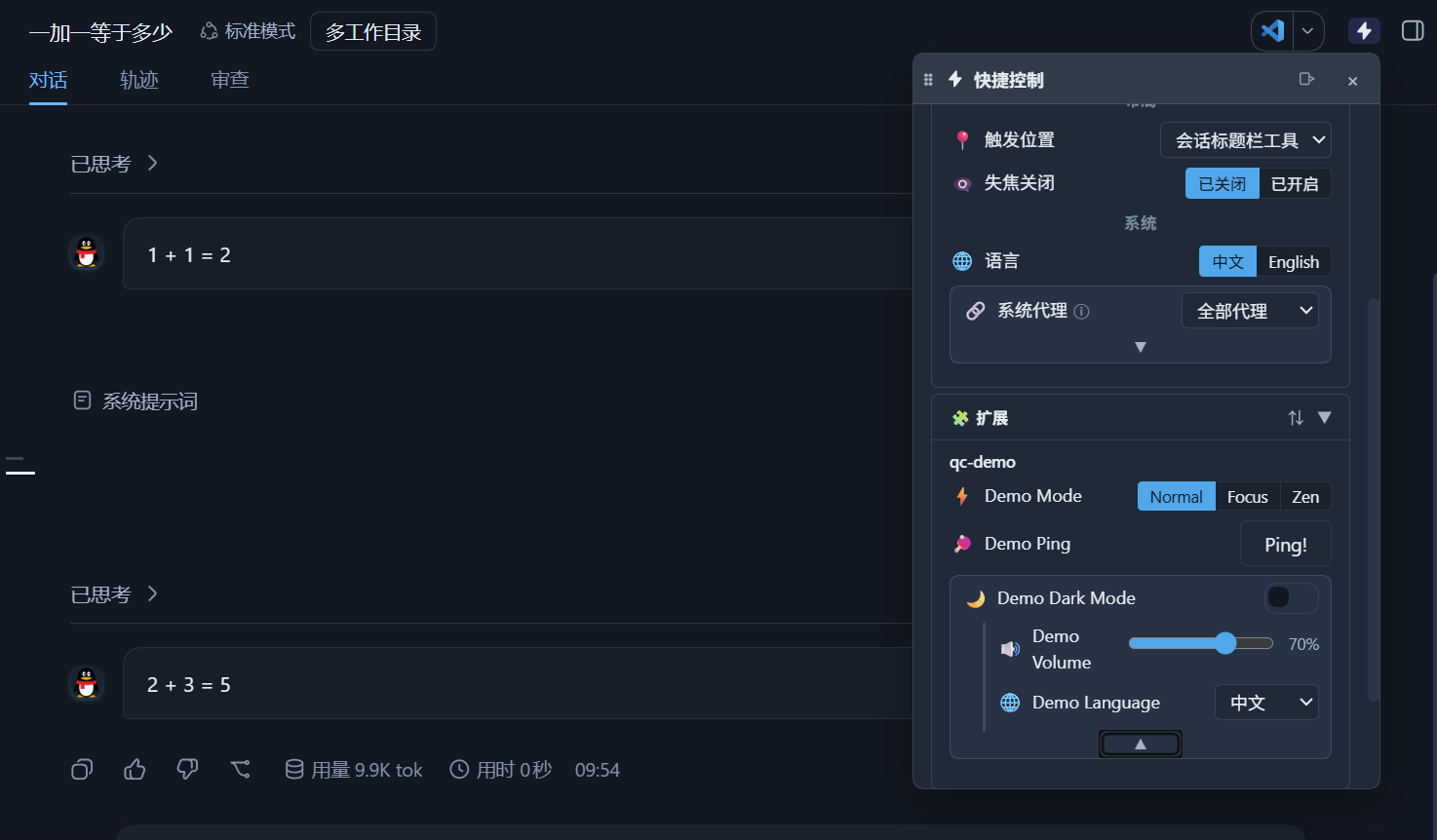
| Workbench | dock-base installed | ⚡ icon in activity bar → sidebar/floating panel | Appearance + System switches |
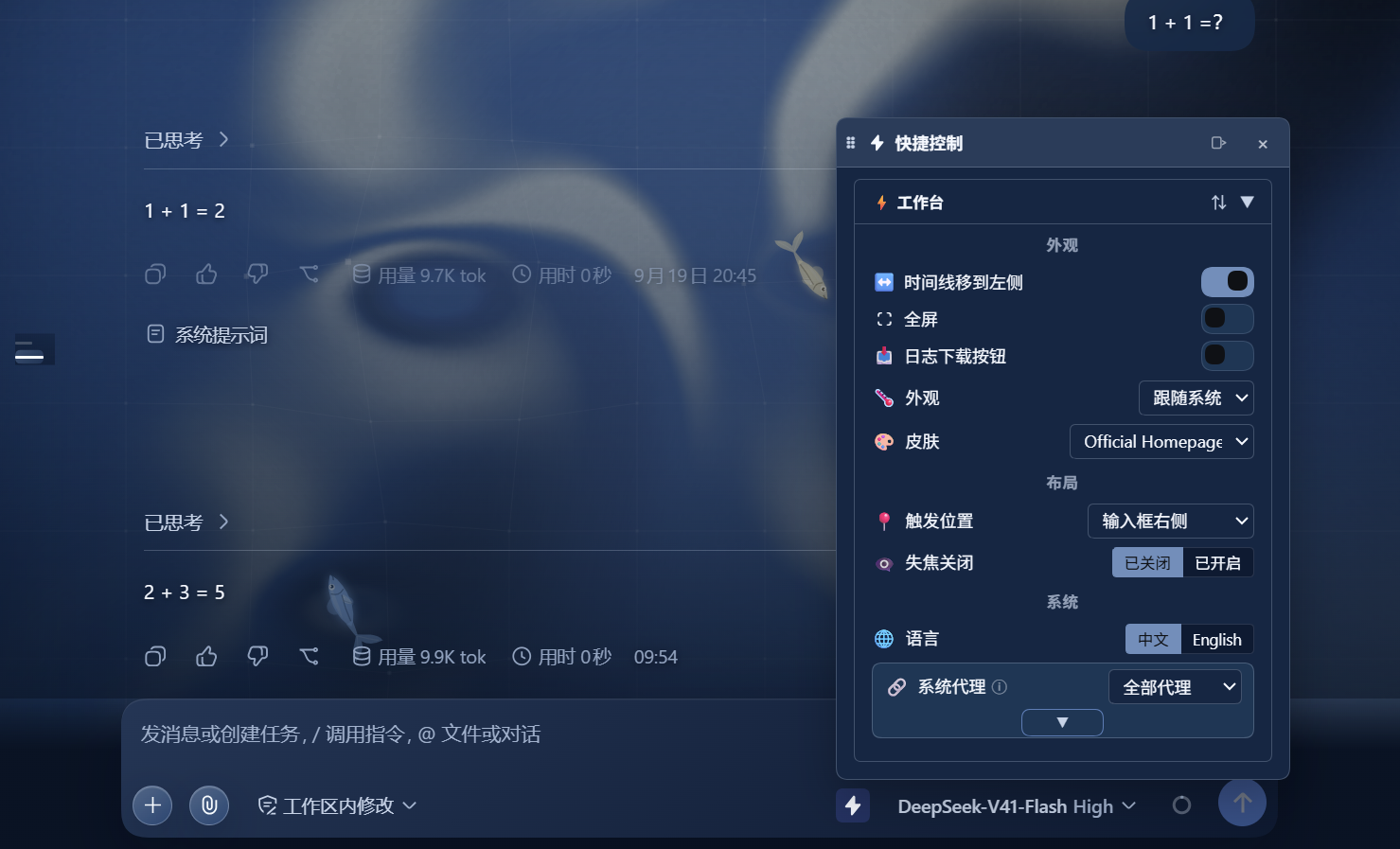
| Standalone | no dock-base | ⚡ trigger button in the configured conversation slot (default: input right) → floating panel | Appearance + Layout + System |
Features
Built-in Switches
Built-in switches are grouped into Appearance / Layout / System (compact two-column layout). The Layout group appears in standalone mode only:
| Group | Switch | Type | Description | Standalone |
|---|---|---|---|---|
| 🎨 Appearance | Theme | select | Light / Dark / System — switches DSH global theme (includes wxj-black-hole conflict retry) | ✅ |
| 🎨 Appearance | Skin | select | Dynamically discovers installed skin plugins and switches between them (requires dsh-market). The list follows the market's own theme classification, so a package the market would refuse to activate is not offered — its own toggle lives in the market's plugin list | ✅ |
| 🎨 Appearance | Turn Rail | toggle | Moves DSH's built-in turn navigator from the right gutter to the left. Hidden unless DSH's own rail is on screen and no other timeline plugin owns it | ✅ |
| 🎨 Appearance | Fullscreen | toggle | Browser Fullscreen API — enter/exit fullscreen | ✅ |
| 🎨 Appearance | Log Download | toggle | Show/hide the session log download button | ✅ |
| 📐 Layout | Close on Blur | buttongroup | Off / On — auto-close the panel when clicking outside. Also a toggle in the panel header (both modes) | ✅ |
| 📐 Layout | Trigger Position | select | Input Left / Input Right / Session Header / Header Utils — where the standalone ⚡ trigger goes — or Conversation top-right, a floating button inside the conversation you can drag anywhere within it | ✅ |
| 📐 Layout | Trigger Button Size | slider | 24–64 px — how big the standalone ⚡ entry point is drawn, glyph and corner radius included. The draggable Conversation top-right position allows the full range; the slot positions cap at 48px so the button still fits the input row, and the row shows the size actually in force. The minimum is the previous fixed size, so the control only ever enlarges it | ✅ |
| 🖱️ Right-click | (the draggable ⚡ itself) | menu | Reset position / current offset / version (click to copy a diagnostic) / layer and rest opacity presets. Not a switch in the panel: the layer and the opacity only apply to the floating button, and the menu deliberately does not repeat trigger-size, trigger-position or close-on-blur |
✅ |
| ⚙️ System | Language | buttongroup | 中文 / English — switches DSH global UI language | ✅ |
| ⚙️ System | System Proxy | select | All Proxy / API Bypass / All Bypass / Custom — fine-grained NO_PROXY control. Custom is validated: host / domain suffix / IP / host:port, comma- or space-separated; blank and CIDR are rejected | ✅ |
| ⚙️ System | Test URL | select | Google 204 / GitHub / DeepSeek API / Custom — the address the connection test probes, with the effective URL printed on its own wrapping line beneath the select (so a custom address is readable). Lives in the proxy cluster, which can be folded | ✅ |
| ⚙️ System | Diagnostics Log | log | Read-only multi-line report of the latest connection test — one fact per line. Appears the instant Test Connection is pressed, starting with the address being tried, and is replaced (never appended) as the run progresses; ✕ clears it, no 30s expiry | ✅ |
The Layout group only renders in standalone mode. In workbench mode
close-on-blurexists solely as the panel-header toggle, so no built-in switch carriesgroup: 'layout'and the category is skipped entirely.
Dock layout is not configured here. Dock edge, auto-hide, reserve space and icon scaling are dock-base's own settings — dock-flash deliberately does not duplicate them. In the Layout group dock-flash owns only
trigger-position,trigger-sizeandclose-on-blur, all standalone-only.
Turn Rail only offers itself while DSH's own rail is what you see. It stays hidden with no session open, in a session without turns, while DSH's own
@container (width<=900px)rule hides the rail, and when another timeline plugin owns it —dsh-codex-timelineenhances the native rail in place, so the rail on screen is its surface and dock-flash must not fight it for the same edge. Type__dockFlashTurnRail()in the browser console to print the decision and its reason.
Core Capabilities
- 🧩 Dynamic Discovery — Other plugins register their own switches through the
quickControlservice; the panel auto-renders them - 🌐 Internationalization — Full Chinese/English localization, auto-follows DSH language setting (via
<html lang>MutationObserver) - 🎨 Skin System — Multi-layer discovery + categorized switching (CSS / Managed / Excluded)
- 🛡️ Error Boundaries — All panel components are wrapped in
PanelErrorBoundaryto prevent render errors from crashing the entire dock-base WorkbenchRoot - 🔌 Standalone Mode — Works without dock-base: a ⚡ trigger injected into the configured conversation slot opens a floating popup panel
- 📝 Recent Changes — Auto-records switch operations (30s TTL), displayed in "old value → new value" format
- 🩺 Connection Diagnostics — A read-only multi-line log of the latest proxy test (route taken, redirect chain, timings, body size, socket error code), one fact per line. It appears the moment the test starts — first line naming the address being tried — and is replaced by the full report when the answer lands, never appended to
- 🧮 Reorderable and hideable Panel — A ⇅ icon in the Workbench and Extensions tab headers opens a reorder mode: ▲▼ move groups and switches, and the result is saved in your DSH profile, so it follows you to another browser or machine. Beside it, a ◉ icon opens a visibility mode with a ●/○ box on every row: untick a switch you never use and it disappears from the panel, while staying listed here so you can bring it back. Both configuration pages list every registered control, including any a plugin is standing down right now — the turn-navigation switch while DSH's rail is absent, the proxy probe while no proxy is configured — and those rows are dimmed with the reason on hover, so a control that does not apply at the moment can still be ordered or hidden. The two modes are mutually exclusive — entering one hides the other’s button — and each has its own ↺ reset, so restoring your order never un-hides a row and showing everything never reshuffles your order. Switches that declare a
clustermove as one unit with a fixed internal order and are drawn as one card whose members fold — the System proxy controls are the case that motivated it, since they only apply once a proxy is configured
Host-side Features
src/index.ts (host half) provides:
- Registers the
dock-flashsettings namespace (proxyModestring +customNoProxystring +testUrlstring) - Listens for proxy mode changes and re-installs the undici global dispatcher via
@deepseek-ai/dsh-http-proxy, so outboundfetch()requests respect the user's NO_PROXY choice - Exposes HTTP routes:
GET /plugins/dock-flash/proxy-status— returns currentproxyMode,customNoProxy,testUrl, and the actualNO_PROXYenv valuePOST /plugins/dock-flash/test-connection— runs the diagnostic connectivity probe; an optional{ "url": "..." }body overrides the stored target
Connection Diagnostics
POST /plugins/dock-flash/test-connection returns a structured report, not a bare pass/fail:
| Field | Meaning |
|---|---|
proxy |
{ mode, noProxy, httpProxy, proxied, routeError } — how dsh-http-proxy would route this exact URL |
redirects |
the redirect chain, walked one hop at a time (redirect: 'manual'), plus redirectLimitHit when capped |
status / statusText |
final response status — any HTTP response counts as ok, because it proves the network path works |
headersMs / bodyMs / elapsedMs |
time to headers, time to body, and total |
bodyBytes / bodySnippet |
body size, plus the first 200 bytes of a textual body — which is where a corporate proxy's own "blocked" page shows up |
error |
{ name, message, code, causeName, causeMessage, causeCode, causeErrno } — the nested undici cause is what carries ENOTFOUND, ECONNREFUSED, UND_ERR_CONNECT_TIMEOUT, DEPTH_ZERO_SELF_SIGNED_CERT, … |
The panel renders this into the Diagnostics Log block, one fact per line. The block appears as soon as the test starts — its first line names the address being tried — and holds the latest run only: each test replaces it rather than appending, because the panel is short and a wall of history buries the run just asked for.
The test target is a setting, never a constant.
testUrldefaults tohttps://www.google.com/generate_204and is stored in the DSH profile on disk, so an internal endpoint can be configured without appearing in this repository.
Proxy Mode Options
| Mode | NO_PROXY | Effect |
|---|---|---|
| All Proxy | (removed) | All traffic goes through the system proxy |
| API Bypass | api.deepseek.com,chat.deepseek.com |
DeepSeek API calls bypass the proxy |
| All Bypass | * |
All traffic bypasses the proxy (direct connection) |
| Custom | (user-defined) | User specifies the NO_PROXY value via a prompt |
Proxy Scope
This setting only affects
fetch()requests within the DSH Node.js process.
- ✅ Affected: Node.js built-in
fetch()(undici), DSH API calls, MCP HTTP transport, pi-ai provider, and any SDK that reachesglobalThis.fetch- ❌ Not affected: Requests via
node:http/node:httpsmodules (e.g. OTLP telemetry), SDKs that build their own transport (e.g. E2B), the operating system's other applications, browsers, or other terminal sessions- The setting works identically on Windows, macOS, and Linux — it modifies
process.envand the undici global dispatcher, both of which are Node.js abstractions with no OS-specific behavior
Structure
src/index.ts      HOST half — settings namespace + proxy mode + connection test (tsc → dist/)
lib/client.js     BROWSER half — quickControl registry + dynamic panel + skin system + i18n
cordis.patch.yml  bundle layer — inserts host rows into profile
Plugin Contract
When dock-base is installed, this plugin follows the dock-base plugin contract, interacting through ctx.workbench methods:
| Registration | API | Description |
|---|---|---|
| Sidebar Panel | ctx.workbench.registerPanel() |
Quick control panel (sideBar area) |
| Activity Bar Item | ctx.workbench.registerActivityBarItem() |
Lightning icon ⚡, click to open sidebar |
| Editor View | ctx.workbench.registerEditorView() |
Quick control panel (draggable to floating window) |
| Command | ctx.workbench.registerCommand() |
dock-flash:openQuickControl command |
| Quick Control Registry | ctx.provide('quickControl', registry) |
For other plugins to register switches |
When dock-base is not installed, dock-flash automatically enters standalone mode: it mounts a floating ⚡ trigger button and popup panel directly in the DOM, providing access to all non-layout switches.
🧩 Dynamic Discovery API
This plugin publishes the quickControl service to WorkbenchContext. Other plugins obtain the registry via ctx.get('quickControl') and register their own switches.
Switch Types
| Type | Description | Required Fields |
|---|---|---|
toggle |
Boolean switch | getValue(), setValue(boolean) |
slider |
Numeric slider | getValue(), setValue(number), min, max, step |
select |
Dropdown select | getValue(), setValue(any), options |
buttongroup |
Button group | getValue(), setValue(any), options |
action |
Action button | run() |
QuickSwitchDefinition
interface QuickSwitchOption {
  label: string | (() => string)
  value: any
}

interface QuickSwitchDefinition {
  /** Globally unique id; use "plugin:switch" format, e.g. "dock-git:show-stash" */
  id: string
  /** Display label (supports functional i18n) */
  label: string | (() => string)
  /** Icon (emoji or text) */
  icon?: string
  /** Switch type */
  type: 'toggle' | 'slider' | 'select' | 'buttongroup' | 'action'
  /** Sort weight (ascending); built-in items use 10-60, start from 100 */
  order?: number
  /** Built-in group: 'appearance' | 'layout' | 'system' (only for dock-flash:* items; ignored by third-party switches) */
  group?: string
  /**
   * Optional cluster label. Switches sharing a label are drawn as ONE card and
   * reordered as one unit (a single ▲▼ pair), keeping a fixed internal order —
   * their `order` field. The card opens folded to its head row and its members
   * can be revealed behind a centred ▼/▲ toggle on the card's bottom edge: a cluster never disappears on its own, so
   * the panel's structure and the saved order survive a condition coming or going.
   */
  cluster?: string

  // ── Common to toggle / slider / select / buttongroup ──
  getValue?: () => any
  setValue?: (value: any) => void

  // ── Slider-specific ──
  min?: number
  max?: number
  step?: number
  formatLabel?: (value: number) => string

  // ── Select / buttongroup-specific ──
  options?: QuickSwitchOption[] | (() => QuickSwitchOption[])

  // ── Action-specific ──
  run?: () => void | Promise<void>
  actionLabel?: string
  /** Drop the title column and let the button fill the row (button carries the wording) */
  hideLabel?: boolean
}
Registration Example
// In another plugin's client.js factory:
exports.inject = ['quickControl']   // ← declare service dependency

exports.apply = function (ctx) {
  const registry = ctx.get('quickControl')

  ctx.effect(() => {
    const dispose = registry.registerSwitch({
      id: 'dock-git:show-stash',
      label: 'Show Stash',
      icon: '📦',
      type: 'toggle',
      order: 100,
      getValue: () => myGitState.showStash,
      setValue: (v) => { myGitState.showStash = v },  // only update state; panel handles UI
    })
    return dispose  // auto-unregister on dispose
  }, 'dock-git: quick-control switch')
}
Service Dependency Declaration
Third-party plugins must declare a dependency on the quickControl service so dock-flash finishes registration before apply() is called. Add exports.inject in the client half:
// client.js — inside factory
exports.inject = ['quickControl']   // ← must declare, otherwise service may not be ready
exports.apply = function (ctx) {
  const registry = ctx.get('quickControl')  // service is ready, no null check needed
  // …
}
Also declare the module-level dependency in package.json's dsh.client.inject to ensure dock-flash's client script loads before your plugin:
{
  "dsh": {
    "client": {
      "inject": ["@deepseek-ai/dsh-client-runtime", "dock-flash/client"]
    }
  }
}
Dynamic Value Updates
If a switch's value changes outside the panel (e.g. timers, server push, other UI actions), call registry.notifyChange(id) to trigger a panel refresh:
const registry = ctx.get('quickControl')
// Some async event changed the value
myGitState.showStash = true
registry?.notifyChange('dock-git:show-stash')
Note: When the user operates a switch in the panel, dock-flash automatically refreshes that switch's UI — no need to call
notifyChangemanually. Only use this method for value changes that the panel cannot detect.
Changelog
The panel automatically logs every user interaction (toggle click, slider drag, option select, buttongroup/action click) in the "Recent Changes" tab (auto-expires after 30s).
Plugins should NOT manually call _notifyChange. The panel injects _notifyChange into each switch during rendering and calls it automatically on user interaction. setValue() only needs to update internal state:
// ✅ Correct: setValue only updates state
setValue: (v) => { myState = v }

// ❌ Wrong: don't call _notifyChange in setValue (causes duplicate entries)
setValue: (v) => { myState = v; sw._notifyChange?.('old', 'new') }
_notifyChange(oldDisplay, newDisplay) should only be used when a plugin proactively changes state (not from user panel interaction) and needs to record it in the changelog, e.g.:
// Timer auto-switches to dark mode
setTimeout(() => {
  state.darkMode = true
  const sw = registry.getSwitches().find(s => s.id === 'my-plugin:auto-dark')
  sw?._notifyChange('Light', 'Dark')
}, 3600000)
Grouping Rules
The panel uses a collapsible tab layout:
- ⚡ Workbench — Built-in switches (ids starting with
dock-flash:), grouped bygroupfield into Appearance / Layout / System subgroups. In workbench mode the Layout subgroup is empty and is not rendered, because dock-base's own settings already own every dock layout property. - 🧩 Extensions — Third-party switches (ids not starting with
dock-flash:), automatically grouped by id colon prefix (plugin name) - 📝 Recent Changes — Switch change records from the last 30 seconds
Rule: id.startsWith('dock-flash:') is built-in, otherwise third-party. The group field on third-party switches is currently ignored; they are all placed in the Extensions tab grouped by source plugin.
Within the same group, switches are sorted by order ascending.
quickControl Service API
| Method | Description |
|---|---|
registerSwitch(def) |
Register a switch, returns a dispose function |
unregisterSwitch(id) |
Unregister by id |
getSwitches() |
Get all switches (sorted by order ascending) |
notifyChange(id) |
Notify that a switch's value changed, triggers panel refresh |
recordChange(entry) |
Record a changelog entry { id, label, icon, oldDisplay, newDisplay } |
getChangelog() |
Get change records from the last 30 seconds |
subscribe(fn) |
Subscribe to registry/value changes, returns a dispose function |
version |
Current registry version number (incremented on every change) |
🎨 Skin System
The skin switcher requires dsh-market to be installed — without it the switcher is not shown (disabled themes are invisible to DOM scan and the list would be incomplete).
Skin Categories
| Category | Description | Examples |
|---|---|---|
| CSS | Activated via <style> / <link> tags + body attributes |
maid-atelier, official-homepage |
| Managed | Own lifecycle with canvas/WebGL/particles; toggled through mount() / unmount() |
Mineradio |
| Excluded | Matched by discovery but hidden from the dropdown (conflicting or unreliable for external control) | bloom-theme, black-hole, theme-manager |
dsh-market Integration
- Fetches the full list of installed/disabled themes (
/dsh-market/installedAPI) - Market-managed themes are activated via the
/dsh-market/use-skinAPI (triggers a page refresh) - Market-disabled themes are labeled "Not Enabled" in the dropdown
Preference Persistence
Skin selection, panel order, the standalone trigger position, the trigger button size and the dragged overlay position are saved to the host settings namespace (dock-flash in your profile's settings.yaml), and restored on load. localStorage is kept only as a cache, so these preferences follow you to another browser or machine rather than staying behind with the browser profile. Values that predate this (still in localStorage only) are migrated into the profile once, on first load.
For implementation details, switching mechanisms, exclusion rationale, and technical constraints, see AGENTS.md.
🌐 Internationalization
The panel includes built-in Chinese/English localization that auto-follows the DSH language setting. Third-party switches can use functional labels (label: () => t('xxx')) for dynamic refresh on language change.
Installation
Requires DSH Web environment:
# Install this plugin
dsh plugin --profile my-profile add ./dock-flash

# (Optional) Install dock-base for full workbench integration
dsh plugin --profile my-profile add dock-base

# Start
dsh --profile my-profile
Without dock-base: dock-flash runs in standalone mode — a ⚡ trigger button is injected into the conversation slot picked by the trigger-position switch (default: input right), drawn at the size set by trigger-size (default 24px, up to 48px in a slot or 64px at the draggable Conversation top-right position). Click it to open the quick control popup panel (Appearance, Layout — trigger position and size — and System switches). The shared sidebar.footer.action slot is deliberately not offered, because other plugins occupy it too.
With dock-base: dock-flash integrates into the workbench — the ⚡ icon appears in the activity bar, and the panel can be opened as a sidebar or floating window with the Appearance and System switches. Dock layout properties (dock edge, auto-hide, reserve space, icon scaling) are configured in dock-base's own settings, not here.
Development
pnpm install
pnpm run build      # tsc → dist/index.js
pnpm run typecheck  # type check only
For development rules, critical constraints, and testing conventions, see AGENTS.md. For what changed in each release and why, see CHANGELOG.md.
Style Contract
This plugin follows the DSH Web style contract: all colors reference --dsw-alias-* design tokens (literals only as fallback), no theme-branching CSS selectors.
Dependencies
| Dependency | Type | Description |
|---|---|---|
dock-base >=0.1.2-0 <1.0.0-0 || >=0.2.0-0 <1.0.0-0 |
peer (optional) | Provides ctx.workbench registry services for full workbench integration |
@deepseek-ai/cordis >=4.0.0-rc.1 <5.0.0-0 || >=4.0.1-0 <5.0.0-0 |
peer | Plugin framework (bundled with DSH) |
License
Comments
Comments live in GitHub Discussions. Sign in with GitHub to post or react.