
Install
Inside DeepSeek Harness, with dsh-market
dsh plugin --profile web add dshmarket
Or from the command line
dsh plugin --profile web add oss-prompt-optimizer
Installing runs third-party code with your own permissions — it can read your files, use your credentials and reach the network. Review the source first, and pin a commit (github:owner/repo#sha) when you can.
README
简体中文 | English
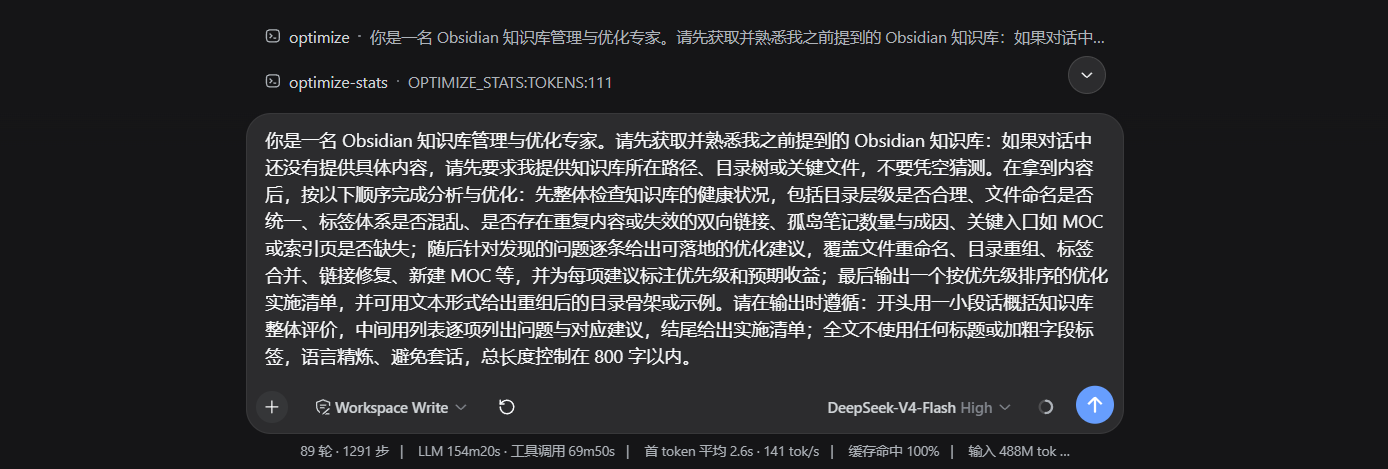
prompt-optimizer turns a casually written sentence into a professional, ready-to-use prompt — the same experience as Qoder and Codex.
By default the result is heading-free plain text (outputStyle: 'plain', fewer tokens); the three parseable labels (outputStyle: 'role-task-goal' — 角色:/任务:/目标:) and the four-section structured style (outputStyle: 'sections' — ## Role / ## Task / ## Context / ## Format, also the internal reference frame during optimization) are configurable. The optimization is driven by a built-in meta-prompt and run through the harness LLM service — the plugin never calls any external API and never touches credentials.
Features
- Tool — agents can call the
prompt_optimizetool with aninstructionand receive the optimized prompt back; passing a previous result aslastOptimizedtogether withiterateInstructioniterates on it instead. - Service — other plugins can call
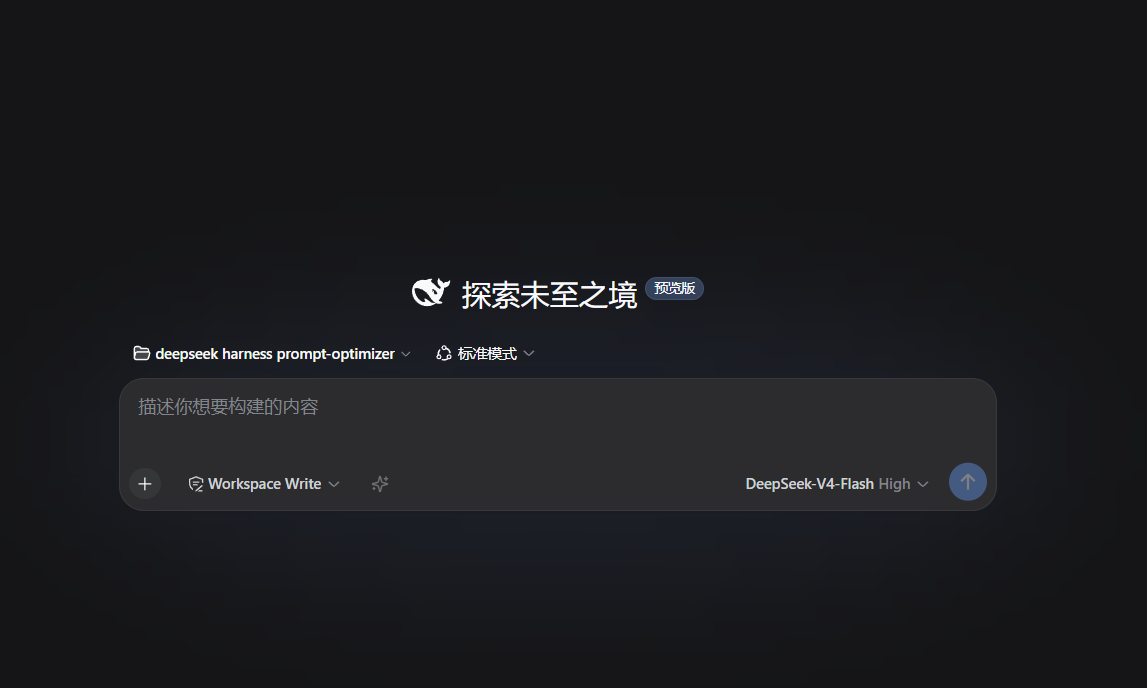
ctx.promptOptimizer.optimize(rawInput, { signal })orctx.promptOptimizer.iterate(lastOptimized, instruction, { signal }); the browser side can call them viactx.remote.promptOptimizer. - Input box ✨ button — a persistent icon in the composer toolbar: click to optimize the current draft and write the result back; clicking again while optimizing cancels; success shows a transient "≈N tokens" cost hint; after success the button switches to undo (↺) — clicking restores the original text as long as the draft hasn't been manually edited; success / failure / undo announced via
aria-live(screen readers). - Role-document language auto-detection — the optimizer's role document (its meta-prompt) follows the instruction's language by default: CJK-dominant input uses the Chinese role document, anything else the English one; pin or restore at runtime via
/optimize --language. - Auto-optimize hook (optional, on by default, prefix-triggered) — user messages starting with a trigger prefix (e.g.
/optimize) are optimized before they reach the model; unprefixed messages are unaffected; toggle at runtime via/optimize --auto on|off|toggle|status. - Context awareness (on by default) — the recent conversation before the instruction is injected into the meta-prompt ("pure data / background reference" guardrail) so the result fits prior discussion; set
contextAware: falseto disable. - Situation awareness — the raw instruction plus conversation context is parsed into role / task / goal profiles and injected into the meta-prompt (
{{情境画像}}), so the optimized## Rolestays strongly tied to the task and the goal/constraints are preserved; a dropped goal/constraint triggers an in-budget retry (goalAlignmentRetry: falseopts out);iteratedetects goal drift and annotates the change; passingsessionIdenables per-session goal carry-over (30-min TTL). Role extraction covers explicit identities, capability clauses (proficient in…), behavior rules (lead with conclusions, never guess) and scene-style identities (acting as…) — a bare capability clause is enough to be recognized;situationProfileLevelcontrols the injection budget (full/minimal/off). - Three-part role definition — the optimized role is written as "identity + capability + behavior" (no "you are" prefix required; a capability or behavior clause alone qualifies); a per-task-type role-writing tip is injected (code → capability-oriented, writing → identity + genre, analysis → identity + method, ops → behavior + steps).
- Faster optimization — stream early-stop (off by default — output completeness first; opt in via
earlyStop: true, with a per-section ≥40-char gate and sentence-boundary stop protection); first-call output-budget linkage (oversized output falls back to resume); anoptimizationProfile: 'fast'one-click speed profile (skips validation and goal-alignment retries, disables self-refine — opt-in). - Result caching — in-memory LRU+TTL cache of validated results; identical requests return with zero model calls (
cacheEnabledon by default, cleared on restart). - Settings panel (1.7.8, requires the host to mount dsh-settings) — the plugin registers its full config as the
prompt-optimizernamespace: all options (defaults/current values) are visible and editable under the Harness Settings → plugin settings; changes apply immediately and persist. On hosts without the settings service the bridge is skipped and config keeps resolving fromcordis.patch.yml— zero behavioural change. - Self-iteration system — three-layer architecture for "the more you use it, the better it gets", zero token cost. Learning data (episode log) and run statistics persist to
~/.dsh/oss-prompt-optimizer/state.jsonby default (1.8.1; shared user-level learning across profiles,$DSH_HOMEand thestateFileconfig override the path,persistState: falserestores the in-memory-only behavior). Privacy: only behavioral metadata (task type / duration / tokens / acceptance) is stored — never the instruction text. The result cache (cacheEnabled) stays in-memory and clears on restart by design:- Session learning (Layer 1) — records success/failure experiences from each optimization (task type, output style, temperature, etc.), building a preference model
- Smart defaults (Layer 2) — automatically recommends optimal config by task type (code/writing/analysis/ops/other)
- User overrides (Layer 3) — runtime adjustments via commands (
--set-profile,--set-local,--set-temperature), fallback on restart - Priority: user overrides > session learning > smart defaults > base config
- Post-validation with retry — when the output misses sections / is too thin / too short, the pipeline retries (configurable count), injecting a diagnosis of the previous failure (missing section names, thin sections with character counts) into the next call's system prompt; if it still fails, the original instruction / previous result is returned with an explanation and a stable machine-readable error code (
OptimizeResult.errorCode:MISSING_SECTIONS/THIN_SECTIONS/THIN_OUTPUT/TIMEOUT/NO_MODEL_ROUTE…), rendered as a[error-code]prefix in tool failures. - Safety rails — the output is always a complete, executable prompt (four sections or plain prose); empty input errors out; oversized input is truncated; cancellation is handled at the UI layer.
Installation
Published on npm (oss-prompt-optimizer). Pick any of the three ways:
Option 1: npm (recommended, no build permission needed)
dsh plugin --profile web add oss-prompt-optimizer
Option 2: from GitHub
dsh plugin --profile web add github:seven282/oss-prompt-optimizer
# Pin a commit: github:seven282/oss-prompt-optimizer#<sha>
The built bundle (lib/) is committed — it is the published artifact — so installing from
source needs no build permission and pnpm ≥10/11 will not ask for allowBuilds. The build
only happens at npm publish time, driven by prepublishOnly.
Option 3: from a local directory (development)
dsh plugin --profile web add <project-path>
# Windows paths containing spaces get split; use a junction first:
#   New-Item -ItemType Junction -Path "C:\dsh-po" -Target "E:\<your-project-path>"
#   dsh plugin --profile web add C:\dsh-po
Uninstall (reversible)
dsh plugin --profile web remove oss-prompt-optimizer
Restart the harness (dsh web) after installing or removing the plugin.
Runtime requirements & compatibility declaration
Declared per release in the manifest (engines + dsh.compatibility) so DSH STORE and
installers can check it:
| Item | Value |
|---|---|
| Node.js | >=22 |
| DSH range | ^0.1.6-alpha.2 |
| Verified releases | 0.1.6-alpha.2 (with disposable-profile install / start / uninstall evidence) |
This plugin declares the current latest DSH release only: older releases are served by older plugin versions, so re-taking evidence for them would produce claims nobody reads.
⚠️ The range must enumerate tuples with
||; writing>=0.1.5-rc.1 <0.2.0does not match0.1.6-alpha.2. By the semver prerelease rule a prerelease version only satisfies a range when some comparator carries the same[major.minor.patch]plus a prerelease.
Reproduce the evidence locally (throwaway DSH_HOME, your real profile is untouched):
node scripts/e3-acceptance.mjs --dsh-bin <path/to/dsh/lib/bin.js> --json e3.json
# On Windows run this outside the assistant sandbox: `dsh web` calls reg.exe, and a blocked
# sandbox leaves the host hanging with no output at all.
Quick scene templates (/template)
/template <scene> returns a ready-to-fill four-section template (Role / Task / Context / Format skeleton with placeholders) — no model call, zero latency/cost — for common scenes like a weekly report, email, copy, translation, data analysis, deployment checklist, etc. Covers all 22 subcategories (zh/en scene names and keywords matched); for personalized needs use /optimize.
Pre-filled: /template <scene> <instruction> (e.g. /template 周报 总结本周进展) returns a filled four-section result — when the local gate passes, the pure-function layer renders it locally (also zero tokens, ~5ms); when the instruction carries no extractable signal, it falls back to the skeleton with a hint to use /optimize.
Auto-optimize
Toggle at runtime via commands (session-scoped, restart fallback):
/optimize --auto on//optimize --auto off//optimize --auto toggle//optimize --auto status
When enabled, the agent/pre-step hook optimizes every user text message (the runtime equivalent of autoOptimizeAll: true).
Or enable via config in cordis.patch.yml:
- insert:
    - id: prompt-optimizer
      name: 'oss-prompt-optimizer'
      config:
        autoOptimize: true
        autoOptimizePrefix: '/optimize '
When enabled, any user message starting with autoOptimizePrefix is optimized by the agent/pre-step hook before it reaches the model step — the prefix is stripped, the remainder is sent as the raw instruction, and the model actually receives the optimized four-section prompt (with a short "auto-optimized" note).
- Safety by design: prefix-triggered only — unprefixed messages reach the model unchanged, normal conversation is never touched (
autoOptimizeis on by default but only applies to prefixed messages). - Graceful degradation: on a non-matching prefix, an empty remainder, or an optimization failure, the original message reaches the model unchanged.
- At most one message is optimized per step, avoiding multiple model calls within a single step.
- The hook is registered in effect scope and removed automatically on plugin dispose.
Full configuration reference: docs/configuration.md
Runtime commands (type them in the input box):
/optimize <instruction>— optimize a raw instruction and return the result./optimize --language auto//optimize --language 中文//optimize --language 英文//optimize --language status— pin the role-document language or switch back to auto-detection (auto by default; session-scoped, falls back tometaPromptLanguageafter restart)./optimize --auto on/off/toggle/status— switch "optimize every message before the model step" at runtime (theagent/pre-stephook equivalent ofautoOptimizeAll: true)./optimize --set-profile fast|balanced— temporarily override the optimization profile (session-scoped, restart fallback)./optimize --set-local on|off|hybrid— temporarily override the local template mode (default off, LLM path; session-scoped, restart fallback)./optimize --set-temperature <0-2>— temporarily override the sampling temperature (session-scoped, restart fallback)./optimize --clear— clear all temporary overrides, restore to config values./optimize --insights— display the current session's learning insights (task type distribution, preferred configs, success rate)./optimize --status— display live runtime status (effective params & source, stats, preference summary, recent events) (also available on the Settings → Prompt Optimizer page).
Development
pnpm install --store-dir .pnpm-store --cache-dir .pnpm-cache   # sandboxed install
pnpm run typecheck    # tsc --noEmit
pnpm test             # vitest (mocked llm, no real credentials needed)
pnpm run build        # tsc -p tsconfig.build.json → lib/
pnpm preflight        # compatibility gate P1–P8 (run before publishing)
pnpm e3               # disposable-profile acceptance: install → start → uninstall (outside the sandbox)
All tests use a mocked llm stream and never read .credentials.yaml.
lib/is tracked. It is the published artifact:main/types/exportsall point into it, and DSH STORE only reads a fixed commit — it never runs install, prepare or build. So a change undersrc/must rebuild and commitlib/in the same commit; gate P8 fails when the artifacts are missing, ignored, or carry uncommitted drift.
Compatibility & failure modes
This plugin runs in the same Node process as dsh, which imposes one hard constraint:
No internal defect in this plugin may prevent
dsh webfrom starting.
dsh's domain packages (dsh-llm, dsh-tools, dsh-timeout…) are still at 0.1.x-rc, so exports get
moved and renamed. If the plugin statically imports them, a single failed resolution is
uncatchable under ESM and takes the whole service down — which is exactly what happened in the
1.8.1 deepFreeze incident.
Rule R1
src/** may only statically import two kinds of package: the framework itself
(@deepseek-ai/cordis) and packages this plugin installs via its own dependencies.
Every other host package goes through src/compat/loader.ts, which loads it synchronously and
lazily — a failure returns null and never throws.
Rule R2
In client/client.js (the browser half), ctx.<name> may only read a service that is declared
in inject. The cordis context is a Proxy, so reading a service that is not injected throws —
and apply() does not catch it, which means one optional-service read takes the whole client half
offline: the ✨ button and the settings page disappear together, leaving
failed to apply loader entry … cannot get property "locale" without inject in the console. That is
the 1.8.2 outage, so optional services (locale / sessions / settingsScope) always go through
ctx.get('<name>'), which does not require inject, returns the service or undefined, and never
throws.
What happens when a host contract changes
| Host change | Consequence |
|---|---|
| A helper is moved out of a package / renamed | That feature degrades + one WARN line; host and every other feature keep working |
A service is renamed (e.g. systemPrompt) |
Only that feature disappears (per-feature gating, no more whole-plugin failure) |
A client-side optional service is missing / renamed (locale…) |
Read via ctx.get(), so only its wording is lost; the ✨ button and settings page still register |
BlockAssembler is missing |
/optimize returns error code UNSUPPORTED_ENV with explicit wording — no faked response, no silent failure |
| Client slot props contract is renamed | A candidate chain adapts; if all candidates fail the button is not registered and a self-diagnosing log is printed |
Domain packages jump versions (0.1.5-rc → 0.2.x) |
Runtime capability probing decides the usable surface; anything unavailable degrades |
Degradation is not silent: the plugin always prints one compat report line at construction
(info when healthy, warn when degraded):
prompt-optimizer: host compat ok (defineTool=ok createUserMessage=ok BlockAssembler=ok)
prompt-optimizer: host compat DEGRADED (defineTool=MISSING …) — defineTool: the `prompt_optimize` tool is not registered; the /optimize command and the input-box button still work | …
How to verify after upgrading dsh
pnpm preflight       # P1 dependency surface / P2 inject resolution / P3 artifact consistency
                     # P4 typecheck+test+build / P5 compatibility report
                     # P6 startup independence (entry still instantiates with every dsh package sealed)
                     # P7 client service-read contract (R2/R2b static scan + apply() actually run
                     #    on a faithful minimal host)
                     # P8 committed runtime artifacts (published paths exist, are tracked, no drift)
pnpm e3 --dsh-bin <that release's dsh/lib/bin.js>   # disposable profile: install → start → uninstall
dsh web              # on a real host: starts normally + one compat report line in the log
P6 seals every @deepseek-ai/dsh* specifier on both the ESM and CJS resolution paths in a child
process, then imports the entry point — the dynamic proof that a host upgrade can cost features but
never startup. P7 actually executes apply() from lib/client.js — the only automated step
in this project that runs the browser half at all — on a faithful minimal host (remote and
remote.commands both registered as real cordis Service instances), and scans for two classes of
violation: reading a service that was never injected (R2), and reading a dotted service name as a
property of its parent (R2b, e.g. ctx.get('remote').commands). Both classes are total-outage bugs
on a real machine, and each one happened once (1.8.2 / 1.8.3).
Lifecycle events (for other plugins)
The promptOptimizer service emits events on the cordis event bus at key points of an optimization / iteration; other plugins can subscribe:
| Event | When | Payload |
|---|---|---|
prompt-optimizer/optimize:start |
input validated, before the first model call | { method, input } |
prompt-optimizer/optimize:success |
success (optimized: true) |
{ method, input, result, durationMs } |
prompt-optimizer/optimize:failure |
fallback (optimized: false) |
{ method, input, result, durationMs } |
methodis'optimize'or'iterate'(both share the three events);inputis the raw input (untruncated);resultis the fullOptimizeResult;durationMsis the pipeline duration in milliseconds.- Fire-and-forget observers: listener errors are swallowed and never affect the pipeline.
- TypeScript subscribers get typed payloads directly (the
declare module '@deepseek-ai/cordis'augmentation ships with the package), or can reference the event names via thePROMPT_OPTIMIZER_EVENTSconstant. - No events are emitted for pass-through (
skipIfAlreadyOptimizedhit) or invalid input (e.g. empty input).
License
MIT — free to use, modify and distribute (including commercially). See the LICENSE file.
Comments
Comments live in GitHub Discussions. Sign in with GitHub to post or react.