
Install
Inside DeepSeek Harness, with dsh-market
dsh plugin --profile web add dshmarket
Or from the command line
dsh plugin --profile web add github:seeingrain/dsh-upload-file
Installing runs third-party code with your own permissions — it can read your files, use your credentials and reach the network. Review the source first, and pin a commit (github:owner/repo#sha) when you can.
Screenshots
README

🇨🇳 中文: README.md
Upload any file to DSH — uploaded files are isolated per workspace and per session.
Best for: users running DSH on a standalone server — upload files straight from chat to the server, then @-reference them right away.
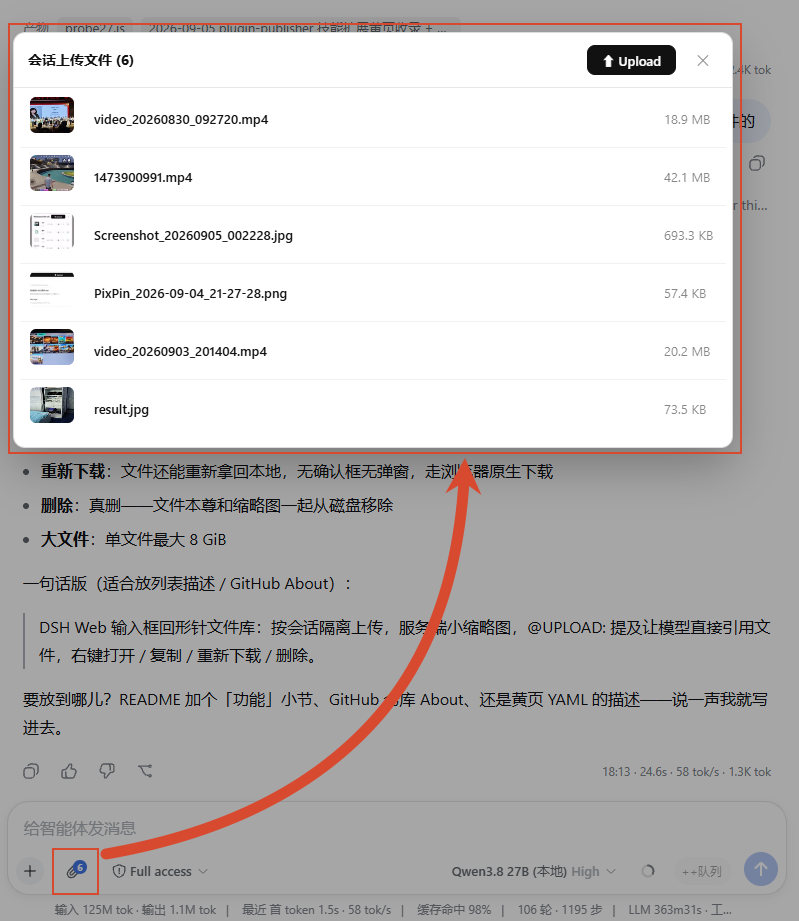
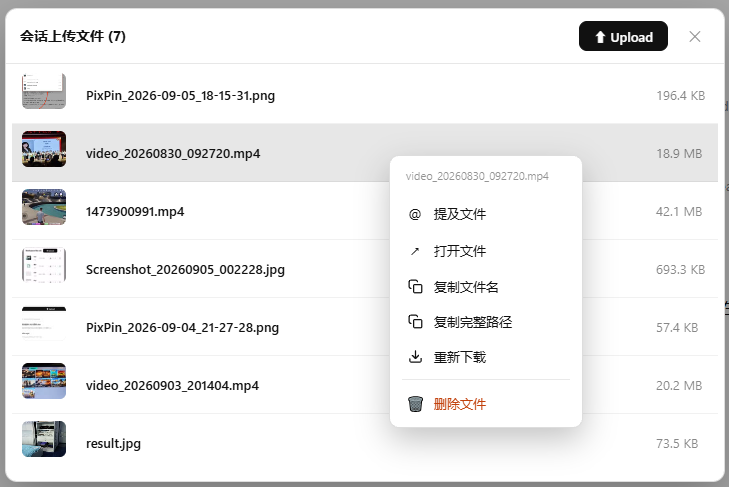
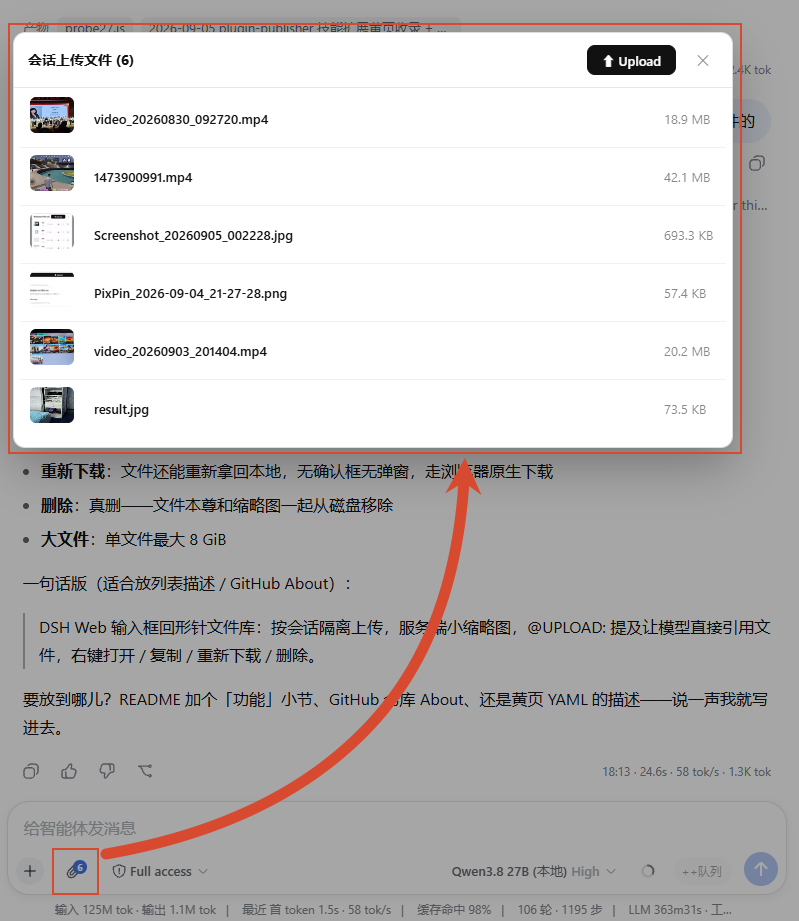
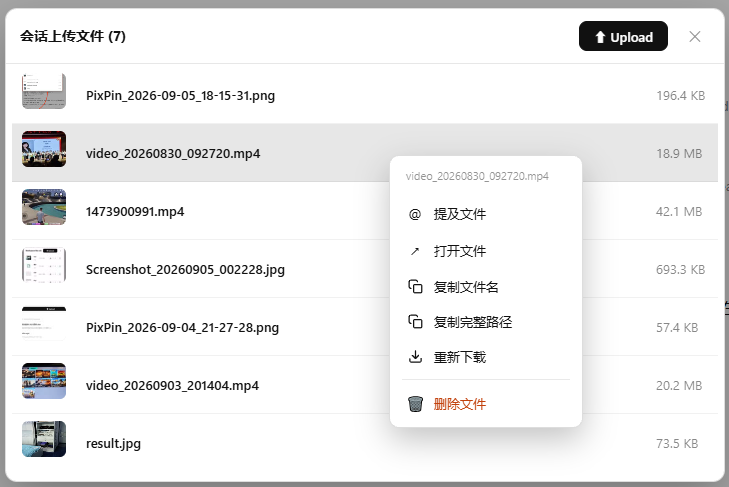
| Library window (upload / list / row actions) | Right-click action menu (6 actions) |
|---|---|
 |
 |
Features
- A 📎 button in the composer toolbar (next to the plus button), badged with this session's file count — click to open this session's library
- Upload: pick several files at once; a progress bar shows while uploading
- List: one row per file — thumbnail (images / video / PDF) or type icon + name + size, newest on top
- @ mention: refer to a file in the composer, so the model can use it directly without you reporting a path
- Right-click a file (long-press on touch) for 6 actions:
- @ mention the file
- open with the system default app (Better Sidebar editor when installed)
- copy name / copy full path
- re-download a copy locally
- delete the file (really gone from disk after confirm — no recycle bin)
- Isolation: each session has its own storage; re-uploading a name gets an auto number suffix, never clobbering
Storage (filesystem as registry, no JSON index)
- One subdirectory per session:
<workspace>/.uploaded_files/<sessionId>/(hidden directory) - The filename is the identity (no displayName indirection); re-uploading the same name in one session gets an auto
_1/_2suffix, and the@UPLOAD:reference always equals the actual file name on disk - Sessions are fully isolated: the same name in different sessions never conflicts
- Listing =
readdir+stat(sorted by mtime descending — newest upload on top) - The system prompt injects the session's upload-directory convention per session (skipped when the directory is empty)
Thumbnails (server-side frame extraction: images / video / PDF)
- Images (png/jpg/gif/webp/bmp/ico) use the original, video (mp4/webm/mov/mkv/avi) uses a frame at the 5% mark (skipping the black intro, capped at 60s), and PDF uses the first page; all are scaled to a 160px max dimension and JPEG-compressed with a quality ladder to ≤10KB
- Stored in the hidden subdirectory
.thumbs/<original-name>.jpginside the session directory; the listing endpoint skips dot-prefixed entries by design, so the library is never polluted - Original filenames are unique per session and never overwritten → a thumbnail, once generated, is final; responses carry an
immutablelong-lived cache - Lazy generation + concurrency dedup: a thumbnail is generated on first request (the upload commit also best-effort pre-generates it; a failure is harmless and the request path is the fallback); concurrent requests for the same file generate it exactly once
- Graceful degradation: depends on system
ffmpeg(images/video) andpdftoppm(PDF, poppler); if either is missing or fails, that file falls back to the original image (images) or a type badge (video/PDF) — uploads and the listing are unaffected - Office documents (docx/xlsx/pptx) are reserved in the generator registry (not generated today, fall back to a type badge); wiring up a LibreOffice headless PDF pipeline later activates them. SVG is vector and natively small, rendered by the browser, so it is not generated
Security
- SHA-256 verification for the whole upload (client-side digest, compared server-side at commit)
- Path-traversal guards on every file operation (
normalize(join())must stay inside the session directory) sessionIdstrictly validated (UUID format); the workspace is resolved from the session's ownheader.cwd— client-supplied paths are never trusted
HTTP API (prefix /dsh-upload-file/v1)
POST /uploads/prepare{sessionId, name, size}→{uploadId, putUrl, commitUrl, deleteUrl}PUT /uploads/<id>streaming upload (application/octet-stream, inline sha256)POST /uploads/<id>/commit{expectedSha256}→{name, displayName, absolutePath, size, createdAt}DELETE /uploads/<id>cancel (an already-committed id returns 404; the client swallows it)GET /sessions/<sessionId>/attachmentsdirectory listingGET /attachments/content?sessionId&namedownload / open (traversal-safe)GET /attachments/thumbnail?sessionId&nameserver-side thumbnail (lazy generation,image/jpeg+immutablecache; unsupported types 404 and the client falls back)DELETE /sessions/<sessionId>/attachments?name=delete a committed file (and its thumbnail)
Build
pnpm install
pnpm run build
Install
dsh plugin --profile web add github:seeingrain/dsh-upload-file
# the host half needs a web restart; the client half loads on next page refresh
Local dev link: add "dsh-upload-file": "link:<path to this repo>" to
profiles/web/package.json dependencies, append dsh-upload-file to the
bundles list, then pnpm install.
License
MIT — see LICENSE.
Comments
Comments live in GitHub Discussions. Sign in with GitHub to post or react.