
Install
Inside DeepSeek Harness, with dsh-market
dsh plugin --profile web add dshmarket
Or from the command line
dsh plugin --profile web add dsh-streamfold
Installing runs third-party code with your own permissions — it can read your files, use your credentials and reach the network. Review the source first, and pin a commit (github:owner/repo#sha) when you can.
Screenshots
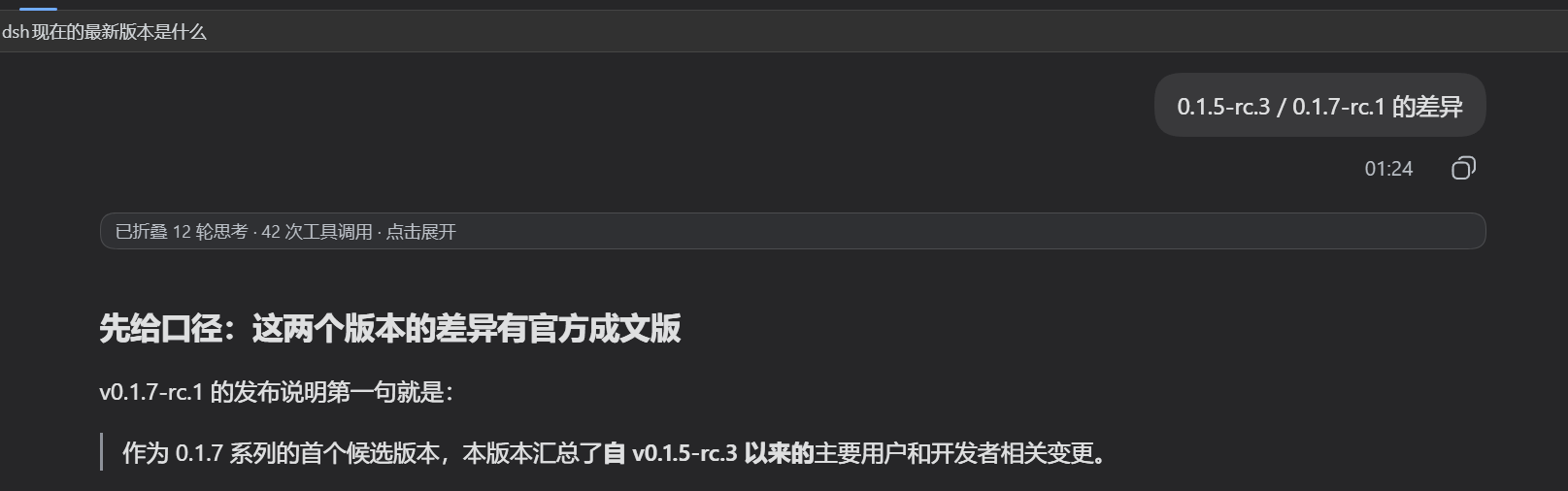
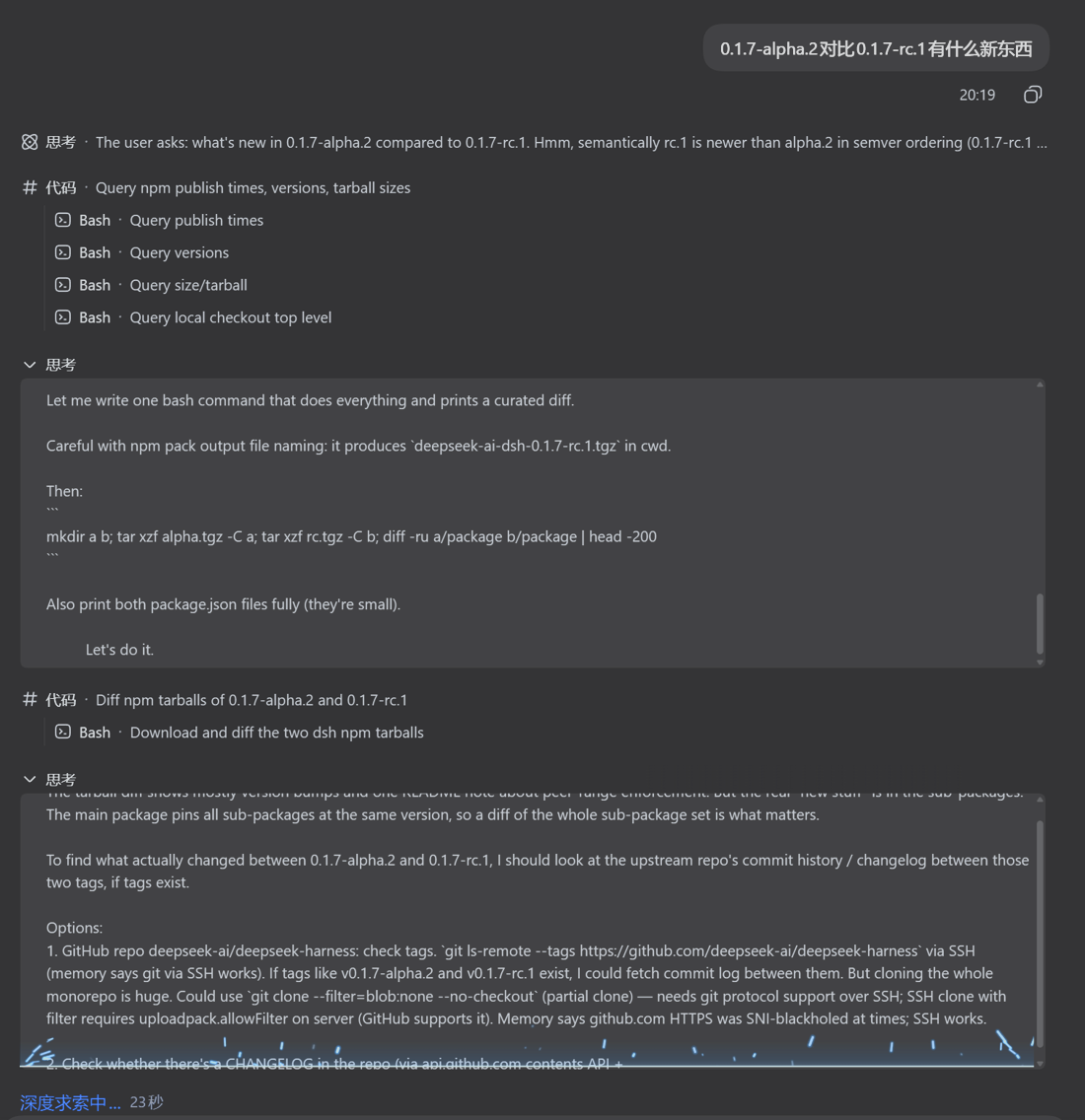
README
简体中文 · English
A better conversation window: the newest thinking window opens automatically while a turn runs, older windows fold themselves, and when the turn finishes the thinking and tool calls fold away — interleaved prose can stay unfolded. Water-like motion throughout.
Why this project exists:
- Peek at what dsh is thinking right now. The newest thinking window opens automatically while it works, and the transcript still stays tidy.
- Motion. We wanted an interface that simply feels good to look at: window height, folding and scroll-follow all advance per frame, like water — no jumps. The "back to bottom" button keeps the official look, but when it shows is decided here — normal follow lag no longer makes it flicker, and clicking it glides back smoothly.
- Sparks. Blue sparks rise from the bottom edge of the running thinking window, like a grinding wheel on metal: the faster the content scrolls, the brighter and denser they fly (brightness follows scroll speed — dim on slow output, hot on fast), and they stop when it stops. Colour and density are configurable; turning it off means it never runs.
- Forging. While the answer streams, every new chunk throws a small spray of sparks from the writing head (the end of the last line), drifting outwards like metal struck on an anvil. Written text only; pause and the hammer stops, and the sparks burn out on their own. Colour, density, speed and lifetime are configurable.
- Settle on the prompt. When a turn finishes the view glides back to the message that started it, so you never have to scroll up to remember what you asked (skipped if you scrolled away yourself; on by default, can be turned off).
- Pin the prompt. The prompt of the turn you are reading stays pinned to the top of the conversation, one line with an ellipsis; it steps aside while the real row is on screen, and clicking it glides back to that message (on by default, can be turned off).

Why it is light
- No separate view. It enhances the official transcript through semantic attributes instead of shipping its own conversation shell, taking over the render pipeline or depending on internal renderer contracts — a small upgrade surface.
- No dependencies, no build. Hand-written
lib/; no runtime dependencies and no file I/O — the host half is just an entry so the client manifest can hand the browser half to the page, and settings live in browser localStorage. - No changes to DSH source; clean uninstall.
Install
Option 1: the DSH plugin panel (recommended) — sidebar → Plugins → Add plugin, paste the line below, then hit “Enable now”:
dsh-streamfold
Option 2: the command line (two equivalent forms):
dsh plugin --profile web add github:rezon-aki/dsh-streamfold
dsh plugin --profile web add https://github.com/rezon-aki/dsh-streamfold
Restart the profile, then refresh the browser page (client code is injected at page load).
Requires DSH >= 0.1.7-alpha.1 (the official transcript view is now owned by the configForms service; for the DSH 0.1.5 series use 0.4.x — v0.4.0 itself declares >=0.1.5-rc.2).
What changed in 0.5: settings are no longer written to a host file (
~/.dsh/streamfold.jsonand the/streamfold/api/settingsroute are gone) — they live in browser localStorage only, so values you already tuned stay put. The 0.1.7 transcript view now has four modes (Compact/Standard/Detailed/Verbose); this plugin appends its own "Fold" entry to that official dropdown and parks the official mode on Verbose while folding, so the two never fight.
Uninstall:
dsh plugin --profile web remove dsh-streamfold
Usage
Settings → General → Work details: the official four modes stay as they are (Compact / Standard / Detailed / Verbose) and a fifth, Fold, is appended — the one this plugin owns:
| Option | Behaviour |
|---|---|
| Compact / Standard / Detailed / Verbose | The official modes, with the official labels and behaviour |
| Fold | This plugin: one window for the running turn, everything else folds into one line |
Choosing Fold parks the official mode on Verbose, so the official side neither folds nor groups anything and folding is done by this plugin alone (no double folding). The four official labels come from the official dictionary, so they follow the official wording; the fifth has no official entry and uses the label shipped with this plugin (Fold).
Dedicated settings page: Settings → Streamfold (all switches below, applied immediately).
While running, only the newest thinking window opens automatically; windows you opened yourself are never auto-collapsed, and a superseded window folds back into a one-line summary after the "superseded grace" (2s by default). Scrolling up stops the follow, and a "↓ back to bottom" button appears once you are away from the bottom.
Settings
| Setting | Default | Meaning |
|---|---|---|
| Fold history turns | on | Off: do not fold past turns on page load (only while a turn runs) |
| Keep interleaved prose | off | Keep prose rows while folding, laid out naturally (no capped window; the final answer is never wrapped either) |
| Window height | 260 | Max height of the running thinking window (px) |
| Auto-expand thinking while running | on | Only the newest block of the running turn; superseded windows fold after the grace period |
| Superseded grace | 2 s | How long an older window waits before folding into a summary line (0–60, decimals allowed) |
| Auto-expand tools while running | off | Expand the newest tool card using the official card's own disclosure/scroll |
| Auto-follow the bottom | on | Stick to the bottom while content grows; scrolling up stops it |
| Smoothing factor | 0.15 | Share of the remaining gap consumed per frame (0.05–0.9) |
| Minimum step | 1 | Minimum pixels advanced per 16 ms (refresh-rate independent) |
| Show "back to bottom" | on | Shown when away from the bottom (hidden for follow lag, to avoid flicker) |
| Settle on the prompt | on | When a turn finishes, glide back to your message that started it; if you scrolled away yourself, nothing moves |
| Pin the prompt | on | Keep the prompt of the turn you are reading pinned to the top of the conversation: it follows you as you scroll up, one line with ellipsis; it steps aside while the real row is in view, click to glide back to it |
| Animated transitions | on | Off makes folding / expanding / jumping instant |
| Window sparks | on | Sparks along the bottom edge of the running thinking window (standalone module: off = no canvas, no frames) |
| Spark colour | #4fa8ff | Spark colour; the core is brightened towards white heat |
| Spark density | 1 | Spark count multiplier (0.2–3): denser costs more to draw (shared by both spark kinds) |
| Forging sparks | on | Sparks thrown from the writing head while the answer streams; nothing new written, no hammer |
| Forging spark speed | 1 | Speed multiplier for the thrown sparks (0.2–4) |
| Forging spark life | 1.3 | How long one spark lives (0.2–5 s, randomised by ±30%) |
Settings live in browser localStorage, scoped to the DSH page origin.
Diagnostics
Browser console:
__dshStreamfold.stats()          // window / fold / chip counts (incl. animation state)
__dshStreamfold.probe()          // row state, still-visible thinking rows, window animation, jump button, spark cost (probe().sparks)
__dshStreamfold.state()          // current settings + official "conversation display" snapshot
__dshStreamfold.set({ smoothGrow: 0.1, supersedeDelay: 3 })
When reporting an issue, attach the probe() output and your DSH version.
Safety
- Client-side presentation only: it reads the conversation DOM, makes no network requests, touches no credentials and never modifies DSH source.
- The host half reads no files and registers no routes: settings stay in browser localStorage, and the official transcript view is read/written through DSH's own settings service (
configForms). - Clean uninstall: the settings row, window markers and injected styles are all removed.
Development
- Hand-written, no build:
lib/client.js(browser half, wrapped inwindow.__ModuleLoader__) andlib/index.js(host half). - After editing
lib/*.js, reload the plugin and refresh the page. - Row anchors use official semantic attributes only:
[data-chat-flow],[data-chat-flow-kind],[data-chat-turn],[data-disclosure-row][aria-expanded],[data-variant=think],[data-tool],[data-sample=bash],[class*=_thinkBody],[class*=_bodyWrap],[data-context-injection-body]— never CSS module hashes. - Verified on DSH 0.1.7-rc.1 / 0.1.7-rc.2.
License
MIT
Comments
Comments live in GitHub Discussions. Sign in with GitHub to post or react.