
Install
Inside DeepSeek Harness, with dsh-market
dsh plugin --profile web add dshmarket
Or from the command line
dsh plugin --profile web add dsh-capability-panel
Installing runs third-party code with your own permissions — it can read your files, use your credentials and reach the network. Review the source first, and pin a commit (github:owner/repo#sha) when you can.
README

One panel to manage MCP servers, skills, and tools for your DeepSeek Harness agent — see what it can actually reach right now, and switch any of them per session or per preset.
A skills & MCP management panel: every skill, every MCP server, and every system tool carries its true in-context state, plus a switch that takes effect on the very next model step.
At a glance (agent quick reference)
| What | A DeepSeek Harness (dsh) web plugin: a skill and MCP management panel that lists the live session's skills, MCP servers, and system tools with their true in-context state, plus switches to toggle them |
| Use it to | answer "why doesn't the agent know this skill"; see whether a loaded skill survived pruning/compaction; turn a tool or MCP server off for one session only; set per-preset default capabilities; count blocked tool calls after a disable |
| Install | dsh plugin --profile web add dsh-capability-panel (then restart dsh) |
| Requires | dsh web profile, dsh ≥ 0.1.2-alpha.4 (older versions run with load states degraded; on 0.1.7+ opening a preset's folder is unavailable as the host API evolved); all @deepseek-ai/* peers provided by the host |
| Data | Settings section: on dsh 0.1.7+ in this plugin entry's own Config inside the active profile patch (addressed by entry id), on ≤ 0.1.6 in the capability-panel namespace of $DSH_HOME/settings.yaml; stats at $DSH_HOME/capability-panel/stats.jsonl; loopback API /api/capability-panel |
| Package | dsh-capability-panel on npm; bundle id capability-panel |
Why
A skill being installed and a skill being in the model's context right now are two different facts — and only the second one answers "why doesn't my agent know this?" Between them sits context management: the tool-result pruner truncates long payloads, and compaction replaces whole spans of history with a summary. A skill you watched load five minutes ago may be partially or fully gone from the model's view, while its load record sits in the durable log forever, pretending otherwise.
And sometimes you simply want the model to stop reaching for one tool in one conversation — not uninstall a plugin, not edit a config file and restart. Just this session, from the next step on.
This plugin turns both into one panel at the right of the composer.
Features: skill, MCP, and tool management
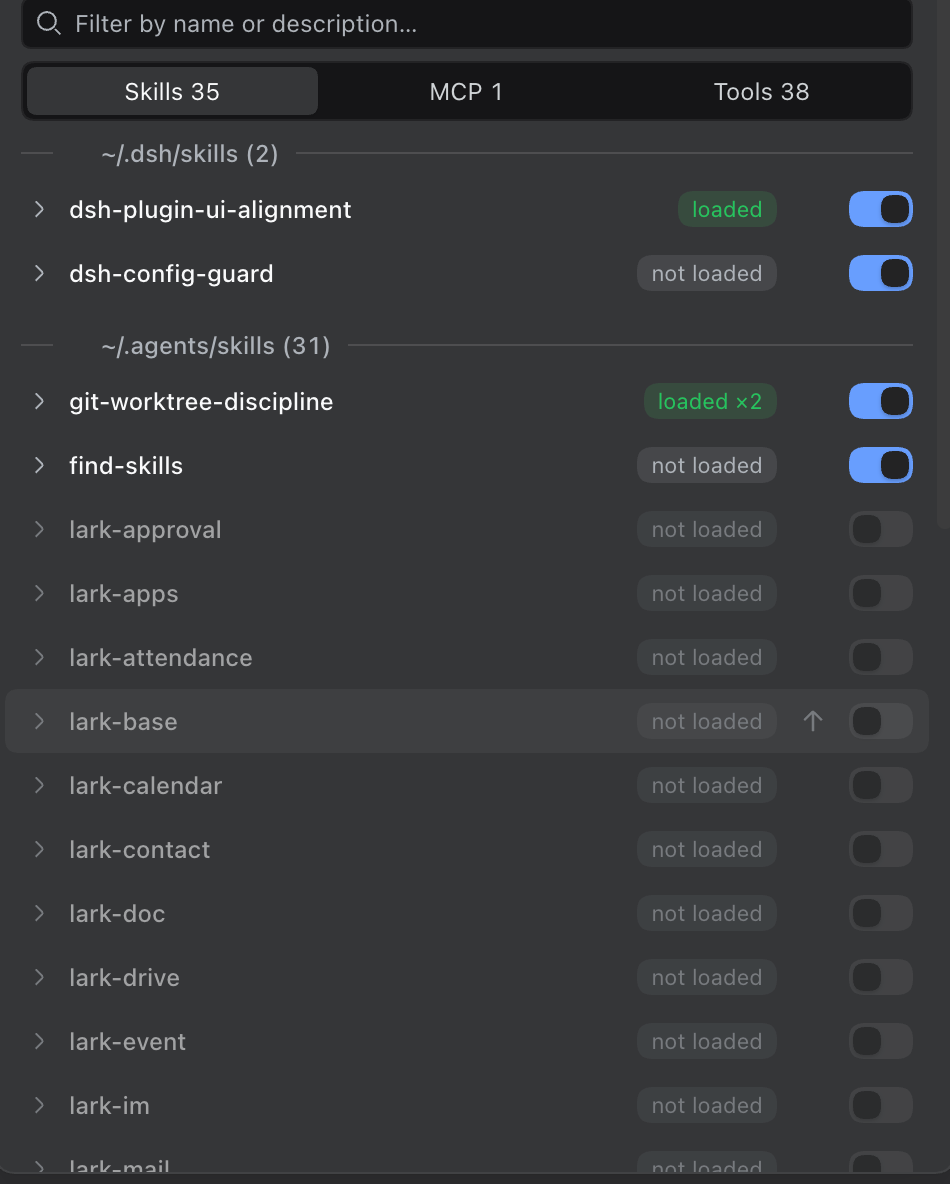
- Ground-truth load states. Every skill reports what the model actually sees on the next request:
loaded(full instructions in context),truncated(the pruner kept head & tail, cut the middle),evicted(compaction took it entirely), ornot loaded— plus a cumulative load count, so a skill reloaded after eviction readsloaded ×2. - Per-session switches that survive restarts. Turn a skill, tool, or whole MCP server off for the current conversation. The switch applies from the next prompt assembly, stays bound to that session across a dsh restart, and never touches another session or the conversation history.
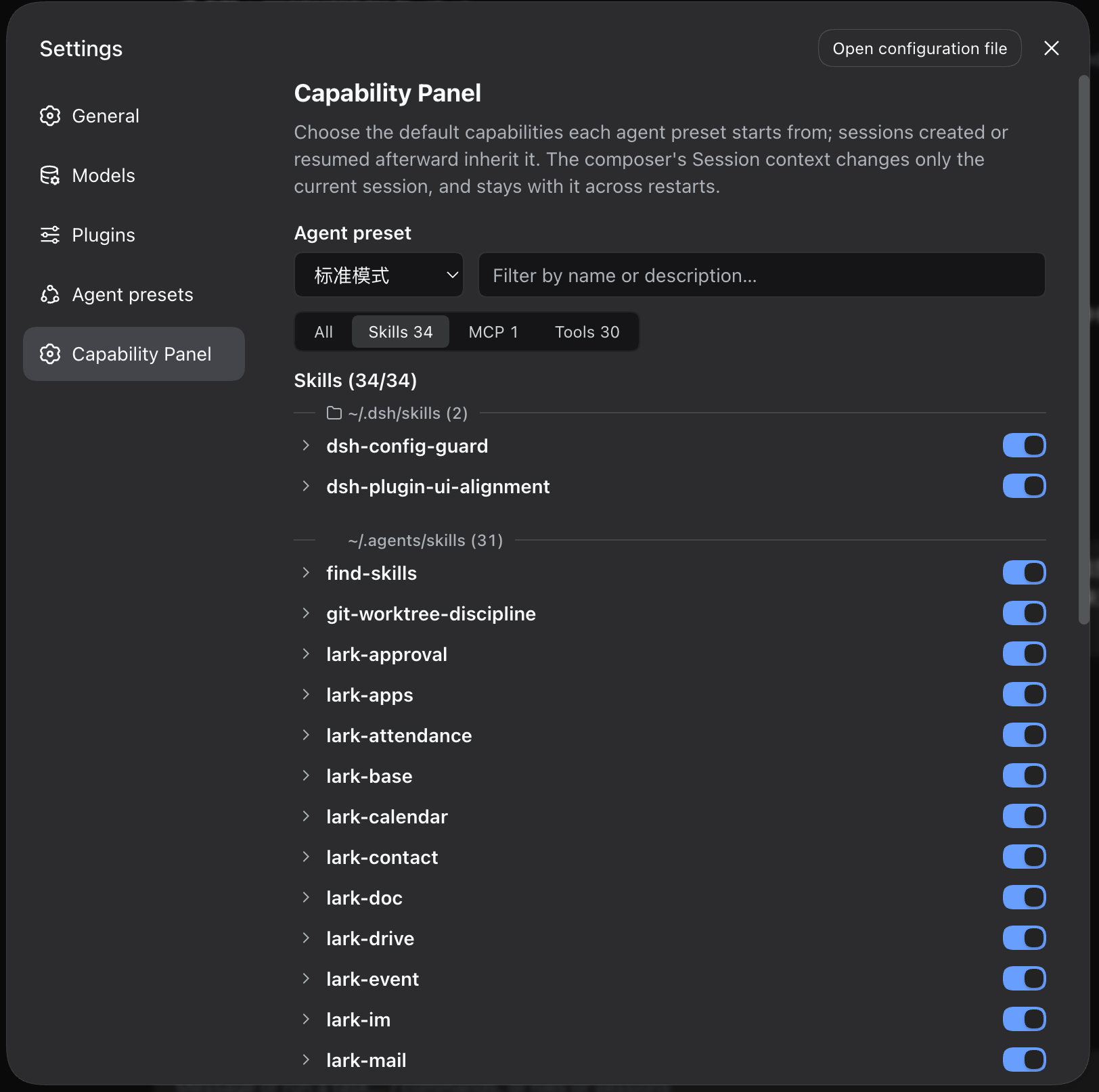
- Preset defaults. Settings → Capability Panel stores the default capability set per agent preset; sessions created or resumed afterward inherit it. All / Skills / MCP / Tools category switching, collapsible groups, and the same filter and switches as the session panel — a preset default is a starting point the session can still override.
- MCP grouped by server. Two hundred tools behind two servers stay scannable: collapse to one row per server, flip the whole server in one write.
- Offline servers stay listed. An MCP server declared in the host composition but currently registering no tools (a local on-demand service that isn't running) still gets a row — marked honestly as "no tools registered", showing the positions already stored off for it, with a Reload button that retries the connection now. Late-registered tools also pick up the session's stored defaults automatically.
- Grouped by source. Skills and MCP servers cluster under labeled divider rules: preset-bundled entries name the preset they came from; everything else shows its real directory (
~/.dsh/skills, project-relative paths, middle-ellipsized when long) — "where did this skill come from" is answered at a glance. - One click to the source folder. Hover a group divider and a folder icon appears; clicking it opens that source directory in the system file manager (macOS, Windows, and freedesktop Linux).
- Blocked-attempt counts. If the model still calls a capability after you turned it off, the panel counts it — the signal that the model is acting from memory and the switch needs a louder story.
- One-click command fill. A skill row's paper-plane button drops
/skill-nameinto the composer, ready for your Enter. - Fast filtering. Match on name, description, or the visible state pill ("truncated" / "已截断" both work), with matching descriptions auto-expanded.
Production-grade by default
- Thoroughly tested: 580+ tests with typecheck, type-aware lint, and 100% coverage gates (statements/branches/functions/lines) enforced in CI on every push and PR.
- Honest failures: when any one read fails (skill registry, session view, settings store), the panel shows partial data plus an explicit degraded note — a read failure never masquerades as an empty list.
- Race-free writes: preset defaults and session switches share one serialized write queue, so two panels writing at once cannot clobber each other.
- Never a drag on the host: the agent-created listener is fully failure-isolated — no plugin error can stop your session from starting.
- Local-first, zero network: the data route accepts loopback callers only, and the plugin makes no outbound calls, sends no telemetry, and talks to no third-party service — settings and stats stay in the local
$DSH_HOME(see "Where data lives"). - Instant even on huge sessions: on a 60k-event, tens-of-MB session log the panel still opens instantly — zero-copy surface reads, one read per open, no polling, no background work.
- History-preserving switches: a switch never rewrites conversation history — disabled capabilities stay intact in the log, and the "these are off" note is recomputed at every assembly. Every switch is a reversible decision, not irreversible surgery.
- Sanctioned seams only: every capability comes from dsh's official extension points (
tools.restrict,system-prompt/assemble, the settings namespace, UI slots) — no monkey-patching, so host upgrades are far less likely to break it. - Theme comes free: all colors are host design tokens, and the icons, switches, and segmented controls are the host's own components — light/dark and language switches follow the host automatically, no theme code to maintain.
- i18n-friendly: panel copy follows the host's UI language (中文/English), and the docs are kept section-aligned across four languages.
Install
From the marketplace or straight from the repo:
dsh plugin --profile web add dsh-capability-panel
# or
dsh plugin --profile web add github:pure-craft/dsh-capability-panel
Restart dsh for the install to take effect.
Requires a DeepSeek Harness web profile (dsh web), dsh ≥ 0.1.2-alpha.4 (older versions run with load states degraded). One build serves everything up to the latest 0.1.7; only "open a preset's folder by name" is unavailable on 0.1.7+ (the newer roster no longer carries paths), everything else stays fully functional. All @deepseek-ai/* runtime pieces are provided by the host as peer dependencies — there is nothing else to install.
Zero configuration — the plugin has no settings of its own. After the restart you will find it in two places:
- the panel icon at the right of any conversation's composer — that opens the session panel
- Settings → Capability Panel — the per-preset default capabilities
--profile web is the profile your dsh web GUI already uses, so the command applies verbatim. You can also search "capability panel" in the marketplace UI for a one-click install. Uninstall with dsh plugin --profile web remove dsh-capability-panel; settings and stats stay in $DSH_HOME (see "Where data lives").
Usage
Open any conversation and click the panel icon at the right of the composer; the panel opens upward.
- Three tabs across the top: Skills N / MCP N / Tools N, each with its live count
- The switch at the right of each row takes effect immediately — no refresh, no restart
- Click the row itself to expand its description
- The filter box at the top matches name, description, or state label, with an
X / Ymatched count - Divider rules group each tab by source: a preset name for preset-bundled entries, otherwise the on-disk directory — hover a divider for the full path, click it to open that folder in the file manager
- A disabled row renders dimmed, and the model is told in its system prompt that you turned the capability off
- A pinned footer bar stays at the bottom: "Global settings" on the left jumps straight to Settings → Capability Panel, "Report an issue" on the right opens the issue tracker
run_code is the reserved Code Mode transport — the registry forbids masking it, so its switch is locked on.
Two scopes, same switches: the composer panel is bound to the session in front of you (and restored with it after a restart); Settings → Capability Panel decides what every later session starts from — the footer's "Global settings" entry jumps straight to that page. Preset defaults are read when a session agent is created — they do not rewrite preset files and do not change agents that are already running.
How it works
Lightweight by construction. The plugin ships zero runtime dependencies — React, the UI primitives, and every @deepseek-ai/* piece are provided by the host — and its reads are zero-copy: load states come from the live session's in-memory surface (what the model will see next), never re-folded from the durable log, so opening the panel costs a scan of references, not a parse of history.
Switches are thin overlays on the next prompt assembly — a same-name shadow for skills, a registry mask for tools — plus a per-assembly note telling the model what you turned off. Session toggles persist under the session's own id in the plugin's settings namespace, so a restored session gets exactly its own switches back, and nothing ever writes to the conversation log.
Where data lives
- Preset defaults and session-bound switch positions: on dsh 0.1.7+ in this plugin entry's own Config inside the active profile patch (
~/.dsh/profiles/<profile>/cordis.patch.yml, addressed by entry id); on dsh ≤ 0.1.6 in thecapability-panelnamespace of$DSH_HOME/settings.yaml. Session switches live undersessions.<sessionId>, kept for up to 200 sessions, oldest evicted first. The harness never drops a section whose plugin is not loaded, so uninstalling keeps these until you delete the section. - Blocked-attempt stats:
$DSH_HOME/capability-panel/stats.jsonl, readable directly atcurl 'http://127.0.0.1:3080/api/capability-panel/stats'.
The data route accepts loopback callers only, keyed on the connection's peer address.
Development
pnpm install
pnpm dev        # watch build
pnpm build      # build both the host and client halves
pnpm test       # run the tests
pnpm typecheck  # typecheck
pnpm lint       # oxlint, including its type-aware rules
pnpm check      # typecheck + lint + test (100% coverage gates)
pnpm scan:dead-code  # advisory dead-code report (never a gate)
A change to the host half needs a dsh restart; the client half hot-swaps while dsh web and the watch build run together.
Support
If this panel saved you a debugging session, a star helps others find it — and sharing it with someone else hacking on dsh helps too. Issues and PRs are welcome — see CONTRIBUTING.md.
Changes are tracked in CHANGELOG.md.
License
Comments
Comments live in GitHub Discussions. Sign in with GitHub to post or react.