Install
Inside DeepSeek Harness, with dsh-market
dsh plugin --profile web add dshmarket
Or from the command line
dsh plugin --profile web add dsh-actions
Installing runs third-party code with your own permissions — it can read your files, use your credentials and reach the network. Review the source first, and pin a commit (github:owner/repo#sha) when you can.
README
简体中文 | English
Write one
actions.jsonthat follows the repo, and it becomes both a panel entry you click in the right sidebar and a structured tool agents can call directly — one definition, one approval gate.
Development work means re-running far more than a single test command:
- the various checks and test suites;
- code generation and doc generation scripts;
- data uploads, asset syncs;
- a lint pass before you commit;
- kicking off a CI build, or checking one's status;
- deploying per environment;
- checking a live service's health.
These share two traits. They repeat — the same requirement, the same kind of task, over and over. And they make you switch platforms — you run a command in the terminal, then open a browser for CI status, then log into yet another system to deploy, carrying output and state between them by hand.
Handing the same work to an agent costs more, not less: it inspects the project, writes a command, gets it wrong, fixes it, runs it again — four or five rounds before it works. The next session then starts from scratch and burns the same tokens over again.
The problem is not that the model isn't smart enough. It is that these commands were never pinned into the project in the first place.
VS Code Tasks answered this with "don't leave the editor." DSH Actions goes one step further — don't leave the conversation, and the first run is already permanent: a person clicks once in the panel, an agent says it once in the session, and the output streams into the same workspace. Neither has to do it twice.
Core value
- A quick launcher for people — every task in the right panel is one click; no recalling commands, no digging through scripts scattered around the repo.
- Agents do the authoring — writing and pinning down both go to the agent: one instruction turns a complex operation into a reusable task, and multi-step flows get coded and debugged by it too. So pinning down a complex operation stops being an engineering project you have to commit to and becomes a passing thought — throw it away if it is not good, at near-zero cost to try.
- Persist and reuse — the workspace layer is committed with the repo, so it is team-shared (a new colleague clones and has the whole set); the global layer is personal and cross-project; tasks that only matter right now go in the session layer, discarded when the session ends and promoted to a file layer once they prove themselves.
- One definition shared by people and agents — pin it down once as a person and any agent session can call it; pin something down as an agent and a person can re-run it with a click.
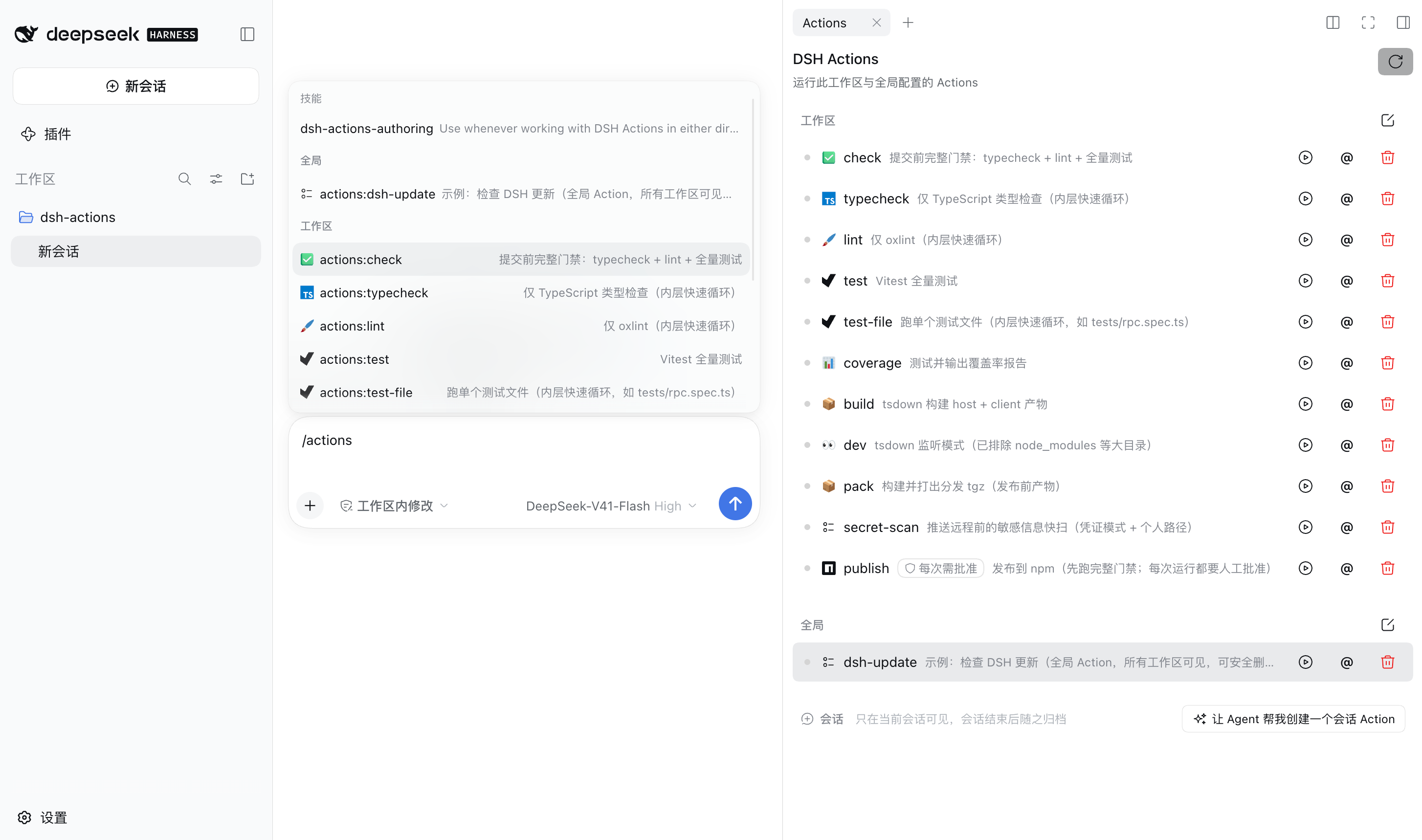
Output is more than text: it streams live into the run tab workspace with a status badge you can read at a glance; it stops on failure and re-runs on demand; a duplicate trigger does not spawn a second instance but locates the one already running; and you can send a task or a single run to the agent as a chip reference and keep asking about its output.
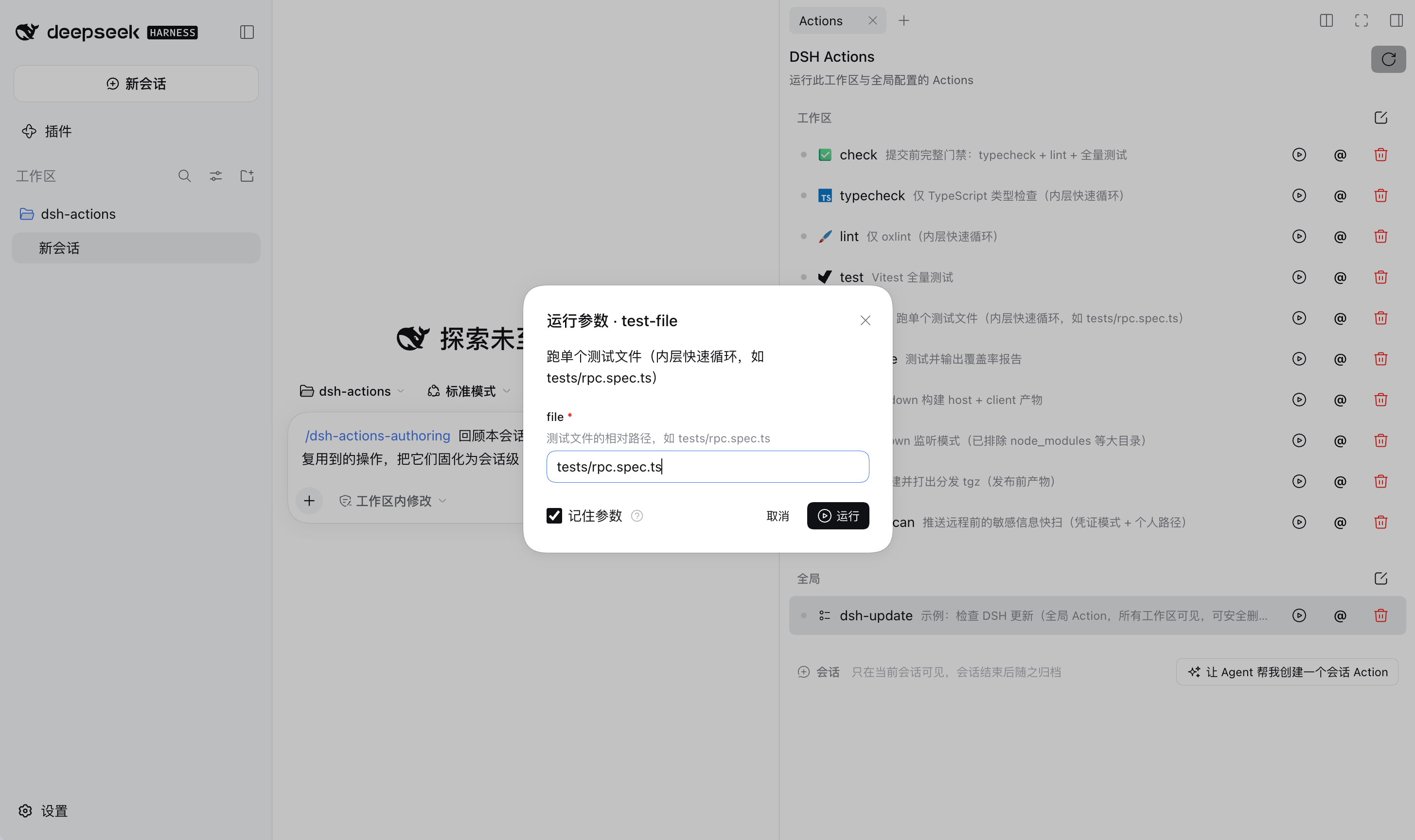
High-risk tasks get something VS Code Tasks has no equivalent for: an approval gate. A task marked for approval starts only after your explicit confirmation — whether a person clicked it or an agent called it.
The single source of configuration is a standalone actions.json (JSONC). There is no runtime importer or bridge for other task formats, and none planned.
Status: when a new session starts, concise summaries of callable Actions and the roles of the four
actions_*tools automatically enter runtime context; full commands, parameter details, and run output remain progressively disclosed throughactions_query. What is still missing is triggering a run directly from the composer and splicing the result back into the conversation.
Contents
- Interface
- Install
- 30-second walkthrough
- One definition, two faces
- Use cases
- Three layers
- Origin
- Documentation
- Package identity
- Acknowledgements
- License
Interface
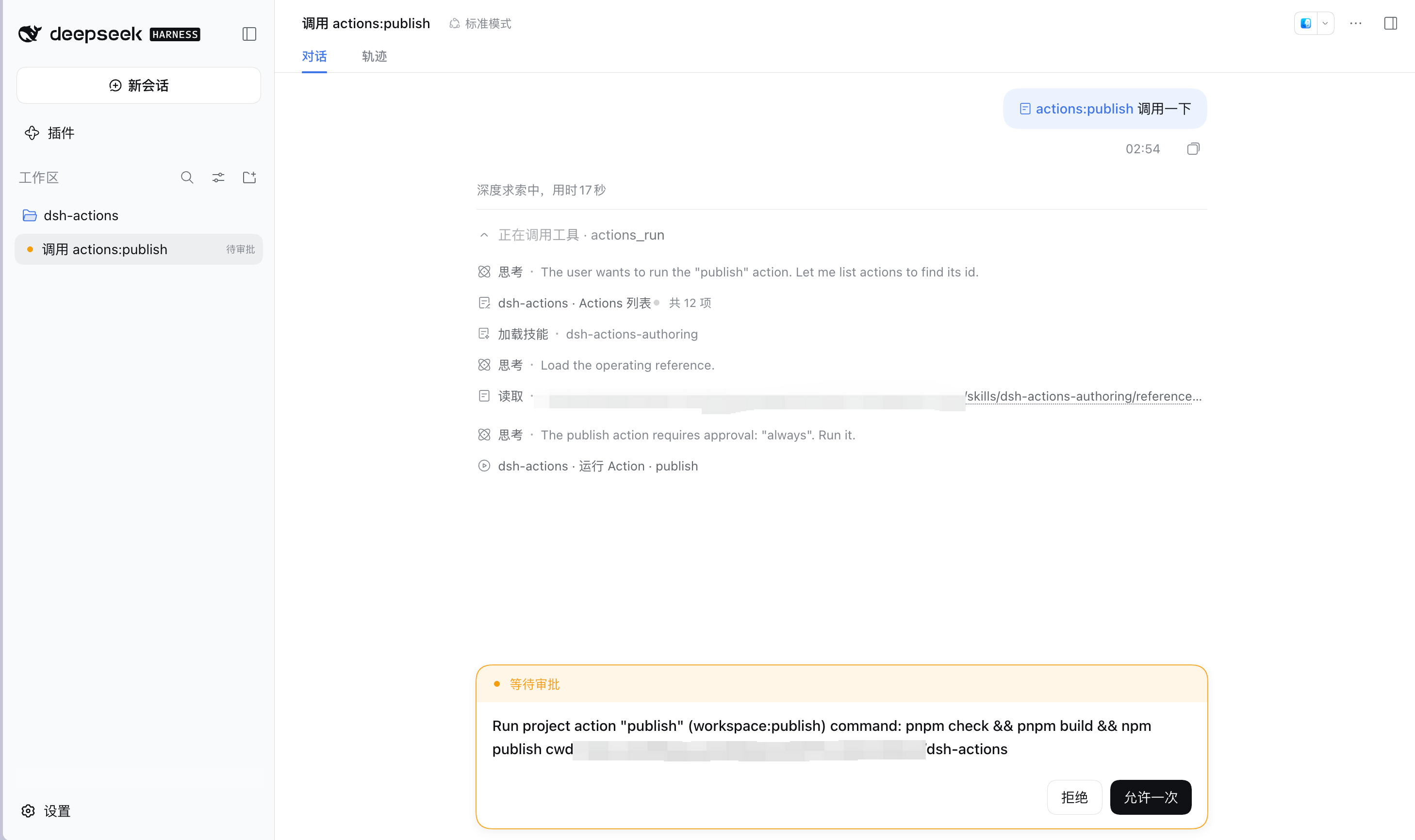
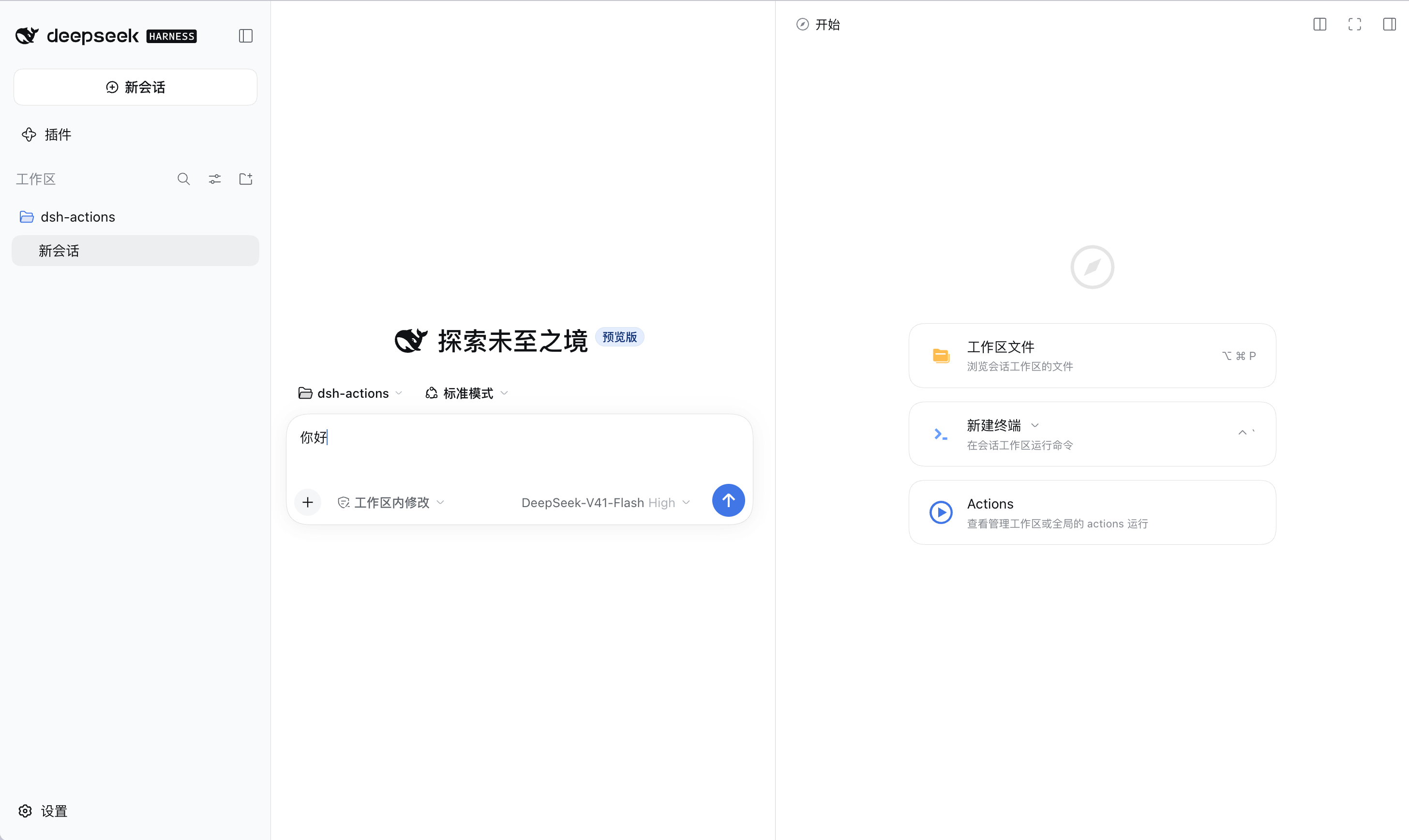
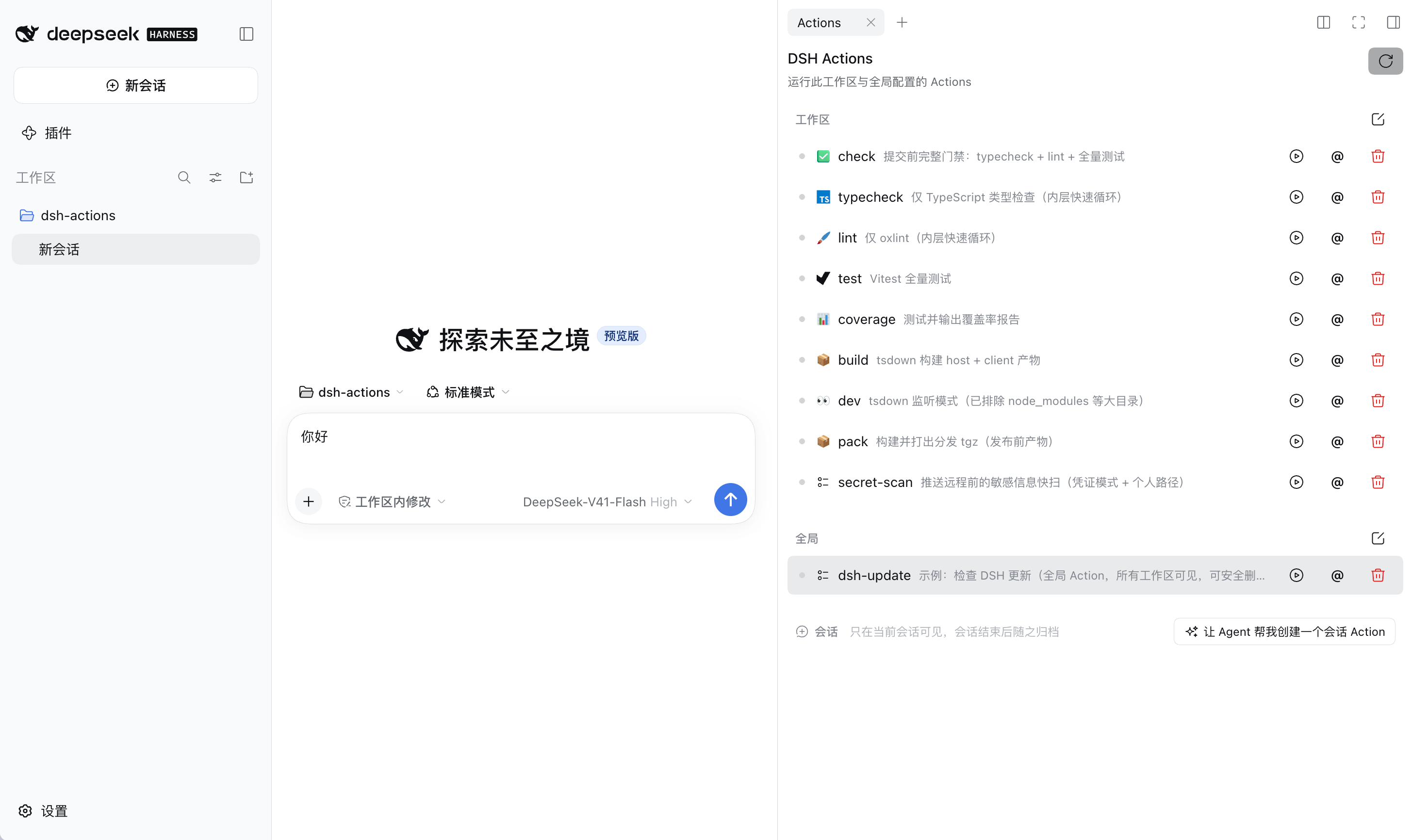
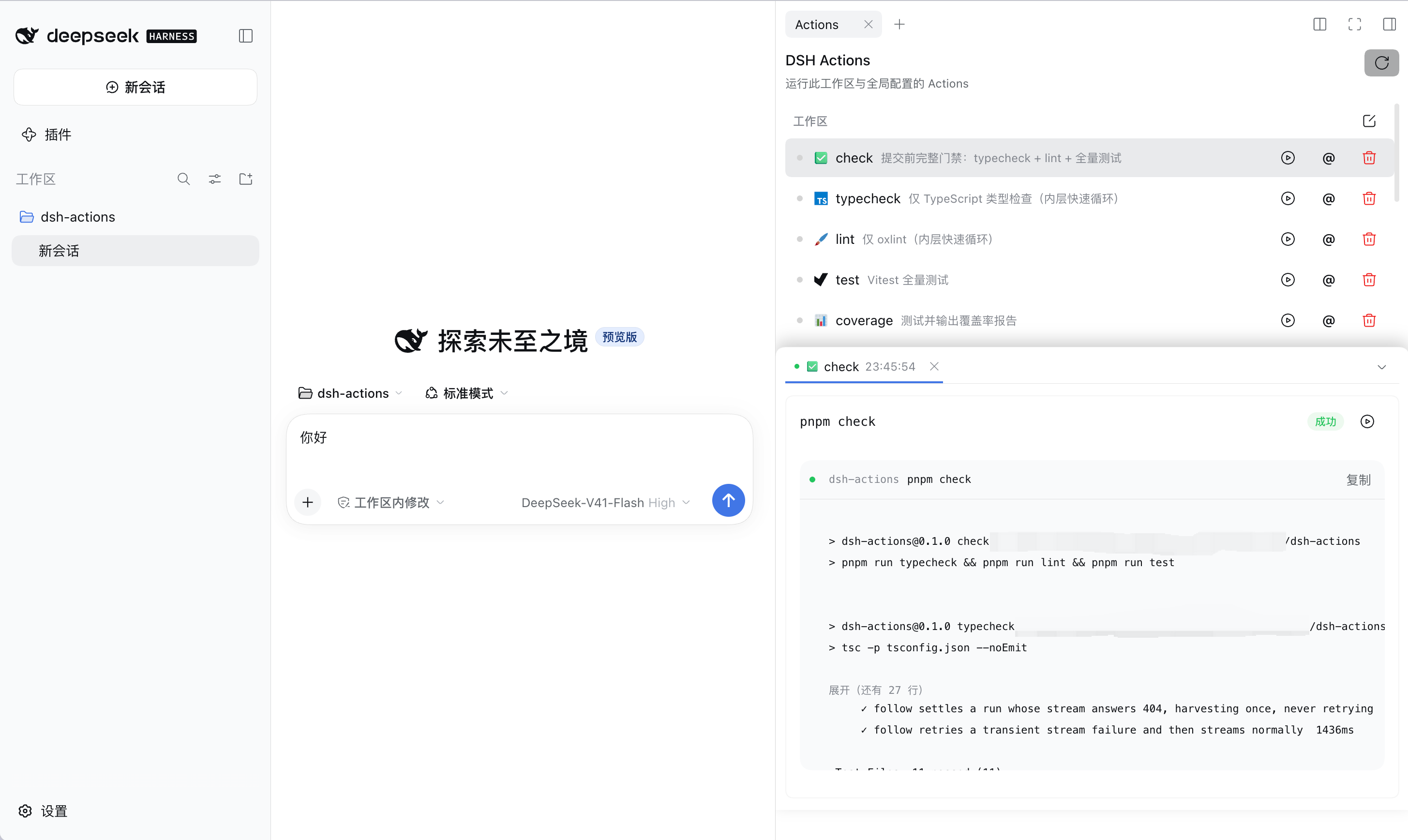
| Right-sidebar entry | Panel overview | Parameter modal |
|---|---|---|
![]() |
![]() |
![]() |
| Run output | /actions: reference menu |
Agent approval flow |
![]() |
![]() |
![]() |
Install
Install it with DSH's own plugin command, then restart:
dsh plugin --profile web add dsh-actions
# restart DSH Web
That one command does three things, all required: it runs a plugin compatibility preflight against your DSH version (a mismatch is rejected outright, with instructions on how to override), then installs dependencies with the profile's own pnpm, and finally registers any package declaring dsh.bundle into dsh.profile.bundles — without that registration it never loads.
Do not npm install inside ~/.dsh/profiles/web: that directory is pnpm-managed, and a bare install skips the bundle registration, so the package lands in node_modules and is never loaded.
Install from source (only when developing this plugin): after cloning the repo —
dsh plugin --profile web add /path/to/dsh-actions
Then open the Start page in the right sidebar — the Actions card is there.
Version floor
Requires DSH >= 0.1.7-alpha.1 (declared in peerDependencies; DSH checks your runtime version against each entry at install time). The registry's latest (0.2.0-rc.2) satisfies that floor, so just install it — no channel switching.
When versions do not match, the install is rejected outright (nothing was installed) and you are given the override command:
dsh plugin allow-version dsh-actions@<version> --dsh-version <your DSH version> --accept-risk
An override applies to that exact pair of versions only, and means you accept the risk of a crash or data corruption — the plugin loads into a running Web UI. The normal answer is to upgrade DSH, not to override.
Because the plugin does not run on 0.1.5 — declaring a floor it cannot hold up only means people install it and then watch the UI break.
The client half takes 31 named exports from @deepseek-ai/dsh-client-ui-primitives and nothing else. Between 0.1.6-alpha.2 and 0.1.7-alpha.1 that package renamed its entire icon set (IconCheckOutline16 / IconCheckOutline14 → IconCheckOutlineRegular) and added Checkbox. So on 0.1.5-rc.3, 20 of those 31 do not exist; React rendering undefined as a component throws — and those icons are used in both the panel and the toolview (the tool card in the conversation), so the failure takes out the whole interface.
A version number cannot tell you any of that, so the floor was swept, not inferred. Clone this repo and you can verify any version yourself (the script is a dev tool and is not shipped in the npm package):
node scripts/verify-floor.mjs 0.1.7-alpha.1 # passes
node scripts/verify-floor.mjs 0.1.5-rc.3 # lists the 20 that are missing
30-second walkthrough
Write .dsh/actions.json at the workspace root:
{
"version": "1.0.0",
"actions": [
{ "label": "check", "command": "pnpm check", "detail": "typecheck + lint + full test suite" }
]
}
That detail line is not optional decoration: it shows up in the panel and in actions_query output alike, and it is what the agent matches on when deciding whether this is the task it wants.
Open the Actions card on the right sidebar's Start page, click the run button next to check, and the output streams into the run tab workspace below. That is the whole loop: write config → click in the panel → watch output. Saving the file takes effect immediately, no refresh needed.
One definition, two faces
The same actions.json is two different things to a person and to an agent, over one definition — not two systems kept in sync:
| How it is discovered | How it is used | |
|---|---|---|
| Person | the Actions panel in the right sidebar | one click; a form for parameterized tasks; output streams visibly |
| Agent | actions_query |
calls actions_run, gets a structured result |
The agent side is four tools: actions_query / actions_run / actions_cancel / actions_configure. For their semantics and the trade-offs behind them, see Agent integration. One of them, actions_configure, registers a flow the agent discovered in-session as a session-layer task, and it always requires your approval — an agent authoring an executable command for itself is high-risk by definition.
The package also ships a dsh-actions-authoring skill: when you ask an agent to write an actions.json, it gets the full field reference and curation guidance on its own, so you do not have to hand it docs.
Use cases
Three typical scenarios have their own walkthroughs:
- Curating scattered script entry points: npm scripts / Makefile / Taskfile / a
scripts/directory all over the place? Have the agent curate them into.dsh/actions.jsonin one pass — the panel and agents share one entry point, and no original entry point is touched; - Wiring up a CI/release pipeline: using Jenkins as the example, pin platform APIs down as Actions — triggering builds, polling status, parameterized deploys (a real use of
inputs+approval); - The session scratchpad: temporary tasks that only matter in the current session but need running repeatedly — an agent registers them, they are discarded with the session, and the good ones get promoted to a file layer.
More complete examples (runOptions, inputs, approval) are in the configuration reference.
Contributions welcome: tell us how you use it, or what you need — the scenario library grows from real usage.
Three layers
Where an action sits determines who can see it and how long it lives — the most distinctive part of the design. The three layers merge field by field with priority global < workspace < session; on a name collision the higher layer wins:
| Layer | Location | Who sees it | Lifetime | Typical use |
|---|---|---|---|---|
| Global | ~/.dsh/actions.json |
all your workspaces | follows the file | personal habitual commands (check a version, check disk, open a common tool) |
| Workspace | <workspace>/.dsh/actions.json |
everyone in the workspace, and agents | follows the directory/repository | the project's build/test/deploy — a new colleague clones and has them all |
| Session | the session's own directory | this session only | archived when the session ends | temporary tasks, plus the repositories this session actually uses under an aggregate directory |
The three layers are not three parallel configs — they are a growth path for a task:
session layer (agent pins it down) ──promote──▶ workspace layer (team-shared) ──distil──▶ global layer (personal, general)
discarded with the session follows the repo reused across projects
- Merge, not isolation: a workspace can change a single field of a global task of the same name (override
commandto add an argument, or add adetail) and inherit the rest. - The session layer is written by the agent:
actions_configurealways requires your approval; the ones you like, you promote to a file layer and they become long-term assets. - One panel for people: all three layers appear in the same list, grouped; they run identically — the layer is metadata, not a barrier.
One workspace containing multiple repositories
If a session workspace is the parent directory of several Git repositories, do not copy every repository's tasks into the root config. Each repository keeps its own .dsh/actions.json; the current session records only the directories involved in this work:
{
"version": "1.0.0",
"folders": ["frontend", "services/api"],
"actions": []
}
folders is valid only in the session layer and has one meaning: additionally load each listed directory's own .dsh/actions.json. It is dynamic session selection, not a field that participates in three-layer inheritance, union, or override. Root-workspace and global Actions continue to load normally. Different sessions can select different directories without rewriting either the aggregate directory's config or any repository's shared config.
Each selected directory is an independent source: when both frontend and services/api define build, they stay two Actions that never override each other — ids look like folder:frontend:build and folder:services/api:build — and ${workspaceFolder} plus the default working directory point at that repository itself, so the command runs there.
Host plugins that deterministically manage the complete session configuration can use the dshActions Service: configureSession(sessionId, workspace, { folders, actions }) replaces both in one atomic write, preserves the session file's version, and immediately refreshes the catalog; clearSession(sessionId, workspace) atomically clears both. The compatibility method setSessionFolders(sessionId, workspace, folders) still replaces only the complete folders array while preserving existing session Actions.
Field-level detail is in the configuration reference; storage and lifecycle of the session layer are in the session layer.
Origin
Day to day you keep hitting steps or flows that need to run repeatedly. Improvising them each time looks convenient at first, but the results can be inconsistent and are hard to reproduce reliably. Fixing them as a CLI, an MCP service, or a custom slash command buys reuse, but it can also freeze the interface too early, making later adjustment and refinement clumsy.
Putting scripts into an agent skill goes the other way: it is flexible and the agent can drive its evolution, but that means the script's whole lifecycle is owned by the agent. Such scripts are hard to discover, govern, and maintain as a shared project capability, and it is hard to expose the exact same tool to a Web UI so a person can find and use it directly.
| How it is pinned down | Reusable | Discoverable by a person | The cost |
|---|---|---|---|
| Improvised each time | ✕ | ✓ | inconsistent results, hard to reproduce |
| CLI / MCP / custom slash command | ✓ | partly | the interface freezes too early; later changes are clumsy |
| Agent skill | ✓ | ✕ | the lifecycle belongs to the agent; unified discovery and governance go missing |
An actions.json in the project (this project) |
✓ | ✓ | every change goes through git |
That is where DSH Actions starts. In one important respect the design resembles Apple Shortcuts, VS Code Tasks, and GitHub Actions: a definition that follows the workspace describes a repeatable Action or flow. That definition can be improved deliberately by a person, or evolve under the agent's drive, while staying reviewable and manageable.
The same Action is then offered in two forms:
- as a structured tool for agents to discover and call;
- as a visual interface in DSH Web for people to inspect and operate.
Skills and MCP already set a good pattern for agent-facing capability. An agent does not need every implementation detail in context from the start: the system can offer a small, refined description first and progressively disclose parameters, constraints, execution details, and results only when they are actually needed. DSH Actions wants to apply that same progressive disclosure to a project's repeatable operations — without making the agent the sole owner of those scripts' lifecycle, and without excluding people from the same set of tools.
That leaves an open question this project still has not worked out: should a script's lifecycle be owned by people, by agents, or shared? Put it in an agent skill and it evolves fast, but people lose the unified entry point and the ability to govern it. Put it in project config and it is reviewable and shareable, but every change goes through git. DSH Actions bets on a third path — and the price of that path is that people and agents both have to learn to collaborate on the same file. Whether it is the right bet will take real usage to decide.
Documentation
Every doc is bilingual: Chinese is the .md, English is the matching .en.md in the same directory. A full index lives in docs/README.md.
Scenarios (when and how to use it):
- Curating scattered script entry points
- Wiring up a CI/release pipeline (Jenkins example)
- The session scratchpad (session-layer temporary tasks)
Features (per-topic reference):
- Configuration reference: every
actions.jsonfield - The Actions panel
- Agent integration
- The session layer
Note:
AGENTS.mdis a local contributor guide and is not distributed at all (neither in the git repo nor in the npm package); the roadmap, backlog, and design research are team-private documents and likewise not in the public repo.
Package identity
| Product | DSH Actions |
| Repo | pure-craft/dsh-actions |
| npm package | dsh-actions |
| Cordis plugin id | dsh-actions |
Acknowledgements
The field design, per-entry tolerance, and instance-reuse semantics of actions.json take after VS Code Tasks (tasks.json v2), reduced to a subset; the Action / Run product vocabulary — execution status, logs, run history, controlled automation — takes after GitHub Actions.
Three-layer merging and the session layer exist in neither: that part was added so one definition can be both clicked by a person and called by an agent. For the full field set and the deliberate differences from those projects, see the configuration reference.
License
MIT
Comments
Comments live in GitHub Discussions. Sign in with GitHub to post or react.