
Install
Inside DeepSeek Harness, with dsh-market
dsh plugin --profile web add dshmarket
Or from the command line
dsh plugin --profile web add @mokuyoaxis/dsh-iris
Installing runs third-party code with your own permissions — it can read your files, use your credentials and reach the network. Review the source first, and pin a commit (github:owner/repo#sha) when you can.
Screenshots

README
dsh-iris gives agents and the Iris workbench image, video, speech, and visual understanding capabilities, and it can optimize any draft directly in the DSH composer. It connects to Alibaba Cloud DashScope (Bailian) and to OpenAI Images–compatible services. Configuration and task management live in the Iris workbench, and a floating Iris bubble in the bottom-right corner is the quick entry point.
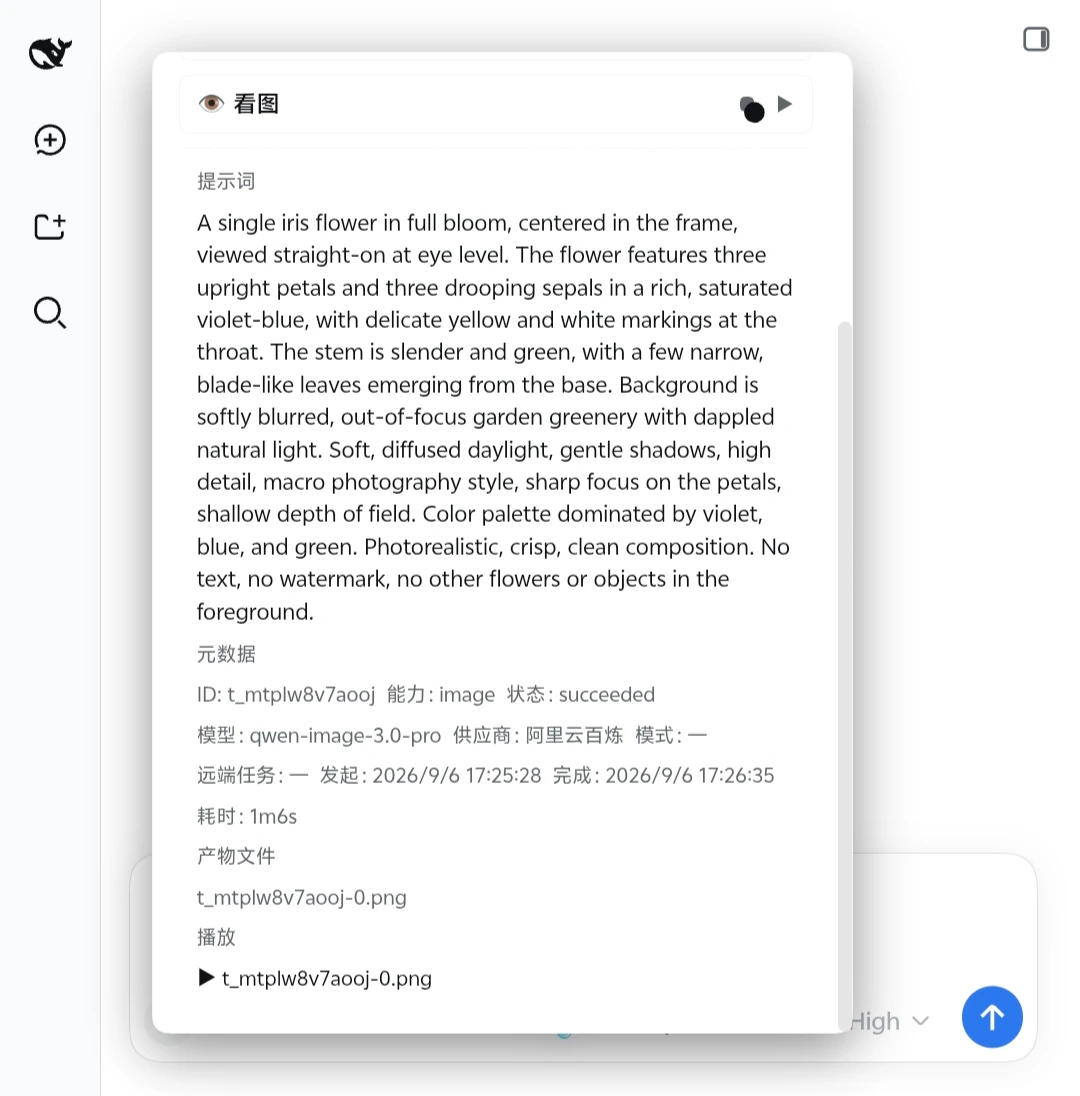
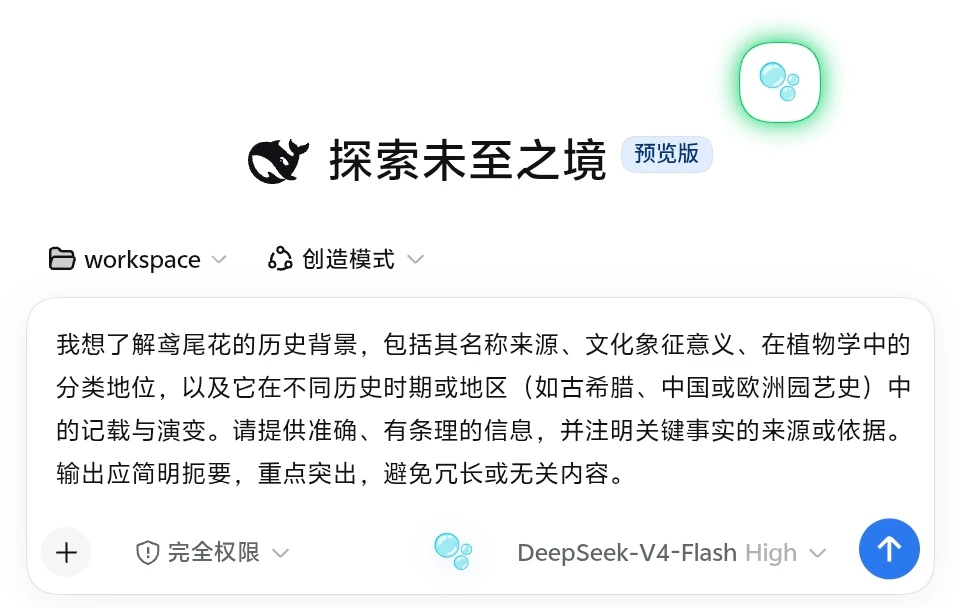
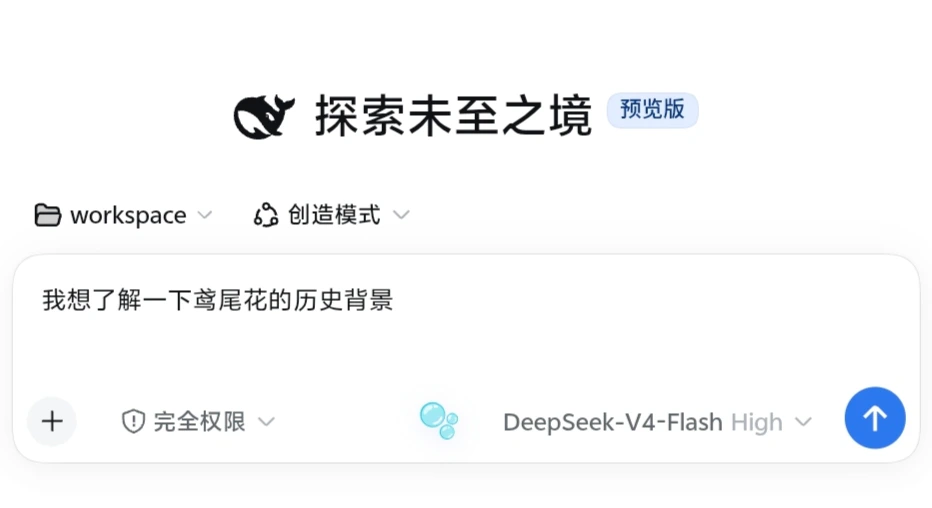
A real generation example
Starting from the two-character draft “鸢尾花”: Iris composer optimization (
deepseek-v4-flash, thinkingoff) → Alibaba Cloud Bailianqwen-image-3.0-progeneration · 2048×2048
Android 16 live UI
These captures come from an Android browser connected to DSH under Termux/PRoot Debian ARM64, using the default DSH skin. Public copies have no EXIF, XMP, or IPTC metadata.
| 🫧 in the conversation composer | Optimized draft written back |
|---|---|
|
|
The project is at an early stage; interfaces and configuration formats may still change between releases.
Iris is evolving toward a media production core that can run independently and plug into different agent hosts. Version 0.2.0 provides both a DSH plugin and a headless CLI media path (crop, image/video/TTS/transcription submission, task observation, artifact export). Core internals have not been frozen as a public SDK.
Version support: Iris
0.2.0requires Node.js>=22.0.0and its DSH plugin supports only the exact host version0.2.0-rc.2. Older DSH hosts should pin@mokuyoaxis/dsh-iris@0.1.4as described below instead of following npm latest. Iris and DSH have independent version numbers.
Two ways to use Iris
| Path A: DSH plugin (0.2.0) | Path B: Headless CLI (0.2.0) | |
|---|---|---|
| Who it's for | DeepSeek Harness users who want agent tools, the workbench, and in-chat prompt optimization | Users who want media generation, task tracking, and artifact export from the command line without DSH |
| Entry point | Choose a pinned release under "Quickest start" below | dsh-iris run ... — see Headless CLI |
| Data location | $DSH_HOME/iris/v1/ (Core data root core-v0) |
Any absolute path passed via --data-root |
| Automatic observation | Yes (bounded DSH host ticks + restart takeover) | No — explicit single-step task observe |
| Dependencies | DSH 0.2.0-rc.2 and Node.js ≥ 22 |
Node.js ≥ 22 and sharp only (ffmpeg for video frames) |
Both paths read and write the same Core Task/Artifact facts: point the CLI at the core-v0 data root of a DSH profile to inspect/export DSH-generated artifacts, and vice versa. Only one writer is allowed per data root.
Install size note: image processing depends on
sharpand its prebuilt binaries (~27 MB). On uncommon platforms (e.g. some ARM proot environments) a failed sharp install is detected bydsh-iris doctor; image actions become unavailable while everything else keeps working.
Relationship with ai-paint
ai-paint is the maintainer's local, unpublished predecessor of Iris. It is not a public dependency, and users never need to download, install, or create it. Without that project, simply configure providers in the Iris workbench as described below.
Early versions read models and credentials from the maintainer's local ai-paint configuration — partly to migrate the predecessor project, and partly so the host process could reuse an existing API key locally instead of pasting keys into agent sessions, command-line arguments, or documents. Version 0.1.1 separates the two configurations completely: Iris uses only its own configuration. The old one can be imported exactly once, and only by explicitly setting IRIS_IMPORT_WORKBENCH_CONFIG to the absolute path of the local config file. Iris never scans for ai-paint by default and never syncs the two sides. The variable carries a file path, not an API key, and the source file is left untouched. See the user guide for details.
Quickest start
Check the host with dsh --version and ensure pnpm is on your PATH. Iris and DSH have independent version numbers; choose a matching combination:
| Your DSH | Iris choice | Source |
|---|---|---|
0.2.0-rc.2 |
0.2.0 |
Pinned npm release |
>=0.1.2-rc.1 <0.1.3-0 or 0.1.5-rc.1 |
Stable 0.1.4 |
Pinned npm release |
| Other versions | No current support claim | Check host adaptation before installing |
Older DSH: install stable 0.1.4
For the older DSH range above, add the pinned release to the Web profile:
dsh plugin --profile web add @mokuyoaxis/dsh-iris@0.1.4
dsh web
To download the published npm package separately:
npm pack @mokuyoaxis/dsh-iris@0.1.4
This writes a .tgz to the current directory. Use npm install @mokuyoaxis/dsh-iris@0.1.4 if you only want a regular npm dependency; that does not add a DSH profile layer. Pinning @0.1.4 keeps selecting the old stable release after latest changes. See npm pack. Version 0.1.4 does not contain the 0.2.0 Core media CLI or the later DSH rc.2 adaptation.
DSH 0.2.0-rc.2: install 0.2.0
Install the pinned npm release into the Web profile:
dsh plugin --profile web add @mokuyoaxis/dsh-iris@0.2.0
dsh web
The plugin loads the next time DSH starts; the web UI defaults to http://127.0.0.1:3080. Open the complete URL if startup output includes authentication parameters. Version 0.2.0's compatibility metadata admits only DSH rc.2.
Choosing a version in dsh-market
The marketplace entry should resolve to the full package name @mokuyoaxis/dsh-iris. Check both its displayed Iris version and your local dsh --version before installing: 0.2.0 is for DSH rc.2; older hosts should use the pinned @0.1.4 commands above. Catalog and npm information may be cached. The actual npm package's dsh.engines.dsh and Node engines determine its declared requirements; a visible listing does not imply support for every DSH release.
The unscoped
dsh-irison npm belongs to a different plugin. Always keep the fully scoped name@mokuyoaxis/dsh-iriswhen installing or updating Iris Media.
After the first start, open "Settings → Iris workbench → + Add provider", enter your DashScope base URL and API key, then click "Discover models". A single provider can start with automatic capability assignment. Full steps, OpenAI Images–compatible configuration, and failover notes are in the user guide (Chinese).
Once configured, minimal instructions can be as simple as:
Use iris_draw_image: draw a white cat sitting by a blue window.
Summarize the image I just uploaded.
Summarize /absolute/path/demo.mp4 with Iris, then turn the summary into speech.
DSH profiles and plugin commands follow the official installation docs. Generating images, videos, or speech may incur provider charges.
For a copyable installation and usage prompt, see Agent quickstart prompt.
Feature overview
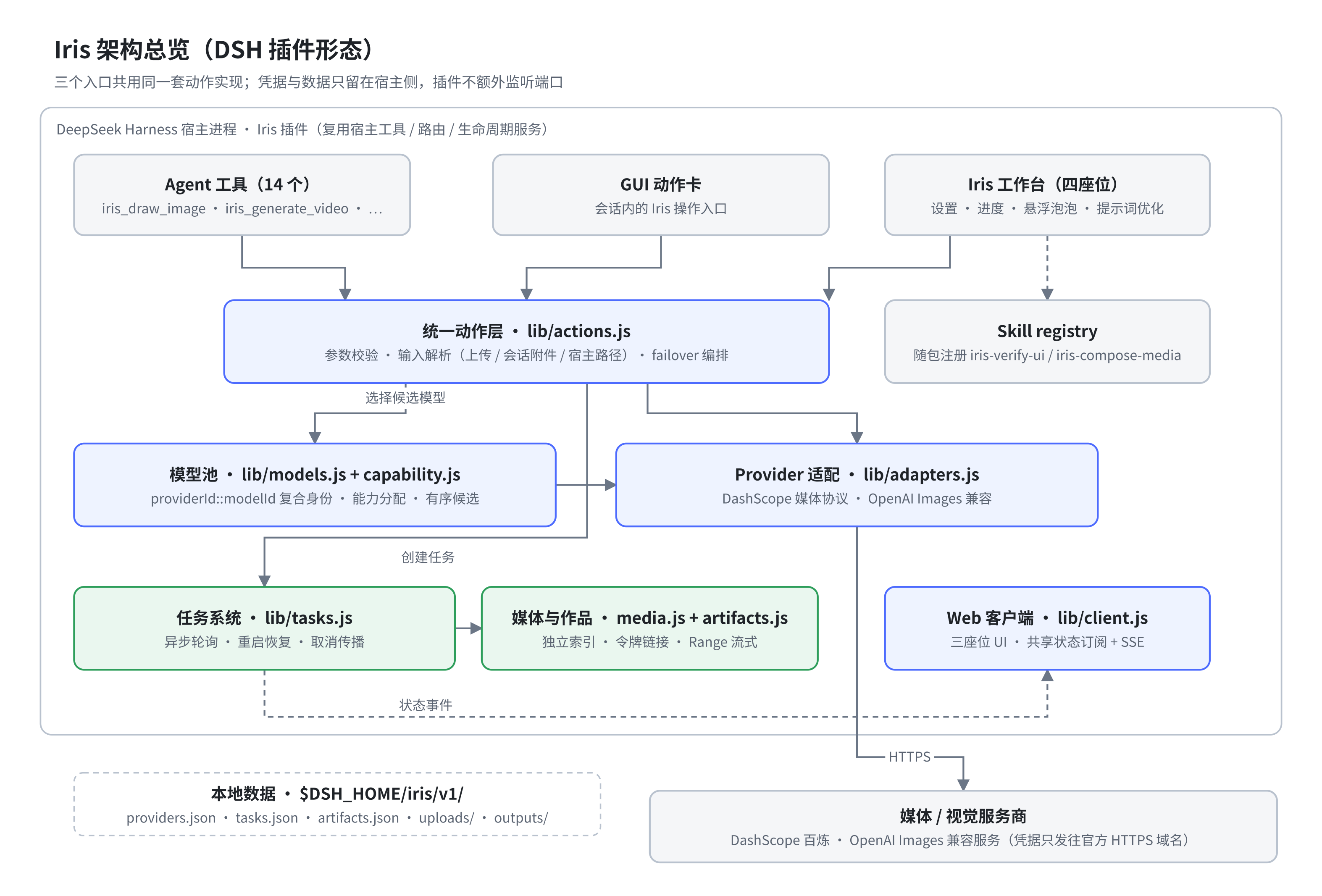
- Image generation, text-to-video, image-to-video, and S2V digital-human video
- Text-to-speech and audio transcription
- Visual question answering, long-image OCR, target grounding, cropping, and pixel-diff analysis
- Video frame extraction and multimodal video summarization
- Asynchronous task tracking, restart recovery, and token-authorized media playback
- An independent work library that survives task-history cleanup and can re-index older
outputs/ - A multi-provider model pool with per
provider + modelcapability assignment - Three file sources: browser upload, session attachments, and host paths
- Workbench-independent composer prompt optimization with current-session and JSON-configured fixed model routing
Prerequisites
- A Node.js version that satisfies your DeepSeek Harness release's requirement; Iris 0.2.0 requires at least 22.0.0, while the published npm 0.1.4 historically requires 20.10.0
- A working DeepSeek Harness environment with
pnpmon the PATH - At least one supported media or vision provider
ffmpegandffprobeon the system, for video frame extraction and video summaries
After installing the plugin, add a provider in the Iris workbench and assign models to the capabilities you need. Provider keys are kept in Iris's host-side configuration; on POSIX systems, Iris's own directories and files are tightened to 0700 and 0600 respectively, and neither the UI nor the API ever returns full keys. On Windows, file modes are not equivalent to ACLs — keep relying on your user directory and system account permissions.
DeepSeek Harness adaptation
dsh-iris remains a native DSH plugin. Its server registers 14 agent tools and uses host-provided routing, attachment, model, and lifecycle services. The web client contributes settings, composer, and global-overlay UI. Iris does not start another service or listen on an extra port.
| Iris version | DSH range | Verification |
|---|---|---|
Published stable 0.1.4 |
>=0.1.2-rc.1 <0.1.3-0 |
Historical clean and daily Web profiles on Linux ARM64 |
Published stable 0.1.4 |
0.1.5-rc.1 |
Historical daily Android/Linux profile checks |
0.2.0 |
Only 0.2.0-rc.2 |
Installed-service isolation checks, Core diff, and SlotRegistry; user demonstration reported successful, with detailed browser actions and asynchronous restart/rollback verification continuing |
See the rc.2 adaptation notes for scope. The published npm 0.1.4 package does not contain these later changes.
Iris 0.2.0 no longer claims older DSH support; historical validation does not automatically cover this version. DSH 0.2.0 stable and other rc versions are also outside its support range. Automated checks cover server loading, tool and Skill registration, routes, the client bundle, and UI slots separately so Doctor can identify which boundary failed.
Core and the DSH Adapter are being separated: DSH keeps loading the same npm package, while the Adapter maps host capabilities into Core. A DSH API change should require an Adapter or client-bridge fix, not a rewrite of Task or Artifact semantics. Version 0.2.0 includes the headless CLI. The dsh prefix will be removed after a second real Host Adapter is implemented and accepted, with a new npm package at that point; see the roadmap.
Tools
Generation, speech, and tasks
| Tool | Purpose |
|---|---|
iris_draw_image |
Generate images from a prompt |
iris_generate_video |
Text-to-video, image-to-video, or S2V digital-human video |
iris_speak_text |
Synthesize speech from text |
iris_transcribe_audio |
Transcribe audio to text |
iris_task_status |
Check the status and outputs of one task or the recent tasks |
Vision and image processing
| Tool | Purpose |
|---|---|
iris_look_at_image |
Ask a question about an image and get a vision model's answer |
iris_relook_attachment |
Re-inspect an image attachment from the session with a new question |
iris_long_ocr |
Recognize text in tall screenshots or long images, chunk by chunk |
iris_locate |
Ground a target in an image and return pixel coordinates |
iris_crop |
Crop an image by pixel region |
iris_pixel_diff |
Compare two images and produce diff statistics and a heatmap |
iris_html_screenshot |
Render an HTML string to a screenshot in a restricted environment |
Video processing
| Tool | Purpose |
|---|---|
iris_video_frames |
Extract frames evenly from a video |
iris_media_summarize |
Summarize a video from sampled frames plus optional audio transcription |
File inputs
Iris accepts three file sources, in the recommended order:
- Browser upload — best for local files and cross-environment access; 64 MB per file.
- Session attachments — best for reusing media already uploaded or generated in the current session.
- Host paths — best for large files the host can read directly. Enter the path as seen by the host process; it is not always the path on the machine your browser runs on.
Uploads are stored under $DSH_HOME/iris/v1/uploads/ and kept for 7 days by default. For path-picking advice on different platforms, see File access across environments (Chinese).
Conversation prompt optimization
Iris adds a borderless, text-free “🫧” control directly to the DSH composer, so the workbench does not need to be open. It opens a translucent glass panel with background blur and soft depth; on narrow screens and Android browsers it becomes a safe-area-aware, internally scrollable bottom sheet to prevent overlap and overflow. It reads only the current unsent plain-text draft and offers general, image, video, and start-to-end-frame video targets. The result is previewed first and is written back only after confirmation; Iris never sends it automatically. Drafts containing structured @ or / references are left untouched for now so their identities are not lost.
By default, the optimizer uses the model selected for the current session and falls back to DSH's default model when the session has none. The request carries no chat history, tools, attachments, or workspace content—only the current draft and target template. To prevent reasoning tokens from exhausting the generation budget before visible text is complete, generation.reasoningEffort defaults to off-if-supported: reasoning is disabled only when DSH model metadata explicitly advertises such an effort; otherwise the provider default is used, and the session High/Low setting is not inherited. JSON may select provider-default, inherit, or an exact effort ID advertised by the model. For predictable cost and latency, use a fixed route with a lightweight non-reasoning model. You can also export prompt-optimizer.json, change route.mode to fixed, name another provider and model already registered in DSH, and import it again. “Reset to defaults” restores Iris's built-in prompt, target templates, session-model routing, and generation settings. The composer control can be disabled independently and re-enabled from the Iris workbench; disabling it does not stop the workbench, agent tools, or task runtime. An optimization call may incur charges from the selected text model.
Model assignment and failover
Capability assignment uses providerId::modelId as the model identity. The same model name from a different provider or account counts as two independent options. Discovery prefers provider capability metadata, falls back to name rules, and preserves explicit user overrides. Alibaba Cloud media calls may use a separate Workspace mediaBaseUrl.
Generation capabilities accept multiple candidate models. Every request starts at the head of the ordered list; this is safe failover, not round-robin. Iris tries the next candidate only when the provider explicitly proves that the request was not accepted. A 500 response, timeout, disconnect, missing response, polling failure, or local persistence failure never authorizes automatic resubmission. Once accepted, Iris may only resume observation or delivery.
The workbench lists paused observation, unknown acceptance/outcome, and successful generation with failed delivery under “Needs attention.” Re-observe never submits; re-deliver never regenerates; acknowledge/restore only changes the local reminder queue; only an explicitly confirmed informed retry creates a linked new task and may incur duplicate charges. Creating that task archives the original reminder while preserving its unknown facts and audit link. See Task semantics, Architecture, Security, and the Fault-injection matrix.
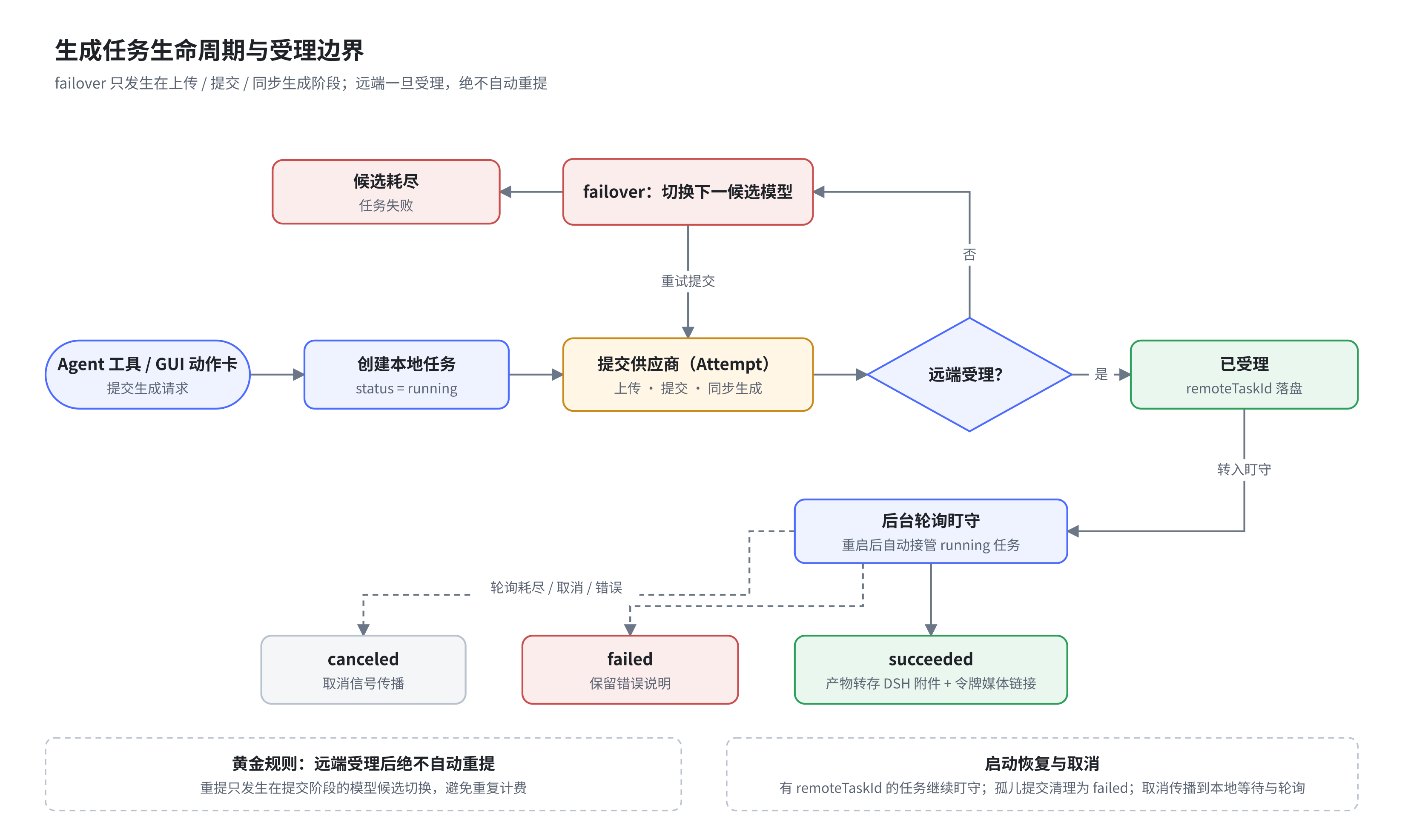
Transcription is a separate transcribe capability and does not consume the TTS or vision model configuration.
Capability health and model verification
The workbench and main bubble expose four persistent health states: gray means unconfigured; blue means configured but unverified, or that success evidence is older than seven days; green means the exact provider × model × capability recently passed an explicit probe or real task; muted red is reserved for explicit 401/403 or authentication/permission failures. Text and evidence time accompany color, and critical provider configuration changes invalidate old evidence.
Iris performs no background probes. Rate limits, network errors, 5xx responses, content-safety failures, cancellation, and unknown acceptance never overwrite a recent green state with red, trigger a hidden retry, or create hidden cost. Vision, image, and TTS can be probed per model; video and transcription require real user tasks. Host Doctor checks only DSH/Iris loading and host ports—it does not validate providers or models. See Provider and capability health for the state and failover contract.
Offline diagnostics
No DSH installation or running host is required, and no provider request is sent:
npx @mokuyoaxis/dsh-iris doctor
npx @mokuyoaxis/dsh-iris doctor --json
The installed binary is dsh-iris. Exit code 0 is healthy, 1 means warnings, and 2 means hard errors. Offline Doctor checks Node.js, sharp, ffmpeg/ffprobe, a real but cleaned-up storage write probe, configuration, models/assignments, task semantics, temporary files, and orphaned or missing artifacts.
A running DSH instance also provides a “Host diagnostics” card in the Iris workbench and exposes the authenticated /iris/api/doctor JSON. It checks the DSH version, plugin, 14 tools, two Skills, four route groups, Browser/attachment/model capabilities, client version, and four UI Slots. It reads only safe snapshots and registration evidence; it never calls Browser, models, or providers. See Host Doctor.
Composed workflow example
Iris ships two agent skills (iris-verify-ui and iris-compose-media) that chain multiple tools into bounded, reviewable media workflows. The example below is "look → redraw → self-check": understand the source image first, then generate, review against concrete mismatches, and only deliver once the review passes.
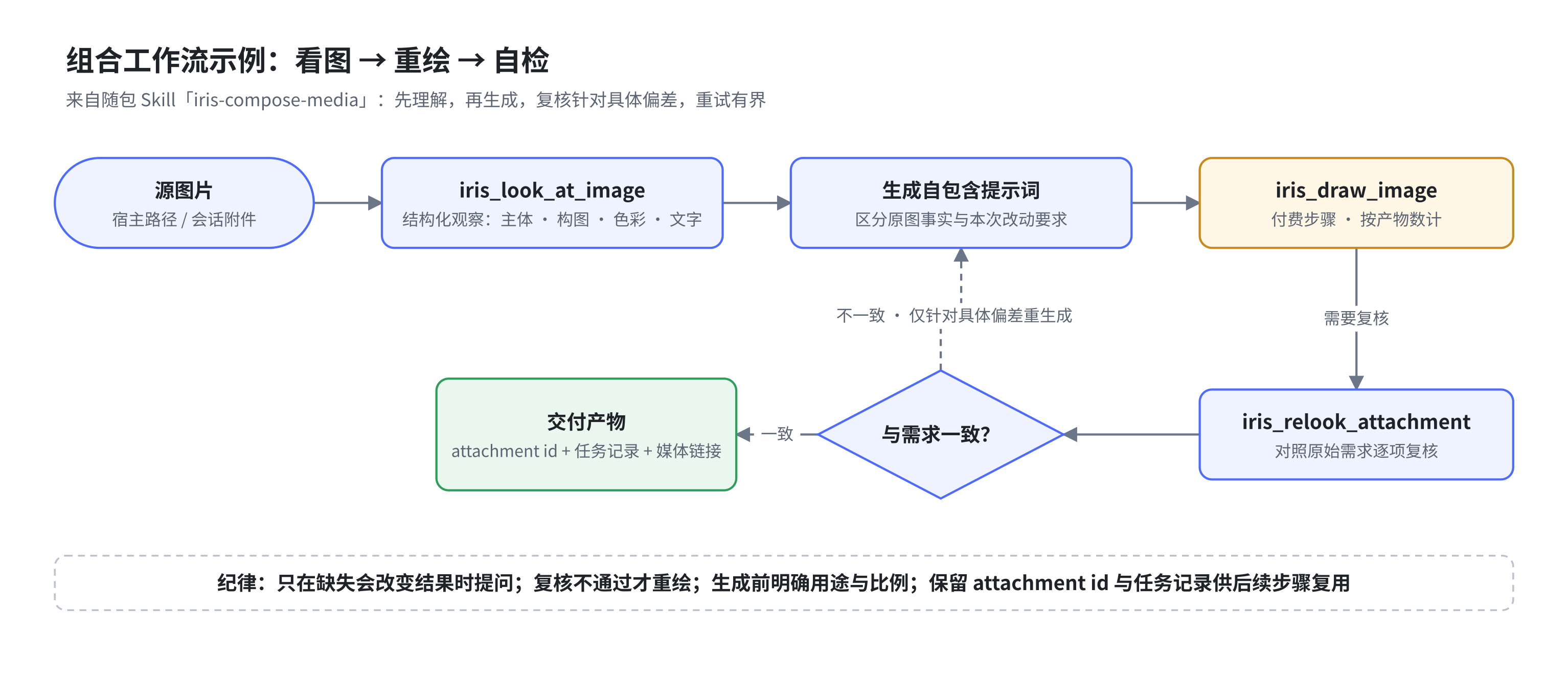
The repository also carries SVG versions and editable drawio sources under docs/assets/diagrams/; the npm package ships only the PNGs shown above. Diagram labels are currently in Chinese.
Data and tasks
Runtime data lives under $DSH_HOME/iris/v1/ by default:
| Location | Contents |
|---|---|
providers.json |
Providers, capability assignments, and redacted health evidence; file mode 0600 |
prompt-optimizer.json |
Imported optimizer prompt, target templates, model route, and generation settings; file mode 0600 |
tasks.json |
Task metadata and attachment indexes; up to 500 records |
artifacts.json |
Minimal work-library index and random access tokens; no prompt, provider, or task relationship |
outputs/ |
Generated and processed media |
uploads/ |
Temporary copies of browser uploads |
On first load, 0.1.1 tightens POSIX permissions across an existing $DSH_HOME/iris/v1/ tree without modifying file contents or following symlinks. Large media downloads stream to a private temporary file and are moved into place atomically, instead of loading a whole video into memory.
Asynchronous tasks are polled in the background. After a plugin restart, Iris can re-adopt tasks that are still running remotely. Cancellation signals propagate through local waits and polling; whether the remote computation itself can be cancelled depends on the provider's API.
The work library has its own lifecycle: clearing terminal task history does not delete works, and older media can be recovered by re-indexing outputs/. Deleting one work or clearing the library deletes the actual files behind a separate confirmation. See Work library v0 (Chinese). Favorites, tags, and search remain future work after the full Artifact Manifest.
Audio and video are served through Iris media links that carry random capability tokens. Images are, wherever possible, also saved as DSH durable attachments so they stay usable in the conversation.
Security notes
- Provider keys are never returned by status endpoints.
- The DashScope media protocol only sends keys to official Alibaba Cloud HTTPS, regional, or Workspace domains. A separate
mediaBaseUrlmay split media from vision/chat traffic; other addresses default to the OpenAI Images–compatible protocol. /iris/*accepts loopback Host headers only by default; LAN or reverse-proxy deployments must setIRIS_TRUSTED_HOSTSexplicitly, and state-changing requests are also checked against cross-site origins.IRIS_TRUSTED_HOSTSis not an authentication mechanism. When exposing DSH to the public internet or an untrusted network, configure authentication and HTTPS at the reverse proxy or host layer.- Paid model probes run one capability at a time and always confirm before a real provider call; video and transcription never submit empty-sample paid probes automatically.
- HTML screenshots render inside a sandboxed page without same-origin privileges; scripts and external network access are disabled by default.
- Media links use random capability tokens, and file paths are resolved only from task records or the minimal work-library index.
- Iris provides no account system of its own; multi-user isolation and access control are the responsibility of the DeepSeek Harness deployment.
Known limitations
sharpbundles native components; glibc Linux, Windows, and macOS are the primary targets. Non-standard environments such as bare Termux may need extra work.- Video frame extraction and video summaries require system-installed
ffmpegandffprobe. - HTML screenshots load no remote scripts, fonts, or images; inline the resources you need first.
- Under WSL, containers, and remote deployments, browser paths usually cannot be handed to the host directly — prefer uploading files.
- Provider model lists are candidate sets only; whether a model truly supports a capability is settled by real calls.
Agent Skills
When the plugin is enabled, it automatically registers the two bundled skills through the DSH skill registry:
| Skill | When to use |
|---|---|
iris-verify-ui |
Combine screenshots, semantic inspection, element grounding, cropping, and pixel comparison into evidence-based UI acceptance |
iris-compose-media |
Chain two or more Iris tools into media workflows: inspect-then-draw, image-to-video, video summary with narration, S2V, and more |
From 0.1.2, as long as the host provides the DSH skill registry, regular npm installs can discover and load both skills from any project directory — no need to clone this repository or configure a skill search path. When the project directory contains same-name skills, DSH's native precedence keeps using the project versions; if the skill registry is unavailable, the 14 Iris tools still load on their own.
For deterministic selection, invoke either skill with DSH's /name form:
/iris-compose-media Inspect my uploaded product photo, create a matching poster, then verify the requested constraints

/iris-verify-ui Compare the current screenshot with the reference, locate regressions, and return an evidence-based verdict
Natural-language discovery remains available. Do not force the composition skill for a single draw, OCR, or transcription action; ask directly or name the matching Iris tool. Skills plan tool use but never bypass Iris task, cost-confirmation, or safety boundaries.
Development and verification
Run in the project directory:
npm test
Tests cover config merging, model identity, task lifecycle, generation actions, HTTP/SSE routing, client interactions, and security boundaries. The project is pure ES Modules with no build step.
The test scheduler runs on Node.js, launching one process per file and stopping at the first failure — no Bash involved. Temporary directories use system APIs and are cleaned up on exit. GitHub Actions defines a Linux/Windows × Node.js 22.0.0/latest 22.x matrix, with repeated natural-exit checks on the minimum version, and a pre-release hook re-runs the full suite. DSH host smoke tests on native Windows/WSL are still pending real-machine verification.
Releases are triggered by v* tags through .github/workflows/release.yml: the full test suite runs first, then the tarball is packaged, a GitHub Release is created with the workflow's built-in GITHUB_TOKEN (tarball attached; release notes taken from the matching CHANGELOG section), and npm publish happens when an NPM_TOKEN secret is configured. No local GitHub credentials are needed.
Documentation
- User guide (Chinese)
- Changelog (Chinese)
- Roadmap (Chinese)
- File access across environments (Chinese)
- Android 16 screenshot gallery
- Task/Attempt v2 semantics (Chinese)
License
Comments
Comments live in GitHub Discussions. Sign in with GitHub to post or react.